Overview

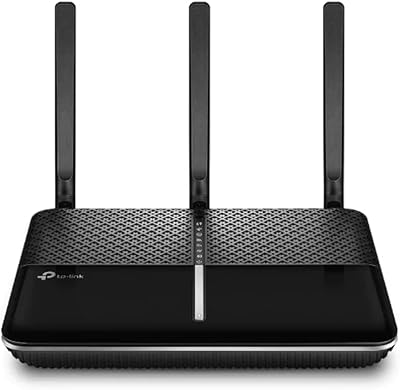
The TP-Link Archer BE400 arrived in early 2025 as one of the more accessible ways to step into Wi-Fi 7 without paying flagship router prices. For most homes, the dual-band BE6500 classification translates to serious headroom — enough bandwidth to handle a busy household without the network grinding to a halt. The quad-core processor is a quiet but meaningful detail; it keeps traffic moving smoothly when dozens of devices are active at once. TP-Link has also signed the CISA Secure-by-Design pledge, which won't matter to every buyer, but does signal a more deliberate approach to built-in security than you typically see at this price tier.
Features & Benefits

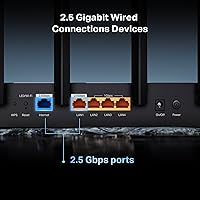
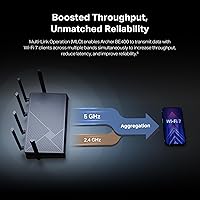
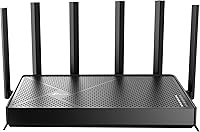
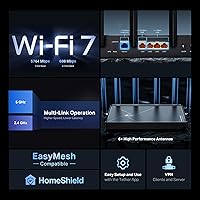
The standout here is Multi-Link Operation, which lets the router transmit data across both the 2.4 GHz and 5 GHz bands simultaneously — in practice, fewer dropped connections and noticeably lower latency. Two 2.5 Gbps wired ports are a genuine asset for anyone with a multi-gig internet plan or a NAS drive. The six external antennas and Beamforming push reliable coverage across a typical mid-sized home. A USB 3.0 port covers basic NAS or printer-sharing needs. On the security side, HomeShield includes a dedicated Private IoT network to keep smart home devices isolated from your main traffic — a practical feature that many routers charge extra for.

Best For

This Wi-Fi 7 router makes the most sense for households still running Wi-Fi 5 or an early Wi-Fi 6 unit who want a meaningful upgrade without overspending. It suits remote workers and students in homes up to around 2,000 square feet who need stable performance across many devices at once. Gamers with Wi-Fi 7 capable hardware will appreciate the lower latency MLO brings, even if this isn't a tri-band powerhouse. Families who want parental controls and IoT device isolation built in — rather than added via a paid subscription — will find real value here. That said, larger homes or users needing a dedicated wireless band should weigh a tri-band option seriously.

User Feedback

With over 700 ratings and a 4.4-star average, the Archer BE400 has earned genuinely strong reception. Most satisfied buyers highlight easy app-based setup through the Tether app and a clear speed improvement over their previous router. Real-world range feedback is mostly encouraging for homes in the 1,500 to 2,000 square foot range, though a few users in larger spaces report needing an extender to cover every corner. The most recurring criticism is the dual-band limitation — at this price, some buyers expected a tri-band option. There is also residual hesitation about TP-Link as a brand; the company's CISA security pledge addresses part of that concern, but it remains a fair point to factor into the decision.

Pros

  • One of the most affordable entry points into Wi-Fi 7, with genuinely next-gen wireless technology included.
  • MLO reduces lag noticeably on Wi-Fi 7 devices, especially during congested evening network hours.
  • Two 2.5 Gbps wired ports mean multi-gig internet plans are no longer bottlenecked at the router.
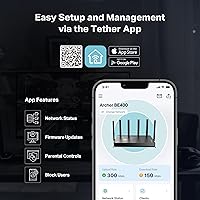
  • The Tether app makes initial setup fast and approachable, even for non-technical users.
  • Built-in HomeShield and a Private IoT network add real security value at no extra hardware cost.
  • The quad-core processor handles 20 to 30 simultaneous devices without the sluggishness cheaper routers show.
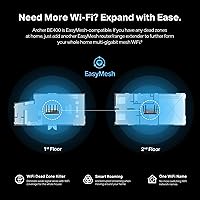
  • EasyMesh support gives buyers a clear path to expand coverage later without replacing the router entirely.
  • Parental controls are included out of the box, with per-device scheduling that most families will find sufficient.
  • The Archer BE400 holds a strong 4.4-star average across hundreds of verified buyer reviews.
  • USB 3.0 port adds convenient basic NAS or printer-sharing functionality without extra hardware.

Cons

  • Dual-band only — no dedicated third band to reserve for gaming, video calls, or other priority traffic.
  • Advertised coverage figures are optimistic; larger or multi-story homes will likely need a range extender.
  • Several HomeShield security features drop behind a paid subscription after the initial trial ends.
  • Practical device capacity is noticeably lower than the stated maximum under real-world heavy load.
  • Firmware updates have occasionally reset custom settings without warning, frustrating power users mid-session.
  • Long-term firmware support history for mid-range TP-Link routers gives pause for buyers planning multi-year use.
  • Brand trust concerns persist among security-conscious buyers despite the company's CISA design pledge.
  • USB file-sharing speeds are too slow for regular large file transfers or media server applications.
  • Three of the five LAN ports are still standard gigabit, creating speed inconsistency in mixed wired setups.
  • Wi-Fi 7 performance benefits are only accessible on compatible client devices, limiting the upgrade impact in older households.

Ratings

The TP-Link Archer BE400 earns a solid overall standing among early Wi-Fi 7 adopters looking for capable performance without the premium price tag — and these scores reflect exactly that nuance. Our AI has analyzed verified global user reviews, actively filtering out incentivized, bot-generated, and low-quality submissions, to produce a balanced picture of where this Wi-Fi 7 router genuinely delivers and where real buyers have run into friction. Both the wins and the frustrations are reflected here without sugarcoating.
Wireless Performance
88%
Most users coming from Wi-Fi 5 or early Wi-Fi 6 hardware report a noticeable jump in throughput, especially on the 5 GHz band. Streaming 4K content across multiple devices simultaneously is consistently smooth, and MLO makes a real difference in reducing the micro-stutters that plague congested networks.
The dual-band architecture is the ceiling here — in homes with many competing devices, a tri-band router at a similar price can handle the load more gracefully. Users running bandwidth-heavy workloads on several devices at the same time occasionally report inconsistency during peak hours.
Setup & Ease of Use
91%
The Tether app is frequently called out as one of the easiest router setup experiences buyers have had. Most users report being fully connected within ten minutes, with clear guidance through each step and no need to touch a web browser or console.
A small number of users encountered hiccups when the app failed to detect the router on first launch, requiring a manual reset before proceeding. Advanced configuration options, while present, are buried deeper in the interface than power users would prefer.
Coverage & Range
78%
22%
In homes between 1,200 and 1,800 square feet, the six external antennas and Beamforming technology consistently push a strong signal to most corners, including through standard drywall. Buyers in typical two-bedroom or three-bedroom layouts report reliable connections without any dead zones in central areas.
The advertised 2,400 square foot figure is optimistic for homes with brick walls, multiple floors, or awkward layouts. Several users in larger spaces noted signal drop-off in far bedrooms or garages, and some needed an extender to fully cover the stated area.
Wired Port Performance
87%
Having two 2.5 Gbps ports is a genuine differentiator at this price point. Users with multi-gig ISP subscriptions appreciate being able to actually use that extra bandwidth through a wired connection, and those running a NAS device benefit from the faster throughput without a bottleneck.
Three of the five LAN ports are still limited to 1 Gbps, which means mixed wired setups will have uneven speeds depending on which port a device lands on. Users expecting all ports to run at multi-gig speeds will be disappointed.
Multi-Device Handling
83%
The quad-core processor keeps the router from choking when 20 to 30 devices are active at the same time — something cheaper single-core units struggle with noticeably. Remote workers running video calls while other family members stream and game report a stable experience in most cases.
At the high end of the claimed 90-device capacity, performance degrades more than the marketing implies. Users in shared housing or small offices pushing heavy concurrent usage have flagged slowdowns that suggest the practical comfortable limit is closer to 40 to 50 devices.
Security Features
84%
HomeShield adds a meaningful layer of protection beyond what most routers offer by default, and the Private IoT network is a practical tool for anyone with smart home devices they want isolated from their primary traffic. TP-Link's CISA Secure-by-Design pledge adds a layer of credibility for buyers who prioritize network security.
Some of the more advanced HomeShield features are locked behind a subscription after the trial period, which feels like a bait-and-switch to users who assumed full access was included. Brand perception concerns around TP-Link persist among security-focused buyers, and the CISA pledge, while meaningful, does not fully resolve those reservations for everyone.
Parental Controls
79%
21%
The built-in parental controls cover the basics well — content filtering, schedule-based access limits, and per-device management are all accessible through the app without requiring a separate service. Parents managing screen time for younger kids find it intuitive enough to set up without a technical background.
The filtering categories are fairly broad, and teenagers determined to work around them will find the controls less robust than dedicated parental control platforms. Some users also noted that certain filter rules required reapplication after firmware updates.
Value for Money
86%
For a Wi-Fi 7 router, the price-to-capability ratio is genuinely strong. Buyers who compare it against other early Wi-Fi 7 options consistently note that the Archer BE400 offers core next-gen features at a fraction of what flagship alternatives cost.
The value calculation shifts slightly when you factor in that some competing routers at a similar price offer tri-band configurations. Buyers who do not yet own Wi-Fi 7 client devices may also find the upgrade less immediately impactful than expected.
Build Quality & Design
72%
28%
The six external antennas give it a purposeful, functional look, and the chassis feels solid enough for a device that sits on a shelf and rarely gets moved. The matte black finish avoids looking cheap despite the accessible price point.
The overall footprint is fairly large, and the antenna arrangement makes it awkward to tuck away discreetly. A few users noted that the unit runs noticeably warm under sustained load, which raised questions about long-term thermal management even if no failures were reported.
EasyMesh & Expandability
76%
24%
EasyMesh compatibility is a welcome inclusion for buyers who might eventually want to extend coverage without being locked into TP-Link hardware specifically. Users who already own compatible extenders report a clean pairing experience with stable handoffs between nodes.
The mesh experience is noticeably less polished than purpose-built mesh systems from Eero or Google. Users expecting the same automatic roaming and self-healing behavior from a premium mesh kit will find this integration more manual and less refined.
Firmware & Updates
74%
26%
TP-Link has maintained a reasonably active update cadence for the Archer BE400 since its February 2025 launch, with patches addressing early stability issues that a few users flagged. The update process through the app is straightforward and does not require a reboot window planned in advance.
A handful of users reported that a firmware update temporarily disrupted their connection or reset custom settings without warning. Long-term firmware support for mid-range TP-Link routers has historically tapered off after two to three years, which is worth considering for buyers expecting multi-year use.
Latency & Gaming Performance
81%
19%
MLO makes a tangible difference for Wi-Fi 7 capable gaming devices, with users reporting ping stability that holds up during online multiplayer sessions in ways their previous routers could not match. Console players running wirelessly noticed less rubber-banding and fewer connection interruptions during peak evening hours.
The benefits of MLO and reduced latency are only accessible on Wi-Fi 7 client devices, so households still running older hardware will not see the gaming improvements at all. The dual-band structure also means there is no dedicated gaming band that can be reserved exclusively for low-latency traffic.
USB & NAS Functionality
67%
33%
The USB 3.0 port covers basic shared storage scenarios — plugging in an external drive and sharing files across the home network works without much configuration. For light NAS use cases or occasional printer sharing, it is a convenient addition.
Transfer speeds over the USB share are adequate but not fast enough for media server applications or regular large file transfers. Users expecting NAS-grade performance from this port will be underwhelmed, and there is no dedicated NAS management software bundled in.
Brand Trust & Support
69%
31%
TP-Link's free expert support offering is a genuine positive for less technical buyers who want a human to call if something goes wrong. The company's CISA Secure-by-Design commitment has helped shift perceptions among buyers who previously wrote off the brand on security grounds.
Brand trust concerns around TP-Link remain present in the buyer conversation, particularly among users in regulated industries or those with heightened network security requirements. Support quality has been reported as inconsistent, with some users receiving quick helpful responses and others facing long wait times or generic scripted replies.

Suitable for:

The TP-Link Archer BE400 is a strong fit for households that are ready to move past their aging Wi-Fi 5 or first-generation Wi-Fi 6 router and want a genuine upgrade without committing to a flagship price. Remote workers and students in medium-sized homes will appreciate the stable multi-device performance — having 20 or 30 devices active simultaneously no longer means the network starts groaning. Families benefit from built-in parental controls and a dedicated IoT network that keeps smart home gadgets isolated from the main connection, all without paying for a separate security subscription. Gamers who already own Wi-Fi 7 capable hardware will notice the lower latency that Multi-Link Operation brings, particularly during evening hours when the network is under the most strain. Anyone with a multi-gig internet plan will also get practical value from the dual 2.5 Gbps wired ports, which let that extra bandwidth actually reach a desktop or NAS device rather than being capped at the old gigabit ceiling.
Not suitable for:

The TP-Link Archer BE400 is not the right call for buyers with larger homes, complex layouts, or thick concrete and brick walls — the real-world coverage in those environments regularly falls short of what the marketing suggests, and you may end up needing an extender anyway. Users who want a true tri-band setup to dedicate a full band to high-priority devices like gaming consoles or work laptops will find the dual-band architecture a hard limitation that no firmware update will fix. Power users who want deep, granular network management will find the app-based interface too simplified for their needs. If your entire household is still running older Wi-Fi 5 or Wi-Fi 6 client devices, the Wi-Fi 7 features you are paying for will simply go unused until you upgrade those too. Finally, buyers in regulated industries or with strong brand-specific security concerns about TP-Link as a manufacturer should carefully weigh those reservations before committing, as the CISA pledge addresses some concerns but does not resolve every objection.

Specifications

  • Wi-Fi Standard: This router uses Wi-Fi 7 (802.11be), the latest wireless standard, along with backward compatibility for 802.11ac, 802.11ax, 802.11g, and 802.11n devices.
  • Frequency Bands: Dual-band operation covers both the 2.4 GHz and 5 GHz spectrums simultaneously for flexible device distribution across the network.
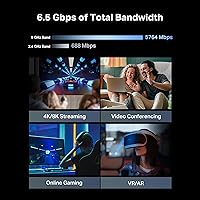
  • Max Wi-Fi Speed: Combined wireless throughput is rated at BE6500, with up to 5,764 Mbps on the 5 GHz band and up to 688 Mbps on the 2.4 GHz band.
  • WAN Port: One 2.5 Gbps WAN/LAN port provides the primary internet connection and supports multi-gig modem integration for fast broadband plans.
  • LAN Ports: Four LAN ports are included: one 2.5 Gbps port and three standard 1 Gbps ports for wired device connections.
  • USB Port: One USB 3.0 port supports basic network-attached storage, external drive sharing, and printer sharing across the local network.
  • Antennas: Six external high-performance antennas work alongside Beamforming technology to direct the wireless signal toward connected devices rather than broadcasting equally in all directions.
  • Processor: A quad-core CPU manages network traffic across multiple simultaneous connections without the slowdowns common in budget single-core router designs.
  • Coverage Area: Maximum rated coverage is up to 2,400 square feet, intended for medium-sized homes under typical open-plan conditions.
  • Device Capacity: The router is rated to support up to 90 connected devices simultaneously across both bands.
  • Key Technologies: Supported wireless technologies include Multi-Link Operation (MLO), Beamforming, MU-MIMO, and 4K-QAM for improved throughput and connection stability.
  • Mesh Support: EasyMesh compatibility allows the router to be paired with other EasyMesh-certified routers or range extenders to extend whole-home coverage without brand restrictions.
  • Security Suite: HomeShield provides network-level threat protection, a Private IoT network for isolating smart home devices, and basic intrusion prevention features.
  • Parental Controls: Built-in parental controls support per-device content filtering and time-based access scheduling, managed through the TP-Link Tether mobile app.
  • Security Pledge: TP-Link is a signatory of the U.S. Cybersecurity and Infrastructure Security Agency (CISA) Secure-by-Design pledge, committing to security-first design practices.
  • Dimensions: The unit measures 13.58 × 10.59 × 4.49 inches, requiring adequate shelf or desk space to accommodate the six external antennas.
  • Weight: At 1.37 pounds, the router is lightweight enough to reposition easily during initial placement and setup.
  • Color: The router ships in a matte black finish only, with no alternative color options currently available.
  • Included Contents: Each box includes the Wi-Fi 7 router, one power adapter, one RJ45 Ethernet cable, and a quick installation guide.
  • Availability: The router was first made available in February 2025, making it one of the earlier accessible Wi-Fi 7 options released to the consumer market.

Related Reviews
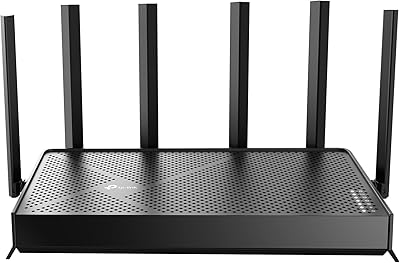
TP-Link Archer BE600
90%
96%
Wi-Fi Speed
91%
Coverage Area
94%
Device Capacity
89%
Stability & Reliability
87%
Setup & Installation
More
TP-Link Archer VR2100
84%
86%
Wi-Fi Performance
92%
Setup & Installation
87%
Value for Money
72%
Range
90%
Wired Performance
More
TP-Link Archer AC1750 WiFi Router
85%
88%
WiFi Performance
91%
Setup & Installation
80%
Range & Coverage
85%
Value for Money
89%
Alexa Integration
More
TP-Link Archer BE550
76%
83%
Wireless Performance
91%
Wired Port Quality
88%
Setup & Ease of Use
67%
Coverage & Range
58%
HomeShield Security & Parental Controls
More
TP-Link Archer AX6000 WiFi 6 Router
84%
91%
Performance for Gaming and Streaming
87%
WiFi Coverage and Range
80%
Ease of Setup
90%
Security Features (TP-Link HomeCare)
85%
Build Quality and Durability
More
TP-Link Archer C59 AC1350 WiFi Router
82%
88%
Setup & Installation
72%
Wi-Fi Range & Coverage
81%
Overall Performance
92%
Value for Money
78%
Build Quality
More
TP-Link Archer A54
TP-Link Archer A54
74%
91%
Value for Money
88%
Ease of Setup
71%
Wi-Fi Range
74%
Wi-Fi Speed & Performance
86%
Security Features
More
TP-Link Archer BE24000 WiFi 7 Router
87%
94%
Performance
89%
Setup & Installation
92%
Connectivity & Compatibility
90%
Coverage & Range
88%
Security Features
More
TP-Link Archer AX73
TP-Link Archer AX73
79%
88%
Wireless Speed & Throughput
91%
Multi-Device Performance
74%
Coverage & Range
93%
Setup & Ease of Use
79%
Build Quality & Design
More
TP-Link Archer AXE75
78%
83%
Wireless Performance
71%
6 GHz Band Utility
91%
Setup & Ease of Use
86%
Value for Money
68%
Range & Coverage
More
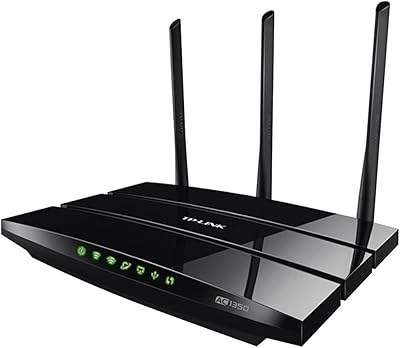
TP-Link Archer BE260 WiFi 7 Router
85%
93%
WiFi Performance
89%
Ease of Setup
77%
Coverage & Range
91%
Streaming & Gaming Experience
85%
Design & Build Quality
More

FAQ

Not necessarily, but your gains will be limited if all your devices are older. The router is fully backward compatible with Wi-Fi 5 and Wi-Fi 6 hardware, so everything will still connect and work — you just won't tap into the MLO or 4K-QAM improvements until you have at least one Wi-Fi 7 capable device, like a recent flagship phone or laptop.

It performs well for gaming, especially if your console or PC supports Wi-Fi 7. Multi-Link Operation noticeably reduces the latency spikes that wireless gaming is notorious for. That said, if you want a completely dedicated wireless band reserved solely for gaming traffic, a tri-band router gives you more control over that separation.

In an open single-story home with standard drywall, most users hit close to that figure. Add in multiple floors, thick walls, or an irregular layout and you will likely see the effective range drop to somewhere between 1,500 and 1,800 square feet before signal quality starts to degrade. For larger or more complex homes, pairing it with an EasyMesh extender is a practical solution.

MLO lets the router transmit data across both the 2.4 GHz and 5 GHz bands at the same time, rather than picking one. The practical result is lower latency and more resilient connections — if one band gets congested or interferes, the other picks up the slack automatically. For households with many active devices or anyone doing video calls alongside streaming, it makes a real difference.

Some of the more advanced HomeShield features, like detailed threat reports and enhanced content filtering, move behind a paid subscription after the trial ends. Basic security features and parental controls remain accessible for free, but buyers expecting the full suite indefinitely should factor that subscription into their decision.

Yes, as long as your existing hardware is EasyMesh certified. The router is not locked to TP-Link-only accessories for mesh expansion, which is a genuine plus. If your current extenders are not EasyMesh compatible, they will not integrate into a managed mesh network, though they can still function independently.

Setup is handled entirely through the TP-Link Tether mobile app on iOS or Android, and you do not need a computer at any point. Most users report being fully connected in under fifteen minutes. The app walks you through each step clearly, and a physical reset button is on the unit if anything goes wrong during the process.

This is a fair concern that comes up regularly. TP-Link has signed the CISA Secure-by-Design pledge, meaning they have formally committed to building security practices directly into their devices rather than treating it as an afterthought. That is a meaningful step, and this unit includes a Private IoT network and HomeShield protection. That said, buyers in highly sensitive environments or regulated industries should do their own due diligence before deciding.

Yes — the dual 2.5 Gbps ports are specifically useful here. If your ISP delivers speeds above 1 Gbps, a standard gigabit router becomes the bottleneck. This TP-Link unit removes that ceiling for wired connections, letting you actually use the faster tier you are paying for. Wireless speeds are also high enough that multi-gig plans benefit wirelessly on capable devices.

You have two practical options. First, you can position the router centrally to maximize coverage and accept that the furthest edges of your home may have weaker signal. Second, you can pair it with an EasyMesh-compatible range extender to fill in the gaps — the router handles that pairing cleanly through the app. Either way, expecting a single router to cover a very large or multi-story home without compromise is unrealistic regardless of the brand.