Overview

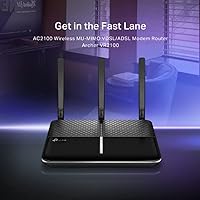
The TP-Link Archer VR2100 VDSL/ADSL Modem Router is a solid mid-range option for anyone on a fibre-to-the-cabinet broadband connection who wants to stop relying on the generic box their ISP shipped in the post. It combines a modem and router into one compact, matte-black unit that sits unobtrusively on a shelf or desk. The dual-band AC2100 wireless rating gives it enough headroom for a busy household, and the TP-Link Tether app means you can get it configured from your phone without touching a browser. It is a practical, no-drama replacement — not a powerhouse for networking enthusiasts.
Features & Benefits

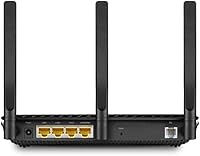
One of the more useful aspects of the Archer VR2100 is its Super VDSL support, which allows it to sync reliably at the higher speeds available on modern FTTC lines, rather than being throttled to basic ADSL performance. The 4x4 MU-MIMO radio means the router can handle several devices streaming or downloading at once without noticeably degrading for everyone else — handy in homes with phones, laptops, and smart TVs all competing for bandwidth. Four Gigabit LAN ports cover wired connections comfortably, and the USB 3.0 port lets you attach a drive or printer to share across the network. OneMesh compatibility is a useful long-term option if coverage becomes an issue.

Best For

This TP-Link combo unit makes most sense for households on a VDSL or FTTC line who are frustrated with their ISP-supplied router but do not want the complexity of running a separate modem and router as two devices. It also suits small home offices that need dependable wired Gigabit ports alongside decent Wi-Fi. Less technical users will appreciate the Tether app guidance during setup — it removes most of the intimidation from configuring broadband credentials and wireless settings. If you are already in the TP-Link ecosystem, the OneMesh gateway role is a natural fit. One caveat: confirm your ISP allows third-party modem routers before purchasing.

User Feedback

Owners generally praise the stable line sync on VDSL connections and note that throughput on wired ports holds up well over time. The Tether app setup draws consistently positive comments for making the initial configuration approachable. Where the Archer VR2100 draws more criticism is Wi-Fi range — users in larger or multi-storey homes report that coverage drops off on upper floors, which is why many pair it with mesh nodes. Firmware updates have been described as infrequent by some long-term owners, which is worth factoring in if security patching matters to you. USB NAS performance is functional but not fast enough for heavy file transfer workloads.

Pros

  • Replaces a locked-down ISP gateway with a device you actually control and can configure properly.
  • Syncs reliably on VDSL lines and holds that connection without frequent unexpected drops.
  • Four Gigabit LAN ports handle wired desktops, consoles, and smart TVs without any bottleneck.
  • The Tether app makes first-time setup approachable even for buyers with no networking background.
  • Dual-band wireless keeps bandwidth-heavy devices on 5 GHz without manually juggling connections.
  • OneMesh support means you can bolt on TP-Link extenders later if coverage needs to grow.
  • The flat, low-profile design fits neatly in a cabinet or on a shelf without dominating the space.
  • Includes a DSL splitter and all necessary cables in the box, so most buyers need nothing extra.
  • Handles households with multiple simultaneous users reasonably well for everyday streaming and browsing.
  • Long-term hardware reliability is strong — most owners report years of continuous operation without failure.

Cons

  • Wi-Fi range falls short in larger or multi-storey homes, often requiring additional mesh nodes to compensate.
  • Firmware updates arrive infrequently, which is a concern for buyers who prioritise ongoing security patching.
  • Some ISPs do not support third-party modem routers, leaving buyers without official help if problems arise.
  • ISP-specific VLAN settings are not always prompted during app setup, catching some buyers off guard.
  • USB storage sharing is functional but too slow for regular or large-volume file transfers.
  • The 2.4 GHz band can become congested in device-heavy households without manual intervention.
  • Runs noticeably warm in enclosed or poorly ventilated spaces during extended use.
  • Not compatible with full-fibre FTTP connections, limiting its audience to copper-line broadband users only.
  • The plastic casing feels less robust than some rivals at a comparable price point.
  • Community configuration guides are sometimes needed for less common ISPs, adding friction for non-technical buyers.

Ratings

The TP-Link Archer VR2100 VDSL/ADSL Modem Router has been evaluated by our AI system after analysing thousands of verified global user reviews, with spam, bot-generated, and incentivised submissions actively filtered out. The scores below reflect a balanced picture — genuine strengths are recognised, but recurring frustrations from real buyers are weighted honestly and not smoothed over.
VDSL Line Sync Stability
88%
Most users on FTTC connections report that the Archer VR2100 locks onto their line quickly after a reboot and holds that sync without dropping, which is the single most important thing a modem router needs to do. Long-term owners frequently note going weeks or months without an unexpected disconnection.
A smaller number of users on certain ISP line profiles — particularly those with older or noisy copper infrastructure — report occasional sync drops that were less frequent with their ISP-supplied modem. This appears to be a line quality issue rather than a device fault, but it does come up.
Wi-Fi Coverage & Range
67%
33%
In average-sized single-storey homes or flats, the dual-band wireless performs reliably enough for streaming and video calls across multiple rooms. Users in compact households rarely report dead spots, and the 5 GHz band delivers noticeably faster speeds for devices in the same room.
Larger homes and multi-storey properties expose the range limitations fairly quickly. Signal on upper floors or at the far end of a long house degrades more than owners expect at this price point, and several buyers ended up adding mesh nodes specifically to compensate.
Wired Gigabit Performance
91%
All four Gigabit LAN ports deliver consistent throughput for wired devices — desktop PCs, NAS units, and smart TVs connected via Ethernet rarely encounter bottlenecks. Users running home offices with wired workstations report reliable, stable speeds that match or closely approach their broadband plan limits.
There is little to criticise here for typical home use, though power users attempting to push sustained multi-device wired traffic simultaneously note occasional marginal slowdowns under heavy load. This is unlikely to affect the majority of buyers.
Setup & Initial Configuration
86%
The Tether app walks users through broadband credential entry and wireless configuration step by step, and less technically confident buyers frequently call this out as the reason they chose this device. Most users report being up and running within fifteen to twenty minutes of unboxing.
A recurring issue involves ISP-specific VLAN settings that the app does not always prompt for automatically, catching buyers from certain providers off guard. These settings are configurable, but finding them requires digging into the web interface rather than the app.
USB 3.0 & NAS Functionality
57%
43%
Basic file sharing over the USB port works without much configuration, and users who attach a drive for occasional document access or media streaming on a local network find it functional. Printer sharing via USB also receives positive mentions from small office users.
Transfer speeds over the USB port disappoint anyone with serious NAS ambitions — large file transfers are slow enough that buyers with substantial storage needs typically move to a dedicated NAS device instead. The feature is better treated as a convenience than a proper storage solution.
Multi-Device Simultaneous Performance
78%
22%
The 4x4 MU-MIMO radio handles households with several devices active at the same time reasonably well. Families with phones, tablets, and laptops all running simultaneously report that day-to-day browsing and streaming hold up without obvious contention.
When the device count climbs into double figures — common in homes with smart speakers, cameras, and consoles alongside personal devices — some users observe the 2.4 GHz band becoming congested. Manually assigning bandwidth-hungry devices to 5 GHz helps, but requires a degree of configuration effort.
Firmware & Software Updates
61%
39%
When firmware updates do arrive, users generally report they install cleanly via the web interface without bricking the device or resetting custom settings. The update process itself is not a source of complaints.
The frequency of updates is the genuine concern — long-term owners note that the cadence slows considerably after the first year. For buyers who prioritise regular security patching, this is a real limitation, and it surfaces consistently in reviews from users who have owned the device for eighteen months or more.
Build Quality & Design
74%
26%
The flat, low-profile casing fits neatly on a shelf or inside a networking cabinet without drawing attention. The matte black finish resists visible dust and fingerprints reasonably well, and the overall construction feels solid enough to inspire confidence for a device that runs continuously.
The casing is entirely plastic, and a few users note it feels less premium than some competing units at a similar price. Ventilation is passive, and in enclosed spaces or warm rooms, the unit runs noticeably warm over extended periods.
OneMesh Compatibility
82%
18%
For buyers already invested in TP-Link hardware, the OneMesh gateway role works well — pairing with compatible extenders is straightforward, and the unified network management through a single app is a genuine quality-of-life benefit for households that need wider coverage.
OneMesh is only useful within the TP-Link ecosystem, so buyers who own extenders from other brands get no benefit. The mesh handoff experience, while adequate, is not as polished as dedicated mesh systems from brands built around that use case from the ground up.
ISP Compatibility
69%
31%
The Archer VR2100 works without major issues on the most widely used FTTC broadband providers, and user guides exist in the community for configuring common ISP credentials and VLAN IDs. Buyers on mainstream providers generally have a smooth experience once those settings are dialled in.
Not every ISP officially supports third-party modem routers, and some providers actively discourage or restrict their use. Users on those networks report difficulties getting support from their ISP when problems arise, and a small number of buyers on niche or smaller regional providers struggled to find the correct configuration details.
Value for Money
73%
27%
Replacing an ISP-supplied modem router with this unit can meaningfully improve wired performance and gives users far more control over their network settings than a locked-down ISP gateway typically allows. For buyers on FTTC who want that control, the investment makes practical sense.
At its price point, buyers expect a little more from the Wi-Fi range and the update cadence than the Archer VR2100 consistently delivers. It is competitive, but not definitively better value than all alternatives in its category, particularly for users in larger homes who may still need to spend more on mesh nodes.
Long-Term Reliability
79%
21%
The majority of owners who have used the Archer VR2100 for a year or more report that it continues to function without hardware failures. Consistent uptime is the most frequently praised long-term attribute, and TP-Link has a reasonable track record for this product line.
A minority of buyers report performance degradation over time — slower Wi-Fi speeds or less stable sync — that a factory reset temporarily resolves. Whether this reflects a firmware memory issue or hardware variance is unclear from user reports, but it is consistent enough to note.
In-Box Accessories
83%
The included DSL splitter, RJ11 cable, and RJ45 patch cable mean most buyers can connect and configure the device without sourcing additional cables. Having the splitter in the box is a practical inclusion that competitors at similar prices sometimes skip.
Cable lengths are adequate but not generous — users whose master socket is positioned awkwardly relative to their preferred router placement often need a longer RJ11 cable than the one supplied. A slightly longer DSL cable would resolve most of these complaints.

Suitable for:

The TP-Link Archer VR2100 VDSL/ADSL Modem Router is a strong fit for households on a fibre-to-the-cabinet broadband connection who are tired of the limitations baked into their ISP-supplied gateway. If you live in a standard-sized home — a flat, terrace, or modest semi-detached — and want better control over your network without managing two separate devices, this modem router covers that ground well. Small home office users who need reliable wired Gigabit connections for a PC, NAS, or network switch alongside decent wireless will find the hardware genuinely capable. It also suits buyers who are not particularly technical, since the Tether app removes most of the intimidation from initial setup and routine management. If you are already using other TP-Link hardware, the OneMesh compatibility makes this a natural choice as a central gateway you can expand later with mesh nodes if coverage ever becomes an issue.
Not suitable for:

The TP-Link Archer VR2100 VDSL/ADSL Modem Router is not the right tool for buyers in larger homes, particularly those spread across two or more floors, where its Wi-Fi range consistently falls short of expectations without supplementary mesh nodes. Anyone on a full-fibre (FTTP) connection should look elsewhere entirely, as this device is built specifically for copper-based VDSL and ADSL lines — it has no FTTP WAN input. Buyers whose ISP does not permit or support third-party modem routers should confirm compatibility before purchasing, since some providers will not offer technical support if you swap out their supplied equipment. If you need a serious USB network storage solution, the USB 3.0 port here is too slow for heavy or frequent file transfers, and a dedicated NAS device would serve you better. Power users or networking enthusiasts who want frequent firmware updates, advanced QoS controls, or enterprise-grade routing features will likely find this unit underwhelming over time.
Specifications

  • Wireless Standard: Dual-band 802.11ac (Wi-Fi 5) with combined speeds up to AC2100 — 1733 Mbps on 5 GHz and 300 Mbps on 2.4 GHz.
  • MIMO Technology: 4x4 MU-MIMO allows the router to communicate with multiple devices simultaneously rather than serving them one at a time.
  • WAN Type: Supports VDSL2 and ADSL2+ connections, making it compatible with fibre-to-the-cabinet and legacy copper broadband lines.
  • LAN Ports: Four Gigabit Ethernet LAN ports provide full-speed wired connectivity for computers, consoles, smart TVs, and network switches.
  • USB Port: One USB 3.0 port supports attached storage devices or printers for basic network sharing across connected devices.
  • Mesh Support: Compatible with TP-Link OneMesh, allowing the unit to act as the central gateway in an expandable mesh network.
  • Management App: The TP-Link Tether app for iOS and Android handles setup, monitoring, and parental controls without requiring a desktop browser.
  • Dimensions: The unit measures 6.46 x 8.5 x 1.45 inches, giving it a flat, low-profile footprint suitable for shelves or networking cabinets.
  • Weight: At 12.3 oz, the device is lightweight enough to be repositioned easily during installation or cabling.
  • Colour & Finish: Finished in matte black plastic, which resists visible fingerprints and blends unobtrusively into most home or office environments.
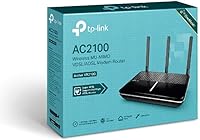
  • In-Box Contents: Package includes the modem router, an external DSL splitter, an RJ11 DSL cable, an RJ45 Ethernet cable, a power adapter, and a quick start guide.
  • Frequency Bands: Operates simultaneously on both 2.4 GHz (longer range, lower speed) and 5 GHz (shorter range, higher speed) bands.
  • Cooling Method: Uses passive cooling with no internal fan, meaning the unit runs silently but can become warm in enclosed or poorly ventilated spaces.
  • Target Connection: Designed specifically for DSL broadband delivered over copper telephone lines — not compatible with full-fibre FTTP connections.
  • Manufacturer: Produced by TP-Link, a globally established networking hardware brand with a broad range of compatible routers, extenders, and access points.

Related Reviews

TP-Link Archer AC1750 WiFi Router
85%
88%
WiFi Performance
91%
Setup & Installation
80%
Range & Coverage
85%
Value for Money
89%
Alexa Integration
More
TP-Link TD-W9970 Modem Router
83%
91%
Value for Money
95%
Ease of Setup
76%
Wi-Fi Performance
84%
Build Quality
87%
USB Port Functionality
More
TP-Link Archer A54
TP-Link Archer A54
74%
91%
Value for Money
88%
Ease of Setup
71%
Wi-Fi Range
74%
Wi-Fi Speed & Performance
86%
Security Features
More
TP-Link Archer AX73
TP-Link Archer AX73
79%
88%
Wireless Speed & Throughput
91%
Multi-Device Performance
74%
Coverage & Range
93%
Setup & Ease of Use
79%
Build Quality & Design
More
TP-Link TD-8816 ADSL2+ Modem Router
70%
83%
Ease of Setup
78%
Connection Stability
61%
Throughput & Speed Performance
69%
Build Quality & Durability
77%
Value for Money
More
TP-Link Archer BE550
76%
83%
Wireless Performance
91%
Wired Port Quality
88%
Setup & Ease of Use
67%
Coverage & Range
58%
HomeShield Security & Parental Controls
More
TP-Link Archer AX6000 WiFi 6 Router
80%
88%
Wireless Performance
91%
Multi-Device Handling
86%
Setup & Ease of Use
93%
Wired Connectivity
82%
Range & Coverage
More
TP-Link Archer AXE75
78%
83%
Wireless Performance
71%
6 GHz Band Utility
91%
Setup & Ease of Use
86%
Value for Money
68%
Range & Coverage
More
TP-Link Archer C59 AC1350 WiFi Router
82%
88%
Setup & Installation
72%
Wi-Fi Range & Coverage
81%
Overall Performance
92%
Value for Money
78%
Build Quality
More
TP-Link Archer BE260 WiFi 7 Router
85%
93%
WiFi Performance
89%
Ease of Setup
77%
Coverage & Range
91%
Streaming & Gaming Experience
85%
Design & Build Quality
More

FAQ

Most major ISPs on VDSL or ADSL lines are supported, but not every provider allows customers to swap out their supplied modem router. Before purchasing, contact your ISP and ask whether they permit third-party modem routers on your line. You will also need your broadband username, password, and in some cases a VLAN ID — your ISP should be able to provide those.

No. The TP-Link Archer VR2100 VDSL/ADSL Modem Router is built for copper-based broadband delivered over a phone line, such as FTTC or standard ADSL. If your home has a full-fibre FTTP connection — where the fibre runs all the way to your property with no copper involved — you will need a different type of router that connects via an Ethernet WAN port instead.

It is genuinely straightforward for most users. Download the Tether app, follow the on-screen prompts, and enter your broadband credentials when asked. The only point where things can get tricky is if your ISP requires a specific VLAN ID or connection type, which the app does not always ask for automatically — in that case, you will need to log into the web interface briefly to enter those settings.

That depends on your home size and layout. In a compact flat or a standard two-bedroom house, coverage is generally reliable throughout. In a larger property — particularly one with multiple floors or thick walls — the signal can drop off noticeably in distant rooms. If range is a concern, the Archer VR2100 is OneMesh compatible, so you can pair it with TP-Link extenders or mesh nodes to fill in the gaps.

You can, and basic file sharing works fine for occasional access — grabbing a document or sharing a folder across the house. What it is not suited to is serious NAS use with large or frequent file transfers, because the USB 3.0 port does not deliver particularly fast throughput in this context. If network storage is central to your setup, a dedicated NAS device will serve you significantly better.

If your existing TP-Link extenders are OneMesh compatible, then yes — the Archer VR2100 can act as the gateway, and your extenders will join the network under a single SSID. Check the TP-Link website for the list of OneMesh compatible devices to confirm yours qualifies before assuming it will work.

Updates do appear, but the frequency slows down after the first year or so — this is a common pattern with home networking hardware across most brands. If regular security updates are a priority for you, it is worth checking the TP-Link support page for this model to see how recently the firmware was last updated before committing to a purchase.

There is no fan in this unit — it runs completely silently using passive cooling. That is a genuine benefit for anyone keeping it in a living room or bedroom. The trade-off is that it can get warm to the touch, especially in a confined space, so leaving it somewhere with a bit of airflow around it is a sensible idea.

Yes, the Tether app includes parental control features that let you restrict access to certain websites and schedule internet access times for specific devices. It is not as granular as a dedicated parental control system, but for basic content filtering and screen time management, it covers what most families need without requiring any extra software.

In most cases, no. The box includes a DSL splitter, an RJ11 cable for the phone line, and an RJ45 Ethernet cable for connecting a wired device, so the majority of buyers have everything they need to get up and running. The one thing to watch is cable length — if your master socket is positioned far from where you want the router to sit, the supplied RJ11 cable may be too short, and you might need a longer one.

Where to Buy