TP-Link Archer AX73
Overview
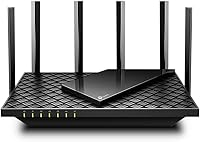
The TP-Link Archer AX73 sits in a sweet spot for households that have outgrown their old router but don't need a full mesh system. Wi-Fi 6 isn't just a marketing badge — it genuinely changes how a network handles a crowded house, distributing bandwidth more intelligently across dozens of devices at once. Physically, this TP-Link router is flat and understated, with six external antennas fanning out to cover a respectable footprint. It plays nicely with every major ISP, though keep in mind that most providers still require a separate modem — this unit alone won't replace that.
Features & Benefits
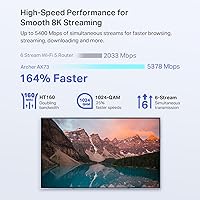
On the 5 GHz band, this Wi-Fi 6 router can theoretically push close to 4.8 Gbps, thanks to HE160 channel support and a 4T4R antenna layout that squeezes more throughput out of the available spectrum. In practical terms, that headroom means 4K streams and large file downloads can run in parallel without one starving the other. OFDMA and MU-MIMO work in tandem to handle multiple devices at the same time rather than queuing them up. Beamforming sharpens signal focus toward active clients instead of scattering it. The USB 3.0 port is a quiet bonus — plug in a drive and you have basic shared storage without a dedicated NAS device.
Best For
This TP-Link router makes the most sense for medium to large single-story homes with 15 to 30 connected devices — think a mix of phones, laptops, smart TVs, and a growing collection of IoT gadgets. Gamers and 4K streamers will appreciate the low-latency 5 GHz band and the built-in QoS controls that let you prioritize traffic without digging into complicated settings. Families who want basic parental controls and light network security without a monthly bill will also find real value here. It's also a strong pick for anyone still running a Wi-Fi 5 router who wants a genuine, noticeable upgrade.
User Feedback
Across close to 9,000 ratings, the Archer AX73 holds a 4.4 out of 5 — a score that reflects genuine satisfaction rather than inflated reviews. Setup through TP-Link's Tether app draws consistent praise for being fast and clear, even for users who don't consider themselves tech-savvy. Where buyers do push back is on two things: range in multi-story homes can fall short, and the HomeShield security suite nudges users toward a paid subscription for its more useful features without being upfront about it during setup. A handful of users also find firmware update prompts more frequent than expected. Fair trade-offs overall, but worth knowing before you buy.
Pros
- Wi-Fi 6 support delivers noticeably faster, more stable connections compared to older Wi-Fi 5 routers.
- Handles 20 or more simultaneous devices without the congestion and buffering that plagues older hardware.
- Setup via the Tether app is genuinely quick and clear, even for non-technical users.
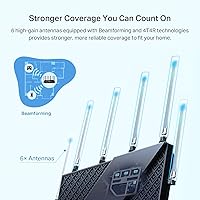
- Six high-gain antennas with Beamforming provide solid single-floor coverage without a range extender.
- The USB 3.0 port adds useful shared local storage at no extra cost or hardware.
- Free HomeShield tier includes security scanning, QoS controls, and weekly network reports out of the box.
- Works with every major ISP, making it a low-friction drop-in upgrade for most households.
- QoS prioritization lets you put gaming or streaming traffic first without digging into complex settings.
- Consistent firmware updates from TP-Link indicate ongoing security maintenance and long-term support.
- At this price point, the hardware specification represents genuinely strong value against direct competitors.
Cons
- Coverage drops significantly in two-story homes, often requiring a separate extender to fill the gap.
- HomeShield's most useful security and parental features are locked behind a paid subscription tier.
- The subscription upsell is not clearly disclosed during setup, which frustrates users after the fact.
- Firmware update notifications appear frequently and are difficult to permanently silence.
- The web admin interface feels outdated and inconsistent with the polished Tether app experience.
- USB file transfer speeds over Wi-Fi are too slow to serve as a practical media server for large libraries.
- No tri-band option means heavy 5 GHz use across many devices can still create congestion during peak hours.
- Advanced parental controls are too limited on the free tier for families with older, more internet-active children.
- Placement flexibility is limited since the router needs open airflow to avoid heat buildup in enclosed spaces.
Ratings
The TP-Link Archer AX73 has accumulated close to 9,000 verified ratings worldwide, and the scores below reflect what real buyers actually experienced — not marketing claims. Our AI analyzed that feedback pool, actively filtering out incentivized and bot-generated reviews, to surface both the genuine strengths and the honest frustrations. The result is a balanced scorecard that covers everything from raw wireless performance to the fine print on TP-Link's security suite.
Wireless Speed & Throughput
Multi-Device Performance
Coverage & Range
Setup & Ease of Use
Build Quality & Design
Value for Money
Security Features
Parental Controls
Firmware & Software Stability
USB Storage & NAS Functionality
Heat Management
ISP Compatibility
Low-Latency Gaming Performance
App & Remote Management
Suitable for:
The TP-Link Archer AX73 is a strong fit for households that have crossed the point where a single aging router just can't keep up anymore. If your home regularly has 15 or more devices competing for bandwidth — phones, laptops, a smart TV or two, a gaming console, and a growing collection of smart home gadgets — this Wi-Fi 6 router handles that load far more gracefully than any Wi-Fi 5 alternative at a comparable price. It works especially well in single-story homes and open-plan spaces where the six-antenna array can cover the full footprint without dead zones. Renters who can't run ethernet through walls will appreciate the strong wireless performance and the Beamforming technology that pushes signal toward devices rather than wasting it. Gamers and 4K streaming households will find the 5 GHz band responsive enough for daily use, and families who want basic parental controls and passive network security without committing to a subscription will get genuine utility from the free HomeShield tier.
Not suitable for:
Buyers with multi-story homes or large square footage should think carefully before committing to the Archer AX73 as their sole networking solution. The coverage works well on a single floor, but the signal reliability drops off across two stories or through multiple thick walls, and several real-world buyers in those situations ended up supplementing with a range extender or moving to a mesh system entirely. This TP-Link router is also not the right tool for power users who need deep network management — advanced VLAN configuration, robust guest network segmentation, or granular per-device controls all hit limitations here. Parents expecting comprehensive parental monitoring tools will find the free tier underwhelming and may resent discovering that meaningful controls sit behind a recurring subscription that was not clearly flagged at purchase. It also is not a modem replacement — buyers currently using an ISP-supplied gateway device need to account for the cost and added complexity of a separate modem, which changes the overall value equation for some.
Specifications
- Wi-Fi Standard: This router operates on the 802.11ax (Wi-Fi 6) standard, along with backward compatibility for 802.11ac, 802.11n, 802.11g, and 802.11b devices.
- Max Throughput: Combined dual-band throughput reaches up to AX5400, with 574 Mbps on the 2.4 GHz band and up to 4804 Mbps on the 5 GHz band.
- Frequency Bands: Dual-band operation covers both 2.4 GHz for wider range and 5 GHz for high-speed, low-latency connections.
- 5 GHz Technology: The 5 GHz band uses HE160 channel support and a 4T4R (four transmit, four receive) antenna configuration to maximize available throughput.
- Antennas: Six external high-gain antennas work in combination with Beamforming technology to direct signal strength toward connected devices rather than broadcasting omnidirectionally.
- Device Handling: MU-MIMO and OFDMA technologies allow the router to communicate with multiple devices simultaneously, reducing wait times and congestion on busy networks.
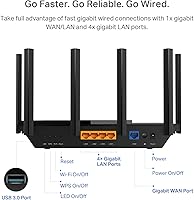
- LAN Ports: Four Gigabit LAN ports support wired connections for devices such as gaming consoles, desktop PCs, and smart TVs.
- WAN Port: One Gigabit WAN port connects to a separate modem, which is required for most standard broadband internet service providers.
- USB Port: One USB 3.0 port enables local network file sharing and lightweight cloud storage access when a compatible USB drive is connected.
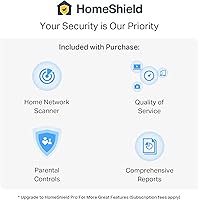
- Security Suite: TP-Link HomeShield provides a free base tier covering security scanning, IoT device identification, basic parental controls, QoS, and weekly network reports, with advanced features available via paid subscription.
- QoS: Quality of Service controls are included in the free HomeShield tier, allowing users to prioritize specific device types or applications for bandwidth allocation.
- Dimensions: The router measures 10.73 × 5.8 × 1.94 inches, with a flat, low-profile form factor designed to sit horizontally on a shelf or desk.
- Weight: The unit weighs 1.46 pounds without the power adapter, making it lightweight and easy to reposition during setup.
- Power Input: The router requires a 12V 2.5A power supply, which is included in the box alongside an RJ45 Ethernet cable.
- Operating Temperature: Rated for use in environments between 0℃ and 40℃ (32℉ to 104℉), suitable for standard indoor home and office conditions.
- ISP Compatibility: Compatible with all major internet service providers including AT&T, Verizon, Xfinity, Spectrum, Cox, and others, though a separate modem is required for most connections.
- Parental Controls: Basic parental control features are built into the HomeShield free tier, with more granular scheduling and content filtering available through the paid upgrade.
- In-Box Contents: The package includes the Archer AX73 router, a 12V 2.5A power adapter, and one RJ45 Ethernet cable for initial connection to a modem.
Related Reviews
TP-Link Archer VR2100 VDSL/ADSL Modem Router
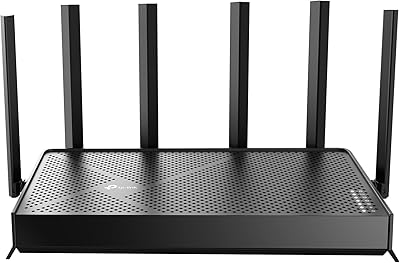
TP-Link Archer BE600 WiFi 7 Router

TP-Link Archer A7 AC1750 WiFi Router

TP-Link Archer BE260 WiFi 7 Router

TP-Link Archer A54

TP-Link Archer BE900 Wi-Fi 7 Router
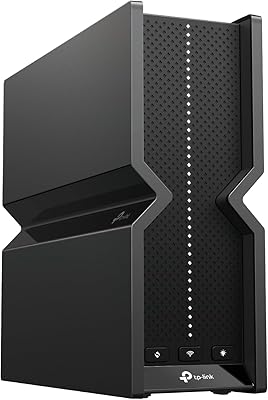
TP-Link Archer BE700 WiFi 7 Router

TP-Link Archer AX6000 WiFi 6 Router

TP-Link Archer BE550
