

Overview

The TP-Link Archer BE700 WiFi 7 Router landed in late 2024 as one of the more capable single-unit routers you can buy right now, built squarely for power users who want their network to stay relevant for the next several years. WiFi 7 is not just a bigger number — it introduces real architectural changes that reduce congestion, lower latency, and push throughput well beyond what WiFi 6 could manage. The Archer BE700 sits above the crowded mesh system market and targets genuine enthusiast-level setups. That said, you will not come close to saturating its theoretical speed ceiling in daily use; the headline figure is a combined maximum, not a per-device promise.

Features & Benefits

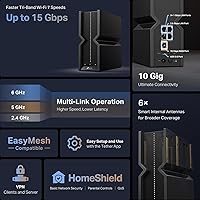
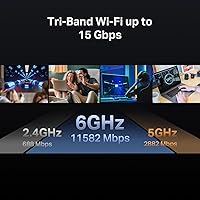
This WiFi 7 router runs three independent radio bands, each serving a distinct purpose. The 6GHz band handles your newest devices — current flagship phones and WiFi 7 laptops — while the 5GHz band serves mid-range clients and 2.4GHz covers smart home hardware. Multi-Link Operation is the standout technology: instead of locking a device to one band, MLO lets compatible clients bond multiple bands at once, cutting latency during busy periods. The 10Gbps WAN port is a practical win for multi-gig internet subscribers or anyone running a local NAS. Native VPN client and server functionality is a real differentiator. On security, HomeShield provides useful free-tier tools — scans and basic parental controls — though deeper features require a paid subscription.

Best For

The Archer BE700 makes the most sense for households that have already started building a WiFi 7 device lineup — newer Android flagships, recent MacBooks, or high-end Windows laptops will benefit tangibly from MLO and the wider 6GHz channels. If your ISP delivers more than a gigabit to your door, the 10G WAN port ensures the router itself is never the bottleneck. Remote workers who need a reliable always-on VPN server without paying for extra hardware will find it built right in. Gamers and heavy streamers also slot in well. Worth noting: this is less ideal for someone who just wants to plug in and walk away — the full value here goes to hands-on network users.

User Feedback

Across a substantial body of reviews, the overall picture is positive — buyers consistently highlight how straightforward the Tether app makes initial setup, and those coming from older WiFi 5 or 6 hardware tend to notice an immediate improvement in both range and throughput. The people most enthusiastic are, predictably, those who already own WiFi 7 client devices. On the flip side, a recurring frustration is the HomeShield upsell friction — it is easy to feel nudged toward a subscription for features that seem like they should come standard. Some users on older cable modems have also reported compatibility hiccups worth investigating before you buy. A handful note the unit runs noticeably warm during heavy sustained use, though it does not appear to throttle.

Pros

  • WiFi 7 with MLO lets compatible devices bond multiple bands at once, meaningfully cutting latency under load.
  • The high-speed WAN port future-proofs the setup for anyone already on a multi-gig internet plan.
  • Tri-band design keeps modern 6GHz devices on clean, fast airspace separate from legacy IoT hardware.
  • Built-in VPN server support is a practical win for remote workers who want to avoid extra hardware.
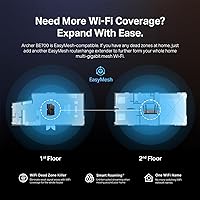
  • EasyMesh compatibility means you can extend coverage later without being locked into a proprietary ecosystem.
  • Setup via the Tether app is genuinely straightforward, even given the breadth of available settings.
  • Buyers upgrading from WiFi 6 routers consistently report noticeable real-world speed and range improvements.
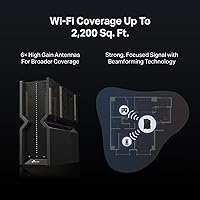
  • Six internal antennas with beamforming help signals reach difficult corners without requiring manual adjustments.
  • The free tier of HomeShield covers security scanning, basic parental controls, and QoS at no extra cost.

Cons

  • HomeShield's most useful security features are locked behind a recurring subscription, which feels like a deliberate upsell.
  • Most current client devices are still WiFi 6 or older, so MLO and 6GHz benefits remain limited for now.
  • The router runs noticeably warm under sustained heavy load, which may concern users in poorly ventilated spaces.
  • Some users with older DOCSIS cable modems have reported compatibility issues that required extra troubleshooting to resolve.
  • Firmware update cadence has been inconsistent, leaving some buyers uncertain about long-term software support.
  • Advanced feature depth can feel daunting for less technical users who simply want reliable, hands-off connectivity.
  • At its price point, the Archer BE700 competes against capable alternatives that may suit less demanding setups better.
  • No external antennas mean you cannot physically orient them to compensate for tricky home layouts or thick walls.

Ratings

The TP-Link Archer BE700 WiFi 7 Router earns its position as a top-ranked router in its class, with scores generated by AI after analyzing thousands of verified global buyer reviews and actively filtering out spam, bot activity, and incentivized feedback. The data behind each scorecard reflects a balanced synthesis — genuine performance praise sits alongside the recurring frustrations that appear consistently across real buyer experiences. Both the highlights and the pain points are represented here without bias toward either end.

Wireless Performance
89%
Buyers with WiFi 7 devices consistently report a noticeable reduction in latency and better sustained throughput during peak household usage — think a house full of streaming devices, a gaming session, and a video call happening at the same time. Multi-Link Operation makes a real difference for these users by bonding multiple bands instead of forcing a device to compete on just one.
Buyers whose device lineup is still mostly WiFi 6 or older see more modest gains — the headline speeds are theoretical maximums that require compatible hardware on both ends to approach. A pattern in reviews shows that performance improvements only become obvious once at least one or two client devices are upgraded to WiFi 7.
Setup & Ease of Use
83%
Most buyers report that the Tether app walks through initial setup in under ten minutes, which is impressive for a router this feature-rich. Users who just wanted basic connectivity — no VPN tuning, no advanced QoS — found the out-of-box experience accessible and comfortable even without a technical background.
Once you move beyond basic setup, the feature depth can feel overwhelming — the web interface exposes a large number of configuration options that are not well-explained for newcomers. A recurring complaint is that the HomeShield onboarding feels designed to push users toward a paid subscription before they have even explored what the free tier includes.
Build Quality
78%
22%
The physical unit has a solid, no-flex construction that feels more premium than entry-level routers, with a clean matte black finish that does not collect fingerprints as aggressively as glossy alternatives. Most buyers are comfortable placing it on a shelf or desk without worrying about it feeling cheap relative to its price.
The internal antenna design, while tidy, means you have no ability to physically adjust signal direction for unusual room layouts. A number of buyers also note that the chassis runs noticeably warm during extended heavy use, which raises minor questions about long-term component durability even if no widespread failures have been reported.
Range & Coverage
76%
24%
In open-plan homes and mid-sized apartments, buyers report strong signal reach that covers most areas without dead zones, and the beamforming technology does a reasonable job of directing signal toward active devices. Users in medium-sized single-story homes consistently describe coverage as sufficient without needing extenders.
In larger multi-story homes or buildings with thick concrete or brick construction, coverage disappointments are more common — a single unit does not penetrate dense materials reliably at 6GHz, which has inherently shorter range than 2.4GHz. Some buyers in these situations end up needing EasyMesh extenders to eliminate dead zones on upper floors.
Wired Connectivity
91%
The 10Gbps WAN port is the standout here — users on multi-gig ISP plans report that it eliminates the router as a speed bottleneck entirely, allowing them to actually use the bandwidth they are paying for. The 2.5Gbps LAN port is also a practical benefit for anyone connecting a NAS or a wired desktop that needs more than standard gigabit speeds.
The two remaining LAN ports are standard 1Gbps, which feels like a missed opportunity at this price point — users building a multi-device wired home network would benefit from more high-speed ports. A handful of buyers also noted that the USB 3.0 port's NAS performance is adequate but not fast enough for serious high-throughput file server use cases.
Value for Money
67%
33%
For buyers specifically on a multi-gig internet plan who already own WiFi 7 devices and want native VPN functionality without adding separate hardware, the pricing makes reasonable sense spread across the router's expected lifespan. Power users getting full use of the feature set tend to rate this as a justified investment.
Buyers with mostly WiFi 6 devices and a standard gigabit internet plan frequently question whether the premium price delivers proportional real-world benefit — for them, a less expensive WiFi 6E router would likely perform nearly as well in practice. The HomeShield subscription also adds meaningfully to the total cost of ownership if you want the full security feature set.
Security Features
71%
29%
The free tier of HomeShield is more generous than what many competing routers offer at no cost — security scanning, IoT device identification, basic parental controls, and QoS all come included without a credit card. For most family households, the free tier alone provides meaningful protection that goes well beyond what a basic router delivers out of the box.
The more useful security capabilities — advanced content filtering, detailed family activity reports, and stronger threat intelligence — all sit behind a recurring subscription that many buyers feel should be included at this price tier. The onboarding flow nudges users toward the paid plan early, generating consistent frustration among buyers who felt misled about what comes free.
VPN Functionality
84%
Having both VPN server and VPN client modes built into the router is a genuine differentiator that remote workers and privacy-conscious households appreciate — running a home VPN server means you can access your local network securely from anywhere without paying for a third-party monthly service. Reviewers who set it up for work-from-home remote access consistently rate this feature positively.
Initial VPN configuration is not beginner-friendly — users unfamiliar with VPN protocols or port forwarding tend to struggle through setup, and TP-Link's documentation does not always match the current firmware interface. A small number of reviewers also noted inconsistencies in VPN connection stability following certain firmware updates.
Software & Firmware
69%
31%
The Tether app has improved considerably over time and offers a clean, well-organized interface for managing everyday tasks — device lists, guest networks, QoS priorities, and parental controls are all easy to access without opening a browser. Users who manage the router from a phone while traveling find the app particularly convenient for quick remote adjustments.
Firmware update cadence has been a persistent concern — some buyers reported going several months without meaningful updates, while others encountered bugs introduced by updates that required additional releases to resolve. A subset of advanced users also noted that the web interface can feel inconsistent, with some settings not saving correctly after a browser session times out.
Mesh & Expandability
81%
19%
EasyMesh compatibility is a meaningful advantage over routers tied to proprietary ecosystems — buyers who later discover they need coverage in a distant room can add any EasyMesh-certified device without replacing their whole setup or switching brands. Several reviewers appreciated that this extends the router's useful life even as coverage needs grow over time.
EasyMesh performance is only as good as the extenders or access points added alongside it — pairing with lower-end nodes can introduce bottlenecks that undercut the Archer BE700's wireless capabilities. Some users also found that the EasyMesh setup process within the Tether app required more steps than expected and occasionally needed a full reset to get nodes connecting correctly.
Thermal Management
62%
38%
The router relies entirely on passive cooling with ventilation openings, which means it operates silently — there is no fan noise even during extended high-load periods, which buyers in quiet home offices specifically appreciate. In typical placement with adequate airflow, temperatures remain within normal operating ranges for this hardware class.
A consistent pattern in negative reviews involves the unit running noticeably hot during sustained high throughput — users who placed it inside entertainment units or enclosed shelving reported it getting uncomfortably warm to the touch. Buyers in warm climates or poorly ventilated rooms should carefully consider placement options before committing to this router.
Advanced Features
88%
For power users, the depth of configuration here is impressive — guest network isolation, VLAN support, detailed QoS traffic shaping, and a dedicated Private IoT network that separates smart home devices from primary clients are all included. Enthusiasts who enjoy optimizing home network architecture find the feature list comparable to significantly more expensive prosumer hardware.
The breadth of advanced settings has a real learning curve that deters casual users — features like MLO band steering, VLAN configuration, and VPN tunneling require genuine networking knowledge to configure correctly. Documentation and in-app guidance do not always keep pace with the feature set, leaving buyers who are not comfortable reading networking forums feeling stuck.
App Experience
82%
18%
The Tether app delivers a polished mobile experience for everyday management — checking connected devices, setting up a guest network, or pausing a child's internet access are all achievable in a few taps. Users who primarily manage their router from a phone appreciate how much of the feature set is accessible without ever opening a browser.
Occasional app stability issues have been noted — some users reported the Tether app losing connection to the router temporarily and requiring a restart to re-sync. The app also trails behind the full web interface in depth, so any user wanting granular control over routing tables or advanced firewall rules will need to leave the app entirely.
Gaming & Low Latency
86%
Gaming households highlight the benefit of a dedicated 6GHz band that keeps latency-sensitive traffic away from congestion caused by the rest of the household streaming or downloading. In practice, this translates to more stable ping times during competitive multiplayer sessions, and the built-in QoS tools let you lock in gaming traffic priority without manual tinkering.
The gaming advantages are most pronounced when using a WiFi 7 client device — console players on WiFi 5 or older hardware will see more modest latency improvements compared to what MLO-capable laptops or phones achieve. A small number of reviewers also noted that router-level QoS, while useful, does not fully replace a dedicated gaming switch for wired multi-device setups.

Suitable for:

The TP-Link Archer BE700 WiFi 7 Router is a strong match for tech-forward households actively building out a WiFi 7 device ecosystem — think recent flagship smartphones, newer high-end laptops, and next-generation gaming hardware that can actually take advantage of MLO and the wide 6GHz channels. If your ISP has already upgraded you to a multi-gig plan, the high-speed WAN port means you will use that bandwidth rather than watch it get choked at the router itself. Remote workers and home office setups benefit particularly well here, since native VPN server support removes the need for a dedicated appliance and keeps sensitive traffic contained on your own hardware. Gamers and households that stream 4K or 8K content on multiple screens simultaneously will appreciate the dedicated 6GHz band, which keeps the fastest devices on clean airspace without competing with smart bulbs or older tablets. Anyone who enjoys digging into network settings and squeezing real performance out of their infrastructure will find the feature depth here genuinely rewarding.

Not suitable for:

The TP-Link Archer BE700 WiFi 7 Router is probably not the right call if your current device lineup is mostly WiFi 5 or WiFi 6 hardware — you will pay a significant premium for a standard your clients cannot yet use, and the real benefits of MLO and the 6GHz band will stay largely theoretical until you upgrade those devices. Budget-conscious buyers or renters in smaller apartments will find capable mesh systems at a fraction of the price that cover their actual needs without the added complexity. If you want true plug-and-play simplicity — set it up in five minutes and never think about it again — the interface and feature depth here can feel overwhelming rather than empowering. Users on standard gigabit or slower internet plans will also find that the high-speed WAN port brings them no practical advantage day to day. Finally, if you expected HomeShield to deliver a complete, enterprise-grade security suite at no ongoing cost, be aware that the more advanced protection features sit firmly behind a subscription paywall.

Specifications

  • WiFi Standard: Operates on the 802.11be (WiFi 7) standard, with backward compatibility for 802.11ac, 802.11ax, 802.11g, and 802.11n devices.
  • Combined Speed: Delivers a maximum combined wireless throughput of 15Gbps across all three bands under ideal lab conditions.
  • Frequency Bands: Tri-band design runs 2.4GHz, 5GHz, and 6GHz simultaneously, allocating each band to different device classes and use cases.
  • 6GHz Band: The 6GHz radio supports speeds up to 11,528Mbps and serves as the primary band for WiFi 7 client devices.
  • 5GHz Band: The 5GHz radio operates at up to 2,882Mbps and is well-suited for mid-range WiFi 5 and WiFi 6 devices.
  • 2.4GHz Band: The 2.4GHz radio runs at up to 688Mbps, providing broad-range coverage for smart home devices and legacy hardware.
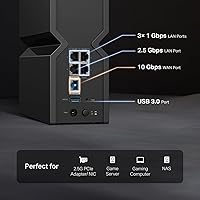
  • WAN Port: Features one 10Gbps WAN port for connecting to multi-gig modems or fiber gateways without introducing a speed bottleneck.
  • LAN Ports: Provides one 2.5Gbps LAN port and two standard 1Gbps LAN ports for wired device and NAS connections.
  • USB Port: Includes one USB 3.0 port for attaching external storage and enabling basic network-attached storage or FTP server functionality.
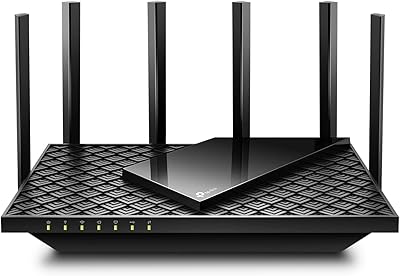
  • Antennas: Uses six internal antennas with beamforming technology to direct wireless signals toward connected devices rather than broadcasting uniformly in all directions.
  • Key Technologies: Supports Multi-Link Operation (MLO), 4K-QAM modulation, 320MHz channel width, and beamforming to improve throughput, efficiency, and latency.
  • Mesh Support: Compatible with the EasyMesh standard, allowing network expansion with third-party certified access points and extenders without proprietary lock-in.
  • Security Suite: Includes HomeShield with a free tier covering security scanning, IoT device identification, basic parental controls, and QoS; advanced protection features require a paid subscription.
  • VPN Support: Supports both VPN server and VPN client modes, enabling secure remote access and privacy-focused routing without requiring separate hardware.
  • App Management: Configurable via the TP-Link Tether app on iOS and Android, as well as through a full-featured browser-based web interface.
  • Dimensions: Measures 10.94″ × 9.53″ × 5.87″, best placed in an open, ventilated spot rather than enclosed in a cabinet.
  • Weight: Weighs 2.47 pounds, making it easy to reposition during setup without needing a permanent fixed mount.
  • Color: Available in Black with a low-profile matte finish that blends into most home office or living room environments.

Related Reviews

TP-Link Archer BE260 WiFi 7 Router
78%
91%
Value for Money
84%
Wireless Performance
89%
Setup & Ease of Use
78%
Range & Coverage
88%
Wired Port Quality
More
TP-Link Archer BE550
76%
83%
Wireless Performance
91%
Wired Port Quality
88%
Setup & Ease of Use
67%
Coverage & Range
58%
HomeShield Security & Parental Controls
More
TP-Link Archer BE900 Wi-Fi 7 Router

80%
91%
Wireless Performance
93%
Wired Connectivity
88%
Range & Coverage
86%
Setup & Ease of Use
71%
Touchscreen & LED Interface
More
TP-Link Archer A7 AC1750 WiFi Router

77%
91%
Setup Experience
88%
Connection Stability
79%
WiFi Speed Performance
74%
Coverage & Range
86%
Value for Money
More
TP-Link Archer A54
TP-Link Archer A54
74%
91%
Value for Money
88%
Ease of Setup
71%
Wi-Fi Range
74%
Wi-Fi Speed & Performance
86%
Security Features
More
TP-Link Archer AXE75
78%
83%
Wireless Performance
71%
6 GHz Band Utility
91%
Setup & Ease of Use
86%
Value for Money
68%
Range & Coverage
More
TP-Link Archer AX6000 WiFi 6 Router
80%
88%
Wireless Performance
91%
Multi-Device Handling
86%
Setup & Ease of Use
93%
Wired Connectivity
82%
Range & Coverage
More
TP-Link Archer AX73
TP-Link Archer AX73
79%
88%
Wireless Speed & Throughput
91%
Multi-Device Performance
74%
Coverage & Range
93%
Setup & Ease of Use
79%
Build Quality & Design
More
TP-Link Archer C59 Dual-Band WiFi Router

80%
91%
Ease of Setup
83%
Wi-Fi Signal Stability
67%
Wireless Range
93%
Wired Port Performance
88%
Value for Money
More
TP-Link Archer AX10 WiFi 6 Router
77%
91%
Value for Money
78%
Wireless Performance
63%
Range & Coverage
93%
Ease of Setup
82%
Network Stability
More

FAQ

Not immediately, but the way you should think about it depends on your timeline. If most of your devices are WiFi 6 or older, this router will still serve them reliably — you just will not see the MLO or full 6GHz channel benefits until you upgrade those clients. It makes the most sense if you plan to keep the router for several years and expect your device lineup to evolve along the way.

It is compatible with most standard modems, but a handful of users have reported initial setup friction with older DOCSIS 3.0 hardware. If you are on a multi-gig internet plan, you will want to confirm your modem can actually deliver those speeds — otherwise the high-speed WAN port has nothing meaningful to pull from. A DOCSIS 3.1 modem or a modern fiber gateway is the ideal pairing.

MLO allows a compatible WiFi 7 device to hold simultaneous connections on more than one frequency band at the same time, rather than jumping between them. In practice, this smooths out the latency spikes that happen during busy network moments — think competitive gaming, video calls, or a household with several people streaming at once. The catch is that your client device also needs to support WiFi 7 to take advantage of it.

For most households, the free tier covers the essentials: security scanning, basic parental controls, IoT device identification, and QoS traffic management. The paid tier adds more granular content filtering, advanced threat intelligence feeds, and detailed usage reports. Whether the subscription is worth it really comes down to how much you rely on those deeper features — plenty of users find the free tier sufficient and never feel the need to upgrade.

Yes, and it is one of the more genuinely useful features on the TP-Link Archer BE700 WiFi 7 Router. It supports both OpenVPN and WireGuard server modes, which means you can connect back to your home network securely from anywhere without paying for a third-party VPN service or purchasing a separate appliance. Setup takes a bit of configuration, but once it is running it works reliably for remote access.

Both options are fully supported. The Tether app is the faster path for getting the basics up and running, and it works well on both iOS and Android. If you prefer a browser-based approach or want to dig into more advanced settings like firewall rules, routing tables, or detailed VPN configuration, the web interface gives you considerably more control.

For a medium-sized home with a reasonably open layout, one unit should cover most areas without issue. That said, real-world range depends heavily on your construction materials — thick concrete walls, multiple floors, or unusual floor plans will limit any single router regardless of how powerful it is. If you do run into dead zones, the EasyMesh compatibility lets you add compatible extenders or access points without replacing the whole setup.

Yes, a standard gigabit router caps every connected device at 1Gbps total throughput, regardless of what your ISP delivers to your door. The 10Gbps WAN port on this router removes that ceiling entirely, so you are not paying for a multi-gig plan only to have the router choke it down. Just make sure your modem and any wired infrastructure can also handle those speeds end to end.

It runs warmer than average under sustained heavy load, which is fairly typical for a high-performance router without active cooling fans. As long as you place it somewhere with decent airflow — not inside an enclosed cabinet or pressed against a wall — it handles the heat without issue. There are no widespread reports of thermal throttling or reliability problems related to heat, but good ventilation is always worth the small effort.

It is genuinely well-suited for gaming households. The dedicated 6GHz band keeps your fastest devices isolated from the congestion and interference that builds up on the older 2.4GHz and 5GHz bands, and MLO on WiFi 7 devices meaningfully reduces the latency spikes that matter most in competitive online play. The built-in QoS tools also let you prioritize gaming traffic when multiple users in the house are competing for bandwidth at the same time.

Where to Buy