Overview

The TP-Link Archer BE600 WiFi 7 Router sits at an interesting crossroads — capable enough to satisfy power users, yet priced where most serious home networking upgrades happen. It runs a tri-band BE9700 configuration, which in plain terms means three separate radio bands handling traffic simultaneously rather than competing for the same airspace. The 10G multi-gig port is genuinely rare at this price tier; most rivals make you pay considerably more for that kind of wired headroom. TP-Link has signed the CISA Secure-by-Design pledge — worth noting given the brand's complicated security history, though a pledge isn't a guarantee. One honest caveat: WiFi 7 gains are real, but only if your devices actually support the standard.
Features & Benefits

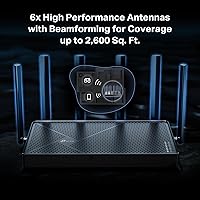
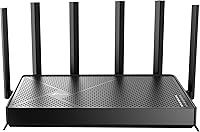
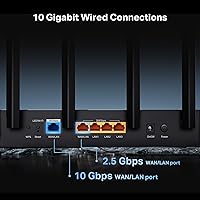
The standout technology here is Multi-Link Operation, which bonds multiple bands together so your device stays connected — rather than dropping for a split second — when you move through the house. On the 6 GHz band, the 320 MHz channel width opens up real headroom for heavy tasks like pulling large files or streaming high-bitrate video. Six beamforming antennas push coverage across up to 2,600 sq. ft., handling up to 120 devices at once. The port loadout is generous: a 10G uplink, a 2.5G combo port, and three 2.5G LAN ports. HomeShield adds parental controls and IoT isolation, though the more useful security features sit behind a paid subscription.

Best For

This WiFi 7 router makes the most sense for households that have already started picking up WiFi 7 devices — think recent flagship phones, newer gaming laptops, or the latest consoles. If you're on a multi-gig internet plan, the 10G port means you can actually use that speed without a bottleneck at the router itself. Gamers and households with heavy simultaneous streaming will appreciate the lower latency that tri-band separation provides. Coverage-wise, it fits homes in the 1,800 to 2,600 square-foot range well. That said, if your ISP tops out at standard gigabit and your devices are mostly WiFi 6 or older, a solid WiFi 6 router will serve you just as well for considerably less money.

User Feedback

Across more than 600 ratings, the Archer BE600 holds a strong 4.4-star average, with most buyers praising how quickly it sets up through the Tether app and how noticeably faster their WiFi 7 devices performed after switching. The wired port selection draws consistent praise from home lab and NAS users specifically. On the flip side, a few recurring frustrations stand out: some report the unit runs warm under sustained load, and the HomeShield free tier locks away enough features that the subscription feels less optional than advertised. The TP-Link trust question still surfaces in reviews, though many buyers say the CISA pledge gave them enough confidence to move forward.

Pros

  • The 10G multi-gig port is rare at this price point and eliminates the need for a separate switch on multi-gig ISP plans.
  • Tri-band architecture keeps gaming, streaming, and general browsing traffic from competing on the same band.
  • Multi-Link Operation noticeably reduces dropped connections when moving between rooms on compatible WiFi 7 devices.
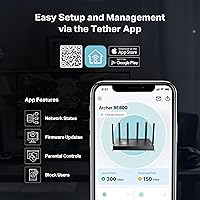
  • The Tether app makes initial setup genuinely fast — most buyers are up and running in under ten minutes.
  • Five wired ports covering 10G and 2.5G speeds make this a practical hub for NAS drives and wired workstations.
  • Beamforming antennas deliver reliable coverage across larger homes without requiring a mesh extender.
  • IoT device isolation keeps smart home gadgets on a separate network segment, reducing security exposure.
  • The Archer BE600 holds a 4.4-star average across hundreds of verified buyers, with setup ease and speed gains cited most often.
  • Access Point mode lets it integrate cleanly into an existing network without replacing your entire setup.

Cons

  • WiFi 7 performance gains are entirely device-dependent — older phones and laptops see no meaningful improvement.
  • The HomeShield free tier is limited enough that the subscription feels close to mandatory for security-focused households.
  • Several users report the unit runs noticeably warm under sustained load, making enclosed cabinet placement risky.
  • Advanced routing features like VLAN setup and granular QoS are not accessible without moving beyond the Tether app.
  • TP-Link's past security vulnerabilities still generate hesitation among buyers, and the CISA pledge is not a third-party audit.
  • No native Google Home or Apple HomeKit integration limits smart home ecosystem flexibility.
  • Mesh expansion requires TP-Link Deco hardware specifically — no cross-brand mesh compatibility.
  • The web-based admin interface feels dated and lacks the polish of competing router software platforms.
  • Per-device bandwidth monitoring is locked behind the paid HomeShield tier, making network troubleshooting harder on the free plan.

Ratings

The TP-Link Archer BE600 WiFi 7 Router earns a strong overall reception across thousands of verified global reviews, with our AI analysis actively filtering out incentivized and bot-generated submissions to surface what real buyers actually experience. Scores here reflect a balanced picture — the genuine strengths that keep satisfaction high alongside the friction points that prevent a perfect rating. Whether you are considering upgrading from WiFi 6 or buying your first tri-band router, the breakdown below covers everything that matters.
Wireless Performance
91%
Buyers with WiFi 7-capable devices consistently report a noticeable jump in real-world throughput — particularly on the 6 GHz band during large file transfers and 4K streaming sessions with multiple people online. The 320 MHz channel width gives the radio genuine breathing room that earlier standards simply could not match.
The performance ceiling is only reachable with compatible client hardware, and many households are still running a mix of older devices that top out at WiFi 5 or 6. A few reviewers in dense apartment buildings noted increased 6 GHz interference compared to less congested 5 GHz usage.
Coverage & Range
84%
For homes in the 1,800 to 2,500 square-foot range, most buyers report solid, consistent signal reaching previously problematic corners — garages, back patios, and upstairs bedrooms that older routers struggled with. The six beamforming antennas do seem to direct signal meaningfully rather than just broadcasting in all directions equally.
Users in homes above 2,600 square feet or with thick concrete walls found the coverage claim optimistic. A handful of reviewers noted that the 6 GHz band, while fast, drops off more quickly with distance or through walls than the 5 GHz band does.
Wired Port Selection
93%
The 10G port is the headline here, and for users on multi-gig ISP plans or running a NAS on their home network, it is a genuinely practical inclusion that avoids needing a separate multi-gig switch. The additional 2.5G ports mean wired workstations and media servers can all run at above-gigabit speeds simultaneously.
There is no standard gigabit port for legacy wired devices, which means older hardware with gigabit NICs technically connects at 2.5G but gains nothing from the upgraded port — a minor inconvenience rather than a real problem, but worth knowing.
Setup & Installation
88%
The Tether app guides you through the initial setup in under ten minutes, and most buyers describe the process as one of the easier router installations they have done. Even less technical users appreciated that the app handles band configuration and firmware updates without requiring any command-line knowledge.
A subset of reviewers ran into issues when migrating from a different router ecosystem, particularly around static IP configurations and port forwarding. The web interface is functional but feels dated compared to some competitors at this price level.
Multi-Link Operation (MLO)
79%
21%
Buyers with MLO-capable devices — newer Android flagships and WiFi 7 laptops in particular — describe noticeably fewer mid-session drops when moving between rooms, which is exactly what the technology promises. For video calls and cloud gaming sessions, the band-bonding effect keeps connections stable in ways that band steering alone never quite managed.
MLO is only active when both the router and the client device support it, which currently limits the real-world pool. Reviewers with a mix of old and new devices saw no benefit on their older hardware, and a few noted that the router does not always surface which band a device is actively using in the app.
HomeShield Security Suite
62%
38%
The free tier covers basic network monitoring and some parental controls, which is enough for households that just want a quick content filter for younger kids. IoT device isolation — keeping smart bulbs and cameras on a separate network segment — works reliably and is genuinely useful without a subscription.
Real-time threat protection, detailed traffic insights, and advanced parental scheduling all sit behind a recurring subscription that adds up over time. Several buyers felt the paywall was more aggressive than expected, and a few considered switching ecosystems specifically because of it.
Latency & Gaming Performance
86%
Console and PC gamers report consistently low ping figures when connected on the 6 GHz or 5 GHz bands, especially on wired connections through the multi-gig ports. The tri-band architecture helps because gaming traffic and heavy streaming traffic no longer compete on the same band.
A small group of competitive gamers noted that without QoS customization beyond the basic HomeShield controls, prioritizing gaming traffic over background downloads requires the paid tier. Out of the box, the router does not offer granular QoS tuning through the free interface.
Build Quality & Design
74%
26%
The router feels solid in hand, and the six antennas snap into position firmly without wobble. At 1.7 pounds it is lighter than some bulkier competitors, and the low-profile black finish sits unobtrusively on a shelf or desk without drawing attention.
Several users flagged that the unit runs noticeably warm during sustained heavy use — not alarmingly hot, but warm enough that a few buyers expressed concern about long-term thermal management. Ventilation placement means it should not be stored in an enclosed cabinet.
App & Software Experience
81%
19%
The Tether app is well-regarded for its clean layout and day-to-day usability — checking connected devices, running speed tests, and managing guest networks all feel intuitive. Firmware updates push automatically without requiring manual intervention, which most buyers appreciated.
Power users looking for advanced routing features — custom DNS, detailed traffic logs, or VLAN configuration — will find the app limiting. The desktop web interface fills some of those gaps but lacks the polish and feature depth of competing platforms like ASUS's router software.
Value for Money
83%
For a router that includes a 10G port, genuine WiFi 7 support, and broad multi-gig LAN connectivity, the price sits below several comparable competitors that offer less on the wired side. Buyers who needed all of those features specifically tend to rate the value proposition highly.
For households that do not have a multi-gig ISP plan and are still mostly running WiFi 6 devices, the premium over a strong WiFi 6 router is harder to justify right now. The HomeShield subscription also factors into the true total cost of ownership over two or three years.
Brand Trust & Security Posture
67%
33%
TP-Link's CISA Secure-by-Design pledge is a meaningful step, and buyers who researched it before purchasing generally felt more comfortable than they might have a year ago. Security-conscious reviewers also appreciated the automatic firmware updates and the ability to segment IoT devices.
TP-Link's history of security vulnerabilities and past government scrutiny still surfaces regularly in reviews, and a number of buyers explicitly noted they considered other brands before committing. The pledge is a commitment, not a verified audit, which some buyers find insufficient.
Device Capacity & Network Management
82%
18%
Households with 30 to 60 connected devices — smart home gadgets, phones, tablets, laptops, and consoles all running simultaneously — report no meaningful performance degradation, which is a genuine strength of the tri-band design. The private IoT network feature keeps less secure devices from touching the main network.
At the very top of the claimed 120-device capacity, a few reviewers in large family or small office environments noticed occasional slowdowns. The app does not surface per-device bandwidth data on the free tier, making it harder to identify which device is hogging resources.
Compatibility & Ecosystem Integration
78%
22%
Alexa voice control works reliably for those already in the Amazon ecosystem, and Access Point mode lets the router slot into an existing network without disrupting other infrastructure. Universal device compatibility means phones, laptops, and consoles from all major brands connect without any configuration headaches.
There is no native integration with Google Home or Apple HomeKit, which matters to buyers deep in those ecosystems. Mesh expansion requires TP-Link's own Deco hardware, so users hoping to mix brands in a mesh setup will find the options limited.

Suitable for:

The TP-Link Archer BE600 WiFi 7 Router is a strong fit for households that have already started building out a WiFi 7 device lineup — recent flagship smartphones, newer gaming laptops, and current-generation consoles that can actually take advantage of the faster standard. If your ISP delivers multi-gig speeds and you have been frustrated by your router being the bottleneck, the 10G uplink port alone justifies serious consideration without needing to buy a separate multi-gig switch. Remote workers juggling video calls, cloud backups, and a houseful of streaming family members will appreciate the tri-band architecture keeping different traffic types from stepping on each other. Gamers who want low-latency wired connections alongside strong wireless coverage for everyone else in the home will find the port selection and band separation genuinely useful in practice. Larger homes in the 1,800 to 2,600 square-foot range that struggle with dead zones will benefit from the beamforming antenna setup, and households running 20 or more smart home devices will value the ability to isolate IoT gadgets on a separate network segment.
Not suitable for:

The TP-Link Archer BE600 WiFi 7 Router is a harder sell if your internet plan tops out at standard gigabit speeds and most of your devices are still running WiFi 6 or older — in that scenario, a well-regarded WiFi 6 router delivers nearly identical real-world performance for noticeably less money. Buyers who are sensitive to brand trust issues may find TP-Link's history of security vulnerabilities difficult to overlook; the CISA Secure-by-Design pledge is a genuine step forward, but it is a commitment rather than a certified audit, and that distinction matters to some users. Anyone expecting a fully featured security suite out of the box should know that the more useful HomeShield functions — detailed traffic monitoring, advanced parental scheduling, and real-time threat protection — require an ongoing subscription that adds to the total cost over time. Power users who rely on granular routing controls like custom VLAN configuration, detailed per-device bandwidth management, or deep QoS tuning will find the software ecosystem limiting compared to some alternatives. Apartment dwellers or anyone in a home under 1,500 square feet will likely find the coverage capabilities more than they need, and may be better served by a simpler, cheaper device.

Specifications

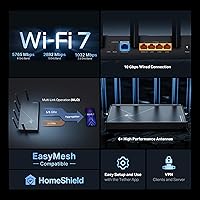
  • WiFi Standard: Supports WiFi 7 (802.11be) along with backward-compatible 802.11ac, 802.11ax, 802.11n, and 802.11g standards.
  • Band Configuration: Tri-band design with simultaneous 2.4 GHz, 5 GHz, and 6 GHz radios operating independently.
  • Combined Speed: Maximum theoretical combined throughput of BE9700, totaling up to approximately 9,700 Mbps across all three bands.
  • 6 GHz Band: Delivers up to 5,765 Mbps on the 6 GHz band using a 320 MHz channel width.
  • 5 GHz Band: Delivers up to 2,882 Mbps on the 5 GHz band for mid-range distance and throughput tasks.
  • 2.4 GHz Band: Delivers up to 1,032 Mbps on the 2.4 GHz band, optimized for longer range and legacy device compatibility.
  • Wired Ports: Includes one 10G WAN/LAN port, one 2.5G WAN/LAN port, and three 2.5G LAN ports for multi-gig wired connectivity.
  • Antennas: Features six external, beamforming-enabled antennas designed to direct signal toward connected devices rather than broadcasting omnidirectionally.
  • Coverage Area: Rated for up to 2,600 sq. ft. of wireless coverage under typical home conditions.
  • Device Capacity: Supports up to 120 simultaneous connected devices across all bands.
  • Key Technologies: Implements Multi-Link Operation (MLO), Multi-RUs, and 4K-QAM modulation as core WiFi 7 performance features.
  • Security Suite: Includes TP-Link HomeShield with a free base tier and a paid subscription tier unlocking advanced threat protection and detailed parental controls.
  • Operating Modes: Can be configured as a standalone wireless router or as a wired Access Point within an existing network.
  • Voice Assistant: Compatible with Amazon Alexa for basic voice-controlled network management functions.
  • Management App: Managed via the TP-Link Tether mobile app, available for iOS and Android, with a secondary web-based admin interface.
  • Dimensions: Measures 13.62 x 10.59 x 4.41 inches with six repositionable external antennas extending the overall footprint.
  • Weight: Weighs 1.7 pounds without packaging, making it lighter than many comparable tri-band routers in this class.
  • In-Box Contents: Package includes the router unit, one power adapter, one RJ45 Ethernet cable, and a printed quick installation guide.
  • Security Pledge: TP-Link is a signatory of the U.S. CISA Secure-by-Design pledge, committing to security-first design and maintenance practices.
  • Mesh Compatibility: Mesh network expansion requires TP-Link Deco-branded hardware and is not compatible with third-party mesh systems.

Related Reviews

TP-Link Archer BE550
76%
83%
Wireless Performance
91%
Wired Port Quality
88%
Setup & Ease of Use
67%
Coverage & Range
58%
HomeShield Security & Parental Controls
More
TP-Link Archer BE260 WiFi 7 Router
85%
93%
WiFi Performance
89%
Ease of Setup
77%
Coverage & Range
91%
Streaming & Gaming Experience
85%
Design & Build Quality
More
TP-Link Archer BE700 WiFi 7 Router
85%
93%
Performance
88%
Ease of Setup
91%
Coverage & Range
94%
Speed (Wi-Fi 7)
85%
Security Features
More
TP-Link Archer BE24000 WiFi 7 Router
87%
94%
Performance
89%
Setup & Installation
92%
Connectivity & Compatibility
90%
Coverage & Range
88%
Security Features
More
TP-Link Archer AC1750 WiFi Router
85%
88%
WiFi Performance
91%
Setup & Installation
80%
Range & Coverage
85%
Value for Money
89%
Alexa Integration
More
TP-Link Archer C59 AC1350 WiFi Router
82%
88%
Setup & Installation
72%
Wi-Fi Range & Coverage
81%
Overall Performance
92%
Value for Money
78%
Build Quality
More
TP-Link Archer A54
TP-Link Archer A54
74%
91%
Value for Money
88%
Ease of Setup
71%
Wi-Fi Range
74%
Wi-Fi Speed & Performance
86%
Security Features
More
TP-Link Archer AX73
TP-Link Archer AX73
79%
88%
Wireless Speed & Throughput
91%
Multi-Device Performance
74%
Coverage & Range
93%
Setup & Ease of Use
79%
Build Quality & Design
More
TP-Link Archer AX6000 WiFi 6 Router
80%
88%
Wireless Performance
91%
Multi-Device Handling
86%
Setup & Ease of Use
93%
Wired Connectivity
82%
Range & Coverage
More
TP-Link Archer AXE75
78%
83%
Wireless Performance
71%
6 GHz Band Utility
91%
Setup & Ease of Use
86%
Value for Money
68%
Range & Coverage
More
TP-Link Deco BE23 WiFi 7 Mesh Router
82%
93%
Value for Money
91%
Setup & Ease of Use
84%
Wi-Fi Speed Performance
82%
Coverage & Signal Range
89%
Wired Port Quality
More

FAQ

It depends entirely on your devices. If you have recent flagship phones, a newer laptop, or a current-gen gaming console that supports WiFi 7, you will notice real improvements in speed and connection stability. If your household is mostly running older devices on WiFi 6 or WiFi 5, the honest answer is that a good WiFi 6 router will serve you just as well for less money. The TP-Link Archer BE600 WiFi 7 Router is best treated as a forward-looking investment rather than an immediate upgrade for everyone.
MLO lets the router bond two or more bands together so your device maintains a single, stronger connection rather than hopping between them. In practice, the most noticeable benefit is fewer dropped connections when you move through the house — especially during video calls or cloud gaming sessions where even a half-second interruption is disruptive. You do need a client device that also supports MLO to benefit from it, so check your device specs before counting on this feature.

If your ISP plan delivers more than 2.5 Gbps, or if you run a NAS drive on your home network, the 10G port is genuinely useful and saves you from needing a separate multi-gig switch. For everyone on a standard gigabit plan with no NAS, it is a nice capability to have for future-proofing but will not change your day-to-day experience at all.

HomeShield is TP-Link's built-in security and parental control system. The free tier gives you basic network monitoring and simple content filtering, which is enough for casual use. The more useful features — real-time malware protection, detailed usage reports, and advanced parental scheduling — are locked behind a paid subscription. It is worth factoring that ongoing cost into your decision, since the free tier alone may feel limited once you start using it.

The concerns are legitimate and worth acknowledging. TP-Link has faced scrutiny over past vulnerabilities and some government-level attention regarding its hardware. The company has since signed the CISA Secure-by-Design pledge, which is a meaningful public commitment to building security into their products from the ground up. That said, a pledge is not a certified third-party audit, so if you work in a sensitive field or have strong security requirements, it is fair to weigh that distinction carefully before buying.

Setup is genuinely straightforward through the Tether mobile app. You plug in the router, download the app, and it walks you through each step — most people are fully connected in under ten minutes. You do not need to touch any configuration files or know what a subnet mask is. The app handles firmware updates automatically too, so ongoing maintenance is mostly hands-off.

Yes, Access Point mode is a supported configuration. You connect it via Ethernet to your existing gateway, switch the mode in the Tether app, and it handles the wireless side while your ISP device manages routing. This is a clean way to add WiFi 7 coverage without fully replacing your existing network setup.

For most homes up to around 2,500 square feet with standard drywall construction, the Archer BE600 should cover the space without needing an extender. Homes with thick concrete or brick walls, unusual layouts, or square footage beyond that range may still have weak spots in the corners. If you do need to expand, you will need to add a TP-Link Deco unit rather than a third-party mesh node, since this router only supports TP-Link's own mesh ecosystem.

A number of buyers have mentioned the unit gets noticeably warm during sustained heavy use — not dangerously hot, but warm enough that you should give it open airflow and avoid placing it inside a closed cabinet or entertainment unit. Treating it like any other active networking device and keeping it ventilated should prevent any long-term issues.

Alexa support is built in and works through the standard Alexa skill for TP-Link. It handles basic commands like enabling guest networks or running a speed check, but it is not a deep integration — you would not manage firewall rules or parental controls by voice. For households already using Alexa as their smart home hub, it is a convenient addition; for everyone else, the Tether app will always be the primary way to manage the router.

Where to Buy