
Overview

The TP-Link Archer A54 is TP-Link's answer to a surprisingly common question: what's the most sensible router you can buy without spending much? Released in late 2021, it sits in the AC1200 entry-level tier — dual-band hardware that splits traffic between 2.4GHz and 5GHz for a combined theoretical peak of 1,200 Mbps. That ceiling rarely matters in a small apartment, but having both bands available means less congestion across your devices. The box ships complete with a power adapter, RJ45 cable, and a short setup guide, so out-of-box readiness is genuinely good. For most everyday home users, it delivers solid baseline performance without unnecessary complexity.

Features & Benefits

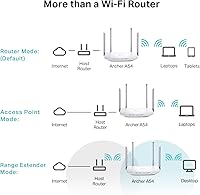
Running on the Wi-Fi 5 (802.11ac) standard, this budget router covers the essentials without overcomplicating things. The 5GHz band handles faster, shorter-range connections well — think a laptop streaming video in the next room — while 2.4GHz keeps smart home devices and phones connected further away. What genuinely stands out at this price is WPA3 security support, which most routers in this range simply don't offer. Access Point Mode is a practical touch: plug it into any wired connection and it instantly becomes a wireless hub. Parental controls and a guest network are both built in, managed conveniently through the TP-Link Tether app on your phone.

Best For

This entry-level TP-Link makes the most sense for renters, apartment dwellers, and anyone stepping away from an ISP-provided combo unit for the first time. If your household's daily needs run to video calls, HD streaming, and light gaming, it handles all of that without trouble. The EasyMesh compatibility is worth noting for anyone whose coverage needs might grow — you can pair it with another compatible device later rather than starting over entirely. It also works well as a secondary router in a cabin, guest house, or dedicated home office where the goal is simply reliable basic coverage rather than peak performance.

User Feedback

Across more than 8,000 ratings, the Archer A54 holds a 4.3-star average — a score that reflects genuine satisfaction rather than hype. The most consistent praise centers on quick, painless setup: reviewers repeatedly mention getting the router running in under ten minutes via the Tether app. Range in single-floor homes and apartments also draws positive comments. The honest downsides? The 5GHz signal loses strength noticeably through multiple walls, making it a less convincing choice for larger or multi-story spaces. A smaller number of users have flagged firmware update inconsistencies. But for the price bracket this sits in, the overall sentiment leans strongly positive.

Pros

  • WPA3 security support is rare at this price point and adds meaningful protection over older WPA2-only alternatives.
  • Setup takes under ten minutes for most users, thanks to a genuinely well-designed guided process via the Tether app.
  • Dual-band Wi-Fi handles everyday streaming, video calls, and browsing across multiple devices without breaking a sweat.
  • Built-in parental controls and guest network come included with no subscription or extra cost attached.
  • EasyMesh compatibility means you can expand coverage later by adding a second compatible device rather than replacing everything.
  • Access Point Mode lets you convert any wired connection into a wireless network — useful for older setups or secondary rooms.
  • The compact, low-profile design sits discreetly on a shelf without demanding attention or a lot of desk real estate.
  • Over 8,000 verified ratings with a 4.3-star average signals reliability that goes well beyond a small sample of enthusiast reviewers.
  • The Archer A54 ships with everything needed — router, power adapter, Ethernet cable, and guide — so there are no surprise extra purchases on day one.

Cons

  • All four LAN ports max out at 100 Mbps, which bottlenecks wired speeds on faster internet plans.
  • 5GHz signal weakens noticeably through multiple walls, making it unreliable across larger or multi-room layouts.
  • A portion of buyers have reported inconsistent firmware update delivery through the Tether app, creating patchy security maintenance.
  • Plastic construction feels lightweight and less durable than competitors even at a comparable price.
  • EasyMesh expansion is locked to TP-Link-compatible devices only, limiting options for mixed-brand households.
  • Advanced configuration — including IPTV and IPv6 settings — requires navigating the web admin panel rather than the app, which is not beginner-friendly.
  • Guest network customization lacks bandwidth controls, so heavy-usage guests can consume a disproportionate share of your connection.
  • Units in poorly ventilated spots or warmer environments tend to run hot under sustained load, with some long-term reliability concerns reported.

Ratings

The TP-Link Archer A54 earns its place as one of the most reviewed budget routers in its class, and our AI-driven scoring reflects exactly that — built by analyzing thousands of verified global buyer reviews while actively filtering out incentivized, bot-generated, and spam submissions. Both the genuine strengths and the real frustrations buyers encountered are transparently reflected in every score below.

Value for Money
91%
Buyers consistently cite this as one of the strongest arguments for choosing this budget router over ISP-supplied hardware. For households that just need reliable basic connectivity without a steep investment, the price-to-performance ratio lands well above expectations in its tier.
Users who later upgraded to faster internet plans occasionally felt the 100 Mbps Fast Ethernet ports became a bottleneck, limiting the real-world speed they could actually pull through wired devices. At that point, the value equation shifts.
Ease of Setup
88%
The Tether app-guided setup process draws near-universal praise, particularly from first-time router buyers stepping away from ISP combo units. Most reviewers report being fully connected within ten minutes of opening the box, with no technical knowledge required.
A small but vocal group of users ran into issues when attempting more advanced configurations, finding the app interface less helpful once you move beyond the basics. Manual web interface navigation can feel clunky for non-technical users in those cases.
Wi-Fi Range
71%
29%
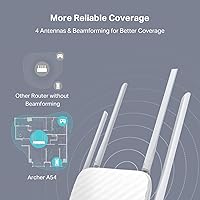
In single-floor apartments and smaller homes, range performance is consistently rated as good by verified buyers. The four external antennas do a reasonable job distributing signal across open-plan spaces, and 2.4GHz coverage reaches into most corners of a typical flat.
The 5GHz band's penetration through multiple walls is a recurring complaint. Users in multi-story homes or properties with dense construction report noticeable signal degradation, and this entry-level TP-Link is genuinely not designed to compensate for that kind of environment.
Wi-Fi Speed & Performance
74%
26%
For everyday tasks — HD video streaming, video calls, casual browsing across several devices simultaneously — the AC1200 throughput is more than adequate. The 5GHz band handles bandwidth-hungry devices well when they stay within a reasonable distance of the router.
Buyers running demanding workloads like 4K streaming on multiple screens or competitive online gaming sometimes hit the ceiling. The theoretical 1,200 Mbps aggregate is split across both bands, so real-world speeds per device are more modest than the headline number implies.
Security Features
86%
WPA3 support at this price point is genuinely uncommon, and security-conscious buyers notice it. Reviewers appreciate that the router ships with a modern encryption standard rather than forcing users to settle for legacy WPA2 found on most competing budget hardware.
While WPA3 is present, some users noted that advanced firewall customization options are limited compared to mid-range alternatives. Those looking for deep network security controls will find the feature set surface-level rather than comprehensive.
Build Quality & Design
67%
33%
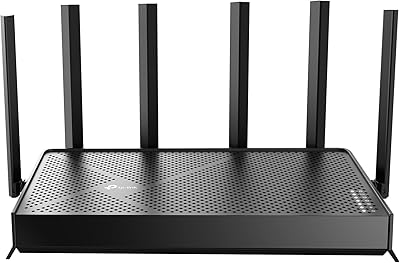
The white flat-panel form factor fits unobtrusively on a shelf or desk, and most buyers find it compact enough to tuck away without dominating the space. At 1.45 pounds, it feels solid enough for a stationary setup.
The plastic casing feels noticeably lightweight, and several reviewers describe it as less premium than expected even for the price tier. The four antennas, while functional, feel slightly flimsy when adjusted, and the overall build does not inspire long-term durability confidence.
Parental Controls
73%
27%
Built-in parental controls accessible through the Tether app are a practical addition that parents in the review pool appreciated. Being able to schedule internet access or block content categories without a paid subscription is a clear advantage over ISP hardware.
The controls are relatively basic compared to dedicated family-focused routers. Users wanting granular per-device time limits or detailed usage reporting found the options thin, and a few noted that tech-savvy kids could work around the restrictions without much effort.
Guest Network
79%
21%
The guest network function works reliably and is easy to activate through the app. Reviewers who frequently host visitors appreciated being able to share internet access without exposing their primary network, and the setup takes under a minute.
Customization of the guest network is minimal — there is no bandwidth throttling option for guest users, which a handful of reviewers flagged as a limitation when guests were consuming disproportionate bandwidth during gatherings.
App & Software Experience
76%
24%
The Tether app receives broadly positive marks for its clean layout and guided onboarding flow. Day-to-day tasks like checking connected devices, running a speed test, or toggling the guest network feel accessible even for non-technical household members.
Some users report that the app occasionally loses connection to the router and requires a restart to reconnect. Firmware update notifications through the app have been flagged as inconsistent, with a minority of buyers missing important updates as a result.
EasyMesh & Expandability
72%
28%
For buyers who anticipate needing more coverage down the line, EasyMesh compatibility is a meaningful feature. Being able to add a compatible range extender or second router later — without replacing this unit — gives the setup some future flexibility.
EasyMesh functionality only works with other TP-Link-compatible devices, so buyers already invested in a different ecosystem cannot take advantage of it. The mesh performance is also entry-level; it will not match a purpose-built mesh system in a larger home.
Wired Port Performance
58%
42%
Having four LAN ports is convenient for users who still connect a desktop, smart TV, or games console via Ethernet. For internet plans up to 100 Mbps, the wired connection works without issue and delivers stable, low-latency performance.
All four ports are Fast Ethernet, capped at 100 Mbps. For anyone on a fiber plan delivering 200 Mbps or more, the wired ports become an immediate bottleneck — a genuine limitation that several technically informed reviewers specifically called out in their feedback.
IPTV & Streaming Support
69%
31%
Support for IGMP Proxy and Snooping, along with Bridge and Tag VLAN configurations, means the router handles IPTV setups better than most budget alternatives. Buyers who subscribe to IPTV services found it compatible without requiring complex workarounds.
These features require navigating the web-based admin panel rather than the app, which puts them out of reach for less technical users. Documentation on configuring IPTV-specific settings is sparse, and setup can feel trial-and-error for anyone unfamiliar with VLAN concepts.
Heat & Reliability
66%
34%
In standard apartment use, the router runs warm rather than hot, and most users report stable uptime over months of daily use. Spontaneous reboots are not a dominant complaint in the review pool, suggesting baseline reliability is acceptable.
A subset of buyers in warmer climates or poorly ventilated setups report the unit running quite hot under sustained load. Long-term reliability questions surface occasionally in one-star reviews, with some units showing connectivity degradation after six to twelve months of use.
IPv6 Support
71%
29%
IPv6 support is included, which matters for users on ISPs that have transitioned to or prioritize IPv6 addressing. It is a detail most casual buyers will never notice, but network-aware reviewers appreciated that it is present rather than omitted.
IPv6 configuration is handled through the admin panel rather than the Tether app, and the options are limited for users who need specific IPv6 tunnel configurations. For most home users this is a non-issue, but it is worth noting for advanced networking needs.

Suitable for:

The TP-Link Archer A54 is the kind of router that makes the most sense for renters, studio apartment dwellers, and anyone living in a single-floor space who needs dependable Wi-Fi without overcomplicating the purchase. If you are currently stuck with a sluggish modem-router combo from your ISP and just want something faster and more reliable that you actually own, this budget router fits that upgrade path well. Households whose daily internet use revolves around streaming, video calls, remote work browsing, and casual gaming will find the dual-band performance more than adequate for those tasks. Parents who want basic content filtering without paying for a subscription service will appreciate the built-in parental controls, manageable through the Tether app without touching a single setting in the admin panel. It also works well as a secondary router for a guest house, cabin, or detached home office where the connectivity demands are modest and simplicity of setup matters more than raw throughput.

Not suitable for:

The TP-Link Archer A54 is a poor match for anyone living in a larger home, a multi-story property, or a space with thick concrete or brick walls, where the 5GHz band's limited penetration will cause real frustration rather than just occasional inconvenience. Power users who have subscribed to a fiber internet plan delivering 200 Mbps or more should be aware upfront that the four LAN ports are capped at 100 Mbps, meaning wired devices will never see the full speed they are paying for — a hardware limitation that no firmware update can fix. Households running a mix of 4K streaming on multiple screens simultaneously, a gaming console, and a work laptop under heavy load may start to feel the ceiling of what AC1200 hardware can realistically handle. Anyone invested in a non-TP-Link network ecosystem will also find the EasyMesh expansion feature effectively off-limits, since it only works within TP-Link's own device range. And if you need advanced network controls — custom firewall rules, detailed traffic monitoring, or granular VPN configuration — this entry-level router simply was not built for that level of management.

Specifications

  • Brand & Model: Manufactured by TP-Link under the model designation Archer A54, part of the entry-level AC1200 router lineup.
  • Wi-Fi Standard: Operates on the 802.11ac (Wi-Fi 5) standard, with backward compatibility for 802.11a, 802.11b, 802.11g, and 802.11n devices.
  • Frequency Bands: Dual-band design transmits simultaneously on 2.4GHz (up to 300 Mbps) and 5GHz (up to 867 Mbps) for a combined theoretical maximum of 1,200 Mbps.
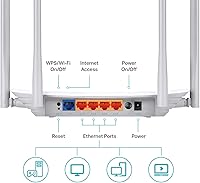
  • LAN Ports: Equipped with four Fast Ethernet LAN ports, each capped at 10/100 Mbps, suitable for wired connections on internet plans up to 100 Mbps.
  • WAN Port: One 10/100 Mbps Fast Ethernet WAN port connects to your modem or ISP gateway for internet access.
  • Antennas: Features four fixed external antennas designed to provide stable omnidirectional signal distribution across a small to medium-sized space.
  • Security Protocol: Supports WPA3 personal encryption as the primary security standard, alongside legacy WPA2 and WPA for backward-compatible device connections.
  • Special Modes: Includes Access Point Mode, which converts a wired network connection into a wireless one without requiring a separate access point device.
  • Mesh Support: EasyMesh compatible, allowing pairing with other TP-Link EasyMesh-certified routers or range extenders to create a unified whole-home network.
  • App Control: Managed via the TP-Link Tether app, available for both iOS and Android, covering setup, device management, parental controls, and basic diagnostics.
  • Parental Controls: Built-in parental controls allow scheduling of internet access and content filtering per device, accessible through the Tether app at no subscription cost.
  • Guest Network: Supports a separate guest Wi-Fi network on both bands, isolating visitor traffic from the primary home network for added security.
  • IPTV Support: Supports IGMP Proxy, IGMP Snooping, Bridge mode, and Tag VLAN configurations to optimize compatibility with IPTV service setups.
  • IPv6 Support: IPv6 is fully supported, ensuring forward compatibility with ISPs that have transitioned to or prioritize next-generation IP addressing.
  • Dimensions: Measures 5.7 x 9.1 x 1.5 inches, with a low-profile flat design intended for placement on a shelf or desk without occupying significant space.
  • Weight: Weighs 1.45 pounds, making it lightweight and easy to reposition or mount if needed.
  • Color: Available in white with a matte finish that blends into most home or office environments without drawing attention.
  • In the Box: Package includes the Archer A54 router, a power adapter, one RJ45 Ethernet cable, and a printed quick installation guide.

Related Reviews
TP-Link Archer VR2100
84%
86%
Wi-Fi Performance
92%
Setup & Installation
87%
Value for Money
72%
Range
90%
Wired Performance
More
TP-Link Archer BE600
90%
96%
Wi-Fi Speed
91%
Coverage Area
94%
Device Capacity
89%
Stability & Reliability
87%
Setup & Installation
More
TP-Link Archer AC1750 WiFi Router
85%
88%
WiFi Performance
91%
Setup & Installation
80%
Range & Coverage
85%
Value for Money
89%
Alexa Integration
More
TP-Link Archer AXE75
78%
83%
Wireless Performance
71%
6 GHz Band Utility
91%
Setup & Ease of Use
86%
Value for Money
68%
Range & Coverage
More
TP-Link Archer BE700 WiFi 7 Router
85%
93%
Performance
88%
Ease of Setup
91%
Coverage & Range
94%
Speed (Wi-Fi 7)
85%
Security Features
More
TP-Link Archer AX73
TP-Link Archer AX73
79%
88%
Wireless Speed & Throughput
91%
Multi-Device Performance
74%
Coverage & Range
93%
Setup & Ease of Use
79%
Build Quality & Design
More
TP-Link Archer BE550
76%
83%
Wireless Performance
91%
Wired Port Quality
88%
Setup & Ease of Use
67%
Coverage & Range
58%
HomeShield Security & Parental Controls
More
TP-Link Archer C59 AC1350 WiFi Router
82%
88%
Setup & Installation
72%
Wi-Fi Range & Coverage
81%
Overall Performance
92%
Value for Money
78%
Build Quality
More
TP-Link Archer BE24000 WiFi 7 Router
87%
94%
Performance
89%
Setup & Installation
92%
Connectivity & Compatibility
90%
Coverage & Range
88%
Security Features
More
TP-Link Archer AX6000 WiFi 6 Router
84%
91%
Performance for Gaming and Streaming
87%
WiFi Coverage and Range
80%
Ease of Setup
90%
Security Features (TP-Link HomeCare)
85%
Build Quality and Durability
More

FAQ

This is a router only — it does not include a built-in modem. You will still need a separate modem or a modem-router gateway from your ISP to connect to the internet. The router plugs into your existing modem via the WAN port using the included Ethernet cable.

It is genuinely one of the easier setups in this category. The TP-Link Archer A54 walks you through the entire process via the Tether app on your phone, and most users report being fully up and running in under ten minutes. You do not need to log into any web-based admin panel unless you want to tweak advanced settings.

Unfortunately, no. The LAN and WAN ports are Fast Ethernet, which means they are physically capped at 100 Mbps for wired connections. If your internet plan delivers more than 100 Mbps, you will only see those full speeds over Wi-Fi, not through a cabled device. For a plan that fast, you would ideally want a router with Gigabit Ethernet ports.

It depends on the layout and construction of the home. In an open two-story space with standard drywall, you may get usable signal on both floors, but expect the 5GHz band to weaken noticeably the further you get from the router. If your home has thick walls, dense flooring, or spans a larger footprint, a mesh system or range extender would serve you better.

No, the EasyMesh feature only works with other TP-Link EasyMesh-compatible devices. It is not cross-compatible with Eero, Google Nest, Netgear Orbi, or other third-party mesh ecosystems. If you want to expand coverage, you would need to add a TP-Link EasyMesh-certified extender or router to the mix.

Basic parental controls — such as scheduling internet access for specific devices — are available without a paid subscription. However, some more advanced HomeCare features in the TP-Link ecosystem do require an account or subscription. For the built-in controls on this budget router, no ongoing fee is needed.

It works with virtually any ISP that provides a standard modem or gateway with an Ethernet output, which covers the vast majority of cable, fiber, and DSL providers. If your ISP uses PPPoE authentication, the router supports that too. The only scenario where you might hit a snag is with very specific ISP configurations, but those are uncommon and usually documented in the admin panel.

Access Point Mode is selectable through the Tether app or the web admin interface during initial setup. In this mode, the router connects to an existing router via Ethernet and broadcasts a Wi-Fi signal from that wired connection, effectively extending wireless coverage to a room or area that previously had only a wired connection. It is a straightforward toggle rather than a complex configuration.

There is no hard device limit published, but real-world performance starts to feel strained once you have 15 to 20 active, bandwidth-consuming devices connected simultaneously. For a household with a mix of phones, laptops, a smart TV, and a few smart home gadgets that mostly sit idle, it handles things without issue. Heavy concurrent use across many devices is where the AC1200 ceiling becomes more noticeable.

The Tether app can notify you when firmware updates are available, and in some configurations updates can be applied automatically. That said, a number of users have reported that update notifications are not always consistent, so it is worth checking the app manually every few months to confirm you are running the latest version. Keeping firmware current is important for both performance and security.