Overview

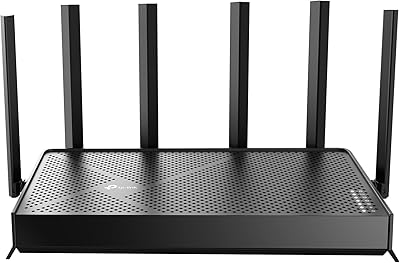
The TP-Link Archer BE550 sits at an interesting crossroads in the Wi-Fi 7 market — capable enough to satisfy power users, yet priced where households upgrading from aging Wi-Fi 5 or Wi-Fi 6 routers can seriously consider it. At its core, the tri-band BE9300 architecture splits traffic across three separate radio bands, reducing congestion without any manual configuration. What really stands out at this price point is the all-2.5G port lineup — one WAN and four LAN ports — which is genuinely rare here. EasyMesh support means it can grow into a whole-home network by adding compatible nodes later, rather than requiring a full system replacement. TP-Link's app-based setup and free expert support make onboarding far less intimidating than the hardware spec sheet might suggest.
Features & Benefits

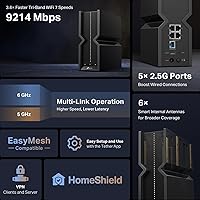
Multi-Link Operation — one of Wi-Fi 7's headline tricks — lets this Wi-Fi 7 router transmit data across multiple bands simultaneously rather than hopping between them, delivering more consistent speeds and lower latency in homes crowded with competing devices. The headline speeds on the 6 GHz band sound staggering on paper, but real-world throughput depends heavily on client hardware and physical distance from the router. The full 2.5G wired ports are a meaningful upgrade for anyone running a NAS box or a desktop that can saturate a standard gigabit connection. HomeShield covers basic security for free, but advanced parental controls and network analytics sit behind a paid subscription — worth knowing before you buy. VPN server support, QoS, and a dedicated guest network round out a genuinely practical feature set.

Best For

This TP-Link unit makes the most sense for households already pushing their current router to its limits. If you're running multiple 4K streams, a gaming rig, and a handful of smart home gadgets simultaneously, tri-band traffic separation keeps things from grinding to a halt. Gamers benefit from both the low-latency wireless performance and the option to plug directly into a 2.5G LAN port for wired stability. It's also a strong pick for small home offices needing a dedicated VPN tunnel or clean segmentation between work and personal devices. And if you're not ready to commit to a full mesh system today, EasyMesh compatibility means you can scale up later without replacing your hardware entirely.

User Feedback

With a 4.0-star average across nearly 1,750 reviews, the Archer BE550 earns solid marks without inspiring unanimous enthusiasm. Most satisfied buyers highlight painless app-based setup, noticeably faster speeds close to the router, and genuine appreciation for five 2.5G ports at this price. Complaints cluster around two areas: range that falls short of the 2,000-square-foot marketing claim in homes with thick walls or complex layouts, and frustration that the HomeShield subscription gates off features many buyers assumed were included. A smaller number of users report occasional firmware hiccups, though TP-Link has generally been responsive with updates. Compared to ASUS or Netgear rivals at a similar price, buyers find setup simpler but feel the software ecosystem lags slightly behind.

Pros

  • Five 2.5G ports — one WAN, four LAN — is a genuinely rare hardware advantage at this price tier.
  • The TP-Link Archer BE550 supports EasyMesh, so expanding coverage later does not mean replacing everything.
  • Tri-band architecture keeps streaming, gaming, and smart home traffic from competing on the same radio.
  • App-guided setup gets most users connected in under ten minutes without touching a browser.
  • Built-in VPN server support competes with routers sold at significantly higher prices.
  • WPA3 encryption and a dedicated IoT network add real security without requiring any technical knowledge.
  • Guest network setup takes under a minute and works reliably without affecting primary network performance.
  • Free expert support from TP-Link is a genuine differentiator for less technical households.
  • The Archer BE550 is positioned well for buyers future-proofing ahead of wider Wi-Fi 7 device adoption.
  • Low-profile internal antenna design fits on a shelf without dominating the room visually.

Cons

  • HomeShield's most useful parental controls and analytics require a paid subscription that is easy to overlook before purchase.
  • Real-world coverage in multi-story or thick-walled homes frequently falls short of the 2,000-square-foot marketing claim.
  • The 6 GHz band's performance advantage is largely inaccessible unless your devices already support Wi-Fi 7.
  • VPN configuration lives only in the web admin interface and is not surfaced in the Tether app at all.
  • QoS uses broad device-type prioritization rather than granular per-application traffic rules.
  • Some firmware updates have introduced intermittent disconnection issues that required rollback by affected users.
  • The app and web admin interface can fall out of sync, requiring a manual refresh to reflect recent changes.
  • No 10G port option limits the ceiling for users with multi-gig ISP plans or high-throughput NAS setups.
  • EasyMesh backhaul defaults to wireless, and enabling a wired backhaul requires navigating sparse documentation.
  • Compared to ASUS rivals, the broader software ecosystem for scheduling, scripting, and monitoring is noticeably thinner.

Ratings

The TP-Link Archer BE550 scores here reflect AI-driven analysis of thousands of verified global buyer reviews, with spam, bot activity, and incentivized feedback actively filtered out before scoring. Each category captures real usage patterns — from daily streaming households to small home offices — so both the strengths and the frustrations come through honestly. Where this Wi-Fi 7 router genuinely impresses, the scores reflect it; where real buyers have hit walls, those pain points are represented too.
Wireless Performance
83%
Users consistently report a noticeable speed improvement over their previous Wi-Fi 5 and Wi-Fi 6 routers, particularly for devices positioned within the same room or one wall away. Multi-band traffic distribution keeps streaming and gaming running smoothly even when a dozen devices are active simultaneously.
The 6 GHz band's impressive theoretical throughput only materializes with Wi-Fi 7 client hardware, which most households do not yet own. Several buyers found that real-world speeds at moderate distances fell closer to what a good Wi-Fi 6E router would deliver.
Wired Port Quality
91%
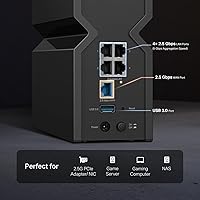
Having five 2.5G ports — one WAN and four LAN — is genuinely uncommon at this price tier, and buyers running NAS drives or wired gaming rigs noticed the difference immediately. Transfers that previously maxed out a standard gigabit connection now run headroom to spare.
There is no 10G port for users with multi-gig ISP service or high-end NAS setups who want a future-proof wired ceiling beyond 2.5G. A small number of users also reported that port negotiation occasionally required a cable swap or reboot to lock in at full 2.5G speeds.
Setup & Ease of Use
88%
The Tether app-guided setup is genuinely one of the smoothest in its class — most buyers report going from box to connected in under ten minutes without touching a browser or reading the manual. TP-Link's free expert support phone line is a real differentiator for less technical households.
Advanced features like VPN configuration and VLAN setup still require dipping into the web admin interface, which is less polished than the app. A handful of users felt the app obscures too many settings behind simplified toggles, limiting fine-grained control.
Coverage & Range
67%
33%
In open-plan apartments and smaller single-story homes, the Archer BE550 covers the advertised footprint comfortably, with users reporting solid signal in every room and outdoor areas close to the house. Beamforming visibly helps maintain connection quality for devices at the edge of range.
The 2,000-square-foot coverage claim does not hold up consistently in multi-story homes or layouts with concrete walls, brick interior dividers, or long narrow floorplans. A meaningful portion of reviewers in larger homes found they needed an additional node or extender sooner than expected.
HomeShield Security & Parental Controls
58%
42%
The free tier of HomeShield does provide basic intrusion detection and simple device blocking, which is enough for households with straightforward security needs. WPA3 encryption and a dedicated IoT network option add a solid baseline layer of protection out of the box.
Many buyers felt misled when they discovered that robust parental controls, real-time threat reports, and advanced network analytics sit behind a recurring subscription fee. This freemium structure is the single most common complaint in negative reviews, and it noticeably colors overall satisfaction scores.
Build Quality & Design
77%
23%
The low-profile, flat form factor with internal antennas fits neatly on a shelf or entertainment unit without looking like a sci-fi prop. The matte black finish resists fingerprints, and the chassis feels solid rather than hollow or cheap for its weight class.
The lack of external antennas leaves some users wondering whether they could improve signal by adjusting positioning, since the internal array offers no physical flexibility. A few buyers noted that the unit runs noticeably warm under sustained heavy load, though no thermal shutdowns were reported.
App & Software Experience
72%
28%
Day-to-day tasks — checking connected devices, setting up a guest network, running a speed test — are handled cleanly inside the Tether app on both iOS and Android. Push notifications for new device connections and network anomalies are a genuinely useful touch that buyers appreciate.
The app has occasional sync delays where changes made in the web interface do not immediately reflect in the app view. Some power users find the software ecosystem noticeably thinner than what ASUS offers through its router app, particularly around scheduling, traffic monitoring, and scripting.
EasyMesh & Scalability
81%
19%
EasyMesh compatibility means buyers can add a second node from a different brand without being locked into a proprietary ecosystem, which is a real advantage for anyone building a network incrementally. Roaming between the main router and a mesh node is smooth enough that most users do not notice the handoff.
EasyMesh performance can vary depending on which compatible node brand is paired, and TP-Link does not publicly certify every compatible device, leaving some guesswork. The mesh backhaul is wireless by default, and buyers with a wired backhaul option reported needing to dig into documentation to enable it properly.
VPN Support
74%
26%
Built-in VPN server support — covering both OpenVPN and PPTP — is a feature that competes with routers sold at a meaningfully higher price, making it a genuine value-add for remote workers and privacy-conscious users. Setup is manageable for intermediate users who have configured a VPN client before.
VPN throughput is not blazing fast when routing all traffic through the router's processor, and users running demanding encrypted tunnels noticed speed drops. The configuration interface for VPN is web-admin-only and not surfaced in the Tether app, which creates a frustrating split experience.
Wi-Fi 7 Readiness & Future-Proofing
79%
21%
Buyers who do own Wi-Fi 7 laptops or phones report tangible improvements in both throughput and connection stability compared to their old routers. Picking this up now means the household network infrastructure is ready as Wi-Fi 7 client devices become mainstream over the next couple of years.
For the majority of current buyers whose devices top out at Wi-Fi 6 or 6E, much of the Wi-Fi 7 investment sits idle until they upgrade clients too. This makes the value proposition feel slightly ahead of its time for households not already invested in newer-generation devices.
Value for Money
76%
24%
The combination of Wi-Fi 7 wireless, five 2.5G ports, EasyMesh support, and VPN capability at this price is difficult to match from any single competitor. For buyers who use even half of those features regularly, the price-to-feature ratio holds up well compared to pricier alternatives.
If a buyer also factors in a HomeShield subscription to unlock the full security and parental control suite, the true cost of ownership is higher than the purchase price suggests. Buyers who want premium software features without ongoing fees may find better value in a one-time-cost competitor.
QoS & Traffic Management
73%
27%
The quality-of-service controls work well for the most common use case — prioritizing gaming or video call traffic over background downloads — without requiring any technical knowledge from the user. Most buyers using it for gaming or conferencing reported fewer interruptions after enabling QoS.
The QoS system uses broad device-type prioritization rather than granular per-application rules, which limits how precisely you can tune traffic in a household with competing high-bandwidth needs. Power users accustomed to more sophisticated traffic shaping found it too blunt an instrument.
Firmware Stability
69%
31%
The majority of buyers report stable day-to-day operation without needing to reboot the router more than occasionally. TP-Link has pushed firmware updates that addressed early bugs, and users who kept auto-updates enabled generally had a smoother experience over time.
A recurring thread in lower-star reviews involves intermittent disconnections after specific firmware versions, with some users reverting to an older version to restore stability. The update rollout cadence is inconsistent, and TP-Link's communication around what each update fixes is less detailed than some competing brands.
Guest Network & Network Segmentation
82%
18%
Setting up a separate guest network takes under a minute from the app, and the IoT network isolation feature adds a meaningful layer of separation for smart home devices without requiring any technical configuration. Buyers with a mix of personal, work, and IoT devices genuinely use these features daily.
The guest network lacks a few finer controls — like bandwidth caps per guest or time-of-day access scheduling — that are available on some competing routers. Advanced VLAN segmentation requires the web interface and is not as intuitive to configure as the rest of the feature set.

Suitable for:

The TP-Link Archer BE550 is a strong fit for households that have outgrown their current router and want a meaningful upgrade without stepping into flagship pricing territory. If your home runs multiple 4K streams, a gaming console or two, and a growing collection of smart home gadgets all at once, the tri-band architecture and dedicated 6 GHz band give you the traffic separation to keep everything moving without bottlenecks. Wired-first users — anyone running a NAS drive, a desktop gaming rig, or a smart TV that supports a direct Ethernet connection — will particularly appreciate the five 2.5G ports, which are almost unheard of at this price point. Small home offices benefit from the built-in VPN server and the ability to run isolated networks for work devices and IoT gadgets simultaneously. And if you are not ready to build a full mesh system today but want the option later, EasyMesh compatibility means you can add a node from a range of compatible brands rather than replacing everything from scratch.

Not suitable for:

The TP-Link Archer BE550 is likely to disappoint buyers with specific expectations the hardware or software cannot realistically meet. If your home spans more than two stories, has thick concrete or masonry walls, or follows a long narrow floorplan, the coverage will likely fall short of the advertised 2,000-square-foot estimate — you will probably need a mesh node sooner than you'd like. Buyers expecting a full-featured parental control and security suite out of the box should know upfront that the more useful HomeShield functions sit behind a recurring subscription, which meaningfully changes the true cost of ownership. Power users who rely on granular traffic shaping, per-application QoS rules, or deep firmware customization will find the software ecosystem thinner than what ASUS or certain open-source-compatible routers offer. And if your device lineup is still mostly Wi-Fi 6 or older, you will not see the most compelling Wi-Fi 7 performance improvements until you upgrade your client hardware — the router is ready, but your laptop or phone may not be yet.
Specifications

  • Wi-Fi Standard: This router operates on Wi-Fi 7 (802.11be), the latest wireless standard, and is backward compatible with 802.11a/b/g/n/ac/ax devices.
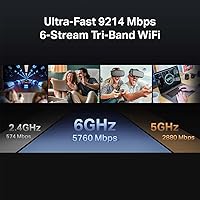
  • Frequency Bands: Tri-band operation covers 2.4 GHz, 5 GHz, and 6 GHz simultaneously, allowing traffic to be distributed across three independent radios.
  • Combined Speed: Maximum combined theoretical throughput is rated at BE9300, comprising 574 Mbps on 2.4 GHz, 2880 Mbps on 5 GHz, and 5760 Mbps on 6 GHz.
  • WAN Port: One 2.5G WAN port connects to your modem or gateway, supporting internet speeds well beyond standard gigabit service tiers.
  • LAN Ports: Four 2.5G LAN ports provide wired connectivity for devices such as NAS drives, gaming PCs, smart TVs, and network switches.
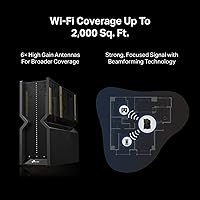
  • Antennas: Six internal antennas are positioned within the chassis and work in conjunction with Beamforming technology to focus signal toward connected devices.
  • Beamforming: Beamforming is enabled by default, directing wireless signal toward individual client devices rather than broadcasting uniformly in all directions.
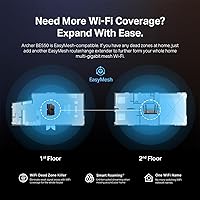
  • EasyMesh Support: The router is EasyMesh-compatible, allowing users to add nodes from any EasyMesh-certified brand to extend coverage without replacing the primary unit.
  • Security: Network protection includes WPA3 encryption, a dedicated IoT network, and the HomeShield platform, with advanced features available under a paid subscription tier.
  • VPN Support: Both OpenVPN and PPTP VPN server protocols are supported natively, enabling secure remote access without third-party hardware.
  • Coverage Estimate: TP-Link rates coverage at up to 2,000 square feet, though actual range varies depending on home layout, wall materials, and interference sources.
  • Dimensions: The unit measures 9.12 x 2.99 x 7.99 inches (L x W x H) and weighs 2.45 pounds, designed for shelf or surface placement.
  • App Compatibility: The TP-Link Tether app supports setup and ongoing management on iOS and Android devices, covering most common configuration tasks.
  • Operating Modes: Supported operating modes include wireless router, access point, and range extender mode, offering flexibility for different network topologies.
  • Special Features: Notable software features include QoS traffic prioritization, guest network, WPS, remote access management, and a private IoT network segment.
  • Power Input: The router operates at 12 volts DC via the included power adapter, which ships in the box alongside an RJ45 Ethernet cable and a quick installation guide.
  • Color & Finish: Available in matte black with a low-profile horizontal form factor that houses all antennas internally for a cleaner aesthetic.
  • USB Port: One USB port is included on the unit, supporting basic file sharing or printer sharing functions when connected to compatible storage or peripherals.

Related Reviews

TP-Link Archer BE600
90%
96%
Wi-Fi Speed
91%
Coverage Area
94%
Device Capacity
89%
Stability & Reliability
87%
Setup & Installation
More
TP-Link Archer VR2100
84%
86%
Wi-Fi Performance
92%
Setup & Installation
87%
Value for Money
72%
Range
90%
Wired Performance
More
TP-Link Archer AC1750 WiFi Router
85%
88%
WiFi Performance
91%
Setup & Installation
80%
Range & Coverage
85%
Value for Money
89%
Alexa Integration
More
TP-Link Archer C59 AC1350 WiFi Router
82%
88%
Setup & Installation
72%
Wi-Fi Range & Coverage
81%
Overall Performance
92%
Value for Money
78%
Build Quality
More
TP-Link Archer AX6000 WiFi 6 Router
84%
91%
Performance for Gaming and Streaming
87%
WiFi Coverage and Range
80%
Ease of Setup
90%
Security Features (TP-Link HomeCare)
85%
Build Quality and Durability
More
TP-Link Archer AX73
TP-Link Archer AX73
79%
88%
Wireless Speed & Throughput
91%
Multi-Device Performance
74%
Coverage & Range
93%
Setup & Ease of Use
79%
Build Quality & Design
More
TP-Link Archer AXE75
78%
83%
Wireless Performance
71%
6 GHz Band Utility
91%
Setup & Ease of Use
86%
Value for Money
68%
Range & Coverage
More
TP-Link Archer BE260 WiFi 7 Router
85%
93%
WiFi Performance
89%
Ease of Setup
77%
Coverage & Range
91%
Streaming & Gaming Experience
85%
Design & Build Quality
More
TP-Link Archer BE24000 WiFi 7 Router
87%
94%
Performance
89%
Setup & Installation
92%
Connectivity & Compatibility
90%
Coverage & Range
88%
Security Features
More
TP-Link Archer BE700 WiFi 7 Router
85%
93%
Performance
88%
Ease of Setup
91%
Coverage & Range
94%
Speed (Wi-Fi 7)
85%
Security Features
More

FAQ

Not necessarily — the Archer BE550 works with all your existing Wi-Fi 5 and Wi-Fi 6 devices and will likely improve their performance compared to an older router. That said, the biggest speed and latency improvements tied to Wi-Fi 7 specifically, like Multi-Link Operation, only activate when a Wi-Fi 7 client connects. Think of it as buying infrastructure that is ready when your devices eventually catch up.

You can absolutely use this Wi-Fi 7 router without paying for HomeShield. The free tier covers basic network protection and limited device management. What sits behind the paywall includes more detailed parental control scheduling, real-time threat logs, and advanced security reports. If those features matter to you, factor the subscription cost into your decision before purchasing.

It depends heavily on your home's layout and construction. Open-plan single-story homes with standard drywall partitions tend to hit that estimate comfortably. Multi-story homes, spaces with brick or concrete interior walls, or long narrow floorplans often see coverage fall short. If your home fits those trickier profiles, plan for the possibility of adding an EasyMesh node rather than expecting the single router to cover everything.

Setup is genuinely beginner-friendly. Download the Tether app, plug in the router, and follow the step-by-step prompts — most people are fully connected in under ten minutes without ever opening a browser. TP-Link also offers free phone support if you hit a snag, which is a real safety net for less technical households.

It works with any EasyMesh-certified device, regardless of brand, so you are not locked into TP-Link hardware for expansion. However, non-EasyMesh extenders can still be used in a more basic repeater configuration, just without the seamless roaming that a proper mesh setup provides.

For the WAN side, you probably will not notice a difference until your ISP plan exceeds 1 Gbps. Where the 2.5G LAN ports shine is for local wired connections — transferring large files to a NAS drive, connecting a gaming PC, or linking a smart TV will all benefit from the headroom beyond standard gigabit, regardless of your internet speed.

Yes, both OpenVPN and PPTP server modes are supported, which means you can securely connect to your home network remotely without any extra hardware. The honest caveat is that VPN setup lives in the web admin interface rather than the Tether app, so it requires a bit more technical comfort than the basic setup process. If you have configured a VPN client before, the router side is manageable.

The TP-Link Archer BE550 generally wins on wired port quality — five 2.5G ports is difficult to match at this price from either competitor. Where ASUS tends to pull ahead is in software depth: its router app and firmware offer more granular control over traffic, scheduling, and security settings. Netgear Nighthawk models at this tier are closer in hardware terms but carry their own subscription-gated features. For pure hardware value, this TP-Link unit is hard to beat; for software power users, ASUS may be the better fit.

Yes, and this is one of the more practical features on this unit. You can configure a dedicated IoT network to isolate smart bulbs, cameras, and other connected gadgets from your primary devices, which limits exposure if any of those devices are compromised. The guest network adds a third layer for visitors. All of this is manageable from the Tether app without needing to touch advanced settings.

Overall stability is solid for most users, but there have been reports of specific firmware versions causing intermittent disconnections. TP-Link has generally addressed these through subsequent updates, and enabling automatic firmware updates tends to keep things running smoothly. If you prefer staying on a known-stable version, the web interface lets you manage updates manually rather than relying on automatic installs.