Overview

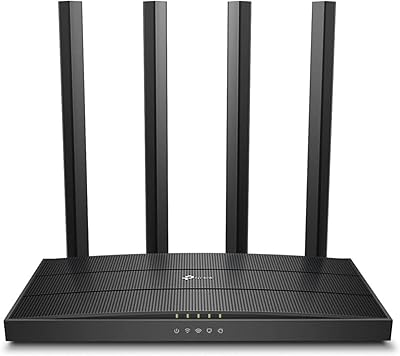
The TP-Link Archer C59 Dual-Band WiFi Router is a straightforward, no-frills option that holds its own for the price. Released in 2016, it sits in the AC1350 class — which in practical terms means adequate speeds for browsing, streaming, and light multitasking, though not the throughput you'd get from newer Wi-Fi 6 hardware. That age is worth acknowledging upfront. Still, TP-Link has a solid reputation for dependable Linux-based firmware, and the Archer C59 reflects that consistency. For a single-floor apartment or smaller home with moderate daily traffic, it performs reliably. Just don't expect it to saturate a high-speed fiber connection across an entire multi-room house.

Features & Benefits

The Archer C59 runs both 2.4 GHz and 5 GHz bands simultaneously. The lower band handles devices spread around the home, while the 5 GHz side suits speed-sensitive tasks like 4K streaming or video calls. What stands out at this price point is the inclusion of four full Gigabit LAN ports — genuinely useful if you're wiring in a desktop, NAS, or gaming console. MU-MIMO is present, though its real-world benefit at this tier is modest rather than dramatic. Three omni-directional antennas help spread signal across rooms, and the Tether app rounds things out with parental controls and a guest network that keeps visitors off your main connection.

Best For

This dual-band router is a practical fit for renters or small households — think one or two-bedroom spaces where coverage distance isn't a major challenge. If your current router is the one your ISP shipped you, the Archer C59 represents a meaningful, low-cost upgrade. Families wanting basic parental controls will appreciate the built-in scheduling tools, which require no subscription. It also suits a home office setup where a couple of reliable wired connections matter alongside wireless use. If you're covering a multi-story home or chasing top-tier wireless performance, this router will likely leave you wanting more. For everyday, dependable use, though, it fits the bill.

User Feedback

With over 380 ratings averaging 4.4 stars, buyers are largely satisfied with what this TP-Link router delivers for the price. Setup earns repeated praise — most people are online within minutes, and the Tether app is consistently described as intuitive. Long-term stability is another highlight, especially in single-floor homes. On the downside, 5 GHz range limitations surface frequently in critical reviews, with some users finding the signal fades faster than expected through walls or between floors. A smaller number report occasional reboot quirks after extended uptime. Nothing alarming, but worth factoring in if rock-solid continuous uptime is a hard requirement for your setup.

Pros

  • Setup takes minutes, even for users with no networking experience.
  • Four Gigabit LAN ports offer excellent wired connectivity at this price point.
  • Stable, consistent signal in apartments and single-floor homes over long periods.
  • The Tether app makes managing connected devices and parental controls genuinely easy.
  • Guest network support keeps visitor traffic separate from your personal devices.
  • Lightweight and compact — takes up almost no shelf or desk space.
  • Compatible with virtually all major ISPs right out of the box.
  • Linux-based firmware contributes to long-term stability and reliability.
  • Over 380 real-world buyers rate it 4.4 stars, reflecting solid satisfaction for everyday use.

Cons

  • The 5 GHz band loses strength quickly through walls, limiting range in larger or multi-room spaces.
  • AC1350 class speeds will bottleneck high-speed gigabit fiber plans over wireless.
  • Not a realistic fit for households with 20 or more simultaneously active devices.
  • Some users report occasional reboots needed after weeks of continuous uptime.
  • No USB port means no option for basic network storage or printer sharing.
  • Wi-Fi 6 alternatives have closed the price gap, making this hardware feel increasingly dated.
  • MU-MIMO performance gains are modest at this tier — don't expect dramatic multi-device improvements.
  • Multi-floor homes will likely need a range extender or a second access point to fill dead zones.

Ratings

Our AI rating system analyzed verified global reviews for the TP-Link Archer C59 Dual-Band WiFi Router, actively filtering out incentivized, duplicate, and bot-generated submissions to surface what real buyers actually experience. The scores below reflect a balanced picture — where this router genuinely delivers and where it falls short — so you can make a confident decision based on honest data rather than marketing language.

Ease of Setup
91%
Getting this router running is one of its clearest strengths. Users consistently report being connected within 10 minutes of unboxing, with the Tether app guiding them through each step clearly. Non-technical buyers — people who have never configured a router before — repeatedly highlight how little friction the setup process involves.
A small number of users hit snags when trying to replace an ISP gateway in bridge mode, which requires an extra configuration step that is not well-documented in the quick-start guide. Those coming from more advanced routers occasionally find the browser-based admin interface a bit dated in layout.
Wi-Fi Signal Stability
83%
In single-floor apartments and smaller homes, the Archer C59 earns consistent praise for staying connected without drops over long periods. Buyers using it for daily video calls, streaming, and working from home on a single floor rarely report interruptions, which is exactly what this class of router is designed to handle.
Stability starts to erode once you introduce physical obstacles — thick walls, floors, or distance beyond a single open space. Several users note that the 5 GHz connection becomes unreliable in rooms that are two walls away from the router, which is a common limitation at the AC1350 tier.
Wireless Range
67%
33%
The three external antennas do a reasonable job spreading 2.4 GHz coverage across a compact living space, and users in studio or one-bedroom apartments generally report reaching every corner without issue. For the intended use case — a small to medium home — range is functional and adequate.
The 5 GHz band is where range limitations become obvious. Users in two-story homes frequently report that the signal drops off sharply between floors, and some find they need to stay fairly close to the router to get the faster band's benefits. Multi-room households should factor this in carefully.
Wired Port Performance
93%
Four Gigabit LAN ports is a genuine standout feature at this price level, and buyers who wire in desktops, consoles, or NAS devices report consistently fast, stable throughput. Home office users specifically call out the wired performance as the main reason they chose this router over cheaper alternatives.
There is no USB port on this router, which means no option for basic network-attached storage or shared printer access via USB — features that some comparable routers in a similar price range do offer. For buyers who wanted that functionality, it is a real gap.
Value for Money
88%
Considering the Gigabit ports, dual-band operation, MU-MIMO support, and parental controls all packed into one affordable unit, buyers widely agree this router punches above its price. It is a particularly smart buy for anyone upgrading from a basic ISP-supplied device who does not want to overspend on features they will never use.
The value calculation shifts if you compare it against newer Wi-Fi 6 budget routers that have entered the market at similar price points. Paying a similar amount for a router that launched in 2016 requires some justification, and buyers who research current alternatives may feel they can do better for the same money today.
Tether App Experience
82%
18%
The Tether app draws consistent praise for being clean and approachable. Parents who use it to schedule internet access for kids describe it as intuitive enough to configure in a few taps, and the ability to see all connected devices at a glance is a feature buyers regularly mention as genuinely useful in day-to-day management.
Advanced users find the app limiting — there is no deep traffic monitoring, QoS fine-tuning is basic, and the app occasionally requires a relogin after periods of inactivity. It covers everyday needs well but falls short for anyone who wants detailed control over their network behavior.
Multi-Device Handling
71%
29%
For households with up to around 12 to 15 connected devices under light to moderate load — a mix of phones, a laptop, smart TV, and a few smart home gadgets — the router manages traffic without noticeable lag. MU-MIMO helps prevent the queuing slowdowns that older single-user MIMO routers would exhibit under similar conditions.
When several devices simultaneously run bandwidth-heavy tasks, performance degrades more visibly than on higher-tier hardware. The MU-MIMO implementation at AC1350 class is modest, and households that have grown to 20 or more active devices will likely hit the ceiling of what this router can comfortably manage.
Long-Term Reliability
79%
21%
Many buyers report running this TP-Link router for two or more years without major issues, crediting the Linux-based firmware for its stable, consistent behavior over time. It is the kind of device people tend to set up and forget, which is exactly what most home users want from networking hardware.
A recurring complaint from long-term owners is the need for occasional manual reboots after weeks of continuous uptime — nothing critical, but enough to be annoying. A few users also note that firmware updates at this stage of the product lifecycle are rare, which raises minor concerns about long-term security patching.
Parental Controls
74%
26%
The built-in parental controls handle the basics well — time scheduling per device, simple content filtering, and quick access via the Tether app. For families with younger children who just need guardrails around screen time, these tools work without requiring a subscription or a separate service.
The controls lack the granularity that parents of older kids or tech-savvy teenagers might want. There is no per-app blocking, no browsing history visibility, and the content filtering categories are broad rather than precise. Anyone expecting the depth of a dedicated parental control platform will be disappointed.
Guest Network Feature
86%
The guest network works exactly as intended — visitors get internet access while your personal devices, shared files, and smart home gear stay completely isolated on the main network. Buyers who frequently host guests or run a small home-based business mention this as a practical feature they use regularly.
Configuration options for the guest network are somewhat limited. You cannot set bandwidth caps for guest users or create separate guest schedules independently of the main parental control settings, which would be useful for hosts who want tighter control over how the guest network is used.
Hardware Design
77%
23%
The low-profile design and light weight make it easy to tuck onto a shelf or position on a desk without it dominating the space. The three antennas provide some visual indication of signal direction, and buyers generally describe the build as solid enough for a device that is never moved once placed.
The all-black plastic finish shows dust and scratches more readily than matte alternatives. Ventilation slots on the unit can accumulate dust over time, and there is no wall-mount option included in the package, which limits placement flexibility in smaller living spaces with limited shelf room.
ISP Compatibility
89%
Buyers across a wide range of ISPs — cable, DSL, and fiber — report no compatibility issues right out of the box. The straightforward WAN port setup means most people simply plug in their modem and follow the quick-start guide without needing to call their ISP or adjust obscure settings.
Users on ISPs that require specific VLAN tagging or advanced WAN configurations occasionally run into limitations with the admin interface, which does not expose as many advanced settings as some competing routers at a similar price. It is an edge case, but worth noting for users on less mainstream ISP setups.
Speed Performance
69%
31%
For everyday tasks — web browsing, HD video streaming, standard video calls, and general file downloads — the Archer C59 delivers perfectly adequate speeds. Users on mid-tier internet plans report that the router does not feel like a bottleneck for their daily routines, which is a reasonable result for its class.
Real-world throughput on the 5 GHz band falls noticeably short of the theoretical 867 Mbps maximum, which is expected but still worth flagging for buyers who take headline speeds at face value. On high-speed gigabit fiber plans, the wireless ceiling of AC1350 becomes a clear limiting factor that faster routers would not impose.
Documentation & Support
72%
28%
The included quick-start guide is clean and sufficient for basic installation, and TP-Link's online knowledge base covers the most common setup scenarios adequately. For a mainstream brand, support resources are accessible and generally up to date for this model.
The printed guide does not cover more advanced scenarios like bridge mode, access point configuration, or ISP-specific setups in any meaningful depth. Users who need those configurations typically have to search TP-Link's community forums or third-party guides, which adds friction for less experienced buyers.

Suitable for:

The TP-Link Archer C59 Dual-Band WiFi Router is a strong match for renters, first-time homeowners, or small families living in apartments or single-floor homes who simply want reliable internet without overthinking it. If you're currently running the generic router your ISP dropped off and wondering why your connection feels sluggish, this is a worthwhile, low-cost upgrade that delivers noticeably more stable performance. It handles a typical household load — phones, laptops, a smart TV or two, maybe a game console — without breaking a sweat. The four Gigabit LAN ports are genuinely appreciated by home office users who want a fast, stable wired connection for a desktop or NAS. Parents who want basic scheduling and access controls for kids' devices will also find the Tether app covers those needs well, without requiring a pricey mesh system or a subscription.

Not suitable for:

The TP-Link Archer C59 Dual-Band WiFi Router is not the right choice for larger homes, multi-story houses, or anyone whose internet needs have grown significantly in the past few years. The 5 GHz band — which is where you'd typically send your most demanding devices — has a shorter effective range, and walls or floors tend to cut it down faster than users expect. If you're subscribing to a high-speed gigabit fiber plan and want to actually use that bandwidth wirelessly across your home, this router will bottleneck you. Households with 20 or more connected devices, heavy 4K streaming on multiple screens simultaneously, or remote workers relying on rock-solid uptime for video calls may find the hardware underpowered. Buyers who care about future-proofing should also note that Wi-Fi 6 routers have become genuinely affordable, and this router's 802.11ac standard is increasingly dated.

Specifications

  • Brand & Model: Manufactured by TP-Link under the Archer series, this router carries the model designation Archer C59.
  • WiFi Class: Rated AC1350, combining up to 450 Mbps on the 2.4 GHz band and up to 867 Mbps on the 5 GHz band.
  • Wireless Standard: Operates on the 802.11ac standard, also backward compatible with older 802.11a/b/g/n devices.
  • Frequency Bands: Dual-band design runs both 2.4 GHz and 5 GHz simultaneously for flexible device distribution.
  • LAN Ports: Equipped with four Gigabit Ethernet LAN ports for wired connections to computers, consoles, or NAS devices.
  • WAN Port: Includes one Gigabit WAN port for connecting to a cable or DSL modem from any major ISP.
  • Antennas: Features three fixed external omni-directional antennas designed to distribute signal broadly across a room or floor.
  • MU-MIMO: Supports MU-MIMO technology, allowing the router to communicate with multiple devices at the same time rather than sequentially.
  • Operating System: Runs on a Linux-based firmware, which contributes to the router's noted long-term stability and reliability.
  • Mobile App: Compatible with the TP-Link Tether app on both iOS and Android for remote management, device monitoring, and parental controls.
  • Guest Network: Supports a dedicated guest Wi-Fi network on both bands, isolating visitor traffic from the primary home network.
  • Parental Controls: Built-in parental controls allow scheduling internet access and blocking content for specific connected devices.
  • Dimensions: Measures 5.8 x 8.9 x 1.3 inches, making it a compact, low-profile unit suitable for a shelf or desktop.
  • Weight: Weighs approximately 1 pound, making it easy to reposition or mount without any heavy hardware.
  • Power Input: Operates at 12 volts via the included power adapter; no external battery or UPS is required for standard use.
  • WPS Support: Includes a WPS button for quick, one-press wireless pairing with compatible devices without entering a password.
  • Compatibility: Works with all major ISPs including AT&T, Verizon, Xfinity, Spectrum, Cox, and others; a separate modem is required for most providers.
  • In the Box: Package includes the router unit, a power adapter, one RJ45 Ethernet cable, and a printed quick installation guide.

Related Reviews
TP-Link Archer A6 AC1200 WiFi Router

76%
74%
WiFi Speed & Performance
67%
WiFi Range & Coverage
88%
Setup & Ease of Use
71%
Build Quality & Design
91%
Wired Port Performance
More
TP-Link Archer AX23 WiFi 6 Router
78%
91%
Value for Money
93%
Ease of Setup
74%
WiFi Speed Performance
67%
Range & Coverage
83%
Connection Stability
More
TP-Link Archer A7 AC1750 WiFi Router

77%
91%
Setup Experience
88%
Connection Stability
79%
WiFi Speed Performance
74%
Coverage & Range
86%
Value for Money
More
TP-Link Archer AXE75
78%
83%
Wireless Performance
71%
6 GHz Band Utility
91%
Setup & Ease of Use
86%
Value for Money
68%
Range & Coverage
More
TP-Link Archer BE700 WiFi 7 Router
79%
89%
Wireless Performance
83%
Setup & Ease of Use
78%
Build Quality
76%
Range & Coverage
91%
Wired Connectivity
More
TP-Link Archer BE900 Wi-Fi 7 Router
80%
91%
Wireless Performance
93%
Wired Connectivity
88%
Range & Coverage
86%
Setup & Ease of Use
71%
Touchscreen & LED Interface
More
TP-Link Archer AX73
TP-Link Archer AX73
79%
88%
Wireless Speed & Throughput
91%
Multi-Device Performance
74%
Coverage & Range
93%
Setup & Ease of Use
79%
Build Quality & Design
More
TP-Link Archer AX6000 WiFi 6 Router
80%
88%
Wireless Performance
91%
Multi-Device Handling
86%
Setup & Ease of Use
93%
Wired Connectivity
82%
Range & Coverage
More
TP-Link Archer BE550
76%
83%
Wireless Performance
91%
Wired Port Quality
88%
Setup & Ease of Use
67%
Coverage & Range
58%
HomeShield Security & Parental Controls
More
TP-Link Archer BE260 WiFi 7 Router

78%
91%
Value for Money
84%
Wireless Performance
89%
Setup & Ease of Use
78%
Range & Coverage
88%
Wired Port Quality
More

FAQ

Yes, in most cases you do. The Archer C59 is a router, not a modem-router combo, so you will need a separate modem provided by or purchased from your ISP. If your ISP gives you an all-in-one gateway device, you can often put it in bridge mode and connect this router to it.

Setup is genuinely straightforward. You connect the router to your modem, power it on, and follow the steps in the Tether app or the browser-based setup page. Most users are up and running in under ten minutes, and you do not need any networking background to get through the process.

Over a wired connection, yes — the Gigabit WAN and LAN ports can move traffic at full gigabit speeds. However, the wireless side is AC1350 class, so wirelessly you will not hit gigabit speeds. If you're on a high-speed fiber plan and want to use that full bandwidth over Wi-Fi, a newer Wi-Fi 6 router would serve you better.

For a single-floor apartment or small house, the coverage is generally solid. The 2.4 GHz band carries further but at lower speeds, while the 5 GHz band is faster but fades more quickly through walls. In multi-story homes or spaces with thick concrete walls, you may notice dead zones on the 5 GHz band.

The TP-Link Archer C59 Dual-Band WiFi Router is comfortable managing roughly 10 to 15 simultaneously connected devices under normal usage. If you have a busy household with many devices all streaming or downloading at the same time, you might notice some slowdown, but for typical everyday use across a small household it holds up well.

It is more capable than a basic companion app. You can use it to see which devices are connected, set parental control schedules, manage the guest network, and reboot the router remotely. It is not as advanced as some premium router apps, but for everyday management it is intuitive and functional.

The Archer C59 is an older model, and firmware updates are infrequent at this stage. TP-Link has not marked it as discontinued, but if keeping firmware actively patched for security is a priority for you, it is worth checking the TP-Link support page for the latest release before purchasing.

Yes, this TP-Link router supports Access Point mode, which lets you connect it to an existing router via Ethernet and use it purely to extend wireless coverage. It is a handy option if you already have a primary router but want to add a dedicated wireless node in another part of your home.

Running a guest network does consume a portion of the router's available bandwidth and processing, but in practice the impact on a lightly loaded home network is minimal. For day-to-day use with a few visitors connected, most people would not notice any difference in their primary connection.

For most people, yes. ISP-provided gateways are often designed to minimum cost specifications, and swapping one out for this dual-band router tends to deliver better signal stability, more control over your network, and the added benefit of proper Gigabit ports. If your complaints are about spotty Wi-Fi or limited settings, this is a reasonable fix.

Where to Buy