
Overview

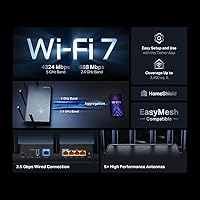
The TP-Link Archer BE260 WiFi 7 Router is one of the more accessible ways to get Wi-Fi 7 into your home without paying tri-band prices. Buyers should know upfront: this Wi-Fi 7 router operates on 2.4 GHz and 5 GHz only — there is no 6 GHz band. That is a deliberate cost trade-off, not an oversight, and understanding that distinction matters when cross-shopping. With over 19,000 Amazon ratings and a top-15 spot in Computer Routers, it has earned genuine market trust. The bundled RE235BE range extender adds real value for larger homes, and TP-Link's formal CISA Secure-by-Design commitment gives it a security credibility most mid-range competitors lack.

Features & Benefits

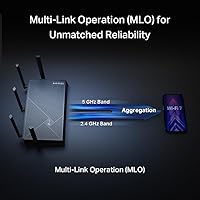
The Archer BE260 brings three practical Wi-Fi 7 advances — Multi-Link Operation, Multi-RU, and 4K-QAM — which let devices pull data across multiple frequencies simultaneously, cutting congestion and latency in ways older standards simply cannot. Less buffering, more consistency. The 2.5G WAN and LAN ports stand out at this price tier, letting you actually use a multi-gig internet plan or connect a NAS without hitting a wired ceiling. A USB 3.0 port handles shared storage or printing. EasyMesh support means you can bolt on compatible extenders later without rebuilding your network, and built-in VPN functionality — both client and server — handles remote work and privacy without extra hardware costs.

Best For

This dual-band router fills a specific need well. If you have a multi-gig internet plan and newer Wi-Fi 7 devices — an iPhone 16 Pro, a Galaxy S24 Ultra, or a recent laptop — the Archer BE260 lets you actually use that hardware without paying for a tri-band system. It suits homes in the 1,500 to 2,400 sq. ft. range handling up to 80 connected devices comfortably. HomeShield and Private IoT make it a solid pick for anyone who wants parental controls and traffic separation built into the router itself rather than managed through a separate subscription they will likely ignore within a month.

User Feedback

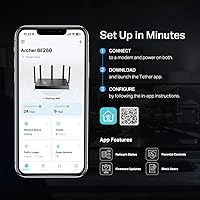
Verified buyers broadly praise how fast and low-friction the initial setup is through the Tether app, with most describing a working network in under ten minutes. Real-world range holds up well for homes within the advertised square footage. The main friction point is the missing 6 GHz band — buyers coming from older routers rarely miss it, but those comparing against tri-band Wi-Fi 7 models notice the gap. The bundled extender draws mixed reactions: genuinely useful for killing dead zones, though placement takes some trial and error. App reliability and firmware update cadence attract occasional complaints, though most users note the experience has improved steadily with successive updates.

Pros

  • Wi-Fi 7 technology at a price point that does not require serious budget gymnastics.
  • The 2.5G WAN port is a genuine rarity in this price range and removes a real wired bottleneck.
  • Setup through the Tether app consistently takes under fifteen minutes, even for less technical users.
  • Built-in VPN client and server remove the need for a separate appliance for remote workers.
  • EasyMesh support means you can expand coverage later without scrapping your existing setup.
  • The bundled RE235BE extender adds immediate dead-zone coverage right out of the box.
  • HomeShield and Private IoT make network segmentation and parental controls accessible without extra subscriptions.
  • Over 19,000 Amazon ratings signal a product that has been stress-tested by a wide, diverse user base.
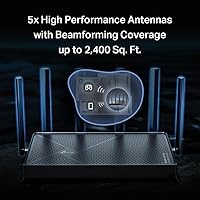
  • Five external antennas and Beamforming improve consistency in hard-to-reach corners of a home.
  • The CISA Secure-by-Design commitment is a meaningful security credential most mid-range competitors cannot match.

Cons

  • No 6 GHz band means you are locked out of Wi-Fi 7's highest-performance frequency from the start.
  • Firmware update cadence has frustrated some users who hit bugs that took weeks to get patched.
  • The Tether app, while generally solid, has logged occasional connectivity drops and UI inconsistencies across user reviews.
  • Range extender placement requires real trial and error to get right — expect to move it at least once.
  • USB 3.0 storage sharing works, but transfer speeds under real-world NAS conditions disappoint power users.
  • HomeShield's more advanced security features sit behind a paid subscription tier, which feels limiting at this price.
  • Only three 1G LAN ports alongside the single 2.5G LAN port may not satisfy wired-heavy home setups.
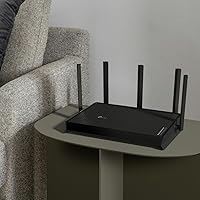
  • The router body is fairly large for its class, which can be awkward in tighter installation spots.

Ratings

The TP-Link Archer BE260 WiFi 7 Router has been scored by our AI system after analyzing thousands of verified global buyer reviews, actively filtering out incentivized, duplicate, and bot-generated feedback to surface what real users actually experience. Scores reflect both the genuine strengths and the recurring frustrations that emerged across different home setups and use cases. The result is a transparent, balanced picture of where this dual-band router earns its praise and where it falls short.

Value for Money
91%
At this price point, getting true Wi-Fi 7 hardware alongside a bundled range extender is genuinely uncommon. Buyers upgrading from aging Wi-Fi 5 routers consistently describe the performance jump as immediately noticeable, making the cost feel well-justified against what competing Wi-Fi 7 routers charge for comparable coverage.
A few buyers feel the HomeShield Pro subscription requirement chips away at the overall value proposition — features that feel standard elsewhere are locked behind a recurring fee. For users who expected a fully-unlocked experience out of the box, that friction leaves a small but real aftertaste.
Wireless Performance
84%
Real-world 5 GHz throughput consistently impresses users with Wi-Fi 7 devices, with several reporting noticeably lower buffering during 4K streams and faster file transfers compared to their previous routers. Multi-Link Operation keeps latency stable even when several devices compete for bandwidth simultaneously.
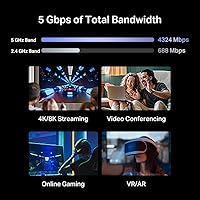
The 2.4 GHz band tops out at 688 Mbps, which is fine for smart home gadgets but underwhelming for any device that cannot reach the 5 GHz band. Users in homes with thick walls also note that 5 GHz signal strength drops faster with distance than the advertised range suggests.
Setup & Ease of Use
89%
The Tether app guided setup is genuinely quick — most buyers describe being connected within ten to fifteen minutes with zero networking knowledge required. The web interface is clean and logically organized for users who prefer browser-based control over a mobile app.
A small but recurring subset of users hit snags where the Tether app failed to detect the router during initial pairing, requiring a full reset and retry. These cases are not the norm, but they are frequent enough in reviews to be worth flagging for less patient buyers.
Range & Coverage
78%
22%
In open-plan homes under 2,000 sq. ft., the five-antenna design and Beamforming deliver solid, consistent signal across most rooms without needing the bundled extender at all. Buyers with single-story layouts specifically praise the reliability of coverage in previously weak corners.
Two-story homes and layouts with older construction or concrete walls regularly push against the rated 2,400 sq. ft. limit, making the range extender more of a necessity than a bonus. Several users note the router alone cannot reliably reach detached garages or basements.
Wired Port Quality
88%
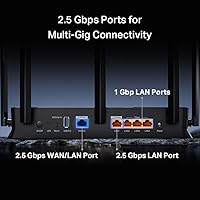
Having both a 2.5G WAN and a 2.5G LAN port in this price range is a meaningful differentiator. Users running a NAS or a wired gaming PC alongside a multi-gig internet plan praise the setup for removing bottlenecks that cheaper routers impose at the 1 Gbps ceiling.
The three remaining LAN ports cap at 1 Gbps, which frustrates users with multiple wired devices who were hoping for more multi-gig connectivity across the board. For a media room with a NAS, a gaming PC, and a smart TV all wired in, the single 2.5G LAN port can feel like a constraint.
App Reliability
71%
29%
Day-to-day monitoring, device management, and parental control adjustments through the Tether app work smoothly for the majority of users most of the time. Push notifications for new device connections and guest network management are cited as particularly useful conveniences.
Long-term users report that firmware updates occasionally break specific Tether features — most commonly remote management and traffic statistics — until a follow-up patch arrives. The gap between bug introduction and resolution has drawn frustration from users who rely on remote monitoring for home security.
Security Features
86%
The CISA Secure-by-Design commitment is backed by tangible features: automatic firmware updates, WPA3 support, Private IoT network isolation, and HomeShield's baseline threat detection. For families or remote workers who want a safer default network configuration, this router delivers more out of the box than most peers.
HomeShield's more powerful security tools — detailed traffic inspection, advanced content filtering, and comprehensive reporting — require a paid subscription that some buyers did not anticipate needing. The free tier is functional but noticeably limited compared to what competing platforms include at no cost.
VPN Functionality
79%
21%
Having both VPN client and server modes built into the router removes the need for a separate device or a software-only workaround. Remote workers who need secure access to their home network while traveling specifically call this feature out as a genuine differentiator at this price.
VPN throughput under load is noticeably slower than the router's raw wireless speeds, which is typical for router-level VPN implementations but still disappoints power users expecting near-line-rate performance. Configuration for less common VPN protocols can also require manual steps that are not covered well in the documentation.
Bundled Range Extender
74%
26%
The included RE235BE is a real Wi-Fi 7 extender, not a token budget accessory, and it handles single dead zones — a back bedroom, a far corner of an upper floor — reliably when placed correctly. Buyers who would have purchased an extender separately recognize the bundle as genuinely cost-effective.
Optimal placement takes real trial and error, and the extender does not always backhaul at the speeds users expect when positioned near the edge of the router's effective range. A handful of buyers also report intermittent disconnections between the extender and the main router that required reboots to resolve.
EasyMesh Integration
77%
23%
EasyMesh compatibility gives this router a meaningful upgrade path — buyers can add compatible TP-Link nodes or extenders later without replacing the router itself. Users who started with just the main unit and later added a node report the transition was largely plug-and-play.
Compatibility outside the TP-Link ecosystem is limited in practice, and buyers who own non-TP-Link extenders often find EasyMesh interoperability unreliable. The mesh management controls in the Tether app are also less polished than what dedicated mesh systems offer, particularly for viewing node-level diagnostics.
Build Quality & Design
73%
27%
The physical construction feels solid rather than flimsy, with five external antennas that click firmly into position and do not wobble after adjustment. The matte black finish resists visible fingerprints and looks reasonably neutral in most home setups.
The unit is physically large — 13.54 × 10.67 inches — which makes placement on smaller shelves or inside cabinets awkward. Some buyers also note the router runs warm after extended use, and TP-Link's ventilation design does not inspire full confidence during peak summer temperatures.
USB Storage Sharing
61%
39%
For light use — sharing a drive across a small household or running automated backups to a connected USB disk — the USB 3.0 port is functional and easy to configure through the web interface. Buyers who just need occasional file access across devices find it adequate.
Sustained transfer speeds to a connected USB drive regularly disappoint users with NAS-level expectations, hovering well below what the USB 3.0 spec theoretically supports. The feature works, but calling it a NAS replacement would be an overstatement — it is better treated as a convenience feature than a storage solution.
Firmware & Update Cadence
68%
32%
TP-Link pushes firmware updates with reasonable regularity, and security patches in particular have been timely relative to disclosed vulnerabilities. Users who stay current with updates generally report a stable, improving experience over the ownership period.
The update process itself has caused temporary performance regressions for a consistent minority of users — particularly around QoS and traffic prioritization settings that occasionally reset to defaults after an update. The lack of a scheduled or staged rollout option also means early adopters of new firmware carry more risk than they should.

Suitable for:

The TP-Link Archer BE260 WiFi 7 Router is built for households that want a meaningful network upgrade without the cost of a full tri-band system. It fits particularly well in homes between 1,000 and 2,400 sq. ft. where one or two residents already own Wi-Fi 7 devices — a recent iPhone, a Galaxy S24 Ultra, or a new laptop — and want those devices to actually perform at their potential. Anyone on a multi-gig internet plan will appreciate the 2.5G WAN port, which is genuinely rare at this price tier and removes a common bottleneck that cheaper routers introduce. Remote workers who need a built-in VPN without paying for a separate appliance will find real, practical value here. The bundled range extender makes this an especially strong pick for buyers who know their home has one or two dead zones they want addressed from day one.

Not suitable for:

Buyers who specifically need the 6 GHz band — for maximum throughput headroom, reduced interference in dense apartment buildings, or future-proofing against a growing ecosystem of 6 GHz-capable devices — should look at a tri-band Wi-Fi 7 router instead, because the TP-Link Archer BE260 WiFi 7 Router does not support that band and never will. Power users running demanding home labs, multiple simultaneous 4K or 8K streams across many devices, or complex network segmentation beyond what HomeShield offers will likely outgrow this router sooner than expected. Large homes above 2,400 sq. ft. with multiple floors may find even the bundled extender insufficient for full, consistent coverage. Buyers who prefer open-source firmware like DD-WRT or OpenWrt should also look elsewhere, as this router operates within TP-Link's proprietary ecosystem only.

Specifications

  • Wi-Fi Standard: This router uses the 802.11be (Wi-Fi 7) standard, with backward compatibility for 802.11ac, 802.11ax, 802.11g, and 802.11n devices.
  • Frequency Bands: Operates on dual-band only — 2.4 GHz and 5 GHz — with no 6 GHz band support.
  • Max Throughput: Aggregate wireless speed reaches up to BE5000, split as 4324 Mbps on 5 GHz and 688 Mbps on 2.4 GHz.
  • Stream Count: Supports 5 spatial streams total across both bands for simultaneous multi-device throughput.
  • WAN Port: Includes one 2.5 Gbps WAN port for connecting to a multi-gig modem or fiber gateway.
  • LAN Ports: Provides one 2.5 Gbps LAN port and three 1 Gbps LAN ports for wired device connections.
  • USB Port: One USB 3.0 port supports network-attached storage sharing or a shared USB printer across the local network.
  • Antennas: Five external antennas work in combination with Beamforming technology to direct signal toward connected devices.
  • Coverage Area: Rated for up to 2,400 sq. ft. of wireless coverage under typical home conditions.
  • Device Capacity: Designed to handle up to 80 simultaneously connected devices without significant performance degradation.
  • Key Technologies: Includes Multi-Link Operation (MLO), Multi-RU, 4K-QAM, EasyMesh, HomeShield, Private IoT, and built-in VPN client and server.
  • Companion App: Managed via the TP-Link Tether app, available on both iOS and Android, or through a standard web browser interface.
  • Security Commitment: TP-Link is a signatory of the CISA Secure-by-Design pledge, meaning security is a core design requirement rather than an afterthought.
  • In the Box: Package includes the router, a RE235BE Wi-Fi 7 range extender, and a Quick Installation Guide.
  • Dimensions: The router body measures 13.54 × 10.67 × 4.29 inches, making it a mid-to-large desktop unit.
  • Weight: The unit weighs 1.34 pounds without cables or power adapter.
  • Color: Available in black only.
  • Model Number: The official model designation is Archer BE260, manufactured and sold under the TP-Link brand.

Related Reviews

TP-Link Archer BE550
76%
83%
Wireless Performance
91%
Wired Port Quality
88%
Setup & Ease of Use
67%
Coverage & Range
58%
HomeShield Security & Parental Controls
More
TP-Link Archer BE700 WiFi 7 Router

79%
89%
Wireless Performance
83%
Setup & Ease of Use
78%
Build Quality
76%
Range & Coverage
91%
Wired Connectivity
More
TP-Link Archer BE900 Wi-Fi 7 Router
80%
91%
Wireless Performance
93%
Wired Connectivity
88%
Range & Coverage
86%
Setup & Ease of Use
71%
Touchscreen & LED Interface
More
TP-Link Archer A7 AC1750 WiFi Router
77%
91%
Setup Experience
88%
Connection Stability
79%
WiFi Speed Performance
74%
Coverage & Range
86%
Value for Money
More
TP-Link Archer AXE75
78%
83%
Wireless Performance
71%
6 GHz Band Utility
91%
Setup & Ease of Use
86%
Value for Money
68%
Range & Coverage
More
TP-Link Archer AX6000 WiFi 6 Router
80%
88%
Wireless Performance
91%
Multi-Device Handling
86%
Setup & Ease of Use
93%
Wired Connectivity
82%
Range & Coverage
More
TP-Link Archer C59 Dual-Band WiFi Router

80%
91%
Ease of Setup
83%
Wi-Fi Signal Stability
67%
Wireless Range
93%
Wired Port Performance
88%
Value for Money
More
TP-Link Archer A54
TP-Link Archer A54
74%
91%
Value for Money
88%
Ease of Setup
71%
Wi-Fi Range
74%
Wi-Fi Speed & Performance
86%
Security Features
More
TP-Link Archer AX73
TP-Link Archer AX73
79%
88%
Wireless Speed & Throughput
91%
Multi-Device Performance
74%
Coverage & Range
93%
Setup & Ease of Use
79%
Build Quality & Design
More
TP-Link Archer A10 AC2600 WiFi Router
75%
83%
Wireless Speed & Performance
78%
Wi-Fi Range & Coverage
91%
Setup & Initial Configuration
81%
Multi-Device Handling
67%
VPN Server Functionality
More

FAQ

It genuinely runs Wi-Fi 7 (802.11be) and includes real Wi-Fi 7 features like Multi-Link Operation and 4K-QAM. That said, you will only benefit from those features if your devices also support Wi-Fi 7 — older phones and laptops will connect normally but at Wi-Fi 5 or 6 speeds.

The 6 GHz band is optional in the Wi-Fi 7 specification, and TP-Link deliberately left it out to keep the price down. Most home users will not notice the missing band in day-to-day use, but if you are in a dense apartment building or have several devices that specifically support 6 GHz, a tri-band Wi-Fi 7 router would serve you better.

Yes, and this is one of its strongest practical advantages. The 2.5G WAN port means you are not bottlenecked at 1 Gbps the way most budget routers would leave you. If your ISP delivers true multi-gig speeds, this router can actually use them.

Setup is genuinely straightforward. The TP-Link Tether app walks you through the process step by step, and most users report being up and running in under fifteen minutes. You do not need any networking background — just follow the prompts.

It is a functional Wi-Fi 7 extender (the RE235BE), not a throwaway accessory. For homes with one clear dead zone — a back bedroom, a garage — it does the job well. Placement matters though; you will likely need to experiment a bit to find the spot where it bridges coverage without dropping too much speed.

It works as both a VPN client and server, which is more than most routers at this price offer. For remote workers who need to connect back to a home network securely, or for routing traffic through a third-party VPN provider, the functionality is solid. It is not a replacement for enterprise-grade VPN hardware, but for home use it handles the job without needing extra devices.

If your existing TP-Link devices support EasyMesh, they should integrate without issue. Devices that only support TP-Link's older OneMesh system may also be compatible — check the specific model on TP-Link's compatibility list before assuming it will work seamlessly.

HomeShield is TP-Link's built-in security and parental control platform. Basic features like network monitoring and simple parental controls are free. More advanced tools — detailed reports, stronger content filtering — require a paid HomeShield Pro subscription, which is a common sticking point for buyers expecting everything to be included.

The Tether app is generally well-regarded and more stable than many competitors, but it is not flawless. Some users report occasional disconnections from the router management interface, and a handful of UI bugs have appeared after firmware updates. TP-Link does push updates regularly, and most issues get resolved, but if rock-solid app reliability is critical to you, it is worth reading recent reviews before buying.

It depends heavily on your home's layout and construction. Open-plan single-floor homes at that size usually get solid coverage from the router alone. Two-story homes with standard drywall framing often benefit from the included extender placed on the second floor. Homes with concrete walls or metal framing will almost certainly need it.

Where to Buy

B&H Photo-Video-Audio
In stock $109.99