Overview

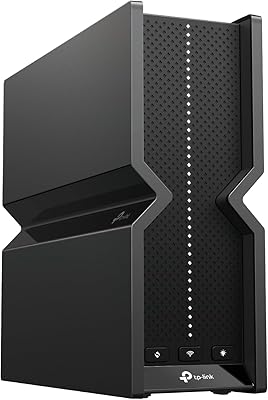
The TP-Link Archer BE900 Wi-Fi 7 Router is TP-Link's most ambitious consumer router to date, built for households that genuinely push their network to its limits. Unlike most routers that blend into the background, this quad-band router makes a statement — a sculpted chassis with a touchscreen and LED panel you'd actually notice on a shelf. It runs on the latest 802.11be standard across four bands, which means more devices can operate at full speed without stepping on each other. One important note before buying: you still need a separate modem to connect to your ISP, which catches more buyers off guard than you'd expect. At the top of TP-Link's lineup, it competes with similarly spec'd flagships from ASUS and Netgear.
Features & Benefits

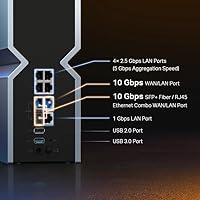
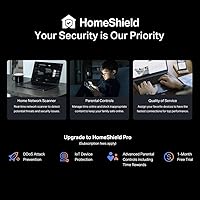
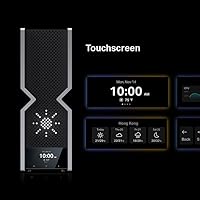
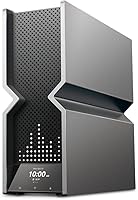
The headline spec is Wi-Fi 7 quad-band support — four simultaneous bands (2.4 GHz, two 5 GHz channels, and 6 GHz) that let the router distribute traffic more intelligently, reducing congestion across a full house of connected devices. The Archer BE900 also ships with two 10 Gbps ethernet ports, a genuine differentiator for anyone on a multi-gig fiber plan or running a NAS over a wired connection. Twelve antennas with Beamforming help focus the signal toward your devices rather than scattering it in all directions. The onboard touchscreen lets you glance at connected devices or adjust basic settings without opening an app — small convenience, but appreciated. EasyMesh support allows range extension with compatible hardware, though Deco mesh systems are excluded. The HomeShield security suite covers basic protection and parental controls at no cost, while advanced features sit behind a paid tier.

Best For

This Wi-Fi 7 router makes the most sense for a specific kind of buyer. If your ISP delivers multi-gigabit fiber speeds and your current router is the weak link, this is a natural upgrade. Gamers and streamers running multiple 4K or 8K feeds at once will appreciate the bandwidth headroom that quad-band architecture provides. Home offices and small studios with NAS devices or direct-attached 10G storage will get real, measurable gains from the wired 10 Gbps ports. It's also worth considering if you're already building out a TP-Link EasyMesh network and need a powerful central node. Conversely, if you're on standard broadband with a handful of devices, this is overkill — and paying for capabilities you'll genuinely never tap into doesn't make much sense.

User Feedback

Across a large pool of verified buyer reviews, the Tether app experience earns consistent praise — most users report getting fully connected within minutes of unboxing. Range improvements over older routers are another recurring highlight, especially in larger homes. Where opinions split is on the physical size: at nearly 12 pounds and close to a foot wide, this quad-band router demands dedicated space and doesn't exactly hide. The HomeShield subscription is a genuine sticking point for many — locking advanced QoS behind a recurring fee frustrates users who expected those features included at this price tier. The touchscreen gets mixed reactions; some find it handy, others never touch it. Early firmware bugs were flagged by initial buyers, but follow-up reviews suggest TP-Link addressed most of them fairly quickly.

Pros

  • Wi-Fi 7 quad-band support dramatically reduces congestion in homes with dozens of simultaneous connected devices.
  • Dual 10 Gbps ethernet ports are rare at this tier and make a real difference for multi-gig fiber subscribers.
  • The Tether app setup process is fast and approachable, even for users who are not deeply technical.
  • Twelve antennas with Beamforming deliver noticeably stronger signals in larger or multi-story homes.
  • The onboard touchscreen lets you check network status or reboot without reaching for a phone or laptop.
  • EasyMesh compatibility offers a practical path to extending coverage using a range of compatible hardware.
  • Real-world range improvements over Wi-Fi 6 and Wi-Fi 6E routers are well-documented by long-term users.
  • Four 2.5 Gbps ports provide flexible high-speed wired connections for desktops, switches, or access points.
  • TP-Link has a solid track record of pushing firmware updates that address early stability issues post-launch.
  • Two USB ports add useful flexibility for attaching shared storage or other network peripherals.

Cons

  • Advanced HomeShield features like detailed QoS controls require an ongoing paid subscription, which feels restrictive at this price point.
  • The router is physically large and heavy, making placement and cable management more demanding than average.
  • Deco mesh system owners cannot integrate this unit into their existing network, which limits upgrade flexibility for that user base.
  • A separate modem is required, adding cost and complexity that first-time buyers sometimes do not anticipate.
  • Early firmware versions had stability issues that some buyers encountered before updates resolved them.
  • The touchscreen, while novel, offers limited functionality and does not replace the full control available through the web interface.
  • Wi-Fi 7 client devices are still relatively uncommon, so the full performance benefits remain out of reach for most current hardware.
  • The physical footprint demands a dedicated, ventilated space rather than a discreet corner placement.
  • At a significant price premium over capable Wi-Fi 6E alternatives, the value case weakens for users without multi-gig internet plans.
  • Buyers on entry-level or mid-tier broadband plans will see little practical performance difference compared to far less expensive routers.

Ratings

The scores below for the TP-Link Archer BE900 Wi-Fi 7 Router were generated by our AI system after analyzing thousands of verified global buyer reviews, with spam, bot-submitted, and incentivized feedback actively filtered out before scoring. Each category reflects the real distribution of user sentiment — strengths are credited where earned, and genuine pain points are not glossed over. The result is a transparent, balanced snapshot of what actual owners experience day to day.

Wireless Performance
91%
Users upgrading from Wi-Fi 6 or Wi-Fi 6E routers consistently report measurable throughput improvements, especially in homes where multiple devices compete for bandwidth simultaneously. Streamers and remote workers in particular note that 4K video calls and large file transfers no longer step on each other during peak hours.
Real-world gains are most visible on Wi-Fi 7 client devices, which remain relatively uncommon in most households as of now. Buyers whose devices top out at Wi-Fi 6 will see improvement in congestion handling, but not the full throughput ceiling this router is capable of delivering.
Wired Connectivity
93%
The dual 10 Gbps port configuration is a standout feature that genuinely differentiates this router from most competitors in its class. NAS users and those on multi-gig fiber plans report that direct-attached 10G transfers feel dramatically faster, with local network speeds that finally match what their storage hardware is capable of.
Getting full value from the 10 Gbps ports requires compatible 10G network cards or switches, which adds cost and complexity beyond the router purchase itself. For users without 10G-capable devices, these ports offer no practical advantage over a standard gigabit connection.
Range & Coverage
88%
Owners of larger homes — particularly two-story houses over 3,000 square feet — consistently report stronger signal penetration compared to their previous routers. The 12-antenna layout with Beamforming appears to reduce dead zones in hallways and rooms that were previously marginal.
A handful of users in homes with thick concrete or brick construction note that coverage still drops off in distant corners, suggesting the router is not immune to building material interference. For very large properties, pairing with an EasyMesh extender is likely still necessary.
Setup & Ease of Use
86%
The Tether app is one of the most praised aspects across the entire user base — the guided setup process is clear enough that even buyers with limited networking experience report being up and running within 15 minutes. The step-by-step interface handles ISP credential entry, band naming, and firmware checks without requiring any manual configuration.
A small but consistent group of users encountered hiccups during initial firmware updates, with a few reporting that the router needed a factory reset after a failed update before everything stabilized. Those unfamiliar with the concept of separate modems also get tripped up during setup, as the product packaging does not prominently flag this requirement.
Touchscreen & LED Interface
71%
29%
The onboard touchscreen genuinely appeals to users who prefer a physical control point — being able to check connected devices or restart the router without unlocking a phone is a small but appreciated convenience. The LED display adds a visual status indicator that some users find useful for quick health checks at a glance.
Many buyers describe the touchscreen as a novelty that they stopped using after the first week, with the Tether app offering far more control and becoming their primary interface. A portion of reviewers feel the touchscreen adds cost and physical bulk without delivering enough practical daily utility to justify either.
Software & Firmware
74%
26%
TP-Link has a reasonable track record of pushing meaningful firmware updates for this router, and users who stayed current with updates report that performance and stability improved noticeably over the first few months of ownership. The Tether app reliably notifies users when new firmware is available, making the process accessible.
Early adopters dealt with connection drop issues and occasional slowdowns that only resolved after one or two firmware revisions, which is frustrating at this price tier. The web-based management interface, while functional, feels dated compared to what some competing brands offer at similar price points.
HomeShield Security
67%
33%
The free HomeShield tier is genuinely useful for families — basic network scanning, device prioritization, and parental controls are all included without any account required beyond setup. For users who just want protection against known malicious domains and simple screen time controls, the free offering covers the essentials.
The paywall for advanced features is a recurring frustration, particularly for buyers who paid a premium expecting full-featured security out of the box. Detailed traffic inspection, advanced parental filtering, and more granular QoS controls all require an ongoing subscription, which feels like a meaningful omission at this price tier.
Build Quality & Design
84%
The physical construction feels deliberately premium — the matte black and gray chassis has a solidity to it that cheaper routers lack, and the overall aesthetic is more considered than the typical plastic spider-leg router design. Users who display their router openly on a shelf appreciate that it looks intentional rather than utilitarian.
The size and weight — nearly 12 pounds across a footprint close to a foot wide — make placement genuinely tricky in smaller apartments or crowded home office setups. Several users note that finding an adequately ventilated surface that also looks reasonable took more effort than expected.
EasyMesh Compatibility
72%
28%
For users already running compatible EasyMesh hardware, adding this router as the main node works reliably and the unified network management through the Tether app is a practical convenience. The ability to extend coverage using third-party EasyMesh devices also gives buyers hardware flexibility.
The explicit incompatibility with TP-Link's own Deco mesh ecosystem is a source of genuine confusion and frustration — buyers reasonably assume that TP-Link hardware works with other TP-Link hardware, and discovering that Deco is excluded after purchase is a trust issue. This limitation should be more prominently communicated before purchase.
Value for Money
69%
31%
For households that can actually exploit what this router offers — multi-gig fiber, 10G wired devices, and a growing collection of Wi-Fi 7 clients — the feature set is competitive and the pricing is broadly in line with ASUS and Netgear equivalents at this specification level. The dual 10 Gbps port configuration alone is difficult to find at a lower price point.
For the majority of buyers on sub-gigabit internet plans with standard Wi-Fi 6 devices, a router costing a fraction of this price would deliver identical real-world performance. The value proposition depends almost entirely on whether your existing infrastructure can actually consume what this router provides.
Thermal Management
76%
24%
Under sustained heavy load — simultaneous 10G wired transfers plus active wireless clients — the router runs warm but stays stable for most users, suggesting the passive cooling design is adequately engineered for typical use patterns. Users who give it adequate open-air placement rarely report heat-related slowdowns.
Buyers who attempted to place the router inside an AV cabinet or enclosed shelf report throttling and occasional disconnects, confirming that the chassis needs real airflow to stay stable under load. The router offers no fan option or thermal warning visible on the touchscreen, which would have been a useful addition at this tier.
ISP Compatibility
89%
Across a wide range of ISPs including Comcast, AT&T, Verizon, Cox, and Spectrum, users report clean and trouble-free connections once the initial modem-router setup is sorted. PPPoE, DHCP, and static IP configurations all appear to work without unusual workarounds.
A small number of users on less common ISPs with non-standard authentication requirements reported needing to consult TP-Link support to get the WAN configuration sorted. The requirement for a separate modem, while standard for routers, continues to catch buyers off guard when not clearly surfaced at the point of purchase.
Long-Term Reliability
78%
22%
Users who have owned the router for six months or longer generally report stable uptime once the initial firmware issues were resolved, with most describing it as a set-and-forget device after the early settling-in period. TP-Link's continued firmware support for this model gives reasonable confidence in its longevity.
The fact that early firmware versions introduced meaningful stability problems is a legitimate mark against the out-of-box experience, and some buyers lost confidence in the product before updates arrived to fix things. Reliability at this price point should be solid from day one, not conditional on post-launch software patches.

Suitable for:

The TP-Link Archer BE900 Wi-Fi 7 Router is purpose-built for households where the network genuinely earns its keep every day. If your ISP delivers multi-gigabit fiber speeds, this router has the wired ports and wireless headroom to match that throughput without becoming the bottleneck. Streamers running multiple 4K or 8K feeds, gamers who need low-latency connections across several devices simultaneously, and content creators shuffling large files over a local NAS will find the quad-band architecture and dual 10 Gbps ports immediately useful rather than aspirational. Home offices and small studios with direct-attached 10G storage setups are another natural fit — the wired port configuration alone justifies serious consideration. Tech-savvy users who enjoy hands-on network management will also appreciate having both a physical touchscreen interface and the Tether app at their disposal, and anyone already building out a TP-Link EasyMesh network will find this a logical and powerful central node upgrade.

Not suitable for:

The TP-Link Archer BE900 Wi-Fi 7 Router is a hard sell for anyone on a standard broadband connection topping out at a few hundred megabits — the hardware is capable of far more than most ISPs currently deliver, and paying a premium price for headroom you cannot use today is difficult to justify. Buyers expecting a plug-and-forget box tucked behind a TV stand will also run into practical issues: this unit is large, heavy, and needs open space and ventilation to perform well. If you are already invested in the Deco mesh ecosystem, be aware that this router does not integrate with it — EasyMesh compatibility covers third-party and some TP-Link hardware, but Deco is explicitly excluded. Users who want advanced security features like detailed traffic analysis or robust parental controls without paying an ongoing subscription will find the free HomeShield tier limiting. Finally, anyone who is not comfortable managing occasional firmware updates or troubleshooting early software quirks may find the ownership experience less polished than expected for a flagship-tier device.
Specifications

  • Wi-Fi Standard: This router operates on Wi-Fi 7 (802.11be), the latest wireless standard, alongside backward compatibility with 802.11ac, 802.11ax, 802.11g, and 802.11n devices.
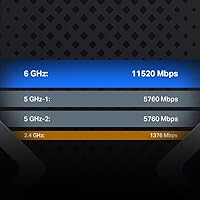
  • Band Configuration: Quad-band architecture spans one 2.4 GHz band, two separate 5 GHz bands, and one 6 GHz band, allowing simultaneous traffic distribution across four independent channels.
  • Max Throughput: Combined theoretical throughput is rated at BE24000, representing the aggregate maximum across all four bands under ideal conditions.
  • 10 Gbps Ports: Two 10 Gbps ethernet ports are included: one is a combo WAN/LAN port that also accepts a fiber SFP module, and the other is a dedicated WAN/LAN ethernet port.
  • 2.5 Gbps Ports: Four 2.5 Gbps WAN/LAN ethernet ports provide high-speed wired connections for desktops, managed switches, or access points requiring more than gigabit throughput.
  • Standard Gigabit Port: One 1 Gbps ethernet port is included for connecting devices that do not require higher wired speeds.
  • USB Ports: Two USB ports are built in, supporting shared storage devices or other USB peripherals accessible across the local network.
  • Antenna Count: Twelve external high-performance antennas are optimally positioned around the chassis to maximize spatial coverage and support Beamforming signal focusing.
  • Beamforming: Beamforming technology is supported, directing wireless signals toward connected client devices rather than broadcasting omnidirectionally, improving per-device signal strength.
  • Mesh Support: EasyMesh compatibility allows pairing with compatible third-party routers, range extenders, or wireless powerline adapters; note that TP-Link Deco mesh systems are not supported.
  • Security Suite: TP-Link HomeShield provides basic network security scanning, Quality of Service controls, and parental controls at no cost, with advanced features available under a paid subscription tier.
  • Management App: The TP-Link Tether app for Android and iOS enables remote network management, device monitoring, and configuration changes from a smartphone.
  • Local Interface: An integrated touchscreen and LED display on the router body allow basic network monitoring and control without requiring a phone, app, or browser.
  • Dimensions: The router measures 11.9 × 10.3 × 3.8 inches, requiring dedicated open shelf or surface space for proper ventilation and antenna clearance.
  • Weight: At 11.71 pounds, this is a substantially heavy unit compared to typical consumer routers, which should be factored into placement planning.
  • Color: The router ships in a Black and Gray colorway with a premium industrial-style chassis design.
  • Included Items: The box includes the Wi-Fi 7 router, a power adapter, one RJ45 ethernet cable, and a quick installation guide.
  • ISP Compatibility: This router works with all major internet service providers including Comcast, Xfinity, AT&T, Verizon, Spectrum, Cox, and others, but requires a separate modem for most connections.

Related Reviews
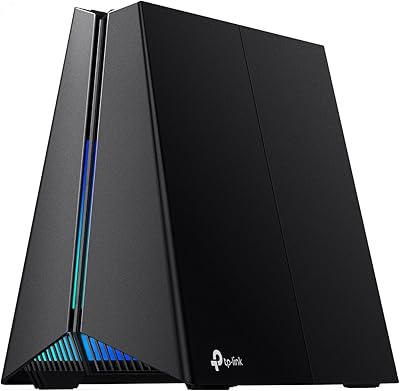
TP-Link Archer BE400
80%
88%
Wireless Performance
91%
Setup & Ease of Use
78%
Coverage & Range
87%
Wired Port Performance
83%
Multi-Device Handling
More
TP-Link Archer GE800
80%
91%
Wireless Performance
94%
Wired Connectivity
88%
Gaming Latency & Prioritization
83%
Build Quality & Design
69%
RGB Lighting
More
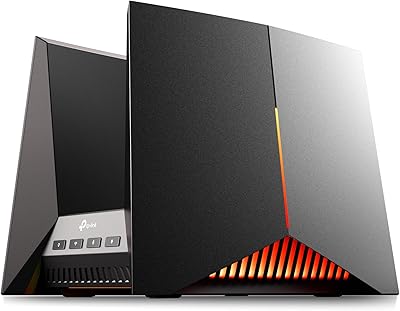
TP-Link Archer GE650 Wi-Fi 7 Gaming Router
79%
91%
Wireless Performance
93%
Gaming-Specific Features
89%
Wired Connectivity
86%
Setup & Ease of Use
71%
Software & App Experience
More
TP-Link Archer AX55
TP-Link Archer AX55
76%
83%
Wireless Performance
74%
Coverage & Range
86%
Device Handling & Congestion
91%
Setup & Ease of Use
78%
Build Quality & Design
More
TP-Link BE3600 Wi-Fi 7 Travel Router TL-WR3602BE

85%
88%
Performance & Speed
94%
Portability & Size
85%
Wi-Fi Range & Connectivity
92%
Security Features
90%
Ease of Use & Setup
More
TP-Link Archer BE550
76%
83%
Wireless Performance
91%
Wired Port Quality
88%
Setup & Ease of Use
67%
Coverage & Range
58%
HomeShield Security & Parental Controls
More
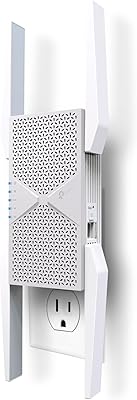
TP-Link Archer BE260 WiFi 7 Router
78%
91%
Value for Money
84%
Wireless Performance
89%
Setup & Ease of Use
78%
Range & Coverage
88%
Wired Port Quality
More
TP-Link Archer BE700 WiFi 7 Router
79%
89%
Wireless Performance
83%
Setup & Ease of Use
78%
Build Quality
76%
Range & Coverage
91%
Wired Connectivity
More
TP-Link RE403BE BE6300 Wi-Fi 7 Range Extender
79%
81%
Wireless Performance
78%
Coverage Range
84%
Setup & Installation
91%
2.5G Ethernet Port
73%
EasyMesh Integration
More
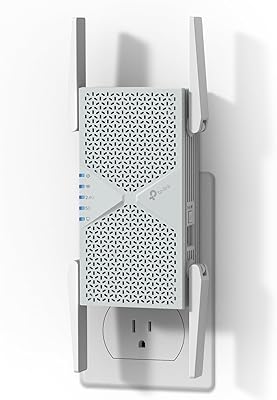
TP-Link RE653BE Wi-Fi 7 Range Extender
80%
88%
Wireless Performance
83%
Wi-Fi 7 Feature Depth
79%
Coverage Range
93%
Ethernet Port Utility
86%
Setup & App Experience
More

FAQ

You will need a separate modem for most internet connections. The Archer BE900 is a router only, so it connects to your modem to distribute the internet signal throughout your home. If your ISP provides an all-in-one modem-router gateway, you can connect this router to it in bridge mode, but the router itself does not have a built-in modem.

Yes, the router is fully backward compatible with older wireless standards including Wi-Fi 5 (802.11ac) and Wi-Fi 6 (802.11ax). Your existing devices will connect and work normally — they just will not benefit from the Wi-Fi 7 speed improvements until you upgrade those devices as well.

Unfortunately, no. While this router supports EasyMesh, which allows it to pair with many compatible extenders and third-party routers, it is not compatible with TP-Link's own Deco mesh ecosystem. If you are building out a Deco network, this router cannot be integrated as a node within it.

The subscription is entirely optional. The free tier includes basic network security scanning, Quality of Service settings, and parental controls, which is enough for most households. The paid tier unlocks more granular traffic analysis and advanced parental control features, but the router functions fully without it.

Most users find it pretty straightforward. The TP-Link Tether app walks you through the setup step by step, and the majority of buyers report getting fully connected within 10 to 15 minutes. Having your ISP login credentials handy before you start will save you time.

Yes, and this is one of the more practical reasons to consider this router if you have 10G-capable storage or a workstation. Both 10 Gbps ports can function as LAN ports, so you can wire a NAS or desktop directly and get full 10G throughput between that device and others on the network — assuming the connected hardware also supports 10G.

Open placement is strongly recommended. The router runs warm under load, and the chassis needs adequate airflow around it to stay stable. Given its size and the fact that the 12 antennas need line-of-sight to work effectively, putting it inside an enclosed cabinet would noticeably reduce performance and could cause thermal throttling over time.

The touchscreen gives you a quick local control panel — you can view connected devices, check network status, toggle the LED light, restart the router, and adjust a few basic settings without opening the app or a browser. It is genuinely handy for quick checks, though it does not replace the full control available through the Tether app or the web interface.

The addition of the 6 GHz band is the biggest help here, since that spectrum is far less congested than 2.4 GHz or 5 GHz in apartment buildings or dense neighborhoods. Beamforming also helps by focusing signals toward your devices rather than broadcasting broadly, which reduces how much signal bleeds into neighboring spaces and minimizes the interference your router picks up in return.

Firmware updates are not automatic by default, but the Tether app will notify you when a new version is available and lets you install it with a tap. TP-Link has been reasonably consistent with firmware updates for its flagship products — early buyers of this router did encounter some stability quirks, but subsequent updates addressed the most commonly reported issues. Checking for updates every few months is a good habit regardless of which router you own.

Where to Buy