Overview

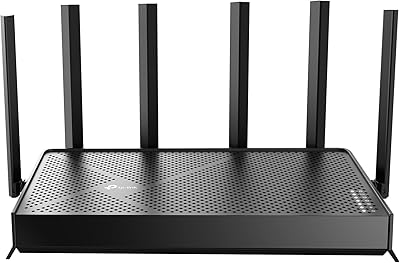
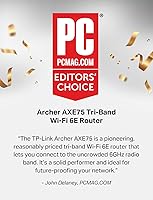
The TP-Link Archer AXE75 is one of the more accessible ways to bring WiFi 6E into your home without spending flagship router money. Launched in 2022, it still holds up well enough to earn a 2025 PCMag Editors' Choice nod — which says something for a router at this price tier. Under the hood, a 1.7 GHz quad-core CPU and 512 MB of RAM give it enough muscle to handle a busy household. One practical note before ordering: this is a large router, nearly 13 inches wide, so it needs dedicated space on a shelf or desk. A separate modem is also required and is not included in the box.
Features & Benefits

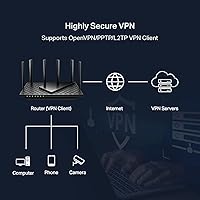
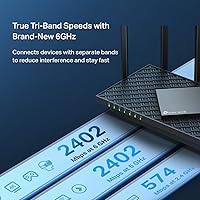
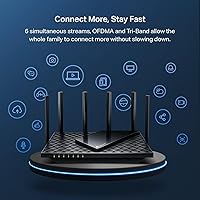
The tri-band configuration — covering 2.4 GHz, 5 GHz, and the newer 6 GHz — is the headline here, with a theoretical combined throughput of 5400 Mbps. Real-world speeds will naturally fall short of that ceiling, but the 6 GHz band genuinely reduces congestion for compatible devices nearby, thanks to wide 160 MHz channels. OFDMA and MU-MIMO help this WiFi 6E router juggle many devices at once rather than serving them in sequence. OneMesh support lets you add a TP-Link extender for broader coverage. The built-in VPN support covering OpenVPN, PPTP, and L2TP is a solid bonus, and HomeShield's free tier handles basic security, parental controls, and QoS without an upcharge.

Best For

The Archer AXE75 makes the most sense for households moving up from an older WiFi 5 setup, particularly those with a growing mix of smart home gadgets, laptops, and streaming devices all competing for bandwidth. Gamers and streamers will appreciate the low-latency 6 GHz band — though it's worth noting that most older devices won't support it, so the benefit depends on your hardware. Remote workers who need a reliable VPN connection without a separate appliance will find the built-in server and client genuinely useful. It also suits anyone already running TP-Link gear who wants to extend coverage via OneMesh rather than switching ecosystems entirely.

User Feedback

With nearly 5,000 ratings averaging 4.3 stars, the majority of buyers are clearly satisfied. App-guided setup through the Tether app earns consistent praise, even from users who find router configuration intimidating. Those with WiFi 6E-capable devices report noticeable real-world speed improvements on the 6 GHz band. The most common criticism involves range — the 6 GHz signal weakens noticeably through walls, making it less effective across larger or multi-story homes compared to the 5 GHz band. A smaller number of users take issue with how the HomeShield app promotes its paid subscription tier post-setup. Not a dealbreaker, but something to be aware of before you dive in.

Pros

  • The TP-Link Archer AXE75 brings WiFi 6E access to a price tier that was previously dominated by WiFi 5 hardware.
  • The Tether app makes initial setup genuinely fast, even for buyers with no networking background.
  • Built-in VPN server and client support removes the need for a separate device or third-party service.
  • OFDMA and MU-MIMO handle dense device environments far better than older router architectures.
  • The free HomeShield tier covers basic security scanning, IoT identification, and QoS at no extra charge.
  • OneMesh compatibility lets you expand coverage using existing TP-Link extenders rather than buying a new system.
  • WPA3 security support offers more robust network protection compared to routers still limited to WPA2.
  • The quad-core CPU and 512 MB of RAM give this WiFi 6E router enough headroom to handle demanding, multi-device households.
  • A 4.3-star average across nearly 5,000 reviews reflects a broad base of satisfied, real-world buyers.

Cons

  • The 6 GHz band signal drops off sharply through walls, limiting its usefulness in multi-room or multi-story homes.
  • A separate modem is required and not included, which adds unexpected cost for buyers switching from an ISP-provided combo unit.
  • HomeShield advanced features — detailed reports, robust parental controls — are locked behind a recurring subscription fee.
  • Few devices on the market today actually support the 6 GHz band, reducing its immediate practical value for most households.
  • The router's physical footprint is large enough to be a real placement challenge in compact living spaces.
  • App-based management, while beginner-friendly, limits the depth of control that advanced or power users expect.
  • OpenVPN throughput slows noticeably when multiple devices route traffic through the VPN simultaneously.
  • Long-term firmware support timelines are unclear, which is a reasonable concern for buyers planning to keep hardware for five or more years.
  • The HomeShield app surfaces subscription upsells frequently post-setup, which several buyers describe as intrusive.
  • OneMesh ecosystem lock-in means the whole-home coverage benefit is unavailable to buyers using non-TP-Link extenders.

Ratings

The TP-Link Archer AXE75 has been rated and reviewed by our AI system after analyzing thousands of verified global buyer reviews, with spam, bot-generated, and incentivized feedback actively filtered out. The result is an honest scorecard that reflects where this WiFi 6E router genuinely excels and where real-world owners have run into limitations. Both the strengths and the frustrations are represented here so you can make a well-informed decision.
Wireless Performance
83%
Buyers consistently report that moving to this WiFi 6E router from older WiFi 5 hardware delivers a meaningful, noticeable speed boost — especially for households where multiple people stream or game simultaneously. The 5 GHz band in particular handles mid-range distances reliably without much drop-off.
The 6 GHz band, while impressive on paper, only delivers its best results within the same room or very close range. Walls and floors cut through its signal more aggressively than the 5 GHz band, which frustrates buyers in multi-story homes or older construction with dense walls.
6 GHz Band Utility
71%
29%
For users with newer laptops, phones, or gaming devices that support WiFi 6E, the 6 GHz band offers noticeably lower latency and less interference than crowded 5 GHz airspace. In apartments with many competing networks, this band feels genuinely cleaner and faster.
The honest reality is that most households still have few or no devices that can actually use the 6 GHz band, which limits its immediate value. Buyers expecting whole-home 6 GHz coverage are often disappointed by how quickly the signal weakens beyond a single room.
Setup & Ease of Use
91%
The Tether app walkthrough is one of the most praised aspects across reviews — even self-described non-technical buyers say they had the router running in under 15 minutes. Port configuration, band management, and guest network setup are all handled within the same clean interface.
A handful of users report occasional app connectivity hiccups where the Tether app loses communication with the router mid-setup, requiring a restart. Advanced users who prefer a full browser-based admin panel may find the app-first approach slightly limiting in depth.
Value for Money
86%
Compared to other WiFi 6E routers, this TP-Link router sits at a price point that makes the technology accessible without requiring a premium router budget. The hardware specs — quad-core CPU, 512 MB RAM, tri-band configuration — feel well-matched to the asking price.
While the core hardware is fairly priced, the HomeShield security suite nudges users toward a paid subscription for advanced features after setup, which some buyers feel should be included at this tier. That recurring cost consideration slightly undermines the overall value proposition for budget-conscious shoppers.
Range & Coverage
68%
32%
In open-plan homes or single-floor apartments, coverage from the Archer AXE75 is generally solid, with strong signal reaching most corners without needing an extender. The 2.4 GHz band pulls through reliably at longer distances for IoT and smart home devices.
Larger homes, especially two-story houses with standard drywall and wood framing, frequently push buyers toward adding a OneMesh extender to fill dead zones. Coverage is respectable for a mid-range unit, but buyers with spaces over 2,000 square feet should budget for an extender from the start.
Build Quality & Design
74%
26%
The router has a solid, sturdy feel with a matte finish that looks clean on a shelf or entertainment unit. Ventilation is adequate, and the unit runs warm but not hot even during sustained heavy usage periods.
At nearly 13 inches wide, this is a physically large device that catches some buyers off guard — the product dimensions deserve more attention before purchasing. It is not a router you tuck away easily, and smaller apartments or cramped desk setups may struggle to accommodate it comfortably.
VPN Performance
81%
19%
Having OpenVPN, PPTP, and L2TP built directly into the router — functioning as both server and client — is a feature that remote workers and privacy-focused users genuinely appreciate. Setting up a VPN server through the admin panel is straightforward compared to third-party solutions.
VPN throughput, particularly with OpenVPN, is limited by the router's hardware and tends to drop noticeably under heavy simultaneous use. Users running a full household through an active VPN tunnel may encounter speed degradation that does not match the router's raw wireless performance.
Device Capacity
84%
OFDMA and MU-MIMO together do make a practical difference in homes packed with smart TVs, phones, tablets, smart speakers, and computers all active at once. Buyers report far less buffering during peak evening hours compared to their previous single or dual-band routers.
Some owners with very large device counts — 40 or more simultaneous connections — report occasional sluggishness during peak periods, suggesting the router has a realistic upper ceiling for congested networks. The tri-band configuration helps, but it is not a substitute for a more expensive enterprise-grade solution.
Security Features
78%
22%
WPA3 support is a meaningful upgrade for households that care about network security, and the free tier of HomeShield covers the basics: a security scan, IoT device identification, and basic parental controls. For most families, the free feature set is genuinely functional day-to-day.
The HomeShield premium upsell becomes a recurring friction point post-setup, with the app regularly surfacing prompts to upgrade. Advanced threat protection, detailed reporting, and granular parental controls all sit behind the paywall, which feels restrictive given the router's price tier.
Parental Controls
67%
33%
Basic parental controls included in the free HomeShield tier allow content filtering and device scheduling, which covers the needs of many families with younger children. Setup through the app is quick and does not require any technical background.
Parents who need per-device time limits, detailed browsing reports, or application-level blocking will hit the limits of the free tier quickly. The feature gap between free and paid is noticeable enough that families relying heavily on parental controls may feel pressured into the subscription.
QoS & Traffic Management
79%
21%
The built-in Quality of Service controls let users prioritize gaming, streaming, or work video calls above general browsing traffic, which genuinely reduces lag spikes during heavy household usage. Gamers in particular appreciate having a clear, accessible way to protect their connection.
QoS configuration offers fewer customization options than competing routers at a similar price, with mostly preset categories rather than granular app-level or device-level controls. Power users coming from routers with advanced traffic shaping will likely find the options too simplified.
OneMesh Compatibility
77%
23%
For households already invested in TP-Link hardware, the ability to add a OneMesh extender and create a unified roaming network is a practical and cost-effective way to extend coverage without buying a full mesh system. Roaming handoffs between the router and extender work smoothly for most users.
OneMesh only functions within the TP-Link ecosystem, so buyers with extenders or access points from other brands get no benefit. The mesh experience also does not match the seamlessness of purpose-built whole-home mesh systems like those from Eero or Google, particularly in complex home layouts.
App Experience
76%
24%
The Tether app covers the most common management tasks — rebooting, guest network setup, device prioritization, and basic diagnostics — in an interface that is cleaner than many competing router apps. Alexa integration adds a convenient layer for voice-based network control.
The app's reliability comes up as an occasional sore point, with some users reporting that remote management outside the home network is inconsistent. Updates to the app have occasionally introduced temporary bugs that required clearing the cache or reinstalling before the router could be properly managed.
Firmware & Long-Term Support
72%
28%
TP-Link has released firmware updates for the Archer AXE75 since its 2022 launch, addressing stability issues and adding minor feature improvements over time. Buyers who purchased early report the router performing better now than it did out of the box.
Firmware update intervals are not always predictable, and some reported stability bugs have taken several months to receive a fix. Long-term support beyond the three-to-four year mark is uncertain, which is a reasonable concern for buyers planning to keep the router for many years.

Suitable for:

The TP-Link Archer AXE75 is a strong pick for households that are ready to move past their aging WiFi 5 router and want a setup that can grow with them as more WiFi 6E devices enter the market. Families or shared living spaces with 20 or more connected devices — smart TVs, phones, laptops, smart speakers, security cameras — will appreciate how the tri-band design spreads the load without things grinding to a halt during peak evening hours. Gamers and streamers who want a dedicated, low-congestion band for competitive play or 4K streaming will get real, practical value from the 6 GHz band, provided their devices support it. Remote workers who need a built-in VPN server to securely access a home or office network will find that capability refreshingly straightforward to configure here. If you are already using TP-Link extenders or access points, the OneMesh support makes it easy to unify everything under one network without replacing your existing hardware.

Not suitable for:

Buyers expecting the TP-Link Archer AXE75 to blanket a large, multi-story home in fast WiFi without any additional hardware are likely to be disappointed — the 6 GHz band in particular loses meaningful strength through walls and floors, making an extender a near-necessity in anything beyond a mid-sized single-floor space. Anyone with mostly older devices — phones, laptops, or smart home gear bought before 2022 — will not benefit from the 6 GHz band at all, which reduces this router to a capable but less differentiated tri-band option. Buyers who want comprehensive parental controls with per-app limits, detailed usage reports, and granular scheduling should know those features require a paid HomeShield subscription, which adds recurring cost to the equation. This WiFi 6E router also requires a separate modem to function, which catches a surprising number of first-time buyers off guard and adds to the real total cost of the setup. If your living space is tight — a studio apartment, a small desk corner — the physical size of this unit at nearly 13 inches wide is a legitimate practical concern worth checking before you order.
Specifications

  • WiFi Standard: The router operates on the 802.11ax (WiFi 6E) standard, supporting the 2.4 GHz, 5 GHz, and 6 GHz frequency bands simultaneously.
  • Combined Speed: Maximum theoretical combined wireless speed is 5400 Mbps across all three bands (574 Mbps on 2.4 GHz, 2402 Mbps on 5 GHz, and 2402 Mbps on 6 GHz).
  • 6 GHz Band: The 6 GHz band delivers up to 2402 Mbps using 160 MHz channel width, providing lower latency and reduced congestion for compatible WiFi 6E devices.
  • 5 GHz Band: The 5 GHz band delivers up to 2402 Mbps and serves as the primary high-speed band for most modern devices in the home.
  • 2.4 GHz Band: The 2.4 GHz band delivers up to 574 Mbps and provides broader range coverage suited for IoT devices, smart home hardware, and legacy equipment.
  • Processor: A 1.7 GHz quad-core CPU handles routing, security processing, and simultaneous multi-device traffic management.
  • Memory: 512 MB of high-speed RAM supports stable operation under heavy multi-device and multi-application workloads.
  • Dimensions: The router measures 12.91 × 10.43 × 4.72 inches, making it a physically large unit that requires dedicated shelf or desk space.
  • Weight: The unit weighs 1.52 pounds, which is standard for a router of this size and feature set.
  • Security: Supports WPA3 encryption and includes TP-Link HomeShield, which provides basic network scanning, IoT device identification, and parental controls at no cost in its free tier.
  • VPN Support: Functions as both a VPN server and VPN client, supporting OpenVPN, PPTP, and L2TP protocols for secure remote access.
  • Mesh Support: Compatible with TP-Link OneMesh technology, allowing the router to pair with OneMesh-certified extenders to create a unified whole-home network.
  • OFDMA & MU-MIMO: Supports both OFDMA and MU-MIMO technologies, enabling simultaneous data transmission to multiple devices and reducing wait times in high-density environments.
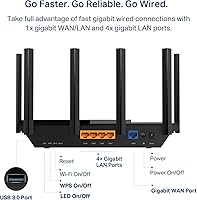
  • Ports: Includes one Gigabit WAN port, four Gigabit LAN ports, and one USB port for network storage or printer sharing.
  • Channel Width: Supports 160 MHz channel width on the 6 GHz band, doubling the available data throughput compared to standard 80 MHz configurations.
  • Smart Home: Compatible with Amazon Alexa for basic voice commands such as enabling guest networks or controlling LED indicators.
  • Included Items: Package includes the Archer AXE75 router, a power adapter, one RJ45 Ethernet cable, and a quick installation guide; a separate modem is required for most ISPs.
  • Wireless Features: Supports beamforming, WPS, QoS traffic prioritization, LED indicator control, and band steering across its three wireless bands.
  • App Management: Managed via the TP-Link Tether mobile app (iOS and Android) as well as a browser-based admin interface for local network configuration.
  • Market Ranking: Ranked number 8 in Computer Routers on Amazon, with a 4.3-star average rating drawn from nearly 5,000 verified buyer reviews.

Related Reviews

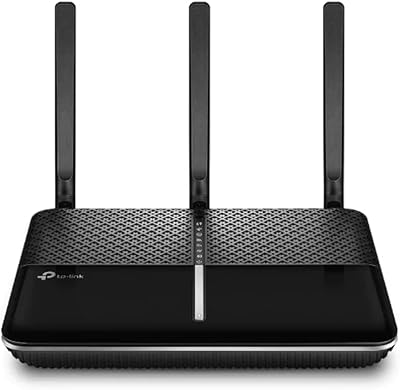
TP-Link Archer VR2100
84%
86%
Wi-Fi Performance
92%
Setup & Installation
87%
Value for Money
72%
Range
90%
Wired Performance
More
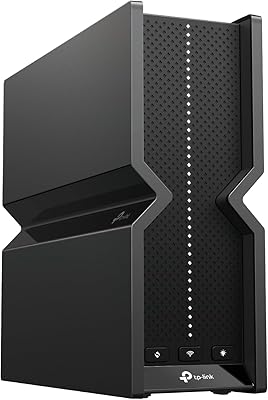
TP-Link Archer BE600
90%
96%
Wi-Fi Speed
91%
Coverage Area
94%
Device Capacity
89%
Stability & Reliability
87%
Setup & Installation
More
TP-Link Archer AC1750 WiFi Router
85%
88%
WiFi Performance
91%
Setup & Installation
80%
Range & Coverage
85%
Value for Money
89%
Alexa Integration
More
TP-Link Archer C59 AC1350 WiFi Router
82%
88%
Setup & Installation
72%
Wi-Fi Range & Coverage
81%
Overall Performance
92%
Value for Money
78%
Build Quality
More
TP-Link Archer AX73
TP-Link Archer AX73
79%
88%
Wireless Speed & Throughput
91%
Multi-Device Performance
74%
Coverage & Range
93%
Setup & Ease of Use
79%
Build Quality & Design
More
TP-Link Archer AX6000 WiFi 6 Router
84%
91%
Performance for Gaming and Streaming
87%
WiFi Coverage and Range
80%
Ease of Setup
90%
Security Features (TP-Link HomeCare)
85%
Build Quality and Durability
More
TP-Link Archer BE550
76%
83%
Wireless Performance
91%
Wired Port Quality
88%
Setup & Ease of Use
67%
Coverage & Range
58%
HomeShield Security & Parental Controls
More
TP-Link Archer BE24000 WiFi 7 Router
87%
94%
Performance
89%
Setup & Installation
92%
Connectivity & Compatibility
90%
Coverage & Range
88%
Security Features
More
TP-Link Archer BE260 WiFi 7 Router
85%
93%
WiFi Performance
89%
Ease of Setup
77%
Coverage & Range
91%
Streaming & Gaming Experience
85%
Design & Build Quality
More
TP-Link Archer A54
TP-Link Archer A54
74%
91%
Value for Money
88%
Ease of Setup
71%
Wi-Fi Range
74%
Wi-Fi Speed & Performance
86%
Security Features
More

FAQ

Yes, in most cases you will. The TP-Link Archer AXE75 is a router only, not a modem-router combo. If your ISP provides a standalone modem or a gateway device, you can connect it directly. If you currently rent a combo unit from your ISP, you may need to either keep it in bridge mode or purchase a compatible standalone modem.
Only if they support WiFi 6E, which is a relatively recent standard. Most devices purchased before 2022 — including smartphones, laptops, and smart home gadgets — do not support 6 GHz. The good news is that the 5 GHz band on this router is still fast and capable, so non-6E devices will still see a performance improvement over older WiFi 5 routers.

The 6 GHz band is noticeably shorter in range than 5 GHz, and it does not travel as well through walls, floors, or dense building materials. Realistically, it performs best within the same room or immediately adjacent spaces. For whole-home coverage on 6 GHz, you would need a compatible OneMesh extender or a purpose-built mesh system.

The basic HomeShield tier is genuinely free with no time limit — it includes a network security scan, basic IoT device identification, simple parental controls, and QoS settings. However, more advanced features like granular content filtering, detailed usage reports, and enhanced threat protection require a paid HomeShield Pro subscription. Most everyday users will find the free tier sufficient.

Quite easy, honestly. The Tether app guides you through the process step by step, and most buyers report completing the initial setup in under 15 minutes. You do not need to log into a browser-based admin panel or manually configure anything unless you want to. It is one of the more beginner-friendly routers in this category.

Yes, the router supports VPN client mode, which means you can configure it to route your entire home network through a compatible VPN service. The supported protocols are OpenVPN, PPTP, and L2TP — most major commercial VPN providers offer at least one of these. Keep in mind that routing all traffic through an active VPN will reduce overall throughput compared to the router's baseline wireless performance.

It will if your extenders are OneMesh-certified. Not all TP-Link extenders support OneMesh, so it is worth checking the TP-Link website to confirm your specific model is compatible before assuming they will pair together. If they are compatible, setup is simple and the network behaves as a single unified system with seamless roaming.

It is on the larger side — nearly 13 inches wide and over 10 inches deep. It is the kind of router that needs a dedicated spot rather than being tucked behind something. If you have a small apartment, a crowded entertainment center, or a compact desk, it is worth measuring your available space before ordering.

For homes under roughly 1,500 to 2,000 square feet with a relatively open layout, this WiFi 6E router should cover most spaces on its own. For larger or multi-story homes, you will likely need to add a OneMesh extender to fill dead zones. That said, a dedicated whole-home mesh system like Eero or Google Nest generally handles complex home layouts more reliably, though it will cost more.

Yes, the Archer AXE75 supports IPv6, which is increasingly relevant as ISPs and online services continue transitioning away from IPv4. You can configure IPv6 settings through either the Tether app or the browser-based admin panel, and most users do not need to adjust anything — it detects and configures automatically in most home network environments.