Overview

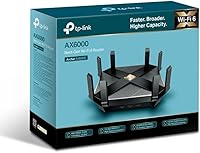
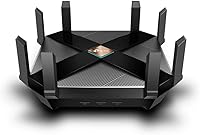
The TP-Link Archer AX6000 WiFi 6 Router arrived in late 2018 as one of the earliest consumer routers to fully embrace the 802.11ax standard, targeting households already pushing the limits of aging AC hardware. At the time, WiFi 6 promised better handling of congested networks, lower latency, and real headroom for the growing wave of smart home devices. This WiFi 6 router still holds a credible position in the premium segment, though it now faces pressure from newer WiFi 6E and WiFi 7 models. For buyers not chasing the absolute cutting edge, the value proposition here remains genuinely solid.
Features & Benefits

What sets this TP-Link flagship apart is how it pairs raw performance with practical, everyday connectivity. The 1.8GHz quad-core CPU, backed by two dedicated co-processors, lets the router handle traffic from dozens of simultaneous devices without visibly struggling — something cheaper routers expose quickly during peak household hours. OFDMA slices bandwidth more efficiently across multiple clients at once, which matters far more in a real home than theoretical peak speeds ever will. Add eight gigabit LAN ports, a 2.5Gbps WAN port, dual USB 3.0 connections for shared storage or a printer, and a lifetime HomeCare subscription covering antivirus and parental controls, and the package is well-rounded.

Best For

The Archer AX6000 makes the most sense for large, device-dense households — think 20 or more connected gadgets spread across multiple floors. Gamers benefit from QoS controls that push gaming traffic to the front of the queue, keeping latency low even when someone else is streaming 4K nearby. Home office users will appreciate having eight wired ports rather than the two or four most routers offer. OneMesh compatibility is a genuine plus for anyone wanting to extend coverage later without replacing their whole setup. Families get solid parental controls baked in, removing the need for a separate paid service entirely.

User Feedback

Across thousands of reviews, setup simplicity via the Tether app comes up repeatedly — most buyers had the router running within minutes. Signal strength earns consistent praise, with the eight antennas delivering reliable coverage in larger homes. That said, a notable portion of users flag the physical size as a surprise; at 10 by 12 inches and 3.5 pounds, this is a substantial piece of hardware that demands real shelf or desk space. Firmware reliability has been mostly positive over time, though occasional reboot needs after updates are reported. Stacked against ASUS and Netgear rivals at a comparable price, long-term value is where this router tends to win the debate.

Pros

  • Eight gigabit LAN ports is a rare feature at this price tier and a genuine advantage for wired-heavy setups.
  • The lifetime HomeCare subscription covers antivirus and parental controls with no ongoing fees attached.
  • OFDMA support keeps performance stable even when many devices are active simultaneously.
  • Setup via the Tether app is consistently praised as fast and straightforward, even for less technical users.
  • The 2.5Gbps WAN port adds headroom for multi-gigabit internet plans without requiring an upgrade anytime soon.
  • QoS controls let gamers and remote workers prioritize their traffic without needing advanced networking knowledge.
  • Eight high-gain antennas deliver reliable signal coverage across larger, multi-floor homes.
  • OneMesh compatibility means you can expand coverage later without replacing the router entirely.
  • The quad-core CPU with co-processors handles heavy multi-device loads without the slowdowns common on cheaper hardware.
  • Long-term firmware support from TP-Link has kept the Archer AX6000 stable and functional years after launch.

Cons

  • The physical footprint is substantial — buyers in smaller spaces may struggle to find a practical placement.
  • No WiFi 6E support means the 6GHz band is off the table as newer client devices begin adopting it.
  • The router runs warm under sustained heavy load, and adequate ventilation around the unit is necessary.
  • Some users report occasional firmware update hiccups that require a manual reboot to resolve.
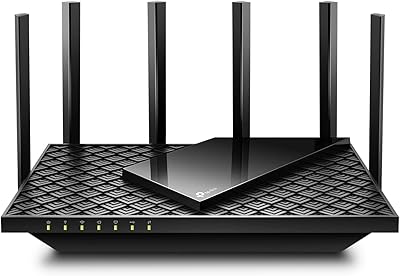
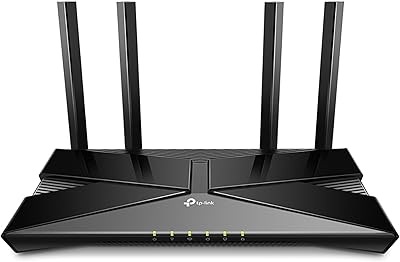
  • The aggressive, angular design with eight protruding antennas is visually dominant and not easy to conceal.
  • Compared to ASUS or Netgear rivals, the advanced configuration interface can feel less polished for power users.
  • No built-in dedicated backhaul makes it less competitive against purpose-built mesh systems in very large homes.
  • At its price point, newer WiFi 7 routers are beginning to appear, making the long-term value case harder to argue.

Ratings

The scores below for the TP-Link Archer AX6000 WiFi 6 Router were generated by our AI after analyzing thousands of verified buyer reviews from global markets, with spam, bot submissions, and incentivized feedback actively filtered out. Each category reflects the honest distribution of real user sentiment — strengths and frustrations weighted equally — so you get a clear picture of where this router genuinely excels and where it falls short.

Wireless Performance
88%
Users consistently report stable, high-throughput connections even in homes with 25 or more active devices. Streaming 4K to multiple TVs while gaming on a console and running video calls simultaneously is where this router noticeably outperforms older AC hardware users had before it.
A handful of users on very large properties note that the 5GHz band loses meaningful strength beyond two walls, which is typical for the frequency but still a point of friction for buyers expecting blanket coverage from a single unit.
Multi-Device Handling
91%
OFDMA and MU-MIMO together make a real difference in dense households. Reviewers with smart home setups — thermostats, cameras, voice assistants, and phones all running at once — note that the network stays responsive in ways their previous routers simply could not manage during peak hours.
A small subset of users with extremely high device counts above 50 report occasional scheduling delays during simultaneous heavy uploads. This is an edge case, but buyers managing a large number of IoT devices should be aware the router is not unlimited in its concurrency.
Setup & Ease of Use
86%
The Tether app-guided setup receives frequent praise for being genuinely accessible to non-technical users. Most reviewers describe having a functioning network within ten to fifteen minutes of opening the box, which is a realistic and repeatable outcome based on the volume of consistent feedback.
A recurring minority complaint involves the web-based admin interface feeling dated compared to rivals like ASUS. Power users who prefer deep manual configuration sometimes find the UI layout less intuitive than expected at this price tier.
Wired Connectivity
93%
Eight gigabit LAN ports is the feature that consistently surprises buyers who assumed premium routers still shipped with four. Home office users with NAS drives, desktop workstations, and IP cameras all connected simultaneously specifically call this out as the deciding factor in their purchase.
The single WAN port, while rated at 2.5Gbps, is the only uplink option — there is no link aggregation or secondary WAN for failover. For small business users hoping to bond connections or set up redundant uplinks, this is a genuine limitation.
Range & Coverage
82%
18%
The eight external antennas paired with beamforming deliver strong signal penetration across multi-floor homes of typical suburban size. Reviewers in two-story homes repeatedly note that dead zones they had with previous routers are gone without needing a range extender.
In homes exceeding 3,500 square feet or with thick concrete walls, coverage gaps do emerge at the edges. BSS Color helps reduce interference from neighbors, but it does not extend the physical range, and buyers with sprawling floor plans may still need a mesh node.
Build Quality & Design
74%
26%
The chassis feels sturdy and the antennas lock firmly into position without any wobble. Users who have run this router continuously for two or more years report no physical degradation, cracked plastics, or port failures, which speaks to reasonable long-term durability.
The aggressive spider-like design with eight antennas is polarizing — many buyers mention it looks imposing and is difficult to place discreetly. At 3.5 pounds and 10 by 12 inches, it demands dedicated space, and several reviewers note it simply does not fit their intended shelf or entertainment unit.
Thermal Management
67%
33%
Passive cooling keeps the unit completely silent, which is appreciated in living rooms and bedrooms where fan noise would be intrusive. Under normal household loads, surface temperatures stay within a comfortable range and the router operates without throttling.
Under sustained heavy load — large file transfers, multiple active torrents, continuous 4K streams — the chassis gets noticeably warm. Users in warmer climates or poorly ventilated rooms report more frequent warmth concerns, and a few mention performance dips they attribute to thermal throttling during extended stress.
Firmware & Stability
79%
21%
The majority of long-term owners report solid day-to-day reliability with months of uptime between reboots. TP-Link has continued pushing firmware updates years after launch, which is reassuring for buyers concerned about support longevity on a router first released in 2018.
A consistent minority of reviews mention that certain firmware updates have introduced temporary connectivity bugs requiring a manual reboot or factory reset to resolve. The update rollout cadence is also slower than some competitors, which frustrates users waiting on security patches.
Security Features
89%
The lifetime HomeCare subscription covering network antivirus, intrusion prevention, and parental controls is one of the most practical value-adds in this category. Families specifically praise the parental controls for being granular enough to set per-device schedules without needing a separate paid service.
HomeCare requires creating a TP-Link cloud account, which some privacy-conscious users find uncomfortable. There is no fully local-only operation mode that retains all HomeCare features without connecting to TP-Link servers, which is a genuine concern for a segment of the buyer base.
Gaming Performance
84%
QoS controls let gamers push their traffic to the front of the queue with minimal manual configuration, and the results are tangible — reviewers note lower ping variance during online matches even when other household members are streaming or downloading simultaneously.
The router lacks a dedicated gaming dashboard or real-time latency monitoring tools that ASUS ROG or Netgear Nighthawk equivalents offer. Serious competitive gamers who want granular per-application traffic shaping may find the QoS options functional but not as precise as they would like.
Value for Money
78%
22%
The combination of eight LAN ports, a 2.5Gbps WAN, and lifetime HomeCare at this price point is difficult to match from competing brands without spending more. For buyers who would otherwise pay separately for parental control software, the bundled value is meaningful.
With WiFi 6E routers now available at overlapping price points, the Archer AX6000 no longer represents the same forward-looking investment it did at launch. Buyers who plan to hold their router for four or more years may find the absence of 6GHz support makes the value calculus less straightforward today.
App & Remote Management
76%
24%
The Tether app handles the most common management tasks well — rebooting the router, checking connected devices, adjusting parental schedules, and running speed tests are all accessible within a few taps. Remote access works reliably for users who need to manage their home network while traveling.
Advanced network configuration through the app is limited, and users who want to set up VLANs, custom DNS, or detailed traffic rules are pushed to the web interface, which is less polished. Notifications for network events are inconsistent and occasionally delayed.
Mesh & Expandability
71%
29%
OneMesh integration with compatible TP-Link extenders works as advertised for most users, providing a single network name and reasonably smooth device handoff between nodes. For households that need to cover an adjacent garage or backyard, adding a single extender is a practical solution.
OneMesh is not a true mesh system — backhaul is shared with client traffic rather than dedicated, which can reduce overall throughput when extenders are under load. Buyers comparing it directly against purpose-built mesh systems like Eero or Google Nest will notice the difference in roaming smoothness.
USB & Storage Sharing
63%
37%
Having both a Type-A and Type-C USB 3.0 port is a thoughtful inclusion, and users who set up a basic network-attached drive for home backups report it working reliably for light use. The dual-port setup allows a drive and a printer to be connected simultaneously without a hub.
Transfer speeds over the USB storage sharing function are noticeably slower than a dedicated NAS, and performance drops further when multiple users access the shared drive at the same time. Power users who want robust network storage should treat this as a convenience feature rather than a true NAS replacement.

Suitable for:

The TP-Link Archer AX6000 WiFi 6 Router is a strong match for households where network congestion is a daily reality — families juggling streaming, video calls, gaming, and a fleet of smart home devices all at once. If you have more than fifteen or twenty connected devices, the combination of OFDMA, MU-MIMO, and a powerful quad-core processor will make a noticeable difference compared to mid-range alternatives. Gamers specifically benefit from the built-in QoS controls, which let you prioritize gaming traffic without manually digging into complex settings. Home office users with wired equipment — NAS drives, desktop workstations, IP cameras, network printers — will find the eight gigabit LAN ports genuinely useful rather than just a spec sheet boast. Families who want parental controls without subscribing to yet another monthly service will also appreciate the lifetime HomeCare inclusion.
Not suitable for:

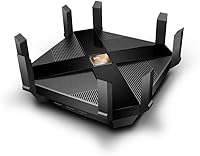
The TP-Link Archer AX6000 WiFi 6 Router is not the right call for buyers in apartments or smaller homes where a mid-range dual-band router would cover every corner without the added cost or bulk. At 10 by 12 inches and 3.5 pounds, this is a physically large device that needs dedicated space — it will not tuck neatly behind a monitor or sit discreetly on a small shelf. Buyers who are already eyeing WiFi 6E or WiFi 7 for future-proofing should know this router tops out at standard WiFi 6, meaning it will not support the 6GHz band that newer client devices are beginning to use. If your internet plan tops out at standard gigabit speeds and you only have a handful of devices, much of what this router offers will go unused. Finally, users who prefer a streamlined, minimalist setup may find the eight-antenna design and aggressive angular aesthetic more imposing than they want in a living space.
Specifications

  • WiFi Standard: This router uses the 802.11ax (WiFi 6) standard, which improves efficiency and throughput in environments with many simultaneously connected devices.
  • Frequency Bands: Dual-band operation covers both the 2.4GHz band (up to 1148 Mbps) and the 5GHz band (up to 4804 Mbps) for a combined maximum of 5952 Mbps.
  • Processor: A 1.8GHz quad-core CPU is paired with two dedicated co-processors to distribute network workloads and maintain stable performance under heavy traffic.
  • LAN Ports: Eight gigabit Ethernet LAN ports are included, allowing multiple wired devices to connect simultaneously without sharing bandwidth over a single port.
  • WAN Port: One 2.5Gbps WAN port supports multi-gigabit internet plans and provides headroom beyond standard gigabit service tiers.
  • USB Ports: Two USB 3.0 ports — one Type-A and one Type-C — support connected storage drives or shared network printers.
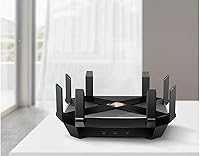
  • Antennas: Eight external high-gain antennas work alongside beamforming technology to focus and strengthen the wireless signal toward connected client devices.
  • MU-MIMO: Multi-User MIMO support allows the router to communicate with multiple devices in parallel rather than sequentially, reducing wait times in busy environments.
  • OFDMA: Orthogonal Frequency Division Multiple Access divides each wireless channel into smaller sub-channels, enabling more efficient simultaneous data delivery to multiple clients.
  • Security Suite: TP-Link HomeCare is included at no ongoing cost and provides network-level antivirus protection, robust parental controls, and traffic prioritization via QoS.
  • Mesh Support: OneMesh compatibility allows users to pair this router with supported TP-Link range extenders to create a unified whole-home mesh network under a single network name.
  • BSS Coloring: BSS Color technology reduces interference from neighboring networks by helping the router distinguish and ignore overlapping wireless signals from nearby routers.
  • Dimensions: The router measures 10 × 12 × 4 inches, making it a physically large unit that requires dedicated shelf or desk space with clear airflow around it.
  • Weight: At 3.5 pounds, this is a heavier router than most consumer alternatives, reflecting its dense internal hardware and large antenna array.
  • Color: The unit ships in black with a dark angular chassis designed to dissipate heat and accommodate the eight external antennas.
  • Wireless Protocols: Beyond WiFi 6, the router is backward compatible with 802.11a/b/g/n/ac devices, ensuring older client hardware connects without issue.
  • Included Items: The retail box contains the router, a network cable, a power adapter, and a quick installation guide.
  • App Control: The TP-Link Tether app for iOS and Android provides guided setup, device management, parental controls, and network monitoring from a smartphone.

Related Reviews

TP-Link Archer AX73
TP-Link Archer AX73
79%
88%
Wireless Speed & Throughput
91%
Multi-Device Performance
74%
Coverage & Range
93%
Setup & Ease of Use
79%
Build Quality & Design
More
TP-Link Archer AX10 WiFi 6 Router
77%
91%
Value for Money
78%
Wireless Performance
63%
Range & Coverage
93%
Ease of Setup
82%
Network Stability
More
TP-Link Archer AX72 Pro WiFi 6 Router
87%
89%
WiFi Performance
92%
Value for Money
94%
Ease of Setup
88%
Security Features
83%
Range and Coverage
More
TP-Link Archer AX23 WiFi 6 Router

78%
91%
Value for Money
93%
Ease of Setup
74%
WiFi Speed Performance
67%
Range & Coverage
83%
Connection Stability
More
TP-Link Archer AC1750 WiFi Router
85%
88%
WiFi Performance
91%
Setup & Installation
80%
Range & Coverage
85%
Value for Money
89%
Alexa Integration
More
TP-Link Archer AXE75
78%
83%
Wireless Performance
71%
6 GHz Band Utility
91%
Setup & Ease of Use
86%
Value for Money
68%
Range & Coverage
More
TP-Link Archer C59 AC1350 WiFi Router
82%
88%
Setup & Installation
72%
Wi-Fi Range & Coverage
81%
Overall Performance
92%
Value for Money
78%
Build Quality
More
TP-Link Archer A54
TP-Link Archer A54
74%
91%
Value for Money
88%
Ease of Setup
71%
Wi-Fi Range
74%
Wi-Fi Speed & Performance
86%
Security Features
More
TP-Link Archer BE700 WiFi 7 Router
85%
93%
Performance
88%
Ease of Setup
91%
Coverage & Range
94%
Speed (Wi-Fi 7)
85%
Security Features
More
TP-Link Archer BE550
76%
83%
Wireless Performance
91%
Wired Port Quality
88%
Setup & Ease of Use
67%
Coverage & Range
58%
HomeShield Security & Parental Controls
More

FAQ

No special modem is required — it works with any standard cable or DSL modem from your internet service provider. The 2.5Gbps WAN port is backward compatible with gigabit connections, so you do not need a 2.5Gbps modem to use it. Just connect your existing modem to the WAN port and follow the setup steps in the Tether app.

Yes, it is fully backward compatible with devices using older wireless standards including 802.11a, b, g, n, and ac. Your older laptops, phones, and smart home gadgets will connect normally — they just will not benefit from the WiFi 6 efficiency improvements until you upgrade those devices.

Setup is genuinely straightforward. The Tether app walks you through the process step by step, and most users report having the router up and running within ten to fifteen minutes. You do not need to touch any advanced settings unless you want to.

Yes — TP-Link HomeCare is included for life at no extra charge. There is no subscription required to access the antivirus protection, parental controls, or QoS settings. That is one of the more practical advantages this router has over some competitors that lock those features behind a recurring fee.

Like most high-performance routers, this one does generate noticeable warmth under sustained heavy load. It does not have active cooling fans, so the chassis relies on passive ventilation. Giving it open space on all sides — rather than stuffing it in a cabinet — is genuinely recommended to keep temperatures reasonable during extended use.

Yes, through OneMesh compatibility you can add supported TP-Link range extenders to build out a mesh-like network. All devices then operate under one network name, so your phone or laptop switches connections automatically as you move around. It is not as seamless as a dedicated mesh system, but it works well for most homes.

The WAN port supports up to 2.5Gbps, so if your internet provider offers a plan in that range, this router can take advantage of it. For standard gigabit plans, the WAN port handles that easily as well.

It remains a capable router for most households, but it does not support the 6GHz band that WiFi 6E and WiFi 7 introduce. If you own newer devices specifically designed to use that band, they will not get the full benefit here. For users without 6GHz-capable devices, the performance gap in practical everyday use is much smaller than spec sheets suggest.

Yes, the Tether app supports remote management as long as the router is connected and you have an active internet connection on your phone. You can check device activity, adjust parental control settings, and reboot the router from anywhere.

TP-Link rates it for use in large homes with many simultaneous connections, and real-world user reports generally support that claim. In practice, households with 30 to 40 devices spread across multiple floors report stable performance. The combination of OFDMA, MU-MIMO, and the multi-core processor is what makes that possible — it is not just about raw speed but how efficiently traffic is managed across all those connections at once.

Where to Buy