Overview

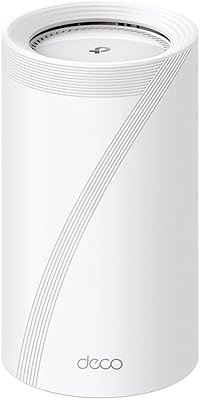
The TP-Link Deco BE23 WiFi 7 Mesh Router is one of the most affordable ways to get Wi-Fi 7 into your home without paying a premium-tier price. Launched in late 2024, this mesh router covers up to 2,500 square feet as a single node — practical for apartments, condos, or smaller single-story homes. If you're upgrading from Wi-Fi 5 or Wi-Fi 6, the jump is real, but keep expectations grounded: you'll need Wi-Fi 7 client devices to fully realize the speed gains. For most buyers, the value here is about future-proofing your network at a price that genuinely doesn't sting.
Features & Benefits

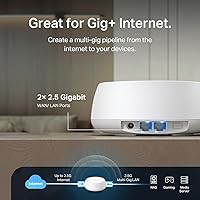
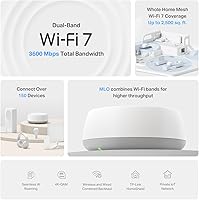
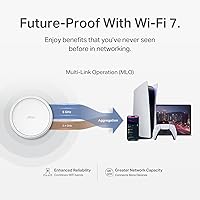
The Deco BE23's standout addition is Wi-Fi 7 MLO — Multi-Link Operation, which lets a device transmit across both bands simultaneously rather than toggling between them, cutting latency and improving reliability noticeably. Each unit ships with two 2.5 Gbps WAN/LAN ports, which is rare at this price tier and means you can connect a multi-gig modem or run a hardwired backhaul between nodes. The 160 MHz channel width across 4 streams pushes theoretical 5 GHz speeds to 2882 Mbps. HomeShield covers basic parental controls and IoT protection at no cost, but advanced threat intelligence sits behind a paid subscription — worth knowing before you commit.

Best For

This Wi-Fi 7 node is a strong fit for smaller homes and apartments where one unit blankets the entire floor plan without dead zones. Remote workers on heavy video calls or cloud-based workflows will appreciate the low-latency MLO connection. Households juggling 30 or more devices — smart speakers, streaming sticks, gaming consoles, phones — should find the 150-device ceiling more than adequate. If you're on a multi-gig internet plan, the dual 2.5G ports ensure the router itself is never the bottleneck. Existing Deco users wanting to add a Wi-Fi 7 node without rebuilding their whole setup will find integration into the ecosystem clean and straightforward.

User Feedback

With over 3,600 ratings averaging 4.5 stars, this mesh router has earned a strong reception for a product only a few months old. Buyers consistently highlight the Deco app experience, describing setup as fast and approachable even for non-technical households. Real-world speed gains over older Wi-Fi 5 and Wi-Fi 6 hardware come up frequently, especially among single-floor users. The recurring frustrations: HomeShield's advanced features sit behind a paywall that catches some buyers off guard, and a few wish for tri-band support in denser multi-node deployments. The TP-Link trust question does surface, but many reviewers cite the company's CISA security pledge as a meaningful reassurance.

Pros

  • One of the very few Wi-Fi 7 mesh routers available at an accessible, non-premium price point.
  • MLO technology reduces latency noticeably for supported devices, benefiting gamers and remote workers alike.
  • Dual 2.5 Gbps ports are rare at this price and fully unlock multi-gig internet plans.
  • The Deco app makes setup genuinely fast — most users are online in under ten minutes.
  • Covers up to 2,500 sq. ft. as a single node, handling most apartments and smaller homes cleanly.
  • Supports 150+ devices simultaneously without degrading performance for the average household.
  • WPA3-Personal encryption is enabled by default, adding modern security without any configuration.
  • AI-Roaming handles device handoff between nodes smoothly, eliminating the sticky-client problem.
  • Backward compatible with Wi-Fi 4, 5, and 6 devices, so your older hardware connects without issues.
  • The CISA Secure-by-Design commitment gives security-aware buyers a concrete, verifiable assurance.

Cons

  • HomeShield's most useful security and parental control features require a paid subscription, not included in the purchase price.
  • No web-based admin interface — power users who need manual network control will hit a wall quickly.
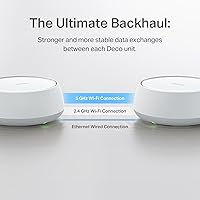
  • Dual-band design means no dedicated wireless backhaul band in multi-node deployments, which can squeeze throughput under heavy load.
  • Real-world Wi-Fi 7 speed gains are minimal if your devices are still on Wi-Fi 5 or Wi-Fi 6.
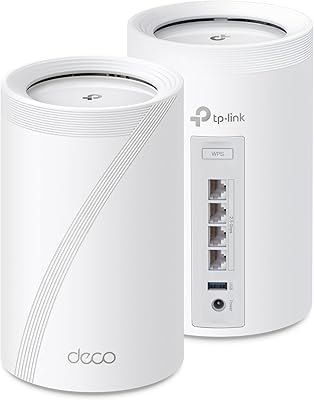
  • Only two ports per unit — anyone needing more than two wired connections will need a separate switch.
  • The plastic build runs noticeably warm under sustained load, raising some questions about long-term thermal management.
  • Single-node coverage struggles in multi-story homes with thick walls or reinforced concrete floors.
  • TP-Link's broader security history still surfaces as a concern among informed buyers, even with the CISA pledge in place.
  • No USB 3.0 port means no option for a shared network drive or USB-connected printer without additional hardware.
  • App-only management creates a dependency on TP-Link's cloud infrastructure that some privacy-conscious users find uncomfortable.

Ratings

The TP-Link Deco BE23 WiFi 7 Mesh Router has been scored below using AI analysis of thousands of verified global user reviews, with spam, bot-submitted, and incentivized feedback actively filtered out. Scores reflect the full picture — where this Wi-Fi 7 node genuinely delivers and where real buyers have run into friction. Both the strengths and the recurring frustrations are weighted transparently into every category.

Value for Money
93%
For buyers who've watched Wi-Fi 7 hardware sit at premium prices since its debut, the Deco BE23 hits a price point that feels almost disruptive. Users consistently note that getting MLO, dual 2.5G ports, and genuine Wi-Fi 7 certification at this cost tier was simply not possible even a year ago.
A handful of buyers feel the value calculation shifts once you factor in a HomeShield subscription for the full security feature set. If you plan to use advanced parental controls or real-time threat monitoring, the ongoing cost changes the long-term math slightly.
Setup & Ease of Use
91%
The Deco app is one of the most consistently praised aspects across the entire review base. Users report that getting from box-open to a working network takes under ten minutes, with clear step-by-step prompts that don't require any networking knowledge whatsoever.
A small segment of users, typically those running more complex home networks with VLANs or custom DNS configurations, find the app-only management approach limiting. There is no traditional web-based admin interface, which frustrates power users who want deeper manual control.
Wi-Fi Speed Performance
84%
Users upgrading from Wi-Fi 5 or older Wi-Fi 6 routers report meaningful real-world speed improvements, particularly on devices close to the node. Streaming 4K content to multiple TVs simultaneously, or running large cloud backups alongside video calls, shows noticeably less congestion than older hardware.
Real-world gains are device-dependent — users without Wi-Fi 7 client hardware won't see the headline speeds and a few buyers admit they didn't realize this before purchasing. On a mixed-device household with mostly Wi-Fi 5 and 6 gear, the improvement over a good Wi-Fi 6 router is incremental rather than dramatic.
Coverage & Signal Range
82%
18%
Apartment and single-story home users are the most satisfied group in the review pool. The four internal high-gain antennas hold signal well through standard drywall and across open floor plans up to the rated 2,500 square feet, with very few dead zones reported in those environments.
In multi-story homes or properties with thick concrete walls, signal drop-off becomes more noticeable beyond the first floor. Several buyers in older homes with brick interior walls or steel-framed construction needed a second node earlier than they expected based on the coverage specs.
Wired Port Quality
89%
Having two 2.5 Gbps ports on a router at this price tier is genuinely uncommon and buyers with multi-gig ISP plans are particularly vocal about how much they appreciate it. Wired backhaul between nodes through these ports also significantly improves multi-node stability compared to wireless-only backhaul setups.
The absence of any additional gigabit LAN ports means wired device capacity is limited out of the box. Users with desktop PCs, NAS drives, and smart TVs all wanting hardwired connections will need to add a separate network switch, which adds cost and another piece of hardware to manage.
Latency & Reliability
86%
MLO — the ability to bond both bands into a single connection path — produces measurable latency reductions for supported devices, which gamers and video conferencing users call out specifically. Day-to-day reliability scores are high, with very few reports of random disconnects or the need to reboot the router.
On non-Wi-Fi 7 devices, the latency benefits of MLO simply don't apply, and a few users were disappointed when their older laptops or phones didn't show the improvement they expected. Wireless backhaul in tri-band-hungry multi-node setups can still introduce more latency than a fully wired configuration.
Security Features
72%
28%
WPA3-Personal encryption is enabled by default, and the CISA Secure-by-Design pledge has noticeably softened concerns among buyers who were aware of past TP-Link security controversies. The free tier of HomeShield does cover basic IoT device isolation and guest network controls adequately for most households.
The paywall for HomeShield's advanced features — including detailed intrusion detection and content filtering beyond basic categories — catches buyers off guard with some regularity. Those who purchased expecting a full-featured security suite without reading the fine print express clear frustration in their reviews.
Parental Controls
68%
32%
Parents running the free HomeShield tier can still set basic time schedules and block broad content categories per device. For households with younger children where granular filtering isn't a priority, the built-in tools are functional enough for everyday use.
The more granular parental control features — per-app blocking, detailed usage reports, and age-based content profiles — sit firmly behind the paid HomeShield subscription. Users expecting router-level parental controls comparable to Circle or Eero's paid offerings are likely to be underwhelmed without subscribing.
App & Software Experience
83%
The Deco app receives strong marks for its clean interface, automatic firmware update handling, and real-time device management. Users appreciate being able to pause internet access for specific devices or run speed tests directly from their phone without logging into any separate dashboard.
Several technically proficient users flag the lack of a desktop web interface as a genuine drawback, particularly when troubleshooting network issues. App-only control also means that if TP-Link discontinues support or changes the app, local management options are effectively nonexistent.
Multi-Node Mesh Performance
79%
21%
Users who run two or three nodes in a larger home report that AI-Roaming handles device handoff between nodes without the sticky-client issues that plagued older mesh systems. Wired backhaul via the 2.5G ports further tightens inter-node performance in those setups.
The dual-band limitation becomes more noticeable in dense multi-node deployments where a dedicated backhaul band would prevent congestion. Buyers coming from tri-band systems note that under heavy simultaneous load across multiple nodes, throughput takes a larger hit than they experienced previously.
Device Compatibility
88%
Backward compatibility with Wi-Fi 4, 5, and 6 devices is handled without issue, which matters in households where not every device is current-generation. Smart home gadgets, older laptops, and budget Android phones all connect and stay connected reliably on the 2.4 GHz band.
A few users with older enterprise-grade network equipment or non-standard ISP modem configurations reported minor compatibility hiccups during initial setup. These cases are edge scenarios, but they do exist in the review pool and typically require a call to TP-Link support to resolve.
Build & Design
77%
23%
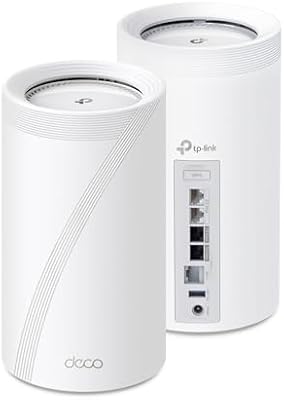
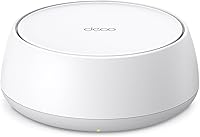
The compact white cylindrical form factor fits discreetly on a shelf or router stand without looking out of place in a living space. At 2.25 pounds it's light enough to mount or reposition easily, and the lack of external antennas keeps the aesthetic clean.
The all-plastic shell feels lightweight in a way some buyers associate with lower durability, and the passive cooling design means the unit runs noticeably warm during sustained heavy traffic. No ventilation slots are visible, which a few users flag as a concern for long-term heat management.
Installation & In-Box Contents
85%
The included RJ45 cable and quick installation guide are genuinely useful rather than token additions, and the power adapter cable length is long enough for most router placement scenarios. Users appreciate that the box contains everything needed to get started without an immediate accessory purchase.
The quick installation guide is intentionally minimal, pointing users to the app for any setup beyond the basics. Those without a smartphone or who prefer physical documentation will find the printed materials insufficient for anything beyond the most straightforward installation.
Brand Trust & Support
71%
29%
The CISA Secure-by-Design pledge and active firmware update cadence have helped rebuild confidence among buyers who were on the fence due to prior TP-Link security headlines. Customer support response times are rated as average-to-good, with most technical issues resolved within one or two contacts.
TP-Link's broader security scrutiny — including past government-level concerns in some regions — remains a visible thread in the review pool, and not all buyers are fully satisfied by the CISA pledge as a resolution. For security-conscious buyers in regulated industries, this brand history requires due diligence before purchasing.

Suitable for:

The TP-Link Deco BE23 WiFi 7 Mesh Router is a strong pick for anyone living in an apartment, condo, or single-story home under 2,500 square feet who wants a genuinely future-ready network without paying a premium price to get there. Remote workers who spend their days on video calls, shared drives, and cloud-based tools will appreciate the low-latency MLO connection, which keeps things stable even when other household members are streaming or gaming simultaneously. Households already running 20 or more connected devices — smart speakers, security cameras, phones, tablets, consoles — will find the 150-device ceiling and strong 5 GHz throughput more than adequate for the foreseeable future. If your ISP recently upgraded you to a multi-gig plan, the dual 2.5 Gbps ports mean this mesh router won't become the speed bottleneck that a standard gigabit router would. Existing Deco users who want to add a Wi-Fi 7 node to expand their current setup will also find the integration into the Deco ecosystem refreshingly painless.
Not suitable for:

The TP-Link Deco BE23 WiFi 7 Mesh Router is not the right choice for buyers expecting premium Wi-Fi 7 performance across a large, multi-story home on a single node — coverage drops off meaningfully through concrete floors or thick walls, and the dual-band architecture lacks a dedicated backhaul band that tri-band systems use to keep inter-node traffic from competing with client traffic. Power users who rely on a web-based router admin interface for VLAN configuration, custom DNS rules, or advanced firewall controls will find the app-only management approach too restrictive. Anyone assuming the HomeShield security suite is fully free should know upfront that meaningful features like detailed content filtering, per-device usage reports, and advanced threat intelligence sit behind a recurring paid subscription. Households with a device fleet made up primarily of older Wi-Fi 5 or Wi-Fi 6 hardware won't see the dramatic speed gains that Wi-Fi 7 headlines suggest, since the biggest improvements only materialize when client devices also support Wi-Fi 7. Finally, buyers in regions or professions where TP-Link's security background remains a disqualifying concern — regardless of the CISA pledge — should factor that into their decision before purchasing.

Specifications

  • Wi-Fi Standard: The Deco BE23 operates on Wi-Fi 7 (802.11be) and is backward compatible with 802.11a/b/g/n/ac/ax devices.
  • Frequency Bands: Dual-band design covers both the 2.4 GHz and 5 GHz frequency bands simultaneously.
  • Max Throughput: Combined wireless throughput is rated at BE3600, comprising up to 2882 Mbps on 5 GHz and 688 Mbps on 2.4 GHz.
  • Channel Width: Supports 160 MHz channel width on the 5 GHz band for higher per-device throughput in supported environments.
  • Streams: 4-stream (4x4) MIMO configuration is supported across the dual-band radios.
  • Wired Ports: Each unit includes two 2.5 Gbps WAN/LAN ports that support both internet input and wired device connections or wired backhaul.
  • Coverage Area: A single node provides Wi-Fi coverage for spaces up to 2,500 square feet under typical residential conditions.
  • Device Capacity: The network supports connections from 150 or more simultaneous client devices without requiring manual load balancing.
  • Backhaul Support: Supports both wired backhaul via the 2.5G ports and wireless backhaul using Wi-Fi 7 MLO in multi-node configurations.
  • Security: Ships with WPA3-Personal encryption enabled by default and includes access to the HomeShield security platform in both free and paid subscription tiers.
  • Antennas: Four internal high-gain antennas per node are paired with four high-power front-end modules (FEMs) for extended signal reach.
  • Key Wi-Fi 7 Features: Implements Multi-Link Operation (MLO), Multi-RUs, and 4K-QAM modulation as part of the 802.11be feature set.
  • Smart Home: Compatible with Amazon Alexa for basic voice control of network functions through the Deco skill.
  • USB Port: No USB port is included on this unit; shared storage or printer connectivity requires a separate network switch or device.
  • Dimensions: Each node measures 7.01 x 6.65 x 4.80 inches in its compact cylindrical form factor.
  • Weight: Each unit weighs 2.25 pounds, making it easy to reposition or mount as needed.
  • Color: Available in White only for the standard retail configuration.
  • In-Box Contents: Each package includes one Deco BE23 node, one power adapter, one RJ45 Ethernet cable, and a printed quick installation guide.

Related Reviews

TP-Link Deco BE75 WiFi 7 Mesh System
85%
94%
Performance
88%
Ease of Setup
91%
Security Features
92%
Coverage & Range
79%
Value for Money
More
TP-Link Deco BE63 WiFi 7 Mesh System
89%
94%
Overall Performance
93%
WiFi Coverage
91%
Device Capacity Handling
88%
Setup & Installation
90%
App Experience
More
TP-Link Deco BE85 WiFi 7 Mesh System
87%
89%
Wi-Fi Performance
91%
Setup Process
85%
Coverage and Range
93%
Security Features
78%
Device Compatibility
More
TP-Link Deco M5 Mesh WiFi Router 1-Pack
86%
88%
Performance
93%
Setup Ease
85%
Coverage Range
91%
Security Features
77%
App Experience
More
TP-Link Deco BE95 Wi-Fi 7 Mesh System 2-Pack
78%
88%
Wireless Performance
83%
Coverage & Range
93%
Wired Connectivity
86%
Setup & Installation
79%
App & Management Experience
More
TP-Link Archer BE700 WiFi 7 Router
85%
93%
Performance
88%
Ease of Setup
91%
Coverage & Range
94%
Speed (Wi-Fi 7)
85%
Security Features
More
TP-Link Archer BE24000 WiFi 7 Router
87%
94%
Performance
89%
Setup & Installation
92%
Connectivity & Compatibility
90%
Coverage & Range
88%
Security Features
More
TP-Link Archer BE550
76%
83%
Wireless Performance
91%
Wired Port Quality
88%
Setup & Ease of Use
67%
Coverage & Range
58%
HomeShield Security & Parental Controls
More
TP-Link Archer BE260 WiFi 7 Router
85%
93%
WiFi Performance
89%
Ease of Setup
77%
Coverage & Range
91%
Streaming & Gaming Experience
85%
Design & Build Quality
More
TP-Link Deco X20 1-Pack Mesh WiFi System
78%
93%
Ease of Setup
71%
Coverage Reliability
84%
Multi-Device Performance
88%
App Experience
86%
Parental Controls
More

FAQ

For most apartments and single-story homes under 2,500 square feet, one node handles coverage without issue. If you have a larger home, multiple floors, or thick concrete walls, you would benefit from a two or three-pack — or adding extra nodes later, since the Deco ecosystem lets you expand at any time.

Honestly, the upgrade will be more modest than the Wi-Fi 7 headlines suggest if your devices are older. You will still get better network management and the dual 2.5G ports are genuinely useful, but the headline speed improvements and latency reductions from MLO only fully kick in when your client devices also support Wi-Fi 7. Think of it as future-proofing as much as an immediate performance leap.

MLO stands for Multi-Link Operation — it lets a compatible device send and receive data across both the 2.4 GHz and 5 GHz bands at the same time, rather than picking one and sticking with it. The practical result is lower latency and more stable connections, which is especially noticeable during video calls or online gaming where a brief dropout is disruptive.

HomeShield has a free tier that covers basic features like guest network management, simple content filtering, and IoT device isolation. The more advanced capabilities — detailed parental control profiles, per-device usage reports, and real-time intrusion detection — require a paid HomeShield Pro subscription. It is worth checking the current subscription pricing on TP-Link's website before assuming the full feature set is included.

The TP-Link Deco BE23 WiFi 7 Mesh Router was developed under TP-Link's CISA Secure-by-Design pledge, which is a formal public commitment to the U.S. Cybersecurity and Infrastructure Security Agency to build and maintain devices with security as a core requirement. That does not erase the company's broader history from public discussion, but it is a concrete and verifiable step. If you work in a regulated industry or handle particularly sensitive data on your home network, it is worth doing your own due diligence — for most residential users, the current security posture is considered acceptable.
The Deco app is the primary and only supported management interface — there is no traditional web-based admin panel. For most users this is completely fine, and the app is well-regarded for being intuitive. If you rely on browser-based access for custom DNS settings, VLAN configuration, or advanced firewall rules, this will be a real limitation for you.

You can mix Deco models within the same mesh network, which is one of the stronger points of the Deco ecosystem. Adding this Wi-Fi 7 node to an existing Deco setup with older hardware is straightforward through the app. Keep in mind that nodes will negotiate down to the capabilities of the slower hardware for inter-node communication, so a fully matched setup will always perform best.

Yes — the dual 2.5 Gbps WAN/LAN ports are specifically what make this mesh router compatible with multi-gig internet plans. Most routers at this price still top out at one gigabit, so having two 2.5G ports here is genuinely useful if your modem and ISP connection can deliver those speeds. Make sure your modem also has a 2.5G output port to take full advantage.

Setup is one of the most consistently praised aspects of this router across thousands of reviews. You download the Deco app, plug in the unit, and follow the on-screen prompts — most users report being fully online within ten minutes. You do need a smartphone to complete the initial setup, as there is no browser-based alternative.

The unit runs warm under sustained load, which is normal for compact routers with passive cooling. Placing it inside a fully enclosed cabinet with no airflow is not recommended — it needs some ventilation around it to stay within safe operating temperatures. A shelf with open sides or a lightly vented enclosure should be fine, but a sealed cabinet risks shortening the hardware's lifespan over time.

Where to Buy