Overview

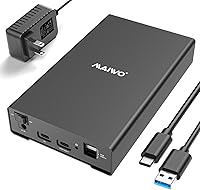
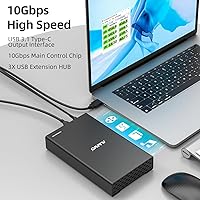
The MAIWO 2.5/3.5 SATA Hard Drive Enclosure takes a practical approach to a familiar problem: what do you do with a stack of old SATA drives that need occasional access? Rather than buying a bulky multi-bay dock, this MAIWO enclosure fits both 2.5-inch and 3.5-inch drives in a single aluminum chassis with no adapter swapping required. The USB-C 3.1 Gen2 interface supports up to 10Gbps throughput with UASP, and a built-in three-port hub turns it into a compact desk utility rather than a one-trick drive reader. It does require an external power adapter — a detail worth knowing before you buy.
Features & Benefits

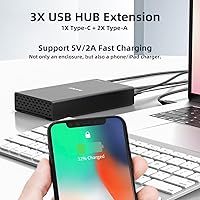
Speed expectations need to be set honestly here. The USB-C 3.1 Gen2 interface is genuinely capable of 10Gbps, but mechanical hard drives are bottlenecked by the SATA bus at closer to 6Gbps regardless of what cable you use. SATA SSDs will get considerably more out of the faster interface. Beyond transfer rates, the three hub ports — two USB-A and one USB-C, each at 10Gbps — are legitimately useful for cutting down desk cable clutter. The aluminum shell assists with passive heat dissipation during sustained transfers, and the internal ABS bracket secures most drives firmly without any tools.

Best For

This SATA drive caddy hits its stride for anyone repurposing old laptop or desktop drives rather than shopping for new storage. Photographers and videographers who regularly move large files and need reliable sustained read speeds will find it a practical fit. IT technicians who swap drives for diagnostics will appreciate the no-fuss dual-size compatibility. The hub ports also make it a sensible pick for Mac mini or compact PC users already running low on available connections. If you need access to one drive at a time and want a bit more utility from the enclosure itself, this covers the bases well.

User Feedback

Across several hundred ratings, this drive enclosure sits at 4.3 out of 5 — a score that reflects genuine satisfaction alongside a handful of recurring complaints. Build quality draws consistent praise, with buyers noting the aluminum construction feels more substantial than the price bracket might suggest. The integrated hub also earns real-world credit, not just spec-sheet recognition. On the downside, the power brick is bulky, and some units ship with a non-detachable cable that limits placement flexibility. A few buyers with thicker 3.5-inch drives also reported fit issues, so verifying your drive dimensions against the supported range before ordering is a sensible precaution.

Pros

  • Accepts both 2.5-inch and 3.5-inch SATA drives in a single unit, eliminating the need for separate enclosures.
  • Aluminum alloy shell feels noticeably more robust than competing all-plastic enclosures at a similar price.
  • The integrated three-port USB hub adds real desk utility, not just spec-sheet padding.
  • USB-C 3.1 Gen2 with UASP support future-proofs the connection, especially if you pair it with a fast SATA SSD.
  • Stable 12V 3A dedicated power supply means 3.5-inch drives spin up reliably without voltage drops.
  • Tool-free drive installation makes swapping drives quick and frustration-free.
  • Works across Windows, macOS, and Linux without driver headaches.
  • Supports drives up to 24TB, so it will not become obsolete as drive capacities grow.
  • At #76 in its Amazon category, it has enough real-world users behind it to trust the feedback patterns.

Cons

  • The external power brick is bulky and adds desk clutter that undermines the enclosure's otherwise tidy footprint.
  • On some units, the data cable is non-detachable, limiting cable management flexibility.
  • Mechanical hard drives will never exceed roughly 6Gbps regardless of the 10Gbps interface — the spec can mislead buyers.
  • Occasional fit issues with thicker 3.5-inch drives have been reported; the bracket is not universally accommodating.
  • The 80cm included cable may fall short for users with tower PCs placed on the floor or away from the desk.
  • Only one drive can be installed at a time, so it cannot replace a multi-bay dock for parallel access workflows.
  • The ABS plastic internal bracket, while functional, feels less premium than the aluminum exterior suggests.

Ratings

The scores below for the MAIWO 2.5/3.5 SATA Hard Drive Enclosure were generated by our AI engine after analyzing verified global buyer reviews, actively filtering out incentivized, bot-generated, and duplicate feedback to surface what real users consistently experienced. Both the strengths that earned this drive caddy its loyal following and the friction points that prevent a perfect score are transparently reflected in every category.
Build Quality
86%
The aluminum alloy shell consistently earns praise from buyers who expected something flimsier at this price point. Users describe it as feeling closer to a mid-range docking station than a budget enclosure, with solid seams and no flex when inserting drives. For home users who keep it on a desk long-term, the premium feel matters.
The internal ABS plastic bracket is a noticeable step down from the exterior quality, and a handful of reviewers found it less confidence-inspiring when securing heavier 3.5-inch desktop drives. It functions correctly in most cases, but it does undercut the premium impression the aluminum shell creates.
Transfer Speed
74%
26%
For users pairing this enclosure with a SATA SSD, the USB-C 3.1 Gen2 interface and UASP support deliver genuinely fast sustained transfers that make offloading large photo or video libraries noticeably quicker than older USB 3.0 enclosures. Reviewers in creative workflows reported a real-world improvement in their file-moving routines.
The 10Gbps headline figure misleads buyers who plan to use it with mechanical hard drives, which are physically capped at around 6Gbps by the SATA interface itself. Several reviewers expressed frustration after expecting a speed leap that spinning drives simply cannot deliver, regardless of the enclosure used.
Drive Compatibility
88%
Supporting both 2.5-inch and 3.5-inch SATA drives in a single unit is the core selling point, and it largely delivers. IT technicians and home users repurposing drives from multiple retired machines appreciate not needing separate enclosures for different form factors, saving both money and desk space.
Thicker 3.5-inch drives, particularly those beyond 15mm, have caused fit problems for a subset of users. The official spec covers drives up to 15mm, but this catches buyers off guard when they assume any standard desktop drive will slide in without issue.
USB Hub Utility
83%
The three downstream hub ports — two USB-A and one USB-C — are one of the most genuinely appreciated differentiators in user feedback. Compact desktop users and Mac mini owners specifically called out the hub as solving a real daily frustration, turning a single-function enclosure into a practical desk accessory.
While the hub ports are rated at 10Gbps, real-world bandwidth is shared across the connection, meaning heavy simultaneous use of the hub ports alongside active drive transfers can create throughput competition. A few users noticed this in data-intensive scenarios.
Power Setup
61%
39%
The dedicated 12V 3A power adapter is the right engineering choice for 3.5-inch drives, which demand more stable current than USB alone can reliably supply. Users who previously experienced drives stuttering or failing to spin up with bus-powered enclosures found this setup noticeably more dependable for desktop HDDs.
The power brick itself draws consistent complaints — it is bulky, adds a wall outlet dependency, and on some units the data cable is non-detachable, which limits cable management flexibility. For anyone wanting a clean desk setup or portable use, this is a genuine daily inconvenience rather than a minor footnote.
Value for Money
82%
18%
At its mid-range price point, this drive enclosure bundles dual drive-size support, an aluminum shell, a USB hub, and UASP-enabled Gen2 speeds into one package that would cost noticeably more if each feature were purchased separately. Buyers repeatedly noted that the aluminum build alone felt like more than they paid for.
The bulky power adapter and occasional fit issues with thicker drives leave some buyers feeling the package is not quite as complete as the spec sheet implies. Competitors at a slightly higher price offer more polished mechanical fit and tidier cable solutions that some users ultimately found worth the premium.
Ease of Setup
89%
Plug-and-play operation across Windows, macOS, and Linux with no drivers required means most users are up and running within seconds of connecting the enclosure. IT technicians and everyday home users alike cited this as a friction-free experience, especially when swapping drives frequently for diagnostics or data recovery.
The tool-free bracket design, while convenient for standard drives, requires a bit of physical confidence when first inserting a drive — there is minimal visual feedback that the drive is seated correctly, which made a few first-time users uncertain before they confirmed it was working via their OS.
Heat Management
78%
22%
The aluminum alloy shell acts as a passive heatsink during sustained transfers, and users running extended backup jobs reported that the enclosure stays comfortably warm rather than hot to the touch. This is a meaningful advantage over all-plastic alternatives that tend to trap heat and reduce drive longevity over time.
There is no active cooling, so users running the enclosure in warm ambient environments or pushing it through very long continuous transfers may see the shell become uncomfortably warm. It is not a thermal failure risk under normal conditions, but it is worth monitoring in demanding or enclosed setups.
Cable & Accessories
63%
37%
The included 80cm USB-C to USB-A cable covers the majority of desktop scenarios where the computer and enclosure share the same desk surface. The power adapter is included out of the box, which avoids the frustrating need to source a compatible brick separately as some rival products require.
Eighty centimeters is not enough for users with floor-standing towers or under-desk PC setups, forcing a separate cable purchase immediately. The non-detachable cable reported on some units compounds this issue, since it removes the option to simply swap in a longer cable of your own choice.
Portability
52%
48%
The enclosure itself is compact and light enough at 1.37 pounds to toss in a bag for occasional transport, and the aluminum shell protects drives adequately during light handling. For users moving between two fixed locations — such as home and office — it is manageable.
The mandatory external power adapter effectively eliminates this as a portable solution for most practical purposes. Without a power outlet and a clear surface, the enclosure simply cannot be used, making it better characterized as a stationary desk device than a travel-friendly option.
OS & Platform Support
91%
Broad native support across Windows, macOS, and Linux without any driver installation is something buyers repeatedly confirmed in real-world use. Mac mini and compact PC users in particular found the enclosure detected and mounted immediately, with no compatibility surprises across different OS versions.
A small number of Linux users on niche distributions reported needing to confirm UASP kernel support manually, though this is a system-level consideration rather than a product defect. No significant platform-specific issues were flagged for mainstream Windows or macOS environments.
Stackability
69%
31%
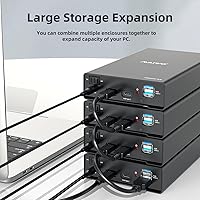
The advertised daisy-chain and stacking capability is a genuine differentiator for users who manage multiple drives and want to scale without buying a dedicated multi-bay dock. The concept works and gives this enclosure a longer useful lifespan as storage needs grow over time.
Real-world reliability of daisy-chaining varies, and user feedback on this specific feature is thinner than on core functions like drive compatibility or hub utility. Buyers should treat stackability as a useful bonus rather than a primary reason to purchase, as consistent performance across chained units is not universally confirmed.
Drive Security & Fit
71%
29%
For the vast majority of standard 2.5-inch drives and typical 3.5-inch desktop HDDs within the 7mm to 15mm thickness range, the tool-free bracket holds drives firmly with no noticeable wobble during normal use. Users swapping drives regularly found the mechanism repeatable and reliable across dozens of insertions.
The fit tolerance for drives near the upper thickness limit is tighter than users expect, and drives slightly outside spec have caused bent brackets or forced insertions in isolated cases. This is not a widespread failure mode, but it is a real risk for buyers who do not verify their drive dimensions in advance.

Suitable for:

The MAIWO 2.5/3.5 SATA Hard Drive Enclosure is a strong fit for anyone sitting on a collection of old SATA drives from retired laptops or desktops who wants a clean, no-fuss way to access them externally. Home users building a simple single-drive backup rotation will appreciate that it handles both drive sizes without any adapter gymnastics. Photographers and videographers regularly offloading large shoots benefit from the reliable sustained transfer speeds, especially when paired with a SATA SSD. IT technicians and hobbyists who swap drives frequently for diagnostics or data recovery will find the tool-free bracket and broad compatibility genuinely convenient. The built-in USB hub also makes it a smart desk accessory for Mac mini or compact PC users who are already stretched thin on available ports.
Not suitable for:

Buyers expecting a purely bus-powered setup should look elsewhere — the MAIWO 2.5/3.5 SATA Hard Drive Enclosure requires a 12V 3A external power adapter, which adds a power outlet dependency and a bulky brick to your desk. If you need to access multiple drives simultaneously, this is a single-drive enclosure and will not replace a multi-bay dock. Users chasing top-end transfer speeds with mechanical hard drives will also be disappointed: no matter how capable the USB-C 3.1 Gen2 interface is, spinning drives are physically limited by the SATA bus to around 6Gbps. Those with thicker 3.5-inch drives should verify their specific drive dimensions against the supported thickness range before ordering, as fit issues have been reported. Finally, frequent travelers or mobile workers who need a compact, self-powered solution will find the power adapter dependency impractical in the field.
Specifications

  • Interface: Connects via USB 3.1 Gen2 Type-C, delivering a theoretical maximum throughput of 10Gbps with UASP protocol support.
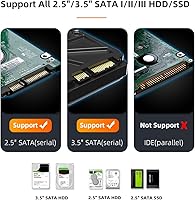
  • Drive Compatibility: Accepts 2.5-inch and 3.5-inch SATA I, II, and III hard drives and solid-state drives without any adapter required.
  • Max Capacity: Supports single hard drives up to 24TB in capacity, accommodating current and near-future large-format desktop drives.
  • Drive Thickness: Officially supports drives ranging from 7mm to 15mm in height, with limited anecdotal support reported for drives up to 26mm.
  • Hub Ports: Features three built-in USB 3.1 ports for downstream devices: two Type-A and one Type-C, each rated at 10Gbps.
  • Power Supply: Requires an included 12V 3A external AC power adapter; the enclosure is not bus-powered and cannot operate from USB alone.
  • Shell Material: Outer housing is constructed from aluminum alloy, which aids in passive heat dissipation during sustained read and write operations.
  • Bracket Material: The internal drive-mounting bracket is made from ABS plastic and secures most standard drives without screws or tools.
  • Included Cable: Ships with one 80cm USB-C to USB-A data cable suitable for most desktop and laptop connection scenarios.
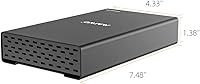
  • Dimensions: The enclosure measures approximately 190mm x 110mm x 35mm (7.48″ x 4.33″ x 1.38″) in length, width, and height respectively.
  • Weight: The unit weighs approximately 1.37 pounds, making it reasonably portable but not designed for frequent travel use.
  • OS Support: Compatible with Windows, macOS, and Linux operating systems; no proprietary drivers are required for standard operation.
  • UASP Support: UASP (USB Attached SCSI Protocol) is supported, reducing CPU overhead and improving transfer efficiency on compatible host systems.
  • Stackability: Multiple enclosures can be daisy-chained or physically stacked to expand accessible storage across several drives from a single connection.
  • Best Sellers Rank: Ranked #76 in the Amazon Enclosures category at the time of evaluation, reflecting a well-established presence in its segment.

Related Reviews

ikuai 3.5″ USB 3.0 Hard Drive Enclosure
80%
93%
Ease of Setup
71%
Build Quality
62%
Cable Quality & Reliability
88%
Drive Compatibility
74%
Data Transfer Speed
More
Inateck FE3001 3.5-inch Hard Drive Enclosure
79%
88%
Build Quality
83%
Drive Compatibility
79%
Transfer Speed
74%
Heat Management
91%
Setup & Ease of Use
More
ORICO 3588C3 3.5″ Hard Drive Enclosure
74%
93%
Ease of Installation
74%
Transfer Performance
67%
Build Quality
61%
Connection Reliability
83%
Value for Money
More
Vantec NexStar JX 3.5″ HDD Enclosure
76%
93%
Ease of Setup
78%
Transfer Speed — USB
86%
Transfer Speed — eSATA
74%
Thermal Management
67%
Build Quality
More
Vantec NexStar3 3.5″ External Hard Drive Enclosure
77%
88%
Build Quality
82%
Transfer Performance
84%
Thermal Management
86%
Ease of Setup
71%
Compatibility
More
StarTech S351BMU33ET 3.5″ Hard Drive Enclosure
80%
86%
Build Quality
91%
Ease of Drive Swapping
83%
USB 3.0 Transfer Performance
74%
eSATA Connectivity
88%
Drive Compatibility
More
Cenmate 5-Bay Hybrid HDD/NVMe Enclosure
73%
83%
Build Quality
78%
Thermal Management
71%
Transfer Speed
69%
RAID Functionality
76%
Drive Compatibility
More
Mediasonic HF7-SU31C 4-Bay Hard Drive Enclosure
77%
88%
Ease of Setup
74%
Transfer Speed
82%
Build Quality
71%
Thermal Management
61%
Fan Noise
More
Syba SY-ENC50122 5-Bay RAID Enclosure
71%
83%
Build Quality
78%
RAID Functionality
86%
Drive Compatibility
71%
USB 3.0 Performance
54%
eSATA Usability
More
TerraMaster D4-320
TerraMaster D4-320
80%
93%
Ease of Setup
86%
Transfer Speed
71%
Build Quality
88%
Noise Level
82%
Thermal Management
More
Vantec NexStar GX 2.5″ USB-C Drive Enclosure
79%
88%
Build Quality
83%
Transfer Speed
91%
Ease of Setup
71%
Heat Management
63%
Drive Fit & Tolerance
More

FAQ

Yes, the enclosure is designed to accept both sizes natively. You do not need a separate adapter or bracket — just slide your drive in and connect. That said, double-check your 3.5-inch drive's thickness, as the bracket is officially rated for drives up to 15mm tall.

That depends heavily on the drive you put inside it. The USB-C 3.1 Gen2 interface is genuinely capable of 10Gbps, but a mechanical hard drive will never exceed roughly 6Gbps because of SATA bus limitations. If you want to get close to 10Gbps, pair the enclosure with a fast SATA SSD rather than a spinning HDD.

It requires the included 12V 3A power adapter — it is not bus-powered. This is actually a good thing for 3.5-inch drives, which need more stable current than a USB port can supply, but it does mean you need a free outlet nearby.

Yes, the MAIWO 2.5/3.5 SATA Hard Drive Enclosure is fully compatible with macOS and requires no drivers. It shows up as a standard external drive. The USB-C connection is also a natural fit for modern MacBooks and Mac mini setups.
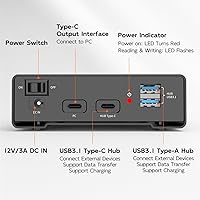
Absolutely. The three downstream hub ports — two USB-A and one USB-C — operate independently of the drive connection, so you can plug in a keyboard, a flash drive, or any other USB peripheral at the same time.

For most standard drives, installation is tool-free. The internal ABS bracket holds the drive in place without screws. A small number of users with non-standard drive sizes have reported fit issues, so it is worth checking your specific drive dimensions beforehand.

The included USB-C to USB-A cable is 80cm long, which works fine for most desktop configurations where the computer and enclosure sit on the same desk. If your PC tower is on the floor, you may want a longer cable purchased separately.

The enclosures are advertised as stackable and daisy-chain compatible, meaning you can link multiple units together. In practice, this is a convenient option for users who regularly need access to several drives without dedicating a full multi-bay dock to the task.

It is a common point of frustration for buyers. The brick is on the bulkier side and adds a cord to your desk setup. If a clean, minimal desk is important to you, factor that in. It is not a dealbreaker for most people, but it is worth knowing about upfront.

The enclosure supports drives up to 24TB in capacity, which covers every consumer-grade SATA hard drive currently available. You are unlikely to outgrow it on capacity alone anytime soon.