Overview

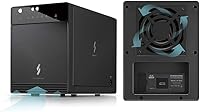
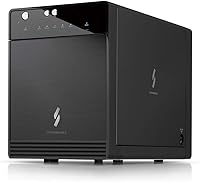
The Mediasonic HF7-SU31C 4-Bay Hard Drive Enclosure sits comfortably in the mid-range of the direct-attached storage market, targeting users who want to expand local storage without wrestling with complex RAID configurations. Built from metal and manufactured in Taiwan, this 4-bay enclosure stands out in a category often dominated by flimsy plastic alternatives. It has been on the market since 2018 and has gathered over 4,000 customer reviews — a track record worth paying attention to. One thing to clarify upfront: this is a direct-attached storage device. It connects to a single host computer over USB-C, with no network sharing capability whatsoever. If that fits your workflow, read on.
Features & Benefits

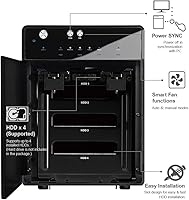
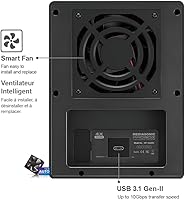
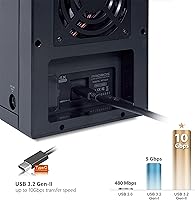
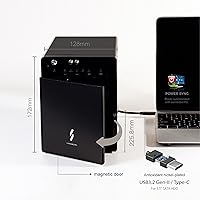
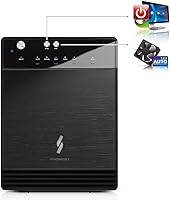
The headline spec is USB 3.2 Gen 2, which supports transfer rates up to 10Gbps over the included Type-C cable. That said, real-world throughput is capped by the mechanical drives themselves — most 3.5-inch HDDs top out around 200–250MB/s — so the interface future-proofs the unit rather than unlocking raw speed today. It accepts up to four 3.5-inch SATA I/II/III drives, supports per-drive capacities up to 24TB, and includes UASP for smoother sustained transfers with lower CPU overhead. A smart thermal fan monitors internal temperature and adjusts speed accordingly, which matters when all four bays are loaded. The Power Sync feature spins drives down alongside your computer, reducing wear during idle hours. A revised front door with an air intake opening rounds out a thoughtfully updated design.

Best For

This drive bay unit is a strong fit for photographers, videographers, and home users who want to consolidate several years of accumulated 3.5-inch drives into one tidy desktop setup. If you have a drawer full of spare SATA HDDs, slotting them in here is a cost-effective way to build a large local archive without buying new media. USB-C compatibility makes pairing with modern laptops and workstations straightforward. It also suits local backup workflows where transfer speed matters more than remote access. However, if you need hardware RAID protection or the ability to share storage across a network, this unit is not the right tool — there is no RAID support and no Ethernet connectivity of any kind.

User Feedback

Across a large pool of verified buyer reviews, the clearest pattern is that most people find setup genuinely plug-and-play — connect the cable, and Windows, macOS, or Linux recognizes the drives without fuss. Transfer speeds and broad OS compatibility are consistently praised. On the flip side, fan noise draws regular complaints under sustained load when all four bays are populated. Reviewers also note the enclosure runs noticeably warm in a fully loaded configuration. Some buyers report inconsistent drive detection on certain chipsets, though this looks like an edge case rather than a widespread defect. It is worth noting that a portion of low-star reviews appear tied to shipping damage, not hardware failure. Overall, 3.9 stars from over 4,000 reviews reflects a product that performs reliably for most, with a handful of well-defined caveats.

Pros

  • Plug-and-play setup works immediately on Windows, macOS, and Linux with no driver installation required.
  • USB 3.2 Gen 2 at 10Gbps delivers a real, noticeable speed improvement over older USB 3.0 enclosures.
  • All-metal chassis feels substantially more durable than plastic enclosures competing at similar price points.
  • Thermally controlled smart fan stays quiet during light workloads and only ramps up when drives are genuinely working hard.
  • Power Sync spins drives down with the host computer, reducing unnecessary wear during idle periods.
  • UASP support lowers CPU overhead during transfers, keeping your machine responsive while large files move.
  • Supports up to four independent 3.5-inch SATA drives, making it easy to scale storage capacity over time.
  • S.M.A.R.T. passthrough works reliably on Windows, giving users early warning visibility into drive health.
  • The revised Air In-Take front door improves airflow over the previous generation in a practical, not just cosmetic, way.
  • Consistently strong sales rank signals that a large number of real buyers have found it worth recommending.

Cons

  • Fan noise at full load is clearly audible and can be disruptive in quiet home office or studio environments.
  • Drive compatibility above 20TB is inconsistent enough that checking your specific drives before purchasing is genuinely necessary.
  • The unit runs noticeably warm with all four bays fully populated under sustained workloads.
  • The bundled USB-C cable is short, often requiring an aftermarket replacement for flexible desk placement.
  • S.M.A.R.T. data access is unreliable on macOS depending on the utility and OS version used.
  • There is only one USB-C port — no redundancy, no USB hub functionality, and no failover option.
  • Power Sync behavior has been reported as inconsistent on certain Linux distributions and macOS sleep configurations.
  • The drive bay trays feel less solid than the main chassis, with minor flex during drive installation.
  • Buyers with older USB controllers may not see meaningful speed gains and would be paying a premium for unused capability.
  • Warranty coverage is limited relative to what some buyers expect from a device intended for long-term continuous operation.

Ratings

The scores below for the Mediasonic HF7-SU31C 4-Bay Hard Drive Enclosure were generated by AI after systematically analyzing thousands of verified global buyer reviews, with spam, bot-submitted, and incentivized feedback actively filtered out. Both the strengths that keep buyers recommending this drive bay unit and the recurring frustrations that push others toward alternatives are reflected transparently in each category score.
Ease of Setup
88%
A consistent theme across reviewer patterns is how little effort initial setup demands. Buyers report sliding drives in, connecting the USB-C cable, and having all four volumes recognized by Windows, macOS, or Linux within seconds — no driver installation or configuration steps required in the vast majority of cases.
A smaller but persistent subset of users encounters drive detection issues, particularly on systems with certain third-party USB controllers or older chipsets. In those cases, troubleshooting can involve cable swaps, port changes, or firmware checks — frustrating for users who expected zero friction.
Transfer Speed
74%
26%
The USB 3.2 Gen 2 interface is genuinely future-ready, and buyers running large sequential file transfers — think multi-gigabyte video exports or full disk backups — report speeds that saturate the mechanical drives themselves, typically in the 200–250MB/s range per drive.
It is worth being direct: the 10Gbps interface ceiling is never the real bottleneck here. Spinning hard drives top out well below that threshold, so buyers expecting a speed revelation over older USB 3.0 enclosures will notice only modest real-world gains. The interface value is about compatibility, not raw velocity.
Build Quality
82%
18%
The metal chassis is a clear step above the plastic shells common at this price tier. Reviewers regularly describe the unit as feeling solid and well-constructed, and the overall fit and finish earns consistent praise from users who have handled competing enclosures made from cheaper materials.
Some buyers note that the drive bay doors and front panel feel slightly less refined than the main chassis, with a bit of flex under pressure. It is not a structural concern, but for a primarily metal unit it stands out as an area where cost-cutting is noticeable up close.
Thermal Management
71%
29%
The smart fan with a built-in thermal sensor does meaningful work during extended transfer sessions. Users running all four bays during overnight backups or archiving projects report that the fan responds to heat buildup and keeps the unit from reaching worrying temperatures under normal load.
With all four bays populated and drives spinning simultaneously, several reviewer cohorts flag that the enclosure runs noticeably warm to the touch. The fan also ramps up audibly under sustained load, which brings its own set of complaints around noise in quiet work environments.
Fan Noise
61%
39%
At idle or light use with only one or two drives active, the fan operates quietly enough that most users in a home office setting report it blends into background noise. Buyers using this unit in a secondary room or media closet rarely flag noise as a concern.
Under full load with four drives populated, fan noise becomes one of the most consistently cited complaints in negative reviews. Users sensitive to ambient sound — those working in quiet recording environments or open-plan offices — find the acoustic profile at peak load genuinely distracting and difficult to mitigate.
Compatibility
86%
Cross-platform support is a genuine strength here. Reviewers across Windows 10 and 11, multiple macOS versions, and various Linux distributions confirm the unit works without any manual driver setup. UASP support further broadens compatibility with modern host controllers, keeping CPU overhead low during sustained transfers.
Compatibility hiccups do surface in reviews, primarily around specific USB host controller chipsets — certain Intel and AMD integrated controllers have been flagged as problematic by a noticeable minority of buyers. These issues are not universal, but they are consistent enough to warrant checking your system specs before purchasing.
Drive Capacity Support
91%
Support for up to 24TB per bay — and a total raw capacity ceiling in the neighborhood of four high-capacity drives — makes this unit viable for users building out serious long-term archives. Photographers and videographers with years of accumulated footage particularly appreciate not having to cap out at smaller drive sizes.
Capacity ceiling figures in the product listing have shifted across revisions, which has led to some buyer confusion about exactly which drive sizes are reliably supported. A small number of reviewers report issues specifically with the highest-capacity SATA drives, suggesting validation with newer high-density models before committing to a full four-drive purchase.
Value for Money
79%
21%
Relative to competing 4-bay USB enclosures at similar price points, the combination of metal construction, USB 3.2 Gen 2 interface, thermal fan management, and Power Sync makes this a well-rounded package. Buyers repurposing existing 3.5-inch SATA drives see particularly strong value, avoiding the cost of new storage media entirely.
Users who need hardware RAID redundancy or network sharing will find the value proposition sharply reduced, since neither feature is present. For that audience, spending similar money on a budget NAS would be a more rational choice, making it important to qualify the use case before evaluating price fairness.
Power Sync Reliability
77%
23%
Buyers who rely on the Power Sync feature for always-on desktop setups report that it works as expected in most configurations — drives spin down with the host system and spin back up cleanly on wake. This adds meaningful real-world longevity for drives that would otherwise spin 24/7.
A recurring complaint thread involves Power Sync behaving erratically with certain host systems, particularly some laptops that use aggressive USB power management policies. In those cases, drives may spin down unexpectedly during active sessions or fail to wake reliably, requiring manual reconnection.
Long-Term Reliability
81%
19%
Multi-year ownership reviews are notably positive. A meaningful share of buyers report using this 4-bay enclosure daily for two to four years without hardware failure, which is encouraging for a product in this category and at this price tier. S.M.A.R.T support also allows proactive drive health monitoring.
Not all long-term experiences are clean. A subset of buyers describe the unit developing intermittent connectivity issues after extended use — particularly loose USB-C port feel and occasional drive drop-outs. These are not the dominant pattern, but they appear often enough to be credible and worth factoring into expectations.
Cable & Accessories Included
72%
28%
Including a USB-C cable in the box is a practical touch that budget and competing units frequently skip. Most buyers report the included cable performs reliably for day-to-day transfers and does not feel like an afterthought.
The included cable length draws occasional criticism for being too short for flexible desktop placement, and a minority of buyers report swapping it out for a higher-quality third-party cable after experiencing intermittent speed drops. It is functional, but not exceptional.
Software & Monitoring Features
66%
34%
S.M.A.R.T support means users can pull health data from individual drives using standard third-party utilities like CrystalDiskInfo or smartmontools on Linux. For users managing large archives, the ability to spot failing drives early is a genuinely useful safeguard.
There is no bundled management software, which will not bother experienced users but leaves beginners without guidance on drive health monitoring. The enclosure also lacks any hardware status indicators beyond basic power LEDs, so identifying which specific drive is causing a problem requires software outside the box.
Physical Footprint & Design
75%
25%
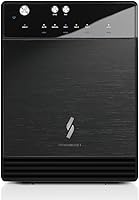
The revised front door with the air intake cutout is a functional improvement over earlier versions, contributing to airflow rather than just changing aesthetics. The unit sits stably on a desk without excessive vibration transfer, and the black metal finish looks professional in most workspace setups.
At roughly 9 inches tall, this drive bay unit has a meaningful vertical footprint that some buyers on tighter desks find awkward. Vibration from four spinning drives simultaneously is also noticeable on hard surfaces, and a small number of reviewers add rubber feet or padding to reduce resonance noise transmitted to their desks.

Suitable for:

The Mediasonic HF7-SU31C 4-Bay Hard Drive Enclosure is a strong fit for anyone who works with large files locally and needs more storage bandwidth than a single external drive can offer. Video editors and photographers dealing with multi-terabyte media libraries will appreciate the 10Gbps USB 3.2 Gen 2 connection, which keeps file transfers fast enough to avoid becoming a bottleneck in a real editing workflow. Home users who have accumulated a pile of individual external drives will find the consolidation into one tidy, metal-chassis unit genuinely satisfying — four bays, one cable, one power brick. Freelancers and small offices looking for a straightforward local backup solution also land squarely in this device's wheelhouse, since it requires no network configuration, no RAID setup, and no driver installation across Windows, macOS, or Linux. If your host machine has a USB 3.2 Gen 2 port and you want fast, direct-attached storage that grows with you as drives get cheaper, this desktop drive dock makes a compelling and practical case for itself.
Not suitable for:

The Mediasonic HF7-SU31C 4-Bay Hard Drive Enclosure is not the right tool if network-attached storage or multi-user access is part of your setup — this is a direct-attached, single-host device, full stop, and no amount of configuration changes that. Anyone expecting RAID functionality for redundancy or performance striping will need to look elsewhere entirely, since all four bays operate independently in JBOD mode only. Users in quiet environments — home recording studios, libraries, shared open offices — should weigh the fan noise at full load seriously before committing, as it is one of the most consistently mentioned frustrations in the real-world review pool. Buyers planning to populate all four bays with drives larger than 20TB should verify compatibility with their specific drive models beforehand, since high-capacity compatibility has been inconsistent enough to warrant caution. Finally, if your computer lacks a USB 3.2 Gen 2 port, the speed advantage that justifies this enclosure over cheaper alternatives largely disappears, making the value proposition harder to defend.
Specifications

  • Model Number: The unit carries the official model designation HF7-SU31C, manufactured by Mediasonic in Taiwan.
  • Interface: Connectivity is provided via USB 3.2 Gen 2 Type-C, supporting theoretical transfer rates up to 10Gbps.
  • Number of Bays: The enclosure houses up to four 3.5-inch SATA hard drives simultaneously in individual bays.
  • Drive Compatibility: Compatible with 3.5-inch SATA I, SATA II, and SATA III hard disk drives from all major manufacturers.
  • Max Drive Capacity: Each individual bay supports hard drives with capacities up to 24TB per drive.
  • Total Raw Capacity: With four bays populated, the enclosure supports a total raw storage capacity of up to 4 x 30TB.
  • Chipset: Internal operation is handled by a VIALabs VL820 and VL716 dual-chipset configuration.
  • UASP Support: UASP (USB Attached SCSI Protocol) is fully supported, reducing CPU overhead and improving sustained transfer efficiency over legacy BOT mode.
  • S.M.A.R.T Support: S.M.A.R.T (Self-Monitoring, Analysis and Reporting Technology) is supported, enabling drive health monitoring via compatible third-party utilities.
  • Cooling System: A built-in smart fan with an integrated thermal sensor automatically adjusts fan speed based on internal temperature readings.
  • Power Sync: The Power Sync feature spins drives down automatically when the connected host computer enters sleep mode, reducing drive wear during idle periods.
  • Hardware RAID: This enclosure does not support any hardware RAID configuration; each installed drive appears as a fully independent volume to the host system.
  • Enclosure Material: The outer shell is constructed from metal, providing a more durable and heat-dissipating chassis than comparable plastic-bodied alternatives.
  • OS Compatibility: The unit is compatible with Windows, macOS, and Linux operating systems without requiring any dedicated driver installation on most configurations.
  • Dimensions: Physical dimensions measure 6.8″ in length, 4.9″ in width, and 9.0″ in height.
  • Item Weight: The enclosure weighs approximately 4 pounds without installed drives.
  • Included Accessories: A USB-C to USB-C cable is included in the box for immediate use upon setup.
  • Air Intake Design: The front door features a revised Air In-Take cutout that actively channels airflow into the enclosure, representing a functional hardware revision over earlier versions.

Related Reviews

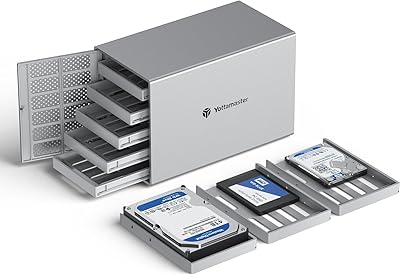
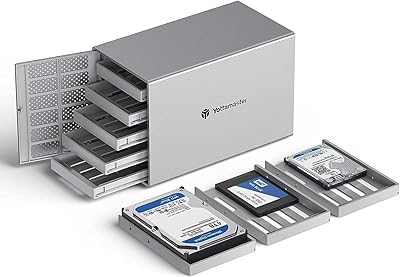
Yottamaster 4 Bay External Hard Drive Enclosure 64TB
82%
94%
Storage Capacity
88%
Ease of Setup
85%
Cooling Performance
90%
Build Quality
91%
Data Transfer Speed
More
ORICO 9948C3 4-Bay 3.5-inch HDD Enclosure
76%
88%
Build Quality
84%
Transfer Speed
79%
Daisy-Chain Functionality
73%
Cooling & Thermal Management
86%
Hot-Swap Usability
More
Mediasonic ProBox HF2-SU3S3 4-Bay DAS Enclosure
76%
88%
Ease of Setup
82%
Build Quality
76%
Cooling & Fan Performance
91%
Drive Compatibility
67%
Transfer Speed (Real-World)
More
IO CREST SY-ENC50129 8-Bay USB4 40Gbps SATA Enclosure
76%
88%
Build Quality
83%
Drive Compatibility
86%
USB4 Interface & Compatibility
71%
Real-World Transfer Speed
74%
Fan Noise & Thermal Management
More
TerraMaster D4-320
TerraMaster D4-320
80%
93%
Ease of Setup
86%
Transfer Speed
71%
Build Quality
88%
Noise Level
82%
Thermal Management
More
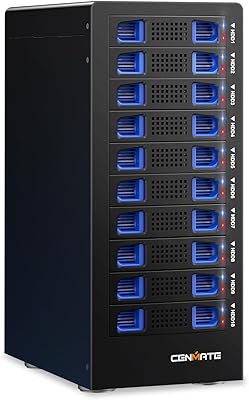
Cenmate 10 Bay Hard Drive Enclosure with Cooling Fan
82%
89%
Performance
94%
Ease of Installation
78%
Cooling Efficiency
85%
Data Transfer Speed
83%
Build Quality
More
Yottamaster PS500U3 5-Bay External HDD Enclosure
74%
84%
Build Quality
79%
Cooling Performance
61%
Transfer Speed
88%
Drive Compatibility
91%
Ease of Installation
More
Cenmate Dual Bay Hard Drive Enclosure
78%
83%
Build Quality
78%
Cooling Performance
76%
Transfer Speed
86%
Hot-Swap Functionality
91%
Ease of Installation
More
Yottamaster PS500C3 5-Bay Hard Drive Enclosure 90TB
82%
85%
Build Quality
91%
Ease of Installation
78%
Cooling Performance
82%
Data Transfer Speed
96%
Storage Capacity
More
TERRAMASTER D6-320 External Hard Drive Enclosure 6-Bay
87%
93%
Data Transfer Speed
88%
Build Quality & Durability
94%
Ease of Setup
85%
Cooling Performance
90%
Storage Capacity
More

FAQ

In the vast majority of cases, no. The Mediasonic HF7-SU31C 4-Bay Hard Drive Enclosure is recognized as standard USB storage by Windows 10, Windows 11, and current macOS versions without any driver installation. Linux users also report the same plug-and-play experience on most distributions. That said, a small number of users with certain third-party USB host controllers have reported detection quirks — if that happens, trying a different USB-C port or cable is usually the first step.
Yes, you can mix brands and capacities freely. Each bay operates completely independently, so a 4TB drive in bay one and a 12TB drive in bay two will both show up as separate volumes on your desktop without any conflict. Just keep in mind there is no RAID here, so each drive is its own island — what goes on one does not affect the others.

No, this is a direct-attached storage device, which is fundamentally different from a NAS. It connects to one computer via USB-C, and only that computer can access the drives directly. There is no Ethernet port and no network sharing capability built in. If you need to share storage across multiple devices on a network, you would need a NAS instead.

Fan noise is one of the more polarizing aspects of this drive bay unit. At idle or with light activity on one or two drives, most users describe it as acceptably quiet. Under sustained load with all four bays spinning — say, during a large backup or file transfer — the fan ramps up and becomes more noticeable. Whether that is tolerable really depends on how noise-sensitive your workspace is; users in recording environments or very quiet rooms tend to find it more disruptive than those in typical home offices.

Since this enclosure has no RAID support, each drive is completely independent. If one drive fails, only the data on that specific drive is at risk — the other three are unaffected. However, there is no automatic redundancy protecting the failed drive's data, so maintaining your own backup of important files is essential. Think of this unit as organized storage expansion, not a data protection solution on its own.

Yes, that is actually one of the stronger selling points of this enclosure. The USB-C connection is natively compatible with modern laptops — including Apple MacBook models and current-generation Windows ultrabooks — without needing an adapter. Just make sure your laptop port supports USB 3.2 Gen 2 data speeds if you want to get the most out of the interface; Thunderbolt ports will also work fine.

It can handle continuous or near-continuous operation. The smart fan and thermal sensor are specifically designed to manage heat during extended use, and the Power Sync feature helps reduce wear on drives during any idle periods when your computer sleeps. Numerous long-term owners report years of daily use without hardware failure. That said, keeping the unit in a well-ventilated spot and not blocking the intake on the front door is worth doing if it runs all day.

It depends on the drives. If you are inserting drives that already contain data formatted in a compatible file system (NTFS for Windows, APFS or HFS+ for Mac, ext4 for Linux), they should show up and be accessible immediately. Brand new, unformatted drives will need to be initialized and formatted through your operating system's disk management utility before you can store files on them. The enclosure itself does not handle formatting — that is entirely managed by your OS.

Start by swapping the USB-C cable, since the included cable, while functional, can be a weak point. Next, try a different USB-C port on your computer, especially if you have both a dedicated USB 3.2 controller port and a port shared with another hub or chipset. Some users have found that connecting directly to a port on the motherboard rather than a front-panel port resolves detection issues. If problems persist, checking whether your system's USB host controller has updated firmware or drivers is also worth doing.

This enclosure is designed specifically for 3.5-inch SATA hard disk drives. Standard 2.5-inch SATA SSDs or HDDs are not directly compatible with the bay mounting system — the trays and connectors are sized and spaced for 3.5-inch form factor drives. Using an adapter bracket to mount a 2.5-inch drive in a 3.5-inch bay is theoretically possible in some enclosures, but Mediasonic does not officially support that configuration for this unit.