Overview

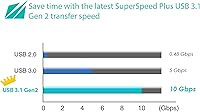
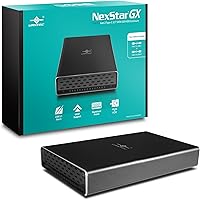
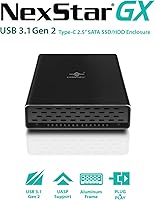
The Vantec NexStar GX 2.5″ USB-C Drive Enclosure is a practical way to give a spare 2.5-inch SATA drive a second life as portable external storage. It occupies the mid-range of a crowded field, but the all-aluminum build immediately distinguishes it from the plastic-shell alternatives that dominate the budget tier. The interface is USB 3.1 Gen 2 — that’s the full 10 Gbps spec, double the bandwidth of the older Gen 1 standard — so the speed upgrade is real, particularly with SSDs. Both a C-to-C and a C-to-A cable are included, which covers most modern setups without hunting for adapters. One honest caveat: this is strictly a SATA enclosure, with no NVMe support whatsoever.
Features & Benefits

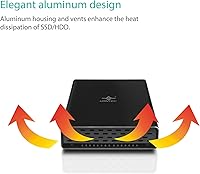
The NexStar GX enclosure uses aluminum for both the outer shell and the internal drive tray, which does a noticeably better job of keeping temperatures in check during extended transfers compared to plastic-bodied competitors. UASP support means the USB 3.1 Gen 2 connection actually performs to its potential rather than bottlenecking at the protocol level — real-world copy speeds with a modern SATA SSD are genuinely impressive. It accepts 7mm and 9.5mm drive heights, so nearly any consumer 2.5-inch SATA SSD or HDD will fit without adapters. The on/off switch and automatic spin-down during system sleep are small touches, but they reflect a level of design consideration that’s easy to appreciate over time. No drivers needed on any major OS.

Best For

This aluminum drive enclosure is an obvious choice for anyone who just upgraded their laptop’s SSD and doesn’t want the old drive gathering dust — slip it in, and you instantly have a fast portable backup drive. Photographers and video editors who work with large files will appreciate the Gen 2 speeds over a slower USB 3.0 alternative. If you move between a USB-C MacBook and a USB-A Windows machine, the dual-cable bundle means you’re never reaching for an adapter. Frequent travelers will appreciate the solid, pocket-friendly build. IT professionals who regularly swap drives for cloning or diagnostics will also find the tool-free assembly and reliable plug-and-play behavior worth the price of admission.

User Feedback

With 4.2 stars across nearly 4,000 ratings, this USB-C enclosure has built a fairly consistent track record. Buyers most often highlight the solid aluminum construction, the genuine speed bump when pairing it with an SSD, and how effortlessly it sets up. The criticisms worth noting: some users report that certain 9.5mm drives sit slightly loose in the tray, suggesting fit tolerances vary between drive brands. Heat during sustained HDD use is also a recurring mention — it runs warm, though not alarmingly so. Given the enclosure launched in 2017, a handful of reviews flag minor OS quirks with newer versions, though the majority of recent buyers report no issues.

Pros

  • Full aluminum construction on both the shell and drive tray delivers better durability and heat management than plastic competitors.
  • USB 3.1 Gen 2 with UASP support produces real-world transfer speeds that clearly outpace older USB 3.0 enclosures, especially with SSDs.
  • Accepts both 7mm and 9.5mm drive heights, covering the vast majority of consumer 2.5-inch SATA SSDs and HDDs without extra adapters.
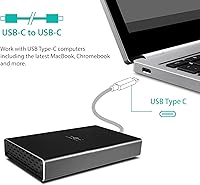
  • Ships with both a C-to-C and a C-to-A cable, so mixed USB-port environments are handled right out of the box.
  • True plug-and-play across Windows, macOS, and Linux — no driver installation required on any platform.
  • On/off switch and automatic sleep spin-down are thoughtful usability touches rarely included at this price tier.
  • Tool-free drive installation makes swapping or loading a drive fast and accessible for non-technical users.
  • At 6.4 ounces and pocket-sized dimensions, it adds virtually nothing to a daily bag or travel kit.

Cons

  • Fit tolerances with certain 9.5mm drives are inconsistent depending on brand, leaving some drives sitting slightly loose in the tray.
  • The aluminum body runs noticeably warm during prolonged HDD operation — not a safety risk, but worth watching in warm environments.
  • Offers zero NVMe or M.2 support; buyers with a modern NVMe drive to repurpose need to shop elsewhere.
  • Launched in 2017, and a visible minority of reviews flag sporadic compatibility issues on newer OS versions that Vantec has not fully addressed.
  • Bus power may be insufficient for older, high-capacity spinning HDDs that draw more current than the USB port can reliably supply.
  • Long-term connector durability has been flagged in some reviews, with a subset of buyers noting wear on the USB-C port after extended daily use.
  • Single-drive design only — not an option for anyone needing to consolidate two drives into one portable unit.

Ratings

The scores below are generated by AI after analyzing thousands of verified user reviews for the Vantec NexStar GX 2.5″ USB-C Drive Enclosure, with spam, bot activity, and incentivized feedback actively filtered out before any number was assigned. Each category reflects the honest spread of buyer sentiment — not a cherry-picked highlight reel. The strengths and the frustrations are weighted equally, so what you see is an accurate picture of what real owners actually experience.

Build Quality
88%
The full aluminum shell and matching drive tray make an immediately positive impression compared to the plastic enclosures crowding the budget tier. Buyers consistently describe the NexStar GX enclosure as feeling solid, well-machined, and free of the flex or creaking that plagues cheaper alternatives. For daily commuters and frequent travelers who toss peripherals into a bag without a second thought, that sturdiness is a real differentiator.
The aluminum casing, while rigid, is prone to visible denting or scuffing if dropped on a hard surface — a trade-off versus plastics that tend to flex and absorb impact rather than deform. A subset of buyers also reports that the tight tolerances make the drive tray slightly tricky to seat on the first few attempts, requiring careful alignment before it slides in cleanly.
Transfer Speed
83%
Pairing this USB-C enclosure with a modern SATA SSD produces transfers that feel genuinely quick — large video project folders or photo libraries that would crawl on an older USB 3.0 enclosure move at a pace that keeps workflows from stalling. UASP support plays a measurable role here, preventing sustained speeds from dropping off during longer copy sessions the way they often do on cheaper controllers.
The speed advantage largely disappears when a spinning HDD is inside, since the drive’s own mechanical limits become the bottleneck well before the interface does. Buyers connecting via USB-A ports that only support the older Gen 1 standard will also miss out on the full throughput potential, which is technically expected but still worth understanding before assuming any USB-C port will unlock peak performance.
Ease of Setup
91%
Drive installation is completely tool-free and takes under a minute, making it genuinely accessible for non-technical buyers who might hesitate at a more involved enclosure. The plug-and-play behavior across Windows, macOS, and Linux means the drive appears in the file manager almost immediately after connection — no driver downloads, no configuration prompts, no accounts to create.
A small but recurring cluster of reviews notes that the drive fails to appear on first connection when plugged into certain USB-C hubs or docks, requiring a direct port connection or a cable reseat to register properly. This is rarely a persistent problem, but it is worth flagging for users whose primary workstation relies heavily on a hub-based setup rather than direct laptop or desktop ports.
Heat Management
71%
29%
The aluminum body dissipates heat noticeably better than plastic enclosures, and for users running a SATA SSD, thermal performance is rarely a concern even during extended transfers. The metal tray maintains direct contact with the drive surface, which helps move heat away from the drive itself and distribute it more evenly across the enclosure.
With a spinning HDD inside, the enclosure gets noticeably warm during sustained workloads — warm enough that a meaningful number of buyers have expressed concern, even if widespread reports of thermal damage have not materialized. Users planning long HDD-intensive sessions should ensure the enclosure has open airflow around it rather than sitting enclosed in a bag, a drawer, or stacked under other gear.
Drive Fit & Tolerance
63%
37%
For the majority of 7mm SSDs and standard 9.5mm HDDs from mainstream manufacturers, the drive slides into the aluminum tray cleanly and holds its position reliably during regular use. Buyers using common drives from well-known brands typically report no fit issues at all, and the tool-free process makes verifying the fit a quick, low-effort step.
A persistent and notable complaint involves certain 9.5mm drives from less common or older brands sitting loosely in the tray rather than seating firmly, with fit quality varying noticeably by drive model. This inconsistency is the single most cited frustration among otherwise satisfied buyers, and it is worth researching whether your specific drive has been flagged for fit issues before committing to a purchase.
Drive Compatibility
73%
27%
Supporting both 7mm and 9.5mm SATA drives gives this aluminum drive enclosure solid coverage across the most common spare drives buyers are likely to have on hand, from slim laptop SSDs to thicker 2.5-inch HDDs. Hybrid drives are also supported without issue, adding a layer of flexibility that is appreciated by users repurposing older hardware.
The hard ceiling here is SATA-only support — NVMe and M.2 drives are simply incompatible, and with NVMe now the dominant format in newer laptops, a growing share of prospective buyers will find this enclosure irrelevant for their specific spare drive. There is no adapter or workaround; if your drive is not SATA, this product is not the right tool.
Cable Quality
67%
33%
Shipping with both a C-to-C and a C-to-A cable eliminates a common friction point for buyers who work across mixed-port environments, such as a USB-C MacBook and a USB-A desktop. Most users report both cables performing reliably through the first year or more of regular daily use, which aligns with the general satisfaction expressed across the broader review base.
Long-term cable durability is the most frequently cited hardware complaint, with a meaningful share of buyers noting that one or both cables developed connection instability or intermittent dropout after six to twelve months of frequent use. Replacements are inexpensive and easy to source, but having to replace bundled cables within the first year undercuts what is otherwise a generous out-of-the-box accessory package.
Port Durability
69%
31%
For buyers who use the enclosure a few times per week, the USB-C port holds up well through at least the first couple of years of ownership without noticeable loosening or degraded connectivity. Occasional-use buyers and IT professionals who swap drives periodically rather than daily report the connection feeling consistently solid over extended time frames.
A visible portion of long-term reviews describe the enclosure-side USB-C port developing a slight wobble or intermittent contact issue after a year or more of heavy daily use, suggesting the connector is not engineered to the same durability standard as the aluminum body itself. The issue appears most concentrated among users who plug and unplug the device multiple times per day as part of a regular workflow.
Value for Money
81%
19%
At its mid-range price point, the NexStar GX enclosure bundles features — full aluminum construction, USB 3.1 Gen 2 speeds, dual cables, an on/off switch, and sleep spin-down — that competing enclosures at comparable prices typically spread across separate, more expensive products. Buyers who have owned cheaper plastic alternatives almost universally rate the step-up in quality as worth the modest price difference.
For buyers who only need a one-time file transfer and have no interest in a durable daily-carry enclosure, the price premium over sub-15-dollar plastic alternatives is harder to rationalize. The enclosure also now faces genuine competition from newer products launched in recent years that match or exceed its feature set at similar prices, narrowing its value advantage compared to when it launched.
Design & Aesthetics
87%
The all-black aluminum finish gives this USB-C enclosure a clean, professional look that sits comfortably alongside modern laptops and workstations without looking like an afterthought. The compact dimensions and slim profile mean it is unobtrusive on a desk or in a camera bag, and the activity LED is restrained enough that it does not become a distraction in low-light environments.
The uniform black aluminum surface is a visible fingerprint magnet from the first day of use and accumulates light surface scratches fairly quickly without a protective sleeve during bag carry. Vantec offers no color variants, which is a minor limitation for buyers who like their accessories to coordinate with a specific setup or simply prefer something other than black.
Long-Term Reliability
74%
26%
A product that has maintained a 4.2-star average across nearly 4,000 ratings since 2017 has earned a credible reliability track record in a market segment where many enclosures quietly disappear within a year or two. A substantial share of reviews specifically call out trouble-free daily use measured in years, which is genuinely reassuring for buyers prioritizing longevity over cutting-edge specs.
The product’s age introduces some uncertainty for buyers on the latest OS releases, with a small but visible cluster of recent reviews flagging sporadic compatibility quirks after major Windows or macOS updates. Vantec’s firmware update cadence has been inconsistent, meaning those issues do not always get resolved promptly — a real consideration for users in environments where uninterrupted daily operation is non-negotiable.
Portability
89%
At under seven ounces and barely three-quarters of an inch thick, this aluminum drive enclosure disappears into a laptop bag, jacket pocket, or camera case without any meaningful weight penalty. For photographers shooting on location, students moving between classrooms and libraries, or anyone who genuinely travels light, the compact footprint is a practical daily-use advantage that adds up quickly.
No protective sleeve or carrying pouch is included in the box, leaving the aluminum finish exposed to scratches from keys, cables, and other items during daily bag carry. Buyers who want to maintain the enclosure’s appearance long-term will need to source their own case separately, which is a minor but real omission that slightly undermines an otherwise clean out-of-the-box experience.
Cross-Platform Support
92%
Immediate recognition on Windows, macOS, and Linux without any driver installation is one of the most consistently and enthusiastically praised aspects of this enclosure across the entire review base. For households or mixed-OS offices where a drive regularly moves between a MacBook, a Windows desktop, and a Linux workstation, the frictionless cross-platform handoff removes a genuine daily inconvenience.
A small proportion of reviews from users on the most recent OS point releases mention brief delays in drive mounting or the occasional need to reconnect after a major system update, suggesting compatibility is not entirely maintenance-free over a multi-year ownership period. These occurrences appear infrequent and typically self-resolving, but they are worth noting for users running beta OS builds or who update their systems the day new versions drop.
Power Delivery
77%
23%
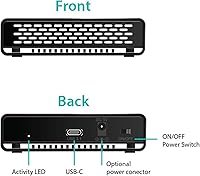
For the vast majority of use cases — modern SATA SSDs and typical 2.5-inch HDDs up to around 2 TB — bus power from the host USB port is completely sufficient, and the enclosure functions without any secondary cable. The inclusion of an optional auxiliary power connector shows genuine consideration for buyers working with older, high-capacity spinning drives that push the limits of standard USB bus power.
The auxiliary power connector requires occupying a second USB-A port to supply additional power, which can be genuinely inconvenient on thin-and-light laptops that may only have one or two ports available. A small number of buyers also report that even with the auxiliary cable connected, certain older high-capacity HDDs still spin up inconsistently on low-power USB implementations, suggesting the fix is not universally reliable.

Suitable for:

The Vantec NexStar GX 2.5″ USB-C Drive Enclosure is purpose-built for practical, real-world scenarios that come up more often than you’d expect. If you’ve just swapped your laptop’s SATA SSD for a larger one, this enclosure converts the old drive into a fully functional portable backup device in minutes — no tools, no frustration. Photographers, video editors, and students who move large files regularly will appreciate the USB 3.1 Gen 2 interface, which runs at roughly double the throughput of older USB 3.0 enclosures and makes a tangible difference when copying project folders or raw photo libraries. The bundled C-to-C and C-to-A cables make it genuinely versatile for anyone who bounces between a USB-C MacBook and a USB-A desktop without constantly hunting for adapters. Travelers and IT professionals who need something compact, durable, and fast to set up will find the aluminum shell and tool-free assembly a clear step above the cheap plastic enclosures that dominate the budget end of this category.
Not suitable for:

The Vantec NexStar GX 2.5″ USB-C Drive Enclosure has a well-defined scope, and buyers whose needs fall outside it will be better served elsewhere. This is strictly a 2.5-inch SATA enclosure — if you have an NVMe M.2 SSD to repurpose, you’ll need a different product entirely. Anyone planning to run a spinning HDD inside it continuously should know the aluminum body gets noticeably warm under sustained workloads; it dissipates heat better than plastic, but it is not the right tool for an always-on backup or NAS-adjacent role. Users with certain 9.5mm-thick drives have also reported inconsistent fit depending on brand, so if your specific HDD is on the thicker side, the tray may not hold it as snugly as you’d like. Finally, given the product first launched in 2017, anyone running a very recent OS update should confirm compatibility before buying, as a small but visible minority of reviews mention sporadic quirks that most but not all users manage to resolve.
Specifications

  • Interface: Connects via USB 3.1 Gen 2 Type-C, providing a maximum theoretical bandwidth of 10 Gbps for fast data transfers.
  • Drive Type: Compatible with 2.5-inch SATA SSDs, spinning HDDs, and hybrid drives; NVMe and M.2 drives are not supported.
  • Drive Heights: Accommodates both 7mm and 9.5mm drive heights, covering the vast majority of consumer 2.5-inch SATA drives on the market.
  • Build Material: Both the outer shell and the internal drive tray are constructed from full aluminum, providing passive heat dissipation and structural rigidity.
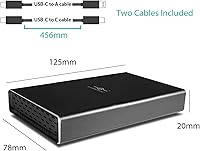
  • Cables Included: Ships with one USB Type-C to Type-C cable and one USB Type-C to Type-A cable, covering the two most common host port configurations.
  • UASP Support: Supports USB Attached SCSI Protocol (UASP), enabling more efficient command queuing and faster sustained transfers compared to the older Bulk-Only Transport protocol.
  • Driver Requirement: No drivers or third-party software are required; the enclosure is detected as a standard USB mass storage device on all supported operating systems.
  • OS Compatibility: Works natively with Windows, macOS, and Linux without additional configuration or driver installation.
  • Power Source: Draws power directly from the host USB port, with an optional auxiliary power connector included for high-capacity or older HDDs that may exceed standard bus-power limits.
  • Power Switch: Features a physical on/off switch on the enclosure body, allowing the drive to be powered down independently of the host device.
  • Auto Spin-Down: Supports automatic drive spin-down when the host system enters sleep, hibernate, or shutdown mode, reducing unnecessary wear on spinning HDDs.
  • Activity LED: An integrated LED indicator provides real-time visual feedback on drive read and write activity.
  • Dimensions: Measures 4.7 x 3.1 x 0.8 inches, sized closely around a standard 2.5-inch drive with minimal additional bulk.
  • Weight: The enclosure body weighs 6.4 ounces without a drive installed.
  • Max Capacity: Supports installed drives up to 8 TB, accommodating current high-density 2.5-inch SATA options.
  • Color: Available in black with a matte aluminum finish.

Related Reviews

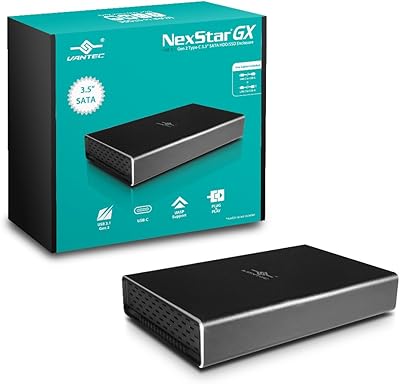
Vantec NST-371C31-BK NexStar Gx USB 3.1 Gen 2 Type-C 3.5″ SATA HDD/SSD Enclosure
84%
89%
Performance
94%
Ease of Setup
85%
Build Quality
92%
Compatibility with Systems
88%
Data Transfer Speed
More
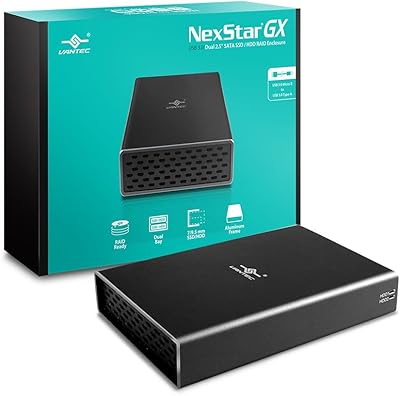
Vantec Nexstar GX Dual 2.5″ RAID Enclosure
74%
86%
Build Quality
83%
RAID Functionality
79%
Transfer Performance
61%
Drive Compatibility
67%
Thermal Management
More
Vantec NexStar JX 3.5″ HDD Enclosure
76%
93%
Ease of Setup
78%
Transfer Speed — USB
86%
Transfer Speed — eSATA
74%
Thermal Management
67%
Build Quality
More
ikuai 3.5″ USB 3.0 Hard Drive Enclosure
80%
93%
Ease of Setup
71%
Build Quality
62%
Cable Quality & Reliability
88%
Drive Compatibility
74%
Data Transfer Speed
More
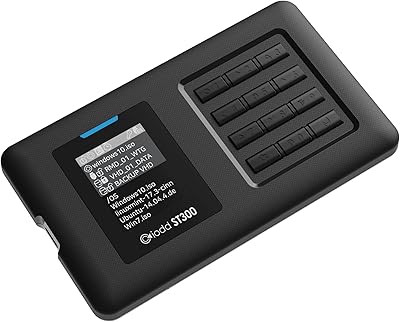
IODD ST300 USB-C Virtual ODD Enclosure
82%
93%
Boot Reliability
91%
Virtual ODD Functionality
89%
Write Protection
76%
On-Device Interface (LCD & Keys)
67%
Build Quality
More
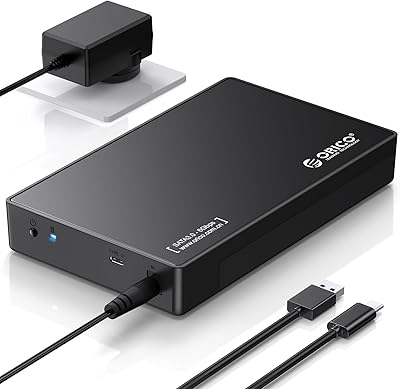
ORICO 3588C3 3.5″ Hard Drive Enclosure
74%
93%
Ease of Installation
74%
Transfer Performance
67%
Build Quality
61%
Connection Reliability
83%
Value for Money
More
Vantec NexStar3 3.5″ External Hard Drive Enclosure
77%
88%
Build Quality
82%
Transfer Performance
84%
Thermal Management
86%
Ease of Setup
71%
Compatibility
More
ADATA EC700G M.2 NVMe SATA SSD Enclosure
81%
88%
Build Quality
83%
Transfer Speed
91%
Drive Compatibility
93%
Ease of Installation
72%
Thermal Performance
More
TerraMaster D4-320
TerraMaster D4-320
80%
93%
Ease of Setup
86%
Transfer Speed
71%
Build Quality
88%
Noise Level
82%
Thermal Management
More
PNY PRO Elite V3 2TB Flash Drive
82%
84%
Transfer Speed
91%
Build Quality
93%
Storage Capacity
86%
Mobile Device Integration
88%
Compatibility
More

FAQ

No — the Vantec NexStar GX 2.5″ USB-C Drive Enclosure is designed exclusively for 2.5-inch SATA drives, which includes SATA SSDs, traditional spinning HDDs, and hybrid drives. If you have an NVMe M.2 SSD to repurpose, you will need an enclosure specifically built for that form factor.
Not at all. The enclosure registers as a standard USB storage device the moment you plug it in, on Windows, macOS, and Linux alike. There is nothing to download, no account to create, and no setup wizard to run through.

It fits for most drives, but this is worth knowing upfront: a subset of buyers has reported that certain 9.5mm drives sit slightly looser in the tray than expected, with the fit varying by drive brand and model. Common consumer HDDs from major manufacturers tend to install without incident, but if a firm fit is important for your use case, checking user feedback for your specific drive is a sensible precaution.

The aluminum body manages heat noticeably better than plastic alternatives, but it does get warm during prolonged operation — especially with a spinning HDD inside. For typical use like file transfers and scheduled backups, there is no cause for concern. If you plan to run it continuously for hours with an HDD, placing it somewhere with decent airflow and checking on it occasionally is a reasonable precaution. With a SATA SSD installed, heat is a much smaller issue.

Gen 1 maxes out at 5 Gbps, while Gen 2 doubles that ceiling to 10 Gbps. In practice, the difference is most noticeable when copying large files to or from a fast SATA SSD — transfers that might drag on an older enclosure can finish meaningfully faster here. For spinning HDDs, the gap is smaller because the drive itself becomes the bottleneck long before the interface does.

For the majority of users, yes — most recent buyers report no compatibility problems on current OS versions. A small number of reviews do mention occasional quirks following major OS updates, which is worth noting given the enclosure was first released in 2017. If you run into any issues, checking Vantec’s support page for a firmware update is the recommended first step.

Yes, it works well for Time Machine. Format the drive as Mac OS Extended (Journaled) or APFS using Disk Utility, then designate it as your Time Machine backup disk, and the NexStar GX enclosure behaves like any other USB external drive. The automatic spin-down during system sleep is a practical bonus, keeping the drive from spinning unnecessarily when your Mac is idle.

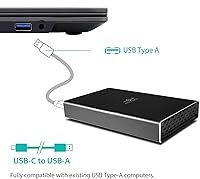
Yes, the bundled C-to-A cable handles this directly without needing a hub or adapter. You will get the full Gen 2 speed only if your USB-A port also supports that standard, but the enclosure is fully backwards compatible and will operate at whatever speed your host port allows.

It depends on what is already on the drive and what you plan to do with it. If it is a Windows-formatted drive connecting to a Windows machine, it will appear in File Explorer and be accessible straight away. Connecting a Windows-formatted drive to a Mac may require reformatting depending on whether you need to write files to it. If the drive still has an old OS installation on it, you can either wipe it clean or simply work around the existing partitions.

Completely tool-free. The drive slides into the aluminum tray, and the tray slides into the enclosure body — no screws, no brackets, no extra hardware needed. The whole process takes under a minute, which makes it particularly useful for anyone who rotates drives frequently or swaps them for diagnostics and cloning tasks.