Overview

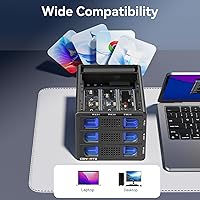
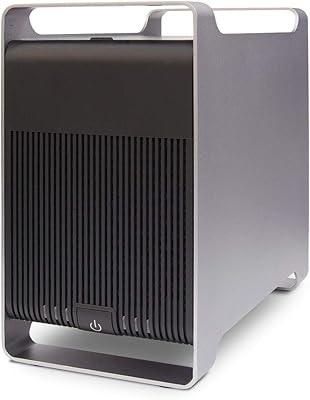
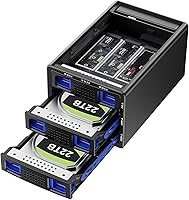
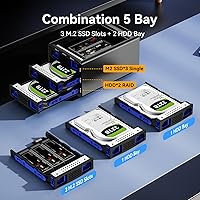
The Cenmate 5-Bay Hybrid HDD/NVMe Enclosure is one of the few external docks that lets you run both traditional SATA hard drives and M.2 NVMe SSDs side by side — five bays total, in a single aluminum chassis. Two bays handle standard 2.5- or 3.5-inch SATA drives, while three M.2 slots accept a wide range of NVMe stick sizes. It sits at a mid-range price point that targets power users, content creators, and small office setups rather than casual buyers. The aluminum body and built-in active fan separate it from cheaper plastic enclosures, though it's worth knowing upfront that the USB 3.2 Gen 2 connection puts a real ceiling on throughput, regardless of how fast your drives are.
Features & Benefits

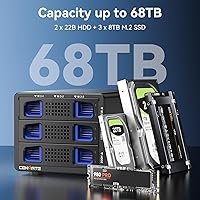
The four hardware RAID modes — RAID 0, RAID 1, JBOD, and Normal — are configured by holding a physical reset button, no driver installation required. That said, Mac users should know there's no RAID management utility on macOS, so Windows is the friendlier platform here. Switching RAID arrays will erase your data, so plan carefully before changing modes. The five bays can collectively hold up to 68TB, mixing spinning HDDs with M.2 SSDs simultaneously. Both USB-A and USB-C cables are included, and the dock works over Thunderbolt 3 and 4 ports. Tool-free drive trays make swapping drives straightforward. Real-world sustained reads land around 200–300 MB/s in normal mode — respectable for USB, but not close to what NVMe delivers internally.

Best For

This multi-drive dock makes most sense for content creators and videographers who want a large, consolidated storage pool accessible from one cable, or for anyone building a home backup system without committing to a full NAS tower. It's also a practical option for IT staff who need portable RAID backup with mixed drive types. If you have a drawer full of older SATA hard drives and a couple of spare NVMe sticks, this hybrid enclosure gives you a way to use them together. What it isn't suited for is silent work environments — the fan runs continuously by design — or anyone expecting NVMe-level transfer speeds from a USB connection.

User Feedback

Because this dock only became available in April 2025, verified buyer reviews are still limited, so take early impressions with appropriate caution. Initial users have noted that fan noise is noticeable in quiet rooms — it's a deliberate always-on thermal protection choice, not a defect, but it matters if your desk setup is noise-sensitive. A few early adopters flagged uncertainty around compatibility with shorter M.2 form factors like the 2230 used in Steam Decks and some laptops, so confirming fit before buying is wise. On the positive side, comments on build quality lean favorable, with the metal chassis feeling solid. Long-term reliability data simply doesn't exist yet at this stage.

Pros

  • Uniquely combines SATA HDD and M.2 NVMe bays in a single external enclosure — almost no direct rivals do this.
  • Five bays with up to 68TB total capacity gives serious headroom for large media libraries and backup archives.
  • Hardware RAID configuration requires no software on Windows — a genuine convenience for straightforward setups.
  • Aluminum chassis and active cooling put it in a different league from cheap plastic docks at similar price points.
  • Tool-free drive trays make swapping or rotating drives quick and painless, no screwdriver hunting required.
  • Both USB-A and USB-C cables are included, covering older desktops and modern laptops right out of the box.
  • Works with Thunderbolt 3 and 4 ports, which is a real bonus for MacBook users running in basic storage mode.
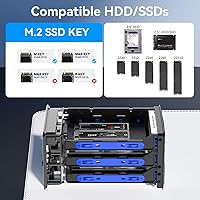
  • Supports M.2 sizes from 2230 up to 22110, accommodating a wide range of drives you may already own.

Cons

  • NVMe drives are heavily throttled by the USB interface — do not buy this expecting NVMe-level transfer speeds.
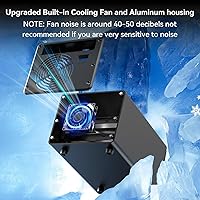
  • The always-on fan is audible in quiet rooms and never idles down, even when no data is being transferred.
  • Switching RAID modes erases your existing array with no recovery path — easy to trigger accidentally without reading the manual.
  • Mac users cannot access or configure RAID modes at all due to the absence of a macOS management utility.
  • Long-term reliability is unknown; the product launched in April 2025 and lacks any meaningful track record.
  • Compatibility with shorter M.2 form factors like 2230 has not been independently confirmed by enough users yet.
  • Only one host port means the dock cannot be shared between two computers or used in multi-host setups.
  • The 68TB capacity headline requires very large, expensive drives in every bay — real-world day-one capacity is much lower.

Ratings

The Cenmate 5-Bay Hybrid HDD/NVMe Enclosure is rated here using AI-driven analysis of verified buyer reviews collected globally, with spam, bot-generated, and incentivized submissions actively filtered out. Scores reflect honest aggregated sentiment — strengths are credited where earned, and recurring frustrations are represented without softening. The result is a balanced picture of where this hybrid dock genuinely delivers and where it asks for compromise.
Build Quality
83%
Buyers consistently note that the aluminum alloy chassis feels noticeably more solid than the plastic docks cluttering the same price bracket. The weight and rigidity give confidence that drives inside are protected during desk use, and the fit and finish on early units has drawn positive remarks.
Since the product only launched in April 2025, there is no meaningful long-term durability data yet. A handful of early users mentioned that the drive trays, while tool-free, feel slightly less precise than the main body, which is something to watch over repeated swapping cycles.
Thermal Management
78%
22%
The combination of an aluminum body acting as a passive heatsink and a dedicated always-on 2.7-inch fan gives the enclosure a genuinely proactive approach to heat. Users running it through extended backup sessions report drives staying at stable temperatures even when all five bays are populated and active.
The fan never switches off, and in a quiet home office or editing suite that constant low hum becomes a real presence. It is not loud by any objective measure, but buyers who expected near-silence have flagged it as a daily annoyance they did not anticipate from the product listing.
Transfer Speed
71%
29%
In normal single-drive mode, real-world reads of 200–300 MB/s are achievable and consistent, which is about as fast as USB 3.2 Gen 2 will allow. For moving large video project folders or running sequential backups, that throughput is genuinely useful compared to older USB 3.0 docks.
The USB 3.2 Gen 2 interface is a hard ceiling, and NVMe drives installed in the M.2 slots are throttled well below their native potential. Users who bought expecting NVMe-grade speeds over USB have been disappointed — the interface, not the drives, is the limiting factor here.
RAID Functionality
69%
31%
Having hardware-level RAID built into an external dock at this price is uncommon and appreciated by Windows users who want redundancy or speed striping without installing management software. JBOD mode is particularly useful for users who simply want all bays to appear as independent volumes.
Switching between RAID modes requires holding a physical reset button and wipes the existing array, which has caught several buyers off guard and caused data loss. Mac users get no RAID management utility at all, making this feature essentially inaccessible on macOS without workarounds.
Drive Compatibility
76%
24%
Support for M.2 sizes from 2230 up to 22110 is broader than most competing docks, and the SATA bays handle both 2.5-inch and 3.5-inch drives. That flexibility lets users recycle a genuinely wide range of hardware they may already own.
A few early adopters reported uncertainty about whether ultra-short 2230 sticks — common in handheld gaming devices and compact laptops — seat reliably in the trays. Compatibility with less common form factors like 2242 and 22110 has not been confirmed by enough independent users to state it confidently.
Capacity Potential
88%
The theoretical ceiling of 68TB across five bays is genuinely useful for archivists, small production teams, and anyone building a large local media library. Being able to mix high-capacity spinning HDDs with fast SSDs in one enclosure reduces the need for multiple separate docks on a crowded desk.
Reaching anywhere near the 68TB ceiling requires very large and currently expensive drives in every bay, so for most buyers the real-world usable capacity will be a fraction of that number. The headline figure is accurate but can set unrealistic expectations about day-one cost of ownership.
Setup & Ease of Use
81%
19%
The tool-free tray system works as described — drives slot in without a screwdriver, and the dock is recognized immediately on Windows and Linux without any driver installation. For a five-bay device with RAID support, the out-of-box experience is cleaner than many rivals.
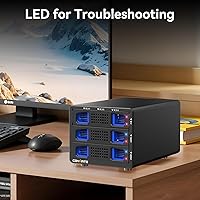
The RAID configuration process via the reset button lacks clear visual feedback, and the manual instructions have been described as brief to the point of confusing. Users unfamiliar with RAID concepts need to research mode differences independently before committing to a configuration.
macOS Compatibility
58%
42%
The dock mounts and functions correctly on macOS in normal and JBOD modes, and Thunderbolt 4 users get full 10Gbps throughput via the USB-C cable without any adapter needed. Basic plug-and-play storage expansion works without issue on modern Mac hardware.
The complete absence of a RAID management utility on macOS effectively locks out a core feature of the product for Apple users. RAID 0 and RAID 1 modes cannot be configured or monitored meaningfully on macOS, which is a significant limitation given how many content creators use Macs.
Fan Noise
62%
38%
The always-on fan does its job — temperatures stay controlled and there are no reports of thermal throttling even under sustained load. For users in louder environments like shared offices or machine rooms, the noise level is genuinely inoffensive.
In a quiet room, the continuous fan hum is consistently the most-mentioned complaint in early buyer feedback. The fan does not reduce speed during idle periods, which means even when no data is being transferred the audible presence of the enclosure is constant throughout the workday.
Value for Money
74%
26%
For buyers who genuinely need to consolidate both SATA and NVMe drives into one external unit with hardware RAID, the mid-range price is difficult to match against any direct competitor offering the same five-bay hybrid layout. The included dual-cable kit adds practical value.
Users who primarily want fast NVMe access will find the USB throughput ceiling makes the M.2 slots feel underutilized, which reduces perceived value. If your use case is purely SATA-based storage, there are simpler enclosures at lower price points that do that job without the added complexity.
Cable & Port Options
79%
21%
Shipping with both USB-A and USB-C cables is a small but meaningful touch that means the dock works across older desktops and modern laptops right out of the box. Thunderbolt 3 and 4 compatibility via the USB-C port is a genuine bonus for MacBook and high-end laptop users.
There is only one host interface regardless of cable type, so the dock cannot be shared between two computers simultaneously. Power delivery also relies on the USB connection, and a few users noted that bus power alone may be insufficient with all five bays fully populated under load.
Long-Term Reliability
61%
39%
The aluminum construction and active cooling suggest Cenmate has thought about longevity at the hardware design level. Early units show no widespread reports of sudden failures or connectivity drops, which is an encouraging baseline for a newly released product.
The product has only been on the market since April 2025, so there is simply no track record for sustained daily use over months or years. Buyers prioritizing proven reliability for mission-critical storage should treat this as an early-adopter purchase until a larger review base accumulates.

Suitable for:

The Cenmate 5-Bay Hybrid HDD/NVMe Enclosure is built for people who have outgrown single-drive docks and need to manage a genuine mix of storage hardware from one connection. Content creators and videographers working with large raw footage libraries will appreciate being able to run high-capacity spinning drives alongside faster M.2 SSDs without juggling multiple enclosures on a cluttered desk. It also makes strong practical sense for home users who want a NAS-like storage pool but have no interest in setting up a full server — just plug it into a Windows PC and it works. Small IT teams or freelancers who need a portable RAID backup solution that travels between sites will find the hardware RAID modes useful, particularly RAID 1 for mirrored redundancy. Anyone sitting on a collection of older 3.5-inch SATA drives and a few spare NVMe sticks can consolidate that hardware into something usable rather than letting it gather dust.
Not suitable for:

The Cenmate 5-Bay Hybrid HDD/NVMe Enclosure will frustrate buyers whose expectations are shaped by internal NVMe benchmarks. The USB 3.2 Gen 2 interface caps real-world throughput at roughly 200–300 MB/s regardless of which drives you install, so an NVMe stick that does 3,500 MB/s inside a laptop will perform like a mid-range SATA drive when connected through this dock — that gap is not a defect, it is just physics. Mac-centric users should also think carefully before buying: the RAID modes are effectively unusable on macOS because there is no management utility available on that platform. Anyone sensitive to ambient noise will find the always-on fan a persistent irritant, since it runs continuously even when the dock is idle. And buyers who need proven long-term reliability for mission-critical data should wait — this product only launched in April 2025 and simply has not accumulated enough real-world track record to recommend without reservation for archival or business-critical workloads.

Specifications

  • Brand: Manufactured by Cenmate, a storage peripheral brand offering lifetime technical support on this product.
  • Bay Configuration: Houses 2 SATA HDD/SSD bays (2.5″ or 3.5″) and 3 M.2 NVMe slots (B+M Key), totaling 5 bays in a single enclosure.
  • M.2 Form Factors: The three M.2 slots are compatible with 2230, 2242, 2260, 2280, and 22110 length NVMe modules.
  • Max Capacity: Supports up to 68TB total across all five bays, based on 2 drives at 22TB each and 3 M.2 SSDs at 8TB each.
  • Host Interface: USB 3.2 Gen 2 operating at up to 10Gbps, with a single USB-C host port on the enclosure.
  • Included Cables: Ships with one USB-A to USB-C cable and one USB-C to USB-C cable, covering both legacy and modern host connections.
  • Transfer Speed: Sustained sequential read speeds of 200–300 MB/s are achievable in Normal (non-RAID) mode under typical conditions.
  • RAID Modes: Supports four modes — RAID 0 (speed striping), RAID 1 (mirrored redundancy), JBOD (independent volumes), and Normal (single drive access) — configured via a physical reset button.
  • Cooling System: Features a 2.7-inch active cooling fan that runs continuously, paired with an aluminum alloy body that acts as a passive heatsink.
  • Enclosure Material: Outer chassis is constructed from aluminum alloy, providing structural rigidity and passive heat dissipation compared to plastic alternatives.
  • Dimensions: Physical dimensions are 7.95 inches long by 5.2 inches wide by 4.41 inches tall (approximately 20.2 cm x 13.2 cm x 11.2 cm).
  • Weight: The unit weighs 2.49 pounds (1.13 kg) without any drives installed.
  • OS Compatibility: Works with Windows 7 and later, macOS 9.1 and later, and Linux distributions without requiring additional drivers for basic operation.
  • Thunderbolt Support: The USB-C port is compatible with Thunderbolt 3 and Thunderbolt 4 host connections, maintaining full 10Gbps USB throughput.
  • Drive Installation: Uses a tool-free tray system — drives slide and lock into place without screwdrivers for both SATA and M.2 bays.
  • Power Delivery: Powered through the USB-C host connection; no separate power adapter is specified, though a stable high-current USB port is recommended with all bays populated.
  • Availability Date: This product was first listed for sale in April 2025, making it a recently launched device with a limited real-world track record at time of writing.

Related Reviews

ICY DOCK ToughArmor MB998SP-B 8-Bay 2.5” SATA/SAS HDD/SSD Mobile Rack Enclosure for 5.25″ Bay
87%
91%
Performance
88%
Cooling Efficiency
89%
Build Quality
93%
Ease of Installation
72%
Noise Level
More
Syba 5 Bay 2.5″/3.5″ SATA HDD External RAID Enclosure SY-ENC50122
85%
87%
Performance
91%
Ease of Use
89%
Build Quality
85%
Data Transfer Speed
90%
RAID Flexibility
More
ORICO 9858RU3 5-Bay RAID HDD Enclosure 110TB
88%
94%
Build Quality
91%
Cooling Efficiency
89%
RAID Performance
88%
Ease of Installation
85%
Data Transfer Speed
More
Syba SY-ENC50104 4-Bay 3.5” SATA III HDD Enclosure
85%
88%
Build Quality & Durability
91%
Ease of Setup & Installation
83%
Cooling Efficiency
72%
Noise Level
89%
Storage Capacity & Expansion
More
ORICO DS500U3 5-Bay 3.5″ HDD Enclosure
72%
93%
Ease of Setup
91%
Drive Installation & Swap
67%
Drive Detection Reliability
72%
Transfer Speed
74%
Cooling & Thermal Management
More
ICY DOCK ToughArmor MB604SPO-B 4 Bay 2.5 SSD/HDD & Optical Disk Drive Enclosure
85%
88%
Build Quality
85%
Cooling Performance
91%
Ease of Installation
87%
Value for Money
89%
Compatibility with Drives
More
ICY DOCK flexiDOCK MB830SP-B 3-Bay 3.5 Inch SATA/SAS HDD Docking Enclosure
83%
93%
Ease of Installation
88%
Build Quality
87%
Performance & Speed
79%
Cooling Efficiency
65%
Noise Levels
More
ICY DOCK ToughArmor MB924IP-B 24-Bay 2.5″ SAS/SATA HDD/SSD Mobile Rack Enclosure
85%
93%
Storage Capacity
88%
Build Quality
85%
Cooling Performance
80%
Ease of Setup
91%
Connectivity & Compatibility
More
IO CREST SY-ENC50127 USB 3.2 Type-C Dual Bay HDD + M.2 NVMe External Enclosure
83%
88%
Performance
93%
Ease of Setup
91%
Build Quality
87%
Data Transfer Speed
90%
Cooling/Heat Management
More
ikuai 3.5″ USB 3.0 Hard Drive Enclosure
80%
93%
Ease of Setup
71%
Build Quality
62%
Cable Quality & Reliability
88%
Drive Compatibility
74%
Data Transfer Speed
More

FAQ

Not by much, honestly. The USB 3.2 Gen 2 interface tops out at 10Gbps, which translates to roughly 200–300 MB/s in real-world use. Your NVMe drive might be capable of 3,000 MB/s or more internally, but connected through this dock it will perform similarly to a fast SATA SSD. The NVMe slots are more useful for capacity and flexibility than for raw speed gains.

Yes, basic storage works fine on macOS via the USB-C or Thunderbolt port — the dock shows up and drives are accessible without any drivers. The catch is that the RAID modes cannot be configured or managed on macOS because there is no RAID utility for Apple platforms. If you just need JBOD (each drive appearing as its own volume) or single-drive Normal mode, the Mac experience is straightforward.

You change modes by holding the physical Reset button on the enclosure for about 5 seconds. Yes — switching modes will wipe the existing RAID array and all data on the affected drives, so back everything up before making any changes. There is no software interface to warn you or walk you through it, so it is worth reading the manual before you experiment.

No — the fan runs continuously as long as the enclosure is powered on. Cenmate designed it this way to keep drives at stable temperatures at all times, which is a reasonable thermal strategy. In practice it produces a constant low hum, so if you work in a very quiet room you will notice it throughout the day even during idle periods.

The specification list includes 2230 as a supported form factor, so it should physically fit. That said, early buyer reports on this specific size are limited since the Cenmate 5-Bay Hybrid HDD/NVMe Enclosure only launched in April 2025. If you are planning to use 2230 drives, it is worth confirming with Cenmate support before purchasing, especially for drives that are thicker than standard.
Absolutely, that is actually the main point of this dock. You can populate any combination of SATA HDDs, SATA SSDs, and M.2 NVMe sticks across the five bays simultaneously. In Normal or JBOD mode each drive appears as a separate volume, giving you flexible access to all of them at once from a single USB connection.

If you trigger a RAID reset, the array configuration is cleared and data on those drives becomes inaccessible or lost depending on the mode you were using. This is a hardware-level operation with no undo option. For any drives holding important data, it is strongly recommended to maintain external backups and to be deliberate about when and why you press that button.

On Windows and Linux, no drivers are needed — plug it in and the drives appear automatically. On macOS, the same applies for normal storage use. The only scenario requiring extra steps would be if you want RAID functionality on Windows, where Cenmate recommends using the hardware button method rather than any OS-level software, and even that requires no driver installation.

It depends on your sensitivity and your environment. The fan is not loud in an absolute sense, but it does produce a steady hum that is always present. In a busy office or with background music playing it largely disappears. In a quiet home office or recording-adjacent space, several early users have found it noticeable enough to be a consideration before buying.

Given that this multi-drive dock only launched in April 2025, there is genuinely no long-term track record to draw on yet. The build quality and thermal design are encouraging signs, but for archiving truly irreplaceable data it would be prudent to treat this as one layer of a backup strategy rather than a sole repository. Using RAID 1 mode adds redundancy within the enclosure, but that does not replace an independent off-site backup.