Overview

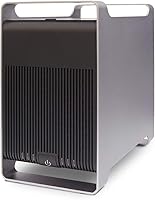
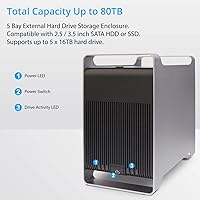
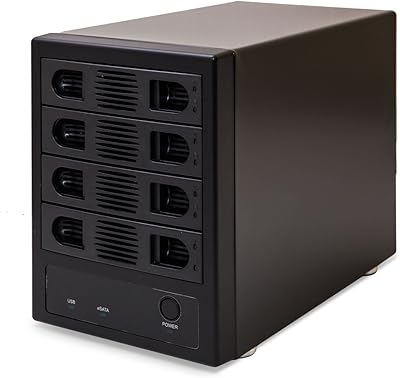
The Syba SY-ENC50122 5-Bay RAID Enclosure sits in an interesting middle ground — capable enough for serious storage work, yet accessible enough that you don't need a full NAS setup to justify it. It holds up to five 2.5-inch or 3.5-inch SATA drives, each reaching up to 24TB, which adds up fast. The aluminum chassis gives it a solid, professional feel, and the tray-less design means swapping drives takes seconds rather than minutes. Connectivity comes via USB 3.0 or eSATA, covering most desktop and workstation setups. Home power users, media archivists, and small office teams are the natural audience here.

Features & Benefits

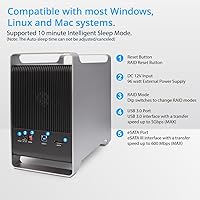
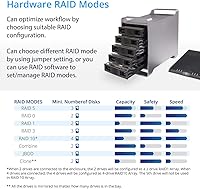
What makes this 5-bay enclosure genuinely useful is the breadth of its RAID mode support. You get RAID 0, 1, 5, 10, and JBOD at minimum — with RAID 3 and SPAN also listed, though those are rarely used in practice. For most users, RAID 5 offers the best mix of performance and redundancy, while JBOD is handy when you just need pooled storage without configuration headaches. USB 3.0 with UASP pushes up to 5 Gb/s on supported systems, though real-world throughput across five drives will vary. The eSATA port can go faster, but only if your host supports Port Multiplier with FIS-based switching — a detail worth confirming before you buy.

Best For

This multi-drive storage unit makes the most sense for people who already own bare SATA drives and want to put them to work in one organized place. Home lab enthusiasts building their first RAID array will appreciate the flexibility without paying for a full NAS. Creative professionals — photographers managing large raw libraries, video editors juggling heavy project files — will find the capacity headroom genuinely practical. It's also a smart pick for small offices that need local redundant backup without cloud dependency. If you're tired of managing a scattered pile of individual USB drives, consolidating into this enclosure is a reasonable, well-structured step up.

User Feedback

With just under 500 ratings averaging 4.1 stars, the Syba RAID enclosure earns its score through consistent praise for easy drive swapping and build quality that feels sturdier than expected at this price point. Users frequently note that the RAID configuration process is approachable once you get past the initial setup. On the downside, fan noise is a recurring complaint — not a dealbreaker for most, but worth knowing if the unit will live on a desk. Some eSATA users hit compatibility walls when their host lacked proper Port Multiplier support. A handful of reviews flag drive detection issues after extended use, though these appear tied to specific hardware configurations rather than a widespread flaw.

Pros

  • Five bays in a single enclosure dramatically reduces desktop clutter compared to stacking individual USB drives.
  • Supports RAID 0, 1, 5, 10, and JBOD, covering the most practical use cases for home and small office storage.
  • Tray-less drive insertion makes adding or swapping drives fast and completely tool-free.
  • Aluminum chassis feels solid and helps dissipate heat passively during long operating hours.
  • Compatible with Windows, macOS, and Linux out of the box with no proprietary software required.
  • UASP support on USB 3.0 gives a real throughput boost on compatible modern systems.
  • Supports both 2.5-inch and 3.5-inch SATA drives, so you are not locked into one drive format.
  • At its price point, this multi-drive storage unit offers genuinely competitive capacity-per-dollar value.
  • Dual interface options (USB 3.0 and eSATA) provide flexibility for different workstation setups.

Cons

  • Fan noise is a recurring complaint and can be distracting in quiet work environments.
  • eSATA functionality requires Port Multiplier with FIS-based switching, which many consumer motherboards lack.
  • Real-world USB 3.0 throughput across five active drives falls well short of the 5 Gb/s ceiling.
  • Some users report intermittent drive detection issues after extended periods of continuous use.
  • Initial RAID configuration can be confusing for users without prior experience managing RAID modes.
  • At 8 pounds, the Syba RAID enclosure is not easy to move around once drives are installed.
  • Long-term reliability feedback is mixed, with a subset of buyers noting problems beyond the first year.
  • No built-in network interface, so sharing storage across multiple computers requires an additional device.
  • RAID 3 and SPAN modes are listed in specs but offer little practical benefit for typical home or office use.

Ratings

The scores below reflect an AI-driven analysis of verified global buyer reviews for the Syba SY-ENC50122 5-Bay RAID Enclosure, with spam, bot activity, and incentivized feedback actively filtered out to preserve signal accuracy. Each category was scored by weighing the volume and consistency of real user experiences, not marketing claims. Both the genuine strengths and the recurring frustrations are represented without sugarcoating.

Build Quality
83%
The aluminum chassis earns consistent praise from users who expected something cheaper at this price tier. Most describe it as noticeably solid — not flimsy plastic — with a heft that makes it feel like a proper piece of equipment sitting on a desk or shelf in a home office or edit suite.
A minority of buyers note that the drive bay slots show some wobble over time with repeated insertions, and the external finish can show fingerprints and minor scuffs more readily than expected for an aluminum unit.
RAID Functionality
78%
22%
Users who set up RAID 5 or JBOD report that the process, while not instant, works reliably once configured. The breadth of supported modes — covering both performance-focused and redundancy-focused configurations — is genuinely appreciated by home lab users who want flexibility without buying separate hardware.
Initial RAID setup is not guided in any meaningful way, which trips up less experienced buyers. A handful of users also report that switching between RAID modes requires wiping the array entirely, which caught some off guard during early experimentation.
Drive Compatibility
86%
Mixing 2.5-inch and 3.5-inch drives in the same unit is a practical advantage that users with mixed collections genuinely rely on. Compatibility across major drive brands — Seagate, WD, Toshiba — is broadly confirmed across hundreds of reviews without brand-specific issues dominating the conversation.
A small but vocal group of users ran into detection problems with specific higher-capacity drives, particularly newer 20TB and 22TB models, suggesting the firmware may lag slightly behind the latest drive generations.
USB 3.0 Performance
71%
29%
For typical workloads — large file transfers, sequential reads from a media library, overnight backup jobs — the USB 3.0 connection holds up well. UASP-enabled systems see a real improvement in responsiveness, and users running RAID 0 for creative work describe throughput as sufficient for HD and 4K proxy workflows.
Sustained multi-drive performance under USB 3.0 rarely approaches the 5 Gb/s ceiling in real-world conditions. Users pushing heavy simultaneous read and write operations across all five drives often encounter noticeable slowdowns that the spec sheet does not prepare them for.
eSATA Usability
54%
46%
Users with motherboards that properly support Port Multiplier and FIS-based switching report that eSATA delivers cleaner sustained throughput than USB 3.0 for large sequential transfers, making it worthwhile for workstations specifically configured for it.
The eSATA experience is the single most polarizing aspect of this multi-drive storage unit. A large portion of buyers assumed their eSATA port would work out of the box, only to find it only recognized one drive at a time — a direct result of missing Port Multiplier support that the product listing does not emphasize clearly enough.
Noise Level
58%
42%
Under light loads or idle conditions, the enclosure runs quietly enough that it is easy to ignore in a larger workspace. Users in server rooms or dedicated storage closets rarely flag noise as an issue at all.
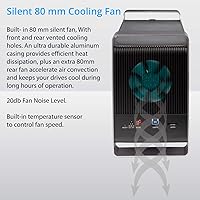
During sustained file operations, the internal fan becomes clearly audible — multiple reviewers use words like persistent or droning to describe it. For anyone using this on a desktop in a quiet bedroom or small studio, the fan noise is a legitimate daily irritation rather than an occasional nuisance.
Thermal Management
76%
24%
The aluminum body does pull some heat away passively, and users running the enclosure around the clock report that drives generally stay within acceptable temperature ranges during normal workloads. The active fan, despite its noise, does its core job of preventing dangerous heat buildup.
With all five bays loaded and under continuous heavy use, some users report that the enclosure runs warmer than they would like, particularly with high-capacity 3.5-inch drives that generate more heat. Positioning the unit with clear airflow around it is essentially mandatory for long-term safe operation.
Ease of Setup
67%
33%
Experienced users — those comfortable with RAID concepts and external storage — find the physical setup genuinely quick and the tray-less mechanism intuitive. The hardware side of getting drives in and connected takes only minutes.
Documentation is thin and the included instructions are frequently described as unhelpful for anyone who does not already understand RAID configuration. First-time enclosure buyers often turn to forum threads and YouTube tutorials to get through the initial setup, which should not be necessary at this price point.
Long-term Reliability
63%
37%
A solid portion of buyers report using this 5-bay enclosure continuously for a year or more without significant issues. Those who run it in stable, well-ventilated environments with matching-generation drives tend to have the most positive long-term experiences.
Beyond the first year, a meaningful subset of reviewers describe intermittent drive detection failures, unexpected disconnects, or arrays that required rebuilding without any clear cause. Whether these stem from firmware limitations or hardware wear is unclear, but the pattern is consistent enough to be worth noting.
Value for Money
74%
26%
Compared to entry-level NAS devices that require network setup and proprietary software, this enclosure offers genuine RAID capability at a more accessible cost for users who only need local, direct-attached storage. Buyers who already own bare drives feel the value proposition strongly.
Users who encounter eSATA compatibility issues or who need more hands-on technical support often feel the purchase was not worth the cost once frustration is factored in. The value equation also weakens if you need to buy all five drives new to fill the unit.
Hot-Swap Design
81%
19%
The tray-less mechanism is one of the most consistently praised physical features. Users who regularly rotate drives in and out — archivists swapping project disks, for example — describe the process as fast and satisfying compared to screw-tray alternatives they have used before.
Over many cycles of insertion and removal, a few users report that the handle mechanisms start to feel looser and less snappy than they did initially. Hot-swap behavior in RAID modes also depends heavily on how the host OS handles it, which is not always predictable.
Software & Firmware
59%
41%
The enclosure is largely hardware-managed, which means it does not require proprietary software drivers for basic functionality across Windows, macOS, and Linux — a setup that experienced users tend to prefer for its simplicity and OS compatibility.
Firmware update availability is limited, and there is no management utility to monitor drive health, array status, or temperature from software. Users accustomed to NAS-level monitoring dashboards will find the lack of any interface visibility a real step down in operational awareness.
Cross-Platform Support
77%
23%
Working across Windows, macOS, and Linux without needing to install anything extra is a genuine convenience for users who switch between operating systems or share the enclosure between machines in a mixed environment. Linux users in particular appreciate that it just works.
macOS users who want RAID 5 will quickly realize that the native operating system does not support it natively, requiring third-party software at additional cost. This is an OS limitation rather than a flaw in the enclosure itself, but it still creates friction for Mac-first buyers.

Suitable for:

The Syba SY-ENC50122 5-Bay RAID Enclosure is a strong fit for anyone who needs centralized, multi-drive storage without committing to a full network-attached storage system. Home lab users and prosumers who already own a collection of bare SATA drives will get immediate value by unifying them into a single, organized enclosure with real RAID redundancy. Video editors and photographers dealing with growing raw file libraries will appreciate the breathing room that comes with up to 120TB of theoretical capacity. Small offices running local backups — where cloud dependency is impractical or too costly — will also find this a workable, self-contained solution. If you are comfortable doing a basic RAID configuration and understand what RAID 5 or JBOD means in practice, this enclosure gives you a lot of capability for what it costs.

Not suitable for:

The Syba SY-ENC50122 5-Bay RAID Enclosure is not the right tool for users expecting plug-and-play simplicity or those unfamiliar with RAID concepts. If you plan to use the eSATA interface for maximum throughput, you need to first confirm that your host machine supports Port Multiplier with FIS-based switching — most consumer motherboards do not, which has caught a notable number of buyers off guard. Users in quiet environments like bedrooms or small studios may find the fan noise genuinely disruptive during sustained use. This is also not a substitute for a true NAS if you need remote access, user permission management, or network-wide file sharing. Anyone expecting guaranteed enterprise-grade reliability or long-term drive detection consistency under heavy workloads should look at more purpose-built, higher-end solutions.

Specifications

  • Drive Bays: Accommodates up to 5 drives simultaneously, supporting both 2.5″ and 3.5″ SATA I, II, or III hard disk drives.
  • Max Capacity: Supports up to 24TB per drive bay, allowing a maximum theoretical total capacity of 120TB across all five bays.
  • RAID Modes: Compatible with RAID 0, RAID 1, RAID 3, RAID 5, RAID 10, SPAN, and JBOD configuration modes.
  • USB Interface: USB 3.0 port delivers data transfer speeds of up to 5 Gb/s and supports UASP on Windows 8 and later, macOS 10.8 and later, and Linux.
  • eSATA Interface: Includes an eSATA port for higher-throughput connectivity, but requires a host system with Port Multiplier and FIS-based switching support to access all drives simultaneously.
  • Chassis Material: The outer enclosure is constructed from aluminum, which contributes to passive heat dissipation during extended operation.
  • Drive Installation: Uses a tray-less, tool-free design that allows drives to be inserted or removed by pulling a built-in handle without any accessories.
  • Dimensions: The unit measures 9.25″ in length, 5″ in width, and 8.9″ in height.
  • Weight: The enclosure weighs 8 pounds without drives installed.
  • OS Compatibility: Works with Windows, macOS, and Linux operating systems; UASP acceleration is available on Windows 8+, macOS 10.8+, and supported Linux kernels.
  • Manufacturer: Designed and sold by Syba, operating under the IO CREST brand, with model number SY-ENC50122.
  • UPC: The product UPC is 857426008680.
  • Availability: First listed for sale in November 2020 and has maintained consistent availability since launch.
  • Market Rank: Ranked #83 in the Enclosures category on Amazon based on sales performance at time of review.
  • UASP Support: UASP (USB Attached SCSI Protocol) is supported to reduce latency and CPU overhead on compatible host systems running Windows 8 or later, macOS 10.8 or later, or Linux.

Related Reviews
Syba SY-ENC50104 4-Bay 3.5” SATA III HDD Enclosure
85%
88%
Build Quality & Durability
91%
Ease of Setup & Installation
83%
Cooling Efficiency
72%
Noise Level
89%
Storage Capacity & Expansion
More
ORICO 9858RU3 5-Bay RAID HDD Enclosure
75%
88%
Build Quality
84%
Ease of Setup
81%
RAID Mode Flexibility
67%
Transfer Speed
74%
Thermal Management
More
Yottamaster DF5RU3 5-Bay RAID Hard Drive Enclosure

75%
88%
Build Quality
84%
RAID Configuration
58%
Transfer Speed
83%
Cooling Performance
67%
Ease of Setup
More
ICY DOCK ToughArmor MB998SP-B 8-Bay 2.5” SATA/SAS HDD/SSD Mobile Rack Enclosure for 5.25″ Bay
87%
91%
Performance
88%
Cooling Efficiency
89%
Build Quality
93%
Ease of Installation
72%
Noise Level
More
GODO 2.5″ Dual Bay RAID Enclosure
75%
88%
Value for Money
91%
Ease of Setup
83%
Build Quality
79%
Thermal Management
67%
Transfer Performance
More
Cenmate 4-Bay RAID Enclosure 80TB
73%
83%
Build Quality
78%
RAID Functionality
71%
Cooling & Thermal Management
47%
Mac Compatibility
89%
Windows Compatibility
More
TERRAMASTER TD2 Thunderbolt 3 2-Bay RAID Enclosure
73%
83%
Read/Write Performance
88%
Build Quality
81%
RAID Flexibility
86%
Mac Compatibility
53%
Windows Compatibility
More
Yottamaster PS500U3 5-Bay External HDD Enclosure
74%
84%
Build Quality
79%
Cooling Performance
61%
Transfer Speed
88%
Drive Compatibility
91%
Ease of Installation
More
Yottamaster PS500C3 5-Bay USB-C HDD Enclosure
72%
83%
Build Quality
57%
Transfer Speed
88%
Drive Compatibility
91%
Ease of Setup
73%
Thermal Management
More
MAIWO K25272 Dual Bay Hard Drive RAID Enclosure 16TB
84%
89%
Performance
88%
Build Quality
92%
Ease of Setup
87%
Data Transfer Speed
85%
Compatibility
More

FAQ

The enclosure ships without any hard drives — you supply your own. This is standard for RAID enclosures at this level, and it actually works in your favor if you already own bare SATA drives you want to put to use.

Yes, the bays support both form factors, so you can mix them freely. Just keep in mind that for RAID modes like RAID 5, the array capacity will be constrained by the smallest drive in the group, so it is worth planning your drive sizes accordingly.

With RAID 5 configured across at least three drives, the Syba SY-ENC50122 5-Bay RAID Enclosure can survive a single drive failure without data loss. You would replace the failed drive and the array rebuilds itself. That said, RAID is not a backup — it protects against drive failure but not against accidental deletion or file corruption.

eSATA can deliver better sustained throughput, but there is an important catch: your computer needs to support Port Multiplier with FIS-based switching on its eSATA controller. Most consumer motherboards do not include this feature. If you are unsure, check your motherboard specs before banking on eSATA — USB 3.0 with UASP is a more reliable default for most setups.

Fan noise is one of the more common complaints from buyers. Under light use it is manageable, but during sustained read/write activity it can become noticeable. If your workspace is very quiet or the enclosure will sit close to you, this is worth factoring into your decision.

It works on macOS, including UASP support on macOS 10.8 Mountain Lion and later. Keep in mind that macOS handles RAID differently than Windows — Apple's built-in Disk Utility supports RAID 0 and 1, but for RAID 5 on a Mac you may need third-party software like SoftRAID. Linux is also fully supported.

JBOD (Just a Bunch of Disks) treats each drive as completely independent, with no striping or redundancy. It is useful when you want to keep drives separate — for instance, if each bay holds a different project archive or backup destination. If you just want pooled storage in one logical volume without redundancy, SPAN is the mode to look at, though JBOD is the safer and more common choice for independent drive management.

Absolutely. You do not need to fill all five bays to use the enclosure. The available RAID modes will depend on how many drives are installed — RAID 5 requires at least three, for example — but running two or three drives in RAID 1 or JBOD is perfectly valid.

The tray-less design is built for easy drive removal, and the enclosure does support hot-swap in practice. However, hot-swap behavior can depend on your RAID mode and host system — always make sure to properly eject or unmount a drive through your operating system before physically pulling it out to avoid data corruption.

For the most part, users report solid performance through the first year of ownership. A subset of longer-term reviews do mention occasional drive detection hiccups after extended continuous use, but these tend to appear in specific hardware configurations rather than across the board. Keeping firmware up to date and ensuring adequate airflow around the unit can help with sustained reliability.

Where to Buy