Overview

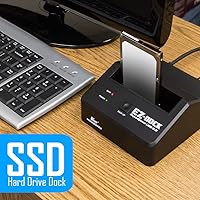
The Kingwin EZD-2535U3 Hard Drive Docking Station is the kind of no-fuss utility tool that quietly earns its place on a desk. It has been around since 2014 — a long run for any peripheral — and the fact that it still sells and rates well says something real about its staying power. The metal body feels sturdier than you would expect at this price point, and the compact footprint means it will not crowd your workspace. USB 3.0 with UASP support handles everyday transfer workloads without complaint, though if you run a USB-C-only machine, you will need an adapter. Practical and unpretentious — that sums it up.
Features & Benefits

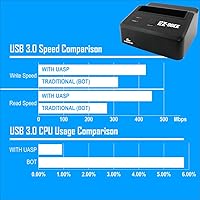
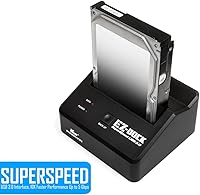
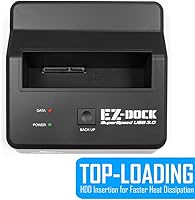
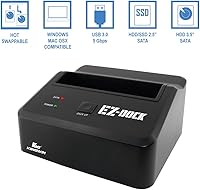
The most practical thing about this docking station is how quickly you can get a drive running. Pop a SATA drive into the slot — whether it is a 2.5-inch laptop drive or a 3.5-inch desktop unit — and your system recognizes it almost immediately, no drivers needed. The One-Touch Backup button is a small but genuinely useful addition for anyone who wants to copy files without opening a single application. UASP support keeps sustained transfers moving at a decent clip rather than throttling under load, and compatibility with drives up to 10TB capacity means newer high-capacity storage won't be an issue down the road.

Best For

This drive dock makes the most sense for people who regularly need to access drives outside of a machine — think IT techs pulling data from old systems, home users who keep bare drives as cheap backup media, or anyone who has tried to recover files from a dead laptop. It handles both 2.5-inch SSDs from old notebooks and 3.5-inch HDDs pulled from desktop towers without swapping hardware. If you are migrating to a new PC and want your old drive's contents without cracking open a second case, this is a straightforward, affordable way to get the job done.

User Feedback

With over 600 ratings and a 4.4-star average, the Kingwin dock has built a reputation that holds up under scrutiny. Most buyers praise how effortlessly it works straight out of the box, and long-term owners — of which there are quite a few given this product's age — report consistent reliability over time. The most cited criticism is fit with smaller 2.5-inch drives, which can feel slightly loose in the slot. A number of buyers also point out that the USB 3.0 interface feels dated now that USB-C is common on modern laptops, though this rarely affects actual day-to-day performance for the tasks this dock is built to handle.

Pros

  • Recognized instantly by Windows, macOS, and Linux with zero driver installation required.
  • Handles both 2.5-inch laptop drives and 3.5-inch desktop HDDs with a single dock.
  • UASP support keeps sustained transfer performance noticeably better than basic USB 3.0 docks.
  • The metal body holds up well — long-term owners report years of use without structural failure.
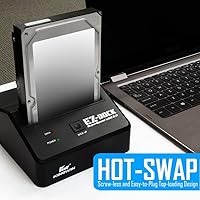
  • Hot-swap capability lets you rotate multiple drives quickly without powering the unit down.
  • Drive capacity support up to 10TB means the dock stays relevant as storage needs grow.
  • One-Touch Backup button provides a quick, software-free way to copy files for less technical users.
  • Dual LED indicators make it easy to confirm at a glance whether the drive is active or idle.
  • The compact footprint fits comfortably on a crowded desk without demanding dedicated space.
  • At its price point, the Kingwin dock offers a build quality and feature set that outpaces most same-tier competitors.

Cons

  • USB Type-A only — no USB-C port means adapter hassles on any modern ultrabook or MacBook.
  • Thin 2.5-inch drives can sit loosely in the slot, risking unstable connections during longer transfers.
  • Single-bay design means you cannot copy directly between two drives without a computer in the loop.
  • The One-Touch Backup behavior is poorly documented and confusing for users who rely on it heavily.
  • No USB 3.2 or Thunderbolt option limits real-world peak speeds for large, time-sensitive transfers.
  • Drive capacity support beyond 10TB is unconfirmed, which is a growing concern as large drives become standard.
  • The base can slide on smooth desk surfaces when a stiff USB cable pulls against the unit.
  • OS compatibility documentation has not been updated to reflect current Windows 11 or recent macOS versions.
  • Internal drive guides show wear over time with heavy rotation use, loosening the fit gradually.
  • No indication of support for NVMe or M.2 drives — strictly limited to legacy SATA form factors.

Ratings

The scores below for the Kingwin EZD-2535U3 Hard Drive Docking Station were generated by AI after systematically analyzing verified buyer reviews from multiple global sources, with spam, incentivized, and bot-flagged feedback actively filtered out. The result is an honest, data-driven breakdown that reflects both the genuine strengths users praise and the real friction points that keep showing up across long-term ownership reports. Nothing is glossed over — the numbers tell the full story.
Ease of Setup
93%
Across hundreds of reviews, plug-and-play performance is the single most praised trait. Users report that connecting a bare SATA drive and having it recognized within seconds — on Windows, macOS, and Linux alike — is exactly what they needed for quick data recovery or a one-off file transfer. No driver hunting, no reboots.
A small group of macOS users on newer Silicon Macs noted an initial mount delay or the need to reformat drives before the system recognized them properly. This is a minor edge case, but worth knowing if you are working with drives freshly pulled from Windows-only machines.
Drive Compatibility
88%
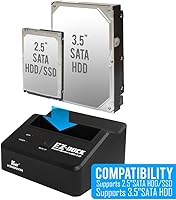
The ability to slot in both 2.5-inch laptop SSDs and 3.5-inch desktop HDDs without any adapters is a practical strength that saves real time. IT users who regularly process drives from different machine types specifically call this out as a reason they keep this dock on their bench permanently.
Compatibility with 2.5-inch drives is the most reported weak spot — thinner or lighter drives can sit loosely in the slot, occasionally causing unstable connections during transfers. This affects a minority of users, but it comes up consistently enough in reviews to be a genuine caveat.
Transfer Speed
76%
24%
With UASP enabled, users doing large file migrations — think hundreds of gigabytes off an old desktop HDD — report noticeably better sustained throughput compared to older docks they have used. For typical backup and recovery workloads, the USB 3.0 connection holds up well without bottlenecking.
The USB 3.0 interface is the ceiling here, and users who have moved to USB-C or Thunderbolt workflows feel that limitation. Transferring very large archives or doing repeated full-drive backups is slower than what a modern USB 3.2 or NVMe-capable dock would offer, and that gap is growing.
Build Quality
81%
19%
The metal body gives this dock a noticeably more solid feel than the all-plastic competitors at a similar price. Long-term owners — some using it for three or more years — report that the housing has held up without cracking, warping, or developing loose structural wobble over time.
The slot opening itself, while functional, does not grip drives with the firmness some users expect. A few reviewers noted that the internal plastic drive guides show wear after heavy rotation use, which can make the fit feel slightly less snug over time compared to day one.
Hot-Swap Functionality
84%
Users who swap drives frequently — for example, those who rotate multiple backup drives across the week — appreciate that they can pull one drive and insert another without powering the dock down or ejecting through the OS. It shaves real minutes off repetitive workflows.
A handful of users reported that the OS did not always detect a freshly swapped drive on the first attempt, requiring them to physically unplug and replug the USB cable to trigger recognition. This seems more common on certain Windows configurations and is an occasional annoyance rather than a consistent failure.
One-Touch Backup
67%
33%
For users who just want to push a button and copy files to a destination drive, the feature does work and removes the need to open any third-party software. It is a genuine convenience addition that budget docks at this tier do not always include.
The implementation is basic — there is limited documentation on exactly how the backup logic selects what to copy, and several users found the behavior inconsistent or unclear without reading deeply into the manual. Power users tend to ignore it entirely and use dedicated backup software instead.
LED Indicators
79%
21%
Both the power and drive-activity LEDs are bright enough to read in a lit room without being distractingly intense at night. Users doing data transfers found the blinking activity light a useful passive confirmation that a copy is still in progress.
The LEDs offer no granular status beyond on and off — there is no visual distinction between read and write activity, and no indication of transfer progress or errors. For a product used in data recovery scenarios, a more informative indicator would genuinely add value.
Value for Money
89%
This is where the Kingwin dock consistently wins over buyers who have tried pricier alternatives. At its price point, the combination of metal build, broad drive support, UASP, and multi-OS compatibility delivers more than most competitors offer. Long-term owners especially emphasize that it has paid for itself many times over.
Buyers who eventually need USB-C connectivity or dual-bay functionality will find themselves shopping again sooner than they hoped, which slightly undermines the long-term value case. It is a great deal for what it is, but its feature ceiling is low by current standards.
Port & Interface Modernity
54%
46%
The USB 3.0 Type-A connection is still widely supported across desktop PCs and older laptops, so the dock does not require any adapters for the majority of traditional workstation setups. For a bench tool in an environment with older hardware, it fits right in.
On modern ultrabooks and MacBooks with only USB-C ports, you need an adapter — and that adapter can sometimes introduce its own reliability quirks. The absence of USB-C, USB 3.2, or Thunderbolt support is the dock's most dated characteristic and is increasingly a friction point for new buyers.
Long-Term Reliability
82%
18%
Few budget peripherals accumulate reviews spanning multiple years of daily use, but this one has. A meaningful number of reviewers mention using it for two to four years without hardware failure, which is a strong reliability signal for a tool that handles rotating mechanical drives and SSDs regularly.
There are isolated reports of the unit suddenly failing to power on or losing USB recognition after extended use, typically without warning. These cases are a small minority, but they do exist — and because the dock handles irreplaceable data, even rare failure modes feel higher stakes than they would on other product types.
Physical Stability
72%
28%
The dock sits flat on a desk without rocking, and the weight distribution is reasonable for a single-bay unit. For users who leave a drive inserted for hours during a backup, there is no concern about tipping or shifting under normal desktop conditions.
When a drive is fully inserted and a cable is connected, the combined weight can cause the dock to slide on smooth desk surfaces if the cable is tugged. There are no rubber feet substantial enough to fully prevent this, and a few reviewers specifically wished the base gripped better.
OS & Software Compatibility
87%
Linux users specifically praise this dock, as driver-free operation is not always guaranteed with budget peripherals on non-Windows systems. The breadth of supported environments — from older Windows builds to current macOS — makes it a versatile tool for mixed-platform households and IT environments.
Support for the operating systems listed on the packaging has not been updated to reflect the latest OS versions, which creates uncertainty for buyers on recent Windows 11 builds or the newest macOS releases. In practice it works, but the dated spec sheet does not inspire confidence at first glance.
High-Capacity Drive Support
83%
The 10TB ceiling means this dock is not immediately obsolete as drive sizes grow. Users who picked it up years ago and have since upgraded to 6TB or 8TB backup drives confirm that it handles those capacities without any configuration changes or firmware concerns.
There is no official confirmation from the manufacturer on support beyond 10TB, which is a real limitation as 16TB and 20TB drives become more accessible. Users with high-capacity needs in the near future may find themselves replacing the dock sooner than expected.

Suitable for:

The Kingwin EZD-2535U3 Hard Drive Docking Station was built for people who need quick, no-drama access to bare SATA drives — and it delivers exactly that for the right buyer. IT technicians who pull drives from decommissioned machines will appreciate how fast they can get data off a drive without unscrewing anything or configuring software. Home users with a shoebox of old laptop and desktop drives will find this dock a practical way to consolidate, archive, or recover files without buying enclosures for each drive individually. It also suits anyone in the middle of a PC migration who wants to copy data from an old system drive directly, treating it like any other external storage. For mixed-platform households running Windows, macOS, and Linux across different machines, the driver-free operation removes a surprisingly common compatibility headache. If your needs are fundamentally about accessing SATA drives quickly and cheaply, this docking station has been doing that job reliably for years.
Not suitable for:

The Kingwin EZD-2535U3 Hard Drive Docking Station is a poor fit for anyone whose primary machine has only USB-C or Thunderbolt ports — you will need an adapter, and that added link in the chain can introduce reliability issues that undercut the whole point of a simple utility dock. Users who need to run two drives simultaneously will also hit a wall immediately, since this is a single-bay unit with no multi-drive capability. If you are doing professional video editing, large NAS migrations, or any workflow that demands consistently high sustained transfer speeds, the USB 3.0 ceiling will frustrate you compared to what a modern USB 3.2 or Thunderbolt dock can deliver. Buyers who want tight, secure retention for thin 2.5-inch SSDs should also be cautious — the slot fit on smaller drives is loose enough that some users have experienced intermittent disconnections mid-transfer. And if you are looking for something to permanently house a drive as a tidy external storage solution, a proper enclosure with a secure mounting mechanism is a better tool for that specific job.
Specifications

  • Model Number: The unit is identified by Kingwin model number EZD-2535U3.
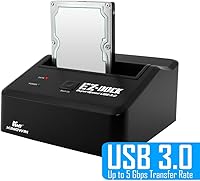
  • Host Interface: Connects to a computer via USB 3.0 Type-A with UASP (USB Attached SCSI Protocol) support for improved sustained transfer performance.
  • Drive Interface: Compatible with SATA I, SATA II, and SATA III hard drives and solid-state drives.
  • Drive Form Factors: Accepts both 2.5″ and 3.5″ SATA drives in a single tool-free slot.
  • Max Transfer Rate: Theoretical maximum data transfer rate reaches up to 5 Gbps under USB 3.0 with UASP enabled.
  • Max Drive Capacity: Supports individual SATA drives up to 10TB in storage capacity.
  • Simultaneous Drives: Single-bay design accommodates one drive at a time; dual-drive operation is not supported.
  • Hot-Swap: Drives can be inserted and removed while the dock remains powered, without requiring a system restart.
  • Driver Requirement: No additional drivers are required; the dock operates as a plug-and-play device across all supported operating systems.
  • OS Compatibility: Compatible with Windows 98SE through Windows 8 and beyond, macOS 10 and later, and most Linux distributions.
  • Backup Function: Includes a One-Touch Backup button for initiating file backup operations without dedicated software on supported setups.
  • LED Indicators: Two LED indicators display real-time power status and drive data access activity independently.
  • Body Material: The outer housing is constructed from metal, providing a sturdier build than comparable all-plastic units at this price tier.
  • Dimensions: The dock measures 4.8 x 2.4 x 5.2 inches (length x width x height).
  • Weight: The unit weighs approximately 1.26 pounds without a drive installed.
  • Power Delivery: The dock includes an external power adapter to supply adequate current for 3.5″ HDDs, which draw more power than USB alone can provide.
  • First Available: This model was first made available for purchase in February 2014, giving it an established track record spanning over a decade.

Related Reviews

SSK DK103 Dual Bay Hard Drive Dock
76%
84%
Offline Clone Reliability
88%
Build Quality
71%
Transfer Speed
79%
Thermal Management
91%
Ease of Use
More
MAIWO Dual-Bay Hard Drive Docking Station
78%
88%
Offline Clone Reliability
91%
Value for Money
67%
Transfer Speed
83%
Drive Compatibility
93%
Ease of Setup
More
RSHTECH RSH-DS02 Dual Bay Hard Drive Dock
80%
88%
Offline Cloning Reliability
83%
Build Quality
76%
Transfer Speed
71%
Heat Management
62%
Large Drive Compatibility
More
dockteck Dual Bay External Hard Drive Docking Station
84%
90%
Performance and Speed
88%
Ease of Use
85%
Build Quality
91%
Cloning Functionality
82%
Compatibility
More
YOTUO 500GB Portable Docking Station External Hard Drive
81%
78%
Performance
92%
Portability
85%
Connectivity Options
88%
Ease of Use
70%
Build Quality
More
ORICO Hard Drive Docking Station DD18C3, 22TB Capacity
86%
89%
Ease of Use
94%
Setup and Installation
85%
Data Transfer Speed
88%
Build Quality
84%
Design and Aesthetics
More
Tccmebius TCC-S868 Dual-Slot USB 3.0 Docking Station
71%
88%
IDE Compatibility
83%
SATA Drive Support
79%
Data Transfer Speed
76%
Ease of Setup
61%
One-Touch Backup (OTB) Feature
More
SABRENT DS-UC1B USB-C Hard Drive Docking Station
81%
88%
Plug-and-Play Reliability
79%
Transfer Speed Performance
74%
Build Quality & Materials
86%
Hot-Swap Functionality
83%
Compatibility Range
More
FIDECO YPZ220C Dual Bay USB 3.2 Gen 1 Hard Drive Docking Station
79%
88%
Offline Clone Functionality
79%
Transfer Speed
92%
Drive Compatibility
91%
Plug-and-Play Setup
63%
Build Quality
More
CineRAID CR-H212 Dual Bay Hard Drive Docking Station 2TB
85%
87%
Performance & Speed
92%
Build Quality & Durability
88%
Ease of Use & Setup
93%
Data Transfer Speed (USB 3.0)
90%
Compatibility with Operating Systems
More
StarTech SDOCKU33BV USB 3.0 Hard Drive Dock
78%
93%
Ease of Setup
84%
Drive Compatibility
78%
Transfer Speed
58%
Build Quality
81%
Hot-Swap Reliability
More

FAQ

No, you do not. The Kingwin EZD-2535U3 Hard Drive Docking Station is fully plug-and-play on Windows, macOS, and Linux. Just connect it, insert your drive, and your operating system should recognize it within a few seconds — no disc, no download required.
The dock uses a USB 3.0 Type-A connector, so you will need a USB-A to USB-C adapter if your MacBook lacks a standard USB-A port. Most quality adapters work fine, but adding that extra link in the chain can occasionally cause detection hiccups, so it is worth using a reliable adapter rather than a cheap one.

Yes, as long as the SSD uses a SATA interface and comes in a 2.5″ form factor — which covers the vast majority of laptop SSDs from the past decade. Note that M.2 NVMe or M.2 SATA drives will not fit; this dock is strictly for 2.5″ and 3.5″ SATA drives.

Unfortunately, yes, this is a known and commonly reported issue. The slot is sized to accommodate 3.5″ drives as the primary form factor, so smaller 2.5″ drives do not always sit as snugly. Most users find it works fine despite the loose feel, but if you are transferring large amounts of data over a long session, it is worth making sure the drive is fully seated and the cable is not pulling on the unit.

No, not with this model. It is a single-bay dock, so only one drive can be connected at a time. Any drive-to-drive copying needs to be done through your computer — insert the source drive, copy the files to your system or another location, then swap in the destination drive. If you need direct drive-to-drive duplication without a PC, you would need a dual-bay dock with a built-in clone function.

Yes, the dock officially supports drives up to 10TB, so an 8TB drive should work without any issues. Buyers have confirmed compatibility with 6TB and 8TB drives in real-world use. Just make sure the drive is formatted in a file system your operating system can read — for very large drives on Windows, exFAT or NTFS is the way to go.

It triggers a backup operation that copies data from the inserted drive to a designated location, depending on your system setup. In practice, the documentation around exactly how it works is thin, and many users find the behavior unclear without digging into the manual. Power users tend to skip it entirely and use dedicated backup software instead — it is a nice extra for casual users but not a feature to rely on for critical backups.

Generally, yes. Many users run extended backups and data migrations through this dock without problems, and long-term owners report it handles sustained workloads without overheating under normal desktop conditions. That said, like any drive dock, it is a good habit to monitor drive temperatures during very long transfers, especially with 3.5″ mechanical HDDs that generate more heat.

The official OS compatibility list on the packaging is outdated and stops at Windows 8, but in practice the dock works fine on Windows 10 and Windows 11 because it relies on standard USB mass storage drivers built into the OS. Multiple buyers have confirmed Windows 11 compatibility without any issues. The stale spec sheet looks concerning, but it is a documentation problem rather than a real incompatibility.

For straightforward tasks — plugging in old drives, recovering files, or rotating backup media — the Kingwin dock holds its own surprisingly well against docks that cost significantly more. Where you start to feel the gap is in interface modernity: pricier docks often offer USB-C, USB 3.2, or Thunderbolt connections that deliver meaningfully faster speeds for large transfers. If your workflow involves frequent high-volume data movement, the upgrade is worth it. For occasional use on a budget, this dock remains a solid and honest choice.