Overview

The Tccmebius TCC-S868 Dual-Slot USB 3.0 Docking Station occupies a genuinely useful niche: it connects both old IDE drives and modern SATA drives to your computer through a single USB 3.0 port. Most docks sold today have quietly dropped IDE support, so finding one that handles both interfaces at a budget-friendly price is rarer than it should be. Ranked #73 in Hard Drive Docking Stations on Amazon, it has earned real traction among home users and hobbyists. The housing is plastic — light and compact, but not built to impress. Think of this IDE and SATA dock as an occasional-use recovery tool rather than a workhorse for daily production tasks.
Features & Benefits

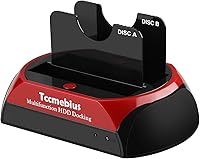
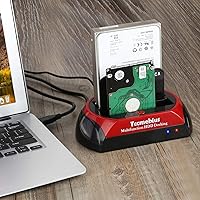
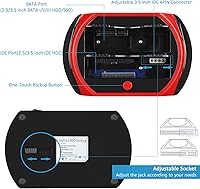
The dual-slot design is where this IDE and SATA dock earns its keep. The SATA slot handles drives up to 20TB across SATA I, II, and III standards, while the IDE slot — fitted with adjustable connectors — supports drives up to 1TB in both 2.5-inch and 3.5-inch form factors. Data transfers run over USB 3.0 at speeds up to 5Gbps, which makes migrating a full drive noticeably faster than older USB 2.0 docks. There is also a One-Touch Backup button for copying files without opening any software — handy in practice, though it requires installing the OTB application first, and it is strictly Windows-only. Mac users can still read and transfer files; they just lose access to that shortcut entirely.

Best For

This dual-slot docking station hits its stride in a specific context: recovering or migrating data from drives you no longer use daily. IT hobbyists dealing with old desktop towers, home users clearing out retired laptops, or anyone sitting on a stack of decade-old IDE drives will find it genuinely useful. Small offices needing an occasional-use solution — not a permanent NAS or RAID setup — also fit the profile well. Windows users get the most out of it overall, since the OTB backup feature is unavailable on Mac. If you need both IDE and SATA support in one compact device without a significant investment, this dock is a practical, no-frills answer.

User Feedback

Across more than 2,300 reviews, the Tccmebius dock holds a 4.2-star average — a solid result reflecting broadly positive real-world experience. The most consistent praise centers on IDE compatibility: buyers frequently note how hard it is to find a modern dock that still supports the older interface, and this one delivers reliably for most standard drives. On the downside, a handful of users report trouble with uncommon or aging IDE configurations the dock does not always recognize cleanly. The OTB setup process also trips up less technical users — it works well once running, but initial installation is not always intuitive. Mac owners have flagged the OTB limitation as something that should be clearer before purchase. Build quality is functional, nothing more.

Pros

  • One of the very few affordable docks that still supports IDE drives alongside modern SATA.
  • Handles both 2.5-inch and 3.5-inch drives across SATA I, II, and III without adapters.
  • USB 3.0 speeds make file migrations noticeably faster than older USB 2.0 docks.
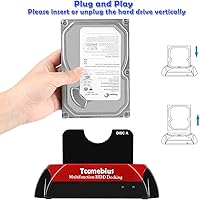
  • Plug-and-play setup for basic drive access — no drivers needed on most modern systems.
  • The SATA slot supports drives up to 20TB, leaving plenty of headroom for current hardware.
  • Compact and light enough to carry between workstations or take to a friend's house.
  • One-Touch Backup button is a genuine time-saver for Windows users once the software is running.
  • Over 2,300 reviews averaging 4.2 stars signals consistent real-world satisfaction at this price tier.
  • One-year warranty plus lifetime email support is a meaningful commitment for a budget product.
  • Adjustable IDE connectors add flexibility when working with drives of varying pin configurations.

Cons

  • OTB software setup is poorly documented and trips up less technical users regularly.
  • Mac users lose access to the One-Touch Backup feature entirely — it is Windows-only.
  • Some older or non-standard IDE drives are not recognized, with no clear fix available.
  • Simultaneous dual-drive transfers can trigger brief disconnections on some USB controllers.
  • The plastic housing feels cheap and creaks slightly under minimal handling pressure.
  • The power adapter adds a cable to the setup, reducing portability more than the compact size suggests.
  • Real-world transfer speeds fall noticeably short of the 5Gbps theoretical ceiling.
  • Drive slot seating lacks the firm, confident click that inspires trust when inserting hardware.

Ratings

The Tccmebius TCC-S868 Dual-Slot USB 3.0 Docking Station has been scored below using an AI-driven analysis of verified global buyer reviews, with spam, bot-generated, and incentivized feedback actively filtered out before scoring. Ratings reflect real-world usage patterns across a broad range of users — from home data recovery projects to small-office file migrations — and both the standout strengths and genuine frustrations are represented without bias.
IDE Compatibility
88%
This is the dock's clearest advantage: finding USB 3.0 hardware that still supports IDE in 2024 is genuinely difficult. Users recovering data from old towers or early-2000s laptops repeatedly call out this feature as the sole reason they chose this unit over cheaper SATA-only alternatives.
Compatibility is not universal — some users with particularly old or non-standard IDE drives report the dock failing to recognize them reliably. The adjustable IDE connector helps, but edge cases with aging hardware do surface often enough to be worth noting.
SATA Drive Support
83%
Support for SATA I, II, and III across both 2.5-inch and 3.5-inch form factors covers the vast majority of drives most users will actually own. The 20TB ceiling on the SATA slot is well ahead of where typical home users are today, so capacity headroom is not a concern.
A small number of users report intermittent recognition issues when swapping SATA drives rapidly, suggesting the hot-swap behavior is not perfectly consistent. Running two drives simultaneously can also occasionally cause the dock to feel underpowered depending on the host system's USB controller.
Data Transfer Speed
79%
21%
The USB 3.0 connection makes a real difference compared to older USB 2.0 docks — users migrating large libraries of photos or video files from decommissioned laptops report the process completing in a fraction of the time they expected. For occasional data recovery use, the throughput feels appropriately responsive.
Real-world transfer speeds rarely hit the theoretical 5Gbps ceiling, which is normal for USB 3.0 but can still disappoint users expecting peak performance. Some buyers also note that speeds vary depending on drive age and condition, which is not unique to this dock but still affects the experience.
Ease of Setup
76%
24%
For basic drive reading and file transfer, setup is genuinely plug-and-play — plug the dock into a USB 3.0 port, insert a drive, and the system recognizes it without any driver installation on most modern Windows and Mac setups. Non-technical users consistently praise how little friction is involved for standard tasks.
The One-Touch Backup feature complicates this otherwise simple experience. Downloading and configuring the OTB software is not intuitive for less experienced users, and the manual guidance provided is sparse. Several buyers gave up on the feature entirely rather than troubleshoot the setup.
One-Touch Backup (OTB) Feature
61%
39%
When it works, the OTB button is a genuinely convenient shortcut — pressing it triggers an automatic copy of selected data without needing to open a file manager or run a script. Windows users who take the time to configure the software properly tend to find it saves meaningful effort on repeat backup jobs.
The OTB function is entirely Windows-exclusive, which is not prominently communicated on the product listing. Mac users expecting a hardware-level backup button are left with nothing. Even on Windows, the software install process is clunky, and the instructions for downloading it are buried in the user manual.
Build Quality
58%
42%
The plastic housing keeps the unit light enough to toss in a bag and use at different workstations, which suits its role as an occasional-use tool. The red and black color scheme gives it a slightly more purposeful look than plain-black budget competitors, and the overall assembly feels acceptably solid for the price.
Nobody is going to mistake this for a premium product. The plastic creaks slightly under pressure, and the drive slots do not have the firm, reassuring click some users expect when seating a drive. For users who want something that feels built to last years of regular use, the construction will underwhelm.
Mac OS Compatibility
64%
36%
Mac users running OS 10.10 or later can read and transfer files from both SATA and IDE drives without issue — the basic functionality works fine without any additional drivers. For Mac users who just need to pull files off an old drive, the dock handles the job.
The OTB backup button does nothing on macOS, and this limitation is not clearly flagged before purchase. Mac users who bought this expecting full feature parity with the Windows experience often feel misled, which is a recurring theme in lower-rated reviews from that segment.
Value for Money
84%
At its price point, offering both IDE and SATA support in a single device is hard to beat. Comparable docks with IDE capability from more recognized brands often cost significantly more, and for users who only need this dock a handful of times per year, the investment makes clear practical sense.
Users who need it for sustained, frequent use may find the build quality does not hold up well enough to justify even the modest cost over time. If you are a Mac user who wanted OTB functionality, the value proposition drops noticeably since a key advertised feature is unavailable to you.
Drive Recognition Reliability
67%
33%
For mainstream SATA drives and commonly encountered IDE drives from the mid-2000s era, recognition is generally consistent and fast. Most users plugging in a drive to recover photos, documents, or system backups report the drive appearing promptly in their file explorer.
Older or less standard IDE drives — particularly early PATA variants or drives from obscure manufacturers — are where reliability breaks down. A meaningful subset of users reports failed recognition that no amount of reseating or adjusting the IDE connector resolves, turning a quick recovery job into a frustrating dead end.
Portability & Footprint
77%
23%
Measuring roughly 7.1 by 4.3 by 3.9 inches and weighing under 9 ounces, this IDE and SATA dock is compact enough to slip into a laptop bag without much thought. For IT hobbyists who move between locations or bring it to a friend's house for a data recovery session, the size is genuinely convenient.
The dock requires its own power adapter, which adds a cable to the equation and reduces the grab-and-go convenience slightly. The form factor is fine, but the power supply dependency means it is not as minimalist as some users assume from its compact dimensions.
Simultaneous Dual-Drive Use
66%
34%
Being able to seat one IDE and one SATA drive at the same time is useful for direct drive-to-drive comparisons or migrations — users copying an old IDE system drive to a newer SATA replacement find this particularly practical without needing a second device.
Transferring data between two simultaneously connected drives can be slower and less stable than users expect. Some report brief disconnection events during large transfers when both slots are active, which is disruptive mid-migration and suggests the dual-slot mode benefits from a reliably powered USB 3.0 host port.
Software & Documentation
47%
53%
The physical setup instructions are straightforward enough that most users do not need the manual for basic drive access. Tccmebius does offer email-based technical support and claims lifetime assistance, which is a reassuring commitment for a budget product.
The OTB software documentation is genuinely poor — finding the download, understanding the install steps, and configuring the backup targets is an exercise in frustration for anyone who is not already technically confident. The user manual references the process without providing a clear direct link, and multiple users report spending more time on this than the actual data transfer.
Warranty & After-Sale Support
71%
29%
A one-year limited warranty paired with a promise of lifetime technical support via email is a meaningful commitment for a product at this price tier. Users who have reached out to Tccmebius generally report receiving a response, which is more than can be said for some competing no-name brands.
Email-only support means resolution times can be slow, particularly for users in time zones distant from the support team. The warranty itself covers manufacturing defects but leaves room for ambiguity on issues caused by incompatible drives or user configuration, which is where most problems actually occur.

Suitable for:

The Tccmebius TCC-S868 Dual-Slot USB 3.0 Docking Station is purpose-built for anyone sitting on a pile of old hard drives and no clear way to access them. It is the right call for IT hobbyists and DIYers who regularly deal with legacy IDE drives — the kind that virtually every other modern dock has stopped supporting — and need a reliable way to pull files off them without hunting down obsolete hardware. Home users clearing out a retired desktop, decommissioning an old laptop, or rescuing family photos from a drive that has been in a drawer for a decade will find this dock covers exactly what they need. Small offices that occasionally need to migrate or archive data from older machines, without committing to a full NAS or RAID setup, also land squarely in the target audience. Windows users get the most complete experience here, since the One-Touch Backup feature adds a genuinely useful shortcut once it is configured. If your priority is handling both IDE and SATA drives in a single affordable device you reach for a few times a year, this dock makes a sensible, no-fuss choice.
Not suitable for:

The Tccmebius TCC-S868 Dual-Slot USB 3.0 Docking Station is not the right tool for users who need a permanent, high-reliability docking solution running multiple drives day in and day out. The plastic construction and inconsistent dual-slot performance under sustained load make it poorly suited for production environments, content creators transferring large video libraries daily, or anyone expecting enterprise-grade durability. Mac users who want the full feature set should look elsewhere — the One-Touch Backup button is completely non-functional on macOS, and this limitation is easy to miss before purchasing. If your IDE drives are particularly old, rare, or non-standard, there is a real chance this dock will not recognize them, turning a straightforward recovery job into a frustrating afternoon. Users who are not comfortable troubleshooting software installs will likely find the OTB setup process more effort than it is worth. And if a premium build, tight tolerances, and a long service life matter to you, the budget-tier plastic housing will disappoint from the moment you take it out of the box.
Specifications

  • Brand & Model: Manufactured by Tccmebius under model number TCC-S868-US.
  • Host Interface: Connects to your computer via a single USB 3.0 port with a maximum theoretical transfer rate of 5Gbps.
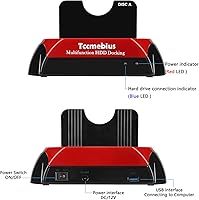
  • Drive Interfaces: Features one SATA I/II/III slot and one IDE slot with adjustable connectors to accommodate varying pin configurations.
  • Form Factor Support: Compatible with both 2.5″ and 3.5″ hard drives and SSDs across both the SATA and IDE interface slots.
  • Max SATA Capacity: The SATA slot supports hard drives with a storage capacity of up to 20TB.
  • Max IDE Capacity: The IDE slot supports drives up to a maximum capacity of 1TB.
  • Simultaneous Slots: Both drive slots can be occupied at the same time, allowing access to two drives concurrently.
  • Backup Feature: Includes a One-Touch Backup (OTB) button that triggers automated file copying to an external drive after software installation on Windows.
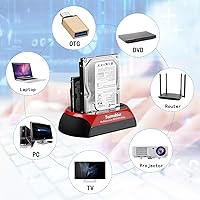
  • OS Compatibility: Supports Windows XP, Vista, 7, 8, 8.1, 10, and 11, as well as Mac OS 10.10 and later, though OTB functionality is restricted to Windows only.
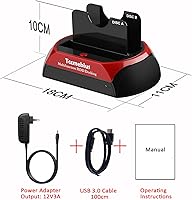
  • Dimensions: The unit measures 7.1″ in length, 4.3″ in width, and 3.9″ in height.
  • Weight: Weighs 8.4 oz (239g), making it light enough for transport between workstations.
  • Material: Housing is constructed from plastic in a two-tone red and black finish.
  • Power: Requires an external power adapter (included) rather than drawing power solely through the USB connection.
  • Driver Requirement: No additional drivers are required for basic drive access on supported operating systems; the dock is recognized as a standard USB storage device.
  • Warranty: Covered by a one-year limited manufacturer warranty, supplemented by a promise of lifetime technical support via email from Tccmebius.
  • Installation Type: Tool-free installation — drives are inserted directly into the open slots without screws or mounting hardware.
  • File System Support: Compatible with FAT32 and exFAT on Linux and Mac OS; Windows additionally supports NTFS formatting.
  • Date Available: This model was first made available for purchase on January 16, 2019.

Related Reviews

WAVLINK WL-ST334UA Dual-Bay USB 3.0 Hard Drive Docking Station

72%
83%
Offline Cloning Reliability
74%
Transfer Speed
79%
Build Quality
91%
Ease of Setup
38%
Mac Compatibility
More
StarTech SDOCK2U33EB Dual-Bay Hard Drive Docking Station

78%
83%
Hot-Swap Reliability
88%
Drive Compatibility
74%
Transfer Performance
76%
Build Quality
93%
Ease of Setup
More
Plugable UD-3900Z
Plugable UD-3900Z
74%
88%
Dual Monitor Performance
79%
macOS Compatibility
93%
Wired Ethernet Reliability
82%
USB Port Availability
74%
Setup & Ease of Use
More
Kingwin EZD-2535U3 Hard Drive Docking Station
80%
93%
Ease of Setup
88%
Drive Compatibility
76%
Transfer Speed
81%
Build Quality
84%
Hot-Swap Functionality
More
StarTech.com Triple Monitor USB 3.0 Docking Station
83%
89%
Performance
91%
Ease of Setup
88%
Display Support
85%
Connectivity Options
80%
Build Quality
More
TobenONE UDS041W USB-C Triple Monitor Docking Station
77%
84%
Multi-Monitor Output
91%
Single-Display Performance
93%
Integrated 100W Charging
88%
Data Transfer Speed
79%
Ethernet Performance
More
StarTech SDOCKU33BV USB 3.0 Hard Drive Dock
78%
93%
Ease of Setup
84%
Drive Compatibility
78%
Transfer Speed
58%
Build Quality
81%
Hot-Swap Reliability
More
Inateck SA02004 USB 3.0 Hard Drive Docking Station
76%
88%
Offline Clone Reliability
74%
Data Transfer Speed
92%
Setup & Ease of Use
63%
Build Quality & Materials
71%
RGB Lighting
More
Sabrent EC-DFLT USB 3.0 SATA Hard Drive Docking Station

77%
93%
Ease of Setup
88%
Drive Compatibility
76%
Transfer Speed
67%
Build Quality
71%
Power Delivery
More
ikuai 3.5″ USB 3.0 Hard Drive Enclosure
80%
93%
Ease of Setup
71%
Build Quality
62%
Cable Quality & Reliability
88%
Drive Compatibility
74%
Data Transfer Speed
More

FAQ

For basic drive reading and file transfers, no. On most modern Windows and Mac systems, the dock is recognized automatically as a USB storage device the moment you plug it in. The only time you need to install software is if you want to use the One-Touch Backup button, which requires the OTB application on Windows.

Unfortunately, no. The OTB feature is strictly Windows-only and does absolutely nothing when the dock is connected to a Mac. Mac users can still read drives and transfer files manually without any issues — they just cannot use the backup button shortcut.

The download instructions are referenced in the physical user manual included in the box. It is worth reading that first, as the software is not available through a simple web search. If you cannot locate it, Tccmebius offers email-based technical support that can point you to the correct download.

Yes, you can have one drive in the SATA slot and one in the IDE slot simultaneously. That said, running large transfers through both slots at once can slow things down or occasionally cause brief disconnections depending on your computer's USB controller. For most casual recovery and migration tasks it works fine.

It works reliably with the majority of standard IDE drives from that era, and the adjustable connector helps with varying pin layouts. However, some users with particularly old or non-standard IDE drives do report recognition failures that are difficult to troubleshoot. If your drive is from a less common manufacturer or uses an unusual configuration, there is some risk it may not be recognized.

Yes, it supports SATA SSDs in both 2.5″ and 3.5″ form factors alongside traditional spinning hard drives. IDE-based SSDs are also supported through the IDE slot, though those are considerably rarer in practice.

Not for reading data — you can plug in an existing drive and access its files immediately as long as it is formatted in a file system your OS supports. If you are setting up a fresh drive for use on a Mac or Linux machine, format it as FAT32 or exFAT. Windows users can also use NTFS.

The dock itself does not have built-in cloning software, but since you can connect two drives at once, you can use third-party cloning tools on your computer (such as Macrium Reflect on Windows or Disk Utility on Mac) to copy one drive to the other through the dock. It is a workable setup for occasional use.

The dock supports hot-swapping in principle, but Tccmebius specifically advises against replacing a hard drive while the product is actively in use or transferring data. To be safe, always eject the drive through your OS before physically removing it.

The plastic housing is functional but not built to withstand years of heavy daily use. For occasional tasks like periodic data recovery or annual drive migrations, it holds up fine. If you are planning to use a dock every day as part of a professional workflow, you would likely be better served by a more robustly constructed unit at a higher price point.

Where to Buy