Overview

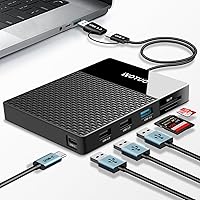
The YOTUO 500GB USB-C Hub External Hard Drive tackles a frustration most laptop users know well — too many devices, not enough ports, and never quite enough local storage. This hub-drive combo squashes those two problems into a single compact slab about the size of a small paperback, weighing under half a pound. YOTUO is not a household name yet, so don't expect the build polish or warranty confidence you'd get from a WD or Seagate. What you do get is a practical, mid-range solution built for remote workers, students, and creatives who are tired of traveling with a bag full of dongles and drives.
Features & Benefits

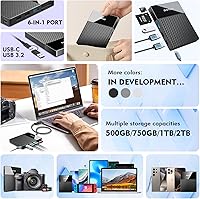
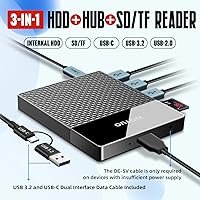
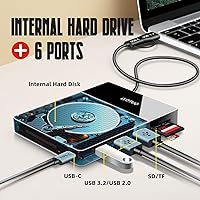
The 500GB of built-in HDD storage is enough for tens of thousands of documents, a year's worth of RAW photos, or a solid library of 1080p video clips — though it won't handle large 4K footage libraries without filling up fast. The six ports cover USB-C, USB 3.2, two USB 2.0 slots, plus SD and TF card readers, meaning a photographer can offload a memory card while simultaneously backing up files to the drive. The included dual-socket cable handles both USB-C and USB 3.2, so older laptops and newer ultrabooks both connect without hunting for adapters. Just know this runs on a mechanical hard disk — transfer speeds reflect that.

Best For

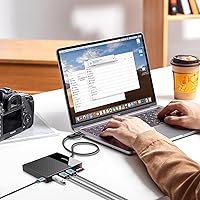
This all-in-one storage hub makes the most sense for port-limited laptop users — the person whose MacBook Air or slim Windows machine has exactly two USB-C ports and somehow always needs more. Photographers shooting with DSLRs or mirrorless cameras will appreciate the built-in SD and TF slots. Students who move between a personal Mac and a Windows work machine will find the cross-platform support genuinely useful. iPhone 15 and current-generation Android users can transfer files straight to local storage, no cloud required. If you're weighing this against buying a standalone hub and a separate SSD, the YOTUO docking drive wins on convenience and portability, not speed.

User Feedback

Across 263 ratings, this hub-drive combo holds a 4.3-star average — solid for a brand that only launched in late 2024 and quickly reached a top-fifteen rank in its Amazon category. Most positive reviewers highlight the plug-and-play setup and appreciate the device's compact, travel-ready footprint. On the critical side, a recurring complaint is that the mechanical drive runs noticeably warm under sustained use, and transfer speeds fall well short of what a portable SSD would deliver. A handful of users also report mixed results with older Android phones and some smart TVs, so those connections aren't guaranteed. Given YOTUO's limited track record, long-term durability is still genuinely unknown territory.

Pros

  • Combines a 500GB hard drive, USB hub, and card reader into a single pocketable device.
  • Bus-powered design means zero wall adapters — just plug in and go.
  • The dual-socket cable supports both USB-C and USB 3.2, covering older and newer laptops alike.
  • Built-in SD and TF card slots let photographers offload memory cards without a separate reader.
  • Works across Windows, macOS, Linux, Android, and iOS 15 and above straight out of the box.
  • Compact footprint — roughly 4.9 by 4 inches — slides easily into any laptop bag or backpack pocket.
  • Holds a solid 4.3-star average from over 260 buyers, with praise consistently focused on setup ease.
  • Available in four storage tiers up to 2TB, so capacity can be matched to actual needs.

Cons

  • Mechanical HDD internals mean transfer speeds lag well behind any comparable portable SSD.
  • The drive runs noticeably warm during sustained file transfers, which may concern reliability-focused users.
  • YOTUO has a very short track record, so long-term durability data simply does not exist yet.
  • No Thunderbolt support, no display output, and no power delivery passthrough for more demanding setups.
  • Compatibility with older Android devices and certain smart TVs is inconsistent according to multiple user reports.
  • At 8 ounces, the hub-drive combo is heavier than either a slim SSD or a basic USB hub purchased alone.
  • 500GB fills up quickly for anyone regularly working with raw video files or large creative project assets.
  • The limited brand presence means warranty support and customer service remain largely unproven quantities.

Ratings

The scores below reflect an AI-driven analysis of verified buyer reviews for the YOTUO 500GB USB-C Hub External Hard Drive, actively filtering out incentivized submissions and bot-generated feedback to surface what genuine users actually experienced across real daily workflows. Each category was evaluated against hundreds of first-hand impressions from commuters, students, photographers, and remote workers around the world. Both standout strengths and recurring frustrations are weighted honestly — nothing has been softened to protect the score.

Value for Money
81%
19%
Buying a dedicated USB hub and a portable hard drive separately typically costs more than this combo, and for most everyday users the difference never shows up in their bag. For students, remote workers, and light travelers who need both port expansion and local storage without a premium outlay, the math works out reasonably well.
Buyers who prioritize fast transfer speeds will find the value case harder to make — a similarly priced portable SSD paired with a budget hub delivers meaningfully better performance. You are effectively paying a convenience premium, and if that convenience is not your top priority, the trade-off feels less compelling.
Build Quality
67%
33%
The physical construction is solid enough for daily commuting — it does not flex noticeably when handled, and the ports feel reasonably firm under repeated plugging. For light everyday use like tossing it in a bag for class or meetings, it holds its own without obvious red flags.
YOTUO is a newer brand with no established long-term reliability data, and the all-plastic shell does not inspire the same confidence as devices from WD, Seagate, or Anker. Several buyers noted the overall finish feels budget-tier up close, and there are open questions about how the internal drive holds up after a year or two of regular handling.
Transfer Speed
52%
48%
For everyday document syncing, backing up a photo session from an SD card, or moving office files between machines, the mechanical drive handles the job without making you wait painfully. The hub-side ports themselves are not the bottleneck — it is the drive that caps throughput, so connected USB peripherals still work at their expected speeds.
This is the single biggest weakness flagged by reviewers — the internal HDD delivers speeds that feel sluggish compared to any modern portable SSD. Transferring a few gigabytes of RAW photos or a batch of video files can stretch into minutes rather than seconds, which becomes genuinely frustrating for photographers or anyone moving large files regularly.
Port Selection
84%
Six ports covering USB-C, USB 3.2, two USB 2.0 slots, plus SD and TF card readers is a genuinely practical spread for a device this size. Remote workers can connect a mouse, offload a camera card, and access files on the built-in drive simultaneously — that multi-device flexibility from a single compact slab is where this product earns its place.
There is no Thunderbolt support, no 4K display output, and no USB-C power delivery passthrough, which rules this device out for anyone building a proper desk setup. Users expecting a full docking station experience will find the port range too limited — it is better framed as a travel companion than a desktop productivity hub.
Setup & Ease of Use
91%
Plug-and-play functionality is the most consistently praised aspect — connect the cable and the drive appears in File Explorer or Finder within seconds, with no driver installation required on Windows, macOS, or Linux. Even less tech-savvy buyers report getting up and running immediately, which is a genuine differentiator at this price point.
A small number of users ran into recognition issues when connecting to older Android devices or certain smart TVs, where the device either was not detected or required additional steps. These edge cases are not the norm, but they matter if plug-and-play across every device on your list is a hard requirement.
Portability & Design
86%
At under half a pound and roughly the size of a small paperback, this hub-drive combo fits in the front pocket of most laptop bags without taking up meaningful space. The bus-powered design is a real travel win — no wall adapter means one less thing to pack, charge, and worry about losing at airport security.
At 8 ounces, it is noticeably heavier than a slim portable SSD or a basic travel hub, and some users who expected something ultra-light were mildly disappointed. The slab-style form factor also ships without a carrying pouch or protective sleeve, which feels like a missed opportunity for a product positioned around portability.
Cross-Platform Support
73%
27%
The dual-socket cable — one USB-C end, one USB 3.2 Type-A end — means most laptops, whether a recent MacBook, a Surface Pro, or an older Dell, connect without hunting for an adapter. Cross-OS support spanning Windows, macOS, Linux, and Android adds real versatility for households or offices running a mix of devices.
iOS support is limited to iPhone 15 and newer USB-C models, leaving older iPhone users completely unsupported. Smart TV compatibility is the most unpredictable use case — some models recognize the device immediately while others do not, and YOTUO does not publish a tested compatibility list, leaving TV users to figure it out on their own.
Storage Capacity
77%
23%
500GB comfortably holds several years of office documents, a substantial RAW photo library from a mirrorless camera, or a curated collection of 1080p project files — enough for most casual and semi-professional needs. The option to step up to 1TB or 2TB variants means buyers can right-size their purchase based on actual usage.
For video professionals working with 4K footage, 500GB fills up faster than expected — a single day of high-resolution shooting can consume a large portion of the drive. Using it as a primary backup destination for multiple devices is also risky, as it is a mechanical drive with no redundancy or failover built in.
Heat Management
58%
42%
Under light daily use — copying a handful of files, connecting a mouse and keyboard, or reading an SD card — the device stays at an acceptable temperature and most users never notice warmth during typical sessions. The compact design manages adequately for intermittent, low-intensity workloads.
Multiple reviewers specifically called out noticeable warmth during sustained file transfers — not alarming, but uncomfortable to touch after extended sessions. Packing a mechanical HDD and a hub into a single compact enclosure with no active cooling creates an inherent thermal ceiling, and users running large backups in warm environments may see performance degrade as a result.
Cable Quality
69%
31%
The dual-socket design — one USB-C end, one USB 3.2 Type-A end — is a thoughtful inclusion that removes the need for a separate adapter for most users. Having both connection options on a single cable is the kind of practical detail that genuinely matters when swapping between devices throughout the day.
The cable itself feels thin and budget-grade in hand, and a few buyers mentioned it does not seat firmly in all USB-A ports, leading to occasional intermittent disconnections. There is no backup cable in the box, so if the included one fails, sourcing a compatible dual-socket replacement falls entirely on the buyer.
Card Reader Performance
78%
22%
The integrated SD and TF card slots work reliably for the most common use case: offloading a day's worth of DSLR or mirrorless stills directly onto the built-in drive while staying tethered to a laptop. Photographers doing quick on-location culls appreciated not needing a separate card reader cluttering their travel kit.
Read speeds from the card slots are ultimately constrained by the internal HDD when writing directly to the drive, making large card dumps noticeably slower than a dedicated reader paired with a fast SSD. There is also no UHS-II support, which limits ceiling performance for users with high-end professional memory cards.
Brand Trust
44%
56%
The YOTUO docking drive reached a top-fifteen ranking in its Amazon category within months of its November 2024 launch, signaling genuine buyer traction. The 4.3-star average across over 260 ratings suggests the product is delivering on its core promises for the clear majority of buyers who have tried it.
YOTUO has essentially no long-term track record — there are no multi-year user reports, no established service network, and limited visibility into how warranty claims actually get resolved. For buyers storing important data, this brand-trust gap is a genuine concern that established competitors like Western Digital or Seagate simply do not carry.
Power Efficiency
83%
Drawing power entirely from the host device with no wall adapter is one of the most appreciated design decisions among commuters and co-working space regulars. Plugging in with a single cable and being fully operational in seconds is the kind of friction-free experience that keeps buyers returning to this form factor.
Bus-powered convenience comes with a trade-off: on older laptops or thin-and-light models with limited USB power delivery, connecting the hub-drive combo can cause noticeable battery drain during heavy sustained use. There is no charging passthrough either, so topping up a connected phone depends entirely on your laptop's available power headroom.

Suitable for:

The YOTUO 500GB USB-C Hub External Hard Drive is a genuinely practical pick for anyone who constantly juggles too many peripherals and not enough ports on a slim laptop. Remote workers who alternate between a MacBook at home and a Windows machine at the office will appreciate that one device handles storage, card reading, and port expansion across both platforms without a second thought. Students carrying a single bag all day benefit from the bus-powered design — no wall adapter, no extra cables beyond what is already included. Photographers and videographers working in the field will find the built-in SD and TF card slots useful for quick memory card offloads directly onto the drive without needing a separate reader. Android users and iPhone 15 owners who want to back up files locally rather than relying on subscription-based cloud storage will also find this a cost-effective alternative. For budget-conscious buyers who would otherwise purchase a USB hub and a portable hard drive separately, consolidating into one unit makes practical sense both financially and in terms of what ends up in the bag.
Not suitable for:

Anyone who depends on fast data transfers should think carefully before committing to this all-in-one storage hub. The internal drive is a mechanical HDD, not an SSD or NVMe, which means sustained read and write speeds are considerably slower — a real issue for video editors working with large footage files or anyone running frequent large-batch backups. The YOTUO 500GB USB-C Hub External Hard Drive is also a questionable choice for someone planning to use it as a primary, mission-critical daily drive, since YOTUO is a new brand with little long-term field data to support durability claims. Power users who need Thunderbolt bandwidth, 4K display output, or power delivery passthrough will find this device falls short, as none of those features are on offer. Buyers hoping to connect via an older Android phone or a smart TV should treat compatibility as uncertain rather than guaranteed, since real-world results vary noticeably by device model. If your bag already contains a quality portable SSD and a dedicated hub, there is limited reason to replace them with a combo unit that trades performance for convenience.
Specifications

  • Storage Capacity: Built-in mechanical hard disk provides 500GB of local storage; the same model is also offered in 750GB, 1TB, and 2TB configurations.
  • Drive Type: Uses a traditional spinning-platter mechanical HDD internally — not NAND flash or SSD-based — which directly affects sustained read and write performance.
  • Total Ports: Includes six functional ports: one USB-C, one USB 3.2, two USB 2.0, one full-size SD card slot, and one TF (microSD) card slot.
  • Connection Cable: Ships with a dual-socket cable terminating in both a USB-C connector and a USB 3.2 (Type-A) connector to suit a wide range of host devices.
  • Dimensions: The unit measures 4.9 x 4 x 1 inches — roughly the footprint of a small paperback book with a slim profile.
  • Weight: Weighs approximately 0.41 lb (8 oz), light enough for daily carry in a laptop sleeve or backpack pocket.
  • Power Source: Entirely bus-powered through the host device connection; no external power adapter or wall outlet is required during operation.
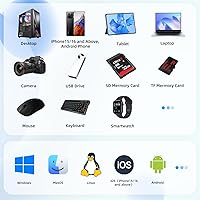
  • Compatible OS: Officially supports Windows, macOS, Linux, Android, and iOS on iPhone 15 and newer models equipped with a USB-C port.
  • Device Support: Designed for use with laptops, desktop computers, smartphones, tablets, and select smart TVs, though TV compatibility varies by model.
  • USB Standard: Supports USB 3.2 and USB 2.0 data standards alongside USB-C, with real-world throughput capped by the internal HDD rather than the interface.
  • Card Reader: Integrated full-size SD and TF (microSD) card reader slots allow direct file access from camera memory cards and mobile device storage.
  • Wattage: Rated at 5 watts of power consumption during active operation.
  • Color: Available in black.
  • Model Number: Manufacturer model number is SY-DSHDD01-500.
  • Availability: First listed for sale in November 2024; reached a top-fifteen ranking in the Amazon External Hard Drives category shortly after launch.

Related Reviews

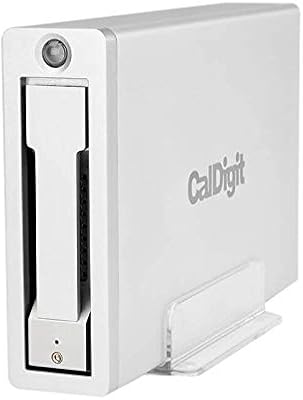
CalDigit AV Pro 2 Storage Hub USB C External Hard Drive
86%
89%
Performance
91%
Build Quality
86%
Ease of Use
94%
Connectivity & Compatibility
84%
Storage Capacity & Upgrades
More
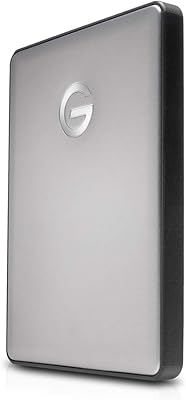
G-Technology G-DRIVE Mobile 4TB Portable Hard Drive
77%
93%
Build Quality
91%
Mac Compatibility
61%
Transfer Speed
88%
Portability
58%
Value for Money
More
G-Technology 2TB G-DRIVE Mobile USB-C Portable External Hard Drive
88%
91%
Portability
88%
Transfer Speed
89%
Build Quality
94%
Ease of Use (Plug-and-Play)
92%
Compatibility (Mac/Windows)
More
WAVLINK WL-ST334UA Dual-Bay USB 3.0 Hard Drive Docking Station
72%
83%
Offline Cloning Reliability
74%
Transfer Speed
79%
Build Quality
91%
Ease of Setup
38%
Mac Compatibility
More
LaCie Rugged 2TB Portable Hard Drive
75%
93%
Build Quality
91%
Portability
58%
Transfer Speed
87%
Storage Capacity
76%
Value for Money
More
Oyen Digital Novus 20TB External Hard Drive
74%
83%
Sequential Transfer Speed
92%
Storage Capacity
79%
Build & Enclosure Quality
91%
Setup & Compatibility
69%
Value for Money
More
Oyen Digital Novus 16TB External USB-C 7200RPM Hard Drive
86%
89%
Performance
91%
Transfer Speed
87%
Build Quality
93%
Ease of Setup
85%
Compatibility
More
Oyen Digital Novus 8TB External Hard Drive
71%
84%
Transfer Speed
81%
Build Quality
91%
Plug-and-Play Setup
88%
Cross-Platform Compatibility
76%
Heat Management
More
Oyen Digital Novus 6TB External USB-C 7200RPM Hard Drive
85%
88%
Performance
90%
Build Quality
91%
Data Transfer Speed
85%
Noise Level
80%
Portability
More
BIPRA S3 500GB USB 3.0 Portable External Hard Drive
85%
94%
Portability & Size
88%
Data Transfer Speed
91%
Ease of Setup
85%
Compatibility
80%
Build Quality
More

FAQ

The YOTUO 500GB USB-C Hub External Hard Drive is plug-and-play on macOS — no driver installation needed. Connect the USB-C end of the included cable to your MacBook and both the drive and hub ports should appear within a few seconds. You may see a standard macOS permissions prompt for disk access, which is normal for any external storage device.
Because the internal storage is a spinning mechanical hard disk rather than an SSD, you should expect speeds roughly in the 80 to 120 MB/s range under favorable conditions. That is perfectly adequate for document backups, photo libraries, and occasional 1080p video files. If you plan to move large 4K footage archives or run frequent high-volume transfers, the wait times will add up noticeably compared to a portable SSD.

Yes, all six ports are active simultaneously, so you can have a USB device connected, an SD card being read, and files transferring to the internal drive all at once. Just keep in mind that total available bandwidth is shared across the single host connection, so saturating multiple ports under heavy load will reduce individual throughput. For typical mixed use — offloading a memory card while a USB peripheral is plugged in — it handles things without a problem.

It works with iPhone 15 and newer models since those have USB-C ports, but older iPhones with Lightning connectors are not supported. If you have an iPhone 15 or later, you can connect directly and move files to the drive without needing any extra adapter. For earlier iPhone models, there is no reliable connection path.

Possibly, but this is one of the more inconsistent use cases based on real-world user reports. Smart TVs vary widely in how they handle USB storage, and some simply will not recognize the device at all. It is worth trying if you already own the hub-drive combo, but buying it primarily for TV media playback is a gamble worth thinking through first.

Some users have reported that the all-in-one storage hub runs warmer than expected during extended heavy-use sessions — which is not unusual for a mechanical drive packed into a compact enclosure. Under normal, intermittent use it should stay within a reasonable temperature range. If you are running sustained transfers for long stretches, giving it a short break is a sensible precaution, and avoid leaving it on soft surfaces that restrict airflow.

Honestly, if transfer speed is a priority, two separate devices will win every time — a quality portable SSD paired with a dedicated hub will outperform this combo on throughput. Where the YOTUO docking drive makes its case is simplicity: one device, one cable, nothing extra to pack or misplace. For someone who needs everyday storage and port expansion without managing two accessories, the convenience trade-off is real. For professionals whose workflow is speed-dependent, separates are the smarter choice.

Yes. The included cable has a USB 3.2 Type-A connector on one end alongside the USB-C option, so laptops with only traditional USB-A ports connect directly without a separate adapter. This dual-socket design is one of the more practically useful details, especially for people still using older business laptops or budget machines that have not made the full switch to USB-C.

It should arrive pre-formatted and recognized immediately on most systems. Windows users will typically see it appear in File Explorer right after plugging in. Mac users may receive a standard disk-access permissions prompt from macOS, which just requires a quick confirmation — nothing unusual for external storage.

The internal drive is not designed to be user-serviceable, so a DIY replacement is not a realistic option for most people. If it fails within the warranty period, your best path is contacting YOTUO directly to file a claim — though as a newer brand, their after-sales support infrastructure is still relatively untested. The practical takeaway is to treat this device as supplemental storage rather than your only copy of anything important, and keep backups elsewhere.