Overview

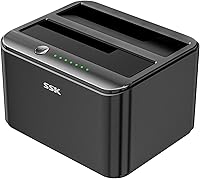
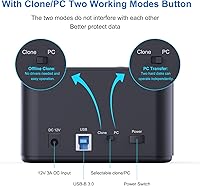
The SSK DK103 Dual Bay Hard Drive Dock sits in a sweet spot for home users and IT hobbyists who occasionally need to clone drives or pull data off bare SATA disks without much fuss. What sets it apart from plastic rivals at this price tier is the aluminum housing — it actually serves a thermal purpose, not just a cosmetic one. That said, this is a tool built for periodic use rather than punishing daily workloads. One design detail worth noting upfront: a manual mode switch separates clone mode from PC transfer mode, which sounds minor until you realize it actively prevents you from accidentally wiping a drive mid-session.

Features & Benefits

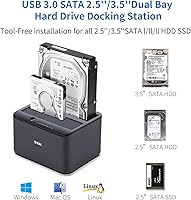
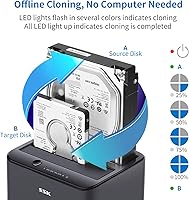
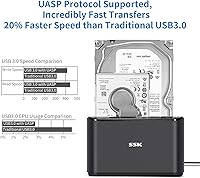
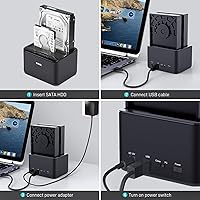
The standout capability here is offline drive cloning — drop a source drive in one bay and a destination in the other, flip the switch, and the duplication runs entirely on its own without a computer involved. Both bays accept 2.5-inch and 3.5-inch SATA drives (I, II, or III), each handling up to 20TB. On the transfer side, USB 3.0 with UASP pushes speeds up to 6Gbps, and both drives operate on independent bandwidth channels, so transferring from one side does not throttle the other. The aluminum shell quietly pulls heat away during long sessions, and three LED indicators keep you informed on power, disk status, and clone progress without needing to check a screen.

Best For

This dual-bay dock makes the most sense for anyone doing an HDD-to-SSD migration at home — particularly if you want to clone an old laptop or desktop drive without installing any software or tinkering with a PC. IT folks who routinely wipe or duplicate drives in small batches will find the no-driver, plug-and-play setup a genuine time-saver. It also works well as a quick data recovery tool when you have pulled a drive from a dead machine and just need access fast. If you have been eyeing aluminum-build docks from bigger names but cannot justify the price jump, this drive duplicator lands in a comfortable middle ground without sacrificing build quality that actually matters.

User Feedback

Owners frequently point to the clone function as the reason they bought the SSK dock, and most report it working correctly on the first try — a relief when you are trusting it with important data. The aluminum shell gets consistent praise for feeling more substantial than competing plastic units. That said, there are real limitations worth knowing. No hot-plug support is the most cited frustration — you have to power down before swapping drives, which interrupts workflow more than you might expect. A handful of macOS users note compatibility gaps on newer OS versions beyond what is officially listed. Transfer speeds also vary more than the spec sheet implies, depending on drive health and cable quality.

Pros

  • Clones one drive to another entirely offline, no computer or software needed at any point.
  • Accepts both 2.5-inch and 3.5-inch SATA drives interchangeably across all three SATA generations.
  • Each bay operates on independent bandwidth, so two simultaneous transfers do not bottleneck each other.
  • The aluminum housing functions as a passive heat sink, keeping drives cooler during long sessions.
  • Plug-and-play across Windows, Linux, and supported macOS versions with no driver installation required.
  • The manual mode switch actively prevents accidental cloning or overwriting during normal PC transfer use.
  • LED indicators for power, each disk bay, and clone progress make unattended sessions easy to monitor.
  • Supports drives up to 20TB per bay, covering virtually all consumer-grade storage sizes available today.
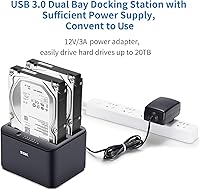
  • Includes a full-sized 12V/3A power adapter in the box — not a flimsy wall-wart afterthought.
  • Delivers noticeably better build quality than plastic rivals at a comparable price point.

Cons

  • No hot-plug support means you must power down the dock every time you swap drives.
  • macOS compatibility officially ends at version 10.11, leaving newer Mac users in uncertain territory.
  • Real-world clone speeds vary considerably depending on source drive health and the cable used.
  • The included USB 3.0 cable is short, limiting desk placement flexibility.
  • UASP mode does not activate correctly on all USB 3.0 host controllers, silently dropping transfer speed.
  • LED blink patterns during cloning are not intuitive enough to distinguish normal progress from a stall.
  • Strictly SATA-only — NVMe and IDE drives are completely incompatible with this dock.
  • The rubber base feet lose grip on smooth or glass desk surfaces over time.
  • No detailed error reporting when a clone fails partway through, making diagnosis harder.
  • Long-term durability data is limited given the product's relatively short time on the market.

Ratings

The SSK DK103 Dual Bay Hard Drive Dock has been scored across 13 categories by our AI system after processing verified buyer reviews from global markets, with spam, bot-submitted, and incentivized feedback actively filtered out before analysis. Ratings reflect the honest distribution of real-world experiences — strengths are credited where earned, and recurring frustrations are weighted fairly against the product's intended use case. The result is a balanced snapshot of what this drive duplicator genuinely delivers and where it falls short.

Offline Clone Reliability
84%
Most users report the clone function completing successfully on the first attempt, even when migrating aging HDDs to new SSDs. The one-button operation removes complexity, which buyers transferring data without a technical background particularly appreciate — no software to configure, no terminal commands.
Clone times vary widely depending on source drive health and total data volume, and some users with fragmented or partially failing drives hit errors mid-process. The dock provides no detailed error feedback beyond LED behavior, making troubleshooting harder when something does go wrong.
Build Quality
88%
The aluminum shell consistently surprises buyers who expect a plasticky feel at this price tier. It feels dense and well-machined, and the drive bays have a snug, precise fit that reduces the micro-vibrations that cheaper plastic docks suffer from during long transfers.
A small number of users noticed that the USB-B port on the rear feels slightly looser than expected after repeated cable insertions. The base rubber feet also tend to lose grip on glass or polished desk surfaces over time, which can be an annoyance during frequent use.
Transfer Speed
71%
29%
With UASP enabled and a quality USB 3.0 cable, real-world speeds are noticeably faster than non-UASP docks — buyers moving large media archives or disk images report solid throughput that keeps waiting time reasonable. The independent bandwidth per bay is a genuine advantage when running two simultaneous transfers.
Speed gains are heavily cable- and drive-dependent, and buyers using the included cable or slower spinning HDDs often see results well below the theoretical ceiling. A handful of users also report that UASP mode does not activate correctly on certain USB 3.0 controllers, dropping them to slower BOT transfer rates without any visible indication.
Thermal Management
79%
21%
The aluminum body functions as a passive heat sink, and drives seated in the bays during long cloning sessions run measurably cooler than in plastic alternatives. Users doing extended overnight clones of 4TB and larger drives report no heat-related shutdowns or drive errors.
There is no active cooling, so in warm ambient environments or during very long back-to-back sessions, drive temperatures do creep up. Power users running the dock continuously for hours at a time should ensure decent airflow around the unit rather than tucking it inside a cabinet.
Ease of Use
91%
Plug-and-play operation with no driver installation means most users are up and running within a minute of unboxing. The manual mode switch — separating clone mode from PC transfer mode — is intuitive once understood, and experienced users specifically praise it as a safeguard against accidental overwrites.
First-time users occasionally find the mode switch confusing without reading the manual, and a few have attempted cloning operations while still in PC transfer mode. The included documentation is functional but brief, which leaves some buyers guessing about less obvious behaviors like LED blink patterns during clone progress.
Drive Compatibility
86%
Supporting 2.5-inch and 3.5-inch SATA drives across all three SATA generations — including drives up to 20TB — gives this dock genuine versatility. IT hobbyists managing a mixed collection of old laptop drives, desktop HDDs, and newer SSDs can cycle through all of them with the same dock.
The dock is strictly SATA-only, so NVMe M.2 drives are a hard incompatibility — a limitation some buyers only realize after purchase. Older IDE drives are also not supported, which matters to users trying to recover data from very old hardware.
OS Compatibility
67%
33%
Windows users across XP through 10 report consistent, hassle-free recognition with no drivers needed. Linux users running Kernel 2.4.2 or newer also find it works out of the box, which makes this a practical option for home server builders and Raspberry Pi enthusiasts.
macOS support is officially listed only through version 10.11, and users on newer macOS versions report inconsistent behavior — some get full functionality, others see the dock recognized but with transfer errors. This is one of the more common complaints in the feedback pool and SSK has not visibly updated the compatibility documentation.
Hot-Plug Support
38%
62%
The dock does support plug-and-play for initial connection, which means the first time you plug it into a powered computer it is recognized immediately without a reboot. That initial convenience is real and reduces setup friction.
Hot-swapping drives while the dock is powered and connected is explicitly not supported, and users who try it risk file system errors or unrecognized drives. For anyone used to modern USB enclosures with proper hot-swap capability, this is a genuine workflow disruption that comes up repeatedly in critical reviews.
LED Status Indicators
76%
24%
Having dedicated LEDs for power, each disk bay, and clone progress is more informative than many competing docks at this tier, which often provide only a single activity light. Users doing unattended clones overnight appreciate being able to check progress status at a glance without waking a connected computer.
The LED blink patterns for clone progress are not particularly intuitive, and without studying the manual it is not always clear whether a slow blink means normal operation or an error state. A few users have reported waiting extended periods during a clone only to realize it had stalled early on without any distinct error signal.
Value for Money
83%
For a dual-bay dock with offline cloning, UASP support, and an aluminum enclosure, the asking price sits well below what established brands charge for equivalent specs. Budget-conscious buyers who compared options extensively before purchasing consistently highlight this dock as punching above its price class.
The value calculus shifts if you need reliable macOS support on current OS versions or hot-swap capability, since those limitations may force you toward a pricier alternative anyway. Buyers who discover the macOS gaps after purchase often feel the value proposition was overstated for their specific setup.
Setup & Packaging
81%
19%
The box includes everything needed to get started: the dock, a USB 3.0 cable, a 12V/3A power adapter, and a user manual. Buyers frequently note that the power adapter is a full-sized, quality unit rather than the flimsy wall-wart style sometimes included with budget peripherals.
The included USB 3.0 cable is functional but not particularly long, which limits placement flexibility on desks with the computer positioned farther away. A few buyers also noted that the power adapter plug style did not match their regional outlet without an adapter, suggesting inconsistent regional fulfillment.
Physical Footprint & Stability
74%
26%
At under six inches in any dimension and just over a pound and a half, this drive duplicator fits easily on a crowded desk or inside a tech bag for transport. The base is wide enough relative to its height that the unit does not tip when inserting large 3.5-inch drives.
The rubber feet do not grip aggressively, and on smooth desk surfaces the dock can slide slightly when drives are inserted or removed with some force. It is a minor but persistent annoyance that a slightly tackier foot pad would have solved at no meaningful cost.
Long-Term Durability
69%
31%
The aluminum construction gives the unit a structural rigidity that plastic alternatives lack, and users who have owned theirs for a year or more generally report no mechanical degradation in the drive bays or port connections. The passive design with no moving parts also removes a common failure vector.
Longer-term feedback is limited given the product's relatively recent market entry, so durability over multi-year use under regular stress is not yet well-documented in the review pool. A handful of users reported the USB-B port developing minor wobble after heavy repeated use, which warrants monitoring over time.

Suitable for:

The SSK DK103 Dual Bay Hard Drive Dock is a strong fit for anyone who regularly deals with bare SATA drives and wants a reliable, low-fuss way to either access or duplicate them without a complicated setup. Home users upgrading from an old spinning hard drive to a new SSD will find the offline cloning function genuinely useful — you slot both drives in, flip the mode switch, and walk away while the copy runs without a computer in the loop. IT hobbyists and small-shop technicians who cycle through drives for imaging, data recovery, or wipe-and-reload tasks will also get real mileage out of this dock, particularly because it handles both 2.5-inch and 3.5-inch SATA drives interchangeably. Anyone pulling a drive from a dead laptop to salvage files will appreciate how quickly this dock gets them to the data without installing drivers or hunting for the right enclosure. The aluminum construction and independent per-bay bandwidth make it a notch above the typical plastic dock at this price point, which matters if you plan to run it for multi-hour sessions rather than quick one-off transfers.

Not suitable for:

The SSK DK103 Dual Bay Hard Drive Dock is not a good fit for users who rely on hot-swapping drives mid-session — the dock must be powered down before drives are swapped, which is a meaningful workflow disruption if you are cycling through many drives in quick succession. Mac users running current or recent versions of macOS should be cautious, as official compatibility tops out at version 10.11 and real-world performance on newer versions is inconsistent enough that it cannot be counted on without testing first. Anyone with NVMe M.2 drives will find no use for this dock at all, since it is strictly limited to SATA — a detail that catches some buyers off guard. If you need a docking station for daily, heavy-throughput workloads in a professional or production environment, this drive duplicator is not built to that standard and would be better replaced by a prosumer-grade option with active cooling and more robust port construction. Finally, buyers expecting plug-and-play perfection across every operating system and drive configuration may encounter edge cases that require a bit of troubleshooting, especially around UASP activation on certain USB controllers.

Specifications

  • Brand & Model: Manufactured by SSK Corporation under the model designation DK103.
  • Bay Count: Dual bay design accommodates two SATA drives simultaneously, each operating independently.
  • Drive Compatibility: Supports 2.5-inch and 3.5-inch SATA I, II, and III hard drives and solid-state drives interchangeably.
  • Max Capacity: Each bay supports drives up to 20TB, for a combined maximum of 40TB across both bays.
  • Host Interface: Connects to a host computer via USB 3.0 using a USB-B connector port on the rear of the unit.
  • Transfer Protocol: Supports UASP (USB Attached SCSI Protocol) for data transfer speeds up to 6Gbps when paired with a compatible USB 3.0 host controller.
  • Offline Cloning: Includes a standalone drive duplication mode that clones one SATA drive to another without requiring a connected computer.
  • Mode Switch: A dedicated physical switch separates clone/duplicator mode from standard PC data transfer mode to prevent accidental data operations.
  • Housing Material: Enclosure is constructed from aluminum, which acts as a passive heat sink to dissipate drive heat during operation.
  • LED Indicators: Three LED indicators display power status, individual disk bay activity, and offline clone progress in real time.
  • Hot-Plug Support: Hot-plugging is not supported; drives must be inserted and the unit powered on before connecting to a host, and powered off before swapping drives.
  • Driver Requirement: No driver installation is required; the dock operates as a plug-and-play device on all supported operating systems.
  • OS Compatibility: Compatible with Windows XP through Windows 10, macOS 10.4 through 10.11, and Linux systems running Kernel 2.4.2 or later.
  • Power Supply: Powered by an included external 12V/3A power adapter; the dock is not bus-powered via USB.
  • Dimensions: The unit measures 5-inch (L) x 3.8-inch (W) x 2.8-inch (H), keeping a compact footprint on a desk or workbench.
  • Weight: The dock weighs 1.57 pounds (0.71 kg), making it light enough to reposition or transport without difficulty.
  • In the Box: Package includes the DK103 dock unit, one USB 3.0 cable, one 12V/3A power adapter, and a printed user manual.
  • Cooling Method: Passive cooling only — the aluminum body conducts heat away from drives with no internal fan or active airflow system.

Related Reviews
dockteck Dual Bay External Hard Drive Docking Station
84%
90%
Performance and Speed
88%
Ease of Use
85%
Build Quality
91%
Cloning Functionality
82%
Compatibility
More
RSHTECH RSH-DS02 Dual Bay Hard Drive Dock
80%
88%
Offline Cloning Reliability
83%
Build Quality
76%
Transfer Speed
71%
Heat Management
62%
Large Drive Compatibility
More
MAIWO Dual-Bay Hard Drive Docking Station
78%
88%
Offline Clone Reliability
91%
Value for Money
67%
Transfer Speed
83%
Drive Compatibility
93%
Ease of Setup
More
CineRAID CR-H212 Dual Bay Hard Drive Docking Station 2TB
85%
87%
Performance & Speed
92%
Build Quality & Durability
88%
Ease of Use & Setup
93%
Data Transfer Speed (USB 3.0)
90%
Compatibility with Operating Systems
More
Cenmate 2-Bay Hard Drive Docking Station

76%
83%
Offline Clone Functionality
76%
Transfer Speed
79%
Drive Compatibility
88%
Value for Money
61%
Build Quality
More
StarTech SDOCK2U33EB Dual-Bay Hard Drive Docking Station

78%
83%
Hot-Swap Reliability
88%
Drive Compatibility
74%
Transfer Performance
76%
Build Quality
93%
Ease of Setup
More
WAVLINK WL-ST334UA Dual-Bay USB 3.0 Hard Drive Docking Station
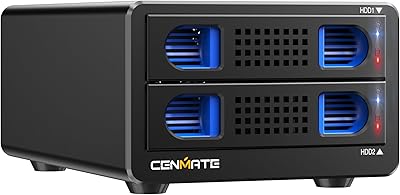
72%
83%
Offline Cloning Reliability
74%
Transfer Speed
79%
Build Quality
91%
Ease of Setup
38%
Mac Compatibility
More
Cenmate Dual Bay Hard Drive Enclosure
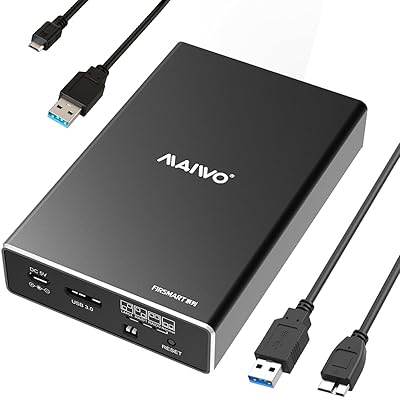
78%
83%
Build Quality
78%
Cooling Performance
76%
Transfer Speed
86%
Hot-Swap Functionality
91%
Ease of Installation
More
MAIWO K25272 Dual Bay Hard Drive RAID Enclosure 16TB
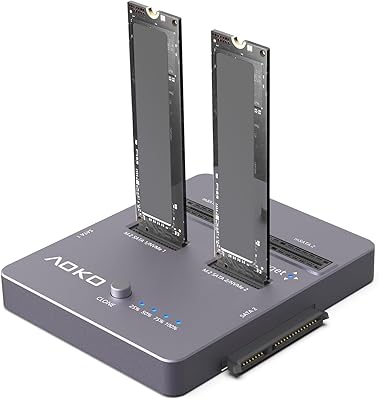
84%
89%
Performance
88%
Build Quality
92%
Ease of Setup
87%
Data Transfer Speed
85%
Compatibility
More
AOKO 4-in-1 M.2 NVMe Hard Drive Duplicator
76%
88%
Ease of Use
83%
Drive Compatibility
86%
Cloning Speed
74%
Offline Cloning Reliability
81%
Build Quality
More

FAQ

Yes, that is one of the core reasons people buy this dock. You place the source drive in bay one and the destination drive in bay two, switch the unit into clone mode using the physical toggle on the device, and press the clone button. The duplication runs entirely on its own — no computer, no software, no cables to a PC required. Just keep in mind that the time it takes depends on how large the source drive is and how healthy it is.

Officially, the SSK DK103 Dual Bay Hard Drive Dock is only listed as compatible with macOS versions 10.4 through 10.11. If you are running anything newer than that — which covers most Macs sold in the last several years — compatibility is not guaranteed. Some users report it working fine on newer macOS versions, while others hit recognition or transfer errors. If your Mac is a primary use case, it is worth verifying before committing.

No, and this is important to know upfront. Hot-plugging is not supported, which means you need to power the dock down before removing or inserting drives. Swapping drives while powered can result in the new drive not being recognized or, in worse cases, file system errors on the drive. It is a straightforward limitation — just treat it like any other non-hot-swap device and power down first.

No, this dock is strictly for SATA drives in 2.5-inch or 3.5-inch form factors. NVMe M.2 drives use a completely different interface and are not compatible. If you need to access or clone NVMe storage, you would need a separate enclosure or dock designed specifically for that connector type.

Clone speed is not fixed — it depends heavily on the speed of both drives involved and the health of the source drive. A healthy modern SSD will clone much faster than a slow or partially failing spinning hard drive. For a rough reference, expect somewhere in the range of one to three hours for a fully-occupied 1TB drive under normal conditions, though that can stretch longer if the source drive has issues. There is no progress bar with a time estimate, just the LED indicator, so patience helps.

Each bay operates on its own independent bandwidth channel, so transferring files from one drive does not slow down a simultaneous transfer on the other side. This is a genuine advantage over cheaper docks that share a single data lane between both bays and throttle each other during concurrent use.

That switch toggles between two distinct operating modes: standard PC data transfer mode and offline clone/duplicate mode. The reason it exists as a manual toggle rather than a software option is to prevent accidental triggering of the clone function while you are in the middle of moving files. Without that switch, a mistaken button press could wipe a drive you did not intend to touch. It is a thoughtful safety feature that is easy to overlook until you actually need it.

Reaching the theoretical 6Gbps ceiling requires a few conditions to align: your computer needs a USB 3.0 port with a host controller that properly activates UASP mode, the drives themselves need to support those speeds, and the cable needs to be a quality one. In practice, many users see solid but somewhat lower real-world throughput, which is normal for USB 3.0 with UASP. If UASP does not activate on your specific host controller, the dock falls back to standard USB 3.0 speeds without any visible indication.

The power adapter is included in the box — it is a 12V/3A external unit, not a flimsy USB-powered design. This dock requires dedicated power to spin up 3.5-inch hard drives reliably, so bus power via USB was never an option. Just note that the adapter plug style may require a regional outlet adapter depending on where you are located.

There is no fan inside this dock, so there is zero fan noise. The aluminum shell handles heat dissipation passively by conducting warmth away from the drives through the enclosure itself. In a quiet room you may hear the drives spinning or the occasional soft click from a mechanical HDD, but the dock itself adds no noise of its own.