Overview

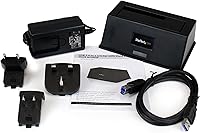
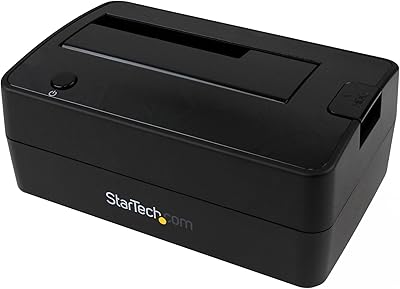
The StarTech SDOCKU33BV USB 3.0 Hard Drive Dock is one of those no-nonsense tools that earns its place on a desk by doing exactly what it promises. Drop a bare SATA drive into the top-loading slot, and you have instant access to its contents — no screwdrivers, no enclosure kits, no fuss. StarTech has kept this docking station in production since 2013, which says something about consistent demand. At its mid-range price point, you get a solidly functional unit backed by a brand with genuine technical support credentials, though don’t expect a premium plastic feel or flashy build materials.
Features & Benefits

The dock connects via USB and, when paired with a host that supports UASP, delivers transfer speeds meaningfully faster than older USB 3.0 connections — useful when moving large video archives or full disk images. It accepts both 2.5-inch and 3.5-inch SATA drives across all three SATA generations, covering the vast majority of HDDs and SSDs you’re likely to throw at it. Swapping drives is instant and hot-swap capable, so there’s no rebooting between jobs. The box includes a cable and power adapter, and plug-and-play recognition on both Windows and macOS means you’re working within seconds of plugging in.

Best For

This drive dock is a natural fit for IT professionals who routinely image or clone drives and need fast, reliable access without permanently housing each one. It’s equally handy for the home user with a drawer full of old hard drives who just wants to pull files off one occasionally. Photographers and archivists backing up large media collections will appreciate the UASP speed boost when their computer supports it. That said, the single-bay design is a deliberate trade-off — if your workflow involves comparing or transferring between two drives simultaneously, you’ll want to look at multi-bay alternatives instead.

User Feedback

Owners of the StarTech single-bay dock tend to split along predictable lines. Most praise how quickly their computers recognized a freshly inserted drive — across different operating systems, with no driver hunting required. Those with UASP-compatible machines also report noticeably quicker transfers on large files. On the downside, a recurring complaint is that the plastic housing feels light, raising questions about durability under heavy daily use. A smaller group has run into occasional recognition issues with certain high-capacity or aging drives. StarTech’s support team, however, gets fairly consistent praise for being accessible and actually helpful when something goes wrong.

Pros

  • Plug-and-play setup means no driver installation or software configuration on either Windows or macOS.
  • Hot-swap capability lets you change drives on the fly without rebooting your computer.
  • Accepts both 2.5-inch and 3.5-inch SATA drives, covering the widest range of HDDs and SSDs.
  • When paired with a UASP-compatible host, transfer speeds are noticeably quicker than older USB 3.0 connections.
  • Comes with a cable and power adapter included, so you’re ready to go straight out of the box.
  • StarTech’s 24/5 multilingual technical support is a genuine safety net that most competitors don’t offer.
  • The two-year warranty provides reasonable long-term reassurance at this price tier.
  • Power and activity LED indicators give you clear, at-a-glance confirmation that a drive is connected and in use.
  • Works across all three SATA generations, so legacy drives are not left out.
  • A decade-plus track record on the market suggests this design has been tested and refined over real-world use.

Cons

  • The plastic housing feels noticeably light, which raises doubts about durability under heavy daily use.
  • A single bay means you cannot transfer data directly between two bare drives at the same time.
  • Occasional drive recognition issues have been reported with certain high-capacity or older SATA drives.
  • The 3-foot cable is short enough to restrict desk placement flexibility in some setups.
  • UASP speed benefits only apply when the host computer’s USB controller actually supports the protocol.
  • No support for IDE, M.2 NVMe, or non-SATA drives without purchasing additional adapters separately.
  • The interface standard is showing its age relative to newer USB4 or Thunderbolt-based dock alternatives.
  • Not designed for always-on or continuous-duty use, limiting its appeal as a semi-permanent storage solution.

Ratings

Our AI rating engine analyzed verified global buyer reviews for the StarTech SDOCKU33BV USB 3.0 Hard Drive Dock, actively filtering out incentivized, duplicate, and bot-generated submissions to surface what real users actually experienced. Scores reflect a balanced synthesis of consistent praise and recurring frustrations, so both the strengths and the trade-offs are represented honestly across every category below.

Ease of Setup
93%
Buyers consistently highlight how little friction there is getting started — plug in the power adapter, connect the USB cable, drop in a drive, and the computer sees it immediately. IT professionals and home users alike report zero driver hunting, which is a genuine time-saver when you are in the middle of a data recovery job.
A small number of users on less common Linux distributions or older Windows installs reported needing a system restart before the dock was recognized, which slightly undercuts the truly universal plug-and-play claim for edge-case setups.
Drive Compatibility
84%
The ability to accept both 2.5″ laptop drives and full-size 3.5″ desktop drives in the same bay is genuinely useful, and users report success with drives spanning nearly a decade of SATA generations. Archivists and IT techs dealing with mixed hardware inventories particularly appreciate not needing separate docks for different form factors.
A recurring subset of reviewers encountered recognition failures with certain high-capacity drives above 8TB or with particularly old SATA I spinners, suggesting that compatibility is not quite as universal as marketed, especially at the outer edges of the drive capacity spectrum.
Transfer Speed
78%
22%
Users with UASP-capable USB controllers report real-world transfer speeds that feel noticeably snappier than what they experienced with older USB 2.0 enclosures, which matters when imaging a 500GB drive or pulling large video project folders. For the intended use cases of backup and data migration, throughput is more than adequate.
The speed advantage is contingent on the host machine supporting UASP — users whose systems default to the older BOT mode see standard USB 3.0 rates, which can feel underwhelming alongside newer Thunderbolt-based dock alternatives. The interface ceiling also means this dock will not fully satisfy users transferring very large sequential workloads regularly.
Build Quality
58%
42%
The compact footprint and clean matte finish give this docking station a professional enough appearance on a workbench or desk, and for moderate-use scenarios, most buyers report no structural failures over the first year of ownership. The unit stays stable when a drive is inserted, which matters more functionally than aesthetics.
This is the most polarizing aspect in user feedback: the lightweight plastic chassis feels noticeably insubstantial when you pick it up, and several reviewers express genuine doubt about long-term durability under daily heavy use. A few users reported the drive slot developing looseness over extended use, which is a real concern for a product positioned at IT professionals.
Hot-Swap Reliability
81%
19%
Users who cycle through multiple drives in a single work session — cloning one drive while staging the next — consistently praise how reliably the dock registers a newly inserted drive after a safe eject. IT techs handling batch imaging tasks specifically call out this feature as a core part of their workflow.
Occasionally, a freshly inserted drive is not detected on the first attempt and requires the user to physically reseat it or toggle the power, which is a minor but recurring annoyance that a handful of reviewers flagged in multi-drive workflows.
Value for Money
76%
24%
At its price tier, this docking station bundles a cable, power adapter, two-year warranty, and lifetime technical support into a functional package that competes reasonably well against cheaper units that offer far less post-purchase backing. For occasional to moderate users, the cost-to-utility ratio lands in a comfortable place.
Power users comparing this dock against newer rivals offering USB4 or Thunderbolt connectivity may question whether the price reflects a product that has not materially evolved since 2013, particularly given the build quality concerns that surface consistently in reviews.
Customer Support
86%
StarTech’s 24/5 multilingual support is one of the more frequently praised aspects of owning this dock, with buyers reporting that real technical assistance is available and actually resolves issues rather than redirecting them to generic FAQ pages. For business buyers, having accessible support is a meaningful differentiator.
Support hours exclude weekends entirely, which is frustrating for home users who tend to tackle data recovery projects on Saturday mornings when a drive suddenly stops being recognized and they need help quickly.
Warranty Coverage
82%
18%
A two-year warranty in this product category is above average and gives buyers a reasonable window of protection, especially given the durability questions around the plastic housing. Users who have needed to invoke the warranty report the process being handled without significant friction.
Two years still falls short of the three-year coverage some competing brands offer, and given that the primary durability concern is wear on the drive slot mechanism, some buyers would feel more confident with extended coverage on that specific component.
Portability
79%
21%
Weighing just over 11 ounces and not much larger than a thick paperback, this drive dock is easy to toss in a laptop bag for on-site IT work or to move between workstations without any hassle. The included cable and compact power brick keep the total kit manageable.
The requirement for an external AC adapter means you always need a nearby power outlet, which limits genuine portability compared to bus-powered alternatives that draw power directly from the USB port of a laptop.
Plug-and-Play Breadth
88%
Windows, macOS, and most Linux distributions treat this docking station as a standard mass storage device, requiring zero configuration on the user’s part. Reviewers working across mixed OS environments particularly appreciate not having to think about platform compatibility when switching between machines.
Chrome OS and less common operating systems are not officially documented, and a small number of users in those environments have reported inconsistent behavior that required workarounds not covered by any official support documentation.
LED Indicators
71%
29%
Having separate power and activity LEDs is a practical touch that lets users confirm at a glance whether a drive is mounted and whether data is actively being read or written, which reduces the anxiety of not knowing if a large transfer is progressing or silently stalled.
The LEDs are relatively dim and can be difficult to read in brightly lit workshop environments, and some users noted that the activity light does not always reflect drive activity with enough precision to be relied upon during intensive sequential transfers.
Cable & Accessory Quality
69%
31%
Including a USB 3.2 Gen 1 cable in the box saves buyers an immediate additional purchase and ensures the connection matches the dock’s rated speed from day one, which is not always the case with budget-tier competitors that bundle substandard cables.
The 3-foot cable length is tight for many desk configurations, and several reviewers who needed to position the dock more than an arm’s length from their computer found themselves sourcing a longer replacement cable almost immediately.
Longevity & Track Record
74%
26%
The fact that this exact model has remained in continuous production since 2013 is a credible signal of sustained demand and functional reliability — products that fail in the market do not survive over a decade on Amazon with a consistent rating above 4 stars.
That same age is a double-edged consideration: the core interface technology has not kept pace with current USB4 and Thunderbolt standards, and buyers who plan to use this dock for another five years may find it feeling increasingly dated against the broader accessory ecosystem.

Suitable for:

The StarTech SDOCKU33BV USB 3.0 Hard Drive Dock is a practical pick for anyone who regularly needs to access bare SATA drives without the hassle of permanent installation. IT professionals handling drive imaging, cloning, or data migration across multiple units will appreciate how quickly they can swap from one drive to the next without restarting their workstation. Home users who have a stack of old hard drives from retired computers will find this docking station a genuinely useful way to pull off files or verify a drive’s contents in minutes. Photographers, videographers, and digital archivists doing periodic backups to raw drives are also well-served here, especially those whose computers support UASP for faster throughput. If your use case is occasional to moderate, and you value simplicity over raw performance ceilings, this dock delivers exactly what it promises.
Not suitable for:

The StarTech SDOCKU33BV USB 3.0 Hard Drive Dock is not the right tool for users who need to work with two or more drives simultaneously, since its single-bay design makes side-by-side transfers or comparisons impossible without a second device. Anyone building a always-on NAS-style setup or looking for 24/7 continuous operation should look elsewhere — this dock is designed for task-based access, not persistent storage. Power users who have already moved to USB4 or Thunderbolt ecosystems may find the bandwidth ceiling limiting when dealing with very large sequential workloads. The lightweight plastic construction also makes it a questionable choice for high-frequency daily use in demanding workshop environments where durability is non-negotiable. Those with M.2 NVMe drives will need to look at dedicated NVMe enclosures, as this docking station only supports SATA-based storage.
Specifications

  • Model Number: This docking station is identified by the model number SDOCKU33BV.
  • Interface: Connects to a host computer via USB 3.2 Gen 1, delivering up to 5 Gbps of bandwidth over a standard Type-A connection.
  • UASP Support: Supports UASP (USB Attached SCSI Protocol), which can significantly improve transfer throughput when the host controller also supports the protocol.
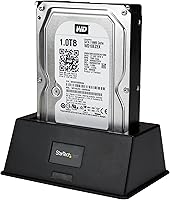
  • Drive Compatibility: Accepts 2.5″ and 3.5″ SATA I, II, and III hard drives and solid-state drives of any storage capacity.
  • Number of Bays: Single-bay design accommodates one drive at a time in a top-loading, toolless slot.
  • Hot-Swap: Drives can be inserted and removed while the dock is connected and powered, without requiring a system restart.
  • Driver Requirement: No drivers or third-party software are required; the dock is recognized automatically by the host operating system.
  • OS Compatibility: Compatible with Windows (Vista through 10 and Server 2008 R2 or later) and macOS, and broadly OS-independent for other platforms.
  • Power Source: Powered by an external AC adapter, which is included in the box, rather than drawing power from the USB connection alone.
  • Included Cable: Ships with a 3-foot USB 3.2 Gen 1 Type-A cable for connecting the dock to the host computer.
  • LED Indicators: Features two LED indicators on the unit to display power status and drive activity at a glance.
  • Dimensions: The unit measures 5.5 x 3.6 x 2 inches, making it compact enough to sit unobtrusively on a desk or workbench.
  • Weight: The dock weighs 11.2 oz (0.32 kg), reflecting its lightweight plastic construction.
  • Warranty: Backed by a two-year warranty from StarTech covering defects in materials and workmanship.
  • Technical Support: Includes free lifetime technical support available 24 hours a day, five days a week, in multiple languages directly from StarTech.
  • Adapter Support: IDE, mSATA, and M.2 SATA drives can be used with separately purchased StarTech adapter accessories, but are not supported natively.
  • First Available: This model was introduced in December 2013 and has remained in active production since, with no discontinuation from the manufacturer.

Related Reviews

StarTech SDOCK2U33EB Dual-Bay Hard Drive Docking Station
78%
83%
Hot-Swap Reliability
88%
Drive Compatibility
74%
Transfer Performance
76%
Build Quality
93%
Ease of Setup
More
WAVLINK WL-ST334UA Dual-Bay USB 3.0 Hard Drive Docking Station
72%
83%
Offline Cloning Reliability
74%
Transfer Speed
79%
Build Quality
91%
Ease of Setup
38%
Mac Compatibility
More
ikuai 3.5″ USB 3.0 Hard Drive Enclosure
80%
93%
Ease of Setup
71%
Build Quality
62%
Cable Quality & Reliability
88%
Drive Compatibility
74%
Data Transfer Speed
More
Tccmebius TCC-S868 Dual-Slot USB 3.0 Docking Station
71%
88%
IDE Compatibility
83%
SATA Drive Support
79%
Data Transfer Speed
76%
Ease of Setup
61%
One-Touch Backup (OTB) Feature
More
StarTech SDOCKU313 USB 3.1 Hard Drive Dock
80%
88%
Transfer Speed
83%
Drive Compatibility
79%
Build Quality
94%
Ease of Setup
62%
Value for Money
More
Inateck SA02004 USB 3.0 Hard Drive Docking Station
76%
88%
Offline Clone Reliability
74%
Data Transfer Speed
92%
Setup & Ease of Use
63%
Build Quality & Materials
71%
RGB Lighting
More
Sabrent EC-DFLT USB 3.0 SATA Hard Drive Docking Station
77%
93%
Ease of Setup
88%
Drive Compatibility
76%
Transfer Speed
67%
Build Quality
71%
Power Delivery
More
G-Technology G-DRIVE Mobile 1TB USB 3.0 Portable Hard Drive
86%
91%
Portability
87%
Data Transfer Speed
93%
Build Quality
89%
Ease of Use
60%
Windows Compatibility
More
Inateck FE3001 3.5-inch Hard Drive Enclosure
79%
88%
Build Quality
83%
Drive Compatibility
79%
Transfer Speed
74%
Heat Management
91%
Setup & Ease of Use
More
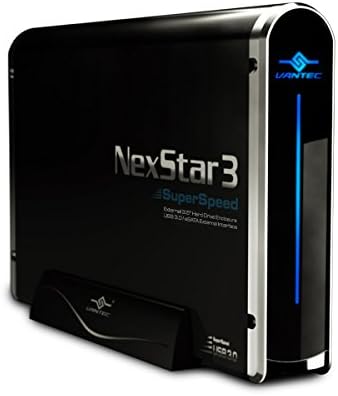
Vantec NexStar3 NST-380SU3-BK 3.5″ SATA to USB 3.0 & eSATA External Hard Drive Enclosure
85%
91%
Value for Money
89%
Build Quality
85%
Performance (Transfer Speed)
92%
Ease of Setup
90%
Compatibility (Windows/Mac OS)
More

FAQ

No, nothing to install. Plug the dock into a USB port, connect the power adapter, drop a drive into the slot, and your computer should recognize it within a few seconds just like any external drive. It works this way on both Windows and macOS out of the box.

Yes, the StarTech SDOCKU33BV USB 3.0 Hard Drive Dock is backward compatible with SATA I and SATA II drives, not just the faster SATA III standard. Older drives will simply run at their native speed, which is perfectly fine for data recovery or file access purposes.
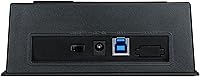
It works with both. Any 2.5″ or 3.5″ SATA-based SSD will slot in and be recognized just like a conventional hard drive. Keep in mind that SATA SSDs are much faster than HDDs, so pairing the dock with a UASP-capable USB port on your computer will get you closer to the SSD’s real-world read and write potential.

UASP is a protocol that reduces overhead in USB storage communication, which can meaningfully speed up large file transfers compared to the older BOT (Bulk-Only Transport) mode. Most computers made after 2013 with USB 3.0 ports support it, but it’s worth checking your USB controller specs to be sure. If your system doesn’t support UASP, the dock still works fine — just at standard USB 3.0 speeds.

Yes, that’s one of the more practical aspects of this docking station. You can eject the current drive through your operating system (just like safely removing a USB flash drive), pull it out, and insert a new one without powering anything down. It’s genuinely useful when you’re cycling through multiple drives in a work session.

The listing references 4TB as a tested capacity, but in practice this drive dock should work with higher-capacity SATA drives as well, since capacity limits are largely determined by the drive’s format and your operating system rather than the dock itself. That said, very high-capacity drives formatted with older partition schemes (like MBR) may need reformatting to GPT to be fully recognized above certain size thresholds.

The dock is described as OS-independent, which means it relies on standard USB mass storage protocols that most modern operating systems support natively. Linux users generally report it working without any configuration, and Chrome OS should recognize it as well, though StarTech’s official support documentation focuses on Windows and macOS.

The included cable is USB Type-A, so you’d need a USB-A to USB-C adapter or a separate cable to connect to a USB-C-only laptop. As long as the USB-C port supports USB 3.x speeds (not just charging), the dock will function normally. Thunderbolt 3 and 4 ports also accept standard USB connections, so those work too.

It’s a reasonable choice for this task. Being able to drop a bare drive directly into the slot and access it immediately is exactly the kind of low-friction setup that helps during data recovery, where you want to minimize stress on an already compromised drive. Just be mindful that if a drive is failing, you’ll want to work quickly and avoid unnecessary read cycles.

It’s a fair concern that comes up in user feedback fairly regularly. The housing is lightweight plastic, which keeps costs down but does feel less substantial than some competing units. For occasional or moderate use, most buyers report it holding up fine over time. If you’re planning heavy daily use in a busy IT environment, it’s worth factoring that in when deciding whether the two-year warranty gives you enough peace of mind.

Where to Buy