Overview

The Kingston A400 240GB M.2 Internal SSD has been one of the most accessible entry points into solid-state storage since it launched in early 2019, and it still holds up as a sensible choice for anyone looking to retire a sluggish spinning hard drive. It runs on a SATA 3 interface — not NVMe — so temper your expectations accordingly; this isn't built for video editing workstations or heavy data workloads. What it does well is giving an older laptop or budget desktop a noticeable boost in everyday responsiveness. Kingston has a long track record in memory and storage, and this A400 drive reflects that: dependable, unfussy, and honest about what it offers.

Features & Benefits

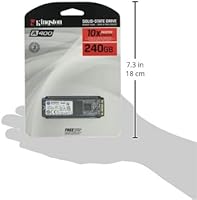
Pull this Kingston M.2 SSD out of its packaging and the first thing you notice is how compact it is — the M.2 2280 format means no data cables, no power connectors, just a slim card that slots directly into your motherboard. Rated at 500 MB/s read and 450 MB/s write, it won't challenge NVMe drives, but compared to a mechanical hard drive, the difference in boot times and app launches is striking. It draws less power than a traditional HDD, which matters on laptops, and it's backward compatible with older SATA 2 systems. No-fuss installation — no software, no configuration, just slide it in and go.

Best For

The A400 drive is purpose-built for one scenario above all others: taking a laptop or desktop that still runs on a spinning hard drive and making it feel like a different machine. If your system takes two minutes to boot Windows and another thirty seconds to open Chrome, this SSD addresses that directly. Students, home office users, and anyone running standard productivity software will get everything they need from it. It also works well as a dedicated OS drive in a budget build, or as secondary storage in a dual-drive setup. What it isn't suited for is heavy video editing, large sequential transfers, or any workload where sustained write speed is critical.

User Feedback

With a 4.6 out of 5 rating backed by over 5,000 reviews, the Kingston A400 has clearly earned broad acceptance among everyday users. The most consistent praise centers on the real-world speed difference buyers notice after ditching an old hard drive — faster startups, snappier app loading, and quiet, vibration-free operation. On the critical side, a recurring concern involves the drive's DRAM-less architecture: users running sustained write-heavy tasks or transferring large file batches sometimes hit noticeable speed throttling. It is also worth flagging a persistent listing confusion — some pages describe this as a 2.5-inch drive, but it is strictly an M.2 2280 form factor. Long-term owners, though, generally report solid reliability over two or three years of regular use.

Pros

  • Boot times drop from minutes to seconds after swapping a mechanical drive for this Kingston M.2 SSD.
  • Read speeds up to 500 MB/s deliver snappy app launches and responsive file access for everyday tasks.
  • The M.2 2280 form factor slots in without any cables, keeping builds tidy and installation simple.
  • No moving parts make the A400 drive far more resistant to bumps and drops than a traditional hard disk.
  • Backward compatibility with SATA 2 systems means it works across a wider range of older hardware.
  • Lower power draw compared to a mechanical drive helps extend battery life on laptops.
  • Kingston's established reputation in memory and storage gives buyers reasonable confidence in the product.
  • A rating of 4.6 out of 5 across more than 5,000 reviews reflects consistently high satisfaction among real buyers.
  • Plug-and-play setup requires no proprietary software, drivers, or complicated configuration steps.

Cons

  • The DRAM-less design causes write speeds to throttle under sustained heavy workloads, noticeable during large file transfers.
  • 240GB fills up faster than expected once the OS, applications, and a few media files are installed.
  • SATA speeds top out well below what modern NVMe drives offer, so performance-focused users will hit a ceiling quickly.
  • Some retail listings incorrectly label this as a 2.5-inch drive, creating real confusion when checking motherboard slot compatibility.
  • No bundled cloning software is included, so users migrating an existing OS install need to source their own tools.
  • There is no hardware encryption support, which matters for users handling sensitive or confidential data.
  • Endurance ratings are modest for a drive this capacity, meaning write-intensive workloads like frequent large backups may shorten its lifespan.

Ratings

The scores below are drawn from AI-assisted analysis of thousands of verified buyer reviews for the Kingston A400 240GB M.2 Internal SSD, with automated filtering applied to exclude spam, bot-generated submissions, and reviews flagged for incentivization. Each category reflects what real users consistently reported across both positive and negative experiences, weighted for recency and verified purchase status. Both the genuine strengths that make this drive a popular budget upgrade and the recurring pain points that affect certain buyers are represented transparently in every score.

Value for Money
88%
For buyers stepping up from a mechanical hard drive on a tight budget, the price-to-performance ratio is genuinely hard to beat at this market tier. The jump in system responsiveness — faster boots, snappier app launches — is dramatic enough that most users feel they received excellent return on a modest outlay.
Buyers who stretch just slightly further can access NVMe drives that offer significantly higher throughput for a small price premium, which makes the value calculation tighter than it first appears. Users who eventually need more capacity may also end up purchasing a second drive sooner than expected, adding to the total cost of ownership.
Read Performance
82%
18%
Hitting close to its rated ceiling in real-world use, this A400 drive opens applications and loads files at a pace that feels genuinely quick after living with a spinning hard drive. Day-to-day tasks — booting Windows, launching a browser with multiple tabs, opening productivity software — all benefit visibly from the SATA 3 read throughput.
The SATA 3 interface caps throughput at roughly half what entry-level NVMe drives deliver, a gap that becomes obvious when benchmarking or transferring large files between drives. Users who have previously owned NVMe-based systems may find the difference in peak read performance noticeably apparent when returning to a SATA drive.
Write Performance
67%
33%
For light writing tasks — saving documents, installing software updates, or downloading files — the drive handles typical workloads without any noticeable hesitation. Most everyday users simply never push it hard enough to experience the limitations of its DRAM-less design during normal sessions.
Without a DRAM cache to buffer incoming data, sustained write speeds drop significantly once the SLC cache is exhausted — a real problem if you regularly copy large folders of photos, move video project files, or run full-drive backups. Users doing creative or data-heavy work will hit this ceiling repeatedly and find it genuinely frustrating.
Installation Ease
93%
Reviewers consistently praise how straightforward the process is — the M.2 card slides into its slot, gets secured with a single screw, and the system detects it immediately on next boot with no drivers required. Even first-time builders with minimal hardware experience report completing the installation in under ten minutes.
The one consistent friction point is the absence of any bundled migration or cloning software, meaning users who want to transfer an existing OS from their old hard drive need to source a third-party tool independently. This extra step catches some less experienced buyers off guard and adds friction to an otherwise smooth process.
Build Quality
79%
21%
The all-solid-state construction means there are no moving parts to rattle, seize, or wear out mechanically — a practical advantage for users who travel with their laptops or work in environments where vibration is common. The compact PCB feels appropriately solid for a drive at this price tier.
There is no metal enclosure or heatspreader — just a bare PCB, which is typical at this price point but means thermal management under sustained load relies entirely on airflow from the surrounding system. Some users note the board feels insubstantial compared to premium drives, even if it functions without issue.
Compatibility
84%
Backward compatibility with SATA 2 boards broadens the range of systems this drive can upgrade, and most users plug it in and find it detected without any BIOS adjustments. It works across a wide range of laptops and desktops that include an M.2 slot with SATA support.
A meaningful number of buyers have been caught out by the fact that some M.2 slots — particularly on newer or ultrabook-style laptops — only accept NVMe, leaving this SATA drive undetected after installation. The persistent mislabeling of this drive as a 2.5-inch product in some retailer listings adds another layer of pre-purchase confusion.
Daily Reliability
86%
A consistent thread through long-term reviews is that this A400 drive simply keeps working — users report running it as a daily OS drive for two to three years without failures, errors, or unexplained slowdowns. The silent, vibration-free operation means there is nothing mechanical gradually wearing out beneath the surface.
A small number of users have reported early failure within the first year, though this appears to be a minority of units rather than a systematic defect. Like most DRAM-less drives, the write endurance ceiling is more conservative than higher-end alternatives, which is a legitimate concern for power users running write-intensive workloads.
Power Efficiency
89%
The low power draw of this Kingston M.2 SSD is one of its quieter practical advantages — switching from a spinning hard drive noticeably extends time between charges on laptops, particularly during light work sessions where the drive is accessed intermittently. Users on older laptops with reduced battery capacity especially appreciate this side effect.
Kingston does not publish official idle or active power consumption figures for this specific drive, making precise comparisons against competing products difficult for technically minded buyers. Under sustained workloads, power draw does increase, though this is standard behavior for any SSD and unlikely to cause concern in typical use.
Thermal Management
74%
26%
Under typical everyday workloads — booting, browsing, running office applications — the drive operates at perfectly acceptable temperatures and does not require active cooling to stay within safe thresholds. Most users in standard desktop and laptop configurations never encounter heat-related issues during normal day-to-day use.
Under sustained workloads like copying large file batches or running extended disk benchmarks, the drive can warm up noticeably, and without a heatsink, thermals are managed entirely passively. In confined laptop chassis with poor airflow, prolonged heavy use could potentially trigger thermal throttling and reduce throughput temporarily.
Capacity Adequacy
61%
39%
When used as a dedicated OS drive paired with a secondary storage drive, 240GB provides enough room to run Windows or Linux comfortably alongside a reasonable application set and working files. In a dual-drive desktop setup, the capacity constraint essentially becomes a non-issue.
As a standalone drive — the only storage in a laptop — 240GB becomes genuinely restrictive within months once OS updates, browser data, downloads, and installed software accumulate. Users regularly report running out of space faster than anticipated and wishing they had opted for a 480GB or larger variant from the start.
Brand Trust
83%
Kingston has decades of market presence in memory and storage, and that history gives buyers a baseline of confidence that is hard to put a price on when choosing between unfamiliar alternatives. The A400 line's consistent availability in major retailers over several years reinforces the brand's staying power.
Kingston does not publish endurance specifications or TBW ratings as prominently as some competitors do, making it harder for technically minded buyers to make fully informed comparisons. Customer support experiences reported online are mixed, with outcomes varying enough to give some buyers pause before committing.
Long-term Durability
76%
24%
The solid-state design eliminates the mechanical wear that eventually kills every spinning hard drive, and users who have kept the Kingston A400 running as a daily OS drive for two or more years generally report no visible degradation in everyday performance. There are simply no heads, platters, or motors to fail.
Without a clearly published TBW rating from Kingston, it is difficult to quantify exactly how much total data this drive can absorb before NAND degradation becomes a real concern. Users running write-intensive workflows — frequent full backups, virtual machines, or database-heavy tasks — are better served by drives with verified, higher endurance ratings.
Form Factor Design
91%
The M.2 2280 format is genuinely practical — no SATA data cable, no power cable, just a compact card integrating directly into the motherboard. This makes cable management a non-issue and is especially appreciated in small form factor builds or slim laptops where every millimeter of internal space matters.
Despite the clean physical design, a notable volume of buyer confusion stems from listings that inaccurately describe this as a 2.5-inch drive, leading some users to purchase the wrong product for their system. Third-party retailer descriptions remain inconsistent on this point, even years after the drive's initial release.

Suitable for:

The Kingston A400 240GB M.2 Internal SSD is the kind of upgrade that makes the most sense when an older machine — one still crawling along on a mechanical hard drive — is the bottleneck holding someone back. If your laptop takes several minutes to boot, or your desktop locks up every time you open a second browser tab, swapping in this drive will feel like a meaningful change. Students who split their time between research tabs, document editing, and video calls will find it handles daily workloads without complaint. Budget-conscious builders who need a reliable, no-drama OS drive from a brand with a solid track record will find it a natural fit. It also works well as a secondary drive in a desktop that already has a faster primary, used for storing apps or documents that do not demand peak throughput.

Not suitable for:

The Kingston A400 240GB M.2 Internal SSD is simply not the right tool for demanding workloads. If you regularly move large batches of high-resolution files, render video, or work with large databases, the DRAM-less architecture becomes a real limitation — write speeds can throttle noticeably once the SLC cache buffer is saturated. Anyone building a speed-focused system should understand clearly that this is a SATA drive, not NVMe; an NVMe alternative using the same M.2 slot can deliver three to five times the sequential read performance for only a modest price difference. Gamers who care about fast level loading or creators working with 4K footage will likely feel the ceiling sooner than expected. Buyers who need the OS, a large application library, and active project files all on one drive simultaneously may also find 240GB uncomfortably tight within a few months.

Specifications

  • Brand: This SSD is manufactured and sold under the Kingston brand, a well-established name in consumer memory and storage products.
  • Model: The model number is SA400M8/240G, identifying the M.2 2280 form factor and 240GB capacity variant within the A400 series.
  • Series: The drive belongs to Kingston's SSDNow A400 lineup, designed as an affordable entry-level solid-state storage solution for everyday computing.
  • Capacity: Total storage capacity is 240GB, sufficient for an operating system installation alongside a moderate selection of applications and files.
  • Form Factor: The drive follows the M.2 2280 standard, measuring 22mm wide and 80mm long, and fits M.2 slots on compatible motherboards and laptops.
  • Interface: It uses a SATA 3 (6Gb/s) interface routed through the M.2 connector, and is not an NVMe drive despite sharing the same physical slot type.
  • Read Speed: Sequential read speed is rated at up to 500 MB/s, representing the maximum throughput achievable under optimal, lightly loaded conditions.
  • Write Speed: Sequential write speed is rated at up to 450 MB/s, though sustained write performance may decrease under continuous heavy workloads due to the DRAM-less design.
  • DRAM Cache: This drive uses a DRAM-less architecture with no dedicated cache memory, which reduces cost but can limit throughput during prolonged sequential write operations.
  • Compatibility: The drive is backward compatible with SATA 2 (3Gb/s) interfaces, though maximum transfer speeds will be limited to what that older standard supports.
  • Dimensions: Physical dimensions are 0.05 x 0.87 x 3.15 inches, consistent with the M.2 2280 specification and standard across compatible systems.
  • Weight: The drive weighs just 0.16 ounces, making it one of the lightest internal storage options available for laptop and desktop upgrades.
  • Installation: Installation is internal and involves inserting the drive into a compatible M.2 slot on a motherboard or laptop, typically secured with a single small screw.
  • Shock Resistance: With no moving mechanical parts, the drive is inherently resistant to shock and vibration damage that commonly affects traditional spinning hard drives.
  • Release Date: This M.2 variant of the Kingston A400 line was first made available in February 2019 and has remained in continuous production since.

Related Reviews
Kingston A400 240GB SATA SSD
79%
91%
Value for Money
93%
Boot Speed Impact
61%
Write Performance
83%
Long-term Reliability
54%
Workload Suitability
More
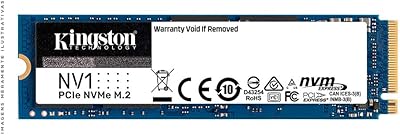
Kingston NV1 250GB NVMe SSD
79%
88%
Value for Money
83%
Read Speed Performance
71%
Write Speed Performance
93%
Installation Ease
81%
Compatibility
More
Kingston NV2 4TB M.2 NVMe SSD
83%
93%
Value for Money
82%
Read Performance
61%
Sustained Write Speed
96%
Installation Ease
89%
Compatibility
More
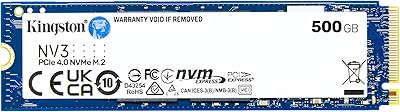
Kingston NV3 500GB NVMe SSD
81%
91%
Read Performance
78%
Write Performance
94%
Value for Money
63%
Thermal Management
93%
Installation Ease
More
Kingston NV1 500GB M.2 2280 NVMe SSD
85%
88%
Performance
92%
Value for Money
90%
Installation Ease
80%
Speed Consistency
85%
Durability
More
Kingston NV3 4TB NVMe SSD
80%
91%
Sequential Read Speed
63%
Sustained Write Performance
94%
Storage Capacity
88%
Value for Money
93%
Installation Ease
More
Kingston NV3 1TB NVMe SSD
87%
93%
Value for Money
88%
Boot and Load Times
94%
Ease of Installation
91%
Physical Compatibility
86%
Power Efficiency
More
Kingston NV2 1TB NVMe SSD
83%
93%
Value for Money
86%
Read Performance
61%
Sustained Write Performance
74%
Thermal Management
91%
Compatibility
More
Kingston NV3 2TB NVMe SSD
82%
88%
Read Speed Performance
71%
Write Speed Consistency
63%
Thermal Management
86%
Value for Money
94%
Installation Ease
More
Kingston NV1 2TB NVMe SSD
81%
88%
Value for Money
82%
Read/Write Performance
93%
Installation Ease
61%
Thermal Management
71%
Long-Term Reliability
More

FAQ

It depends on whether your laptop has an M.2 slot that supports the SATA protocol. Many laptops made after 2015 include an M.2 slot, but some only accept NVMe drives, and a few older models lack an M.2 slot entirely. The safest way to confirm is to look up your laptop's exact model number in the manufacturer's technical specifications or service manual before purchasing.

Yes, this A400 drive is backward compatible with SATA 2 (3Gb/s) systems. You will not reach the full rated speeds, but even at reduced throughput, the performance improvement over a traditional hard drive is substantial for everyday tasks like booting, opening applications, and file access.

For anyone coming from a mechanical hard drive, the change is dramatic. Boot times that used to stretch to two or three minutes often drop under thirty seconds, and applications that once felt sluggish to open tend to launch almost instantly. The improvements are most noticeable during startup, application loading, and general system responsiveness — less so during raw file transfer tasks.

No proprietary software or drivers are required. If you are using it as a fresh OS drive, you install your operating system as you normally would. The one thing Kingston does not include is a cloning tool, so if you are migrating an existing system from another drive, you will need to source a third-party cloning utility on your own.

For a lean setup — an OS plus a handful of productivity applications and browser use — 240GB is workable but not generous. It fills up faster than most people anticipate once OS updates, temporary files, and downloads accumulate over time. If you plan to keep large media files, games, or project archives on the same drive, consider pairing it with a larger secondary drive or choosing a higher-capacity variant from the start.

In most cases, yes. The majority of M.2 slots that support NVMe also support SATA, since the physical connector is identical. However, a small number of motherboards and laptops are wired to support only NVMe in their M.2 slots and will not recognize a SATA M.2 drive at all. Always verify in your system's documentation that the M.2 slot explicitly supports SATA before purchasing.

It is strictly an M.2 2280 drive, not a 2.5-inch drive. The mislabeling appears in some third-party listings and causes genuine confusion, but the product itself will not fit a standard 2.5-inch SATA bay. Before ordering, confirm that your system has a free M.2 slot, not just a 2.5-inch drive bay.

For the vast majority of daily tasks — web browsing, document editing, video calls, and light multitasking — you are unlikely to notice any impact from the DRAM-less design. It only becomes a tangible limitation when you are writing large volumes of data continuously, such as copying hundreds of gigabytes of files or running disk-intensive applications back to back. For standard home and office workloads, it holds up well.

Based on the experiences reported by long-term users and the general endurance profile of SATA SSDs at this tier, several years of reliable daily use is a reasonable expectation for typical workloads like OS operation, web browsing, and office tasks. That said, the endurance rating is not especially high, so if your use case involves constant heavy writes — such as running database applications or performing daily large-scale backups — a drive with a higher TBW rating would be a more prudent long-term choice.

Yes, it works as a primary boot drive for both Windows and Linux without any complications. Modern BIOS and UEFI firmware detect it automatically. For Windows 10 or 11, using UEFI boot mode is recommended over legacy BIOS, and from there the installation process is no different from setting up any other SSD.