Overview

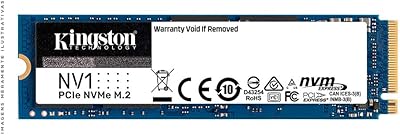
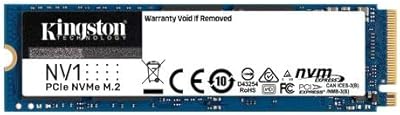
The Kingston NV1 500GB NVMe SSD is built for one simple job: getting people off slow spinning hard drives and onto something that actually feels fast. It slots into the M.2 2280 form factor, which covers the overwhelming majority of laptops and desktops sold in the last several years, so compatibility is rarely the sticking point. This drive belongs to Kingston's broader NV1 family, which also comes in 1TB and 2TB sizes if you need more room down the line. Nobody should expect workstation-grade performance here. Instead, this is a practical, no-frills upgrade aimed at quicker boots, faster app launches, and snappier file transfers for everyday computing.
Features & Benefits

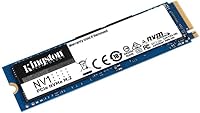
On paper, this NVMe drive is rated for sequential speeds up to 2100 MB/s read and 1700 MB/s write, which sounds abstract until you actually feel app windows pop open almost instantly. The PCIe Gen3 x4 interface is the real story here, since it's a meaningful step up from any SATA-based SSD, even if it doesn't push into the fastest Gen4 territory. Physically, this storage upgrade keeps things simple: the slim 2280 length slides into thin laptop chassis without a fight, and there's no bulky heatsink to find room for. Kingston has been making consumer storage for decades, and that experience shows in how unremarkable the installation process is, in the best possible sense.

Best For

This SSD makes the most sense for someone replacing an aging hard drive in a laptop or desktop that's started to feel sluggish for no obvious reason. It's a comfortable fit for everyday tasks: browsing, office documents, video calls, and streaming, where the jump from spinning storage to solid-state changes the whole feel of the machine. Casual gamers will notice shorter load screens without paying premium prices for a high-end Gen4 drive. It also works well as a dedicated boot drive in a build where bulk storage lives elsewhere on a separate disk. Where it's not the right call is sustained, heavy workloads, things like large video editing projects or server use, which ask more of a drive than this one is designed to give.

User Feedback

Owner feedback backs up the on-paper numbers, with this storage upgrade holding a 4.8 out of 5 average across roughly 7,600 ratings, a genuinely strong showing for a budget-friendly drive. Most buyers describe a dramatic difference in boot and load times compared to whatever hard drive or SATA SSD they replaced, and that initial wow factor seems to hold up over time. A few more experienced reviewers point out that it performs best as an OS drive rather than for repeatedly shuffling huge files, since sustained write speeds aren't its strongest suit. One recurring tip from the comments: double-check that your motherboard or laptop actually has a free NVMe Gen3 slot before ordering, since plugging it into the wrong type of slot is the most common complaint.

Pros

  • Boots and launches everyday apps noticeably faster than a spinning hard drive or SATA SSD
  • Slim M.2 2280 design fits easily into thin laptops without any tight squeeze
  • No external heatsink needed, which keeps installation straightforward for first-time builders
  • Backed by Kingston, a brand with a long, reliable history in consumer storage
  • Sequential speeds up to 2100 MB/s feel genuinely snappy for everyday computing tasks
  • Holds an excellent 4.8 out of 5 rating across thousands of real owner reviews
  • The Kingston NV1 500GB NVMe SSD offers a clear upgrade path with 1TB and 2TB options

  • Affordable enough to use as a dedicated boot drive alongside separate bulk storage
  • Works well for casual gaming with shorter load screens compared to older drives

Cons

  • Lacks a dedicated DRAM cache, so performance can dip during long, sustained file transfers
  • Not ideal for heavy video editing or other large-scale professional production work
  • Requires confirming your motherboard or laptop actually has a free PCIe Gen3 NVMe slot first
  • Falls short of flagship Gen4 drives if raw top-end speed is the main priority
  • Sustained write performance trails behind pricier drives once cache buffers are exhausted
  • Some buyers mistakenly install it in incompatible slots, leading to setup confusion
  • Not a great fit for server duty or constant background read and write activity
  • Speed gains are most noticeable for boot and load tasks, less so for bulk data moves

Ratings

Our team's AI rating engine analyzed thousands of verified global reviews for the Kingston NV1 500GB NVMe SSD, filtering out spam, duplicate accounts, and incentivized feedback to surface genuine owner experiences. The scores below reflect a balanced mix of praise and frustration reported by real buyers, not a marketing average. Where this storage upgrade consistently impresses or falls short, we've broken it down category by category.

Everyday Performance & Speed
88%
Owners consistently describe a snappier overall feel during daily browsing, document work, and multitasking compared to their previous drive. App launches and file opens happen with noticeably less delay, making routine computer use feel less sluggish.
A portion of users expected flagship-level speeds given the marketing numbers and felt slightly let down once they realized this is a budget-tier drive. Real-world gains plateau quickly outside of light, everyday tasks.
Boot & Load Time Improvement
91%
This is the single most praised aspect in owner feedback, with buyers repeatedly noting dramatically faster startup times after swapping out an old hard drive. Many describe boot times dropping from over a minute to just seconds.
A few reviewers coming from existing SATA SSDs report the improvement feels more incremental than transformative. Gains are most dramatic only for users upgrading directly from spinning hard drives.
Sustained Write Performance
64%
36%
For typical short bursts, like saving documents or installing smaller applications, performance feels perfectly responsive and doesn't bottleneck everyday workflows. Most casual users never push the drive hard enough to notice any slowdown.
Because this NVMe drive is DRAM-less, write speeds can drop noticeably during large, sustained transfers once the cache buffer fills. Reviewers moving big media libraries or backups report a clear slowdown partway through.
Installation Ease
93%
Buyers repeatedly call this one of the simplest PC upgrades they've done, with the compact M.2 2280 size sliding into laptops and desktops without any tight fitting issues. No extra cables or tools are needed beyond a single screw.
A small number of first-time builders mention initial confusion distinguishing NVMe slots from SATA M.2 slots on their motherboard. Clearer guidance in the packaging could prevent some of these early missteps.
Compatibility
79%
21%
Most modern laptops and desktops built in the last several years accept this drive without issue, and buyers appreciate the broad support across both Intel and AMD platforms. Compatibility with mainstream PCIe Gen3 systems is generally smooth.
Some owners with older systems or M.2 SATA-only slots discovered compatibility problems after purchase, leading to returns. Checking your exact slot type beforehand is essential and not always obvious to casual buyers.
Build Quality
84%
The drive feels solid and well-constructed for its price point, with a slim profile that doesn't flex or feel cheap during handling. Reviewers haven't reported widespread physical defects or fragile components.
Without a heatsink or thermal pad included, a handful of users in poorly ventilated laptops noted the drive running warmer than expected under sustained load. It's a minor concern, but worth monitoring in compact builds.
Value for Money
89%
This storage upgrade is widely viewed as an excellent entry point into NVMe speeds without the premium price tag of higher-tier drives. Reviewers frequently mention it delivers more performance than they expected for the cost.
A few buyers comparing prices closely note that slightly pricier drives with DRAM caches offer meaningfully better long-term performance for not much more money. Shoppers focused purely on longevity may want to compare options first.
Heat Management
86%
Most users report the drive stays comfortably cool during typical day-to-day use, even without an included heatsink. It runs quietly within normal temperature ranges for light and moderate workloads.
During longer, heavier write sessions, a small number of owners observed elevated temperatures, particularly in cramped laptop interiors with limited airflow. Adding a basic heatsink in desktop builds can help mitigate this.
Gaming Performance
77%
23%
Casual and mid-range gamers report shorter level-load times and quicker game launches compared to hard drives or older SATA SSDs. It handles single-player and moderately sized game libraries comfortably.
Competitive gamers chasing the lowest possible load times found the gains less impressive than premium Gen4 alternatives. It's adequate for casual play but not a top pick for performance-focused gaming rigs.
Long-Term Reliability
81%
19%
Many long-term owners report stable, trouble-free operation months after installation, with no sudden failures or data corruption reported in most reviews. Kingston's reputation for consumer storage adds to buyer confidence over time.
A small subset of reviewers mention drive failures or detection issues after extended use, though this appears to affect a minority rather than a widespread pattern. Regular backups are still recommended regardless of brand.
Brand Trust & Warranty
87%
Kingston's long-standing reputation in the storage market gives buyers added peace of mind, and most reviewers describe straightforward support experiences when issues arise. Warranty coverage adds reassurance for a budget purchase.
A few users found the warranty claim process slower than expected or felt regional support varied in responsiveness. Clearer, faster documentation would improve the post-purchase experience for affected buyers.
Power Efficiency
92%
Laptop owners specifically note improved battery life after switching from a hard drive, since this NVMe drive draws less power during idle and light use. It runs efficiently without excessive heat or drain.
A handful of reviewers running intensive, sustained workloads noticed slightly higher power draw during heavy write activity. This is a minor tradeoff that rarely affects typical everyday usage patterns.
Software & Toolkit Support
68%
32%
Buyers who use Kingston's SSD management software appreciate being able to check drive health and firmware status without needing third-party tools. It's a simple, functional addition for monitoring drive condition.
Several reviewers describe the software as basic compared to competitors, lacking advanced tuning options or detailed diagnostics. Users wanting deeper insight into drive performance often turn to separate third-party utilities instead.

Suitable for:

The Kingston NV1 500GB NVMe SSD is a smart pick for anyone still running a laptop or desktop on a mechanical hard drive who wants a dramatic, immediately noticeable speed boost without spending a lot of money. It suits home office workers and students who mainly need faster boot times, quicker app launches, and smoother multitasking rather than raw professional-grade throughput. Casual and mid-range gamers benefit too, since shorter level-load times come without paying for a high-end Gen4 drive they don't really need. It's also a good match for PC builders who want a snappy, affordable boot drive and plan to pair it with a separate larger drive for bulk storage. Anyone upgrading an older system that already supports PCIe Gen3 NVMe will likely feel the difference within the first few minutes of use.
Not suitable for:

The Kingston NV1 500GB NVMe SSD isn't the right choice for video editors, 3D artists, or anyone regularly moving very large files who needs consistently high write speeds over long, sustained transfers. Because it skips a dedicated DRAM cache, performance can taper off noticeably once you push past short bursts of heavy writing, which matters for demanding production work. Server use, intensive multitasking with constant background read/write activity, or any workload that hammers the drive for extended periods will expose its budget-tier limits. Buyers with older systems lacking a PCIe Gen3 NVMe M.2 slot should also steer clear, since compatibility issues are one of the more common complaints. If raw, sustained performance is the priority over price, a higher-tier NVMe drive with DRAM cache is the better investment.

Specifications

  • Capacity: This model is configured with 500GB of usable storage space.
  • Form Factor: It uses the M.2 2280 form factor, measuring 80mm in length like most standard NVMe drives.
  • Interface: It connects over PCIe Gen3 x4 using the NVMe protocol for communication with the host system.
  • Sequential Read Speed: Sequential read speeds are rated at up to 2100 MB/s under optimal conditions.
  • Sequential Write Speed: Sequential write speeds are rated at up to 1700 MB/s under optimal conditions.
  • Model Number: The official model number for this capacity is SNVS/500G.
  • Dimensions: The drive measures 3.15 x 0.87 x 0.14 inches in length, width, and height.
  • Weight: The drive weighs approximately 0.212 ounces, or about 6 grams.
  • Color: The circuit board and label are finished in blue.
  • Compatible Devices: It is designed to work with desktops and laptops that have a free PCIe NVMe Gen3 M.2 slot.
  • Installation Type: This is an internal drive intended for direct installation inside a PC or laptop chassis.
  • Memory Cache: This drive is DRAM-less, relying on host memory buffer technology instead of an onboard DRAM cache.
  • Brand: It is manufactured by Kingston Technology, a long-established name in consumer memory and storage.
  • Available Capacities: The NV1 series this drive belongs to is also offered in 1TB and 2TB capacities.
  • Heatsink: No external heatsink is included or required for standard desktop or laptop installation.
  • Customer Rating: The product holds an average customer rating of 4.8 out of 5 stars based on 7,648 ratings.

Related Reviews
Kingston NV1 250GB NVMe SSD
79%
88%
Value for Money
83%
Read Speed Performance
71%
Write Speed Performance
93%
Installation Ease
81%
Compatibility
More
Kingston NV3 500GB NVMe SSD
81%
91%
Read Performance
78%
Write Performance
94%
Value for Money
63%
Thermal Management
93%
Installation Ease
More
Kingston NV1 2TB NVMe SSD
81%
88%
Value for Money
82%
Read/Write Performance
93%
Installation Ease
61%
Thermal Management
71%
Long-Term Reliability
More
fanxiang S880E 500GB NVMe SSD
78%
83%
Raw Speed Performance
86%
PS5 Compatibility
91%
Value for Money
77%
Thermal Management
93%
Installation Ease
More
Kingston XS2000 500GB Portable SSD
76%
88%
Transfer Speed
91%
Build Quality
96%
Portability & Form Factor
67%
Thermal Performance
83%
Value for Money
More
Crucial P310 500GB NVMe SSD
87%
93%
Read & Write Speed
91%
Value for Money
88%
Thermal Management
94%
Compatibility
92%
Installation Ease
More
Crucial P3 500GB NVMe M.2 SSD
82%
88%
Read Speed Performance
71%
Write Speed Performance
93%
Value for Money
94%
Ease of Installation
86%
Reliability & Longevity
More
TEAMGROUP MP44L 500GB Gen4 NVMe SSD
78%
88%
Sequential Read Speed
61%
Sustained Write Performance
79%
Thermal Management
91%
Installation & Compatibility
93%
Value for Money
More
WD_BLACK SN7100 500GB NVMe SSD
83%
91%
Read Performance
83%
Write Performance
89%
Power Efficiency
58%
Storage Capacity
72%
Thermal Management
More
WD_BLACK SN770M 500GB NVMe SSD
89%
93%
Performance
95%
Compatibility with Gaming Consoles
91%
Speed (Read/Write)
88%
Installation Ease
87%
Durability
More

FAQ

It works in both, as long as your laptop has an M.2 slot that supports NVMe Gen3 drives. Most laptops made in the last several years include this slot, but it's worth checking your laptop's specs or manual first since some budget models still use SATA-only M.2 slots.

No, you don't need one. This drive doesn't run hot enough during typical use to require additional cooling, and the listing doesn't include one because it isn't necessary for normal desktop or laptop installation.

If you're coming from a traditional hard drive, the difference is dramatic, boot times and app launches will feel almost instant by comparison. Coming from an older SATA SSD, you'll still notice quicker load times, though the jump won't feel as dramatic since SATA SSDs are already fairly fast for everyday tasks.

It's a solid pick for casual to mid-range gaming, especially for shorter level-load times. If you're a competitive gamer chasing every last millisecond or working with massive game install libraries, a higher-end NVMe drive with a DRAM cache will hold up better under sustained pressure.

You can, but it's not really built for that. Because it lacks a dedicated DRAM cache, write speeds can slow down noticeably during long, sustained transfers, which makes it less ideal for heavy video editing or large file-heavy workflows.

Check your motherboard or laptop specifications for an M.2 slot that supports PCIe Gen3 NVMe, not just M.2 SATA. Most desktop motherboards from the past five or six years include at least one compatible slot, but it's always smart to confirm before purchasing.

Not really, it's one of the easier PC upgrades to perform yourself. You just align the drive's connector with the M.2 slot, secure it with a single small screw, and you're done, no cables or extra tools required.

Kingston typically backs its NV1 series with a multi-year limited warranty, though exact terms can vary by region, so it's worth checking the manufacturer's current warranty page for your specific country before relying on a number.

It works great as your main boot drive, especially if you're prioritizing fast startup and everyday responsiveness. Many builders pair the Kingston NV1 500GB NVMe SSD as their primary OS drive with a separate, larger drive for bulk file storage.

Most of those issues come down to installing the drive in the wrong type of M.2 slot, since some boards have both SATA and NVMe M.2 slots that look identical but aren't interchangeable. Double-checking your slot type beforehand avoids almost all of these reported problems.