

Overview

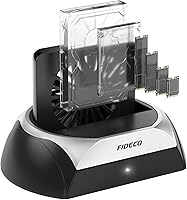
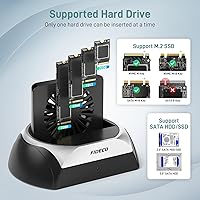
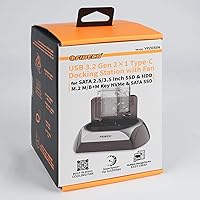
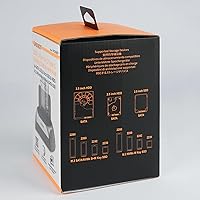
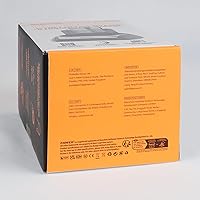
The FIDECO YPZ03SN Hard Drive Docking Station is a single-slot reader that handles an unusually wide range of drive formats — 2.5-inch and 3.5-inch SATA, M.2 NVMe, and M.2 SATA — all from one compact unit. What sets it apart at this price point is a built-in cooling fan with its own independent switch, something most competing docks quietly skip. It runs on Windows, Mac, and Linux with zero driver installation. Worth stating upfront, though: this is a one-drive-at-a-time dock. If simultaneous multi-drive access is what you need, this is not that device — but for single-drive versatility, it covers a lot of ground.

Features & Benefits

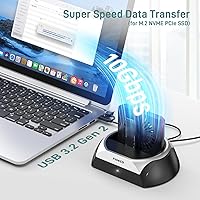
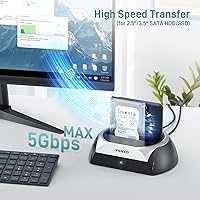
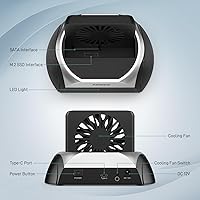
The active cooling fan is the headline feature — it has its own on/off switch, so you can run silent during a quick file check or kick it on during a long transfer session. For NVMe drives, the dock supports connections up to 10Gbps, though actual throughput depends on your host machine; treat that figure as a ceiling, not a promise. SATA drives top out at 5Gbps. The included USB-C to USB-C cable comes with a USB-A adapter attached, covering older laptops without a separate purchase. OTG-compatible phones and tablets can connect too. The whole unit weighs under 8 ounces and takes up minimal desk space.

Best For

This docking station suits IT technicians and enthusiasts who constantly juggle different drive formats — someone pulling data from an old 3.5-inch desktop drive one day and cloning an M.2 NVMe the next. It is also a strong pick for home users doing a one-time PC migration, where temporary drive access beats cracking open a case. Content creators moving large video files off SSDs will appreciate the NVMe speed headroom. And if you have a drawer of mixed old drives you occasionally need to read, the FIDECO dock earns its place as a no-install utility tool ready whenever you need it.

User Feedback

Buyers consistently highlight the cooling fan as a genuine practical upgrade, with several noting measurable temperature drops during extended transfers — reassuring if you run long backup sessions. The broad format compatibility earns high marks too, especially from users surprised to find legacy SATA and M.2 NVMe supported in one affordable unit. On the critical side, some owners report that real-world NVMe speeds fall short of the stated ceiling, which is typical for USB-based enclosures and not unique here. A minority mention fit issues with particularly thick 3.5-inch drives. Also worth knowing: new unformatted drives require initialization in Disk Management before the dock recognizes them — a standard setup step, not a defect.

Pros

  • Supports 2.5-inch SATA, 3.5-inch SATA, M.2 NVMe, and M.2 SATA drives — genuinely covering nearly every common consumer format.
  • Built-in cooling fan with its own on/off switch actively reduces drive temperatures during long transfers.
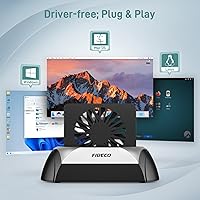
  • Plug-and-play on Windows, Mac, and Linux — no driver downloads, no setup frustration.
  • Included cable handles both USB-C and USB-A hosts right out of the box, no extra purchase needed.
  • Compact footprint means it sits on a desk without taking over your workspace.
  • OTG support lets compatible Android phones and tablets connect directly to the dock.
  • Ranked in the top 100 in its Amazon category, with over 300 ratings reflecting a solid track record.
  • The fan switch is a thoughtful touch — you can run it silent for quick jobs and cool for sustained workloads.
  • New drive initialization is a standard OS step, not a design flaw, and straightforward for most users.

Cons

  • Only one drive can be connected at a time, which limits utility for users needing simultaneous multi-drive access.
  • Real-world NVMe transfer speeds fall noticeably short of the 10Gbps theoretical maximum over USB.
  • ABS plastic construction feels functional rather than premium, especially during extended handling.
  • A small number of users report that certain thick 3.5-inch drives do not seat as snugly as expected.
  • No included power adapter documentation makes it less clear how power-hungry 3.5-inch drives are being supplied.
  • The fan, while useful, does add audible noise — not ideal in very quiet work environments.
  • No multi-bay capability means users with growing drive libraries will hit the limit of this dock quickly.

Ratings

The scores below reflect AI-driven analysis of verified global buyer feedback for the FIDECO YPZ03SN Hard Drive Docking Station, with spam, incentivized, and bot-pattern reviews actively filtered out before scoring. Each category captures both what users genuinely praised and where real frustrations surfaced — nothing is glossed over. The result is a transparent, balanced picture of where this drive reader earns its place and where it asks for some patience.

Drive Compatibility
91%
Buyers consistently describe this as one of the standout strengths — the ability to drop in an old 3.5-inch desktop drive, a modern M.2 NVMe, or a 2.5-inch laptop SATA without swapping adapters is genuinely appreciated. IT technicians in particular highlight how much time it saves when working across mixed hardware environments.
M.2 SATA support is limited to B+M Key only, which catches some users off guard when their M-Key SATA drive is not recognized. A clearer warning at the point of purchase would prevent confusion for less technical buyers who do not know their drive's key type before ordering.
Cooling Performance
88%
The built-in fan with its independent on/off switch stood out in user feedback as a practical, thoughtful feature that most competing docks skip entirely. Several buyers reported measurable temperature reductions during long backup sessions, which gave them more confidence running extended transfers without worrying about thermal throttling.
The fan does generate audible noise — not loud, but noticeable in a quiet home office setup. A handful of users wished for a variable speed option rather than simply on or off, especially for moderate workloads where full fan speed felt like overkill.
Transfer Speed
72%
28%
For NVMe SSDs, real-world throughput is meaningfully faster than SATA-only docks, and users moving large video projects or disk images do notice the difference during longer transfers. The 5Gbps SATA ceiling covers everyday backup tasks without any frustrating bottlenecks for typical home use.
Real-world NVMe speeds consistently fall short of the 10Gbps theoretical maximum — this is a USB bandwidth limitation, not a defect, but it still disappoints buyers who expected peak speeds. Users benchmarking the dock against internal PCIe performance will find the gap significant enough to matter for high-frequency professional workflows.
Plug-and-Play Setup
93%
Zero-driver operation is something buyers across all skill levels praised without reservation — plug in the cable, insert a drive, and the OS picks it up immediately on Windows, Mac, and Linux. This frictionless experience is especially valued by home users who dread software installation and just want their data accessible fast.
The one consistent exception is brand new, unformatted drives, which require disk initialization before the system recognizes them — a standard OS step, but one that surprises novice users enough that it generates support questions. Clearer first-use guidance in the box would eliminate most of this confusion.
Cable & Connectivity
84%
The included USB-C to USB-C cable with its attached USB-A adapter was widely praised for covering both modern and legacy host ports without requiring a separate purchase. Buyers setting up the dock on older laptops with only USB-A ports appreciated not having to hunt down an extra cable on day one.
The attached adapter, while convenient, means you are working with a slightly awkward cable configuration if you want a clean desk setup. Some users also noted that connecting via USB-A naturally caps performance, and the packaging could do a better job of explaining that trade-off upfront.
Build Quality
69%
31%
The ABS enclosure is solid enough for regular home and office use, and the overall construction feels intentional rather than flimsy — the fan housing and drive slot both feel reasonably sturdy during repeated insertions. For a utility device that sits on a desk and does a job, most buyers found the build perfectly adequate.
The plastic construction does not inspire confidence during heavy daily use, and the silver-and-black aesthetic reads more functional than premium. A minority of users reported that the drive slot tolerance felt slightly loose with certain drive thicknesses, which raises long-term durability questions for high-frequency swap scenarios.
3.5-Inch Drive Fit
67%
33%
The majority of users with standard 3.5-inch desktop drives report a straightforward insertion experience with no alignment issues. For typical consumer hard drives recovered from desktop PCs or purchased new, the slot accommodates them without any fuss.
A notable minority flagged fit issues with thicker or older 3.5-inch drive models, where the physical slot did not hold the drive as securely as expected. This is not a universal problem, but it is consistent enough across feedback that buyers with non-standard drive sizes should verify compatibility before committing.
OTG & Mobile Use
74%
26%
OTG functionality is a genuinely useful bonus for users who want to pull files off a drive directly to a compatible Android tablet or USB-C iPad without involving a desktop machine. Content creators who work between mobile editing setups and desktop drives found this a practical convenience rather than a gimmick.
OTG compatibility varies by device and operating system version, and FIDECO does not publish a tested device list, which leaves some mobile users troubleshooting independently. iOS users in particular may run into app-level restrictions that limit what they can actually do with a connected drive, even when the hardware side works.
Thermal Management Design
81%
19%
Having the fan switch physically on the dock rather than software-controlled means you can adjust cooling without opening any app or menu — a small but appreciated design choice for users who regularly alternate between quick reads and sustained data migrations. Drive temperatures during long sessions stayed in a comfortable range according to multiple buyers who monitored with third-party tools.
There is no thermal indicator or temperature readout, so users have to rely on touch or external software to know whether the fan is actually making a difference in their specific situation. For more demanding NVMe workloads, passive cooling alone during fan-off periods may still allow moderate heat buildup.
OS Compatibility
92%
Confirmed working across Windows 10, Windows 11, recent macOS versions, and various Linux distributions without any driver installation — a range that covers virtually every buyer's setup. Mac users, who sometimes encounter quirks with third-party storage accessories, reported particularly smooth detection and mounting behavior.
Chromebook compatibility is not officially confirmed, which is a gap for buyers in education or lightweight computing environments where Chrome OS is common. There is no documented firmware update process for end users, so edge-case OS compatibility issues may not have a clear resolution path.
Value for Money
86%
For a dock that supports nearly every consumer drive format and includes an active cooling fan — features that typically push competitors into a higher price tier — buyers broadly feel they are getting more than they paid for. The bundled cable that covers both USB-C and USB-A hosts adds to the perception of a complete, ready-to-use package.
The single-drive limitation is a genuine value constraint for buyers who later realize they needed multi-bay access, effectively making the purchase less versatile than they initially assumed. If your needs expand, you will be buying a second enclosure rather than growing with this one.
Footprint & Portability
83%
At under 8 ounces and with a compact 4.65 × 4.84 × 6.97 inch frame, the FIDECO dock slips into a laptop bag or sits unobtrusively on a crowded desk without demanding dedicated real estate. Technicians who carry it between job sites appreciated its lightweight profile compared to bulkier multi-bay alternatives.
The open-slot design means the dock is not great for transport with a drive already inserted — there is no cover or retention mechanism to keep the drive secured during movement. For desk-only use this is irrelevant, but mobile users should plan to pack drives separately.
Documentation & Support
63%
37%
FIDECO provides a direct support email and has indicated that firmware updates are available upon request, which is a better support posture than many budget-tier accessory brands. Users who reached out for help with initialization questions generally reported receiving responses.
The included documentation is thin — new users, particularly those unfamiliar with drive initialization, are left to search for answers independently when something does not work immediately. Given that unformatted drive recognition is a recurring support topic, a simple quick-start troubleshooting card in the box would meaningfully reduce frustration.

Suitable for:

The FIDECO YPZ03SN Hard Drive Docking Station is an excellent fit for anyone who regularly handles a mix of drive types and does not want to own four separate adapters to do it. IT technicians and power users who swap drives often — testing recovery images, cloning client machines, or benchmarking SSDs — will find the universal format support genuinely useful rather than just a marketing claim. Home users planning a PC upgrade and wanting to copy data off an old hard drive before the new build goes live get a plug-and-play option with no installation headaches. The built-in cooling fan makes it a reasonable choice for longer transfer sessions where drive heat is a legitimate concern. Content creators who occasionally pull footage off M.2 NVMe drives will also benefit from the higher-speed connection this dock supports. Anyone with a collection of older 3.5-inch desktop drives and a modern USB-C laptop will find this drive reader bridges that gap without buying a powered multi-bay enclosure.

Not suitable for:

The FIDECO YPZ03SN Hard Drive Docking Station is not the right tool if you need to access more than one drive simultaneously — it physically supports only a single drive at a time, full stop. Users building NAS setups, running RAID configurations, or needing to compare data across two drives side by side should look at purpose-built multi-bay enclosures instead. If your primary use case is permanently housing a drive as an always-on external storage solution, a dedicated external enclosure with a fixed cable and a more stable long-term design will serve you better. Buyers expecting USB-connected speeds to match internal PCIe NVMe performance will be disappointed — real-world throughput is always lower than the rated ceiling, and that is not specific to this dock but worth understanding before purchase. Users with unusually thick 3.5-inch drives should also verify fit compatibility, as a small number of owners have reported tension on wider form-factor models.

Specifications

  • Brand: Manufactured by FIDECO, model number YPZ03SN.
  • Drive Compatibility: Supports 2.5″ and 3.5″ SATA HDDs and SSDs, M.2 NVMe SSDs (M-Key and B+M Key), and M.2 SATA SSDs (B+M Key only).
  • Max Transfer Speed: Up to 10Gbps for M.2 NVMe drives and up to 5Gbps for 2.5″ and 3.5″ SATA drives under ideal conditions.
  • Simultaneous Drives: Supports one drive at a time; this is a single-slot dock, not a multi-bay enclosure.
  • Interface: Connects to the host device via USB, using the included USB-C to USB-C cable with an attached USB-A adapter.
  • Cooling System: Features a built-in active cooling fan with an independent on/off toggle switch on the unit.
  • OS Support: Compatible with Windows, Mac OS, and Linux operating systems out of the box with no driver installation required.
  • OTG Support: Works with OTG-enabled smartphones and tablets in addition to standard desktop and laptop computers.
  • Dimensions: The unit measures 4.65 × 4.84 × 6.97 inches, keeping the desk footprint compact.
  • Weight: Weighs 220g (7.8 oz), making it light enough to move between workstations easily.
  • Material: Enclosure is constructed from ABS (Acrylonitrile Butadiene Styrene) plastic in a black and silver finish.
  • Included Cable: Comes with one USB-C to USB-C cable that has a USB-A adapter attached for broader host compatibility.
  • Driver Required: No driver installation is needed; the dock operates as a plug-and-play device on all supported operating systems.
  • Power Source: Powered through the USB connection to the host device; no separate power adapter is included or required for typical use.
  • Category Rank: Ranked #92 in the Hard Drive Docking Stations category on Amazon at time of listing, based on over 300 customer ratings.

Related Reviews
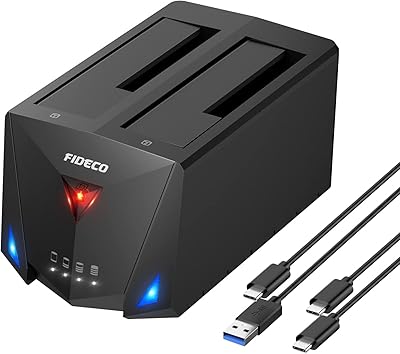
FIDECO YPZ220C Dual Bay USB 3.2 Gen 1 Hard Drive Docking Station
79%
88%
Offline Clone Functionality
79%
Transfer Speed
92%
Drive Compatibility
91%
Plug-and-Play Setup
63%
Build Quality
More
SSK DK103 Dual Bay Hard Drive Dock
76%
84%
Offline Clone Reliability
88%
Build Quality
71%
Transfer Speed
79%
Thermal Management
91%
Ease of Use
More
ORICO Hard Drive Docking Station DD18C3, 22TB Capacity
86%
89%
Ease of Use
94%
Setup and Installation
85%
Data Transfer Speed
88%
Build Quality
84%
Design and Aesthetics
More
YOTUO 500GB Portable Docking Station External Hard Drive
81%
78%
Performance
92%
Portability
85%
Connectivity Options
88%
Ease of Use
70%
Build Quality
More
Tccmebius TCC-S868 Dual-Slot USB 3.0 Docking Station
71%
88%
IDE Compatibility
83%
SATA Drive Support
79%
Data Transfer Speed
76%
Ease of Setup
61%
One-Touch Backup (OTB) Feature
More
MAIWO Dual-Bay Hard Drive Docking Station
78%
88%
Offline Clone Reliability
91%
Value for Money
67%
Transfer Speed
83%
Drive Compatibility
93%
Ease of Setup
More
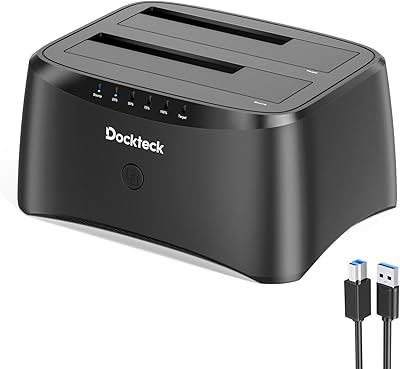
dockteck Dual Bay External Hard Drive Docking Station
84%
90%
Performance and Speed
88%
Ease of Use
85%
Build Quality
91%
Cloning Functionality
82%
Compatibility
More
RSHTECH RSH-DS02 Dual Bay Hard Drive Dock
80%
88%
Offline Cloning Reliability
83%
Build Quality
76%
Transfer Speed
71%
Heat Management
62%
Large Drive Compatibility
More
SABRENT DS-UC1B USB-C Hard Drive Docking Station
81%
88%
Plug-and-Play Reliability
79%
Transfer Speed Performance
74%
Build Quality & Materials
86%
Hot-Swap Functionality
83%
Compatibility Range
More
CineRAID CR-H212 Dual Bay Hard Drive Docking Station 2TB
85%
87%
Performance & Speed
92%
Build Quality & Durability
88%
Ease of Use & Setup
93%
Data Transfer Speed (USB 3.0)
90%
Compatibility with Operating Systems
More
Inateck SA02004 USB 3.0 Hard Drive Docking Station
76%
88%
Offline Clone Reliability
74%
Data Transfer Speed
92%
Setup & Ease of Use
63%
Build Quality & Materials
71%
RGB Lighting
More

FAQ

No — the FIDECO YPZ03SN Hard Drive Docking Station is a single-slot device, meaning you can only connect one drive at a time. If you need simultaneous access to multiple drives, you would need a multi-bay enclosure instead.

In practice, probably not quite. The 10Gbps figure is a theoretical ceiling based on the USB interface bandwidth. Real-world speeds depend on your host computer, the drive itself, and cable quality — most users see respectable but somewhat lower throughput than that maximum. It is still significantly faster than a standard SATA connection.

No, none at all. Just plug the cable into your computer and insert a drive — it shows up automatically on Windows, Mac, and Linux. No downloads, no setup wizard, nothing to install.

Almost certainly not. Brand new drives that have never been formatted need to be initialized before any computer or dock can recognize them. On Windows, open Disk Management, right-click the unallocated drive, and initialize it. On a Mac, use Disk Utility to format it. This is a one-time step and completely normal.

You can control it yourself. There is a dedicated on/off switch on the unit specifically for the fan, so you can run it silent during a quick file check and switch it on when you are doing a long backup or transfer session where heat builds up.

Yes, as long as your device supports USB OTG (On-The-Go). Many Android phones and tablets support OTG natively. iPads with USB-C ports generally support it too, though access to external drives on iOS may depend on your OS version and app support.

For M.2 NVMe drives, the dock supports both M-Key and B+M Key connectors — this covers the vast majority of consumer NVMe SSDs. For M.2 SATA drives, it only supports B+M Key, not M-Key. If you are unsure which type your M.2 SATA drive is, check the physical notch on the connector end of the drive.

It is designed to support 3.5-inch drives via the USB connection, but power delivery over USB can be a limiting factor for spinning hard drives, which draw more current than SSDs. Most users report it working fine, but a small number have noted issues with power-hungry older desktop drives. If you experience detection problems, try a powered USB hub.

A small number of users have reported that certain thicker 3.5-inch drives do not seat as snugly as expected. It is not a widespread problem, but it does come up with some older or oversized drive models. If your drive feels like it is not fully inserted, double-check the slot alignment and avoid forcing it.

Yes. The included cable is USB-C to USB-C, but it comes with a USB-A adapter already attached, so you can plug directly into a standard USB-A port without buying anything extra. Note that connecting via USB-A will cap your transfer speed at the USB-A port's rated limit rather than full USB-C speeds.