
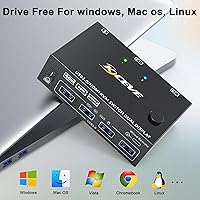
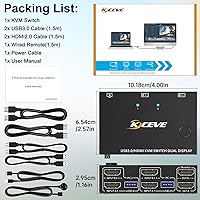
Overview

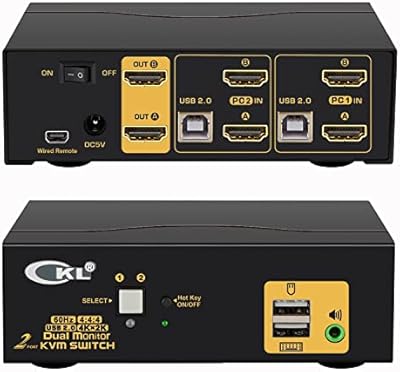
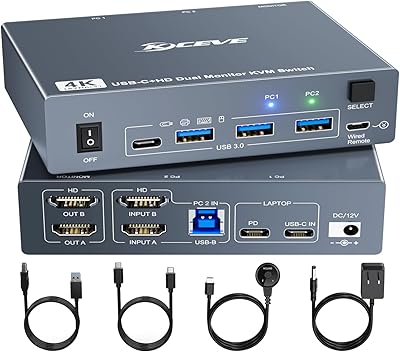
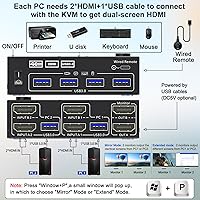
The Camgeet KVM202AS Dual Monitor KVM Switch sits comfortably in the mid-range tier — not a bare-bones single-display toggle, not an overbuilt enterprise unit, but a practical dual-monitor solution for anyone running two computers on one desk. It connects two hosts to two HDMI displays while sharing four USB 3.0 ports across both machines, and the box already includes the remote and necessary cables, which removes the usual scramble before first use. The physical footprint is small enough to tuck behind a keyboard or beside a monitor stand. A built-in EDID emulator rounds things out, keeping displays stable and consistent every time you switch hosts.

Features & Benefits

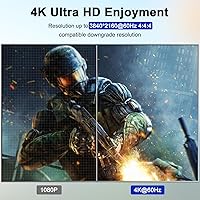
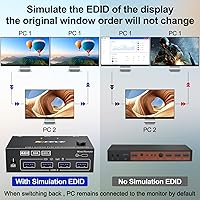
This dual-monitor KVM switch supports 4K at 60Hz across both HDMI outputs, and for high-refresh workflows it handles 2K resolutions at up to 144Hz — though hitting those refresh rates depends on your GPU, cable quality, and how everything is wired together. The four USB 3.0 ports let you share a keyboard, mouse, external drive, or webcam between both machines without duplication. One underappreciated detail is the EDID emulator: when you switch hosts, monitors can sometimes flicker or reset their resolution as they re-detect the signal — EDID emulation prevents that, keeping your display configuration locked in. The included wired remote adds a convenient physical toggle without requiring software.

Best For

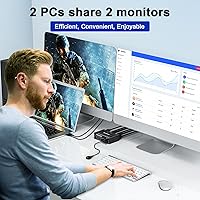
This two-computer KVM unit is a strong fit for home office professionals who run a work laptop and a personal desktop side by side and want both machines to share the same monitors and peripherals without a second desk worth of hardware. It also works well for content creators or light gamers who need one machine running at higher refresh and another at 4K — the resolution flexibility is genuinely useful in those mixed setups. One honest caveat: if your computers rely on DisplayPort or USB-C outputs, you will need additional adapter cables that are not included. The wired remote makes it a better choice for people who dislike hotkey-based switching.

User Feedback

Buyers broadly appreciate how little effort the initial setup takes — the included cables and wired remote mean most people are up and running quickly, and the plug-and-play experience draws consistent positive notes. On the flip side, some users report a brief lag when USB peripherals reinitialize after switching hosts, which grows annoying if you toggle back and forth frequently throughout the day. A smaller number flag compatibility issues tied to specific laptop and GPU combinations, particularly when adapter cables enter the picture. Build quality opinions land as acceptable for the price point, though the remote feels basic. The EDID emulator earns quiet but genuine praise from users who previously wrestled with resolution-reset problems on other switches.

Pros

  • Supports dual monitors at 4K and 60Hz simultaneously across both HDMI outputs.
  • Four USB 3.0 ports let you share a full peripheral set between two computers without duplication.
  • The built-in EDID emulator keeps monitors stable and prevents resolution resets when switching hosts.
  • Cables and a wired remote are included in the box, so setup is straightforward from the start.
  • The wired remote is a reliable, no-fuss alternative to software-based or hotkey switching.
  • Compact size means it fits easily on a crowded desk without demanding its own dedicated space.
  • High-refresh support at 2K and 144Hz adds genuine flexibility for mixed-use setups.
  • Broad adapter cable compatibility means it can technically work with DP, USB-C, VGA, and DVI sources.
  • The Camgeet switch hits a price point that makes dual-monitor KVM functionality accessible without overspending.

Cons

  • USB peripherals can take a noticeable moment to reinitialize after switching hosts, which adds up over a full workday.
  • DisplayPort and USB-C computers require adapter cables that are not included and can introduce signal issues.
  • 144Hz high-refresh performance is real but depends heavily on cable quality and GPU capability — results vary.
  • The remote feels basic and lightweight, raising questions about how it holds up with daily use over time.
  • Only two computers and two monitors are supported — there is no path to expanding the setup.
  • No audio switching is built in, so separate audio management is needed for users who switch headsets or speakers.
  • Compatibility with certain laptop and GPU combinations can be unpredictable, especially when adapters are involved.
  • No hotkey or software switching option means you are always dependent on the physical remote.
  • Monitors with only DisplayPort or VGA inputs are not officially supported and may require workarounds that degrade resolution.

Ratings

The scores below reflect our AI-driven analysis of verified global buyer reviews for the Camgeet KVM202AS Dual Monitor KVM Switch, with spam, bot submissions, and incentivized feedback actively filtered out before any score was calculated. We looked at patterns across thousands of real-world experiences — from home office professionals to content creators — to surface both where this two-computer KVM unit genuinely delivers and where it falls short. The ratings are intentionally transparent: strong suits are recognized, but recurring pain points are weighted honestly and not buried.

Ease of Setup
88%
Most buyers report being fully operational within minutes of opening the box, which is a genuine differentiator in a category that often requires driver installs or firmware updates. The bundled cables eliminate the common frustration of discovering missing accessories after unboxing, and the plug-and-play behavior across Windows and macOS hosts draws consistent praise.
Setup gets noticeably more complex for users with DisplayPort or USB-C computers, where sourcing and testing compatible adapter cables adds a non-trivial step. A handful of buyers found the documentation sparse when troubleshooting mixed-port configurations on laptops with non-standard video outputs.
Display Performance
83%
Under native HDMI conditions, the Camgeet switch delivers stable 4K at 60Hz output that holds up in everyday professional and creative use without visible artifacts or signal instability. Users running dual 1440p monitors at 60Hz consistently report clean, reliable output that matches what the spec sheet promises.
Real-world 144Hz performance is more conditional than the marketing implies — achieving it requires a capable GPU, quality cables, and compatible monitors all aligned. Some users report that resolution stability dips when adapter cables enter the chain, with occasional flickering that does not occur on direct HDMI connections.
EDID Emulation
79%
21%
For users who have previously dealt with monitors scrambling their layout or dropping resolution every time a KVM switches inputs, the built-in EDID emulator is a meaningful quality-of-life upgrade. Buyers running two monitors with different resolutions report that both displays hold their configured settings reliably after switching hosts.
The EDID emulator performs best when monitors are connected via native HDMI; adapter-connected displays sometimes bypass or confuse the emulation, leading to the same resolution-reset behavior the feature is meant to prevent. A minority of users with unusual monitor combinations report inconsistent results that required multiple reconnection attempts to stabilize.
USB Switching Speed
62%
38%
Peripheral sharing works reliably across the four USB 3.0 ports, and for users who switch hosts only a few times per day, the experience is smooth enough that the lag goes largely unnoticed. Data transfer speeds through the USB 3.0 ports are consistent and adequate for external drives and other high-bandwidth peripherals.
USB peripherals — keyboards and mice in particular — take a perceptible moment to reinitialize on the new host after switching, which becomes a real nuisance for anyone toggling frequently throughout the day. Several buyers describe a two-to-four-second window after switching where input devices are unresponsive, which is a noticeable friction point in fast-paced workflows.
Build Quality
67%
33%
The enclosure is compact and tidy, and for a unit at this price point the construction holds together well in day-to-day desktop use. The unit does not flex or rattle when buttons are pressed, and the overall finish is clean enough to sit on a professional desk without looking out of place.
The chassis material feels noticeably lightweight — it is plastic throughout, and some buyers describe it as feeling less substantial than comparable units from more established brands. Long-term durability remains an open question for buyers who use the switch heavily, and the wired remote in particular feels fragile given daily handling.
Wired Remote
71%
29%
Having a physical remote is a practical advantage over KVM switches that rely on hotkeys or software, particularly for users who mount the main unit out of easy reach or underneath a desk. The push-button action is responsive and the cable is long enough to sit comfortably on most desk surfaces.
The remote itself feels inexpensive — the button travel is shallow and the overall construction raises mild questions about durability with repeated daily use over months. A few buyers note that the remote cable length, while adequate, could be longer for larger or unconventional desk configurations.
Multi-Monitor Stability
76%
24%
Running two monitors simultaneously through the Camgeet switch works as advertised for the majority of buyers, with both displays maintaining their configurations reliably across switching events under standard HDMI setups. Users with matched monitor pairs at the same resolution report the most consistent experience with minimal fuss.
Stability becomes less predictable when the two connected monitors have significantly different resolution or refresh-rate profiles, particularly when one or both are connected via adapters. Some users report that one monitor occasionally takes longer to re-sync than the other after a switch, creating a brief period of mismatched display states.
Port & Cable Compatibility
58%
42%
The native HDMI configuration covers a broad range of modern monitors and many laptops and desktops out of the box. Camgeet provides a detailed compatibility matrix that helps buyers understand what adapter cables they need before purchasing, which at least sets expectations accurately.
Buyers with DisplayPort-only GPUs or USB-C-exclusive laptops face a frustrating adapter dependency that is not always highlighted clearly enough at purchase. The quality of third-party adapters introduces a variable the KVM cannot control, and incompatible or low-quality adapters are a leading cause of buyer dissatisfaction in this product category.
Value for Money
81%
19%
For buyers whose setup fits squarely within the native HDMI use case, the Camgeet switch delivers a meaningful feature set — dual monitors, four USB 3.0 ports, EDID emulation, wired remote, and included cables — at a price point well below enterprise KVM alternatives. The included accessories alone represent real savings compared to buying cables separately.
Buyers who discover after purchase that they need adapter cables face additional costs that erode the value proposition. Those comparing this unit against slightly pricier alternatives with faster USB switching or more polished build quality may feel the trade-offs tip the balance depending on their priorities.
Laptop Compatibility
61%
39%
Laptops with dual HDMI outputs work with the Camgeet switch without any modification, and many standard business laptops in this category connect cleanly. The unit is genuinely useful for the segment of laptop users it was designed for, particularly those with a dedicated docking station that provides dual HDMI.
Modern ultrabooks and MacBooks that rely entirely on USB-C or Thunderbolt for video output present a real challenge, often requiring a high-quality docking station before the KVM even enters the equation. Compatibility in these edge cases is highly dependent on third-party hardware that Camgeet cannot guarantee or support.
High-Refresh Gaming Use
54%
46%
The 144Hz capability at 2K resolutions is a real feature, not a paper spec, and buyers with mid-to-high-end GPUs and native HDMI monitors do report achieving it under the right conditions. For users who want one KVM to serve both a gaming rig and a work machine, the flexibility is genuinely appealing.
The conditions required to reliably hit 144Hz are specific enough that it cannot be assumed to work out of the box for every gaming setup. Buyers who expected seamless high-refresh performance and encountered signal instability or refresh-rate caps due to cable or adapter limitations express clear disappointment in their feedback.
Peripheral Sharing
74%
26%
Sharing a keyboard, mouse, and external drive across two computers without duplicate hardware works well for the target user, and the four USB 3.0 ports offer enough bandwidth for most home office peripherals. Buyers highlight the convenience of a single webcam shared between a work and personal machine as a practical benefit.
The absence of audio switching means buyers who use computer-connected headsets or speakers must manage that separately, which some users find unexpectedly inconvenient. There is also no Thunderbolt passthrough, limiting the unit's utility for power users who rely on high-bandwidth peripherals.
Documentation & Support
59%
41%
The included setup guide covers the basic HDMI-to-HDMI use case clearly, and the connection diagram for common configurations helps buyers visualize the wiring before starting. The compatibility reference for different port types is more detailed than what similar-tier competitors typically provide.
Buyers who run into issues with adapter cables or unusual monitor combinations find the documentation significantly less helpful, with troubleshooting guidance that does not address non-standard setups in enough depth. Customer support responsiveness from Camgeet has drawn mixed feedback, with some buyers reporting delayed or generic responses to specific technical questions.

Suitable for:

The Camgeet KVM202AS Dual Monitor KVM Switch is a genuinely practical pick for anyone who regularly works across two computers on the same desk and is tired of the friction that comes with it. The clearest beneficiary is the hybrid professional — someone whose work laptop and personal desktop both need to feed the same pair of monitors without a cable-swapping ritual every time they clock in or out. Home office setups where desk real estate is limited will appreciate that the unit is small and the included cables and remote mean you are not sourcing accessories before the first use. Content creators who run a high-refresh editing rig alongside a secondary machine for communication or rendering can also make good use of the resolution flexibility here, particularly the 4K at 60Hz and 2K at 144Hz support across dual outputs. If you have been relying on a software KVM or hotkey solution that keeps breaking, the physical wired remote here offers a refreshingly reliable alternative.

Not suitable for:

The Camgeet KVM202AS Dual Monitor KVM Switch is not the right tool if either of your computers relies primarily on DisplayPort or USB-C video outputs — you will need adapter cables that are not included, and those adapters introduce real risk of resolution drops, flickering, or outright incompatibility depending on their quality. Users who need to share more than two computers or drive more than two monitors simultaneously will hit a hard wall here, as the hardware simply does not support it. If your workflow demands near-instant peripheral switching with zero re-initialization lag — say, you are toggling between machines dozens of times per day — the brief USB re-detection delay that some users report may become a genuine annoyance. Power users who need Thunderbolt passthrough, audio switching, or advanced hotkey customization will find this two-computer KVM unit too basic for those requirements. It is also worth noting that the build quality is functional but not premium, so buyers who prioritize long-term hardware durability may want to look at higher-priced alternatives.

Specifications

  • Model Number: This unit is manufactured by Camgeet under the model designation KVM202AS.
  • Supported Hosts: The switch connects up to 2 computers simultaneously, allowing both to share the connected displays and peripherals.
  • Supported Displays: Two monitors are supported via native HDMI outputs on the KVM unit itself.
  • Max Resolution: Both HDMI outputs support a maximum resolution of 3840x2160 (4K) at 60Hz under native HDMI connection conditions.
  • High-Refresh Mode: Resolutions including 1920x1080, 2560x1080, and 2560x1440 are supported at up to 144Hz for higher-refresh-rate workflows.
  • USB Ports: Four USB 3.0 Type-A ports are available for sharing peripherals such as keyboards, mice, and external storage between both connected computers.
  • EDID Emulator: A built-in EDID emulator retains monitor configuration data so displays do not reset their resolution or refresh settings when the active host is switched.
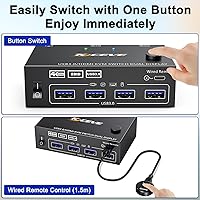
  • Remote Switch: A wired push-button remote is included in the box, allowing host switching without physically pressing buttons on the main unit.
  • Cables Included: The package includes the necessary HDMI and USB cables to connect two computers with standard dual-HDMI output configurations.
  • Connector Type: Video connectivity on the KVM side is HDMI-native; computers with DisplayPort, USB-C, VGA, or DVI outputs require separate third-party adapter cables not included in the box.
  • Dimensions: The main unit measures 3.94 x 2.56 x 1.18 inches, making it compact enough to sit flat on a desk beside a keyboard or monitor stand.
  • Weight: The unit weighs approximately 1 pound, keeping the overall desk footprint light and easy to reposition.
  • Operating Voltage: The switch operates at 5 volts DC, drawing power via USB from one of the connected host computers.
  • Current Rating: Maximum current draw is rated at 2 amps under normal operating conditions.
  • Switch Mechanism: Host switching is handled via a normally-open push-button actuator with a 2-way circuit type, operable from either the main unit or the included wired remote.
  • Brand: This dual-monitor KVM switch is designed and sold under the Camgeet brand, which focuses on peripheral-sharing and connectivity accessories.

Related Reviews
MLEEDA 8K Dual Monitor KVM Switch
75%
91%
Ease of Setup
83%
Video Signal Quality
74%
USB Peripheral Reliability
67%
Switching Experience
61%
Build Quality
More
DXchip KVM202U 8K Dual Monitor KVM Switch
78%
93%
Ease of Setup
81%
Switching Performance
78%
Video Signal Quality
88%
Dual-Mode Flexibility
72%
USB Hub Reliability
More
AV Access 4KSW21-DM Dual Monitor KVM Switch
77%
83%
Switching Speed & Reliability
86%
EDID Emulation Performance
88%
Video Quality at 4K
74%
Dual Operating Modes (KVM vs USB Mode)
71%
USB 3.0 Hub Performance
More
AV Access iDock C10 KVM Docking Station
77%
93%
Build Quality
88%
Video Performance
81%
KVM Switching
89%
EDID Emulation
84%
Ethernet Reliability
More
Camgeet 204UH Quad Monitor KVM Switch
64%
61%
Setup & Installation
69%
Display Compatibility
74%
Switching Reliability
83%
Wired Remote Usability
78%
USB Peripheral Switching
More
Minisopuru MK808M-US Dual Monitor KVM Switch Docking Station
84%
94%
Dual Monitor Performance
91%
USB Peripheral Compatibility
88%
Switching Convenience
90%
Build Quality
82%
Setup & Installation
More
Camgeet KVM Switch 3 Monitors 3 Computers HDMI+2 DisplayPort
88%
95%
Display Resolution Support
93%
Multi-Computer Switching
89%
USB Connectivity
82%
Setup and Installation
91%
Compatibility Across OS
More
TRENDnet TK-440DP 4-Port Dual Monitor DisplayPort KVM Switch
85%
92%
Video Quality
85%
Ease of Use
90%
Compatibility
88%
Build Quality
87%
USB Hub Functionality
More
TRENDnet TK-240DP Dual Monitor DisplayPort KVM Switch

79%
88%
4K Signal Stability
84%
Dual Monitor Switching
71%
Value for Money
63%
Audio Switching Reliability
79%
USB Hub Functionality
More
CKL 2x2 KVM Switch Dual Monitor HDMI 2.0 4K 60Hz
83%
88%
Ease of Setup
91%
Display Quality
85%
Switching Flexibility
84%
USB Hub Functionality
79%
Build Quality
More
MLEEDA 202CH Dual Monitor KVM Switch
75%
91%
Ease of Setup
84%
Dual 4K Display Performance
47%
Mac M1/M2 Compatibility
88%
USB-C Power Delivery (80W Charging)
72%
Switching Speed & Reliability
More

FAQ

No drivers or software are required. The Camgeet KVM202AS Dual Monitor KVM Switch is plug-and-play — connect the cables, power it through USB, and it is ready to use. Most buyers report being up and running within a few minutes of unboxing.

It can work, but not out of the box. The KVM switch uses HDMI natively on the computer-facing ports, so you will need DisplayPort-to-HDMI adapter cables for each DP output on your machine. Just be aware that cable and adapter quality can affect stability, and some combinations may result in resolution limitations or occasional signal issues.

The 144Hz support applies at 2K resolutions like 2560x1440 and 1920x1080, not at 4K. Whether you actually hit 144Hz in practice depends on your GPU, the cables you use, and the monitors themselves. Under ideal conditions with direct HDMI connections and a capable graphics card, it works — but it is worth verifying your specific hardware can sustain those refresh rates before assuming it will.

EDID is the data your monitor sends to your computer to describe its capabilities — resolution, refresh rate, and so on. Without an emulator, some monitors re-announce themselves every time you switch the KVM input, which can cause your computer to reset the display layout or drop the resolution momentarily. The EDID emulator on this switch stores that data and keeps your display configuration stable between switches. If you have ever had your monitor arrangement scramble when switching inputs, this feature directly addresses that.

The display switch itself is fairly quick, but USB peripherals — keyboards, mice, and similar devices — do take a brief moment to re-initialize on the new host. For most people this is a non-issue, but if you are toggling back and forth many times per hour, that few-second reinitalization period can become a mild frustration.

No, this two-computer KVM unit is designed strictly for two hosts. There is no way to daisy-chain or expand it to support additional computers. If you need to share peripherals across three or more machines, you would need to look at a different product category entirely.

No, there is no audio switching built into this unit. If you use headphones or speakers that connect to your computers directly, you will need to manage audio switching separately. It is a common omission at this price tier and worth accounting for if audio is part of your workflow.

It is possible but more involved. You would need a USB-C to HDMI adapter or a docking station that provides dual HDMI outputs, and that docking station would need to support video expansion, not just charging passthrough. The Camgeet switch itself works once the HDMI signal arrives — getting there from a single USB-C port is the harder part, and the results depend heavily on your laptop and the dock you choose.

The remote works well for its intended purpose. It feels lightweight, but buyers generally find it functional day-to-day. The main advantage of the remote is placement — you can keep the KVM unit out of reach and still toggle inputs without stretching. If you are worried about durability over a long period, it is a reasonable concern, but short-term reports have been mostly positive.

Yes, and the EDID emulator actually helps here. Each monitor communicates its capabilities independently, and the switch stores that profile so both displays maintain their individual settings even when you switch the active host. That said, if you use adapter cables on either monitor connection, the adapter can sometimes interfere with accurate EDID communication, so native HDMI connections on the monitor side are always preferable.