Overview

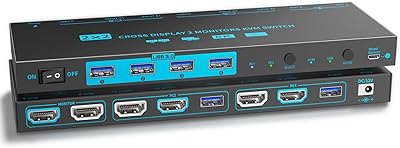
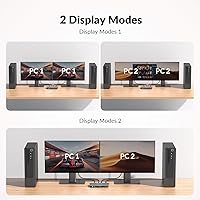
The AV Access 4KSW21-DM Dual Monitor KVM Switch is a mid-range desk-sharing hub built for anyone juggling two computers on a single pair of monitors. It operates in two distinct ways: in KVM mode, your keyboard, mouse, and both displays follow one active computer at a time; in USB mode, each monitor independently shows a different video source simultaneously. That second mode is where things get interesting for multitaskers who want visibility into both machines at once. The hardware is compact — a slim bar that sits quietly at the edge of a desk without demanding attention. It lands in a practical price range that undercuts enterprise-grade options while still covering the essentials most home office users actually need.
Features & Benefits

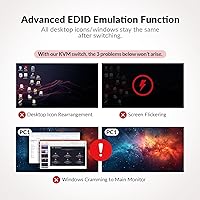
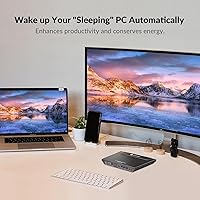
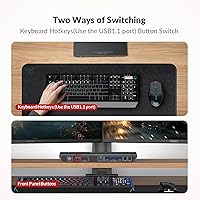
Both monitors output at up to 4K@60Hz over HDMI, and the refresh rate support stretches well beyond that baseline — you can run 1080p at 240Hz or 1440p at 144Hz, which matters if one display is a high-refresh gaming monitor and the other is a standard productivity screen. One underrated inclusion is EDID emulation, which keeps both monitors from going through their full re-detection cycle each time you switch computers. Without it, that delay can feel painfully long. The built-in USB 3.0 hub adds three ports for shared peripherals like webcams or external drives. Switching itself is handled via a front-panel button or keyboard hotkey, and an auto wake-up feature nudges sleeping PCs back to life when you redirect focus to them.

Best For

This KVM switch is a natural fit for remote workers running a personal machine alongside a company laptop — one desk, two computers, no cable chaos. Developers and IT staff who toggle between a Windows box and a Linux workstation will appreciate not having to physically reach for a different keyboard every hour. Gamers with a dedicated streaming or productivity PC can also make good use of the high-refresh-rate support without sacrificing resolution on either screen. Home office users who already own a dual-monitor setup get particular value here, since the only thing they need to add is the switcher itself and their own HDMI cables. It is less suited for anyone needing more than two source computers or requiring DisplayPort connectivity.

User Feedback

Buyers who use this desk-sharing hub in mixed-OS environments consistently point to switching reliability as its strongest trait — particularly when EDID is doing its job and monitors return without reshuffling open windows. Setup, however, draws some grumbling. A few users report spending more time than expected sorting out cable routing and making sense of the two operating modes, especially the KVM versus USB mode distinction if they skipped the manual. The USB 3.0 hub generally gets decent marks, though some note real-world transfer speeds falling short of the rated ceiling on certain drives. Build quality feedback is mostly positive — the unit feels solid for its size. Compatibility complaints are occasional and tend to center on specific monitor brands rather than a systemic flaw.

Pros

  • EDID emulation keeps monitor layouts intact after switching, sparing you the window-reshuffling frustration common on cheaper KVM devices.
  • Supports 4K@60Hz with full 4:4:4 chroma on both displays simultaneously, which holds up well for color-sensitive work.
  • High-refresh-rate compatibility — including 1080p@240Hz and 1440p@144Hz — means gaming monitors run at their native best.
  • USB mode lets each monitor show a different source at the same time, a genuinely useful trick for passively monitoring a secondary machine.
  • The built-in three-port USB 3.0 hub eliminates the need for a separate peripheral sharing solution on most desks.
  • Auto wake-up brings sleeping PCs back online when you switch focus to them, keeping workflow interruptions minimal.
  • Front panel button and keyboard hotkey give you two switching methods, so you never have to reach awkwardly for the unit.
  • Works across Windows, macOS, and Linux without additional drivers, making it practical for mixed-OS households.
  • The slim form factor takes up almost no desk real estate and does not require any vertical clearance above it.
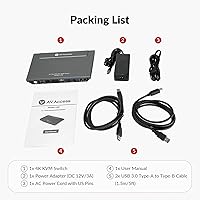
  • Two USB cables are included in the box, covering part of the connection hardware needed right out of the packaging.

Cons

  • HDMI cables are not included, and you need four of them to fully connect two monitors to two computers — that is an extra purchase on day one.
  • The KVM mode versus USB mode distinction is poorly explained in the manual, leading to real confusion during initial setup for new users.
  • USB 3.0 hub transfer speeds fall noticeably short of the rated 5Gbps ceiling in real-world use with external storage drives.
  • Auto wake-up behaves inconsistently with certain macOS and Linux power management settings, making it unreliable for some users.
  • Hotkey switching can produce a brief black-screen pause on some monitor and cable combinations rather than a truly instant transition.
  • The default hotkey sequence is awkward to execute one-handed, which slows down users who switch frequently throughout the day.
  • No remote switch button or secondary input device is included, limiting placement flexibility if the unit ends up in an inconvenient spot.
  • Long-term reliability data is limited given the product line age, making it harder to assess durability beyond one to two years of use.

Ratings

The AV Access 4KSW21-DM Dual Monitor KVM Switch was scored by our AI system after processing verified buyer reviews from multiple global markets, with spam, incentivized posts, and bot activity actively filtered out before any scoring was applied. What emerges is an honest picture of a capable mid-range dual-monitor switcher that earns real loyalty from home office professionals and developers, while carrying a few friction points that prospective buyers should weigh carefully.
Switching Speed & Reliability
83%
Most users report that hotkey switching between computers feels noticeably quicker than competing devices in this price bracket, largely because EDID emulation keeps the monitors from running through a full handshake cycle each time. Daily users switching dozens of times per session say it becomes second nature within a day or two.
Switching speed can vary depending on cable quality and monitor brand. A handful of buyers noted occasional hesitation or a black-screen pause lasting a second or two, particularly on older monitors or when using generic HDMI cables not rated for 4K bandwidth.
EDID Emulation Performance
86%
EDID emulation is one of the standout practical wins here. Buyers who previously dealt with windows rearranging themselves on every switch — a common frustration with cheaper KVM devices — report that this desk-sharing hub largely solves that problem, keeping display layouts intact across both screens.
A small subset of users running unusual multi-monitor configurations or ultra-wide displays found EDID emulation less consistent, occasionally needing to power-cycle one monitor to restore proper resolution. It works well in standard setups but is not foolproof in edge cases.
Video Quality at 4K
88%
Running dual monitors at 4K@60Hz with full 4:4:4 chroma is a genuine differentiator at this price point, and buyers using color-sensitive workflows like photo editing noticed no visible degradation compared to a direct connection. The signal path is clean in the vast majority of reported setups.
A few users attempting to push both monitors to 4K@60Hz simultaneously reported signal instability, and the consensus is that cable quality is the most likely culprit. The hardware handles the resolution well; the chain around it needs to match.
Dual Operating Modes (KVM vs USB Mode)
74%
26%
The USB mode — which lets each monitor independently display a different source at the same time — is a genuinely useful feature that sets this switcher apart from single-mode alternatives. Buyers who discovered it after purchase consistently called it a hidden highlight, especially for monitoring a secondary machine passively.
The distinction between KVM mode and USB mode is poorly communicated in the setup documentation, and a meaningful number of buyers spent considerable time confused about what mode they were in or why one monitor was not behaving as expected. Better onboarding material would reduce this friction significantly.
USB 3.0 Hub Performance
71%
29%
Having three shared USB 3.0 ports built into the switcher is a practical convenience, particularly for users who share a webcam, speakerphone, or external SSD between two workstations without wanting a separate hub cluttering the desk. Day-to-day peripheral sharing works reliably for most users.
Real-world transfer speeds through the hub fall short of the theoretical 5Gbps ceiling for a noticeable number of buyers, particularly when transferring large files to external drives. It handles standard peripherals well but is not the right solution for users who rely on sustained high-speed storage transfers.
Initial Setup Experience
62%
38%
Hardware installation is physically straightforward — the unit is compact, ports are clearly labeled, and the two included USB Type-B to Type-A cables cover the basics. Buyers with prior KVM experience typically get up and running within fifteen minutes.
Users new to KVM switches frequently report a steeper learning curve than expected, citing the dual-mode system, hotkey sequence memorization, and occasional driver quirks on macOS as sticking points. The included documentation does not do enough to walk first-time buyers through the less intuitive aspects.
Build Quality & Durability
79%
21%
The chassis feels more solid than the price tag might suggest. Buyers consistently describe the unit as sturdy and well-finished, with no reports of flex or rattling even on busy desks. The slim bar profile also means it does not take up meaningful workspace.
The plastic housing, while sturdy, does accumulate fingerprints and minor scuffs visibly over time. A couple of long-term owners noted the front button developing a slightly mushier feel after heavy daily use, though functional failures are rarely reported.
Cross-Platform Compatibility
77%
23%
Running a Windows desktop alongside a MacBook is a common use case here, and the dual-monitor switcher handles it well for most buyers. Linux users also report solid compatibility without needing third-party drivers, which is a meaningful win for developers running mixed-OS home labs.
macOS users occasionally encounter a delay before the machine registers the keyboard and mouse after switching, which a few described as long enough to be disruptive. Compatibility is broad but not perfectly consistent across every OS version and hardware combination.
Hotkey & Button Control
81%
19%
The keyboard hotkey shortcut for switching is responsive and customizable enough to fit most users' muscle memory quickly. The physical front button provides a reliable fallback and is positioned accessibly without requiring the user to move the unit.
Some buyers found the default hotkey sequence awkward to execute one-handed, and a few noted the front button requires a deliberate press rather than a light tap, which can feel clunky in fast-switching scenarios. Neither issue is a dealbreaker, but both are noticeable.
Auto PC Wake-Up
73%
27%
The automatic wake-up feature is one of those small conveniences that buyers appreciate more over time than at first glance. Switching focus to a machine that went to sleep and having it wake up without a manual nudge keeps the workflow uninterrupted, particularly for users on timed sleep schedules.
Wake-up behavior is inconsistent with certain power management configurations, especially on macOS and some Linux distributions. Buyers who rely on aggressive sleep settings found the feature unreliable enough to disable it and wake machines manually instead.
Cable Management & Box Contents
61%
39%
Including two USB Type-B to Type-A cables in the box is a thoughtful touch that gets users partially set up out of the packaging. The unit's slim profile also cooperates reasonably well with cable routing along the back of a desk.
HDMI cables are not included, which surprises some buyers who assume a video-focused device would come fully cabled. Given that four HDMI cables are needed to connect two monitors to two computers, the omission adds cost and a potentially frustrating shopping trip before the unit is usable.
Value for Money
76%
24%
At its price point, the dual-monitor switcher offers a combination of 4K support, EDID emulation, dual operating modes, and a USB hub that would cost considerably more to replicate with separate hardware. For home office users and developers, the functional value is genuine.
Buyers who encounter setup friction or compatibility quirks feel the value proposition is harder to justify, since the experience gap between a smooth setup and a troublesome one is wide. Compared to premium-tier alternatives, long-term reliability data is still limited given the product's age.
Refresh Rate Support
84%
Support for 1080p at 240Hz and 1440p at 144Hz through the same device that handles 4K productivity work is a real differentiator for users with high-refresh gaming monitors. Buyers running a gaming display alongside a 4K workstation monitor report both performing at their native best without compromise.
Achieving higher refresh rates consistently requires premium-rated HDMI cables, and not all buyers realize this upfront. A few reported their high-refresh monitor defaulting to 60Hz until they replaced the cable, which created unnecessary confusion about the device's actual capabilities.

Suitable for:

The AV Access 4KSW21-DM Dual Monitor KVM Switch is a strong match for anyone managing two computers from a single desk and tired of physically swapping cables or keeping two sets of peripherals around. Remote workers and hybrid professionals who run a personal machine alongside a work-issued laptop will find the setup particularly practical — one keyboard, one mouse, two monitors, and a hotkey press to move between worlds. Developers and IT staff toggling between a Windows workstation and a Linux box get the added benefit of cross-platform compatibility without driver headaches. Gamers who maintain a dedicated streaming or content PC alongside their main rig can take advantage of the high-refresh-rate support, running a 144Hz or 240Hz display without downgrading to 60Hz just because a KVM is in the chain. Home office users who already own a dual-monitor setup get the most immediate value, since the only real addition needed is this desk-sharing hub, a pair of quality HDMI cables, and a few minutes to configure the hotkeys.
Not suitable for:

The AV Access 4KSW21-DM Dual Monitor KVM Switch is not the right tool for anyone needing to connect more than two source computers, and buyers hoping to expand to three or four machines should look at higher-tier multi-port alternatives from the outset. DisplayPort users are also out of luck — the device is HDMI-only, and adapters introduce their own complications that tend to undermine the EDID emulation benefits that make this unit worthwhile. Anyone expecting plug-and-play simplicity with zero configuration effort may be frustrated; the two operating modes and hotkey setup require some initial investment of time, and the documentation does not hold your hand through it. Users who depend on sustained high-speed file transfers between computers via shared storage should know the USB 3.0 hub here is better suited for peripherals like webcams and keyboards than for moving large files regularly. MacOS users on newer Apple Silicon hardware have reported occasional input recognition delays after switching, so if a Mac is your primary machine, it is worth researching compatibility with your specific model before committing.
Specifications

  • Brand & Model: Manufactured by AV Access under the model designation 4KSW21-DM.
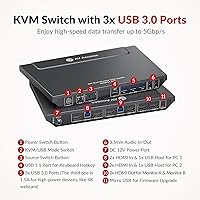
  • Video Interface: All video connections use HDMI Type-A 19-pin ports exclusively; no DisplayPort or VGA inputs are present.
  • Max Resolution: Supports up to 4K (3840×2160) at 60Hz with full 4:4:4 chroma subsampling on both monitors simultaneously.
  • Refresh Rate Support: Compatible with 1080p at 240Hz, 165Hz, 144Hz, and 120Hz, as well as 2560×1440 at 144Hz, 120Hz, and 60Hz.
  • Connected Computers: Connects to exactly two desktop or laptop computers via HDMI and USB upstream cables.
  • Monitor Support: Drives two monitors simultaneously in either extended or mirror mode depending on the active operating mode.
  • Operating Modes: Offers two modes: KVM Mode for traditional single-computer control and USB Mode for displaying two independent video sources across both screens at once.
  • USB Hub Ports: Includes three USB 3.0 ports with data transfer speeds of up to 5Gbps and one USB 1.1 port for legacy peripheral support.
  • Switching Methods: Computers can be switched via a front-panel push button or a keyboard hotkey sequence without touching the unit.
  • EDID Emulation: Built-in EDID emulation retains monitor configuration data so displays do not re-detect or reset their resolution after each switch.
  • Auto Wake-Up: Automatically sends a wake signal to the target computer when switching focus, bringing it out of sleep mode without manual input.
  • OS Compatibility: Fully compatible with Windows, macOS, and Linux operating systems without requiring proprietary drivers.
  • Power Supply: Powered by an external DC adapter rated at 12 volts and 3 amps; adapter specifications should be verified before substitution.
  • Dimensions: The unit measures 5.61 × 0.91 × 1.03 inches, making it compact enough to sit flat along the rear edge of most desks.
  • Weight: Weighs 3.62 pounds including the unit and power adapter, light enough to reposition without effort.
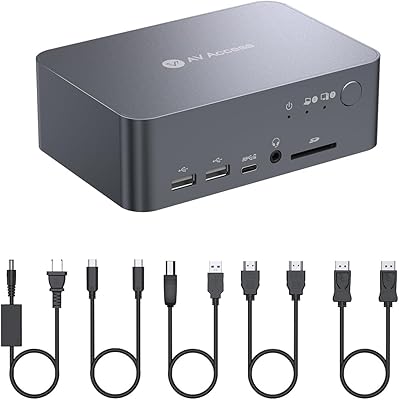
  • Included Cables: Two USB Type-B to Type-A cables are included in the box; HDMI cables are not included and must be purchased separately.
  • HDMI Cables Needed: Four HDMI cables are required to complete the full setup — two from the computers and two to the monitors — none of which are bundled.
  • First Available: This product was first listed for sale in July 2022, giving it a moderate track record in the market.

Related Reviews
AV Access iDock C10 KVM Docking Station
77%
93%
Build Quality
88%
Video Performance
81%
KVM Switching
89%
EDID Emulation
84%
Ethernet Reliability
More
MLEEDA 8K Dual Monitor KVM Switch
86%
92%
Visual Performance
88%
Ease of Setup
85%
Build Quality
90%
USB Connectivity
75%
Switching Reliability
More
DXchip 8K Dual Monitor KVM Switch
85%
88%
Performance
91%
Ease of Use
94%
Visual Quality (Resolution & Clarity)
87%
USB Transfer Speed
83%
Build Quality
More
AV Access iDock D23
AV Access iDock D23
78%
93%
Display Quality & Resolution
88%
KVM Switching Speed
79%
Triple Monitor Setup & MST Reliability
91%
Always-On Ethernet Performance
82%
Hub & Peripheral Connectivity
More
Minisopuru MK808M-US Dual Monitor KVM Switch Docking Station
84%
94%
Dual Monitor Performance
91%
USB Peripheral Compatibility
88%
Switching Convenience
90%
Build Quality
82%
Setup & Installation
More
TRENDnet TK-440DP 4-Port Dual Monitor DisplayPort KVM Switch
85%
92%
Video Quality
85%
Ease of Use
90%
Compatibility
88%
Build Quality
87%
USB Hub Functionality
More
TRENDnet TK-240DP Dual Monitor DisplayPort KVM Switch

79%
88%
4K Signal Stability
84%
Dual Monitor Switching
71%
Value for Money
63%
Audio Switching Reliability
79%
USB Hub Functionality
More
CKL 2x2 KVM Switch Dual Monitor HDMI 2.0 4K 60Hz
83%
88%
Ease of Setup
91%
Display Quality
85%
Switching Flexibility
84%
USB Hub Functionality
79%
Build Quality
More
AV Access HDEX80-KVM HDMI KVM USB Extender
88%
90%
Performance
95%
Ease of Setup
89%
Reliability
92%
Latency
85%
Build Quality
More
MLEEDA 202CH Dual Monitor KVM Switch
75%
91%
Ease of Setup
84%
Dual 4K Display Performance
47%
Mac M1/M2 Compatibility
88%
USB-C Power Delivery (80W Charging)
72%
Switching Speed & Reliability
More

FAQ

You will need to purchase four HDMI cables on your own — two to connect the unit to your computers and two to connect it to your monitors. The box does include two USB Type-B to Type-A cables, which handle the data side of the connection, but AV Access does not bundle any HDMI cables. For a reliable 4K@60Hz signal, make sure the cables you buy are rated for 48Gbps bandwidth; generic cables can cause signal instability at higher resolutions.

KVM Mode is the traditional setup where both monitors and all peripherals follow one active computer at a time — press the hotkey or front button and everything shifts to the other PC. USB Mode is a separate operating state where each monitor independently displays a different video source simultaneously, which is useful if you want to keep an eye on both machines at once without fully switching. The mode is toggled through a specific hotkey combination, and it is worth reading the manual carefully on this point since many users initially confuse the two.

EDID emulation is specifically designed to prevent that window-shuffling problem. By storing each monitor's display data internally, the unit convinces each computer that the monitors are always connected even when that computer is not active. In standard setups this works well, but users with non-standard configurations — like ultra-wide displays or daisy-chained monitors — occasionally report EDID inconsistencies that require a power cycle to fix.

Yes, cross-platform compatibility is one of the genuine strengths of this desk-sharing hub. You can run a Mac and a Windows machine simultaneously without installing any special software on either. The one thing worth noting is that some users on Apple Silicon Macs have reported a brief delay before the keyboard and mouse are recognized after switching, so if your Mac is the machine you switch to most frequently, factor that into your expectations.

Yes, the two HDMI outputs operate independently, so you can have one monitor running at 4K@60Hz for productivity and another running at 1440p@144Hz for gaming without either one being capped by the other. Just make sure the HDMI cables feeding each monitor are rated for the target resolution and refresh rate, as cable bandwidth is the most common reason users see a display fall back to 60Hz unexpectedly.

Most users describe the transition as quick — typically under two seconds in a well-configured setup with quality HDMI cables. That said, speed varies depending on your monitors, your cables, and whether EDID handshaking completes cleanly. It is not instantaneous in the way a keyboard shortcut feels, but it is fast enough that daily users stop thinking about it after a short adjustment period.

Yes, that is actually one of the more practical uses of the built-in USB 3.0 hub — plug your webcam into one of the three USB 3.0 ports and it becomes available to whichever computer is currently active in KVM Mode. The hub does not share peripherals to both computers simultaneously; it routes them to the active PC. When you switch computers, the USB devices follow.

It is, and Linux compatibility is better here than on many competing devices at this price point since no proprietary drivers are required. Developers running Ubuntu, Debian, or Fedora alongside a Windows workstation have reported smooth operation. The auto wake-up feature may behave inconsistently depending on the Linux distribution and power management configuration, so it is worth testing that specific function in your environment.

In USB Mode, the video outputs are split between two independent sources, but USB peripheral routing still follows the standard switching logic — peripherals are assigned to one active computer at a time rather than being shared between both. If you need true simultaneous USB access from two machines, this unit does not support that scenario.

A small number of users have noted that the front button requires a deliberate, firm press rather than a light tap to register, which can feel inconsistent if you are used to more responsive switches. This appears to be a design characteristic rather than a defect, and most users adapt to it quickly. If the button stops registering entirely, it is worth checking whether the unit needs a power cycle, as occasional firmware hangs can mimic a hardware fault.

Where to Buy