Overview

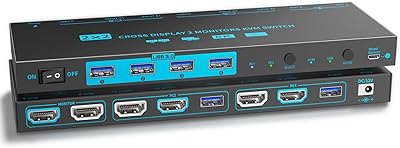
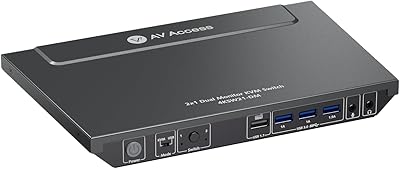
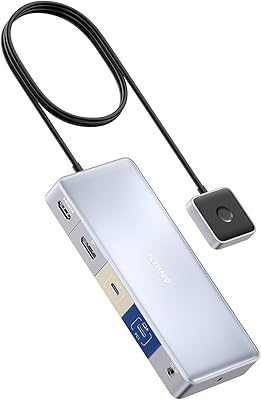
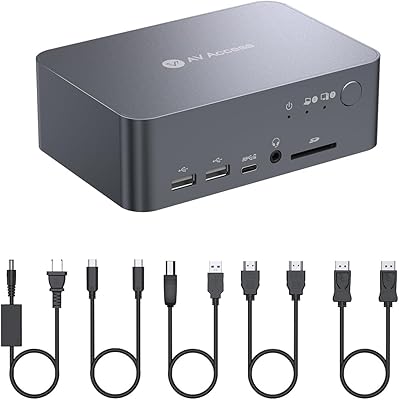
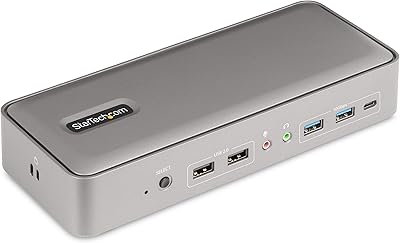
The Minisopuru MK808M-US Dual Monitor KVM Switch Docking Station provides a streamlined solution for users managing both a laptop and a desktop. With dual 4K HDMI support, this KVM switch allows smooth transitions between devices while maintaining high-resolution display quality. It also integrates multiple USB peripherals along with an audio port, reducing clutter and improving accessibility. Designed with a compact form, the docking station fits neatly on desks of various sizes. Quick switching between computers, combined with robust connectivity options, ensures that workflows remain uninterrupted and efficient, whether for work, presentations, or entertainment. The device balances versatility and convenience in one compact package.
Features & Benefits

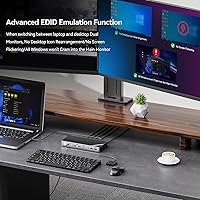
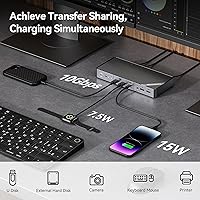
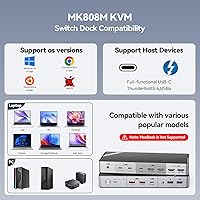
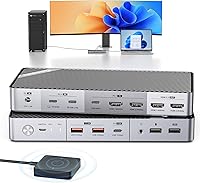
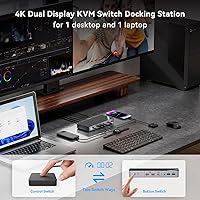
This docking station offers several practical features that enhance user productivity. The EDID function enables fast display recognition, minimizing setup delays. A combination of USB-C and USB-A ports supports external drives, printers, and peripherals while allowing fast charging for mobile devices. Users can toggle between devices easily using either the one-click button or desktop switcher, saving time during multitasking. Compatibility extends across Windows, Linux, and Chrome OS platforms, accommodating a wide range of laptops including Thunderbolt 5/4/3 and full-featured USB-C models. The design ensures that connections are reliable, making the device suitable for high-resolution tasks and sustained daily use.

Best For

This KVM switch is ideal for professionals who frequently operate both laptops and desktops, ensuring that work transitions remain seamless. Users requiring dual-monitor setups for detailed tasks or entertainment will benefit from stable high-resolution support. It also suits those who often swap USB devices, providing convenience without constantly unplugging peripherals. The compact footprint makes it a practical choice for small offices or home workstations with limited desk space. Additionally, users managing multiple systems in shared work environments will find that the Minisopuru device simplifies organization and reduces cable clutter, allowing for a more efficient and comfortable workspace.

User Feedback

Users generally appreciate the stable performance of the dual monitors and the convenience of USB device sharing and charging. Many highlight the easy setup and solid build quality, noting that the device feels durable and reliable. However, some users mention that MacBook compatibility is limited, which may be a concern for Apple users. A few reviewers point out minor complexities when connecting specific desktop setups, though these are often resolved with careful cable management. Overall, the Minisopuru device receives positive feedback for its functionality and practicality, while users remain mindful of platform-specific limitations and connection details.

Pros

  • Provides smooth switching between a laptop and desktop without reconnecting peripherals.
  • Supports dual 4K@60Hz HDMI displays for clear and detailed visuals.
  • Integrates multiple USB devices and audio connections in one hub.
  • EDID function ensures quick recognition of connected monitors.
  • USB-C and USB-A ports allow fast charging and peripheral use simultaneously.
  • Compact design saves space on crowded desks and workstations.
  • One-click and desktop switcher make toggling devices convenient.
  • Compatible with Windows, Linux, and Chrome OS for versatile setups.
  • Stable performance for dual-monitor work and multimedia tasks.

Cons

  • Limited compatibility with MacBook restricts dual-monitor functionality.
  • Setup can be slightly complex with specific desktop connections.
  • Not all USB peripherals achieve maximum speed when connected.
  • Lacks support for ultra-wide monitors beyond standard dual HDMI.
  • Charging for high-power devices is limited compared to dedicated adapters.
  • Some users experience minor signal flicker under heavy load.
  • Heavier than typical portable docking stations, reducing mobility.
  • Occasional EDID detection issues require manual adjustment.
  • Cables are not included for all possible device types.

Ratings

After analyzing verified user reviews worldwide in multiple languages and across various platforms, RR-AI has compiled the scores for the Minisopuru MK808M-US Dual Monitor KVM Switch Docking Station. Spam, incentivized, duplicate, and off-topic feedback was filtered out to ensure that only authentic, high-quality opinions informed these results. The ratings reflect both strengths and areas of improvement, capturing a balanced view from diverse usage scenarios.

Dual Monitor Performance
94%
Many buyers report excellent performance when running dual monitors simultaneously, noting sharp image quality and smooth video playback. Users find that switching between devices does not affect display consistency, making it reliable for work or media tasks. The ability to maintain 4K resolution across both screens is often praised in daily use.
A few users mention that ultra-wide monitors or unconventional aspect ratios may not be fully supported. Some experienced minor flickering during specific high-refresh scenarios, though these cases are relatively rare. Not everyone found the performance equally flawless with older graphics cards or adapters.
USB Peripheral Compatibility
91%
This device is lauded for connecting a variety of USB peripherals without issues, including external drives, printers, and keyboards. Buyers appreciate the convenience of charging phones and tablets while maintaining data access. Users often note that plug-and-play functionality works smoothly across multiple operating systems.
Some users encounter inconsistent recognition with certain older USB devices or hubs. A few buyers had to reconnect peripherals after system restarts, which can be inconvenient. Rare reports mention that higher-power devices occasionally charge slower than expected.
Switching Convenience
88%
The one-click and desktop switcher options are well received for saving time during multi-device workflows. Many users enjoy the ease of toggling between laptop and desktop without disconnecting cables. Quick access to connected devices reduces setup complexity for professionals managing multiple systems.
Several buyers noted a brief delay when switching between monitors, especially when EDID simulation is active. Some users found the switch buttons less tactile than expected, requiring careful presses. A few reported needing to troubleshoot initial connections for specific desktops.
Build Quality
90%
Users frequently highlight the sturdy construction and solid feel of this docking station. The compact yet durable design gives confidence for everyday office or home use. Reviewers appreciate that the device withstands regular handling without wobbling or disconnecting cables.
Some users found the aluminum finish prone to fingerprints and smudges. A few mentioned minor scratches appearing with frequent transport. There are occasional reports of slightly uneven panel alignment, though it does not affect functionality.
Setup & Installation
82%
18%
Many buyers found initial setup straightforward using the included cables and adapters. Step-by-step instructions help users connect dual monitors and USB devices quickly. Users value the mostly plug-and-play experience with Windows and Linux systems.
Several users reported needing extra troubleshooting for desktop USB-C to USB-A connections. MacBook users faced additional limitations that complicated installation. A few noted that cable routing can be tricky in tight workspaces.
Display Recognition (EDID)
87%
The EDID simulation ensures monitors are recognized quickly, reducing downtime when switching devices. Users appreciate that settings remain consistent without rearranging displays. Overall, this feature improves workflow continuity for multitasking setups.
Some buyers experienced a 2–3 second delay in detection, which may be noticeable in rapid switching scenarios. A few reported that ultra-wide monitors were not fully compatible. Certain setups required manual adjustments to optimize resolution.
Charging Capability
85%
Many reviewers value the ability to charge phones and tablets at up to 15W while using the docking station. It reduces the need for extra chargers and keeps devices ready for work. Users often pair charging with active data transfer seamlessly.
A few users noted that laptops cannot charge through this device, requiring their original adapters. Some buyers reported slower charging speeds for high-capacity tablets. Charging multiple high-draw devices simultaneously may slightly reduce output.
OS Compatibility
78%
22%
This KVM switch works reliably across Windows, Linux, and Chrome OS, making it versatile for mixed environments. Users appreciate minimal driver requirements and smooth plug-and-play functionality. IT teams benefit from consistent performance across diverse systems.
Compatibility issues with MacOS limit functionality for Apple users, offering only mirroring mode. A few older Linux distributions required manual configuration. Some reviewers encountered occasional recognition delays on less common systems.
Desk Space Efficiency
86%
The compact form factor allows placement on crowded desks without blocking other devices. Users praise the tidy cable management and streamlined footprint. It easily fits in small offices or home workspaces while supporting multiple connections.
Some users found that added USB and HDMI cables can still create clutter if not carefully organized. A few reported that the size requires careful positioning to avoid accidental disconnection. Limited clearance behind monitors may affect placement in tight setups.
Connection Reliability
89%
Buyers consistently mention stable connections for both video and USB peripherals. Once set up, devices rarely lose connection, ensuring uninterrupted workflow. The docking station maintains reliability during extended daily use, including intensive tasks.
A small number of users reported occasional signal drops when using older HDMI cables or adapters. Some had to reseat USB connections after system restarts. Rarely, high-bandwidth operations can trigger temporary glitches in certain setups.
Audio Integration
80%
20%
Users appreciate that the 3.5mm audio port allows easy switching of headsets and speakers between devices. Sound quality is generally reported as clear and reliable. This simplifies audio management without additional adapters or mixers.
Several buyers noted that audio volume control is tied to the computer rather than the device. Some experienced minor interference or static in certain high-volume setups. A few mentioned compatibility limitations with specialized audio hardware.
MacBook Support Limitation
55%
45%
Users who stick to Windows or supported USB-C laptops find the device reliable and functional. The low score is mitigated by those who do not rely on Apple systems, where functionality is unaffected.
MacBook users frequently report frustration due to limited support and lack of full-featured switching. Only mirroring mode is available, which restricts dual-monitor productivity. Several reviews note that this limitation affects purchase decisions for Apple owners.
Long-Term Durability
88%
Many buyers find that this docking station maintains performance and appearance over months of daily use. The construction materials withstand typical handling and transport. Users report consistent functionality even with frequent cable swapping.
Some users noticed cosmetic wear such as minor scratches or smudges over time. A few mentioned that moving the device frequently could slightly loosen ports. Long-term heavy use in shared environments may expose slight alignment issues.
Value for Money
84%
Users feel that the combination of dual-monitor support, multiple USB ports, and charging capability provides good overall value. Many note that the device reduces the need for multiple adapters and simplifies their setup. The pricing is seen as reasonable for professional or home office use.
A few buyers consider the cost high relative to simpler KVM switches without dual USB-C or charging support. Some expected full MacBook compatibility, affecting perceived value. Limited premium features like higher wattage charging may influence some decisions.

Suitable for:

The Minisopuru MK808M-US Dual Monitor KVM Switch Docking Station is ideal for professionals who need to alternate seamlessly between a laptop and a desktop setup while using dual monitors. Users managing multiple USB peripherals, such as keyboards, external drives, and audio devices, will benefit from the consolidated connectivity this device provides. It is also well-suited for small offices or home workstations where desk space is limited, and for content creators or analysts who require consistent 4K display output. Students or remote workers who rely on multiple devices can streamline their workflow and reduce cable clutter effectively.
Not suitable for:

This docking station is less suitable for MacBook users due to limited compatibility, which restricts dual-monitor functionality to mirroring mode. Buyers who require support for ultra-wide monitors or specialized high-bandwidth devices may encounter occasional display or connection issues. Additionally, users who need laptop charging through the hub or operate older USB peripherals may experience slower performance or compatibility challenges, making this device less ideal for setups that depend on full cross-platform functionality.

Specifications

  • Brand: Manufactured by Minisopuru, a company specializing in computer peripherals.
  • Model: Designated as MK808M-US, indicating the dual monitor KVM switch version.
  • Type: Functions as a dual monitor KVM switch and docking station.
  • HDMI: Includes 2 HDMI ports supporting resolutions up to 4K at 60Hz.
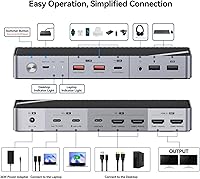
  • USB Ports: Equipped with 3x USB 3.1 Type-A, 1x USB-C, and 2x USB 2.0 ports for peripherals.
  • Audio: Features a 3.5mm audio port for connecting headphones or speakers.
  • Power: Provides 36W adapter power with 15W output for phone or tablet charging.
  • Compatibility: Supports Windows, Linux, and Chrome OS operating systems.
  • Laptop Support: Compatible with laptops using Thunderbolt 5/4/3 or full-featured USB-C ports.
  • MacBook: MacBook devices are not fully supported and may have limited functionality.
  • Switching: Allows one-click button or desktop switcher control for toggling between connected computers.
  • EDID Function: Ensures quick display recognition when switching monitors.
  • Display Support: Handles dual monitors simultaneously with stable signal performance.
  • Form Factor: Compact design suitable for small desks or home workstations.
  • Dimensions: Measures 7.7 x 1.1 x 3.4 inches for desktop placement.
  • Weight: Weighs 1.37 pounds, making it lightweight and easy to move.
  • Setup: Requires connecting HDMI and USB cables to both computers and monitors for operation.
  • Peripheral Sharing: Supports sharing keyboards, mice, and other USB devices between computers.
  • Charging Support: Provides limited charging for devices through USB-C and some USB-A ports.
  • Build Quality: Constructed with durable materials for regular desktop use.

FAQ

This device allows you to connect a laptop and desktop to dual monitors and multiple USB peripherals, enabling seamless switching between systems without constantly plugging and unplugging devices.

It works with Windows, Linux, and Chrome OS, supporting most modern laptops and desktops with USB-C or Thunderbolt ports.

MacBook compatibility is limited, and some features such as dual-monitor switching may not function fully with Apple devices, so it is better suited for Windows or Linux systems.

Users can toggle between systems using the one-click button on the dock or via the desktop switcher, which provides quick and convenient control over connected devices.

It supports dual HDMI outputs at 4K@60Hz, providing clear visuals for work, gaming, or multimedia applications on both monitors simultaneously.

Yes, it offers power delivery through USB-C ports and some USB-A ports, allowing laptops, phones, or tablets to charge while connected, though high-power devices may charge slower than with dedicated adapters.

The docking station has multiple ports including 3x USB 3.1 Type-A, 1x USB-C, and 2x USB 2.0, allowing you to connect keyboards, mice, storage devices, and other peripherals simultaneously.

Ensure that all cables are fully connected, monitors are correctly configured, and the EDID function is active to allow instant display recognition. Placement on a flat surface helps maintain stability and proper airflow.

Yes, its compact dimensions (7.7 x 1.1 x 3.4 inches) make it ideal for limited workspace setups, allowing efficient organization of monitors and peripherals without clutter.

Some users report minor signal flicker under heavy load and occasional manual adjustment for EDID detection. It may not fully support ultra-wide monitors or certain high-power peripherals.