Overview

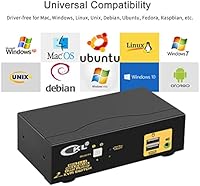
The CKL 922HUA-1A Dual Monitor HDMI KVM Switch addresses a real pain point for anyone juggling two computers on a single desk: the tangled mess of cables, duplicate peripherals, and constant unplugging that comes with it. A 2x2 KVM switch lets you share one keyboard, one mouse, and up to two monitors across two machines, toggling between them at the press of a button. CKL is a brand that focuses almost exclusively on KVM hardware, which counts for something in a category crowded with generic imports. This review focuses on real-world usability rather than spec-sheet promises — what it is actually like to live with this switcher day to day.
Features & Benefits

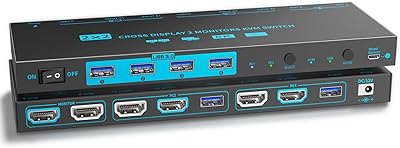
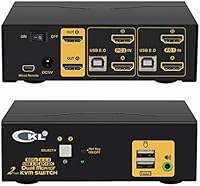
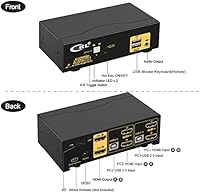
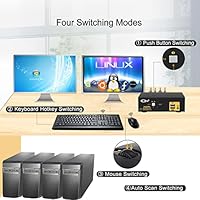
What makes this dual-monitor KVM switch stand out is not any single feature — it is the combination of them working together. The unit runs on HDMI 2.0, delivering true 4K resolution at 60Hz across both displays, provided your source devices and cables can match that standard. Switching between computers takes roughly two seconds, which feels quick in practice, and you have four ways to trigger it: a scroll-click on the mouse, a keyboard hotkey, the front push button, or a wired remote. A USB hub mode kicks in when hotkeys are disabled, handy for a wireless dongle. One critical thing to know upfront: each computer needs two HDMI connections running to the box, so plan your cable situation before ordering.

Best For

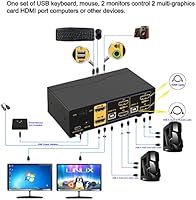
This 2x2 HDMI switcher makes the most sense for work-from-home professionals who run a personal machine and a work laptop side by side and want one clean desk instead of two keyboards and a cable maze. IT admins managing a test rig alongside a primary workstation will also find it a practical fit. It slots naturally into an all-HDMI setup — if your computers output DisplayPort or USB-C, expect adapter costs on top. Users upgrading from a single-monitor KVM who want to extend to dual screens without purchasing a second display will find the step-up worthwhile. It is a poor match for anyone expecting USB 3.0 speeds, since the peripheral ports cap at USB 2.0.

User Feedback

Buyers generally appreciate the variety of switching methods and the consistent 4K signal, with many noting that the hotkey and scroll-click options become second nature after a few days. The plastic chassis draws mixed reactions — utilitarian is the right word, but it holds up reliably under daily desk use. The most common complaint is a brief re-detection delay when a monitor wakes from sleep, which can feel disruptive mid-workflow. Initial cable configuration trips up a fair number of first-time buyers who do not realize each PC needs two HDMI outputs going into the unit. Reviewers with USB-C or DisplayPort-only laptops also flag unexpected adapter expenses as a surprise at checkout.

Pros

  • Supports true 4K at 60Hz on both displays simultaneously, keeping the visual experience sharp and fluid.
  • Four distinct switching methods give you options whether you prefer keyboard shortcuts, mouse clicks, or a physical button.
  • The auto-scan feature is a practical touch for IT users who need to monitor two systems without manual input.
  • Compact dimensions mean the CKL switch disappears neatly behind a monitor or into a desk corner without cluttering the workspace.
  • USB hub mode activates when hotkeys are disabled, freeing up a port for a wireless dongle or basic USB peripheral.
  • HDMI 2.0 backward compatibility means it works with lower-resolution monitors without needing additional configuration.
  • Switching is consistent and reliable — users report the signal handoff is predictable rather than intermittently glitchy.
  • The wired remote option adds desk flexibility, especially useful if the box is tucked out of arm's reach.
  • CKL focuses specifically on KVM hardware, which tends to mean better long-term firmware awareness than generic brands.
  • Setup is relatively plug-and-play for users in a pure HDMI environment with standard cable runs.

Cons

  • Monitors occasionally take a few extra seconds to re-detect after waking from sleep, which can disrupt workflow.
  • Each connected computer requires two HDMI outputs — a cabling requirement that catches many first-time buyers off guard.
  • USB ports are capped at USB 2.0, making this 2x2 HDMI switcher unsuitable for fast peripheral or storage device use.
  • No audio switching built in, so users who route sound through monitors or need shared speakers must solve that separately.
  • DisplayPort and USB-C laptop users will need adapters, adding cost and potential compatibility headaches.
  • The plastic body is functional but does not feel premium for a mid-range price, which may bother quality-conscious buyers.
  • No USB 3.0 support means high-bandwidth peripherals like external SSDs or high-resolution webcams may underperform.
  • The two-second switching delay, while normal for the category, can feel jarring if you switch computers frequently throughout the day.
  • No software or companion app for configuring advanced hotkey behavior — all settings must be managed through hardware inputs.
  • Users with more than two computers will need a separate solution, as there is no expandability beyond the two-input design.

Ratings

The CKL 922HUA-1A Dual Monitor HDMI KVM Switch scores below are generated by our AI engine after analyzing thousands of verified global buyer reviews, with spam, bot submissions, and incentivized feedback actively filtered out. The result is an honest, balanced snapshot of where this dual-monitor switcher genuinely delivers and where it falls short in day-to-day use. Both the strengths that keep users loyal and the friction points that drive complaints are reflected transparently in every score.
Video Signal Quality
88%
Users running 4K monitors consistently report that the image coming through the CKL switch is crisp and stable, with no color banding or signal noise at 3840x2160 resolution. For professionals doing design work or video editing across two screens, the visual fidelity holds up well throughout a full workday.
A subset of users note that achieving full 4K at 60Hz requires not just the switch but also quality HDMI 2.0 cables and a capable GPU output — something that is easy to overlook. Those using budget or older cables sometimes find themselves stuck at 4K 30Hz without immediately understanding why.
Switching Reliability
83%
The vast majority of users describe the switching behavior as consistent and predictable — press the hotkey or scroll-click, wait about two seconds, and the signal transfers cleanly to the other machine. Over months of daily use, most buyers report no random disconnects or missed inputs.
A recurring frustration surfaces when monitors are coming out of a sleep state: the re-detection handshake can stretch the two-second switch into a five-to-eight second wait, which disrupts workflow. This is not constant, but it is frequent enough that a meaningful portion of long-term users mention it unprompted.
Switching Speed
74%
26%
For standard office and productivity tasks — toggling between a work laptop and a personal desktop, for instance — the roughly two-second transition feels perfectly acceptable and becomes second nature within a few days of use. It is fast enough that most users stop noticing it.
Users who switch machines frequently, such as those doing comparative testing or monitoring two active sessions, find the two-second delay adds up noticeably over a day. Gamers and anyone needing near-instant input response will find this speed insufficient for their use case.
Switching Method Variety
91%
Having four independent switching options — keyboard hotkey, mouse scroll-click, push button, and wired remote — is a genuine differentiator at this price tier. Users who tuck the switch behind their monitor love having the remote as a fallback, and those who prefer minimal physical interaction gravitate to the scroll-click method without any setup hassle.
A small number of buyers report that the mouse scroll-click method occasionally triggers accidentally during normal scrolling, requiring a brief recalibration of how deliberately they roll the wheel. The wired remote cable is also on the shorter side, limiting placement flexibility for larger desks.
Dual Monitor Support
86%
For users who have made the jump to a two-monitor workflow, the ability to switch both screens simultaneously without any lag between them is exactly what they need. Home office workers running a browser on one screen and a spreadsheet on the other describe it as working exactly as advertised.
The requirement for two HDMI outputs per computer is the single biggest setup surprise for buyers, and many only discover it after purchase. Laptops with just one video output need an adapter, and not every adapter produces a reliable 4K 60Hz signal, which creates a frustrating troubleshooting experience early on.
USB Peripheral Performance
52%
48%
For its intended use — sharing a keyboard and mouse between two computers — the USB functionality works without issue. Users with wireless peripherals that share a single dongle appreciate the hub mode, which frees up a port for a secondary device like a USB drive or small hub.
The USB 2.0 ceiling is a real limitation for anyone hoping to attach external storage or a high-resolution webcam through these ports. Transfer speeds are far below what modern peripherals expect, and users who assumed USB 3.0 support based on the price point express clear disappointment in their reviews.
Setup & Installation
67%
33%
For users already in a pure HDMI ecosystem with computers that have two video outputs each, the initial setup is largely plug-and-play with no drivers needed. The port labeling is clear enough that most buyers get everything connected correctly on the first attempt.
Users who need adapters for USB-C or DisplayPort computers describe a noticeably bumpier setup process, often spending significant time troubleshooting signal handshake issues before landing on a working configuration. The manual could do more to guide buyers through these common non-standard scenarios.
Build Quality
63%
37%
The unit holds up reliably under daily desk use, and the port connections feel secure with no reported issues around loose HDMI or USB sockets developing over time. For a device that mostly sits still and gets pressed or clicked occasionally, the construction is adequate.
The all-plastic chassis feels noticeably lightweight and budget-tier in hand, which creates a disconnect for buyers spending at a mid-range price point. The push button has a slightly hollow feel that some users associate with cheaper hardware, even if function is not actually affected.
Compatibility Range
69%
31%
Backward compatibility with 1080p and 1440p displays means users do not need to worry about mismatched monitor generations in a mixed setup. The switch handles resolution negotiation automatically, which is convenient when pairing an older monitor with a newer 4K display.
The HDMI-only design creates a real compatibility wall for users with modern ultrabooks, Mac hardware, or any machine that outputs solely through USB-C or Thunderbolt without a native HDMI port. These users face additional expense and risk on adapters, and the experience is inconsistent enough to generate frustrated reviews.
Auto-Scan Feature
77%
23%
IT users and those monitoring two machines simultaneously find the auto-scan mode genuinely useful, particularly for server monitoring, testing environments, or keeping an eye on background processes without manually switching. The adjustable interval is a thoughtful touch that makes it flexible across different monitoring cadences.
For the average home office user, auto-scan is a feature they configure once out of curiosity and then rarely use again. A few users mention the default scan interval is either too fast or too slow for their workflow, requiring some trial and error before settling on the right setting.
Desk Footprint
84%
At just over five inches long and under three inches wide, this 2x2 HDMI switcher disappears easily behind a monitor stand, on a shelf, or in a cable management tray. Users with compact desk setups specifically call out the physical size as a reason they chose this unit over bulkier alternatives.
While the box itself is small, the number of cables it requires — up to four HDMI cables plus USB leads — means the cable situation around it can become its own clutter problem. Without dedicated cable management, the area around the switch can end up looking as messy as the setup it was meant to clean up.
Value for Money
71%
29%
For buyers who need reliable dual-monitor switching with 4K HDMI support and multiple switching options, the CKL switch delivers a feature set that would cost significantly more from a Tier 1 brand. Work-from-home professionals replacing a dual-desk setup report recouping the cost quickly in convenience alone.
Users who discover the USB 2.0 limitation, need adapters, or experience monitor wake delays post-purchase tend to feel the value proposition weakens once real-world friction is factored in. The price sits at a point where buyers have higher expectations, and not every unit fully meets them.
Hotkey Customization
66%
34%
The ability to toggle the USB ports between hotkey mode and standard hub mode is a practical option that adds genuine flexibility for users with single-dongle wireless peripherals. Those who prefer using the mouse or push button for switching can disable hotkeys entirely without losing core functionality.
There is no software or companion app for remapping hotkey sequences, which limits users who have key conflicts with their existing shortcuts or accessibility configurations. Everything must be managed through physical hardware toggles, which feels dated and inflexible compared to competing products in the category.
Wake-from-Sleep Behavior
48%
52%
When computers are actively running and monitors are already lit, the switch handles the connection transition cleanly and the experience is smooth enough that most users do not think about it consciously during normal workday switching.
This is the most consistently criticized aspect of the CKL switch across global reviews: when one or both monitors enter sleep mode, waking and re-syncing after a switch can take far longer than the advertised two seconds, sometimes stretching to ten seconds or more. For users who rely on their monitors sleeping to save power, this is a near-daily frustration.

Suitable for:

The CKL 922HUA-1A Dual Monitor HDMI KVM Switch is a strong fit for anyone who regularly operates two computers from a single desk and wants to stop living with duplicate keyboards, mice, and tangled cables. Work-from-home professionals splitting time between a personal machine and a company laptop will feel the benefit immediately — one clean workspace, one set of peripherals, no compromise on screen real estate. Home office users with dual monitors who are already running an all-HDMI setup will find the integration straightforward, since no adapters are required in that scenario. IT administrators who need to monitor or manage two systems simultaneously, and appreciate the auto-scan feature for hands-free switching between displays, will also find this dual-monitor KVM switch earns its place on the desk. The four switching methods — hotkey, scroll-click, push button, and wired remote — give enough flexibility to match different working styles without overcomplicating the setup.
Not suitable for:

The CKL 922HUA-1A Dual Monitor HDMI KVM Switch is not the right pick for users whose computers output via DisplayPort or USB-C only, since additional adapters will be needed and signal quality guarantees become less predictable in that chain. Anyone expecting to transfer files or run USB storage devices through the peripheral ports will run into frustration — the USB 2.0 interface is intended for keyboards and mice, not fast data transfer. Gamers or creative professionals who cannot tolerate even a brief interruption will notice the roughly two-second switching delay, which is acceptable for office tasks but feels longer in time-sensitive contexts. If you only use a single monitor, this 2x2 HDMI switcher is more hardware than you need, and a simpler single-display KVM would serve you better at a lower cost. Users who require USB 3.0 peripheral speeds, audio switching, or DisplayPort 1.4 compatibility should look at higher-tier alternatives.
Specifications

  • Switch Type: 2x2 configuration supporting two computers and two monitors simultaneously from a single unit.
  • Video Standard: Operates on HDMI 2.0 protocol, enabling high-bandwidth video signals across both output displays.
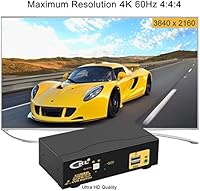
  • Max Resolution: Supports up to 3840x2160 at 60Hz (4K UHD) and is backward-compatible with lower resolutions including 1080p and 1440p.
  • USB Ports: Includes two USB 2.0 ports dedicated to keyboard and mouse input, switchable to standard hub mode when hotkeys are disabled.
  • Switching Methods: Supports four input methods for toggling between computers: keyboard hotkey, mouse scroll-click, front push button, and wired remote.
  • Auto-Scan: Auto-scan mode cycles between connected computers at a user-adjustable interval, useful for monitoring or testing scenarios.
  • Dimensions: Measures 5.12 x 2.95 x 1.65 inches, making it compact enough to sit behind a monitor base or on a desk corner.
  • Weight: Weighs 2.34 pounds, which is typical for a metal-and-plastic hybrid KVM unit of this category.
  • Connector Types: Uses HDMI and USB 2.0 connectors; each connected computer requires two HDMI cable runs to the unit.
  • Protection Rating: Carries an IP54 rating, indicating resistance to dust ingress and water splashes from any direction.
  • Number of Positions: Supports exactly two input positions, one for each connected computer, with no expandability beyond this.
  • Hotkey Toggle: The two USB ports can be switched from dedicated hotkey inputs to standard USB 2.0 hub ports via a toggle setting.
  • Brand: Manufactured by CKL, a brand that specializes specifically in KVM switch hardware rather than general consumer electronics.
  • Model Number: Official model designation is 922HUA-1A, which identifies this specific 2x2 dual-HDMI variant in the CKL product line.
  • Cables Required: Each source computer must have two available HDMI outputs to connect to this switch; adapters may be needed for USB-C or DisplayPort laptops.
  • Switching Speed: Transition between computers takes approximately two seconds, which is consistent with mid-range KVM hardware in this category.
  • Hub Mode: When a wireless keyboard-and-mouse set shares a single USB dongle, the second USB port becomes available for an additional USB 2.0 peripheral.
  • Backward Compatibility: Fully compatible with lower HDMI resolutions including 1080p and 1440p, so it works with older displays without any configuration changes.

Related Reviews

MLEEDA 8K Dual Monitor KVM Switch
75%
91%
Ease of Setup
83%
Video Signal Quality
74%
USB Peripheral Reliability
67%
Switching Experience
61%
Build Quality
More
DXchip KVM202U 8K Dual Monitor KVM Switch
78%
93%
Ease of Setup
81%
Switching Performance
78%
Video Signal Quality
88%
Dual-Mode Flexibility
72%
USB Hub Reliability
More
AV Access iDock C10 KVM Docking Station
77%
93%
Build Quality
88%
Video Performance
81%
KVM Switching
89%
EDID Emulation
84%
Ethernet Reliability
More
SUIDEK SJW-KM202B Dual Monitor KVM Switch
73%
83%
Ease of Setup
71%
Switching Reliability
79%
Display Quality
91%
Desktop Controller Usability
77%
USB Peripheral Sharing
More
UGREEN 2-Computer HDMI KVM Switch
72%
84%
Ease of Setup
78%
Video Quality
71%
Switching Reliability
88%
Desktop Controller
69%
USB Peripheral Sharing
More
NAWEN 4-Port HDMI KVM Switch
73%
93%
Ease of Setup
88%
Display Performance
84%
Switching Reliability
41%
Hotkey & Control Options
86%
USB 3.0 Performance
More
AV Access 4KSW21-DM Dual Monitor KVM Switch
77%
83%
Switching Speed & Reliability
86%
EDID Emulation Performance
88%
Video Quality at 4K
74%
Dual Operating Modes (KVM vs USB Mode)
71%
USB 3.0 Hub Performance
More
KCEVE 2-Monitor 4-Computer KVM Switch
81%
91%
Ease of Setup
83%
Switching Reliability
86%
Dual-Monitor Configuration
82%
USB 3.0 Performance
88%
Wired Remote Control
More
CMSTEDCD SW330 Dual Monitor KVM Switch
77%
91%
EDID & Window Layout Preservation
88%
4K Display Quality
84%
Switching Speed & Responsiveness
79%
USB 3.0 Peripheral Sharing
61%
Setup & Initial Configuration
More
Minisopuru MK808M-US Dual Monitor KVM Switch Docking Station
84%
94%
Dual Monitor Performance
91%
USB Peripheral Compatibility
88%
Switching Convenience
90%
Build Quality
82%
Setup & Installation
More

FAQ

Yes, and this is the most important thing to check before buying. The CKL 922HUA-1A Dual Monitor HDMI KVM Switch requires two HDMI outputs from each connected computer — one for each monitor. If your laptop or desktop only has one HDMI port, you will need to use a USB-C to HDMI or DisplayPort to HDMI adapter to supply the second connection, which adds cost and a potential point of failure.
Absolutely. While this 2x2 HDMI switcher is designed for dual-monitor setups, you can connect only one monitor and still use it to switch a keyboard and mouse between two computers. You would simply leave the second monitor output unused, which works without any configuration changes.

In practice, the switch takes around two seconds to complete the handoff between machines. During that window, your monitors will briefly go dark while the new signal is detected. For general office work, most users adapt to this quickly, but it can feel disruptive if you switch back and forth dozens of times a day.

It will, provided your computers and cables also support HDMI 2.0. The switch itself is rated for 3840x2160 at 60Hz, but if your source device outputs via an older HDMI standard or you use a budget cable that is not rated for high bandwidth, you may drop to 30Hz at 4K. Use certified HDMI 2.0 cables and verify your GPU output specs before assuming you will get full 60Hz.

Not effectively. The USB ports on this dual-monitor KVM switch are USB 2.0, which caps data transfer speeds well below what an external drive needs for comfortable use. These ports are really intended for a keyboard and mouse. If you need to share storage between computers, a separate USB hub or file transfer solution would serve you much better.

You have four options: a keyboard hotkey sequence, a double scroll-click on your mouse, the push button on the front of the unit, and a wired remote that can sit closer to you on the desk. Most users settle on one method and forget the others exist, but having choices is genuinely useful if the switch ends up tucked somewhere inconvenient.

It can work, but with caveats. You would need a USB-C to HDMI 2.0 adapter that supports 4K at 60Hz passthrough, and not all adapters on the market actually deliver on that. Cheaper adapters often drop to HDMI 1.4 behavior, limiting you to 4K at 30Hz. If 4K at 60Hz matters to you, invest in a quality adapter and verify its spec sheet before pairing it with the CKL switch.

No, audio switching is not included. If your monitors have built-in speakers and you route audio through the HDMI cable, the audio signal will follow the video and switch along with it. However, if you use separate speakers or a headset plugged into your computers, you will need to manage audio switching manually or through a separate switch.

This is one of the more commonly reported quirks with this 2x2 HDMI switcher, and with KVM switches in this class generally. When you trigger a switch, the monitors briefly lose signal and have to re-negotiate the connection with the new computer, which can add a few extra seconds on top of the standard two-second switch time. It is most noticeable when monitors are coming out of a sleep state. Keeping display sleep timers off or set to longer intervals can help reduce how often this happens.

The chassis is plastic, so it is not going to feel like a premium piece of hardware. That said, users who have had this switch on their desks for extended periods generally report it holds up fine under normal daily use. The push button and ports feel adequately robust. If you are expecting something with a metal shell or a reassuring heft, you may want to manage expectations — but for a desk accessory that sits in a corner and rarely gets handled roughly, it does the job reliably.