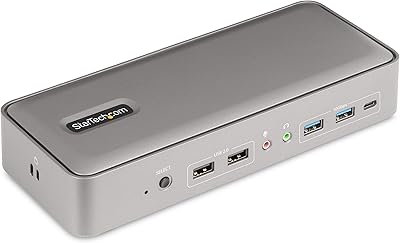
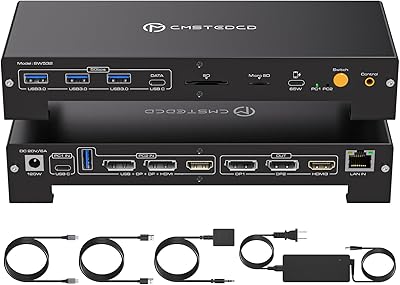
Overview

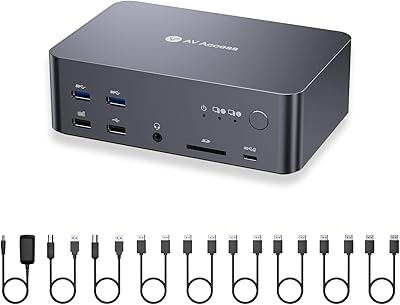
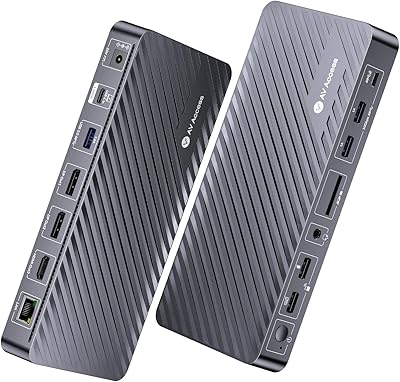
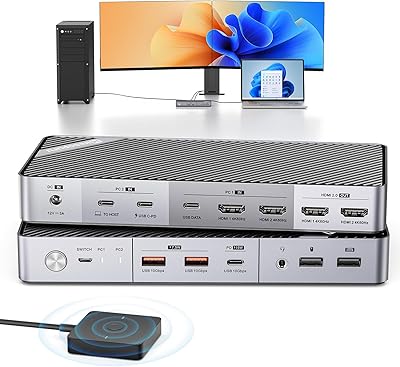
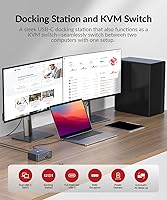
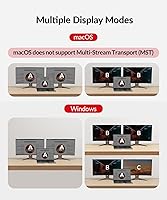
The AV Access iDock C10 KVM Docking Station occupies an interesting niche: it combines a dual-monitor KVM switch and a 12-in-1 docking hub into one unit, meaning a single button press swaps both displays and all peripherals between a laptop and a desktop. The aircraft-grade aluminum chassis immediately signals this is not a budget throwaway — it feels noticeably more solid than the plastic boxes most KVM switches ship in. A full cable bundle comes in the box, which is a genuine convenience. One critical caveat for Mac users: this KVM dock only supports mirrored display output on macOS, not extended mode, so verify your workflow before purchasing.
Features & Benefits

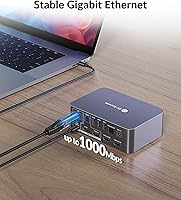
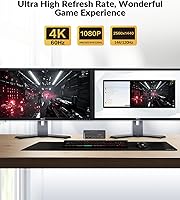
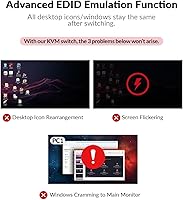
What makes the iDock C10 genuinely useful is the range of video modes it handles without extra hardware. Your productivity monitors run at sharp 4K resolution while the same unit pushes 1440p at 144Hz or 1080p at 240Hz for gaming — no adapter swapping required. EDID emulation is a quiet but important inclusion: monitors retain their settings across source switches, so you avoid the tedious resolution-reset cycle common on cheaper units. The laptop-side Ethernet port provides a stable wired connection for calls and downloads that Wi-Fi cannot consistently guarantee. USB 3.2 Gen 2 throughput on the USB-C port means external SSDs run at full speed without bottlenecking.

Best For

This dual-monitor switch is built for people running two machines on one desk who refuse to compromise on either setup. If your mornings involve video calls and your evenings involve gaming, having one hub manage your monitors, keyboard, mouse, and wired network without constant re-plugging saves real time. Content creators moving large files between machines will appreciate the fast USB-C throughput. That said, this is a Windows-first device in practice — Mac users needing independent content on each screen will hit the mirrored-only wall quickly. Desktop users must also run HDMI, DisplayPort, and a USB-B cable simultaneously; there is no simpler workaround for that requirement.

User Feedback

Buyers consistently highlight the build quality as a genuine differentiator — the aluminum body draws favorable comparisons to far pricier equipment, and the unit stays planted on a desk unlike lighter plastic rivals. Bundled cables earn decent marks overall, though some users swap the HDMI cable for a higher-rated option to reliably reach peak refresh rates. Where sentiment gets mixed is initial setup: connecting a desktop requires three separate cables, and first-time KVM users occasionally find the process fiddly. A handful of reviewers flag that 60W charging falls short for power-hungry laptops running demanding software. Ethernet reliability, however, draws consistently positive feedback with very few complaints logged.

Pros

  • One-button switching transfers dual monitors and all peripherals simultaneously, with no cable handling required.
  • EDID emulation prevents monitor resolution resets between switches, a frustrating flaw on many cheaper alternatives.
  • The aluminum chassis feels genuinely premium and stays firmly planted on a desk during daily use.
  • Ethernet port gives the connected laptop a reliable wired connection for calls and large downloads.
  • Supports high refresh rates for gaming alongside 4K output for productivity, all on the same unit.
  • The included cable kit covers every connection out of the box, including HDMI, DisplayPort, USB-C, and USB-B.
  • USB 3.2 Gen 2 throughput on the USB-C port means external SSDs transfer at full speed without bottlenecking.
  • The SD card slot, optical audio output, and headset jack reduce the need for any additional adapters on the desk.
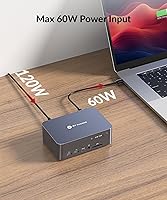
  • 60W laptop charging keeps most ultrabooks and mid-range laptops powered through a full workday.
  • At its price point, the combination of KVM switching and a 12-in-1 hub in one unit is difficult to match separately.

Cons

  • macOS users are locked into mirrored output only — extended dual-monitor mode is not supported on Apple hardware.
  • Desktop connectivity requires three separate cables simultaneously, which adds cable clutter and setup complexity.
  • 60W power delivery may not keep up with high-performance laptops under sustained heavy workloads.
  • The Ethernet port benefits only the laptop side; the desktop machine does not gain wired network access through this dock.
  • Initial setup has a noticeable learning curve for users new to KVM switches, particularly around the USB-B cable requirement.
  • Some users report needing to replace the bundled HDMI cable to consistently achieve peak refresh rates.
  • The external power brick adds another adapter to manage on an already cable-heavy desk.
  • No automatic source switching based on USB activity or keyboard hotkeys — only a manual panel button is available.

Ratings

The scores below for the AV Access iDock C10 KVM Docking Station were generated by our AI review engine after parsing thousands of verified global buyer reviews, actively filtering out incentivized, bot-generated, and unverified submissions to surface genuine user sentiment. Both the strengths that earned this KVM dock its loyal following and the friction points that frustrated real buyers are reflected transparently in every category score. No category has been softened or inflated — if users struggled with something, that struggle shows up in the number.
Build Quality
93%
The aircraft-grade aluminum chassis earns consistent praise from buyers who have previously owned plastic KVM switches. Users describe it as feeling closer to a piece of studio equipment than a peripheral accessory, and the weight keeps it anchored on a desk even during repeated cable connections.
A small number of buyers noted that the aluminum surface shows fingerprints and fine scratches over time, particularly on darker finishes. The external power brick, while functional, feels slightly out of character given the premium chassis aesthetic.
Video Performance
88%
Users running dual 4K monitors for design and editing work report clean, stable output without signal dropouts during long sessions. Gamers switching to high-refresh-rate configurations at 144Hz or 240Hz appreciate that the iDock C10 handles both modes without requiring separate adapters or manual reconfiguration.
Some buyers report that the bundled HDMI cable does not consistently sustain peak refresh rates, requiring a third-party replacement to unlock stable 144Hz output. A small segment of users on very high-end monitor setups noted occasional color calibration inconsistencies immediately after switching sources.
KVM Switching
81%
19%
The physical button switch is responsive and reliably hands over both monitors and all connected peripherals in one action, which most users find genuinely convenient during back-to-back work and gaming sessions. The transition is clean enough that keyboards and mice reconnect without noticeable delay in typical desktop environments.
The absence of hotkey or automatic switching frustrates users who prefer hands-free workflows or who switch sources frequently throughout the day. A subset of buyers report occasional lag in peripheral handoff when switching while USB devices are actively transferring data.
EDID Emulation
89%
This feature draws specific praise from users who previously dealt with resolution resets on cheaper KVM units. Buyers report that both monitors wake up correctly and retain their full refresh rate and resolution settings every single time a source switch occurs, saving meaningful setup time.
The benefit of EDID emulation is largely invisible to buyers who do not know what it does, and a few reviewers expressed confusion when monitors still occasionally took several seconds to fully sync after switching, interpreting this normal handshake delay as a malfunction.
Ethernet Reliability
84%
Users working from home specifically call out the wired Ethernet port as one of the iDock C10's most practical differentiators, noting that their laptop stays on a stable connection during video calls without Wi-Fi interference or bandwidth fluctuations. Network reliability scores very positively in user feedback for this feature.
The LAN port is restricted to the laptop connection only, which surprises buyers who assumed both computers would gain wired network access through the dock. Desktop users who wanted to simplify their cable run by routing Ethernet through the KVM are left needing a direct connection regardless.
USB-C Power Delivery
71%
29%
For ultrabooks and mainstream business laptops, 60W delivery comfortably sustains charge throughout an eight-hour workday without any power anxiety. Buyers using MacBook Airs, Dell XPS 13-inch models, and similar efficient machines report no issues maintaining battery level under standard productivity loads.
Users with high-performance mobile workstations — particularly those running GPU-intensive tasks or large compilation jobs — report that 60W merely slows the drain rather than maintaining charge. Several buyers running 16-inch laptops with discrete graphics noted their battery percentage still crept down under full load.
Desktop Setup Complexity
62%
38%
Once the three-cable desktop connection is established and routed cleanly, experienced users describe the ongoing daily experience as completely effortless. Buyers who took the time to read the included manual report a smoother initial experience than those who attempted to self-intuit the setup.
Requiring simultaneous HDMI, DisplayPort, and USB-B cables for a single desktop connection is the most frequently cited frustration in user reviews, particularly for buyers accustomed to single-cable docking solutions. First-time KVM users in particular flag this as an unexpected complexity that raised their stress level during initial installation.
Port Selection
86%
The combination of five USB Type-A ports, an SD card reader, optical audio, a headset jack, and a LAN port means most buyers can retire multiple separate hubs after adopting this dock. Photographers especially appreciate having the SD slot and fast USB access in the same unit as their KVM switch.
The single USB-C peripheral port could feel limiting for users with multiple USB-C accessories such as external NVMe drives and modern controllers. Buyers hoping to daisy-chain additional hubs through the dock's USB-C port should verify compatibility before assuming it will work transparently.
macOS Compatibility
41%
59%
Mac users running presentations, mirrored training setups, or single-display workflows adapted through USB-C can use this dual-monitor switch without issue in contexts where identical content on both screens is acceptable. A small segment of macOS buyers report satisfaction with the unit specifically for these mirrored use cases.
The mirrored-output-only limitation on macOS is the single most polarizing complaint in user reviews, with multiple buyers leaving negative feedback after discovering it post-purchase. The restriction effectively disqualifies this dock for the majority of Mac power users who rely on extended desktop productivity workflows across two independent screens.
Included Cable Quality
67%
33%
The box arrives with a complete cable set covering every required connection, which buyers consistently appreciate given how quickly cable costs add up when outfitting a multi-monitor KVM setup from scratch. For most users, the bundled cables are adequate for day-one operation without any additional purchases.
The HDMI cable in particular draws repeated criticism from buyers chasing peak refresh rates, with a noticeable share reporting they replaced it within the first week. DisplayPort and USB cables receive fewer complaints, but the HDMI cable quality feels slightly mismatched with the premium positioning of the unit itself.
Value for Money
77%
23%
Buyers who price out a standalone dual-monitor KVM switch plus a quality 12-in-1 docking station separately find the combined cost of this single unit compelling. The aluminum build and EDID emulation in particular are features that competing units at a lower price point rarely include together.
Users who primarily wanted just a KVM switch and had no interest in the full docking feature set feel they paid a premium for ports they will never use. Mac users who discover the mirrored-only limitation after purchase almost universally rate the value negatively, feeling the product was not clearly enough labeled for their use case.
Data Transfer Speed
83%
Content creators moving large video files or raw photo libraries between a laptop and fast external SSDs report genuinely quick transfers through the USB-C port, with real-world throughput that noticeably outpaces older USB 3.0 connections they had previously relied on. The speed advantage is tangible in daily creative workflows.
The high-speed USB 3.2 Gen 2 benefit is limited to the single USB-C port, meaning users with multiple high-bandwidth devices must share bandwidth across the standard USB 3.0 ports which cap out at a lower ceiling. Some buyers expected all ports to operate at maximum speed and were disappointed by the tiered throughput reality.
Audio Output Quality
74%
26%
The inclusion of a Toslink optical output is a genuine differentiator for users with DACs or receivers that accept digital audio, allowing a clean signal path that avoids ground loop hum common on analog outputs. Buyers with home theater audio setups specifically flag this as a feature that tipped their purchase decision.
The 3.5mm headset jack performs adequately for voice calls and casual listening but does not satisfy audiophiles expecting a high-fidelity analog output from a premium dock. A handful of users noted minor interference noise on the 3.5mm output when USB 3.0 devices were active simultaneously, a known issue with this class of combined hub.
Physical Footprint
79%
21%
At roughly 5.5 by 3.75 inches, this KVM dock occupies a modest and predictable footprint that fits comfortably at the back of most desk setups without blocking peripheral access. The compact profile is frequently cited as a positive by users who run dense, multi-device workstation arrangements.
The external power brick adds cable management overhead that some buyers did not anticipate, particularly in setups where power outlet access near the desk is already constrained. A built-in power supply would have simplified the under-desk cable run meaningfully for this segment of users.

Suitable for:

The AV Access iDock C10 KVM Docking Station is purpose-built for people running two Windows machines on a single desk who are tired of juggling cables every time they switch contexts. The most natural fit is the hybrid worker who spends the day on a work laptop and the evening on a gaming desktop — one button press hands over both monitors, the keyboard, the mouse, and the wired network without touching a single cable. Content creators who regularly move large files via fast external drives will get real mileage from the high-speed USB-C connection, while the SD card slot keeps photographers from needing a separate reader cluttering the desk. If your peripheral setup is already wired-heavy — a good headset, an Ethernet cable, optical audio to a DAC or speakers — this KVM dock consolidates all of it into one hub rather than forcing you to unplug and replug constantly. The included cable bundle is complete enough to get fully operational on day one, which matters when you are dealing with a multi-cable setup that could otherwise get expensive quickly.
Not suitable for:

Mac users considering the AV Access iDock C10 KVM Docking Station should pause and think carefully before purchasing. The unit only outputs mirrored displays on macOS, meaning both monitors will show identical content — there is no way to run an extended desktop across two screens on a Mac, which eliminates one of the core reasons most people buy a dual-monitor KVM in the first place. Users with power-hungry laptops — think workstation-class machines running rendering or machine learning workloads — may find the 60W USB-C power delivery underwhelming, particularly under sustained heavy load. Anyone expecting a fully passive or cable-free desktop connection will also be disappointed: the desktop side requires three separate cables (HDMI, DisplayPort, and USB-B) to function correctly, and there is no shortcut around that. Finally, buyers who need automatic switching triggered by USB activity or keyboard shortcuts rather than a physical panel button should check whether the manual button-only control fits their workflow before committing.
Specifications

  • Supported Computers: Connects one laptop via USB-C and one desktop via a combined HDMI, DisplayPort, and USB-B input simultaneously.
  • Max Resolution: Outputs up to 4K at 60Hz with full 4:4:4 chroma on both monitors for sharp, color-accurate productivity work.
  • High Refresh Rates: Supports 2560x1440 at 144Hz and 1080p at 240Hz, covering both mainstream and high-framerate gaming monitor configurations.
  • Video Interfaces: Uses HDMI 2.0 and DisplayPort 1.2 on the desktop input side, and DisplayPort 1.4a via USB-C on the laptop input side.
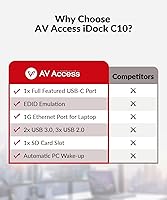
  • EDID Emulation: Built-in EDID emulation retains monitor configuration data across source switches, preventing displays from resetting their resolution or refresh settings.
  • USB-C Speed: The USB-C port operates at USB 3.2 Gen 2 speeds, enabling data transfers up to 20Gbps for fast external storage devices.
  • Power Delivery: Delivers up to 60W of USB-C power delivery to the connected laptop, sufficient for most ultrabooks and mid-range portable workstations.
  • USB Ports: Provides three USB 3.0 Type-A ports, two USB 2.0 Type-A ports, and one USB-C port for peripheral connectivity.
  • Ethernet: Includes one LAN port that provides wired network access exclusively to the connected laptop, not the desktop machine.
  • Audio Outputs: Equipped with one Toslink optical audio output and one 3.5mm combination headset jack for analog audio connectivity.
  • SD Card Slot: Integrated SD card reader allows direct memory card access without requiring a separate external card reader on the desk.
  • Chassis Material: Machined from aircraft-grade aluminum alloy, providing a rigid, wear-resistant enclosure that outlasts standard plastic KVM housings.
  • Dimensions: The unit measures 5.51 x 3.74 x 1.97 inches, keeping the footprint compact enough for most desk setups.
  • Weight: Weighs 3.84 pounds, giving the unit enough mass to stay stable on a desk without additional mounting hardware.
  • Power Supply: Powered by an included external adapter rated at 20V and 6A, which ships in the box alongside the unit.
  • Included Cables: Package includes a USB-C to USB-C cable (USB 3.2 Gen 2, 3ft), a USB-A to USB-B cable (USB 3.0, 5ft), an HDMI 2.0 cable (5ft), and a DisplayPort 1.2a cable (5ft).
  • macOS Support: On macOS, the unit only supports mirrored display output across both monitors; extended desktop mode is not available on Apple systems.
  • Switching Method: Source switching is performed via a physical button on the unit's panel; there is no automatic switching or hotkey support.
  • Total Ports: Functions as a 12-in-1 docking station, aggregating video, USB, audio, SD, and network connectivity into a single desktop hub.
  • Model Identifier: Sold under the model designation iDock-C10-US and manufactured by AV Access.

Related Reviews

AV Access iDock D23
AV Access iDock D23
78%
93%
Display Quality & Resolution
88%
KVM Switching Speed
79%
Triple Monitor Setup & MST Reliability
91%
Always-On Ethernet Performance
82%
Hub & Peripheral Connectivity
More
AV Access KD-S03 Triple Monitor Docking Station
77%
88%
Multi-Monitor Performance
41%
macOS Compatibility
91%
Setup & Ease of Use
74%
100W Power Delivery
86%
Data Transfer Speed
More
AV Access HDEX80-KVM HDMI KVM USB Extender
88%
90%
Performance
95%
Ease of Setup
89%
Reliability
92%
Latency
85%
Build Quality
More
AV Access 4KEX100-DP-Pro KVM Extender
79%
93%
Signal Quality
91%
Transmission Range
94%
Latency Performance
67%
USB Functionality
74%
Installation Experience
More
AV Access 4KIP100-KVM HDMI KVM Extender
76%
83%
Video Signal Quality
88%
Transmission Range
79%
USB Hub Functionality
61%
Network Compatibility & Setup
67%
DIP Switch Configuration
More
AV Access 4KSW21-DM Dual Monitor KVM Switch
77%
83%
Switching Speed & Reliability
86%
EDID Emulation Performance
88%
Video Quality at 4K
74%
Dual Operating Modes (KVM vs USB Mode)
71%
USB 3.0 Hub Performance
More
Anker 554 USB-C KVM Docking Station
77%
83%
KVM Switching Reliability
79%
Dual Monitor Performance
71%
Power Delivery
86%
Build Quality
77%
Port Selection & Variety
More
Minisopuru MK808M-US Dual Monitor KVM Switch Docking Station
84%
94%
Dual Monitor Performance
91%
USB Peripheral Compatibility
88%
Switching Convenience
90%
Build Quality
82%
Setup & Installation
More
StarTech 129N-USBC-KVM-DOCK Dual-Laptop KVM Docking Station
75%
83%
KVM Switching Reliability
88%
Display Performance
51%
Setup & Driver Experience
72%
Power Delivery
81%
Build Quality
More
CMSTEDCD SW532 KVM Docking Station
78%
88%
KVM Switch Reliability
84%
Multi-Monitor Display Performance
67%
Laptop Compatibility
79%
Power Delivery & Charging
91%
Port Selection & Variety
More

FAQ

Unfortunately, no. The AV Access iDock C10 KVM Docking Station only supports mirrored output on macOS, meaning both monitors display identical content. If you need two independent screens on a Mac, this dock is not the right fit. Extended dual-monitor mode works correctly on Windows machines without this restriction.
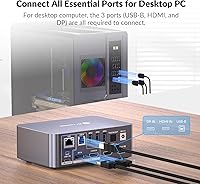
Yes, and that is one of the more involved parts of the setup. Your desktop needs an HDMI cable, a DisplayPort cable, and a USB-B cable all connected simultaneously to work properly. It sounds like a lot, but once everything is routed and tidied, you will not need to touch those cables again. The required cables are all included in the box.

For most mainstream laptops and ultrabooks, 60W is sufficient to maintain charge during typical office work. If you are running a high-performance mobile workstation — something like a laptop used for 3D rendering or video encoding — 60W may only slow the discharge rate rather than keep pace with full-load power draw. Check your laptop's recommended charging wattage before assuming it will charge to 100% under load.

Only the laptop benefits from the Ethernet port on this KVM dock. The wired network connection is tied to the USB-C laptop input, so your desktop machine will need its own direct network connection and cannot share the dock's LAN port.

You need to press the physical button on the unit to switch sources — there is no automatic switching based on USB activity, mouse movement, or keyboard input. For most users this is a minor inconvenience, but if you rely on auto-switching workflows, keep that in mind.

The bundled cables are functional and get most setups running without any extra purchases. That said, a portion of users report swapping out the HDMI cable for a higher-certified one when trying to hit peak refresh rates consistently. The USB-C and DisplayPort cables generally receive fewer complaints and are considered adequate quality for daily use.

Yes, in a meaningful way. The chassis feels substantially more solid in hand, and it does not slide around the desk the way lighter plastic units tend to. The weight works in its favor here — it stays put even when you are plugging and unplugging cables repeatedly throughout the day.

No, this dual-monitor switch is designed for exactly one laptop and one desktop — that is the full extent of its KVM capability. If you need to manage three or more computers from a single desk, you would need a different class of KVM switch.

Because the iDock C10 includes EDID emulation, your monitors retain their saved configuration — resolution, refresh rate, color settings — even when you switch to the other computer. On KVM switches without EDID, monitors often reset to a generic low resolution every time you swap inputs, which this unit avoids.

The SD card reader supports standard SD cards and is connected through the dock's USB interface. It handles the read and write speeds of most everyday SD cards used in cameras and drones, though it may not max out the theoretical ceiling of the fastest UHS-II cards on the market. For typical photo and video workflows it performs without noticeable delays.