Overview

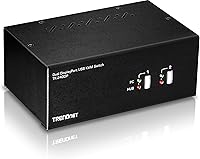
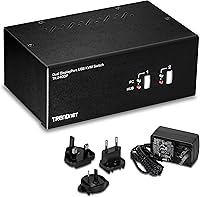
The TRENDnet TK-240DP Dual Monitor DisplayPort KVM Switch sits in a niche that is genuinely useful but still underserved: dual-monitor switching with native DisplayPort 1.2 support and full 4K UHD output. It targets power users who run two computers on the same desk — a work machine alongside a personal rig — and need to control both without touching a single cable. Before ordering, know this upfront: the switch requires two TK-CP06 cable kits purchased separately, which adds meaningfully to the total cost. For government buyers and IT departments, NDAA and TAA compliance makes this TRENDnet switch one of the few dual-DP options that checks procurement boxes most competitors simply do not.
Features & Benefits

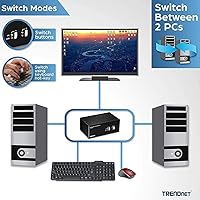
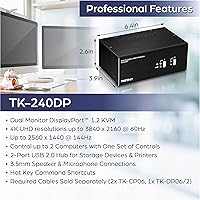
At its core, this dual-monitor KVM switch delivers 4K UHD resolution — up to 3840x2160 at 60Hz — across both connected displays simultaneously, which is the main reason technical buyers choose it over cheaper single-monitor alternatives. The built-in USB 2.0 hub adds real convenience, letting you share a printer or external drive between both machines without physically swapping cables. Audio gets proper treatment too: dedicated 3.5mm jacks for speakers and a microphone mean anyone on regular video calls will not be scrambling for workarounds. True Transparent USB emulation handles keyboard and mouse compatibility quietly in the background, and at under two pounds, the unit tucks neatly onto a desk or mounts to a wall without demanding much space.

Best For

This TRENDnet switch makes the most sense for a few specific buyer types. Professionals keeping a work computer and a personal rig on the same desk will get the most out of it — especially those running dual 4K monitors where dropping resolution simply is not acceptable. Video editors, developers, and designers who depend on pixel-accurate output will appreciate that the DisplayPort 1.2 connection does not compromise image quality the way adapter-based workarounds sometimes can. Government contractors and IT teams in regulated environments will find NDAA/TAA compliance a genuine requirement, not a nice-to-have. If you are already invested in DisplayPort monitors and GPUs, this is the KVM that keeps your existing setup intact without forcing compromises.

User Feedback

Buyers who have lived with the TK-240DP for a while tend to praise the stable 4K signal and the reliability of hotkey switching — two things cheaper KVM switches frequently get wrong. The two-year warranty also surfaces as a reassuring detail. That said, the most consistent frustration is the cable situation: requiring separate TK-CP06 kits is a genuine added expense that catches first-time buyers off guard. A handful of users report minor compatibility hiccups with certain GPU drivers, and audio switching can occasionally lag or require a manual nudge to sync properly. The overall picture is a switch that experienced KVM users tend to trust, but one that may trip up anyone expecting a completely plug-and-play setup straight out of the box.

Pros

  • Native DisplayPort 1.2 connection keeps 4K signal integrity intact across both monitors without adapters.
  • Hotkey switching is fast and consistent — most users report sub-second response times in daily use.
  • Both NDAA and TAA compliant, covering a critical procurement requirement that most competing switches do not meet.
  • Dedicated 3.5mm audio jacks handle speakers and microphone separately, which matters for headset users.
  • True Transparent USB emulation supports a wide range of keyboards and mice without driver installs.
  • Two-year manufacturer warranty provides above-average post-purchase protection for this product category.
  • Wall-mount compatibility and compact weight make it easy to keep off the desk surface entirely.
  • Front panel push buttons offer a reliable physical fallback when hotkey commands conflict with software.
  • The built-in USB hub consolidates shared peripherals like printers cleanly between two workstations.

Cons

  • Required TK-CP06 cable kits are sold separately, adding significant hidden cost that catches buyers off guard.
  • DisplayPort 1.4 is not supported, ruling out refresh rates above 60Hz at 4K resolution.
  • Audio switching occasionally fails to follow the active computer, requiring manual reconnection to resolve.
  • The USB hub runs at 2.0 speeds, making large file transfers between shared drives frustratingly slow.
  • Some GPU driver combinations cause resolution instability that the product documentation does not adequately address.
  • Hotkey commands can be intercepted by remote desktop and virtual machine software, requiring manual remapping.
  • High-polling-rate gaming mice and macro keyboards sometimes lose custom profiles when switching between computers.
  • The unit runs noticeably warm under sustained use, raising mild questions about long-term thermal management.
  • Third-party troubleshooting resources and community documentation for this specific model are limited compared to more mainstream KVM brands.

Ratings

The TRENDnet TK-240DP Dual Monitor DisplayPort KVM Switch earned these scores after our AI systems processed verified purchaser reviews from global marketplaces, actively filtering out incentivized submissions, bot patterns, and outlier noise. What remains reflects a honest cross-section of real daily use — from IT professionals managing dual workstations to designers pushing 4K output across both screens. Strengths and frustrations are weighted equally, so the scorecard below reflects where this dual-monitor KVM switch genuinely delivers and where it falls short.
4K Signal Stability
88%
Users consistently report that once the setup is dialed in, the 4K output at 3840x2160 holds steady across both monitors without flickering or resolution drops during switching. Professionals running pixel-sensitive workflows — photo editing, CAD, video grading — note that signal integrity is one of the stronger aspects of this switch compared to budget alternatives.
A subset of buyers experienced resolution instability tied to specific GPU drivers or cable quality, confirming that 4K performance is not purely a function of the switch itself. Those using older DisplayPort cables or integrated graphics report more inconsistency, which the product documentation does not clearly warn against.
Dual Monitor Switching
84%
Switching both displays simultaneously with a single hotkey command is the defining feature here, and most users agree it works reliably in daily use. The front panel button provides a tactile fallback that power users appreciate, especially when hotkey conflicts arise with certain software environments.
A small but notable number of buyers report that the two monitors do not always switch in perfect sync, with one display lagging a fraction of a second behind the other. While this rarely causes functional problems, it is noticeable during rapid switching sessions and slightly undermines the polished experience users expect at this price point.
Value for Money
71%
29%
For a TAA and NDAA compliant dual-monitor DisplayPort KVM switch with audio support and a USB hub built in, the price is defensible — particularly for government procurement or small business setups where compliance is non-negotiable. Buyers who factor in the total feature set, including the two-year warranty, generally feel the investment is justified.
The mandatory purchase of two TK-CP06 cable kits — sold separately — adds a meaningful amount to the real out-of-pocket cost that is easy to overlook at checkout. Buyers who did not anticipate this extra expense frequently call it out as a frustration, and some feel the kits should be bundled given the switch's price tier.
Audio Switching Reliability
63%
37%
Having dedicated 3.5mm jacks for both speaker output and microphone input is a genuine convenience for users on frequent video calls or audio-sensitive workflows. Those who rely on it for basic daily communication — headsets, desktop speakers — report it works adequately under normal conditions.
Audio switching is the most polarizing aspect of this TRENDnet switch in user feedback. Reports of audio failing to follow the active computer, requiring manual reconnection of the headset or a system reboot, appear with enough regularity to be a real concern. Users who depend on reliable audio handoff during back-to-back meetings should weigh this risk carefully.
USB Hub Functionality
79%
21%
The two-port USB 2.0 hub handles shared peripherals like external drives and printers cleanly, letting small offices consolidate hardware without running separate switches. Users who primarily share a printer between two workstations report this feature works exactly as expected with no device recognition issues.
USB 2.0 speeds are a limitation that stands out more in 2024 than they might have when this switch launched — transferring large files between computers via a shared drive feels slow by modern standards. Users expecting USB 3.0 throughput for frequent storage tasks will find this hub underwhelming for that specific use case.
Keyboard and Mouse Compatibility
83%
True Transparent USB emulation means the switch handles a wide range of keyboard and mouse configurations without requiring manual driver installations or custom firmware. Users with gaming peripherals, ergonomic keyboards, and programmable mice largely report plug-and-play behavior across both connected computers.
Occasional hiccups appear with certain high-polling-rate gaming mice and macro-heavy keyboards, where TTU emulation does not always preserve custom profiles across the switch. These edge cases affect a minority of buyers but are worth knowing if advanced peripheral configurations are central to your workflow.
Build Quality
76%
24%
The unit feels solid and purposeful — not lightweight plastic that flexes under pressure. Users who have had it deployed in small office environments for extended periods report no structural deterioration, and the front panel buttons retain their tactile feedback over time.
A few buyers mention the enclosure runs noticeably warm under sustained use, which raises mild concerns about long-term component reliability even if no failures have been widely reported. The overall aesthetic is utilitarian rather than refined, which is a minor but fair observation for buyers considering desk placement.
Setup and Installation
67%
33%
Users with prior KVM experience tend to get the TK-240DP running without significant friction, particularly those already familiar with DisplayPort cabling and USB peripheral management. The hotkey command structure is logical once learned, and the front panel button provides an intuitive starting point.
First-time KVM users frequently describe setup as more involved than expected, especially once they realize the required cable kits are not included. Figuring out the correct cable routing, display detection order, and hotkey sequences adds time and frustration that better documentation or included accessories could have prevented.
Hotkey Switching Performance
81%
19%
Keyboard hotkey switching is snappy in practice, with most users reporting sub-second response times that do not interrupt active workflows. The ability to cycle between computers without leaving the keyboard is well-executed and consistent under normal operating conditions.
Hotkey conflicts with certain applications — particularly remote desktop software and virtual machines — can cause the switch command to be intercepted before it reaches the KVM hardware. Users in virtualized environments may need to remap commands, which adds a setup step that is not prominently covered in the included documentation.
NDAA and TAA Compliance
93%
For government contractors, federal IT departments, and organizations operating under procurement mandates, compliance certification is not optional — it is the deciding factor. The TK-240DP is one of very few dual-monitor DisplayPort KVM switches that meets both NDAA and TAA requirements, making it essentially irreplaceable in those purchasing contexts.
For non-government buyers, compliance adds no practical benefit and may contribute to a price premium that private-sector users are essentially subsidizing. Those shopping purely on performance and value should factor this in when comparing against non-compliant alternatives that may offer similar functionality at a lower effective cost.
Display Port Compatibility
77%
23%
Native DisplayPort 1.2 support means users avoid the signal quality compromises and latency that often accompany HDMI-to-DP adapters. For buyers already standardized on DisplayPort monitors and graphics cards, the native connection keeps the signal chain clean from GPU to panel.
The switch does not support DisplayPort 1.4 or higher, which rules it out for users targeting refresh rates above 60Hz at 4K resolution. Buyers with high-refresh-rate 4K monitors will hit a ceiling here, and those hoping to future-proof their setup should note this limitation before purchasing.
Warranty and Support
82%
18%
A two-year manufacturer warranty is above average for the KVM switch category, where one-year coverage is common. Users who have needed to contact TRENDnet support report reasonable response times and a straightforward claims process, which adds confidence to a mid-range purchase.
Some buyers note that warranty service requires shipping the unit back, which means downtime for a mission-critical desk setup. There is also limited community documentation and third-party troubleshooting resources available for this specific model compared to more widely adopted KVM brands.
Compact Footprint
85%
At under two pounds and with a wall-mount option, this dual-monitor KVM switch fits into tight desk setups without demanding prime real estate. Users who mount it vertically on a desk riser or wall bracket report it disappears into the workspace cleanly once cabled up.
The physical dimensions, while reasonable, mean the unit does not sit as low-profile as some competing switches that are purpose-built for under-desk or panel mounting. For users with extremely minimal desk setups, the cable density radiating from the unit can feel cluttered even if the box itself is compact.

Suitable for:

The TRENDnet TK-240DP Dual Monitor DisplayPort KVM Switch is built for a specific kind of user, and when it lands with the right buyer, it genuinely earns its place on the desk. Professionals who split their time between a work-issued PC and a personal machine — and refuse to compromise on display quality — will find native DisplayPort 1.2 support across two 4K monitors a meaningful upgrade over adapter-heavy workarounds. Designers, developers, and video editors who spend hours staring at pixel-accurate output will appreciate that the signal stays clean from GPU to panel without the degradation that HDMI adapters can introduce. Government contractors and IT administrators operating under federal procurement requirements will also find this one of the few dual-monitor DisplayPort KVM switches on the market that satisfies both NDAA and TAA compliance simultaneously. Small offices that need to share a printer or external drive between two workstations without physically swapping cables will get practical day-to-day value from the built-in USB hub, even if it is USB 2.0 speed.
Not suitable for:

The TRENDnet TK-240DP Dual Monitor DisplayPort KVM Switch is not a plug-and-play purchase for everyone, and some buyers will find its trade-offs genuinely frustrating. The most immediate dealbreaker is the required accessory situation: the switch does not include the TK-CP06 cable kits needed to actually connect your computers, meaning your real out-of-pocket cost is noticeably higher than the unit price alone. Users who depend on rock-solid audio handoff during back-to-back video calls should also be cautious — audio switching has a documented reliability gap that crops up often enough to be a real concern rather than an isolated complaint. Buyers with high-refresh-rate 4K monitors will hit a hard ceiling here, since DisplayPort 1.4 is not supported, capping output at 60Hz regardless of what your monitor and GPU can otherwise achieve. Anyone new to KVM switches who expects everything to just work straight out of the box may find the setup learning curve steeper than anticipated, particularly around hotkey configuration and display detection order. Finally, users who transfer large files frequently between computers via a shared drive will find the USB 2.0 hub speeds a limiting factor by today's standards.
Specifications

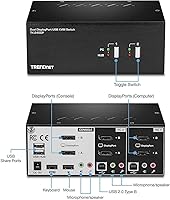
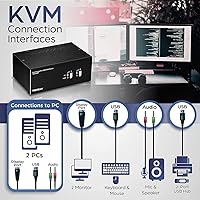
  • KVM Ports: The switch supports two computers, each connected via dedicated DisplayPort 1.2 inputs for video along with USB and audio connections.
  • Max Resolution: Both monitors can output up to 3840x2160 at 60Hz simultaneously when using compatible DisplayPort 1.2 cables and graphics cards.
  • Video Interface: Each computer connection uses two DisplayPort 1.2 ports, making this switch exclusively designed for DisplayPort monitor setups rather than HDMI or DVI.
  • USB Hub: A built-in 2-port USB 2.0 Type-A hub allows shared peripherals such as printers or external storage drives to be accessed from either connected computer.
  • Keyboard Input: Keyboard connection is handled via USB Type-A, compatible with the vast majority of modern wired and wireless USB keyboards.
  • Mouse Input: Mouse connection is via USB Type-A, with True Transparent USB emulation ensuring broad compatibility across standard and advanced mouse designs.
  • Audio Ports: A 3.5mm speaker output jack and a separate 3.5mm microphone input jack are included, supporting standard analog headsets and desktop audio peripherals.
  • Switching Method: Users can switch between computers using front panel push buttons on the unit or via keyboard hotkey commands without touching the device physically.
  • USB Emulation: True Transparent USB emulation technology replicates keyboard and mouse signals to both computers simultaneously, eliminating most reconnection delays during switching.
  • Dimensions: The unit measures 6.4 x 6.9 x 2.6 inches, making it compact enough for desk placement or wall-mount installation in space-constrained setups.
  • Weight: The switch weighs 1.6 pounds, light enough for wall mounting without requiring heavy-duty hardware.
  • Mounting: The TK-240DP is wall-mount compatible, giving users the option to keep the unit entirely off the desk surface when cabling allows.
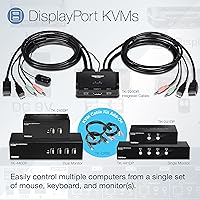
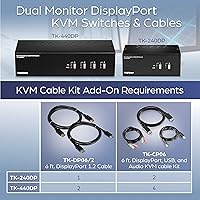
  • Required Cables: Two TK-CP06 TRENDnet DisplayPort, USB, and Audio KVM Cable Kits are required to connect computers to the switch and are sold separately.
  • Compliance: The switch meets both NDAA and TAA compliance standards, applicable to buyers in the United States and Canada operating under federal procurement requirements.
  • Warranty: TRENDnet provides a 2-year manufacturer protection warranty covering defects in materials and workmanship from the date of purchase.
  • Power: The switch operates at 9 volts with a current rating of 1 amp, using a plug-in connector type for power delivery.
  • Operating Temp: The unit is rated for operation between 32 degrees and 104 degrees Fahrenheit, suitable for standard indoor office and home environments.
  • Operating Humidity: Maximum operating humidity is 90 percent non-condensing, consistent with typical climate-controlled office conditions.

Related Reviews

TRENDnet TK-440DP 4-Port Dual Monitor DisplayPort KVM Switch
85%
92%
Video Quality
85%
Ease of Use
90%
Compatibility
88%
Build Quality
87%
USB Hub Functionality
More
MLEEDA 8K Dual Monitor KVM Switch
86%
92%
Visual Performance
88%
Ease of Setup
85%
Build Quality
90%
USB Connectivity
75%
Switching Reliability
More
DXchip 8K Dual Monitor KVM Switch
85%
88%
Performance
91%
Ease of Use
94%
Visual Quality (Resolution & Clarity)
87%
USB Transfer Speed
83%
Build Quality
More
AV Access iDock C10 KVM Docking Station
77%
93%
Build Quality
88%
Video Performance
81%
KVM Switching
89%
EDID Emulation
84%
Ethernet Reliability
More
TRENDnet TK-207K 2-Port USB KVM Switch
84%
90%
Setup and Installation
88%
Usability and Ease of Use
84%
Build Quality
60%
Hotkey Functionality
85%
Switching Speed
More
AV Access 4KSW21-DM Dual Monitor KVM Switch
77%
83%
Switching Speed & Reliability
86%
EDID Emulation Performance
88%
Video Quality at 4K
74%
Dual Operating Modes (KVM vs USB Mode)
71%
USB 3.0 Hub Performance
More
MLEEDA Displayport KVM Switch 2 Computers 1 Monitor
84%
88%
Performance
92%
Ease of Setup
90%
Resolution Support
85%
USB Port Functionality
82%
Build Quality
More
TRENDnet TK-209K 2-Port USB KVM Switch with Audio
86%
88%
Ease of Use
91%
Value for Money
84%
Audio Quality
80%
Build Quality
86%
Resolution Support
More
Minisopuru MK808M-US Dual Monitor KVM Switch Docking Station
84%
94%
Dual Monitor Performance
91%
USB Peripheral Compatibility
88%
Switching Convenience
90%
Build Quality
82%
Setup & Installation
More
KCEVE 2-Monitor 4-Computer KVM Switch
81%
91%
Ease of Setup
83%
Switching Reliability
86%
Dual-Monitor Configuration
82%
USB 3.0 Performance
88%
Wired Remote Control
More

FAQ

They are not included. You will need to purchase two TK-CP06 KVM cable kits separately — one for each computer you are connecting. This is probably the most important thing to know before ordering, because skipping this step means the switch simply will not work out of the box. Factor that cost into your total budget upfront.

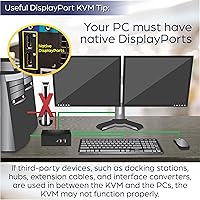
Any monitor with a standard DisplayPort input should work fine. The switch is not brand-locked — what matters is that your monitors use DisplayPort natively rather than relying on an adapter from HDMI or another format. Adapter-based connections can introduce compatibility issues, so sticking to native DisplayPort panels is strongly recommended.

Not at those refresh rates, no. The TRENDnet TK-240DP Dual Monitor DisplayPort KVM Switch is built around DisplayPort 1.2, which caps out at 4K 60Hz. If your GPU and monitors are configured for high refresh rates above 60Hz at 4K, you will need to drop the refresh rate down to use this switch, or look for a DisplayPort 1.4 compatible alternative.
It is designed to switch automatically along with the video and USB signals. In practice, though, audio switching is one of the less reliable aspects of this type of KVM switch, and some users do report occasional situations where audio stays locked to the previous computer and requires a manual fix — such as reseating the headset or adjusting the default audio device in Windows or macOS.

Yes, that is exactly what the built-in USB 2.0 hub is designed for. You connect the printer to one of the hub's USB ports, and whichever computer is currently active can send print jobs to it. It works cleanly for standard print tasks, though keep in mind the USB 2.0 connection is not ideal for high-speed data transfer from storage drives.

Generally yes — the switch does not care what operating system your computers are running, since it operates at the hardware level rather than through software drivers. Users with mixed Mac and Windows setups have reported successful configurations. The main variable is whether your Mac's GPU outputs native DisplayPort; some Mac models may require a Thunderbolt-to-DisplayPort adapter, which can introduce its own compatibility considerations.

Both options are available. There is a physical push button on the front of the unit that you can press to cycle between computers, and you can also use keyboard hotkey commands to switch without touching the device. The hotkeys work well for most setups, though users running virtual machines or remote desktop software sometimes find those applications intercept the command before it reaches the switch.

The switch requires its own power supply — it operates at 9 volts and uses a plug-in connector. It does not draw power from your computers via USB, so make sure you have an available outlet or power strip nearby when planning your desk setup.

It works perfectly well in a home office context, especially if you are managing a work laptop docked alongside a personal desktop and want to run both through the same pair of 4K monitors. The NDAA and TAA compliance features are specifically relevant to government and regulated-sector buyers, but those certifications do not limit or change how the switch performs for everyday home use.

Standard keyboard functionality transfers reliably through the True Transparent USB emulation built into this TRENDnet switch. However, some users with heavily customized macro keyboards report that stored profiles or per-key configurations do not always carry over perfectly between computers. Basic key input works without issues, but if your workflow depends on complex keyboard macros, it is worth testing your specific keyboard model before committing.

Where to Buy