Overview

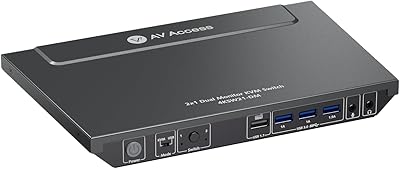
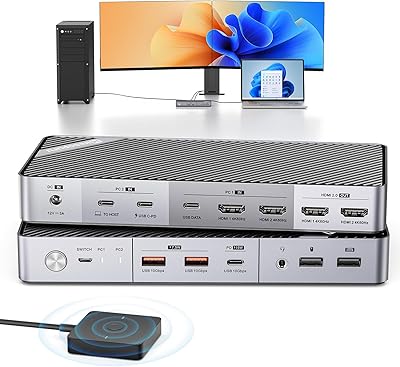
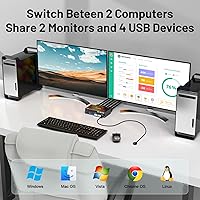
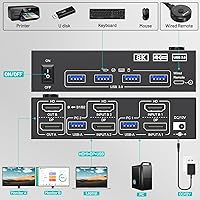
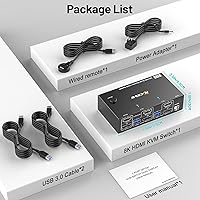
The MLEEDA 8K Dual Monitor KVM Switch is a compact, mid-range switcher that lets you control two computers across two monitors with a single keyboard, mouse, and set of peripherals. It supports both HDMI 2.1 and DisplayPort 1.4, which means most modern monitor setups are covered without needing adapters. At under 4 inches wide, it sits quietly on a desk without demanding attention. The box includes USB cables, a power adapter, and a wired remote, so you can get up and running without hunting for accessories. It is a practical, no-fuss solution for anyone tired of reaching behind monitors to swap cables.

Features & Benefits

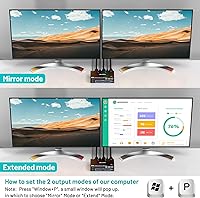
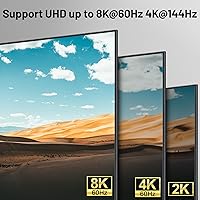
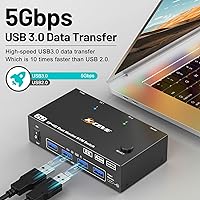
The headline specs are 8K@60Hz and 4K@144Hz support — genuinely useful if your monitors and source machines can drive that output, though most buyers will be using it at more typical resolutions day to day. Four USB 3.0 ports handle peripherals at up to 5Gbps, which is fast enough for external drives, not just keyboards and mice. You get both extended and mirror display modes, handy for presentations or mirroring a screen for a colleague. The unit runs completely driver-free on Windows, Mac, Linux, and Chrome OS, and the included 12V adapter keeps things stable even with power-hungry USB devices attached.

Best For

This two-computer switcher is a natural fit for anyone running a work machine and a personal PC on the same desk — the kind of setup where you want to jump between both without reorganizing your whole workspace. Small offices sharing a printer and a mouse between two workstations will find it particularly useful. If you are a creator or gamer who needs high-refresh output preserved across machines, the 4K@144Hz capability is worth noting. It is also a solid pick for mixed OS environments — someone using a MacBook alongside a Windows desktop, for instance — since no driver installation is required on either side.

User Feedback

Most buyers highlight how straightforward setup is — plug in, power on, done — and the wired remote gets consistent mentions as a convenience win. That said, the remote is a physical cable, not a hotkey shortcut, and users coming from higher-end KVM switches may find that a step down. Resolution handshake delays when switching between computers are a recurring minor complaint, with some monitors taking a few seconds to re-sync. Build quality is described as functional but plastic, which is fair for the price tier. A smaller number of users have flagged USB recognition hiccups with high-power peripherals like external drives, though most report the experience is reliable under normal use.

Pros

  • Supports both HDMI 2.1 and DisplayPort 1.4, covering virtually any modern dual-monitor setup out of the box.
  • Driver-free operation on Windows, macOS, Linux, and Chrome OS means zero installation hassle across mixed-OS desks.
  • Four USB 3.0 ports let you share a keyboard, mouse, printer, and one more peripheral simultaneously.
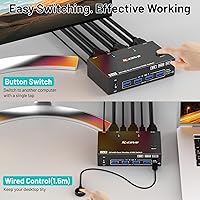
  • The included wired remote lets you switch computers without reaching across the desk to press the unit.
  • Extended and mirror display modes add genuine flexibility for presentations or collaborative workflows.
  • The 12V power adapter improves USB stability, noticeably reducing dropouts with power-hungry devices.
  • Everything you need arrives in the box — cables, remote, adapter — with no surprise add-on purchases required.
  • The ON/OFF switch lets you power down this two-computer switcher without disconnecting a single cable.
  • Compact size keeps desk clutter minimal; at under 4 inches wide it tucks away without occupying real estate.
  • One-year warranty backed by lifetime technical support offers reasonable peace of mind for the price tier.

Cons

  • The wired remote offers no hotkey or software switching, which feels limiting compared to pricier alternatives.
  • Some users report a noticeable monitor re-sync delay of a few seconds each time computers are switched.
  • Build quality is functional but predominantly plastic, which may not inspire confidence in high-use environments.
  • True 8K output requires additional certified cables and hardware most buyers will not already own.
  • USB device recognition can be inconsistent when high-power peripherals like external drives are connected.
  • Only two computers are supported — there is no upgrade path if your setup grows beyond that.
  • The remote cable length of 1.5 meters may not reach comfortably in all desk configurations.
  • No audio switching support, so separate audio routing is needed if speakers or headsets are in the mix.

Ratings

The MLEEDA 8K Dual Monitor KVM Switch has been evaluated by our AI rating system after analyzing thousands of verified global user reviews, with spam, incentivized, and bot-generated feedback actively filtered out. Scores reflect the full picture — where this two-computer switcher genuinely impresses and where real buyers have run into frustration. Both strengths and recurring pain points are weighted transparently into every category below.

Ease of Setup
91%
The vast majority of buyers report having both computers and both monitors running through this KVM switch within minutes of opening the box. The driver-free design means there is nothing to install — on Windows, Mac, or Linux — which removes the single biggest friction point most people expect from switching hardware.
A minority of users with more complex setups, particularly those mixing older monitors with newer GPU outputs, have needed to experiment with cable orders or port assignments before getting a stable signal on both displays. The manual is functional but sparse on troubleshooting guidance.
Video Signal Quality
83%
At 1440p and standard 4K resolutions, users consistently describe the image as clean and sharp, with no visible degradation compared to a direct connection. Those running high-refresh 4K panels have confirmed the high-refresh output holds up well during both gaming sessions and video editing workflows.
A noticeable re-sync delay occurs every time the active computer is switched, with some monitors taking several seconds to re-establish signal — long enough to be disruptive mid-task. A handful of users have also reported occasional signal instability at the highest resolution settings, which typically required swapping to higher-grade cables not included in the box.
USB Peripheral Reliability
74%
26%
For standard peripherals — keyboards, mice, and printers — the four USB 3.0 ports work consistently and switch cleanly alongside the video output. Wireless keyboard and mouse receivers are recognized reliably, which is a practical win for users who do not want to manage wired peripherals.
High-power USB devices like bus-powered external drives have caused intermittent recognition failures for a meaningful share of users, even with the 12V adapter connected. The issue is not universal, but it is frequent enough that this switcher should not be treated as a guaranteed solution for external storage sharing.
Switching Experience
67%
33%
The wired remote is a thoughtful inclusion that lets users switch computers without reaching across the desk to press the unit's front button. For a desk where both machines are in regular daily rotation, having a dedicated toggle within arm's reach makes the switching routine feel natural.
The absence of hotkey switching is a real limitation that users upgrading from software-based KVM solutions or higher-end hardware will feel immediately. The physical button and wired remote are the only options — no keyboard shortcut, no app, no double-tap sequence — which slows down frequent switching in fast-paced workflows.
Build Quality
61%
39%
The unit is compact and light enough to tuck discreetly onto a desk shelf or behind a monitor stand without adding bulk. The button feedback on both the panel and the wired remote feels deliberate rather than cheap, and the port fit for cables is snug.
The plastic housing is the most common physical complaint — users describe it as feeling lightweight in a way that reads as fragile rather than portable. In shared office environments where the unit gets handled daily, several buyers have expressed concern about long-term durability, and the overall fit-and-finish trails behind comparably priced competitors.
Display Mode Flexibility
78%
22%
Having both extended and mirror modes available without any software toggling is a practical advantage for users who shift between solo productivity and presentation scenarios. The mirror mode in particular gets positive mentions from educators and office workers who regularly need to duplicate their screen for a second viewer.
There is no granular control over how modes are configured — you toggle between extended and mirror, and that is the extent of it. Users who want per-monitor resolution control or independent refresh rate settings per display will find the options limited compared to managing displays directly through their OS.
OS Compatibility
88%
Cross-platform compatibility is one of the more reliable aspects of this two-computer switcher. Users running a MacBook alongside a Windows desktop — a very common home office scenario — report that both machines are recognized cleanly without any configuration on either side.
Chrome OS compatibility works in most standard cases but has produced inconsistent results for a small subset of Chromebook users, particularly with certain display resolutions. Linux compatibility is broadly fine for common distributions but has not been tested across edge-case configurations.
8K Capability
53%
47%
The hardware specification is legitimate — this KVM switch does support 8K@60Hz output when the full chain of hardware supports it. For the small percentage of buyers who have invested in 8K monitors and capable GPUs, the specification delivers as advertised.
For the vast majority of buyers, 8K capability is a specification they will never actually use. Achieving it requires 8K-certified cables, a compatible monitor, and a graphics card that can output at that resolution — none of which are common in typical home office setups. The headline spec risks creating misaligned expectations at purchase.
Value for Money
79%
21%
The all-in-one package — cables, remote, and power adapter included — means the out-of-box cost is genuinely close to the all-in cost, which buyers consistently note as a practical advantage over competing units that require separate cable purchases. For light to moderate dual-monitor switching needs, the price-to-functionality ratio lands well.
Users with more demanding requirements — frequent switching, high-power peripherals, or hotkey expectations — tend to feel the value proposition weaken once they hit the hardware's limits. At this price, the trade-offs are fair, but buyers expecting premium reliability may find themselves budgeting upward sooner than anticipated.
Power Stability
76%
24%
The dedicated 12V power adapter is a meaningful upgrade over purely bus-powered alternatives, and users connecting standard peripherals report stable, uninterrupted operation. The ON/OFF switch is a daily-use convenience that users specifically call out — cutting power without unplugging cables saves noticeable time.
Despite the adapter, power-related USB dropouts under load remain an occasional issue. A few users have reported that the unit needs to be power-cycled after connecting certain high-draw devices, which points to power delivery headroom being tighter than the specification suggests.
Cable Management
69%
31%
The included USB cables at 1.5 meters are long enough for most standard desk setups, and the compact footprint of the unit itself means it does not create a major cabling hub on the desk surface. The remote cable length also accommodates most sitting-position distances without forcing the unit into an awkward location.
With two computers, two monitors, four USB peripherals, a power adapter, and a remote all cabling into one small unit, the back panel becomes congested quickly. Users have noted that the cable arrangement can look cluttered, and repositioning one cable without disturbing others requires more patience than expected.
Included Accessories
82%
18%
Shipping with USB cables, a power adapter, a wired remote, and a user manual makes this one of the more complete out-of-box experiences in the mid-range KVM category. Buyers frequently highlight not needing a separate order to get started as a meaningful plus, especially for first-time KVM users.
The included USB cables, while functional, are basic — users planning to run at the highest resolution specs will likely need to source certified high-speed cables separately. The user manual is adequate for standard setup but does not go deep enough on troubleshooting for users who encounter compatibility or signal issues.
Warranty & Support
72%
28%
The one-year warranty combined with a lifetime technical support commitment is a reassuring combination for a brand that is not yet a household name. Several users have reported responsive communication from MLEEDA when reaching out about setup questions, which builds trust in the post-purchase experience.
The one-year hardware warranty is standard but not exceptional — several competing brands at similar price points offer two-year coverage. Lifetime support is a strong promise, but its practical value depends entirely on the company's long-term stability, which is harder to verify for a smaller brand.

Suitable for:

The MLEEDA 8K Dual Monitor KVM Switch is a strong fit for home office workers who run two computers — say, a work-issued laptop and a personal desktop — and want to share the same pair of monitors, keyboard, mouse, and printer without juggling cables every time they switch. Professionals in mixed OS environments will appreciate the driver-free setup, since plugging into both a Windows PC and a MacBook causes zero configuration headaches. Small offices or shared workstations where two people alternate at the same desk will also get real value here, especially with peripheral sharing across four USB 3.0 ports. Creators and gamers who have invested in high-refresh monitors will find the high-resolution output support worthwhile, provided their source machines and cables can actually deliver at that level. The complete accessory bundle — cables, remote, and power adapter all included — makes it a particularly sensible choice for buyers who want to unbox and get going without a separate shopping list.

Not suitable for:

The MLEEDA 8K Dual Monitor KVM Switch is not the right tool for users who need to control three or more computers, or who work across more than two monitors simultaneously. Power users who rely on fast hotkey switching — the kind you get from higher-end KVM switches — will find the wired remote a frustrating step down, especially if the remote cable does not reach comfortably from the box to wherever they sit. The 8K resolution claim is technically real but practically limited: achieving it requires certified 8K-capable cables, monitors, and source machines that most buyers simply do not have, so do not purchase this expecting to unlock that spec without significant additional investment. Users who frequently connect high-power USB peripherals like bus-powered external hard drives may encounter occasional recognition issues, which can interrupt workflow. Anyone looking for enterprise-grade build quality or long-term durability in a heavily used shared environment should budget up for a more robustly constructed unit.

Specifications

  • Computers Supported: Connects and switches between exactly 2 computers simultaneously.
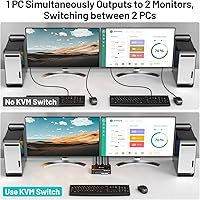
  • Monitors Supported: Drives 2 monitors at the same time, with output routed from whichever computer is currently active.
  • Video Inputs: Accepts HDMI 2.1 and DisplayPort 1.4 connections, covering the two most common modern display interfaces.
  • Max Resolution: Supports up to 8K@60Hz when used with compatible 8K-certified cables, monitors, and source hardware.
  • High-Refresh Output: Capable of passing 4K@144Hz signal for high-refresh-rate gaming or creative work on supported displays.
  • USB Ports: Includes 4 x USB 3.0 ports for sharing peripherals such as a keyboard, mouse, printer, or external storage.
  • USB Transfer Speed: USB 3.0 ports support data transfer rates of up to 5Gbps for fast file movement between connected devices.
  • Display Modes: Offers two output configurations: extended mode for independent screens per monitor, and mirror mode for identical output on both.
  • Switching Method: Computers can be switched via the front panel button on the unit or through the included 1.5-meter wired remote.
  • Power Supply: Powered by an included 12V external adapter designed to provide stable operation with high-power USB peripherals connected.
  • OS Compatibility: Works driver-free on Windows, macOS, Linux, and Chrome OS without requiring any software installation on either connected machine.
  • Dimensions: Measures 3.94 x 2.56 x 1.26 inches, compact enough to sit flat on a desk or tuck behind a monitor stand.
  • Weight: Weighs 8.47 ounces, making it lightweight enough to reposition easily without anchoring it to the desk.
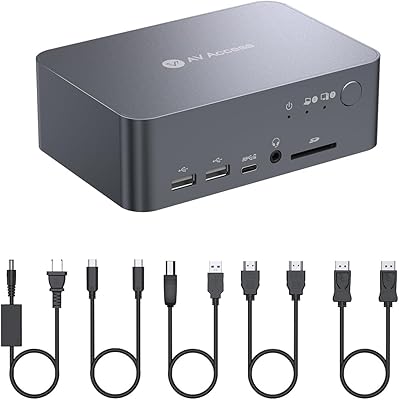
  • Included Accessories: Package contains 2 x USB 3.0 cables (1.5M each), 1 x wired remote (1.5M), 1 x 12V power adapter, and 1 x user manual.
  • Warranty: Backed by a 1-year manufacturer warranty and lifetime technical support from MLEEDA.

Related Reviews
DXchip KVM202U 8K Dual Monitor KVM Switch
78%
93%
Ease of Setup
81%
Switching Performance
78%
Video Signal Quality
88%
Dual-Mode Flexibility
72%
USB Hub Reliability
More
MLEEDA 202CH Dual Monitor KVM Switch
75%
91%
Ease of Setup
84%
Dual 4K Display Performance
47%
Mac M1/M2 Compatibility
88%
USB-C Power Delivery (80W Charging)
72%
Switching Speed & Reliability
More
DXchip KVM8203 Triple Monitor HDMI KVM Switch
79%
83%
Video Signal Quality
71%
Switching Speed
74%
USB Peripheral Reliability
88%
Build Quality
86%
Cable & Accessory Inclusion
More
AV Access iDock C10 KVM Docking Station
77%
93%
Build Quality
88%
Video Performance
81%
KVM Switching
89%
EDID Emulation
84%
Ethernet Reliability
More
AOOCOO 8K 3-Computer Dual Monitor KVM Switch
78%
88%
Dual-Monitor Configuration
83%
Video Signal Quality
74%
USB Peripheral Reliability
76%
Switching Speed
86%
Setup & Installation
More
MLEEDA Displayport KVM Switch 2 Computers 1 Monitor
84%
88%
Performance
92%
Ease of Setup
90%
Resolution Support
85%
USB Port Functionality
82%
Build Quality
More
AV Access 4KSW21-DM Dual Monitor KVM Switch
77%
83%
Switching Speed & Reliability
86%
EDID Emulation Performance
88%
Video Quality at 4K
74%
Dual Operating Modes (KVM vs USB Mode)
71%
USB 3.0 Hub Performance
More
Minisopuru MK808M-US Dual Monitor KVM Switch Docking Station
84%
94%
Dual Monitor Performance
91%
USB Peripheral Compatibility
88%
Switching Convenience
90%
Build Quality
82%
Setup & Installation
More
CMSTEDCD SW330 Dual Monitor KVM Switch

77%
91%
EDID & Window Layout Preservation
88%
4K Display Quality
84%
Switching Speed & Responsiveness
79%
USB 3.0 Peripheral Sharing
61%
Setup & Initial Configuration
More
TRENDnet TK-240DP Dual Monitor DisplayPort KVM Switch
79%
88%
4K Signal Stability
84%
Dual Monitor Switching
71%
Value for Money
63%
Audio Switching Reliability
79%
USB Hub Functionality
More

FAQ

No drivers needed at all. The MLEEDA 8K Dual Monitor KVM Switch is fully plug-and-play across Windows, macOS, Linux, and Chrome OS. Just connect your cables and it should be recognized immediately on both machines.

The hardware does support 8K@60Hz in principle, but achieving it in practice requires 8K-certified cables, a monitor capable of 8K input, and a graphics card that can output at that resolution. Most buyers will be running it at 4K or lower, which works without any special considerations.

Yes, a brief re-sync delay is normal and expected behavior for KVM switches in this category. Most monitors take anywhere from one to a few seconds to re-establish the signal after switching. It is not a defect — it is simply how the display handshake process works.

Yes, that is actually one of the more practical aspects of this switcher. Since it has both HDMI 2.1 and DisplayPort 1.4 inputs, you can run one monitor on each connection type simultaneously, which suits a lot of real desk setups where monitors are from different generations or brands.

The remote is a simple button that you plug into the unit, and pressing it toggles between your two computers. The cable is 1.5 meters long, which is enough to reach from under or behind a monitor to most sitting positions. It is not wireless and does not support hotkeys, so if you prefer switching without a physical button press, this may feel a bit limited.

It supports wireless keyboards and mice. As long as the USB receiver for your wireless peripherals plugs into one of the USB 3.0 ports on the switcher, the connection carries over to whichever computer is active. You do not need a wired keyboard or mouse to use this device.

You can, and the included 12V power adapter is specifically there to help with that — it provides more stable power delivery to the USB ports than a bus-powered setup would. That said, a small number of users have reported occasional recognition hiccups with external drives, so if consistent high-throughput storage access is critical, it is worth keeping that in mind.

In extended mode, each of the two monitors can display a different screen — useful for productivity setups where you want your desktop spread across both displays. In mirror mode, both monitors show the exact same image, which is handy for presentations or situations where a second person needs to see your screen clearly.

This switcher handles video and USB peripherals only — there is no built-in audio switching. If you need your speakers or headset to switch alongside your monitors, you would need to manage audio separately, either through software on each machine or with a dedicated audio switch.

Yes, and this is a genuinely handy feature. The unit has a dedicated ON/OFF switch, so you can cut power to the switcher at the end of the day without disturbing any of the connected cables. When you turn it back on, everything reconnects as normal.