Overview

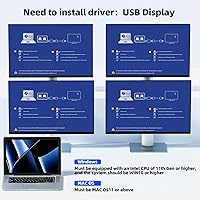
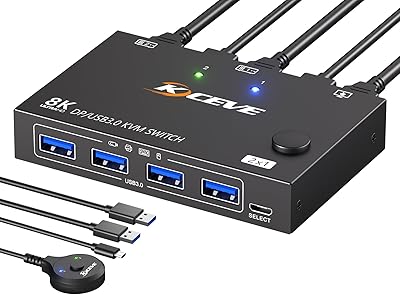
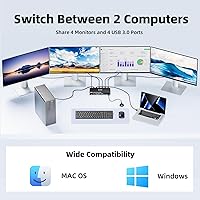
The Camgeet 204UH Quad Monitor KVM Switch solves a specific, frustrating problem: you have two computers and four monitors, and you want all four screens to serve either machine without unplugging a single cable. Unlike traditional KVM switches that pass native GPU signals, this four-screen switcher relies on USB-based video output — each PC connects via one USB cable, and the device distributes that signal through a software driver. That driver is not optional; monitors will not be recognized without it. Resolution tops out at 1080p at 60Hz, which is worth knowing upfront if your monitors can do more. This dual-PC display hub targets home office workers, hybrid setups, and developers who want a clean, consolidated workspace without a second desk full of peripherals.
Features & Benefits

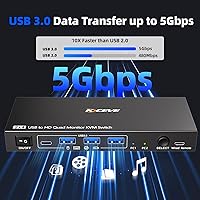
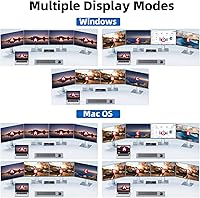
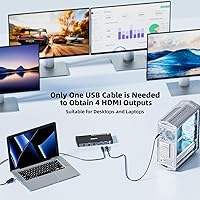
The single-USB-per-PC architecture is what makes this quad-monitor KVM switch unusual. Each computer plugs in with one USB 3.0 cable, and the switch multiplexes that into four HDMI outputs — all running at up to 1080p@60Hz in either mirror or extended mode. Four USB 3.0 ports handle peripherals at up to 5 Gbps, so your keyboard, mouse, and printer all follow the switch without extra steps. A wired remote sits on your desk for quick toggling, meaning you never have to reach across to the unit itself. LED indicators show the active PC at a glance. Worth noting: hotkey switching and EDID emulation are absent, and an 11th-gen CPU or newer is a hard requirement for the driver to function correctly.

Best For

This four-screen switcher fits a fairly specific buyer profile. If you run two machines — say, a work laptop and a personal desktop — and want all four monitors switching together with peripherals in tow, this dual-PC display hub covers that scenario well. It works best when 1080p resolution is already what you are using; if any of your monitors are 4K, or you rely on refresh rates above 60Hz for gaming or video editing, this is not the right fit. You will also need to be comfortable with driver installation and have hardware that meets the 11th-gen CPU minimum. Buyers who already own HDMI monitors and cables and simply need the switching layer will get the most straightforward value here.

User Feedback

Buyers who get the setup right tend to praise the convenience of the wired remote and the clean one-click switching experience, with the compact build earning positive mentions too. But the driver requirement is where opinions split. Users on older hardware hit an immediate wall — the 11th-gen CPU minimum is non-negotiable, and several reviewers discovered that only after purchase. Driver stability draws mixed reports as well; most describe it working reliably after a proper install, but a handful note occasional display drops following system updates. The 1080p ceiling frustrates buyers who hoped for 4K output. On balance, those who researched the requirements thoroughly tend to be satisfied; those who did not often regret the purchase.

Pros

  • One USB cable per PC is all it takes to drive four monitors simultaneously — no GPU upgrade needed.
  • Both mirror and extended display modes give real flexibility for presentations and multi-app workflows.
  • The wired remote keeps switching within arm's reach without hunting for the unit behind your monitors.
  • Four USB 3.0 ports at 5 Gbps handle keyboard, mouse, printer, and storage all at once.
  • LED indicators make it immediately clear which computer is currently active.
  • Compact enough to sit on a desk or mount out of sight without disrupting your setup.
  • Works on both Windows and macOS, making mixed-OS two-machine desks a viable use case.
  • The included USB 3.0 cables reduce out-of-box costs for most buyers.
  • Camgeet's technical support responds within 12 hours, which is genuinely useful during tricky driver setups.

Cons

  • Mandatory driver installation catches many buyers off guard — plug-and-play this is not.
  • The 11th-gen CPU minimum immediately disqualifies a large share of still-common hardware.
  • Driver instability after Windows OS updates has forced full reinstalls for multiple users.
  • No hotkey switching means keyboard-focused users must physically press a button or use the remote every time.
  • HDMI cables are not included, adding cost for first-time quad-monitor setups.
  • USB-based video output introduces minor latency and quality trade-offs versus native GPU connections.
  • The 1080p@60Hz ceiling means 4K monitors will be underutilized or incompatible.
  • EDID emulation is absent, which can cause monitors to lose input settings after switching.
  • Only four USB ports may not be enough for users with a dense peripheral setup.
  • Public documentation and community support for this specific device are thin compared to established KVM brands.

Ratings

The scores below for the Camgeet 204UH Quad Monitor KVM Switch were generated by AI after analyzing verified global buyer reviews, actively filtering out incentivized, bot-generated, and low-quality feedback to surface what real users actually experienced. Both the strengths that made buyers recommend it and the friction points that led others to return it are reflected here without softening either side. If you are on the fence, this breakdown should give you a clearer picture than any product listing ever could.
Setup & Installation
61%
39%
Buyers who read the instructions carefully and had compatible hardware generally got the switch running within 20 to 30 minutes. The on-screen driver wizard walks you through each step, and users with 11th-gen or newer CPUs reported the process as fairly painless once they knew what to expect.
The mandatory driver installation is where most negative experiences begin. Users who expected plug-and-play behavior were caught off guard, and several reported hours of troubleshooting before realizing their CPU did not meet the 11th-gen minimum. This single requirement generates a disproportionate share of low-star reviews.
Display Compatibility
69%
31%
For standard 1080p office monitors, compatibility is broadly solid. Both mirror and extended modes work as advertised, and users running four identical screens in an extended layout for spreadsheet-heavy or coding workflows were generally satisfied with the output consistency across all four displays.
The USB-based video output architecture imposes hard limits that native GPU connections do not. Buyers who own 4K monitors, 144Hz displays, or ultra-wide panels found the switch either downscaled their resolution or simply would not work with certain models, leading to returns and disappointment.
Switching Reliability
74%
26%
Day-to-day switching between a work laptop and a personal desktop is where this dual-PC display hub earns its keep for most buyers. The transition is clean and consistent during normal use, and the LED indicator system makes it immediately obvious which machine is active without guessing.
A recurring complaint involves display dropouts or monitor re-detection delays after switching, particularly following Windows updates that affect the installed driver. Some users report needing to reinstall the driver after OS updates, which is an annoyance that adds up over time in a professional environment.
Wired Remote Usability
83%
The wired remote is one of the most consistently praised elements across buyer feedback. Having a desk-level toggle means you never awkwardly reach behind a monitor array to find the unit itself. For users with the switch mounted out of sight, this small inclusion makes the whole experience significantly more practical.
The cable on the remote is adequate but not generous, and desk layout matters. A handful of users noted the remote feels somewhat lightweight and cheap relative to the overall price of the unit, though functional complaints about it are rare.
USB Peripheral Switching
78%
22%
All four USB 3.0 ports reliably carry keyboard, mouse, and printer connections across both computers, and the 5 Gbps throughput is sufficient for most external drives used in office workflows. Users running a full peripheral stack — keyboard, mouse, audio dongle, and USB hub — found switching worked cleanly in most cases.
Some users noted brief re-enumeration delays when USB storage devices were connected, particularly larger external drives. The four-port limit can also feel tight if you have a richer peripheral setup, since there is no internal hub expansion and you are limited to what you can plug directly into the switch.
Driver Stability
58%
42%
When the driver installs cleanly on a supported system and the OS is not updated, most buyers describe it as stable for weeks or months of continuous use. For a home office worker who does not update frequently, the day-to-day experience can be quite reliable once everything is correctly configured.
Post-update driver failures are reported often enough to be a real concern. Windows feature updates and some macOS point releases have broken display recognition for multiple users, requiring a full driver reinstall. In a setup where uptime matters, this fragility is a genuine operational risk worth weighing carefully.
Build Quality & Form Factor
72%
28%
The switch is compact and light enough to sit discreetly on a desk or mount behind a monitor arm without adding visual clutter. At under nine ounces, cable weight is often a bigger factor in placement than the unit itself, and buyers generally appreciate the small footprint for a device managing four video outputs.
The plastic housing feels functional rather than premium for the price, and the overall finish drew occasional comments about it feeling more budget than the cost suggests. Port labeling is minimal, which causes some initial cable confusion during the first setup if you are working alone.
Resolution & Video Quality
63%
37%
For everyday productivity tasks — documents, spreadsheets, video calls, web browsing — 1080p at 60Hz across four screens is perfectly usable. Users who set expectations correctly and own 1080p panels reported clean, stable images without obvious degradation compared to a direct GPU connection for office work.
The gap between USB-driven video and a native GPU connection becomes noticeable in motion-heavy content or anything requiring color accuracy. Video playback can exhibit minor artifacting, and creative professionals relying on accurate color reproduction for design or photo editing should look elsewhere entirely.
Compatibility with Older Hardware
31%
69%
On paper, the switch supports both Windows and macOS, and for users with fully current hardware the cross-platform promise holds up reasonably well, particularly for those sharing a modern Mac and a Windows machine on the same monitor set.
The 11th-gen Intel CPU minimum is an absolute hard limit that eliminates a large portion of potential buyers. Users on 9th or 10th-gen systems — which are still very common in workplaces and home offices — simply cannot use this four-screen switcher, and no workaround exists. This is perhaps the single most impactful purchasing gotcha in the product.
Value for Money
66%
34%
For a buyer who qualifies on all the hardware requirements and genuinely needs to share four monitors between two computers, there are very few alternatives at any price. The niche it fills is real, and satisfied buyers tend to view the cost as justified purely because the problem it solves is otherwise expensive or awkward to address.
Buyers who run into driver issues, OS update breaks, or discover the CPU incompatibility after purchase feel strongly that the value proposition collapses. Paying a premium for a device that requires ongoing driver maintenance and may stop working after a routine update is a hard sell in a competitive peripheral market.
Cable Management
67%
33%
The inclusion of two USB 3.0 cables is a practical touch that reduces the out-of-box shopping list. With all video connections routing through just two USB cables to the PCs, the cable run to the computers themselves is cleaner than you might expect from a four-monitor solution.
The four HDMI cables are not included, so a full first-time install still requires a separate purchase. With four monitors each needing a cable run to the switch, the display-side cabling can become messy quickly, and the compact unit offers no cable routing guides or tie points to keep things tidy.
Hotkey & Switching Options
44%
56%
The physical button and wired remote cover the basic switching needs for most users and work without any additional configuration. For buyers who switch infrequently — perhaps once or twice a day moving from work mode to personal use — the available options are functionally sufficient.
The absence of hotkey switching is a genuine limitation that frustrates power users who prefer to stay hands-on-keyboard. Compared to competing KVM switches at similar or lower price points that offer keyboard shortcut switching, this gap feels like a meaningful omission rather than a minor inconvenience.
Vendor Support & Documentation
71%
29%
Camgeet advertises a 12-hour response window from their technical team, and multiple buyers confirmed receiving helpful, prompt replies when they ran into setup issues. The on-screen driver wizard, while not foolproof, does give first-time users a guided path rather than leaving them with a bare hardware manual.
Publicly available documentation beyond the in-box guide is sparse, and the driver download process is not always clearly linked for users who need to reinstall after an OS update. Several buyers reported that forum and community support resources for this specific device are thin compared to more established KVM brands.

Suitable for:

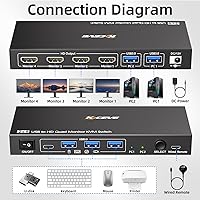
The Camgeet 204UH Quad Monitor KVM Switch is built for a specific kind of power user: someone who runs two computers — a work machine and a personal one, or a desktop alongside a laptop — and wants all four monitors, the keyboard, mouse, and printer to follow a single button press. Home office workers who context-switch between an employer-managed laptop and a personal desktop will get the most out of it, especially if their existing monitors top out at 1080p and they have no immediate plans to upgrade to 4K displays. Developers who keep a Linux box and a Windows workstation side by side, or hybrid employees sharing one physical desk between two computing environments, will find this four-screen switcher genuinely reduces the daily friction of cable-swapping. The setup does require driver installation and patience on first run, so buyers who are comfortable with a bit of software configuration and are running 11th-gen Intel or equivalent hardware will have the smoothest experience. If that profile matches yours and your monitors are already HDMI-connected at 1080p, this dual-PC display hub fills a gap that very few other devices address at any price.
Not suitable for:

The Camgeet 204UH Quad Monitor KVM Switch is a hard pass for anyone on older hardware — if your CPU predates 11th-gen Intel or its AMD equivalent, the driver will not function and the device will not work, full stop. Users who own 4K monitors, high-refresh-rate gaming displays, or panels used for color-critical design and photo editing should also look elsewhere; the USB-based video architecture caps everything at 1080p at 60Hz with no exceptions. This four-screen switcher is equally unsuitable for buyers who rely on hotkey switching to stay keyboard-focused — that feature is absent, and there is no workaround. Anyone who needs EDID emulation to prevent monitors from resetting their input preferences when switching will run into problems, as that is not supported either. Finally, if you frequently update your OS or work in an environment where system updates are pushed automatically, the driver fragility reported after Windows feature updates makes this a risky choice for a mission-critical workstation.
Specifications

  • Brand: Manufactured by Camgeet, a peripheral accessories brand focused on multi-display and KVM switching solutions.
  • Supported PCs: Connects up to 2 computers simultaneously, allowing either machine to take control of all shared peripherals and displays.
  • Monitor Outputs: Equipped with 4 HDMI output ports, enabling a single connected PC to drive four separate monitors at once.
  • Max Resolution: Supports a maximum output resolution of 1080p at 60Hz across all four HDMI ports; higher resolutions are not supported.
  • Display Modes: Operates in both mirror mode (identical image on all screens) and extended mode (separate desktop areas across all four monitors).
  • USB Ports: Features 4 USB 3.0 ports with data transfer speeds of up to 5 Gbps, backward compatible with USB 2.0 and USB 1.1 devices.
  • PC Connection: Each computer connects to the switch via a single USB 3.0 cable, with video output handled through USB display driver technology rather than native GPU output.
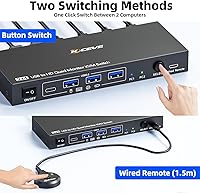
  • Switching Methods: Supports two switching methods: a physical button on the unit and a wired remote control included in the box for desk-level operation.
  • Driver Requirement: A software driver must be installed on each connected PC before monitors can be detected; the device does not function as plug-and-play for display output.
  • CPU Requirement: Requires an 11th-generation Intel processor or AMD equivalent at minimum; the driver will not function correctly on older CPU generations.
  • OS Compatibility: Compatible with Windows and macOS operating systems; Linux support is not officially stated or confirmed.
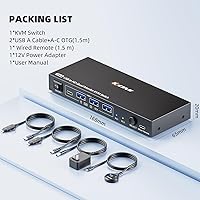
  • Included Cables: Comes with 2 USB 3.0 cables for connecting the two PCs; HDMI cables for monitor connections are not included and must be sourced separately.
  • Wired Remote: A wired remote control is included in the package, allowing users to switch the active computer without touching the main unit.
  • LED Indicators: Onboard LED indicators clearly display which computer is currently active, eliminating guesswork during switching.
  • Dimensions: The unit measures 6.69 × 2.56 × 0.79 inches, making it compact enough to sit on a desk or mount behind a monitor arm.
  • Weight: The switch weighs 8.75 ounces, light enough that cable tension is generally a bigger placement consideration than the unit itself.
  • EDID Emulation: EDID emulation is not supported, meaning monitors may reset their input and resolution preferences when switching between computers.
  • Hotkey Switching: Keyboard hotkey switching is not supported; users must use either the physical button or the included wired remote to change the active computer.
  • Power Supply: Operates at 5 volts with a 2-amp current rating, powered via USB connection rather than a separate external power adapter.
  • Protection Rating: Carries an IP54 rating, indicating resistance to dust ingress and splashing water, though it is intended for indoor desktop use.

Related Reviews

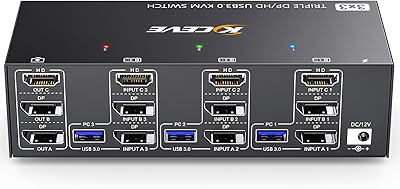
Camgeet KVM Switch 3 Monitors 3 Computers HDMI+2 DisplayPort
88%
95%
Display Resolution Support
93%
Multi-Computer Switching
89%
USB Connectivity
82%
Setup and Installation
91%
Compatibility Across OS
More
DXchip 8K Dual Monitor KVM Switch
85%
88%
Performance
91%
Ease of Use
94%
Visual Quality (Resolution & Clarity)
87%
USB Transfer Speed
83%
Build Quality
More
MLEEDA 8K Dual Monitor KVM Switch
86%
92%
Visual Performance
88%
Ease of Setup
85%
Build Quality
90%
USB Connectivity
75%
Switching Reliability
More
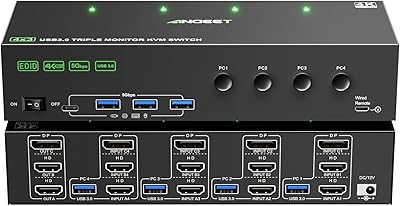
ANGEET KVM Switch 3 Monitors 4 Computers
87%
90%
Performance Stability
93%
Ease of Setup
85%
Display Quality
88%
Compatibility with Multiple OS
91%
Switching Convenience (Wired Remote)
More
MLEEDA 202CH Dual Monitor KVM Switch
75%
91%
Ease of Setup
84%
Dual 4K Display Performance
47%
Mac M1/M2 Compatibility
88%
USB-C Power Delivery (80W Charging)
72%
Switching Speed & Reliability
More
Viagkiki 2-Computer 1-Monitor KVM Switch
73%
91%
Ease of Setup
76%
Switching Reliability
68%
Video Quality & Resolution
61%
Build Quality & Durability
83%
Value for Money
More
MLEEDA Displayport KVM Switch 2 Computers 1 Monitor
84%
88%
Performance
92%
Ease of Setup
90%
Resolution Support
85%
USB Port Functionality
82%
Build Quality
More
AV Access iDock C10 KVM Docking Station
77%
93%
Build Quality
88%
Video Performance
81%
KVM Switching
89%
EDID Emulation
84%
Ethernet Reliability
More
AOOCOO 8K 3-Computer Dual Monitor KVM Switch
78%
88%
Dual-Monitor Configuration
83%
Video Signal Quality
74%
USB Peripheral Reliability
76%
Switching Speed
86%
Setup & Installation
More
NAWEN HDMI KVM Switch 4 Computers 1 Monitor
86%
89%
Performance
93%
Resolution Support (8K/4K)
91%
Ease of Setup
85%
USB 3.0 Performance
87%
Switching Reliability
More

FAQ

You cannot skip it. The Camgeet 204UH Quad Monitor KVM Switch uses USB-based video technology rather than passing a native GPU signal, so the driver is what tells your PC how to output video through the USB connection. Without it, your monitors simply will not be detected. When you first connect everything, the monitors themselves will display step-by-step instructions for the install, so follow that wizard carefully and you should be up and running within about 20 minutes.
Unfortunately, no. The minimum hardware requirement is an 11th-gen Intel processor or an AMD equivalent from a similar era. The driver relies on USB display capabilities introduced in more recent CPU generations, and there is no workaround for older hardware. This is one of the most common reasons buyers end up returning the unit, so check your CPU generation before purchasing.

The switch will physically connect to a 4K monitor via HDMI, but it will only output at a maximum of 1080p at 60Hz regardless of what your monitor supports. If you own 4K displays and want to use them at their native resolution, this four-screen switcher is not the right device for that setup.

This is a known pain point. Windows feature updates can sometimes break the installed display driver, causing monitors to stop being detected until the driver is reinstalled. It does not happen after every update, but it has been reported enough times that you should treat driver reinstallation as an occasional maintenance task rather than a one-time setup step.

No, hotkey switching is not supported on this device. Your two options are the physical button on the unit itself or the wired remote that comes in the box. The remote is genuinely useful for keeping the switch out of sight while still having easy desk-level control, but if keyboard shortcuts are important to your workflow, this is a real limitation to factor in.

According to Camgeet, the driver is used solely for monitor identification and does not log or transmit any personal information. That said, if you are working in a security-sensitive or corporate environment with strict software policies, you should verify with your IT team whether a third-party display driver is permitted before installing it on a managed machine.

Yes. The package includes two USB 3.0 cables for connecting your two PCs to the switch, but HDMI cables for the four monitor connections are not included. If you are setting this up for the first time with four monitors, factor in the cost of four HDMI cables when budgeting for the full setup.

They might, and this is because the switch does not support EDID emulation. EDID is the system that lets a monitor communicate its capabilities to a computer, and without emulation, some monitors reset their preferred resolution or input settings when the active computer changes. It is not universal, but it has been reported by users with certain monitor brands and is worth being aware of if your workflow is sensitive to display interruptions.

Yes, the switch is officially compatible with both Windows and macOS, so running a Mac on one input and a Windows machine on the other is a supported configuration. Both machines will need the driver installed independently. Some users report a slightly smoother initial setup on Windows, but macOS compatibility is genuine for systems meeting the hardware requirements.

The remote cable is adequate for most standard desk setups where the switch sits somewhere on or near the desk surface, but it is not an especially long run. If you plan to mount the unit behind a monitor or at the back of a deep desk, measure the distance first. A handful of buyers noted they wished the cable were longer for more flexible placement options.