Overview

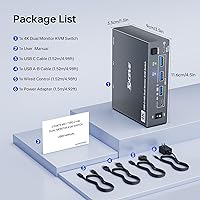
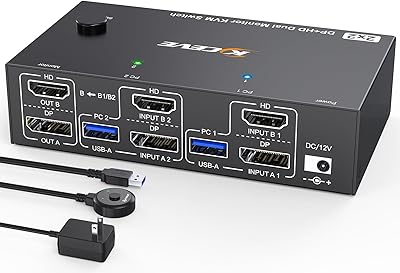
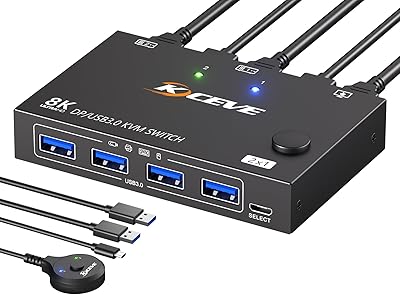
The MLEEDA 202CH Dual Monitor KVM Switch occupies a practical middle ground in the KVM market — not a bare-bones single-screen switcher, but not an expensive enterprise unit either. It's built squarely for home office users who run a work desktop and a personal laptop side by side and want both machines sharing two monitors and a full set of peripherals without cable chaos. Setup is genuinely plug-and-play; no drivers, no software required. The box includes a USB-C cable, a USB-A-to-B cable, a wired remote, and a power adapter, so you're not hunting for accessories on day one. MLEEDA isn't a household name yet, but the switch backs itself with a one-year replacement warranty and lifetime email support.
Features & Benefits

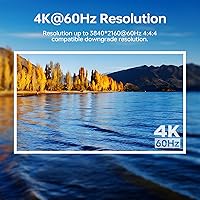
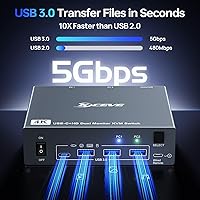
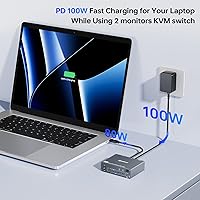
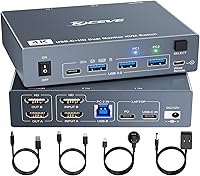
The headline spec is 4K at 60Hz on both monitors simultaneously — delivered through HDMI 2.0 on the desktop side and USB-C with DisplayPort 1.4a MST on the laptop side. If your monitors don't run 4K, the docking KVM steps down gracefully to 2560x1440 at 120Hz or 1080p at 144Hz. The 80W USB-C charging port means your laptop stays topped up all day without a separate power brick on the desk. Four USB 3.0 ports run at 5Gbps for keyboard, mouse, printer, or external drives. Display-wise, you choose between extended mode — two different screens — or mirror mode, which outputs identical images on both. No driver installation needed across Windows, macOS, Linux, or Chrome OS.

Best For

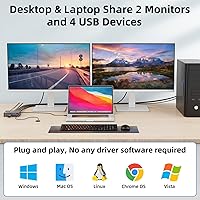
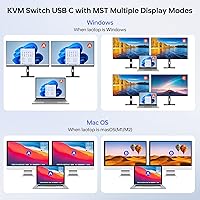
This docking KVM makes the most sense if you sit at one desk all day and need to flip between a corporate desktop and your own laptop without touching a single cable. Dual 4K screens, fast USB peripherals, and laptop charging all handled from one compact box — that's a real space and cost saving versus buying two separate docking stations. Developers and creatives who depend on extended display real estate will appreciate having the full screen count available on both machines. One group that genuinely needs to pause: Mac M1 and M2 users. Apple's chips don't support MST, so extended dual-screen mode simply won't function; both monitors will mirror the same image instead.

User Feedback

Buyers consistently praise the straightforward setup and the reliability of the 4K signal once both machines are connected. The wired remote earns appreciation from people who don't want to reach across their desk to switch — though anyone coming from premium KVMs with keyboard hotkey shortcuts will notice that feature's absence here. The most common complaint involves brief display re-detection delays when switching computers, where monitors go dark for a moment before the signal locks back in. A notable number of Mac owners discovered the dual-extend limitation only after purchase, which is a frustration worth knowing upfront. Customer service responses are generally described as helpful, though turnaround times aren't always fast.

Pros

  • Plug-and-play setup works across Windows, macOS, Linux, and Chrome OS without any driver installation.
  • Dual 4K at 60Hz output keeps both monitors sharp and stable for all-day productivity work.
  • The 80W USB-C charging port eliminates the need for a separate laptop power brick on the desk.
  • Four USB 3.0 ports at 5Gbps mean fast file transfers and reliable peripheral connections on both computers.
  • Included wired remote lets you switch machines without reaching behind or under your monitor setup.
  • Ships with all necessary cables — USB-C, USB-A-to-B, remote, and power adapter — ready to go out of the box.
  • Extend and mirror display modes give flexibility for both daily work and presentation scenarios.
  • Compact footprint fits neatly behind a monitor stand or on a crowded desk shelf without dominating the space.
  • One-year replacement warranty and lifetime email support offer reasonable coverage for a mid-range device.

Cons

  • M1 and M2 Mac users cannot run two independent extended screens — both monitors will mirror instead.
  • Switching between computers triggers a two-to-four-second blackout while monitors re-detect the new source.
  • No keyboard hotkey switching — the wired remote is the only hands-free option, which feels limiting.
  • The included USB-C cable is only 0.8 meters, too short for many real desk layouts.
  • Some users report intermittent USB drops with high-bandwidth devices immediately after switching computers.
  • Documentation is sparse, with little guidance on troubleshooting or non-standard configurations.
  • Email-only customer support means no quick resolution if something goes wrong during a critical workday.
  • The plastic build feels budget relative to competing switches at a similar price from more established brands.
  • No hotkey or software control means this switch is harder to integrate into automated or scripted workflows.

Ratings

The scores below for the MLEEDA 202CH Dual Monitor KVM Switch were generated by AI after analyzing verified buyer reviews from multiple regions, with spam, bot-generated, and incentivized feedback actively filtered out. Each category reflects the genuine balance of praise and frustration real users have reported — nothing is smoothed over to make the product look better than it is. Where strengths are clear, the scores reflect that; where recurring pain points emerged, those are captured honestly too.
Ease of Setup
91%
Most buyers had both monitors and all peripherals running within minutes of unboxing. The plug-and-play design means no driver downloads, no software conflicts — you connect the cables, plug in power, and it just works across Windows, macOS, Linux, and Chrome OS without fuss.
A small number of users reported needing to replug cables or restart machines to get the initial signal recognized, particularly when mixing different monitor brands. It's not a widespread issue, but worth knowing if your setup uses older displays.
Dual 4K Display Performance
84%
Running two monitors at 4K and 60Hz simultaneously is where this docking KVM earns its keep. Users doing design work or coding across extended screens consistently report sharp, stable output with no visible compression or flicker under normal desktop workloads.
A segment of buyers noticed occasional signal instability when switching rapidly between computers, with both monitors briefly going dark for a few seconds while the source re-negotiates. It is not a dealbreaker for most, but in fast-switching workflows it becomes noticeable.
Mac M1/M2 Compatibility
47%
53%
The MLEEDA switch does connect to M1 and M2 MacBooks without any driver installation, and a single external display works without issue. For users who only need one active monitor on their Mac, this limitation may be entirely irrelevant.
Because Apple silicon does not support MST, extended dual-screen mode simply does not function on M1 or M2 Macs — both monitors show the same mirrored image instead of independent workspaces. Many buyers discovered this only after purchase, which generated clear frustration in reviews.
USB-C Power Delivery (80W Charging)
88%
The 80W charging output is one of the more practical touches on this docking KVM. Users with power-hungry laptops like 14-inch MacBook Pros or Dell XPS models report keeping their machines fully charged throughout an eight-hour workday without needing a separate charger on the desk.
The 80W output requires using a USB-C power adapter — the included 12V/2A barrel adapter powers the unit itself, not the laptop charging port. Users who missed this distinction initially had to source a separate USB-C power supply, which added friction to setup.
Switching Speed & Reliability
72%
28%
Pressing the front panel button or using the wired remote triggers a clean switch between computers in most cases. Users who alternate between machines a handful of times per day find the response time perfectly adequate for a calm, structured workflow.
When switching occurs, monitors typically go dark for two to four seconds while displays re-detect the new source. For users who switch frequently throughout the day — say, during a call on one machine while referencing another — this lag is a consistent annoyance that several buyers explicitly called out.
Wired Remote Usability
76%
24%
The included 1.5-meter wired remote is a thoughtful inclusion that lets you switch computers without reaching across the desk to the main unit. Users who mount the switch behind a monitor or under a desk shelf particularly appreciate having this option.
The remote is a physical button on a cable — there are no keyboard shortcut or hotkey switching options. Power users coming from higher-end KVMs that support programmable hotkeys find this limiting, as it means one more physical object to keep accessible on an already busy desk.
USB 3.0 Peripheral Performance
83%
With four USB 3.0 ports running at up to 5Gbps, transferring large files from an external SSD feels noticeably fast compared to older KVMs with USB 2.0 hubs. Keyboard, mouse, and printer connections are stable across both connected computers without re-pairing on each switch.
A portion of users reported intermittent USB drops — particularly with high-bandwidth devices like external SSDs — immediately after switching computers. The issue appears inconsistent and may relate to specific device combinations rather than a universal flaw.
Build Quality & Form Factor
74%
26%
The unit is compact and light enough to tuck behind a monitor stand or mount on a desk shelf without occupying prime real estate. The plastic housing feels solid enough for stationary desk use, and the front panel button has a reassuring tactile click.
Compared to similarly priced alternatives from more established brands, the shell feels slightly budget in hand. It is not flimsy, but buyers expecting a premium metal chassis at this price point will likely be underwhelmed by the matte plastic construction.
Extend vs. Mirror Mode Clarity
69%
31%
Having both extend and mirror modes available in a single switch adds flexibility. Users who need mirror mode for presentations and extend mode for daily productivity genuinely value the ability to toggle between both without additional hardware.
Several buyers reported confusion about how to switch between the two modes, as the documentation is sparse and the labeling on the unit itself is minimal. A number of Mac users assumed they were in extend mode when the device had silently defaulted to mirror due to M1/M2 MST restrictions.
Cable Inclusion & Out-of-Box Readiness
86%
Shipping with a USB-C cable, a USB-A-to-B cable, the wired remote, and a power adapter means most buyers can complete their full setup without a single extra purchase. That is not universal in this product category, and frequent buyers of KVM gear noticed and appreciated it.
The included USB-C cable is only 0.8 meters long, which proved too short for users whose laptop sits away from the switch — on a laptop stand or to the side of the desk. Several buyers flagged needing to source a longer cable to make the layout work comfortably.
Cross-Platform OS Compatibility
81%
19%
Running one Windows desktop and one Linux laptop through the same switch without any driver configuration is exactly the kind of quiet reliability that makes a product earn long-term trust. Chrome OS users also reported full functionality without any workarounds.
The Mac M1/M2 dual-screen limitation casts a shadow over the otherwise strong compatibility story. Outside of Apple silicon, compatibility issues are rare, but the Mac scenario is significant enough that it should be a primary consideration for anyone in a mixed Mac-and-PC setup.
Value for Money
79%
21%
For users who need a KVM switch that handles dual 4K monitors, USB 3.0 peripherals, and laptop charging in one box, the price lands at a reasonable point relative to buying a docking station per machine. The all-inclusive cable bundle adds to the perceived value.
Buyers who encountered the Mac MST limitation, USB drop issues, or switching lag naturally feel the value proposition weakens. If your use case involves frequent switching or heavy USB bandwidth demands, you may find yourself considering a pricier alternative after a few weeks.
Brand Trust & Warranty Support
66%
34%
MLEEDA backs the switch with a one-year free replacement policy and lifetime email-based technical support, which is a reasonable commitment for a newer brand. Several buyers reported receiving helpful and timely responses when they reached out with setup questions.
MLEEDA does not yet carry the reputation or broad service infrastructure of established names in the KVM space. Some users reported slower-than-ideal email response times, and there is no live chat or phone support option — a drawback if you need urgent troubleshooting during a work-critical moment.
Documentation & User Guide Quality
58%
42%
The included user manual covers the basic connection layout clearly enough for most standard setups — single laptop to single desktop with two monitors. First-time KVM buyers following that exact configuration generally got up and running without confusion.
Beyond the basic setup diagram, the documentation is thin. Mode-switching instructions, troubleshooting steps for display re-detection issues, and the Mac MST limitation are either buried or absent. Users with non-standard setups frequently turned to forums rather than the manual for answers.

Suitable for:

The MLEEDA 202CH Dual Monitor KVM Switch is a strong fit for home office professionals who run a work desktop and a personal laptop at the same desk and want both machines sharing two monitors, a keyboard, a mouse, and other peripherals without re-plugging anything. If your typical day involves flipping between a company-issued tower and your own laptop a few times — checking personal email, jumping onto a side project, or separating work and personal environments cleanly — this docking KVM handles that transition without drama. Developers and creative professionals who rely on extended dual-screen setups will find the 4K output and fast USB 3.0 hub genuinely useful across both machines, particularly if they also need to charge a laptop throughout the day. The plug-and-play nature makes it approachable for people who are not especially technical; there is no software to configure, no drivers to hunt down, and the included cable bundle means you can complete the full setup in one sitting. Windows, Linux, and Chrome OS users especially get the best overall experience from this switch.
Not suitable for:

If you own an Apple MacBook with an M1 or M2 chip and you need two genuinely independent screens in extended mode, this docking KVM will disappoint — Apple silicon does not support MST, so both monitors will display the same mirrored image regardless of your settings, and there is no firmware workaround for this. Power users who switch between computers frequently throughout the day — say, ten or more times — will likely find the two-to-four-second display re-detection pause frustrating enough to look at pricier alternatives with faster signal handoff. Anyone who relies on keyboard hotkeys to switch inputs will find the wired remote a step backward from what higher-end KVMs offer. The MLEEDA 202CH Dual Monitor KVM Switch is also not the right pick for IT professionals or multi-computer setups needing more than two source machines, or for users requiring video output beyond HDMI — DisplayPort-only monitors will need an active adapter. Finally, buyers who prioritize brand pedigree and want established service infrastructure with phone or live chat support should factor in that MLEEDA is a newer player offering email-only assistance.
Specifications

  • Dimensions: The unit measures 4.61 × 3.54 × 1.30 inches, making it compact enough to tuck behind a monitor base or sit unobtrusively on a desk shelf.
  • Weight: At 9.35 ounces, the switch is light enough to mount or reposition without any hardware anchoring required.
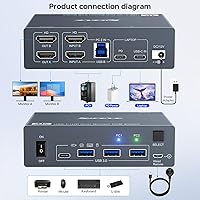
  • Video Inputs: Accepts one USB-C (MST) input for a laptop and one combined HDMI plus USB-B input for a desktop, supporting two source computers simultaneously.
  • Video Outputs: Provides two HDMI outputs capable of driving two monitors independently in extend mode or identically in mirror mode.
  • Max Resolution: Supports up to 4K at 60Hz per monitor via HDMI 2.0 and DisplayPort 1.4a (over USB-C MST).
  • Alt Resolutions: Also supports 2560×1440 at 120Hz, 2560×1440 at 60Hz, and 1920×1080 at 144Hz for high-refresh-rate monitor users.
  • USB Ports: Includes four USB 3.0 Type-A ports delivering up to 5Gbps data transfer, with backward compatibility for USB 2.0 and 1.1 devices.
  • PD Charging: One dedicated USB-C port provides up to 80W of Power Delivery output to charge a connected laptop during active use.
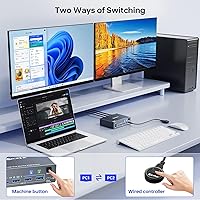
  • Switching Method: Computers can be switched using the physical button on the front panel or via the included wired remote with a 1.5-meter cable.
  • Display Modes: Supports both extend mode (two independent screens) and mirror mode (identical output on both monitors), selectable by the user.
  • OS Support: Compatible with Windows, macOS, Linux, and Chrome OS; no driver installation required on any supported platform.
  • Mac Limitation: Mac M1 and M2 systems do not support MST, so dual-monitor extended mode is unavailable on Apple silicon — both screens will mirror instead.
  • Included Cables: Package includes one USB-C cable (0.8 meters) and one USB-A to USB-B cable (1.5 meters) for connecting both source computers.
  • Power Supply: Powered by an included 12V/2A barrel-connector adapter; a separate USB-C power adapter is required if the 80W laptop charging port is to be used.
  • Wired Remote: The included wired remote features a single switching button on a 1.5-meter cable, with an LED indicator showing the active computer.
  • Warranty: Backed by a one-year free replacement guarantee and lifetime email-based technical support provided directly by MLEEDA.
  • Driver Required: No driver or software installation is needed; the switch operates as a plug-and-play device on all supported operating systems.
  • Brand: Manufactured by MLEEDA, a newer entrant in the KVM switch category focused on mid-range dual-monitor home office solutions.

Related Reviews

MLEEDA 8K Dual Monitor KVM Switch
86%
92%
Visual Performance
88%
Ease of Setup
85%
Build Quality
90%
USB Connectivity
75%
Switching Reliability
More
DXchip 8K Dual Monitor KVM Switch
85%
88%
Performance
91%
Ease of Use
94%
Visual Quality (Resolution & Clarity)
87%
USB Transfer Speed
83%
Build Quality
More
MLEEDA Displayport KVM Switch 2 Computers 1 Monitor
84%
88%
Performance
92%
Ease of Setup
90%
Resolution Support
85%
USB Port Functionality
82%
Build Quality
More
AV Access iDock C10 KVM Docking Station
77%
93%
Build Quality
88%
Video Performance
81%
KVM Switching
89%
EDID Emulation
84%
Ethernet Reliability
More
AV Access 4KSW21-DM Dual Monitor KVM Switch
77%
83%
Switching Speed & Reliability
86%
EDID Emulation Performance
88%
Video Quality at 4K
74%
Dual Operating Modes (KVM vs USB Mode)
71%
USB 3.0 Hub Performance
More
Minisopuru MK808M-US Dual Monitor KVM Switch Docking Station
84%
94%
Dual Monitor Performance
91%
USB Peripheral Compatibility
88%
Switching Convenience
90%
Build Quality
82%
Setup & Installation
More
TRENDnet TK-440DP 4-Port Dual Monitor DisplayPort KVM Switch
85%
92%
Video Quality
85%
Ease of Use
90%
Compatibility
88%
Build Quality
87%
USB Hub Functionality
More
TRENDnet TK-240DP Dual Monitor DisplayPort KVM Switch
79%
88%
4K Signal Stability
84%
Dual Monitor Switching
71%
Value for Money
63%
Audio Switching Reliability
79%
USB Hub Functionality
More
CKL 2x2 KVM Switch Dual Monitor HDMI 2.0 4K 60Hz
83%
88%
Ease of Setup
91%
Display Quality
85%
Switching Flexibility
84%
USB Hub Functionality
79%
Build Quality
More
MLEEDA 8-Port DisplayPort KVM Switch
86%
88%
Performance
85%
Video Quality (4K Support)
90%
USB 3.0 Data Transfer
92%
Ease of Installation
80%
Switching Modes (Panel/Remote/RS232)
More

FAQ

No, the MLEEDA 202CH Dual Monitor KVM Switch is fully plug-and-play. You just connect your computers and monitors using the included cables, plug in the power adapter, and it works. There is nothing to download on Windows, macOS, Linux, or Chrome OS.
Unfortunately, no. Apple M1 and M2 chips do not support MST (Multi-Stream Transport), which is the technology this docking KVM uses to drive two independent monitors from a single USB-C connection. What you will get on an M1 or M2 Mac is mirror mode — both screens showing the same image. If you need two genuinely different workspaces on a Mac, you would need a Mac with a dedicated GPU or a Thunderbolt dock designed specifically for Apple silicon.

Extend mode treats your two monitors as one large desktop — you can have different windows, apps, or content on each screen. Mirror mode outputs the exact same image on both monitors simultaneously, which is useful for presentations or when you want a second person to see your screen. You can toggle between the two modes as needed.

80W is enough to maintain charge on most mainstream laptops — including 14-inch MacBook Pros, Dell XPS models, and similar power-hungry machines — during active use. That said, the 80W output comes from a USB-C power adapter you supply separately; the included 12V/2A barrel adapter only powers the switch unit itself, not the laptop charging port. Make sure you have a compatible USB-C power brick available.

Most users report a two-to-four-second blackout on both monitors while the switch re-negotiates the display signal with the new source computer. It is not instant. For users who switch a few times a day this is perfectly manageable, but if you find yourself flipping between machines frequently throughout the day, that pause can become noticeable.

Yes. The four USB 3.0 ports support wireless keyboard and mouse receivers just like any standard USB hub. You plug the USB dongle in once, and both computers can use those peripherals after switching — no re-pairing needed.

That depends on where you position the switch. The included cable is 0.8 meters, which works fine if the switch sits close to your laptop. If your laptop is on a stand, off to the side, or farther than about two and a half feet from the switch, you will likely need a longer USB-C cable that supports DisplayPort Alt Mode. It is a common complaint, so worth measuring your desk before assuming the included cable reaches.

It is a physical button on a 1.5-meter cable — there are no keyboard shortcut or hotkey options. You press the button and the switch toggles to the other computer. If you are used to higher-end KVMs that let you tap a keyboard sequence to switch, this will feel like a step down. That said, having a 1.5-meter cable means you can position the remote where it is easy to reach without stretching across your desk.

All four USB 3.0 ports switch together with the video signal, so your keyboard, mouse, and any other connected peripherals are handed off to the newly active computer in the same action. You do not need to manage peripherals separately — one button press moves everything over.

MLEEDA offers a one-year free replacement warranty and lifetime email-based technical support. Buyers who have contacted support generally describe the responses as helpful, though turnaround times are not always fast given the brand's size. There is no phone or live chat option, so if you need immediate troubleshooting during a work-critical moment, you will be relying on email or community forums while you wait.