Overview

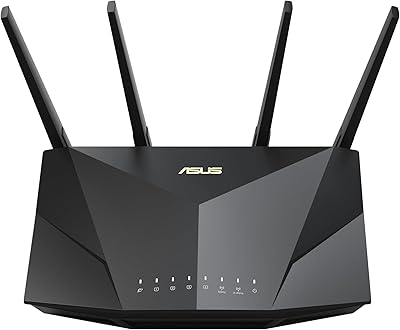
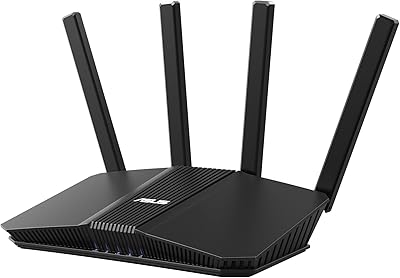
The ASUS RT-AX55 AX1800 WiFi 6 Router landed in late 2020 as a practical step up for households still running older WiFi 5 gear, and it has aged surprisingly well. Built around a 1.5GHz quad-core processor, this WiFi 6 router handles the kind of multi-device chaos that would bog down a cheaper option — think a dozen phones, laptops, and smart home gadgets all active at once. The dual-band design is rated for up to 3,000 square feet, which covers most apartments and mid-sized homes comfortably, though open floor plans will fare better than multi-story layouts. ASUS has a long track record in home networking, and this router reflects that experience without demanding a premium price.
Features & Benefits

What makes this ASUS router genuinely useful day-to-day is how it handles a packed network. WiFi 6 brings two key technologies — OFDMA and MU-MIMO — that allow it to communicate with multiple devices at the same time rather than taking turns, which matters when your household has phones, tablets, a smart TV, and a gaming console all demanding bandwidth simultaneously. The 5GHz band sustains over 1,200Mbps, plenty for 4K streaming or lag-sensitive video calls, while the 2.4GHz band extends reach for IoT devices. Security is handled by AiProtection Classic, a Trend Micro-backed feature that costs nothing extra — not enterprise-grade, but solid for home use. Four gigabit LAN ports and a built-in VPN round things out.

Best For

This WiFi 6 router hits a sweet spot for a specific kind of buyer. If you live in an apartment or a medium-sized home and your network is straining under 10 to 20 devices — phones, laptops, smart speakers, a streaming box — the RT-AX55 is a logical, no-nonsense upgrade. Families will appreciate the built-in parental controls that require no monthly subscription to activate. It also suits small home offices where a few reliable wired connections need to coexist with wireless. If you are managing a large multi-story house or need USB-based NAS storage, this router starts to show its limits — there are better-equipped options for those scenarios.

User Feedback

Buyers consistently point to easy app-based setup as a standout — most get up and running in under ten minutes, which is not always the case with networking hardware. Speed improvements over older routers are frequently noted, particularly in homes that had been limping along on aging WiFi 5 equipment. The lifetime security feature gets mentioned repeatedly as a deciding factor; people appreciate not being nudged toward a subscription after purchase. On the other side, the absence of a USB port is a genuine inconvenience for anyone hoping to share a printer or attach network storage. Some power users find the firmware less flexible than higher-end ASUS models, and a handful report weaker signals in larger or wall-heavy homes.

Pros

  • WiFi 6 support with OFDMA meaningfully reduces network congestion when 15 or more devices are active simultaneously.
  • Lifetime AiProtection security is included at no extra cost — no annual renewal fees to budget for.
  • App-based setup gets most users online in under ten minutes with no technical background required.
  • Four gigabit LAN ports comfortably support a console, desktop, smart TV, and a switch at the same time.
  • The quad-core processor keeps performance steady during peak household usage without noticeable slowdowns.
  • Built-in parental controls with scheduling and content filtering require no subscription to activate or maintain.
  • The Instant Guard VPN adds a practical layer of protection for users who connect to public networks regularly.
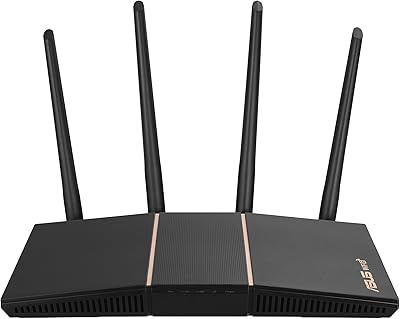
  • Compact and low-profile design fits on a shelf or desk without requiring dedicated space or external antennas.
  • Regular firmware updates from ASUS have addressed early software issues and improved long-term stability.
  • For households upgrading from WiFi 5, the real-world speed and reliability improvement is consistently noticeable.

Cons

  • No USB port means there is no way to attach a shared drive or printer directly to the network.
  • Real-world coverage in multi-story or wall-heavy homes often falls short of the advertised 3,000 square foot figure.
  • Firmware options are limited compared to higher-end ASUS models, frustrating users who want granular network control.
  • Parental controls lack detailed activity reporting, so parents cannot review specific browsing history or flag visited sites.
  • Alexa integration is narrow in scope and rarely useful beyond a few basic voice commands.
  • Mesh expansion works technically via AiMesh, but this router performs better as a node than as a primary mesh hub.
  • Under very heavy concurrent load — 25 or more active devices — processing limits can begin to surface.
  • The power adapter cable is short enough to restrict placement flexibility depending on outlet locations.
  • No wall-mounting hardware is included, requiring users to source brackets separately for a cleaner installation.
  • Competing WiFi 6 routers have closed the price gap since launch, slightly softening the value argument over time.

Ratings

The ASUS RT-AX55 AX1800 WiFi 6 Router has been evaluated using AI analysis of thousands of verified global user reviews, with spam, bot submissions, and incentivized feedback actively filtered out to ensure the scores reflect genuine buyer experiences. Ratings span both the strengths that keep this router consistently well-regarded and the real-world frustrations that surface after extended daily use. Nothing has been smoothed over — the scores reflect what actual households encountered.
Wireless Performance
83%
Users upgrading from WiFi 5 gear consistently report a noticeable reduction in buffering during 4K streaming and fewer dropped connections during video calls. Homes with 12 to 18 simultaneously connected devices tend to report the steadiest improvement, crediting OFDMA for keeping traffic organized rather than chaotic.
Performance on the 2.4GHz band is adequate but unremarkable — older smart home devices still occasionally struggle with congestion. Some users in densely populated apartment buildings note interference from neighboring networks that the router cannot fully compensate for.
Setup & Ease of Use
91%
The ASUS Router app walks most users through the entire configuration process in under ten minutes, including network naming, password setup, and a basic security scan. Even buyers with no prior networking experience consistently describe the process as straightforward and confidence-inspiring.
A small portion of users hit snags when configuring more advanced features like the VPN or custom DNS settings, finding the in-app guidance insufficient. Those who prefer a browser-based interface occasionally find the mobile-first design approach mildly frustrating.
Coverage & Range
72%
28%
In open-plan apartments and single-story homes up to roughly 2,500 square feet, the RT-AX55 delivers reliable coverage without dead zones. Beamforming helps direct signal toward active devices rather than broadcasting uniformly, which noticeably benefits users in rooms adjacent to the router.
The 3,000 square foot rating assumes favorable conditions that many real homes do not have — thick walls, multiple floors, or older construction materials can shrink effective range considerably. Users in two-story homes or layouts with multiple partitioned rooms frequently report weaker signal on the far end of the house.
Value for Money
88%
At its price point, few dual-band WiFi 6 routers bundle lifetime security, a built-in VPN, parental controls, and four gigabit LAN ports without asking for ongoing subscription fees. Buyers who previously paid monthly for third-party security software appreciate that cost being absorbed into the hardware purchase.
As competition in the budget WiFi 6 segment has intensified since 2020, a handful of newer alternatives now offer comparable specs at a lower price. Buyers who discover this after purchase occasionally feel the value proposition has softened slightly over time.
Build Quality & Design
74%
26%
The router has a compact, low-profile footprint that fits neatly on a shelf or desk without dominating the space around it. The matte black finish resists visible dust and fingerprints better than glossy alternatives, and the unit runs noticeably cool during sustained use.
The plastic chassis feels utilitarian rather than premium — applying any lateral pressure reveals some flex that more expensive routers avoid. The fixed internal antennas also mean there is no way to physically adjust signal direction, which some users find limiting compared to external-antenna designs.
Security Features
82%
18%
AiProtection Classic provides real-time network monitoring, malicious site blocking, and vulnerability detection without charging a recurring fee — a meaningful advantage for budget-conscious families who want more protection than a bare router offers. The Instant Guard VPN is a practical bonus for users who frequently connect to public Wi-Fi.
AiProtection Classic is a trimmed-down version of Trend Micro's full commercial suite, so it should not be treated as a substitute for endpoint antivirus software on individual devices. Advanced users managing a home lab or small business network may find its threat detection capabilities insufficient for their needs.
Parental Controls
79%
21%
The app-based parental controls allow per-device scheduling, content category filtering, and internet pause — practical tools for parents managing screen time across multiple children and devices without needing a separate subscription service. Setup takes only a few minutes and changes take effect almost immediately.
The filtering categories are fairly broad, and parents looking for granular control over specific apps or platforms will find the options limited compared to dedicated parental control services. There is also no detailed activity reporting, so parents cannot review browsing history or flag specific sites visited.
LAN Port Availability
77%
23%
Four gigabit Ethernet ports is a generous allocation at this price tier, comfortably supporting a wired desktop, a gaming console, a smart TV, and a network switch simultaneously. Wired connections through these ports are consistently fast and stable, with no throughput degradation reported under typical household load.
The absence of a USB port is a recurring complaint — users who want to attach an external drive for basic NAS functionality or share a printer across the network have no native way to do so. This omission forces some buyers to add a separate network switch or NAS device to their setup.
App & Firmware Experience
68%
32%
The ASUS Router app covers the essentials well — network monitoring, device management, guest network toggling, and basic QoS settings are all accessible without logging into a browser interface. Regular firmware updates have addressed stability issues reported in the router's earlier software versions.
Power users who are accustomed to ASUS's higher-end Merlin-compatible firmware will find the RT-AX55's software environment notably more restricted. Some advanced networking options available on pricier ASUS models — like detailed traffic analysis or custom routing rules — are either absent or buried behind unintuitive menus.
Multi-Device Handling
81%
19%
The quad-core processor handles concurrent connections from a full household of devices without the sluggishness that single-core budget routers show when traffic peaks. Users working from home while family members stream and game simultaneously report fewer of the mid-session slowdowns that plagued their previous routers.
Under extreme load — think 25 or more active devices with several running high-bandwidth tasks simultaneously — the router begins to show its processing limits. This is an edge case for most households, but users in larger families or those running frequent large file transfers may eventually hit a ceiling.
Installation & Physical Setup
86%
The included quick-start guide is clear enough that most users never need to consult a separate tutorial. The physical port layout is sensibly organized on the rear panel, and the included RJ-45 cable is long enough to be immediately useful rather than a token inclusion.
The router ships without any mounting hardware, so wall or shelf mounting requires sourcing brackets separately. The power adapter cable is also on the shorter side, which can limit placement options depending on where the nearest outlet is located relative to the ideal router position.
Latency & Gaming Performance
76%
24%
For casual to mid-level online gaming, the RT-AX55 delivers acceptably low latency on wired connections and on the 5GHz band when the device is in the same room or an adjacent one. QoS settings allow users to manually prioritize gaming traffic over background downloads.
Dedicated competitive gamers who scrutinize ping times may find the latency performance less consistent than purpose-built gaming routers offer. The QoS implementation is relatively basic, and automated traffic prioritization does not always correctly identify gaming packets without manual intervention.
Mesh & Network Expansion
63%
37%
The RT-AX55 does support AiMesh, which means it can technically pair with other compatible ASUS routers to extend coverage across a larger home without starting from scratch. For users already in the ASUS ecosystem, this is a useful pathway to broader coverage.
Mesh performance with this router as the primary node is adequate but not impressive — it works best paired with a more capable ASUS router as the node rather than being the backbone of a larger mesh system. Users expecting plug-and-play mesh expansion comparable to dedicated mesh systems like Eero or Orbi will likely be disappointed.
Alexa & Smart Home Integration
58%
42%
Alexa compatibility allows users to perform basic network controls via voice command, which is a minor convenience for households already embedded in the Amazon smart home ecosystem. Pairing is straightforward for users familiar with the Alexa app.
In practice, Alexa integration is limited to a narrow set of commands — users cannot perform meaningful network management or diagnostics through voice. Most buyers treat this feature as a checkbox rather than something they rely on, and it rarely influences purchase decisions one way or the other.

Suitable for:

The ASUS RT-AX55 AX1800 WiFi 6 Router is a strong fit for households that have outgrown their older WiFi 5 equipment and want a meaningful upgrade without entering premium pricing territory. It handles the reality of modern home networks well — families juggling a mix of phones, laptops, smart TVs, gaming consoles, and IoT gadgets will notice fewer slowdowns and more consistent connections compared to a single-band or older dual-band router. Renters and homeowners in apartments, condos, or single-story homes up to around 2,500 square feet in practice will find the coverage reliable without needing a mesh system on top. Parents specifically benefit from the built-in parental controls and content filtering, which work without a subscription and can be managed quickly from a phone. Small home office setups that need a few solid wired connections alongside wireless access for the rest of the household are also well served by the four gigabit LAN ports.
Not suitable for:

The ASUS RT-AX55 AX1800 WiFi 6 Router is not the right choice for everyone, and being honest about that matters. If your home spans multiple floors, has thick concrete or brick walls, or exceeds 2,500 square feet in a non-open layout, you will likely hit real coverage gaps that a single router cannot bridge — a mesh system or a higher-power option would serve you better. Anyone who needs to attach a USB storage drive for network-accessible backups or share a printer across the household will be disappointed, as there is no USB port on this model. Advanced users who want deep firmware customization, detailed traffic analytics, or compatibility with third-party open-source firmware should look at higher-end ASUS models or alternatives that support those features natively. Competitive gamers who prioritize the absolute lowest latency and want dedicated gaming-optimized traffic management will also find this router lacking the specialized controls they need.
Specifications

  • WiFi Standard: The router supports 802.11ax (WiFi 6) along with backward-compatible 802.11a, 802.11n, 802.11g, and 802.11ac standards.
  • Frequency Bands: Dual-band operation covers both the 2.4GHz band (up to 574Mbps) and the 5GHz band (up to 1201Mbps) for a combined throughput of 1800Mbps.
  • Processor: A 1.5GHz quad-core processor manages concurrent network traffic across multiple connected devices without significant performance degradation.
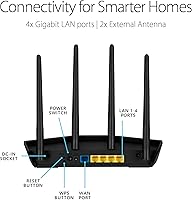
  • LAN Ports: Four gigabit Ethernet LAN ports provide wired connectivity for devices such as desktop computers, gaming consoles, smart TVs, and network switches.
  • WAN Port: One gigabit Ethernet WAN port connects the router to a cable or fiber modem from your internet service provider.
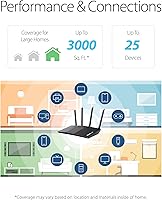
  • Coverage Area: ASUS rates the router for spaces up to 3,000 square feet under ideal open-plan conditions; real-world coverage varies by layout and building materials.
  • Security: AiProtection Classic, powered by Trend Micro, provides lifetime network-level threat detection and malicious site blocking at no recurring subscription cost.
  • VPN: ASUS Instant Guard enables a one-click personal VPN connection for secure browsing on untrusted public networks, managed through the ASUS Router app.
  • MU-MIMO: Multi-User MIMO support allows the router to communicate with several devices simultaneously rather than sequentially, reducing wait times during peak usage.
  • OFDMA: Orthogonal Frequency Division Multiple Access (OFDMA) divides each channel into smaller sub-channels, improving efficiency when many devices are active at once.
  • Beamforming: Beamforming technology focuses the wireless signal toward connected devices rather than broadcasting in all directions equally, improving effective range and stability.
  • Parental Controls: Built-in parental controls via the ASUS Router app support per-device scheduling, content category filtering, and instant internet pause with no subscription required.
  • Guest Network: A separate guest network mode allows visitors to access the internet without exposing the primary home network or its connected devices.
  • Alexa Support: The router is compatible with Amazon Alexa for basic voice-command network management within an existing Amazon smart home setup.
  • Dimensions: The unit measures 9.06″ x 5.28″ x 2.2″, offering a low-profile footprint suitable for shelf or desk placement without external antennas.
  • Weight: The router weighs 13.1 ounces, making it lightweight and easy to reposition during initial setup or relocation.
  • Power Input: The included power adapter operates at 110 Volts AC, suitable for standard North American electrical outlets.
  • In the Box: The package includes the RT-AX55 router, a power adapter, one RJ-45 Ethernet cable, a quick-start guide, and a warranty card.
  • OS Compatibility: The ASUS Router app and web interface are compatible with Microsoft Windows, Mac OS, Linux, and Apple iOS for configuration and management.
  • First Available: The router was first made available in September 2020 and has received ongoing firmware updates from ASUS since launch.

Related Reviews

ASUS RT-AX1800S
ASUS RT-AX1800S
79%
88%
Value for Money
79%
WiFi Speed & Performance
74%
Coverage & Range
83%
Setup & Ease of Use
67%
Router App Experience
More
ASUS RT-AX86U WiFi 6 Gaming Router
84%
91%
Wireless Performance
88%
Gaming Latency
86%
Range & Coverage
79%
Setup & Ease of Use
74%
Value for Money
More
ASUS RT-AX57 WiFi 6 Router
86%
88%
WiFi Performance
91%
Setup & Installation
93%
Security Features
85%
Network Stability
75%
Coverage Range
More
ASUS RT-AX88U PRO WiFi 6 Router
77%
88%
Wireless Performance
84%
Range & Coverage
91%
Multi-Device Handling
57%
Setup Experience
79%
Build Quality
More
ASUS RT-AX82U
ASUS RT-AX82U
82%
88%
Wireless Performance
91%
Gaming Latency
93%
Setup & Ease of Use
71%
Range & Coverage
82%
Build Quality & Design
More
ASUS RT-AX5400 WiFi 6 Dual-Band Router
80%
84%
WiFi Speed & Throughput
71%
Coverage & Range
88%
Setup & Ease of Use
91%
Built-in Security (AiProtection)
83%
Parental Controls
More
ASUS RT-AXE7800 Tri-Band WiFi 6E Router
79%
88%
Wireless Performance
83%
Setup & Installation
79%
Signal Range & Coverage
91%
Network Security
84%
Parental Controls
More
ASUS RT-BE82U WiFi 7 Dual-Band Router
84%
88%
Wireless Performance
93%
Wired Connectivity
82%
Setup & Ease of Use
74%
Firmware & Software
86%
AiMesh Integration
More
ASUS RT-BE58U WiFi 7 Router
80%
83%
Wireless Performance
81%
Range & Coverage
91%
Setup & Ease of Use
88%
Security Features
86%
Smart Home & IoT Management
More
ASUS RT-ACRH18 AC1750 Dual-Band WiFi Router
68%
88%
Setup & Installation
74%
Wi-Fi Speed & Performance
69%
Wireless Range & Coverage
66%
Connection Stability
71%
Multi-Device Handling
More
ASUS RT-BE86U BE6800 Dual-Band WiFi 7 Router
77%
83%
Wireless Performance
91%
Wired Connectivity
77%
Setup & Ease of Use
58%
Mobile App Experience
62%
Firmware Stability
More

FAQ

Not at all — the router is fully backward compatible with older WiFi 5, WiFi 4, and earlier devices. Older devices will simply connect using the best standard they support. That said, you will see the biggest improvements in speed and reduced congestion on devices that natively support WiFi 6.

It depends heavily on your layout. In an open-plan apartment or single-story home, you can get close to that figure. But if you have multiple floors, thick walls, or a lot of interior partitions, expect the effective range to be closer to 1,800 to 2,500 square feet. No single router handles every floor plan equally well.

It is genuinely free for the life of the router — no trial, no credit card required. ASUS licenses the Trend Micro-backed protection and includes it as a built-in feature. Just keep in mind it provides network-level protection and is not a replacement for antivirus software on individual devices.

Unfortunately, no. This router does not have a USB port, so there is no native way to attach external storage or share a printer over the network. If network-attached storage is important to you, you would need a separate NAS device or a router model that includes USB connectivity.

It is one of the easier routers to get started with. The ASUS Router app guides you through the process step by step, and most users are fully connected within ten minutes of unboxing. You do not need any prior networking knowledge to complete the basic setup.

For casual to mid-level online gaming it performs well, especially over a wired connection or on the 5GHz band from a nearby room. The QoS settings let you manually prioritize gaming traffic. Competitive players who are sensitive to every millisecond of latency may eventually want a router with more specialized gaming features, but for the vast majority of gamers this is more than adequate.

Yes, the ASUS RT-AX55 AX1800 WiFi 6 Router supports AiMesh, which lets it pair with other compatible ASUS routers to extend your network. It works best as a secondary node rather than the main hub if you are building a larger mesh system, but it is a workable option for expanding coverage without replacing your setup entirely.

Everything is managed through the ASUS Router app on your phone. You can set up time schedules for specific devices, block content categories, and pause internet access with a tap. There is no separate app or account needed, and no subscription fee to unlock the features.

It remains a solid choice for its intended use case — medium-sized homes with a moderate number of devices that need a reliable, no-fuss WiFi 6 upgrade. Newer options have entered the market at similar prices, so it is worth comparing before buying, but the RT-AX55 still holds its own on core performance and value, particularly given the lifetime security inclusion.

Most users report it running stably for weeks or months at a stretch without needing a manual restart. Occasional firmware updates may prompt a reboot, but day-to-day it is a set-and-forget device for the majority of households. A small number of users in earlier firmware versions reported intermittent stability issues, most of which ASUS has since addressed through updates.

Where to Buy