Overview

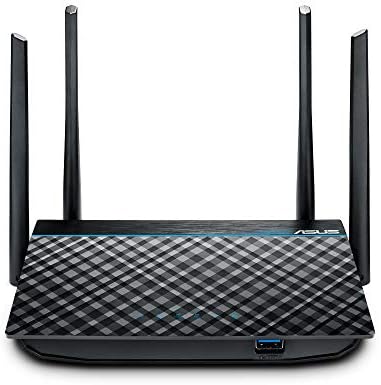
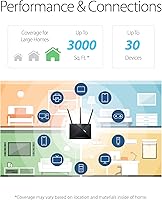
The ASUS RT-ACRH18 AC1750 Dual-Band WiFi Router is a straightforward, no-fuss option for everyday home users who want dependable coverage without wrestling with complicated settings. ASUS has a solid reputation in the networking space, and this router reflects that — competent hardware at an accessible price. It claims coverage up to 3,000 square feet, which realistically holds up well in a one-story home, a mid-sized apartment, or a condo layout. Expect smooth performance for HD streaming, video calls, and general browsing. Just don't expect it to anchor a multi-floor house or handle a dozen simultaneous bandwidth-hungry connections. Light-to-moderate households will find it more than capable; power users will likely feel its ceiling quickly.
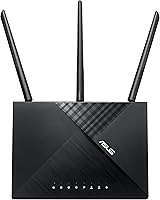
Features & Benefits

The RT-ACRH18 runs on two separate bands — 2.4 GHz for range and 5 GHz for speed — letting you push laptops and streaming devices onto the faster band while leaving phones and smart-home gadgets on the other. MU-MIMO technology allows the router to communicate with several devices at once rather than cycling through them one by one, though the real-world gain only shows when your devices actually support the standard. AiRadar beamforming focuses the signal toward connected devices rather than scattering it in every direction, which helps at coverage edges. There is also a USB 3.0 port for attaching an external drive or printer — a genuinely practical addition at this price tier. Setup and ongoing management, including parental scheduling, all run through the ASUS Router app.

Best For

This ASUS router makes the most sense for renters or homeowners in small-to-medium spaces — a single-floor house, a two-bedroom apartment — where you need solid, consistent coverage without overcomplicating things. Families will appreciate the built-in parental controls, which let you filter content and set access schedules directly from the app, no third-party subscription required. That said, the controls are fairly basic compared to what dedicated filtering tools offer. This dual-band router also suits households making their first real upgrade from a budget ISP modem-router combo, or anyone juggling five to ten devices across streaming, browsing, and video calls. Where it falls short is in more demanding scenarios — competitive gaming rigs, larger multi-story homes, or setups routinely pushing more than a dozen active connections.

User Feedback

With a 4.1-star average across more than 2,700 reviews, the RT-ACRH18 sits in solidly positive territory — but the picture is not entirely without blemish. Most owners highlight how quick and painless the initial setup is, and many report stable, consistent day-to-day performance in single-floor homes. The ASUS app draws praise for being reasonably intuitive, though some users run into account login friction that makes remote management more frustrating than it should be. Periodic reboots to restore performance come up often enough to be worth noting. The 5 GHz range, in particular, tends to fall short in larger or multi-wall environments. Long-term reliability is where opinions split most sharply — plenty of users report two-plus years of smooth operation, while others see noticeable degradation after the first year.

Pros

  • Setup takes under 30 minutes for most users, guided entirely by the ASUS mobile app.
  • Dual-band operation lets you separate high-demand devices from smart-home clutter with minimal effort.
  • Stable day-to-day performance for streaming, video calls, and general browsing in single-floor homes.
  • AiRadar beamforming delivers a noticeably more focused signal for stationary devices like smart TVs.
  • Built-in parental controls require no subscription — schedule access and filter content directly from the app.
  • USB 3.0 port enables basic network storage or printer sharing, a rare bonus at this price tier.
  • ASUS brand backing means real firmware update support and an established user community for troubleshooting.
  • Compact, understated design sits discreetly on a shelf without drawing attention in a living space.
  • Earned a 4.1-star consensus across more than 2,700 real-world buyer reviews — a strong signal of broad satisfaction.

Cons

  • Periodic reboots to restore full speed are reported often enough in long-term reviews to be a genuine nuisance.
  • 5 GHz range drops off quickly through walls or across floors, well short of marketed coverage figures.
  • App login issues and unexpected session timeouts frustrate users who rely on remote management.
  • MU-MIMO gains are minimal in mixed households where older devices lack support for the standard.
  • Parental controls are device-based only — no per-user profiles and relatively easy for tech-savvy kids to bypass.
  • Firmware updates have occasionally introduced new stability issues rather than resolving existing ones.
  • The unit runs noticeably warm under sustained load, which may contribute to degraded performance over time.
  • Long-term reliability is inconsistent — a meaningful share of owners report hardware or performance issues after year one.
  • Network storage speeds via the USB port are average at best and disappoint anyone expecting NAS-level performance.

Ratings

The ASUS RT-ACRH18 AC1750 Dual-Band WiFi Router has been scored below by our AI system after analyzing thousands of verified global buyer reviews, with spam, bot-generated feedback, and incentivized posts actively filtered out. The scores reflect the honest consensus of real users — strengths and frustrations alike — so you get a clear picture of where this dual-band router genuinely delivers and where it falls short before you commit.
Setup & Installation
88%
Getting this router up and running is one of its most consistently praised qualities. The ASUS Router app walks first-time users through the process in minutes, and most buyers report connecting their first device well within half an hour of opening the box — no networking background required.
A small but vocal group of users hit snags with the app requiring an ASUS account login for full functionality, which some found unnecessary and occasionally unreliable. A handful of users on older smartphones reported app compatibility issues that pushed them toward the browser-based setup instead.
Wi-Fi Speed & Performance
74%
26%
For typical home workloads — 4K streaming on one TV, a few video calls, and background browsing — the RT-ACRH18 handles the load without complaint. The 5 GHz band in particular delivers noticeably snappier throughput for devices within a reasonable distance of the router.
Throughput starts to feel constrained when several bandwidth-intensive tasks run at once, and real-world speeds on the 5 GHz band drop off faster with distance or through walls than the spec sheet implies. Users expecting consistent gigabit-class performance will be disappointed, especially on the 2.4 GHz band.
Wireless Range & Coverage
69%
31%
In open single-floor layouts — a mid-sized apartment or a ranch-style home — coverage is genuinely solid, reaching most corners without dead zones. Users in 1,200 to 1,800 square foot homes tend to report consistently strong signal throughout.
The advertised 3,000 square foot figure represents best-case conditions that most real homes do not offer. Multi-story houses, thick concrete walls, and interference from neighboring networks all trim the effective range considerably, and a number of users in larger spaces report weak signal on upper floors or in detached garages.
Connection Stability
66%
34%
Day-to-day, this ASUS router holds a steady connection well enough for households doing normal tasks. Video calls, streaming sessions, and remote work tend to run without interruption for the majority of users, particularly in the first several months of ownership.
Periodic reboots to restore full performance come up frequently enough in long-term reviews to be a real concern. Some users describe a gradual slowdown over weeks that a quick restart fixes, suggesting firmware or memory management issues that ASUS has not fully resolved across updates.
Multi-Device Handling
71%
29%
The combination of dual-band operation and MU-MIMO support means households with five to ten devices can distribute load reasonably well. Putting high-demand devices on the 5 GHz band while offloading smart-home gadgets to 2.4 GHz reduces congestion noticeably.
MU-MIMO benefits only materialize when client devices actually support the standard, and many older phones, tablets, and smart-home devices do not. In mixed households with a variety of device generations, the practical gain is often modest rather than transformative.
App & Management Experience
67%
33%
The ASUS Router app is cleaner and more approachable than what you get from most ISP-provided hardware. Everyday tasks like checking connected devices, running a speed test, or tweaking parental control schedules are all handled without digging through a dense web interface.
Mandatory account creation for cloud features frustrates users who prefer local-only management. Login sessions time out unexpectedly, and some users report the app losing track of the router entirely after firmware updates, requiring a re-pairing process that is more involved than it should be.
Parental Controls
61%
39%
Built-in content filtering and time-scheduling tools are accessible directly from the app at no extra cost — a genuine advantage for families who do not want to pay for a subscription-based filtering service. Setting screen time limits for specific devices is straightforward.
The controls are fairly blunt instruments compared to dedicated parental platforms. Category-based filtering lacks granularity, bypass via VPN is possible, and there is no per-user profile management — you are filtering by device, not by child. Families with older, tech-savvy kids may find the restrictions easy to work around.
Beamforming Effectiveness
63%
37%
AiRadar beamforming does produce a tangible improvement for stationary devices — a desktop PC or a smart TV in a fixed spot tends to get a more focused, stable signal compared to routers without the feature at this price tier.
The benefit is harder to perceive on mobile devices that move around the home, and in smaller spaces the advantage over standard broadcast is marginal. Users in larger homes notice that beamforming alone does not compensate for the router's overall range limitations.
USB Port Utility
58%
42%
Having a USB 3.0 port on a router at this price is a practical bonus. Users who attach an external drive report functional network storage that works reasonably well for light file sharing across a home network.
Transfer speeds over the network share are average at best and disappoint anyone expecting NAS-level performance. Printer sharing functionality works but requires some configuration that the app does not fully guide users through, leaving a few people relying on forum posts to complete setup.
Build Quality & Design
72%
28%
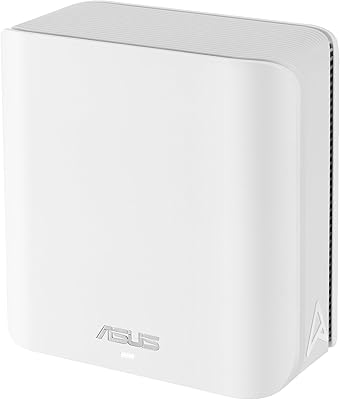
The RT-ACRH18 has a tidy, understated design that sits unobtrusively on a shelf or desk. At just over a pound, it feels well-constructed for its class, and the plastic casing shows no obvious cost-cutting that would raise durability concerns in normal home use.
The all-white finish is a fingerprint magnet, and the ventilation gaps can accumulate dust faster than expected in living environments. A few users note the unit runs noticeably warm under sustained load, which may contribute to the long-term reliability concerns reported after extended use.
Long-Term Reliability
57%
43%
Many buyers report trouble-free operation across two or more years, particularly those who keep firmware updated and position the router in a well-ventilated spot. For a budget-tier device, that kind of longevity is respectable.
A meaningful portion of reviews specifically mention performance degradation or outright hardware failure in the second year of use. The pattern is frequent enough to suggest the RT-ACRH18 is better suited as a short-to-medium-term solution than a long-horizon investment, especially in always-on households.
Firmware & Update Quality
59%
41%
ASUS does push firmware updates for this model, and some updates have addressed known stability bugs. Users who stay current with updates tend to report fewer recurring connection issues than those who leave the router on factory firmware.
Update history is inconsistent — some patches have introduced new stability issues rather than resolving them. The update process through the app is straightforward, but there is no automatic update scheduling, meaning less hands-on users often run outdated firmware without realizing it.
Value for Money
78%
22%
For a small-to-medium household that primarily needs reliable everyday coverage, this dual-band router delivers a reasonable return on investment. The feature set — dual-band, MU-MIMO, beamforming, USB port, app management — is genuinely competitive at its price point.
As household demands grow or the router ages past the one-year mark, the value calculation shifts. Buyers who end up needing to replace it within two years due to reliability issues will likely feel the overall cost-per-year is less favorable than it first appeared.

Suitable for:

The ASUS RT-ACRH18 AC1750 Dual-Band WiFi Router is a practical fit for anyone living in a single-story home, apartment, or condo who wants dependable whole-home coverage without the complexity of enterprise-grade hardware. First-time router buyers upgrading from the box their ISP handed them will find the setup process refreshingly painless, and the ASUS app makes day-to-day management accessible even with zero networking experience. Families with kids will appreciate having built-in parental controls that let them schedule screen time and filter content without paying for a separate subscription service — it is basic, but it covers the fundamentals. Households running five to ten connected devices across a mix of streaming, video calls, casual browsing, and smart-home gadgets will generally find the RT-ACRH18 keeps up without complaint. It also suits renters or buyers on a tighter budget who want a recognizable, reliable brand rather than gambling on a no-name alternative.

Not suitable for:

The ASUS RT-ACRH18 AC1750 Dual-Band WiFi Router is not the right call for anyone expecting it to cover a large multi-story house, a home with thick concrete walls, or a sprawling open-plan layout — the 3,000 square foot claim represents ideal conditions, and real-world range in more demanding environments falls noticeably short. Competitive gamers and remote workers who depend on rock-solid, low-latency connections at all hours should look at higher-tier hardware where throughput and stability headroom are substantially better. Households with more than ten to twelve simultaneously active devices — especially bandwidth-heavy ones — will start to feel the router strain under combined load. Parents who want sophisticated, granular parental controls with per-user profiles or robust bypass prevention will outgrow this router's built-in tools quickly. Finally, anyone planning to use this as a long-term cornerstone of a home network should weigh the mixed reliability feedback from the second year of ownership before committing.

Specifications

  • Brand & Model: Manufactured by ASUS under the model designation RT-ACRH18, a mid-range home router in the company's consumer networking lineup.
  • Wi-Fi Standard: Supports 802.11ac (Wi-Fi 5) along with legacy standards 802.11a, 802.11b, 802.11g, and 802.11n for broad device compatibility.
  • Wi-Fi Class: Rated AC1750, combining up to 450 Mbps on the 2.4 GHz band and up to 1300 Mbps on the 5 GHz band under ideal conditions.
  • Frequency Bands: Dual-band operation across 2.4 GHz and 5 GHz, allowing devices to be distributed across both bands to reduce congestion.
  • Coverage Area: Rated for up to 3,000 square feet of coverage, best achieved in open single-floor layouts without significant physical obstructions.
  • MU-MIMO: Supports MU-MIMO technology, enabling simultaneous data transmission to multiple compatible client devices rather than sequential communication.
  • Beamforming: Equipped with ASUS AiRadar beamforming, which focuses the wireless signal toward connected devices to improve stability and reduce signal scatter.
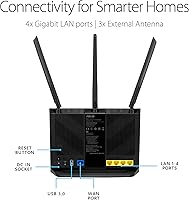
  • USB Connectivity: Includes one USB 3.0 port on the rear panel, usable for attaching external storage drives or a shared network printer.
  • Dimensions: Physical dimensions measure 8.66 x 6.30 x 3.43 inches, making it a compact unit suited to shelf or desk placement.
  • Weight: Unit weighs 1.03 pounds without cables, keeping it lightweight and easy to reposition during setup.
  • Power Input: Accepts AC input of 110V to 240V at 50–60 Hz, with a DC output of 12V at a maximum of 1.5A via the included power adapter.
  • Color & Finish: Available in white with a smooth plastic casing and passive ventilation slots along the top and sides.
  • Parental Controls: Offers app-based parental controls including content category filtering and time-based internet access scheduling, with no subscription required.
  • Setup Method: Initial configuration and ongoing network management are handled through the ASUS Router mobile app, available for iOS and Android.
  • Wireless Security: Supports WPA2-Personal and WPA2-Enterprise encryption protocols, along with WPS for simplified device pairing.
  • In the Box: Package includes the RT-ACRH18 router, a power adapter, a Quick Start Guide, and a warranty card.
  • User Rating: Holds a 4.1 out of 5 star average based on 2,733 verified ratings on Amazon as of the product listing date.
  • Release Date: First made available for purchase on April 7, 2021 under ASIN B0927P65W9.

Related Reviews

ASUS RT-AX1800S
ASUS RT-AX1800S
79%
88%
Value for Money
79%
WiFi Speed & Performance
74%
Coverage & Range
83%
Setup & Ease of Use
67%
Router App Experience
More
ASUS RT-ACRH13 AC1300 Dual Band WiFi Router
86%
88%
WiFi Performance
91%
Setup and Installation
90%
Value for Money
83%
Signal Coverage
89%
Ease of Use (Mobile App)
More
ASUS RT-AX5400 WiFi 6 Dual-Band Router
80%
84%
WiFi Speed & Throughput
71%
Coverage & Range
88%
Setup & Ease of Use
91%
Built-in Security (AiProtection)
83%
Parental Controls
More
Asus RT-AC1200 Wireless Dual-Band Router
83%
85%
Wi-Fi Performance
91%
Ease of Setup
78%
Coverage Range
88%
Parental Controls
81%
Streaming & Gaming Performance
More
ASUS RT-N66R Dual-Band Wireless-N900 Router
84%
87%
Performance & Speed
92%
Setup & Installation
89%
Signal Coverage
80%
Reliability & Stability
85%
Build Quality
More
ASUS RT-BE92U WiFi 7 Router
81%
88%
Wireless Performance
83%
Coverage & Range
84%
Setup & Initial Configuration
91%
Network Security (AiProtection)
86%
Latency & Gaming Performance
More
ASUS RT-AX89X AX6000 Dual Band Wi-Fi Router
86%
91%
Wi-Fi Performance
89%
Speed & Throughput
87%
Setup & Installation
84%
Build Quality
93%
Security Features
More
ASUS ZenWiFi BD4 Dual-Band WiFi 7 Mesh Router
86%
93%
Wi-Fi Performance
89%
Setup & Installation
91%
Security Features
88%
Gaming & Streaming Performance
84%
Value for Money
More
ASUS RT-BE82U WiFi 7 Dual-Band Router
84%
88%
Wireless Performance
93%
Wired Connectivity
82%
Setup & Ease of Use
74%
Firmware & Software
86%
AiMesh Integration
More
ASUS RT-AXE7800 Tri-Band WiFi 6E Router
79%
88%
Wireless Performance
83%
Setup & Installation
79%
Signal Range & Coverage
91%
Network Security
84%
Parental Controls
More

FAQ

It is genuinely one of the easier routers to get running. The ASUS Router app guides you step by step, and most first-time users report being fully connected within 20 to 30 minutes of opening the box. You do not need any networking background — just follow the on-screen prompts.

That depends heavily on your floor plan and building materials. In a typical two-story home, you will likely get solid coverage on the main floor but notice signal drop-off upstairs, especially through dense walls or ceilings. The 3,000 square foot figure assumes open, single-floor conditions — real-world multi-story coverage is usually noticeably less.

You can complete the basic local setup without an account, but certain app features — particularly remote management when you are away from home — require an ASUS account login. Some users find this unnecessary, and a few have reported session timeouts that require logging back in more often than expected.

For casual online gaming on a single device in a small space, it is adequate. However, if you are a competitive gamer who needs consistently low latency, or if you have multiple players gaming simultaneously, the ASUS RT-ACRH18 AC1750 Dual-Band WiFi Router is not purpose-built for that workload and you would benefit from a router with more advanced QoS controls and higher throughput headroom.
They cover the basics — you can block content categories and set daily time limits per device directly from the app without paying for anything extra. That said, the filtering is fairly coarse and operates at the device level rather than per user. Tech-savvy teenagers can potentially work around it using a VPN, so it is better suited for younger children than older ones.

Yes, the USB 3.0 port supports this. You can attach a compatible external drive and access it from other devices on your network through the ASUS app or a browser interface. Just keep expectations realistic — transfer speeds are functional for casual file sharing but fall well short of a dedicated NAS device.

It comfortably manages five to ten active devices for everyday tasks like streaming, browsing, and video calls. Push much beyond that with bandwidth-heavy devices all running simultaneously and you will start to feel the performance ceiling. Splitting devices across the two bands helps, but it is not a substitute for a more powerful router in a busy household.

Unfortunately, periodic reboots are a recurring theme in long-term user feedback. Many owners describe a gradual slowdown over days or weeks that a quick restart resolves. It is not a dealbreaker for most people, but it is worth knowing before you buy — especially if you are looking for a truly set-it-and-forget-it device.

The 2.4 GHz band has longer range but lower maximum speed and is more prone to interference from neighboring networks and household devices like microwaves. The 5 GHz band is faster but has shorter range and is better suited for devices that stay close to the router, like a laptop or smart TV. A good rule of thumb: put your streaming and computing devices on 5 GHz and let smart-home gadgets and phones in distant rooms use 2.4 GHz.

Plenty of users report trouble-free operation for two years or more, particularly those who keep the firmware updated and give the unit good ventilation. That said, a noticeable share of reviews mention performance degradation or failure in the second year of use. It is a solid short-to-medium-term solution, but if you are planning for a five-year horizon without thinking about replacements, the reliability track record suggests some caution.