Overview

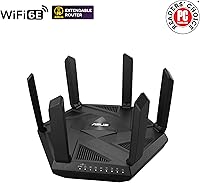
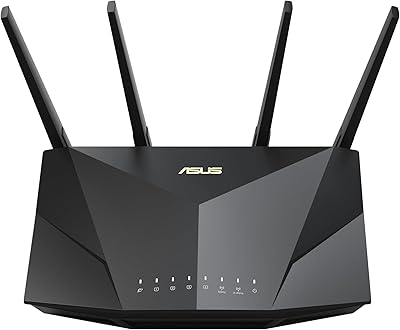
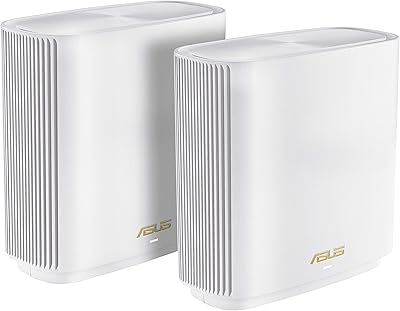
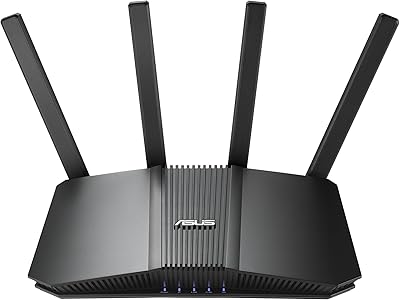
The ASUS RT-AXE7800 Tri-Band WiFi 6E Router sits in an interesting spot in the market — capable enough to impress serious home networking enthusiasts, but approachable enough that it doesn't require a networking degree to set up. The real story here is the 6 GHz band, a spectrum that's genuinely uncrowded in most neighborhoods right now, meaning far less interference than the perpetually congested 5 GHz. ASUS has a long track record in this space, and this model reflects that with a compact, low-profile design that won't look out of place on a shelf. That said, you'll get the most out of this tri-band router if your devices actually support WiFi 6E.
Features & Benefits

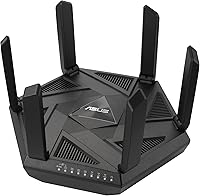
The tri-band setup here is well thought out: the 2.4 GHz band handles older smart home gadgets without complaint, 5 GHz covers everyday streaming and browsing, and the 6 GHz band is reserved for the fastest, lowest-latency connections. If you have a multi-gig internet plan, the 2.5G WAN port removes a chokepoint that most routers still impose. Security-wise, AiProtection Pro is included for life at no extra cost — though it does rely on ASUS cloud services, which some privacy-minded users may want to research before committing. The Instant Guard VPN is quietly one of the best built-in perks here: one tap and you have a shareable secure tunnel. AiMesh support rounds things out for anyone thinking about expanding coverage later.

Best For

This ASUS WiFi 6E router makes the most sense for households that already own WiFi 6E-capable devices — newer Android flagships, recent MacBooks, or gaming laptops — and want to put that 6 GHz headroom to immediate use. Gamers in particular will appreciate having a dedicated 6 GHz lane that isn't competing with every other device in the house. Families dealing with screen time battles will find the built-in parental controls genuinely useful, with per-device scheduling and content filtering that skips the third-party app subscription. Remote workers and frequent travelers get real value from Instant Guard too. And if you're already in the ASUS ecosystem with older routers sitting around, the AiMesh compatibility makes expanding coverage straightforward.

User Feedback

With a 4.2-star average across close to 600 ratings, the RT-AXE7800 lands in solid but not unanimous territory. Buyers consistently praise how easy the initial setup is through the ASUS app, and many note the signal range holds up well across larger homes. The security features draw positive comments, especially from parents. On the other side, a noticeable number of reviewers find the app cluttered, and the advanced routing settings carry a real learning curve once you move beyond the defaults. A few long-term owners report that firmware updates occasionally introduce minor bugs before patches arrive. Honestly, several buyers also note that 6 GHz speed gains were modest until they upgraded their client devices — which is simply the reality of being an early adopter.

Pros

  • The 6 GHz band offers a genuinely uncrowded wireless channel that meaningfully reduces interference in dense living environments.
  • Lifetime AiProtection Pro security means no annual subscription fee eating into long-term ownership costs.
  • Instant Guard VPN works with a single tap and requires no technical configuration, making secure remote access practical for non-technical users.
  • Per-device parental controls with content filtering and time scheduling are built in at no extra cost.
  • The 2.5G WAN port future-proofs the RT-AXE7800 for multi-gigabit internet plans without a hardware bottleneck.
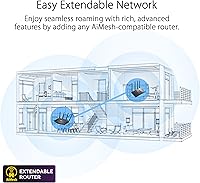
  • AiMesh support lets you anchor a whole-home mesh network using compatible ASUS hardware you may already own.
  • Initial setup via the ASUS app is fast and accessible, with most users reporting they were online in under ten minutes.
  • The low-profile, antenna-free design fits naturally on a shelf without looking like a piece of data center equipment.
  • Tri-band architecture keeps legacy smart home devices on 2.4 GHz while reserving faster bands for more demanding tasks.
  • QoS settings allow gaming or work traffic to be prioritized without manually throttling every other device on the network.

Cons

  • Real-world 6 GHz performance gains are negligible if none of your current devices actually support the WiFi 6E standard.
  • AiProtection Pro requires an active ASUS cloud connection, which is a non-starter for privacy-focused or fully local network setups.
  • The ASUS app feels cluttered and promotional, with marketing prompts competing for space alongside functional controls.
  • Firmware updates have a track record of occasionally introducing connectivity bugs that require reboots or even factory resets to resolve.
  • Advanced routing configuration carries a real learning curve once you move past the guided setup defaults.
  • The 6 GHz band has noticeably shorter range than 5 GHz, which limits its usefulness in larger homes without additional nodes.
  • The 2.5G WAN port delivers no benefit unless your ISP plan actually exceeds standard gigabit speeds.
  • AiMesh compatibility is locked to the ASUS ecosystem, making it useless if you own mesh hardware from other brands.
  • The unit runs noticeably warm in enclosed or poorly ventilated spaces, which has concerned some long-term owners.
  • Users who disable cloud-dependent features to address privacy concerns also lose a significant portion of the security functionality.

Ratings

The scores below for the ASUS RT-AXE7800 Tri-Band WiFi 6E Router were generated by our AI system after analyzing verified purchase reviews from buyers worldwide, with spam, incentivized, and bot-flagged submissions actively filtered out. The results reflect a realistic cross-section of real households — from families and remote workers to gamers and networking enthusiasts — and both the strengths and the genuine frustrations are represented without softening. If you are on the fence about whether this router fits your situation, these scorecards are designed to give you an honest answer.

Wireless Performance
88%
Buyers with WiFi 6E-capable devices consistently report noticeably lower latency and more stable throughput compared to their previous routers, particularly in dense apartment buildings where 5 GHz congestion was a daily frustration. The 6 GHz band's clean spectrum translates into real-world gains for gaming sessions and 4K video calls.
Households without any WiFi 6E client devices see performance improvements that are solid but not dramatic — essentially on par with a good WiFi 6 router. Several reviewers noted the 6 GHz band's shorter range means it underperforms at the edges of larger homes.
Setup & Installation
83%
The ASUS app-based setup draws consistent praise from buyers who describe getting up and running in under ten minutes, even without prior networking experience. The guided process is clear, and the physical cable and port layout is intuitive enough that most people never needed the quick start guide.
A recurring frustration appears once users move past the initial setup into advanced configuration — the web interface layers options in ways that can feel overwhelming, and some settings are buried several menus deep. A handful of buyers found that certain app features required account creation, which annoyed those expecting fully local control.
Signal Range & Coverage
79%
21%
For average-sized homes — think a two-story house under 2,500 square feet — the RT-AXE7800 handles coverage reliably without dead spots near exterior walls. Multiple reviewers in open-plan spaces specifically called out the consistent signal strength across living areas.
In larger homes or layouts with thick concrete walls, the single-unit range starts to show its limits, particularly on the 6 GHz band which is inherently more susceptible to signal degradation through obstacles. Buyers with multi-story homes often noted they still needed a secondary node to cover a basement or far bedroom.
Network Security
91%
AiProtection Pro's network-level threat blocking is a genuine differentiator — users report it quietly blocks malicious domains without any manual configuration, and the Trend Micro partnership means the threat database stays current. For families with kids, having this layer of protection active by default offers meaningful peace of mind.
Privacy-conscious buyers have flagged that AiProtection Pro requires the router to maintain a connection to ASUS cloud servers to function fully, which is a deal-breaker for those running fully local or air-gapped home networks. Disabling cloud features to address this concern also partially disables the security suite, which is a compromise some users were not expecting.
Parental Controls
84%
Parents frequently highlight that the per-device scheduling and content filtering goes well beyond the blunt on/off timers found on budget routers. Being able to restrict a child's tablet to educational content during school hours, then automatically open access later, is a feature that earns real loyalty from family-oriented buyers.
The parental control interface inside the app has a learning curve, and some parents found the content category labels vague enough that fine-tuning filters took trial and error. A few reviewers noted that determined teenagers found workarounds using VPNs on their devices, which the router-level controls cannot fully prevent.
VPN Functionality
77%
23%
Instant Guard earns specific praise from remote workers and frequent travelers who want a router-based VPN without managing a separate subscription service. The ability to share a secure connection link with a family member or colleague is a thoughtful touch that users genuinely appreciate.
Performance on the VPN noticeably drops under heavy load — streaming in HD while tunneled through Instant Guard prompted complaints about buffering from several buyers. Power users with more demanding VPN needs reported that the router's processing overhead limits throughput in ways a dedicated VPN service would not.
AiMesh & Mesh Expandability
86%
For buyers already owning other ASUS routers, AiMesh integration is described as surprisingly painless — adding a secondary node to extend coverage required minimal configuration and the resulting mesh handoff between units drew positive comments from users who move around a lot during video calls.
AiMesh only plays nicely within the ASUS ecosystem, so buyers hoping to incorporate non-ASUS nodes are out of luck. A few early adopters also reported occasional mesh instability after firmware updates, requiring a reboot of secondary nodes to restore connectivity.
App & Software Experience
66%
34%
The ASUS Router app handles the basics — monitoring connected devices, running speed tests, managing parental schedules — in a way that casual users find accessible. Real-time traffic monitoring in particular helps buyers quickly identify bandwidth-hungry devices on their network.
The app frequently draws criticism for feeling cluttered and promotional, with marketing prompts for ASUS services competing for attention alongside functional controls. Several technically inclined reviewers abandoned the app entirely in favor of the web interface, describing the app as unreliable for anything beyond the basics.
2.5G Port & Wired Performance
81%
19%
Buyers who subscribe to multi-gigabit ISP plans — 1.5 Gbps or higher — immediately recognize the value of the 2.5G WAN port, as it removes the bottleneck that standard Gigabit WAN ports impose. For NAS users and heavy local file transfers, wired throughput is consistently described as rock solid.
For the majority of buyers on standard 500 Mbps or 1 Gbps plans, the 2.5G port provides no tangible benefit, and some feel the emphasis on it in marketing sets expectations that only a minority of users can actually realize. The LAN side lacks a matching 2.5G port, which frustrated a few users trying to build a fully high-speed wired backbone.
Build Quality & Design
74%
26%
The low-profile, antenna-free chassis is genuinely appreciated by buyers who want networking hardware that doesn't look aggressive or industrial sitting on a shelf. At under 2.3 pounds, it's light enough to mount or tuck away without concern, and the matte black finish handles fingerprints reasonably well.
Some buyers feel the plastic construction doesn't fully justify the price point, especially when competing routers at similar costs offer a more premium feel. Ventilation concerns were raised by a small number of long-term owners who noticed the unit running noticeably warm in enclosed spaces.
Firmware Reliability
67%
33%
ASUS has a relatively active firmware update cadence compared to many router manufacturers, and buyers report that security patches tend to arrive in a reasonable timeframe. When updates go smoothly, they frequently add quality-of-life improvements to the interface and fix reported bugs.
A consistent thread in longer-term reviews describes firmware updates occasionally introducing new connectivity issues — dropped 6 GHz connections, slower speeds, or mesh instability — that require a rollback or a factory reset to resolve. The unpredictability of update outcomes is a genuine source of frustration for buyers who rely on continuous uptime.
Value for Money
73%
27%
For buyers with WiFi 6E devices, the combination of lifetime AiProtection Pro, built-in VPN, and capable parental controls means there are no recurring subscription costs eating into the long-term ownership equation. Compared to routers that charge for security features annually, the total cost of ownership looks more competitive over time.
For households without WiFi 6E client devices — which is still the majority — the premium over a strong WiFi 6 router is harder to justify on immediate performance alone. Buyers who purchased primarily for the 6 GHz band, only to find none of their current devices could use it, felt the value proposition fell flat.
Gaming Performance
82%
18%
Gamers with WiFi 6E-capable laptops or consoles describe noticeably more consistent ping times during competitive sessions, crediting the dedicated 6 GHz band for keeping gaming traffic insulated from the rest of the household's activity. QoS settings allow prioritizing gaming traffic without manually managing every other device.
Console gamers using older hardware — PlayStation 4, Xbox One era — cannot tap into the 6 GHz improvements and instead share the 5 GHz band with everything else in the house. A few competitive players noted that wired Ethernet still outperformed even the best wireless results for latency-critical titles.
Smart Home & Device Compatibility
78%
22%
The 2.4 GHz band handles a dense smart home ecosystem reliably, and Alexa compatibility means voice-based network management is available without workarounds. Buyers running twenty or more simultaneous connected devices — smart bulbs, thermostats, speakers — reported stable connections across the board.
A small number of buyers encountered compatibility quirks with certain older smart home hubs that struggled to negotiate a stable 2.4 GHz connection after initial setup, requiring manual band steering adjustments. The guest network setup, while functional, lacks the granular isolation controls that security-focused smart home users would prefer.

Suitable for:

The ASUS RT-AXE7800 Tri-Band WiFi 6E Router is a strong fit for households that are either already using WiFi 6E-capable devices or are actively planning to upgrade their laptops, phones, and tablets in the near future. Gamers who want a clean, interference-free lane for competitive play will immediately appreciate what the uncrowded 6 GHz band delivers — especially in dense neighborhoods where 5 GHz channels are a mess. Families with kids will find the built-in parental controls genuinely useful, offering per-device content filtering and time scheduling without needing to pay for a separate service. Remote workers and frequent travelers get practical value from the Instant Guard VPN, which requires no technical setup and no ongoing subscription. If you are already invested in the ASUS ecosystem with older routers around the house, the AiMesh compatibility makes this a natural anchor node for a whole-home mesh setup. Households on multi-gigabit ISP plans will also benefit from the 2.5G WAN port, which removes a real throughput ceiling that most routers still impose.

Not suitable for:

If none of your current devices support WiFi 6E — and for most households right now, that is the honest reality — the premium you pay over a solid WiFi 6 router is difficult to justify on day-one performance alone. The ASUS RT-AXE7800 Tri-Band WiFi 6E Router is also not the right pick for privacy-first buyers who prefer fully local network management, since AiProtection Pro depends on ASUS cloud connectivity to function properly, and disabling that cloud link partially undermines the security suite. Budget-conscious shoppers looking to cover a large home with a single unit may also find the 6 GHz range limiting, as that band does not penetrate walls and floors as well as 5 GHz does. Users who want a dead-simple app experience with no learning curve might find the ASUS software ecosystem more layered than expected once they move past the initial setup. And if you already own non-ASUS routers you were hoping to fold into a mesh system, the AiMesh compatibility wall will be a dealbreaker.
Specifications

  • WiFi Standard: This router operates on the 802.11ax (WiFi 6E) standard, supporting legacy 802.11a/g/n/ac connections for backward compatibility with older devices.
  • Frequency Bands: Tri-band architecture spans three separate radio frequencies: 2.4 GHz, 5 GHz, and the newly available 6 GHz band introduced with WiFi 6E.
  • Combined Speed: Maximum theoretical aggregate throughput across all three bands reaches up to 7800 Mbps under ideal, laboratory-grade conditions.
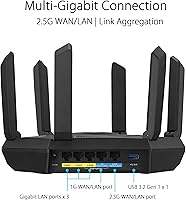
  • WAN Port: A single 2.5G Ethernet WAN port allows the router to accept multi-gigabit internet feeds without the throughput ceiling of a standard 1G port.
  • Dimensions: The unit measures 9.49 x 8.27 x 2.44 inches, delivering a flat, low-profile footprint that fits comfortably on a shelf without external antennas.
  • Weight: At 2.28 pounds, the router is light enough to mount vertically or tuck into a media cabinet without heavy-duty hardware support.
  • Security Suite: AiProtection Pro, powered by Trend Micro, provides lifetime network-level threat blocking and malicious site filtering at no recurring subscription cost.
  • VPN Feature: Instant Guard offers a one-tap, shareable VPN tunnel for securing internet traffic when connecting remotely or while traveling, built directly into the router firmware.
  • Parental Controls: Built-in parental controls support per-device content category filtering and time scheduling, with no third-party app or paid subscription required.
  • Mesh Support: Full ASUS AiMesh compatibility allows this unit to function as either a primary node or a secondary node within a multi-router ASUS mesh network.
  • Connectivity: The router supports wired Ethernet and USB connectivity in addition to its tri-band wireless radio, accommodating a range of peripherals and wired backhaul configurations.
  • Voice Assistant: Alexa compatibility is built in, enabling basic voice-activated network management commands through an Amazon Echo device.
  • Color & Finish: The unit ships in matte black, with a surface finish designed to resist fingerprints and blend into home entertainment setups.
  • Wireless Standards: Supported wireless protocols include 802.11a, 802.11g, 802.11n, 802.11ac, and 802.11ax, ensuring connectivity with virtually any WiFi-capable device manufactured in the past two decades.
  • In-Box Contents: Each unit ships with the router, a power adapter, one RJ-45 Ethernet cable, a Quick Start Guide, and a Warranty Card.
  • Compatible Devices: The router is designed to support gaming consoles, personal computers, smart televisions, smartphones, and tablets across its three frequency bands.
  • Recommended Use: ASUS positions this router for home, gaming, and small business environments where a combination of speed, security, and coverage flexibility is required.
  • User Rating: Based on approximately 597 verified ratings, the router holds a 4.2 out of 5 star average on Amazon as of the time of this review.

Related Reviews

ASUS RT-BE92U WiFi 7 Router
81%
88%
Wireless Performance
83%
Coverage & Range
84%
Setup & Initial Configuration
91%
Network Security (AiProtection)
86%
Latency & Gaming Performance
More
ASUS RT-ACRH13 AC1300 Dual Band WiFi Router
86%
88%
WiFi Performance
91%
Setup and Installation
90%
Value for Money
83%
Signal Coverage
89%
Ease of Use (Mobile App)
More
ASUS RT-AX5400 WiFi 6 Dual-Band Router
80%
84%
WiFi Speed & Throughput
71%
Coverage & Range
88%
Setup & Ease of Use
91%
Built-in Security (AiProtection)
83%
Parental Controls
More
ASUS RT-AX1800S
ASUS RT-AX1800S
79%
88%
Value for Money
79%
WiFi Speed & Performance
74%
Coverage & Range
83%
Setup & Ease of Use
67%
Router App Experience
More
MSI Radix AXE6600 WiFi 6E Gaming Router
75%
88%
Gaming Performance
84%
Setup & Installation
58%
App & Software Experience
76%
WiFi Range & Coverage
83%
Multi-Device Handling
More
ASUS ZenWiFi ET9 2-Pack Mesh WiFi System
77%
83%
WiFi Coverage
86%
Network Speed
57%
Setup Experience
72%
App & Management
91%
Network Security
More
ASUS ZenWiFi BT6 Tri-Band WiFi 7 Mesh Router
83%
91%
WiFi Performance
88%
Security Features (AiProtection Pro)
84%
Mesh Network Expansion
75%
Setup and Installation
89%
Build Quality
More
ASUS ZenWiFi BT8 WiFi 7 Mesh Router
77%
83%
Wireless Performance
71%
Coverage & Range
54%
Firmware Reliability
88%
Setup Experience
67%
App & Management
More
ASUS ROG Rapture GT6 WiFi 6 Mesh Router
81%
91%
Wireless Performance
88%
Gaming Latency
84%
Coverage & Range
83%
Setup & App Experience
71%
Mesh Roaming
More
ASUS RT-AX86U WiFi 6 Gaming Router
84%
91%
Wireless Performance
88%
Gaming Latency
86%
Range & Coverage
79%
Setup & Ease of Use
74%
Value for Money
More

FAQ

It depends on what devices you own right now. If your laptops, phones, or tablets already support WiFi 6E, you will notice real benefits from the uncrowded 6 GHz band — lower latency, more stable speeds in busy households. If none of your current gear supports it, you are essentially buying into a future-proof upgrade rather than something you will feel immediately. That is a perfectly valid reason to buy it, but go in with clear expectations.

Most buyers describe the ASUS RT-AXE7800 Tri-Band WiFi 6E Router as straightforward to set up through the ASUS Router app — plug it in, follow the guided steps, and you are typically online within ten minutes. The initial experience is genuinely beginner-friendly. Where things get more complicated is if you want to configure advanced features like VLANs, custom DNS, or detailed QoS rules — that side of the interface has a real learning curve.
Unfortunately, no. AiMesh only works with other ASUS routers that carry AiMesh support. If you have Eero, Netgear Orbi, or TP-Link Deco nodes sitting around, you cannot fold them into the same mesh system. This router works best as part of an all-ASUS setup, so keep that in mind if you are planning to expand coverage later.

The subscription itself is free for the life of the router, which is a genuine differentiator compared to competitors that charge annually for similar protection. The practical catch is that AiProtection Pro relies on a connection to ASUS cloud servers to function fully. If you are the kind of person who prefers fully local, cloud-free network management, you will need to weigh that trade-off carefully, because disabling the cloud features also dials back the security suite.

Only if your ISP plan actually delivers speeds above one gigabit. The 2.5G port removes a bottleneck that a standard Gigabit WAN port would impose on plans running at 1.5 Gbps, 2 Gbps, or higher. If you are on a 500 Mbps or even a standard 1 Gbps plan, you will not notice any difference from that port at all.

Instant Guard creates a secure VPN tunnel directly through your home router, so when you are traveling or on public WiFi, your traffic routes back through your home connection. You can activate it from the ASUS app with one tap, and you can share a connection link with a family member or colleague so they can use it too. It is not a replacement for a high-performance commercial VPN in terms of raw speed, but for secure browsing on the go it works well and costs nothing extra.

They are more flexible than most built-in router controls. You can set restrictions per device rather than per user, which means a younger child's tablet can have strict content filters and early cutoff times while a teenager's laptop has different rules entirely. Content filtering works by category rather than requiring you to manually block individual websites, which makes initial setup manageable. It is not as granular as a dedicated parental control service, but for most families it covers the essentials without adding a monthly bill.

The general picture from longer-term owners is positive, but with one consistent asterisk: firmware updates occasionally introduce minor connectivity issues that require a reboot or, in some cases, a full factory reset to resolve. ASUS does push updates reasonably regularly, and most bugs get patched, but if you need guaranteed uptime without unexpected hiccups, the update cadence is something to be aware of. Keeping automatic firmware updates turned off and applying them manually after checking community feedback is a strategy several experienced users recommend.

Yes, the tri-band setup handles a dense device environment well. WiFi 6E includes OFDMA technology, which improves how the router schedules traffic across many simultaneous connections. Smart home devices land on 2.4 GHz, mid-demand devices share 5 GHz, and your fastest clients get the 6 GHz band to themselves. In practice, buyers with large smart home ecosystems report stable connections across the board.

It runs warm under sustained heavy load, which is normal for this class of hardware. A small but vocal group of long-term owners has flagged concerns about heat when the router is placed in an enclosed cabinet with poor airflow. If you plan to put it in a closed space, leave some room around it for ventilation — a few inches on the sides and top makes a meaningful difference. Running it in the open on a shelf is the safest bet for long-term thermal performance.

Where to Buy