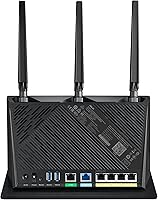
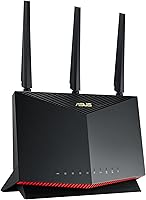
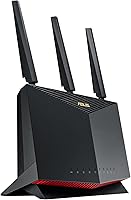
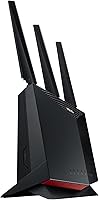
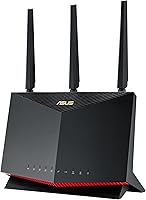

Overview

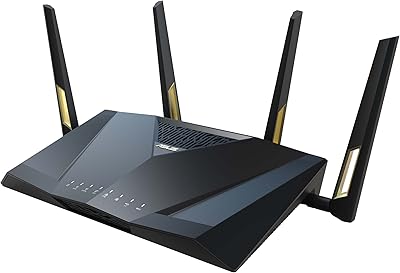
The ASUS RT-AX86U WiFi 6 Gaming Router has been a fixture in the premium router market since 2020, and the fact that it still ranks among the top sellers in its category says something real about its staying power. This isn't a router built around flashy lights and empty promises — it genuinely balances serious gaming performance with practical whole-home networking. You get a capable dual-band platform that fits neatly into ASUS's AiMesh ecosystem, which means room to grow without starting over. That said, the price sits firmly in premium territory, so whether it's worth it depends heavily on what you're actually asking your network to do.

Features & Benefits

The RT-AX86U runs on WiFi 6 (802.11ax), which in practice means faster throughput and better handling of congestion when a dozen devices are competing for bandwidth simultaneously. The dedicated 2.5G WAN port is a standout for anyone already paying for a multi-gigabit ISP plan — most routers in this class still cap out at 1 Gbps on the WAN side. Mobile Game Mode, accessible through the ASUS Router app, lets you prioritize a specific mobile device with a couple of taps — handy, though it does require the app. Security comes baked in via AiProtection Pro, and there is no annual fee attached to keep it running.

Best For

This ASUS gaming router is an especially strong fit for households with multiple active gamers who need low-latency traffic prioritization rather than just raw speed. If your ISP offers multi-gig service, the 2.5G WAN port lets you actually use it — something most routers cannot say. Home networking enthusiasts who want port forwarding, VPN controls, and detailed QoS settings without paying for a third-party subscription will find a lot to work with here. It also makes sense for existing ASUS router owners who want to build out a mesh network gradually, and for remote workers who need a reliable built-in VPN solution.

User Feedback

Across thousands of reviews, this WiFi 6 router holds a 4.6-star rating — solid by any standard. Buyers regularly praise how approachable the ASUS Router app makes initial setup, which is notable given how many advanced settings are lurking under the hood. Range and signal through walls get frequent positive mentions for medium to large homes. On the critical side, some users find the web-based admin interface genuinely intimidating if they are not already comfortable with networking concepts. A smaller number of long-term owners have flagged that the unit runs warm under heavy sustained load. Firmware updates have earned trust, though, with consistent improvements noted over time.

Pros

  • The 2.5G WAN port is a real differentiator for anyone on a multi-gigabit ISP plan.
  • AiProtection Pro delivers network-level threat blocking with no annual fee attached.
  • WiFi 6 handles congested multi-device households noticeably better than older standards.
  • Signal range and wall penetration earn consistent praise from owners of medium to large homes.
  • AiMesh support lets you expand coverage gradually without replacing your existing hardware.
  • The ASUS Router app makes initial setup approachable despite the router's deep feature set.
  • Instant Guard VPN works with a single tap and is easy to share with family members.
  • Firmware updates have been consistent and well-received by long-term owners.
  • Port forwarding and QoS controls give enthusiasts the granular tuning most routers charge extra for.
  • A sustained 4.6-star rating across thousands of real-world buyers reflects genuine, lasting satisfaction.

Cons

  • The web admin interface is genuinely intimidating for users without a networking background.
  • Mobile Game Mode requires the ASUS app to activate, which adds a step non-technical users may overlook.
  • The unit runs noticeably warm under heavy sustained load, which may concern some buyers about longevity.
  • Dual-band only — households with extreme device density may eventually feel the ceiling.
  • The price is hard to justify if your ISP plan tops out at standard gigabit speeds.
  • No tri-band option means the 5GHz band handles both backhaul and client traffic in mesh setups.
  • Buyers outside the ASUS ecosystem lose the AiMesh benefit, weakening the long-term value case.
  • Physical footprint is substantial — nearly 13 inches tall — which limits placement options in tight spaces.

Ratings

Our AI rating engine analyzed thousands of verified global reviews for the ASUS RT-AX86U WiFi 6 Gaming Router, actively filtering out incentivized, bot-generated, and low-signal feedback to surface what real buyers genuinely experience over time. The scores below reflect both the strengths that keep this router among the top-ranked in its class and the friction points that real users have flagged — nothing is glossed over. Whether you are deciding between routers or just validating a purchase, these category scores give you an honest, data-grounded picture.

Wireless Performance
91%
Buyers running multiple gaming sessions, 4K streams, and video calls simultaneously report noticeably less congestion compared to their older routers. The WiFi 6 standard with 160MHz channel support delivers real throughput improvements in dense device environments, not just on paper.
A handful of users on the edge of the router's range — particularly through thick concrete or brick walls — noted inconsistent 5GHz speeds. The dual-band architecture means the 5GHz band carries a heavier shared load than a tri-band alternative would.
Gaming Latency
88%
Gamers consistently report stable, low-ping connections during peak household usage hours, which is exactly the scenario this router is engineered for. The traffic prioritization tools give wired and wireless gaming devices an edge when bandwidth is contested.
Mobile Game Mode, while effective, requires navigating the ASUS app to activate — it is not automatic, which means less tech-savvy users may never take advantage of it. Some PC gamers noted that QoS configuration takes time to tune correctly for optimal results.
Range & Coverage
86%
Medium to large home owners regularly cite strong signal penetration through multiple interior walls and across floors as one of the RT-AX86U's most reliable strengths. The three external antennas with one internal PCB antenna provide broad omnidirectional coverage that holds up well in typical residential layouts.
In very large homes exceeding 3,000 square feet, dead zones can still appear without adding a mesh node. Users in older homes with dense plaster walls or metal framing reported more significant drop-off than those in standard wood-frame construction.
Setup & Ease of Use
79%
21%
The ASUS Router app guides new users through initial configuration cleanly, and most buyers report getting online within minutes of unboxing. For anyone who just wants a working network without touching advanced settings, the app experience is genuinely well-designed.
The browser-based admin interface is a different story — it is feature-rich but visually dense, and first-time router owners frequently describe it as overwhelming. Several reviewers specifically mentioned needing to watch tutorial videos before feeling confident making changes beyond the basics.
Value for Money
74%
26%
For users on multi-gigabit ISP plans or households with five or more active devices, the feature-to-price ratio is competitive given that AiProtection Pro and VPN tools are included at no extra cost. Long-term owners tend to rate value higher once they have actually used the advanced features over time.
For buyers with standard gigabit service and modest device counts, the asking price is difficult to justify when capable mid-range alternatives exist for significantly less. The premium is most defensible for power users — anyone buying this just for basic home WiFi coverage is likely overpaying.
Security Features
93%
AiProtection Pro handling real-time threat detection without a recurring fee is a genuine differentiator — competing routers in this price bracket often require paid subscriptions for equivalent protection. Long-term owners report that the security database stays updated through firmware pushes, keeping it relevant beyond the purchase date.
Advanced security logging and detailed threat reporting in the interface can be hard to interpret for users without a technical background. A small number of enterprise-focused buyers noted they would prefer more granular firewall rule customization than the current firmware exposes.
VPN Capability
84%
Instant Guard makes setting up a personal VPN genuinely accessible — sharing it with a family member or colleague requires nothing more than sending a link. For remote workers who need a trustworthy connection back to their home network while traveling, this feature works reliably without third-party software.
Advanced VPN users who want to configure split tunneling or protocol-level customization may find the options more limited than dedicated VPN router firmware like DD-WRT provides. Connection speeds over the VPN can vary based on server load and distance, which a few reviewers noted as inconsistent.
Firmware & Updates
87%
ASUS has maintained a consistent firmware update cadence for this model since its 2020 launch, which is not guaranteed at this price tier and earns genuine loyalty from long-term owners. Several reviewers specifically mentioned that firmware updates have added stability improvements and new features rather than creating new problems.
Automatic update notifications are not always prominent, meaning some users stayed on outdated firmware longer than they should have. A minority of reviewers reported that specific firmware versions introduced temporary bugs — though these were typically resolved in subsequent releases.
AiMesh Integration
89%
Users who added a second ASUS AiMesh node reported a notably smooth experience — device handoff between nodes during roaming is clean, and the unified network management through a single app is well-executed. The ability to expand coverage without replacing the primary router is a meaningful long-term cost advantage.
AiMesh compatibility is strictly limited to ASUS devices, which is a real constraint if you own mesh hardware from another brand. Users who chose a non-ASUS node reported occasional syncing issues that required a firmware check to resolve.
Build Quality
82%
18%
The physical construction feels solid and the upright form factor with adjustable antennas holds up well after extended use — no reported antenna wobble or casing issues from long-term owners. The matte black finish resists visible dust accumulation reasonably well in typical home environments.
At nearly 13 inches tall, placement options are limited in confined spaces like media cabinets or shelves with low clearance. A minority of users noted the unit runs warm to the touch under sustained heavy load, raising questions about long-term thermal management in enclosed spots.
App Experience
78%
22%
The ASUS Router app is well-rated on both iOS and Android for core functions like network monitoring, device management, and parental controls. Regular app updates have addressed early usability complaints, and features like Mobile Game Mode activation are genuinely simple once you locate them.
Some users report the app occasionally loses connection to the router and requires a restart to re-sync, which is frustrating mid-session. Certain advanced settings available in the web interface are not exposed through the app at all, forcing a browser visit for deeper configuration.
Port Selection
85%
The inclusion of a 2.5G WAN port alongside multiple Gigabit LAN ports gives wired users meaningful flexibility — especially for NAS connections or wired gaming setups where the extra bandwidth headroom makes a tangible difference. The port layout is practical and clearly labeled.
Users with larger wired device counts noted they hit the LAN port limit quickly and needed an additional switch. There is no 10G port option, which puts it behind some specialized competitors targeting prosumer networking builds.
Parental Controls
76%
24%
The built-in parental controls through AiProtection allow per-device scheduling and content filtering without requiring a separate service, which parents in reviews appreciated as a convenience they did not expect at this level. Setup through the app is accessible enough for non-technical parents.
Power users looking for highly granular filtering or detailed per-device usage reporting found the controls somewhat basic compared to dedicated parental control platforms. A few parents noted the content filter categories are broad and occasionally block legitimate sites alongside unwanted content.

Suitable for:

The ASUS RT-AX86U WiFi 6 Gaming Router is built for households where the network genuinely gets pushed — multiple gamers online at the same time, a mix of streaming, video calls, and smart home devices all competing for bandwidth. If your ISP delivers multi-gigabit speeds, the 2.5G WAN port means you are not leaving performance on the table the way you would with a standard gigabit router. Power users who want deep control — port forwarding, custom QoS, VPN configuration — without paying ongoing subscription fees for any of it will find the feature set hard to match at this tier. It also fits naturally into the hands of existing ASUS router owners who want to build out AiMesh coverage across a larger home without scrapping what they already own. Remote workers and privacy-focused users who want a dependable built-in VPN rather than a separate paid service will appreciate Instant Guard as a practical everyday tool.

Not suitable for:

The ASUS RT-AX86U WiFi 6 Gaming Router is probably overkill — and an expensive one — for anyone with a single-gigabit or slower ISP plan who just needs reliable basic coverage in a small apartment. Buyers who are not comfortable digging into network settings should be aware that while the mobile app smooths out initial setup, the full web interface is genuinely dense and can frustrate anyone expecting a plug-and-play experience. If your home is small or your device count is low, the performance ceiling here is one you are unlikely to ever reach, which makes the price harder to justify. People who want a true tri-band router for even heavier multi-device loads may also find dual-band limiting over time. And if you are not already in the ASUS ecosystem, the AiMesh advantage is irrelevant — which removes one of the stronger long-term value arguments for buying in.

Specifications

  • WiFi Standard: This router uses 802.11ax (WiFi 6), which improves throughput efficiency and handles congested multi-device environments better than the previous 802.11ac standard.
  • Frequency Bands: Dual-band operation covers both the 2.4GHz band for range and compatibility and the 5GHz band for higher-speed connections.
  • Max Speed: Combined theoretical throughput reaches up to 5700 Mbps across both bands, with 160MHz channel support on the 5GHz band for peak wireless performance.
  • WAN Port: A dedicated 2.5 Gigabit Ethernet WAN port allows the router to fully utilize multi-gigabit ISP plans that exceed standard 1 Gbps limits.
  • Antennas: The unit includes three external adjustable antennas plus one internal PCB antenna, providing omnidirectional coverage suited for medium to large homes.
  • Dimensions: The router measures 9.53 x 3.94 x 12.8 inches, giving it a tall, upright form factor that requires adequate clearance in open placement areas.
  • Weight: At 1.83 pounds, the unit is lightweight enough for flexible desk or shelf placement without special mounting hardware.
  • Security: AiProtection Pro, powered by Trend Micro, provides real-time network threat detection and blocking at no additional subscription cost.
  • VPN: ASUS Instant Guard enables a one-click personal VPN that can be shared with others via a link, covering devices away from the home network.
  • Mesh Support: Full AiMesh compatibility allows the router to act as either a node or main hub in a multi-router mesh system alongside other AiMesh-compatible ASUS devices.
  • Mobile App: The ASUS Router app, available for both iOS and Android, handles setup, device management, and features like Mobile Game Mode activation.
  • LAN Ports: The router includes multiple Gigabit LAN ports for wired device connections, supporting computers, gaming consoles, and network switches.
  • Power Supply: The included power adapter supplies 19V with a maximum current of 2.37A, or 19.5V with a maximum of 2.31A depending on adapter variant.
  • Wireless Protocols: Supported wireless standards include 802.11a, 802.11b, 802.11n, 802.11ac, and 802.11ax, ensuring backward compatibility with older client devices.
  • Compatible Devices: Designed to support gaming consoles, desktop and laptop computers, and smartphones across both frequency bands simultaneously.
  • Special Features: Includes WPS for quick device pairing, port forwarding controls for gaming and server applications, and Mobile Game Mode for lag reduction on mobile devices.
  • Color: Available in black with an aggressive angular design aesthetic consistent with ASUS's ROG-adjacent gaming product lineup.
  • In The Box: The package includes the RT-AX86U router, a power adapter, one RJ-45 Ethernet cable, a Quick Start Guide, and a warranty card.

Related Reviews
ASUS RT-AX82U
ASUS RT-AX82U
82%
88%
Wireless Performance
91%
Gaming Latency
93%
Setup & Ease of Use
71%
Range & Coverage
82%
Build Quality & Design
More
ASUS RT-AX57 WiFi 6 Router
86%
88%
WiFi Performance
91%
Setup & Installation
93%
Security Features
85%
Network Stability
75%
Coverage Range
More
ASUS RT-AX88U PRO WiFi 6 Router
77%
88%
Wireless Performance
84%
Range & Coverage
91%
Multi-Device Handling
57%
Setup Experience
79%
Build Quality
More
ASUS RT-AX1800S
ASUS RT-AX1800S
79%
88%
Value for Money
79%
WiFi Speed & Performance
74%
Coverage & Range
83%
Setup & Ease of Use
67%
Router App Experience
More
ASUS RT-AX5400 WiFi 6 Dual-Band Router
80%
84%
WiFi Speed & Throughput
71%
Coverage & Range
88%
Setup & Ease of Use
91%
Built-in Security (AiProtection)
83%
Parental Controls
More
ASUS TUF-AX4200 WiFi 6 Router
79%
88%
Gaming Performance
91%
Port Forwarding & NAT
83%
WiFi Speed & Throughput
89%
Wired Connectivity
63%
Wireless Range
More
ASUS ROG Rapture GT-AX6000 WiFi 6 Gaming Router
86%
94%
Gaming Performance
91%
Connection Stability
78%
Setup/Installation Ease
88%
Value for Money
85%
Build Quality
More
ASUS ROG Rapture GT-AX11000 Pro
77%
91%
Wireless Performance
93%
Wired Port Flexibility
82%
Gaming Features
61%
Setup & Configuration
89%
Network Security
More
ASUS ROG Rapture GT6 WiFi 6 Mesh Router
81%
91%
Wireless Performance
88%
Gaming Latency
84%
Coverage & Range
83%
Setup & App Experience
71%
Mesh Roaming
More
ASUS RT-ACRH18 AC1750 Dual-Band WiFi Router
68%
88%
Setup & Installation
74%
Wi-Fi Speed & Performance
69%
Wireless Range & Coverage
66%
Connection Stability
71%
Multi-Device Handling
More

FAQ

Initial setup through the ASUS Router app is genuinely straightforward — it walks you through the basics step by step and most people have it running within 15 minutes. Where things get more complex is if you want to dig into advanced settings like custom QoS rules or VPN configuration, and for that the web interface can feel overwhelming. If you stick to the app for day-to-day management, though, you will rarely need to touch the advanced panel.

Honestly, no — if your current plan tops out at 1 Gbps, the 2.5G port will not give you faster internet speeds. It becomes valuable only when your ISP delivers service faster than 1 Gbps to your modem. That said, it does future-proof the router if you plan to upgrade your ISP plan down the line.

The AiMesh feature only works with other ASUS AiMesh-compatible routers — it is not a cross-brand standard. If you have a mesh system from a different manufacturer, you cannot add this router into that system as a node. You could still use it as a standalone router feeding a separate access point, but you would lose the integrated mesh benefits.

Mobile Game Mode is activated through the ASUS Router app, not through any physical button on the router itself. Once enabled, it prioritizes the selected mobile device's network traffic to reduce latency during gameplay. It is a per-device feature, so you choose which phone or tablet gets the priority treatment.

As of the current product generation, AiProtection Pro does not require an ongoing subscription — the protection is bundled into the firmware. ASUS has maintained this for the RT-AX86U since launch, though it is always worth checking ASUS's official support pages for any policy changes on future firmware updates.

A minority of long-term owners have reported that the unit runs noticeably warm under heavy sustained load. In normal household use it is generally fine, but if you are planning to push it hard 24/7 — heavy torrenting, NAS traffic, continuous gaming — make sure it has good airflow and is not enclosed in a cabinet. Overheating has not been a widespread failure point, but ventilation is worth taking seriously.

A tri-band router adds a third radio — typically a second 5GHz band — which allows it to dedicate one band entirely to mesh backhaul while the other two serve clients. This router is dual-band, meaning the single 5GHz band handles both client traffic and backhaul in a mesh setup, which can create a bottleneck in very large or device-heavy deployments. For most households, dual-band is perfectly adequate.

Yes, the RT-AX86U supports VPN server and client configurations through its firmware, so you can route all connected devices through a VPN without installing anything on each individual device. Instant Guard is the simpler one-click option for personal use, but the router also supports OpenVPN and other protocols for more advanced setups.

Range is one of the areas where this WiFi 6 router gets consistent positive marks from real buyers — signal through floors and interior walls is generally strong enough to cover medium to large two-story homes without dead zones. Results vary depending on construction materials and layout, but for a typical wood-frame house it performs well as a standalone unit. If you have a larger or unusually shaped home, the AiMesh option lets you add a second node rather than struggle with placement.

Yes, port forwarding is fully supported and accessible through the web admin interface. It is straightforward to configure once you know the ports your game or server requires, and the interface lets you set up both single ports and port ranges. This is particularly useful for getting an open NAT type on gaming consoles or hosting game servers from home.

Where to Buy