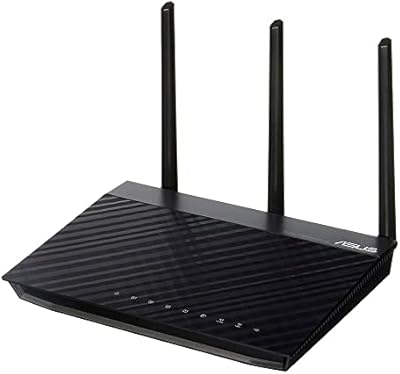
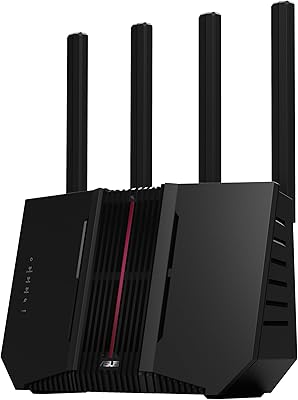
Overview

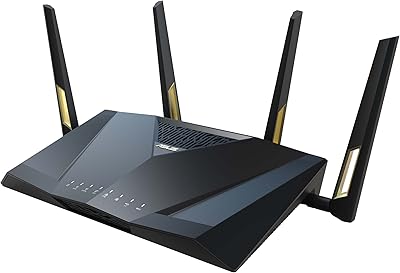
The ASUS RT-AX5400 WiFi 6 Dual-Band Router lands squarely in the middle of ASUS's lineup — not a bare-bones starter unit, not an expensive tri-band flagship, but a genuinely capable router built for households juggling streaming, gaming, and a growing pile of smart home gadgets. Launched in April 2023, it entered a WiFi 6 market that was already getting crowded, yet it carves out a real niche thanks to AiMesh compatibility, which lets you bolt on a second ASUS router later without scrapping your whole setup. The dual-band design covers 2.4GHz for range and 5GHz for speed — a practical split that handles everyday congestion reasonably well in most medium-sized homes.
Features & Benefits

WiFi 6 is not just a marketing label here — in a home with 15 or more connected devices, the RT-AX5400 handles simultaneous traffic noticeably better than older WiFi 5 routers, with less slowdown during peak hours. The lifetime AiProtection security, powered by Trend Micro, is one of the more compelling reasons to choose this over similarly priced competitors; it blocks malicious sites, intrusion attempts, and infected devices at the router level with no annual fee ever. Instant Guard VPN lets you create a secure tunnel back to your home network with one tap — handy when traveling and avoiding sketchy public Wi-Fi. Parental controls are genuinely granular: time limits and content filters per device, all managed from the ASUS Router app.

Best For

This WiFi 6 router is well-suited to households running 10 to 20 devices at once — think a 4K TV, a gaming console, a couple of laptops, and a dozen smart home gadgets all competing for bandwidth. Families with kids will appreciate the built-in parental controls without needing to pay separately for a service like Circle. Coverage-wise, it performs well in spaces up to roughly 2,500 square feet, though larger homes or awkward layouts may need a second AiMesh node added later. It is not the right call if you want Wi-Fi 6E or a high-end tri-band setup, but for budget-conscious gamers and streamers who need a solid mid-range option, it delivers real value.

User Feedback

With over 3,200 ratings and a 4.4-star average, this ASUS router earns its score through consistent praise for easy app-based setup and long-term signal stability — several reviewers note it simply works, month after month, without needing reboots. The lifetime security inclusion gets frequent mentions as a genuine money-saver compared to routers that tack on annual fees. That said, not everyone is thrilled: users in larger homes report that the 5GHz signal struggles to reach distant rooms, and a handful flag occasional glitches with the ASUS Router app losing its connection to the router. Against similarly priced TP-Link and Netgear alternatives, most buyers consider the AiMesh flexibility and no-cost security the deciding factors in this router's favor.

Pros

  • Lifetime network security powered by Trend Micro requires zero annual fees, unlike most competing routers.
  • WiFi 6 handles 15-plus simultaneous devices noticeably better than older WiFi 5 routers under real household load.
  • App-based setup takes most users under ten minutes, even without prior networking experience.
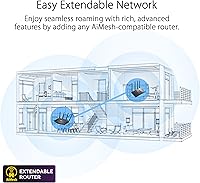
  • AiMesh support lets you expand coverage later by adding a second ASUS node rather than replacing the router entirely.
  • Per-device parental controls with time scheduling are built in — no separate subscription needed.
  • Signal stability over months of continuous use is consistently praised across thousands of verified reviews.
  • Instant Guard VPN lets you tunnel securely back to your home network while traveling, with one tap.
  • Access point mode gives the RT-AX5400 a second life in setups where a standalone wireless node is all that is needed.
  • Regular firmware updates from ASUS have addressed bugs and added features since the April 2023 launch.
  • Buyers switching from similarly priced TP-Link and Netgear routers frequently cite the bundled feature set as a decisive upgrade.

Cons

  • 5GHz range drops off sharply past one floor or through dense walls in larger homes.
  • The ASUS Router app occasionally loses its connection to the router, requiring a relaunch or reboot to fix.
  • Firmware updates have a known pattern of causing temporary instability, sometimes needing a full factory reset afterward.
  • Content filtering categories are broad — blocking one category can accidentally restrict legitimate apps on the same device.
  • USB file-sharing speeds are too slow for anyone wanting to run a practical home media server.
  • Dual-band backhaul in AiMesh mode eats into available bandwidth for client devices when both nodes are heavily loaded.
  • Advanced settings still live in a browser-based web interface that feels dated compared to competitor apps.
  • VPN tunnel speeds are noticeably reduced, making it impractical for remote bandwidth-heavy tasks like 4K streaming.
  • The router runs warm under sustained heavy load, though no widespread overheating failures have been widely reported.
  • Parental control workarounds via device-level VPNs are a known limitation that tech-savvy kids can exploit.

Ratings

The ASUS RT-AX5400 WiFi 6 Dual-Band Router has been scored by our AI system after processing thousands of verified global buyer reviews, with spam, bot submissions, and incentivized feedback actively filtered out. The scores below reflect where real users consistently agree — and where friction points keep surfacing — so you get an honest picture before buying.
WiFi Speed & Throughput
84%
Users with busy households — multiple 4K streams running alongside active gaming sessions — consistently report a noticeable reduction in buffering and lag compared to their previous WiFi 5 routers. The RT-AX5400 handles simultaneous device traffic well for its price tier.
Raw throughput at range drops off more than some buyers expect, particularly on the 5GHz band beyond one or two walls. Heavy users doing large file transfers across the network occasionally hit a ceiling that pricier tri-band routers would clear more comfortably.
Coverage & Range
71%
29%
In apartments and single-story homes up to around 2,000 square feet, most users report solid, consistent coverage with few dead zones. Placing the router centrally tends to deliver reliable connectivity to every corner for typical daily use.
Multi-story homes and larger layouts regularly expose the dual-band setup's limits — the 5GHz signal in particular weakens noticeably past one floor or through dense walls. Several reviewers in homes above 2,500 square feet say they needed a second AiMesh node sooner than anticipated.
Setup & Ease of Use
88%
The ASUS Router app walks new users through the initial configuration in under ten minutes, and the process is consistently praised as one of the smoothest among routers in this class. Even users who describe themselves as non-technical report getting online quickly without consulting a manual.
A subset of users encounters occasional hiccups where the app loses its connection to the router mid-session, requiring a restart of the app or the router itself. Advanced settings buried in the web interface can feel cluttered for users who venture beyond the basics.
Built-in Security (AiProtection)
91%
The lifetime AiProtection coverage, backed by Trend Micro, is one of the most frequently cited reasons buyers chose this router over competing models. It actively blocks malicious domains, flags infected devices on the network, and handles intrusion prevention — all without ever paying a renewal fee.
Security-conscious power users note that the protection layer, while effective for most households, lacks the granular logging and reporting depth that dedicated firewall appliances offer. A few users also report that aggressive filtering occasionally flags legitimate sites, requiring manual whitelisting.
Parental Controls
83%
Parents consistently appreciate being able to set per-device time schedules and content filters directly from their phone, without subscribing to a third-party service like Circle or Disney+. The ability to pause internet access for a specific device instantly is a feature families mention repeatedly as genuinely useful.
The content filtering categories are somewhat broad — blocking a category like social media affects every app in that bucket, which can create unintended restrictions. A handful of parents also note that determined teenagers have found workarounds using VPNs on their devices.
AiMesh & Network Expansion
86%
For users already owning another compatible ASUS router, setting up an AiMesh network is a genuinely low-friction experience that turns two separate routers into one unified system. Roaming between nodes stays smooth enough for video calls and streaming without manual band-switching.
AiMesh only works within the ASUS ecosystem, which limits flexibility if you want to mix in a node from another brand. Backhaul runs over the same wireless bands used for client traffic, which can reduce effective throughput when the two nodes are heavily loaded simultaneously.
Instant Guard VPN
74%
26%
The one-tap VPN tunnel back to your home network is a genuinely handy feature for travelers or remote workers accessing home devices securely over hotel or cafe Wi-Fi. It requires no third-party VPN subscription, which adds real value for casual use cases.
Connection speeds through the VPN tunnel are noticeably slower than a direct connection, which makes it less practical for bandwidth-heavy tasks like streaming high-quality video remotely. Users wanting a full-featured privacy VPN for all outbound traffic will likely find the implementation too limited.
App Experience
72%
28%
The ASUS Router app covers the essentials well — network status, device management, parental controls, and security alerts are all accessible from a clean enough interface. Regular firmware updates through the app have addressed several early bugs, and most users find the day-to-day controls intuitive.
The app has a known pattern of occasionally dropping its connection to the router, forcing users to relaunch or toggle their phone's Wi-Fi to re-establish the link. Some advanced settings still push you to the browser-based web UI, which feels dated compared to the more polished apps on competing routers.
Signal Stability & Reliability
87%
Long-term owners — many reporting six-plus months of continuous use — cite steady uptime as a defining characteristic of the RT-AX5400. Reboots are infrequent, and the connection holds firm during extended gaming sessions or all-day remote work without the drops that plague cheaper routers.
A smaller but consistent segment of reviewers reports needing a router reboot after major firmware updates to restore full stability. A few users also note intermittent slowdowns during peak household usage hours that a reboot typically resolves, suggesting occasional memory management issues.
Value for Money
82%
18%
When buyers factor in the lifetime security suite — which competitors often charge annually for — the RT-AX5400 looks considerably more cost-efficient over a two-to-three year ownership horizon. Reviewers switching from similarly priced TP-Link and Netgear units frequently cite the bundled features as the deciding factor.
Buyers who do not need the security features or parental controls may find that competing routers at the same price offer better raw performance or wider coverage. The value equation tilts less favorably if you already subscribe to a separate security solution and do not plan to build an AiMesh network.
Hardware Build Quality
78%
22%
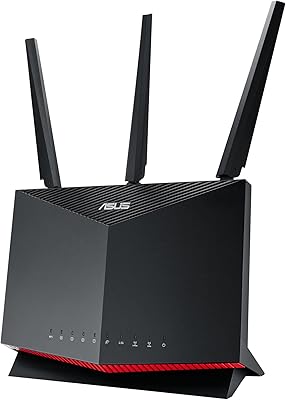
The chassis feels solid and the antenna placement provides good physical stability on a shelf or desk. The matte black finish holds up well over time and does not show dust as aggressively as glossy alternatives at this price point.
At roughly 8.9 inches wide, the footprint is noticeable on smaller desks or entertainment units, and the fixed antennas limit positioning flexibility compared to fully adjustable designs. A couple of users report the unit running warm under sustained heavy load, though no widespread overheating issues appear in the data.
Firmware & Software Updates
76%
24%
ASUS has a solid track record of pushing firmware updates for this product line, addressing both bugs and security vulnerabilities over time. Automatic update notifications through the app mean most users stay current without manual intervention.
Post-update instability is a recurring complaint in a meaningful slice of reviews — some users report needing a factory reset after a firmware push to get things running cleanly again. The update process itself can also briefly drop the entire network, which is disruptive in households with active video calls or online sessions.
USB & Access Point Functionality
69%
31%
Having a USB port for basic network storage or printer sharing is a useful bonus that some buyers specifically seek out at this price range. Access point mode works reliably for users who already have a modem-router combo and just need a capable wireless access point.
USB transfer speeds are adequate but not fast enough for anyone planning to run a serious NAS-style media server off this router. The access point mode setup is also not prominently documented, and a few users had to dig through forums to configure it correctly.
Multi-Device Performance
81%
19%
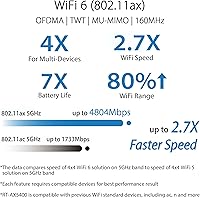
WiFi 6's OFDMA and MU-MIMO capabilities give the RT-AX5400 a real edge in homes where ten or more devices are active at once — smart bulbs, phones, tablets, and a gaming console can all coexist without the congestion slowdowns that older routers suffer under similar load.
When the full device roster is active and several of those devices are doing bandwidth-intensive tasks simultaneously, the dual-band architecture shows its limits more clearly than a tri-band router would. Users running busy home offices alongside active smart home ecosystems occasionally notice the performance ceiling.

Suitable for:

The ASUS RT-AX5400 WiFi 6 Dual-Band Router is a strong pick for households running 10 to 20 connected devices across a single-story home or apartment up to around 2,500 square feet — think a mix of smart TVs, gaming consoles, phones, and smart home hubs all active at the same time. Families with school-age children will find the built-in parental controls genuinely useful, since per-device scheduling and content filtering come included at no extra cost, removing the need for a paid third-party service. Budget-conscious gamers who want the real-world latency benefits of WiFi 6 without jumping to a more expensive tri-band router will find the RT-AX5400 hits a practical sweet spot. It also makes particular sense for anyone already owning another AiMesh-compatible ASUS router, since expanding coverage later is as simple as adding a second node rather than replacing the whole setup. Remote workers who occasionally connect over public Wi-Fi will also appreciate the Instant Guard VPN feature, which adds a layer of protection without requiring a separate subscription.
Not suitable for:

The ASUS RT-AX5400 WiFi 6 Dual-Band Router is not the right tool for large homes above 2,500 square feet, especially multi-story houses where walls and floors kill 5GHz signal well before it reaches distant rooms — buyers in those situations should look at a dedicated tri-band mesh system from the start. Power users who prioritize raw, sustained throughput for activities like 8K streaming, large network backups, or competitive esports at the highest level will hit the dual-band architecture's ceiling and would be better served by a higher-end tri-band or WiFi 6E router. If you already pay for a premium third-party security suite, the included AiProtection becomes redundant, and the value equation shifts toward competitors offering better raw specs at a similar price. Buyers who want advanced network management features — detailed traffic analytics, complex VLAN setups, or enterprise-grade QoS — will find the firmware capable but not as deep as dedicated prosumer alternatives. Anyone expecting the USB port to serve as a fast, full-featured NAS for media streaming will likely be disappointed by the transfer speeds.
Specifications

  • WiFi Standard: Supports WiFi 6 (802.11ax) along with backward-compatible 802.11a, 802.11g, and 802.11ac standards.
  • Frequency Bands: Dual-band design operates simultaneously on 2.4GHz for range and 5GHz for higher-speed, shorter-range connections.
  • Max Speed: Combined wireless throughput is rated at AX5400, split across both bands under optimal conditions.
  • Dimensions: The unit measures 8.91 x 6.54 x 6.31 inches, making it a moderately sized desktop router.
  • Weight: The router weighs 1.35 pounds without packaging, light enough to reposition easily on a shelf.
  • Security: Includes lifetime AiProtection powered by Trend Micro, covering malicious site blocking, intrusion prevention, and infected device detection with no subscription fee.
  • VPN: Instant Guard provides a built-in one-click VPN server, allowing secure remote access to the home network without third-party software.
  • Parental Controls: Offers advanced per-device parental controls including internet time scheduling and content category filtering, managed through the ASUS Router app.
  • Mesh Support: Fully AiMesh compatible, allowing the router to pair with other supported ASUS routers to form a unified whole-home wireless network.
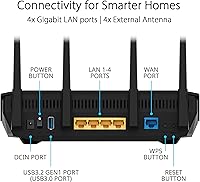
  • Connectivity Ports: Includes Ethernet LAN and WAN ports plus a USB port for basic network storage or printer sharing.
  • App Control: Managed via the ASUS Router app, available for both iOS and Android devices.
  • OS Compatibility: Compatible with Windows, Mac OS, Linux, and mobile app environments for both setup and advanced configuration.
  • Compatible Devices: Designed to connect gaming consoles, personal computers, smart televisions, smartphones, and tablets.
  • Special Modes: Supports Access Point Mode and Guest Network Mode in addition to standard router operation.
  • Smart Home: Alexa compatible, enabling basic voice command integration for supported smart home routines.
  • Power: Operates at 110 Volts and comes with a power adapter included in the box.
  • In the Box: Package includes the RT-AX5400 router, power adapter, RJ-45 Ethernet cable, quick start guide, and warranty card.
  • Color: Available in matte black finish only.
  • Launch Date: First made available in April 2023, positioning it as a current-generation mid-range WiFi 6 device.
  • User Rating: Holds a 4.4 out of 5 star average based on over 3,260 verified ratings, ranking it among the top 35 routers in its category.

Related Reviews

ASUS RT-AX1800S
ASUS RT-AX1800S
79%
88%
Value for Money
79%
WiFi Speed & Performance
74%
Coverage & Range
83%
Setup & Ease of Use
67%
Router App Experience
More
ASUS RT-ACRH13 AC1300 Dual Band WiFi Router
86%
88%
WiFi Performance
91%
Setup and Installation
90%
Value for Money
83%
Signal Coverage
89%
Ease of Use (Mobile App)
More
ASUS RT-AX86U WiFi 6 Gaming Router
84%
91%
Wireless Performance
88%
Gaming Latency
86%
Range & Coverage
79%
Setup & Ease of Use
74%
Value for Money
More
ASUS RT-AX57 WiFi 6 Router
86%
88%
WiFi Performance
91%
Setup & Installation
93%
Security Features
85%
Network Stability
75%
Coverage Range
More
NETGEAR WAX202 WiFi 6 Dual-Band Router
84%
88%
WiFi Performance
93%
Setup & Installation
85%
App Usability
89%
Speed & Coverage
90%
Device Connectivity
More
ASUS RT-AX88U PRO WiFi 6 Router
77%
88%
Wireless Performance
84%
Range & Coverage
91%
Multi-Device Handling
57%
Setup Experience
79%
Build Quality
More
Asus RT-AC1200 Wireless Dual-Band Router
83%
85%
Wi-Fi Performance
91%
Ease of Setup
78%
Coverage Range
88%
Parental Controls
81%
Streaming & Gaming Performance
More
ASUS RT-AX82U
ASUS RT-AX82U
82%
88%
Wireless Performance
91%
Gaming Latency
93%
Setup & Ease of Use
71%
Range & Coverage
82%
Build Quality & Design
More
ASUS RT-BE92U WiFi 7 Router
81%
88%
Wireless Performance
83%
Coverage & Range
84%
Setup & Initial Configuration
91%
Network Security (AiProtection)
86%
Latency & Gaming Performance
More
ASUS RT-N66R Dual-Band Wireless-N900 Router
84%
87%
Performance & Speed
92%
Setup & Installation
89%
Signal Coverage
80%
Reliability & Stability
85%
Build Quality
More

FAQ

The RT-AX5400 is unlocked and works with virtually any ISP that uses a standard modem or gateway. You just connect it via the WAN Ethernet port to your existing modem — cable, fiber, or DSL setups all work fine.

Setup is genuinely straightforward. Download the ASUS Router app on your phone, plug the router in, and follow the on-screen steps — most people are online in under ten minutes. You do not need to touch any advanced settings unless you want to.

Honestly, it depends on the size and layout. In a two-story home under roughly 2,000 to 2,200 square feet with a centrally placed router, most rooms should get usable coverage. In larger or more spread-out homes, the 5GHz signal can weaken on the second floor, and adding a second AiMesh-compatible ASUS node is the most practical fix.

No, the AiProtection security suite is genuinely included for the life of the router at no extra charge. It covers malicious site blocking, intrusion prevention, and infected device alerts — features that some competing brands charge an annual subscription for.

Yes, as long as your existing ASUS router is AiMesh compatible. You pair them through the ASUS Router app, and they merge into a single network with one name and password. Your devices roam between the two nodes automatically.

The Instant Guard VPN is primarily designed for connecting back to your home network securely when you are on public Wi-Fi — at a coffee shop or hotel, for example. It is not a full outbound privacy VPN in the way a paid service like NordVPN or ExpressVPN works, so if anonymizing all your browsing traffic is the goal, you would still want a dedicated VPN service.

Yes, controls work at the individual device level. You can set daily time limits, schedule internet-off windows, and apply content category filters separately for each device. It is all managed from the ASUS Router app on your phone, so you can make changes on the fly.

This ASUS router supports WiFi 6 (802.11ax) only — it does not include the 6GHz band that WiFi 6E routers offer. For most households, standard WiFi 6 is more than sufficient, but if you have newer devices with 6GHz radios and want maximum future-proofing, you would need to look at a WiFi 6E model.

You can connect a USB storage drive to share files across your network, or a compatible USB printer to make it available to all networked devices. It works well for light use, but transfer speeds are not fast enough to serve as a practical media server for large video libraries.

Firmware updates are pushed automatically and notified through the app, so staying current is easy. That said, a pattern in user feedback worth knowing: some people report brief instability right after a major firmware update, and occasionally a factory reset is needed to fully restore stable operation. It does not happen to everyone, but it is worth being aware of before updating.

Where to Buy