Overview

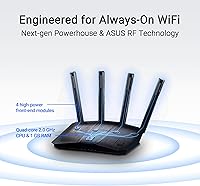
The ASUS RT-BE58U WiFi 7 Router arrived in late 2024 as one of the more accessible ways to step into the 802.11be generation without spending a fortune. It runs dual-band at up to 3600 Mbps aggregate, pairs a 2.5G WAN port with four gigabit LAN ports, and weighs just over a pound — compact enough to tuck almost anywhere. It also supports AiMesh, meaning it can slot into a broader whole-home mesh setup if you already own compatible ASUS hardware. For a mid-range router, the hardware credentials are genuinely solid, and its early Amazon ranking confirms it found an audience quickly.
Features & Benefits

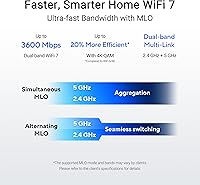
The headline feature here is Multi-Link Operation, which in plain terms means the router can use both frequency bands simultaneously for a single device, reducing the latency spikes caused by constant band-switching. Pair that with 4096-QAM modulation and single-band throughput runs roughly 20% higher than WiFi 6E could achieve. The AiProtection Pro security suite, powered by Trend Micro, handles threat blocking at the network level with no subscription fee attached — though watching future firmware updates is wise to confirm that stays free. Smart Home Master lets you spin up separate SSIDs for IoT gadgets, a kids network, and VPN use, keeping the main network cleaner and easier to manage.

Best For

This WiFi 7 router makes the most sense for households currently running WiFi 5 or older WiFi 6 gear that want hardware built to last the next several years. Families will particularly appreciate the built-in parental controls and the dedicated kids SSID — no third-party app or extra subscription required. If you are managing a growing stack of smart home devices, the IoT network segmentation keeps those gadgets off your main connection, which is a practical security step. Small home offices benefit from the VPN support and the mobile tethering backup. One caveat: the AiMesh capability only activates when paired with compatible ASUS nodes, so standalone use is the default for most buyers.

User Feedback

Across nearly 6,000 ratings, the RT-BE58U holds a 4.4-star average, and recurring praise centers on two things: how painless the initial setup is through the ASUS app, and noticeably better range compared to older ASUS models. The security feature set gets called out repeatedly as a differentiator — buyers are happy to get Trend Micro protection without paying extra. The honest critiques are worth noting, though. Most people do not yet own WiFi 7 client devices, so MLO and the top-end speed gains remain largely theoretical for now. A handful of users ran into firmware quirks, though most resolved them with a manual update — not a dealbreaker, but worth monitoring post-purchase.

Pros

  • Built-in AiProtection Pro provides network-level threat blocking with no ongoing subscription fee.
  • The 2.5G WAN port supports multi-gig internet plans that are becoming increasingly common.
  • Smart Home Master lets you create separate IoT, VPN, and kids networks without any technical expertise.
  • Setup through the ASUS Router app takes most users under ten minutes from box to browsing.
  • MLO technology uses both bands simultaneously, reducing the latency drops common during band-switching.
  • USB port supports 4G and 5G mobile tethering as a live backup when your main ISP connection fails.
  • Range improvements over previous ASUS generations are consistently noted by real-world buyers.
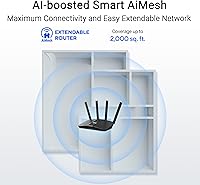
  • AiMesh compatibility lets you expand coverage later by adding another ASUS node rather than replacing the whole system.
  • At its price point, the combination of WiFi 7 hardware and included security software is hard to match.
  • Alexa compatibility adds hands-free basic controls for users already running an Amazon smart home setup.

Cons

  • Most current devices cannot use WiFi 7 features yet, so headline speeds are largely a future promise.
  • Occasional firmware updates have caused temporary connectivity drops for a minority of users.
  • LAN ports are capped at 1 Gbps, which bottlenecks wired transfers to a NAS or high-end desktop.
  • The ASUS Router app splits some advanced settings off to a separate web interface, which feels inconsistent.
  • AiMesh only works within the ASUS ecosystem, locking out buyers with other mesh hardware already installed.
  • VPN throughput under sustained load is noticeably lower than the router's raw wireless capacity.
  • AiProtection Pro is currently free but carries no formal guarantee against future subscription requirements.
  • Parental controls can be bypassed by teenagers using a personal VPN app on their own device.
  • A single node will not adequately cover large multi-story homes without supplementary hardware.
  • The Alexa integration is limited to basic commands and does not support granular network management by voice.

Ratings

The ASUS RT-BE58U WiFi 7 Router has been scored by our AI system after analyzing thousands of verified global buyer reviews, with spam, bot activity, and incentivized feedback actively filtered out before any score was calculated. The results reflect a genuinely balanced picture — where this router punches above its weight class, and where it still has room to grow. Both the standout strengths and the friction points that real users encountered day-to-day are transparently baked into every number below.

Wireless Performance
83%
Users upgrading from WiFi 5 or older WiFi 6 routers consistently report a meaningful jump in real-world throughput, especially in homes with multiple simultaneous streams. The 4096-QAM modulation and dual-band configuration handle busy household traffic — video calls, 4K streaming, and background updates — without the congestion that plagued older hardware.
Most households do not yet own WiFi 7-capable client devices, which means the headline 3600 Mbps aggregate speed is largely a future-state figure for now. Early adopters expecting dramatic day-one speed gains over a good WiFi 6 router may find the difference modest until their device ecosystem catches up.
Range & Coverage
81%
19%
A recurring theme in buyer feedback is that the RT-BE58U covers medium-to-large homes more reliably than its predecessor ASUS models. Single-floor homes and open-plan layouts in particular benefit from consistent signal strength across rooms that previously had dead spots.
Multi-story homes or properties with thick concrete walls still expose the limits of a single dual-band node. Without pairing it with additional AiMesh-compatible ASUS hardware, buyers in larger or more complex floor plans may still need a supplementary access point.
Setup & Ease of Use
91%
The ASUS Router app makes initial configuration genuinely approachable — reviewers with no networking background consistently report being up and running within ten minutes. Clear LED indicators on the unit itself give instant visual feedback during setup, which reduces the back-and-forth troubleshooting common with competing brands.
Advanced features like VPN configuration or manual SSID segmentation can feel buried in the app's menu structure for less technical users. A small number of buyers also noted that the app occasionally requires a restart to reflect network changes in real time.
Security Features
88%
AiProtection Pro, backed by Trend Micro's threat database, provides network-level malware blocking and intrusion prevention that you would typically expect from a business-grade appliance. The one-tap security scan gives everyday users a quick way to check for vulnerabilities without needing to understand what they are actually scanning for.
It is worth noting that AiProtection Pro is currently free, but there is no formal long-term guarantee this will not shift to a subscription model in future firmware. For small offices treating this as their primary security layer, it should supplement — not replace — a dedicated firewall solution.
Smart Home & IoT Management
86%
The Smart Home Master feature lets users carve out a dedicated IoT SSID, keeping smart TVs, thermostats, and security cameras on a separate network segment from primary devices. In practice this reduces the attack surface if any smart device is compromised, and it removes the bandwidth competition that clutters mixed-use networks.
Setting up and labeling multiple SSIDs is intuitive at first, but managing which devices belong on which network requires some ongoing housekeeping as new gadgets are added. Buyers with large smart home ecosystems noted they wished the app offered more automation rules for device onboarding.
Parental Controls
84%
The dedicated kids network SSID paired with the built-in parental controls gives families a no-extra-cost content filtering solution that works at the router level, meaning it applies to every device on that network regardless of what the device itself allows. Parents appreciated being able to set time schedules and content categories without installing anything on kids' phones.
The filtering categories are somewhat broad, and tech-savvy older children using VPN apps on their own devices can route around network-level controls. The scheduling interface, while functional, lacks the granularity of dedicated parental control platforms like Circle.
VPN Support
77%
23%
Built-in VPN server and client capabilities make the RT-BE58U a practical choice for remote workers who need secure access to a home network while traveling. The configuration process is more guided than on many competing routers at this price point.
VPN throughput under load is noticeably lower than the router's raw wireless speeds, which is a hardware limitation rather than a software one. Users running persistent VPN tunnels for work reported occasional drops that required reconnecting — a known trade-off at this performance tier.
WAN Flexibility & Failover
79%
21%
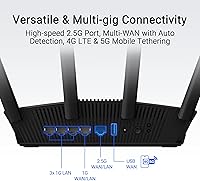
The 2.5G WAN port is a genuine future-proofing feature for homes with multi-gig ISP plans, and the USB port's support for 4G and 5G mobile tethering as a backup WAN source is a practical addition for anyone who cannot afford internet downtime.
The mobile tethering failover works well in principle, but a few users found the automatic WAN detection switching was slower than expected during a live connection drop. It functions, but it is not as instant as a dedicated failover appliance would provide.
AiMesh Integration
82%
18%
For existing ASUS router owners, adding the RT-BE58U as a mesh node — or using it as the primary node with additional ASUS hardware — is nearly automatic through the app. It inherits network settings without manual reconfiguration, which makes expanding coverage far less painful than managing separate access points.
AiMesh only works within the ASUS ecosystem, so it is not useful for buyers who own mesh hardware from other brands. The mesh benefits also scale with the number of nodes, meaning solo use of this unit does not tap into what makes AiMesh compelling.
Build Quality & Design
74%
26%
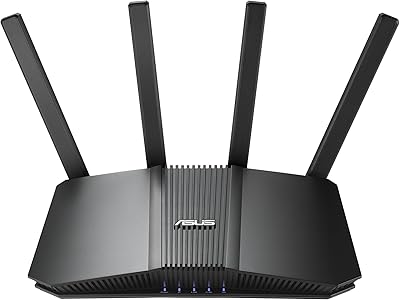
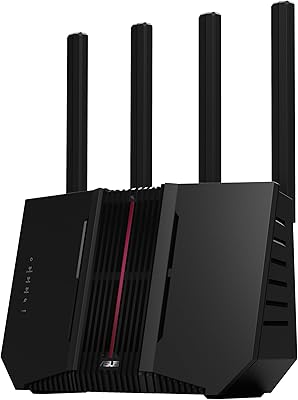
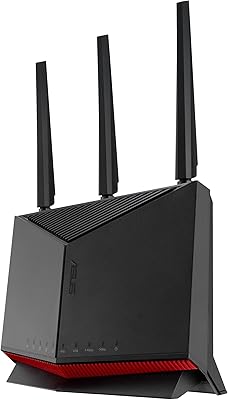
The compact black chassis is unobtrusive enough to sit on a bookshelf or media console without drawing attention. At just over one pound, it is light enough to mount on a wall bracket if needed, and the build feels sturdy without any flexing or cheap-feeling panels.
The antenna-free external design, while tidy, does raise questions from more technically inclined buyers about whether internal antennas limit beamforming performance versus comparable routers with external adjustable antennas. The aesthetic is clean but unremarkable for a product positioned as next-generation.
Firmware Stability
68%
32%
Most users run the RT-BE58U for extended periods without any intervention needed. Regular firmware updates from ASUS demonstrate active product support, and the automatic update option in the app means most buyers never need to think about it.
A recurring minority complaint involves firmware updates occasionally introducing temporary connectivity issues or resetting custom configurations. While these cases are not widespread, they are consistent enough across reviews to flag as a real — if infrequent — inconvenience that requires a manual rollback or re-setup.
App & Remote Management
78%
22%
The ASUS Router app handles the bulk of everyday tasks — checking connected devices, adjusting QoS priorities, running diagnostics — from a phone without needing to access a web interface. Remote management outside the home network works reliably for basic monitoring tasks.
The app's interface organization has a learning curve, and some advanced settings still redirect to the traditional web-based admin panel rather than being natively handled in the app. For users who want everything in one place, the split experience feels inconsistent.
Value for Money
87%
Buying into WiFi 7 hardware at this price point, with Trend Micro security included at no ongoing cost and a port configuration that supports multi-gig WAN, represents strong value relative to what competing brands charge for equivalent specs. Most buyers conclude they are getting hardware that will remain relevant for several years.
Buyers who do not have a multi-gig internet plan and whose devices are all WiFi 6 or older will be paying a premium for capabilities they cannot currently use. The value proposition is real, but it is front-loaded for future use rather than immediate tangible gain.
Alexa & Voice Integration
63%
37%
Alexa compatibility allows basic voice commands like checking network status or restarting the router without reaching for a phone or laptop. For smart home users already embedded in the Amazon ecosystem, this adds a layer of hands-free convenience that competitors at this price rarely include.
The Alexa integration is narrow in scope — it does not extend to granular controls like adjusting SSID settings or switching VPN profiles by voice. Users expecting a fully voice-managed network experience will find the functionality more of a convenience footnote than a core feature.
Port Selection & Connectivity
76%
24%
Four gigabit LAN ports covers most home and small office wiring needs comfortably, and the presence of a 2.5G WAN port alongside a USB expansion port gives the unit a degree of connectivity flexibility that routers at similar prices often skip. Wired device performance is consistent and well-reviewed.
There is no 2.5G or 10G LAN port for wired devices that could benefit from faster local transfers, such as a NAS unit or a desktop workstation. For users who push large files across their local network regularly, the LAN ceiling at 1G is the one area where the hardware feels constrained.

Suitable for:

The ASUS RT-BE58U WiFi 7 Router is a strong match for households that are ready to move beyond aging WiFi 5 or WiFi 6 hardware and want something that will stay relevant as newer devices roll out over the next few years. Families with kids will find the built-in parental controls and dedicated kids network genuinely useful — it works at the router level, so there is no per-device app to install or maintain. If your home is filling up with smart devices like thermostats, cameras, and voice assistants, the IoT network segmentation keeps that traffic isolated from your primary devices without requiring any advanced networking knowledge. Remote workers and small home office setups benefit from the native VPN support and the 4G/5G tethering option, which provides a practical backup if the main internet connection drops. Existing ASUS router owners looking to extend coverage will find this unit integrates cleanly into an AiMesh setup, though that does require at least one other compatible ASUS node to activate the mesh functionality.
Not suitable for:

Buyers expecting to unlock the full performance ceiling of WiFi 7 immediately will likely be disappointed — the reality is that most current laptops, phones, and tablets are still WiFi 6 or 6E devices, meaning the advanced Multi-Link Operation and peak throughput figures will sit unused until the broader device ecosystem catches up. The ASUS RT-BE58U WiFi 7 Router is also not the right fit for large multi-story homes or properties with thick masonry walls where a single node will leave coverage gaps; in those scenarios, a full tri-band mesh system with dedicated backhaul would serve better. Serious gamers or power users who need wired speeds beyond 1 Gbps to a desktop or NAS will find the LAN port ceiling limiting, as none of the four LAN ports step up beyond gigabit. Small businesses treating this as a primary security appliance should be cautious — AiProtection Pro adds real value, but it is not a substitute for a dedicated commercial firewall, and its free status is not formally guaranteed beyond current firmware. Finally, anyone deeply invested in a non-ASUS mesh ecosystem should not expect cross-brand compatibility; AiMesh is ASUS-only.
Specifications

  • WiFi Standard: This router operates on the 802.11be (WiFi 7) standard, the latest generation of wireless networking technology.
  • Band Configuration: Dual-band design covers both the 2.4 GHz and 5 GHz frequency ranges simultaneously.
  • Max Aggregate Speed: Combined wireless throughput reaches up to 3600 Mbps across both bands under optimal conditions.
  • Modulation: 4096-QAM (4K-QAM) modulation increases single-band transmission efficiency by approximately 20% compared to WiFi 6E.
  • MLO Support: Multi-Link Operation allows a compatible client device to send and receive data across both bands at the same time, reducing latency.
  • WAN Port: A single 2.5 Gigabit WAN port supports multi-gig broadband plans from compatible ISPs.
  • LAN Ports: Four 1 Gigabit Ethernet LAN ports are available for wired device connections.
  • USB Port: One USB port supports 4G LTE and 5G mobile tethering as a secondary or failover WAN source.
  • Security: AiProtection Pro, powered by Trend Micro, provides network-level malware blocking, intrusion prevention, and Safe Browsing at no additional subscription cost under current firmware.
  • SSID Segmentation: Smart Home Master supports up to three separate SSIDs dedicated to IoT devices, a VPN tunnel, and a kids network respectively.
  • Mesh Support: AiMesh compatible, allowing integration with other supported ASUS routers to extend whole-home wireless coverage.
  • Parental Controls: Built-in parental controls enable content filtering and time scheduling at the router level for devices on the kids network SSID.
  • VPN Support: Supports both VPN server and VPN client configurations for secure remote access and outbound tunneling.
  • Voice Assistant: Alexa compatible for basic voice-controlled network management within the Amazon smart home ecosystem.
  • Dimensions: The unit measures 7.6 x 2.3 x 9.37 inches, with a compact vertical profile suited for shelf or desk placement.
  • Weight: The router weighs 1.01 lbs, making it light enough for wall-mount bracket installation if needed.
  • Color: Available in Black with an understated design that blends into most home and office environments.
  • In the Box: Package includes the RT-BE58U router, power adapter, RJ-45 Ethernet cable, Quick Start Guide, and warranty card.
  • Wireless Channels: Supports 160 MHz channel bandwidth for higher throughput on compatible client devices in less congested environments.
  • Connectivity: Supports both Wi-Fi and Bluetooth connectivity, with app-based management available through the ASUS Router mobile application.

Related Reviews
ASUS RT-BE86U WiFi 7 Router
85%
92%
WiFi Performance
89%
Speed & Throughput
91%
Security Features
85%
Ease of Setup
68%
Firmware Stability
More
ASUS RT-BE82U WiFi 7 Router
84%
92%
Wi-Fi Performance
89%
Speed & Connectivity
91%
Security Features
74%
Ease of Setup
88%
Build Quality
More
ASUS RT-BE92U WiFi 7 Router
81%
88%
Wireless Performance
83%
Coverage & Range
84%
Setup & Initial Configuration
91%
Network Security (AiProtection)
86%
Latency & Gaming Performance
More
ASUS RT-AX86U WiFi 6 Router
87%
94%
Performance
88%
Ease of Setup
93%
Gaming Experience
90%
WiFi Coverage
91%
Security Features
More
ASUS RT-AX57 WiFi 6 Router
86%
88%
WiFi Performance
91%
Setup & Installation
93%
Security Features
85%
Network Stability
75%
Coverage Range
More
ASUS RT-AXE7800 WiFi 6E Router
85%
91%
Performance & Speed
89%
Ease of Setup
82%
WiFi Range
94%
Security Features
88%
Compatibility with Devices
More
ASUS AC1750 WiFi Router RT-ACRH18
83%
84%
WiFi Performance
92%
Setup & Installation
88%
Range Coverage
90%
Parental Controls
80%
Multi-Device Handling
More
ASUS RT-AX88U PRO WiFi 6 Router
85%
91%
Performance for Gaming
88%
WiFi Speed & Range
94%
Security Features (AiProtection Pro)
78%
Setup & Installation
82%
Ease of Use (App & Controls)
More
ASUS RT-AX82U
ASUS RT-AX82U
82%
88%
Wireless Performance
91%
Gaming Latency
93%
Setup & Ease of Use
71%
Range & Coverage
82%
Build Quality & Design
More
ASUS RT-AX5400 Dual Band WiFi 6 Router
87%
94%
Performance for Gaming and Streaming
89%
WiFi Coverage and Range
92%
Security Features
88%
Ease of Setup and Configuration
85%
Parental Controls
More

FAQ

Not necessarily. Even if your current phones and laptops are WiFi 6 or older, you will still benefit from improved range, better congestion handling, and the security features. The WiFi 7-specific advantages like Multi-Link Operation become relevant as you gradually replace devices over the next few years — so you are buying for where your setup is heading, not just where it is today.

In simple terms, MLO lets a compatible device use both the 2.4 GHz and 5 GHz bands at the same time rather than picking one and sticking with it. The practical result is a more stable connection with fewer latency spikes — useful for video calls, online gaming, or anything where a brief dropout is noticeable. That said, you need a WiFi 7 client device to take advantage of it, and most current devices do not support it yet.

As of current firmware, AiProtection Pro is included at no extra charge, which is a genuine differentiator at this price point. However, ASUS has not made a formal permanent commitment to keeping it free indefinitely, so it is worth checking the ASUS product page or firmware release notes periodically. For most home users it is a significant bonus, but businesses should not rely on it as their sole security layer regardless.

Yes, as long as your existing ASUS router also supports AiMesh — which covers a wide range of ASUS models released in recent years. You can add the RT-BE58U as either the primary node or a satellite node within an existing AiMesh setup. Just note that AiMesh is an ASUS-only ecosystem, so it will not work alongside mesh hardware from other brands like Eero or Netgear Orbi.

Most users report it takes under fifteen minutes using the ASUS Router app on a smartphone. The app walks you through each step with prompts, and the LED indicators on the router itself give you real-time visual feedback on connection status. You do not need to log into a web-based admin panel for basic setup, which makes the experience far more approachable than traditional router configuration.

For now, yes — a 2.5G WAN port will not do anything for a 500 Mbps connection since your ISP speed is the actual bottleneck. But multi-gig plans are becoming more widely available and affordable, so if you upgrade your internet service in a year or two, the hardware will be ready for it without needing a new router.

It supports USB tethering with 4G LTE and 5G dongles, but compatibility is not universal across every dongle brand and model. ASUS maintains a compatibility list on their support site that is worth checking before purchasing a specific dongle. Most major carrier-branded devices and common consumer modems tend to work fine, but niche or older models can be hit or miss.

Unfortunately, yes. Router-level parental controls filter traffic at the network layer, but if a device runs its own VPN app that tunnels traffic through an external server, it can route around the filters. For younger children this is rarely an issue, but older teens with some technical knowledge can circumvent it. For more robust enforcement, pairing router-level controls with a device management app directly on the child's phone is a more reliable approach.

It handles medium-to-high device counts well for a dual-band router. The ability to segment IoT devices onto a separate SSID helps a lot — keeping smart bulbs and cameras off the same band as your laptop reduces competition for bandwidth. Where it can get stretched is in very dense environments with 30 or more active devices all demanding real throughput simultaneously, in which case a tri-band router or a multi-node mesh setup would serve better.

A small number of users have reported temporary problems after firmware updates, but these are usually resolved by a full factory reset followed by reconfiguring the router from scratch, or by rolling back to a previous firmware version through the ASUS support site. Enabling automatic updates is convenient but it is worth keeping notes on your custom settings — VPN configs, SSID names, and port forwarding rules — so you can restore them quickly if something goes sideways after an update.