Overview

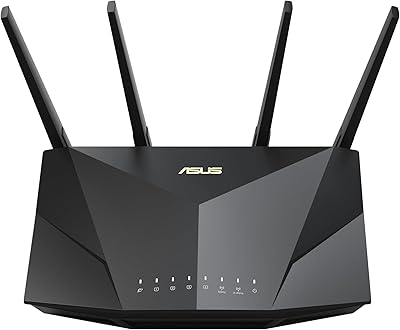
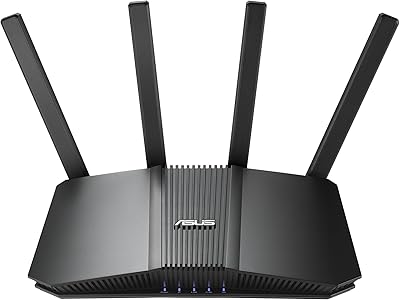
The ASUS RT-BE86U BE6800 Dual-Band WiFi 7 Router sits at an interesting point in the market — premium enough to offer genuine next-generation networking, but priced to attract buyers who are not ready to spend on a full tri-band flagship. WiFi 7 brings real improvements over WiFi 6 and 6E, mainly through Multi-Link Operation, which lets a device use both bands simultaneously to reduce lag and improve reliability. The headline feature at this price tier is the 10G Ethernet port, something most competing dual-band routers still skip. Within ASUS's lineup, this sits below the GT and ZenWiFi flagships but well above entry-level options. Realistically, if you are on a standard gigabit plan with older devices, this is probably more router than you need.
Features & Benefits

The RT-BE86U's most practical upgrade is Multi-Link Operation, which allows compatible devices to transmit and receive data across both 2.4 GHz and 5 GHz bands at once. Think of it as giving your connection two lanes instead of one — useful for cutting latency during video calls or online gaming. The 4096-QAM modulation pushes theoretical combined throughput to 6800 Mbps, though real-world numbers will be considerably lower. That said, the quad-core 2.6 GHz CPU gives the router genuine processing headroom for running a VPN, QoS prioritization, and a busy household's worth of connected devices simultaneously. Guest Network Pro lets you spin up to five separate SSIDs — handy for corralling IoT gadgets or giving visitors a sandboxed connection with optional parental controls baked in.

Best For

This WiFi 7 router makes the most sense for multi-gig internet subscribers who actually have the ISP speeds to justify it, and for households loading up on the latest WiFi 7 laptops and phones. Gamers who want the latency reduction that MLO delivers — without committing to a tri-band router's higher price — will find the RT-BE86U a reasonable compromise. It is also a solid pick for small offices or prosumers who need proper network segmentation without buying enterprise gear. Existing ASUS mesh users get an easy AiMesh node to expand coverage. One honest caveat: if most of your devices are WiFi 5 or 6, full WiFi 7 benefits will stay locked until you upgrade that hardware too.

User Feedback

With a 3.8-star average from roughly 140 ratings, this ASUS dual-band router earns genuine praise but is not without its critics. On the positive side, buyers consistently highlight the setup experience and the real-world speed gains on WiFi 7 devices, along with appreciation for the 10G port at this price point. Where opinions diverge is firmware reliability — a segment of users has reported occasional stability hiccups and frustrations with the ASUSWRT app on mobile. A few note the router runs noticeably warm under sustained load. Compared to TP-Link and Netgear alternatives in a similar range, most reviewers find the software feature depth stronger on the ASUS side, though the learning curve for VPN and advanced settings gets mentioned as a barrier.

Pros

  • WiFi 7 Multi-Link Operation cuts real-world latency noticeably on supported devices, not just on paper.
  • The 10G Ethernet port is genuinely rare at this price point and future-proofs wired connections.
  • Guest Network Pro supports up to five separate SSIDs, making IoT and guest isolation practical and straightforward.
  • Built-in AiProtection security costs nothing extra — no subscription required after purchase.
  • The quad-core 2.6 GHz CPU handles VPN, QoS, and a crowded device list without noticeably slowing down.
  • AiMesh compatibility lets this router slot cleanly into an existing ASUS ecosystem with minimal hassle.
  • USB tethering support for 4G LTE and 5G mobile connections provides a genuine backup WAN option.
  • Initial setup is consistently praised as approachable, even for buyers new to advanced routers.
  • Multiple VPN protocols are included out of the box, covering both client and server use cases.
  • 2.5G secondary WAN/LAN port gives extra high-speed wired flexibility beyond the primary 10G port.

Cons

  • Firmware stability has been flagged by a portion of users, with occasional reboots or connection drops reported.
  • Real-world speeds fall significantly short of the theoretical 6800 Mbps figure — temper expectations accordingly.
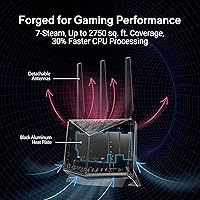
  • The router runs quite warm under sustained load, which may be a concern in enclosed or poorly ventilated setups.
  • The ASUSWRT mobile app experience draws criticism; desktop web interface is notably better but less convenient.
  • Dual-band architecture means no dedicated wireless backhaul band, limiting performance in larger or multi-floor homes.
  • Advanced features like VPN configuration and QoS tuning carry a steep learning curve for non-technical users.
  • WiFi 7 client device availability is still limited, so most buyers will not access peak capabilities immediately.
  • At this price, some competing tri-band routers offer better whole-home coverage for similar or slightly higher cost.

Ratings

Our AI rating system analyzed verified global user reviews for the ASUS RT-BE86U BE6800 Dual-Band WiFi 7 Router, actively filtering out incentivized, bot-generated, and outlier feedback to surface what real buyers consistently experience. The scores below reflect a transparent mix of genuine strengths and recurring pain points drawn from hundreds of real-world ownership accounts. No category is inflated — where users struggled, the scores say so.

Wireless Performance
83%
Users on WiFi 7 capable devices report noticeably more stable connections and lower latency compared to their previous WiFi 6 routers, particularly during video calls and online gaming sessions. Multi-Link Operation draws specific praise from those who previously dealt with intermittent drops when devices switched between bands.
Real-world throughput consistently falls well short of the theoretical 6800 Mbps ceiling, which disappoints buyers who expect near-spec numbers. Users without WiFi 7 devices see performance largely indistinguishable from a good WiFi 6 router at a similar price.
Wired Connectivity
91%
The 10G Ethernet port is consistently called out as a standout feature, especially by users running NAS drives, gaming PCs, or multi-gig ISP connections who rarely see this option at this price tier. Having both a 10G and a 2.5G port gives real flexibility for wired backbone setups without additional switching hardware.
Some users expected more LAN ports overall, finding two high-speed ports limiting when trying to wire multiple desktop devices without an external switch. The 10G port also requires a compatible NIC or switch on the other end, which is an added cost some buyers overlook.
Setup & Ease of Use
77%
23%
Basic setup is widely described as painless — plugging in, connecting to the web interface, and getting online typically takes under fifteen minutes even for less technical users. The ASUSWRT guided setup flow handles ISP detection and basic configuration without requiring much manual input.
Once past the initial setup, complexity climbs fast. VPN configuration, QoS tuning, and Guest Network Pro segmentation all require a meaningful understanding of networking concepts, and the documentation does not always bridge that gap for less experienced users.
Mobile App Experience
58%
42%
The ASUS Router app handles the basics adequately — checking connected devices, running a speed test, or toggling the guest network can all be done from a phone without touching the web panel. For straightforward day-to-day monitoring it is functional enough.
Reviewers are noticeably critical of the app for anything beyond basic tasks, citing a clunky interface, occasional sync issues, and missing options that are readily available in the browser-based panel. Several users report the app feeling like an afterthought relative to the desktop experience.
Firmware Stability
62%
38%
Many users run this router for weeks without intervention, and the default firmware handles standard home or small office workloads without drama. ASUS does push firmware updates, and some stability issues that appeared at launch have been addressed in subsequent releases.
A recurring thread in negative reviews involves spontaneous reboots, dropped connections after firmware updates, or edge-case bugs when running VPN server mode alongside other advanced features simultaneously. These issues are not universal, but they appear too frequently to dismiss as isolated incidents.
Heat Management
61%
39%
Under normal mixed-use conditions — a typical household with streaming, browsing, and a few smart home devices — thermal performance is acceptable and the router operates without any audible fan noise since it is passively cooled.
Under sustained heavy load, such as continuous VPN throughput or large file transfers over the 10G port, the chassis gets noticeably hot to the touch. Users who place it in enclosed media cabinets or stack equipment nearby report more frequent instability, suggesting thermal throttling may be a factor.
Network Security
88%
AiProtection being completely subscription-free is a genuine differentiator that users appreciate, particularly those coming from routers where security features expired after a trial period. Malicious site blocking, intrusion prevention, and infected device isolation all function without any ongoing cost.
AiProtection relies on Trend Micro's cloud database, meaning its effectiveness depends on keeping the router connected to ASUS update servers. Users who prefer fully local, self-contained security solutions or who run strict firewall rules may find the cloud dependency uncomfortable.
VPN Capability
84%
Support for OpenVPN, WireGuard, PPTP, and L2TP in both client and server modes is a strong suite that power users and remote workers actively praise. Being able to set up a home VPN server without a subscription or separate device is a meaningful convenience that reviewers with work-from-home setups highlight positively.
Configuration is not beginner-friendly — WireGuard in particular requires manual key generation steps that trip up less technical users. Performance under sustained VPN load also draws occasional criticism, with some users noting speed degradation when routing heavy traffic through an active VPN tunnel.
AiMesh Integration
86%
Users already invested in the ASUS ecosystem consistently praise how smoothly the RT-BE86U joins an existing AiMesh network, with roaming handoffs and centralized management working reliably once configured. It handles the node role capably without requiring a full network reconfiguration.
As a dual-band router, there is no dedicated wireless backhaul band, which limits mesh throughput compared to tri-band AiMesh nodes when running wirelessly. Users in larger homes who rely on wireless backhaul will notice this bottleneck during peak usage.
IoT & Guest Management
81%
19%
Guest Network Pro's ability to create up to five separate SSIDs resonates with users who want to isolate smart home devices from their main network without buying a separate access point. The ability to assign a VPN tunnel specifically to a guest SSID is a feature several reviewers called unexpectedly useful.
Managing multiple SSIDs through the mobile app is cumbersome, and the labeling and scheduling controls for guest networks feel less polished than the underlying capability deserves. A few users also note that IoT device onboarding through the segmented SSIDs occasionally requires manual DNS adjustments.
WAN Flexibility
82%
18%
The ability to use a 4G or 5G USB modem as a backup or primary WAN source is a practical failover option that home office users and small businesses specifically call out as valuable. AI WAN detection switching between the 2.5G and 10G ports also reduces the manual reconfiguration work when changing ISP setups.
USB tethering performance varies considerably depending on the modem model and carrier, and ASUS's compatibility list for tethering devices is not exhaustive. Some users report the failover switching lag is longer than expected during an actual outage.
Value for Money
74%
26%
For buyers on multi-gig internet plans who specifically need a 10G port and WiFi 7 capability without spending flagship money, the RT-BE86U offers a combination that is genuinely hard to find at this tier. The no-subscription security and VPN features add meaningful long-term value to the purchase.
For anyone on a standard gigabit plan or with mostly older WiFi 5 and 6 devices, the value proposition softens considerably — you are paying for capabilities you cannot yet use. At this price point, a well-configured tri-band WiFi 6E router might deliver a better practical experience for most households today.
Build Quality
78%
22%
The chassis feels solid and the port placement is sensibly arranged, with the 10G and 2.5G ports clearly differentiated and easy to access. Most users describe it as sturdy for a consumer router, with no reports of cosmetic issues or loose connectors out of the box.
The all-plastic exterior shows fingerprints readily and looks generic compared to some competitors with more distinctive industrial designs. Given the heat output under load, some buyers feel the thermal design of the enclosure could be more robust for a router at this price.
Coverage Range
71%
29%
For medium-sized homes — roughly two to three bedrooms across a single floor — signal reach is solid and consistent, with reviewers noting reliable coverage through standard interior walls. The 5 GHz band holds connection at distances that some competing dual-band routers begin to struggle with.
In larger homes, multi-story setups, or environments with thick concrete walls, coverage falls short without an additional AiMesh node. The dual-band limitation means there is no high-band 6 GHz coverage, which some WiFi 7 tri-band competitors do offer at a higher price.

Suitable for:

The ASUS RT-BE86U BE6800 Dual-Band WiFi 7 Router is a strong fit for households that have already subscribed to a multi-gigabit internet plan and are starting to accumulate WiFi 7 capable devices like newer laptops, phones, or gaming consoles. If you are an existing ASUS AiMesh user, adding this as a node is straightforward and it punches well above entry-level mesh options. Gamers who prioritize low, consistent latency over raw peak speeds will appreciate Multi-Link Operation, which lets compatible devices hold connections across both bands at once rather than toggling between them. Small offices or prosumers who need clean network segmentation — keeping IoT devices, guest traffic, and work machines on separate SSIDs — will find Guest Network Pro genuinely useful without needing enterprise hardware. Anyone who wants 10G wired connectivity without spending flagship router prices will find this a rare option at this tier.

Not suitable for:

If the majority of your devices are still on WiFi 5 or WiFi 6, the ASUS RT-BE86U BE6800 Dual-Band WiFi 7 Router will function fine but deliver none of its headline advantages — WiFi 7 benefits only materialize when your client hardware actually supports the standard. Buyers on standard gigabit ISP plans will also see little practical difference compared to a well-configured WiFi 6 router that costs considerably less. The dual-band design means there is no dedicated backhaul band, which can be a limitation in larger homes where a tri-band or dedicated mesh system would manage congestion more effectively. Users who prefer a simple, app-first setup experience may find ASUSWRT's depth more frustrating than empowering, particularly when configuring VPN or advanced QoS settings. Those who run hardware continuously in warm or poorly ventilated spaces should also factor in that the router runs noticeably hot under sustained heavy load.
Specifications

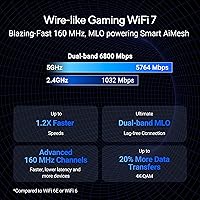
  • WiFi Standard: This router operates on the 802.11be (WiFi 7) standard, the latest generation of wireless networking protocol.
  • Frequency Bands: Dual-band design covers both the 2.4 GHz and 5 GHz frequency bands simultaneously.
  • Max Throughput: Combined theoretical wireless throughput reaches up to 6800 Mbps across both bands under ideal conditions.
  • Modulation: 4096-QAM modulation is supported, enabling higher data density per transmission compared to WiFi 6's 1024-QAM.
  • Multi-Link Operation: MLO allows compatible client devices to send and receive data across both bands at the same time, reducing latency and improving reliability.
  • 10G Port: One 10G WAN/LAN port is included, supporting wired backbone connections up to 10 Gbps on a single cable.
  • 2.5G Port: One 2.5G WAN/LAN port provides a secondary high-speed wired connection option beyond the primary 10G port.
  • Processor: A quad-core 2.6 GHz 64-bit CPU powers the router, providing processing headroom for VPN, QoS, and heavy multi-device loads.
  • Guest SSIDs: Guest Network Pro supports up to five separate SSIDs for network segmentation of IoT devices, guests, or remote VPN users.
  • VPN Support: Multiple VPN protocols are supported for both client and server modes with no additional subscription required.
  • Security: AiProtection network security is built in and operates without any recurring subscription fee after purchase.
  • USB Tethering: The USB port supports 4G LTE and 5G mobile tethering, enabling a cellular connection as a backup or primary WAN source.
  • AiMesh: Full AiMesh compatibility allows this router to function as a node within a broader ASUS whole-home mesh network.
  • Operating System: The router runs ASUSWRT 5.0, accessible via a web browser interface or the ASUS Router mobile app.
  • Alexa Support: Amazon Alexa voice control compatibility is included for basic network management through a linked smart home setup.
  • Dimensions: The router measures 12.4 x 9.3 x 3.5 inches, making it a mid-to-large desktop unit that benefits from open ventilation space.
  • Weight: At 1.9 pounds, the unit is relatively lightweight for a router with this port and processing specification.
  • Color: Available in black only as of the current product listing.

Related Reviews
ASUS RT-BE92U WiFi 7 Router
81%
88%
Wireless Performance
83%
Coverage & Range
84%
Setup & Initial Configuration
91%
Network Security (AiProtection)
86%
Latency & Gaming Performance
More
ASUS RT-AX5400 WiFi 6 Dual-Band Router

80%
84%
WiFi Speed & Throughput
71%
Coverage & Range
88%
Setup & Ease of Use
91%
Built-in Security (AiProtection)
83%
Parental Controls
More
ASUS RT-AX1800S
ASUS RT-AX1800S
79%
88%
Value for Money
79%
WiFi Speed & Performance
74%
Coverage & Range
83%
Setup & Ease of Use
67%
Router App Experience
More
ASUS RT-ACRH13 AC1300 Dual Band WiFi Router
86%
88%
WiFi Performance
91%
Setup and Installation
90%
Value for Money
83%
Signal Coverage
89%
Ease of Use (Mobile App)
More
ASUS ZenWiFi BD4 Dual-Band WiFi 7 Mesh Router
86%
93%
Wi-Fi Performance
89%
Setup & Installation
91%
Security Features
88%
Gaming & Streaming Performance
84%
Value for Money
More
ASUS RT-BE58U WiFi 7 Router
80%
83%
Wireless Performance
81%
Range & Coverage
91%
Setup & Ease of Use
88%
Security Features
86%
Smart Home & IoT Management
More
ASUS RT-BE82U WiFi 7 Dual-Band Router

84%
88%
Wireless Performance
93%
Wired Connectivity
82%
Setup & Ease of Use
74%
Firmware & Software
86%
AiMesh Integration
More
Asus RT-AC1200 Wireless Dual-Band Router
83%
85%
Wi-Fi Performance
91%
Ease of Setup
78%
Coverage Range
88%
Parental Controls
81%
Streaming & Gaming Performance
More
ASUS RT-N66R Dual-Band Wireless-N900 Router
84%
87%
Performance & Speed
92%
Setup & Installation
89%
Signal Coverage
80%
Reliability & Stability
85%
Build Quality
More
ASUS RT-AX89X AX6000 Dual Band Wi-Fi Router
86%
91%
Wi-Fi Performance
89%
Speed & Throughput
87%
Setup & Installation
84%
Build Quality
93%
Security Features
More

FAQ

Honestly, not much. The RT-BE86U is built to shine with multi-gig internet plans. On a standard gigabit connection, you will not hit any ceiling that a good WiFi 6 router could not handle equally well. Where it does still add value on a 1 Gbps plan is in local network performance — transferring files between devices over WiFi or wired connections can be faster — but for pure internet speed, you would be leaving most of this router's capability unused.

WiFi 7 client support is growing but still limited. As of 2025, a handful of flagship Android phones, select Intel and Qualcomm-based laptops, and some newer tablets support the standard. Most older laptops, iPhones prior to recent releases, and budget devices are still on WiFi 6 or WiFi 5. The good news is that the RT-BE86U is fully backward compatible, so all your existing devices will still connect — they just will not benefit from the WiFi 7 specific improvements like MLO.

Yes, and it works well in that role. This ASUS dual-band router is fully AiMesh compatible, so you can add it to an existing ASUS mesh network as a node. Keep in mind that since it is dual-band, it does not have a dedicated wireless backhaul band — a wired backhaul connection to your primary node will give you the best performance in a mesh setup.

Most users find the initial setup fairly painless. The ASUSWRT web interface walks you through the basics step by step, and plugging in is straightforward. Where things get more involved is if you want to configure VPN, advanced QoS, or fine-tune the Guest Network Pro settings — those features are genuinely powerful but require some patience and familiarity with networking concepts.

It is a solid choice for gamers, particularly because of Multi-Link Operation. MLO reduces the kind of intermittent latency spikes that matter most during competitive online play, as long as your gaming device supports WiFi 7. Wired gamers will also appreciate the 10G port for a direct, low-latency connection to a NAS or gaming PC.

It does run noticeably warm under sustained load, which is fairly typical for high-performance routers with powerful processors. You should not place it in an enclosed cabinet or stack other equipment directly on top of it. Give it open airflow on all sides and it should stay within safe operating temperatures. There are no widespread reports of heat-related hardware failures, but thermal management is worth keeping in mind for placement.

The RT-BE86U supports several VPN options including OpenVPN, WireGuard, PPTP, and L2TP, covering both server and client modes. This means you can either run a VPN server from the router itself so remote devices can connect back to your home network, or configure it as a VPN client so all traffic on your network routes through an external VPN provider. No subscription to ASUS is needed to use any of these.

The ASUS Router mobile app gets mixed reviews. For everyday tasks like checking connected devices, running a speed test, or enabling guest access, it is adequate. For anything more involved — setting up VPN, adjusting firewall rules, or configuring QoS — the browser-based ASUSWRT web panel is significantly more capable and easier to navigate. If you are a power user, plan to manage this router from a desktop browser most of the time.

You still need a separate modem. This is a router only — it handles distributing and managing your network, but it needs a modem or gateway from your ISP to actually connect to the internet. The exception is the USB tethering option, where you can plug in a 4G or 5G USB modem as a primary or backup WAN source, which some users find handy for failover redundancy.

AiProtection on this router is genuinely free with no expiration. ASUS does not require a subscription to keep the core network security features active, which includes malicious site blocking, intrusion detection, and infected device quarantine. This is a real differentiator compared to some competing routers that lock security features behind a recurring annual fee after an initial trial period ends.

Where to Buy