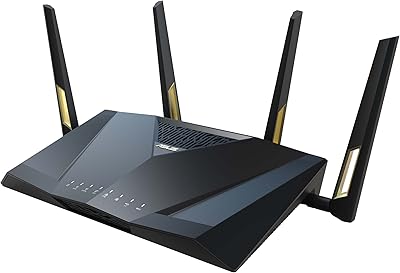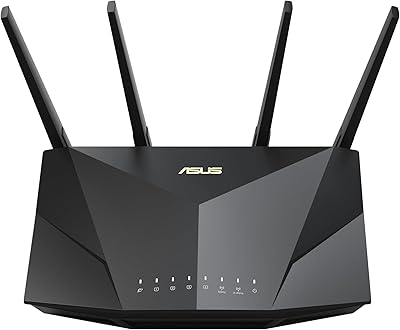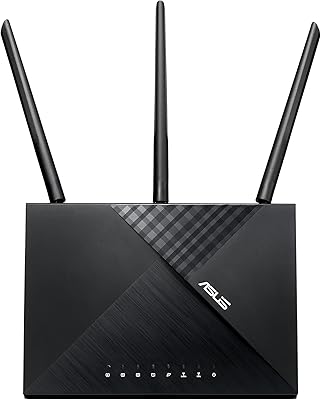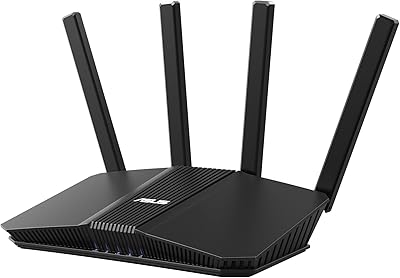


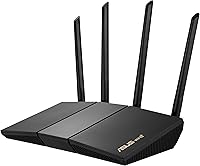
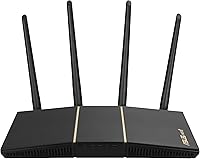
Overview

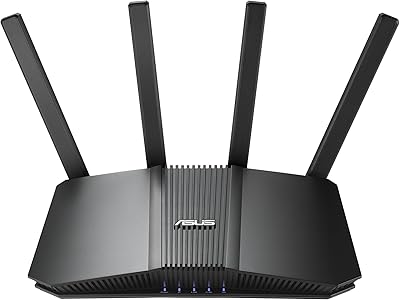
The ASUS RT-AX57 WiFi 6 Router sits comfortably in the middle of ASUS's lineup — capable enough for most households without the price tag of their flagship models. In practical terms, the dual-band design delivers real muscle on the 5GHz band for streaming and gaming, while the 2.4GHz band handles background traffic from smart home gadgets and phones. Setup is refreshingly approachable: the ASUS app walks you through it in minutes, even if you have never touched a router interface before. It competes directly with similarly priced offerings from TP-Link and Netgear, and generally holds its own on features and reliability.

Features & Benefits

WiFi 6's biggest practical advantage isn't raw speed — it's how this WiFi 6 router handles congestion. Thanks to OFDMA and MU-MIMO, the RT-AX57 communicates with multiple devices simultaneously rather than taking turns, which matters when your household has phones, laptops, a smart TV, and a gaming console all active at once. The 5GHz band's extra headroom makes a real difference for latency-sensitive tasks like online gaming or 4K streaming. On the security side, AiProtection Classic runs without a subscription fee — a genuine advantage many competing routers don't offer. The one-click VPN via Instant Guard is a thoughtful addition for anyone who travels regularly.

Best For

This ASUS router makes the most sense for households juggling 10 to 20 connected devices, especially those still running an older WiFi 5 router and noticing the slowdown. It's a natural fit for apartment dwellers and renters who want dependable coverage in a compact space without the cost of a full mesh system. Gamers wanting low-latency performance on a budget will find it punches above its weight on the 5GHz band. Built-in parental controls and no-subscription security make it practical for families too. AiMesh compatibility is a genuine draw if you are already in the ASUS ecosystem, though keep in mind that expanding coverage means buying additional ASUS hardware.

User Feedback

With a 4.3-star average from several hundred buyers, the RT-AX57 earns its marks mainly for easy setup and consistent day-to-day performance in smaller homes. Most satisfied buyers note how stable the connection stays even with many devices active simultaneously. The most common criticism centers on range — those in larger homes or multi-floor layouts report that the signal fades more than they expected. A handful of reviewers also flag the ASUS app as being less intuitive than they'd like. Firmware reliability gets mostly positive comments, with occasional resets needed post-update. On balance, the majority find it good value at this price point, though buyers with bigger homes or more demanding setups will likely want a more capable option.

Pros

  • WiFi 6 technology handles crowded device environments far more efficiently than older routers
  • Built-in AiProtection Classic security requires no subscription, unlike many competing routers
  • The 5GHz band delivers noticeably lower latency for gaming and 4K streaming
  • Setup via the ASUS app is beginner-friendly and takes only a few minutes
  • AiMesh compatibility gives you a genuine upgrade path without replacing your hardware
  • Parental controls are robust and do not require a third-party app or paid tier
  • Instant Guard VPN is a practical bonus for users who frequently work from public networks
  • Compact physical footprint fits easily on a shelf or desk without dominating the space
  • Solid build quality and brand reliability backed by a strong warranty and support track record
  • At its price point, the feature set is hard to beat among dual-band WiFi 6 routers

Cons

  • Signal range fades noticeably in larger homes or across multiple floors
  • The ASUS management app feels less intuitive compared to some rival router interfaces
  • Occasional firmware updates have caused temporary instability for a subset of users
  • No tri-band support limits maximum throughput when many high-demand devices compete simultaneously
  • AiMesh expansion requires buying additional ASUS hardware, adding to the total cost
  • No dedicated gaming port or advanced traffic prioritization for competitive gaming setups
  • 2.4GHz band speeds are modest and may bottleneck older smart home devices under heavy use
  • Customer support response times have drawn mixed feedback from buyers with technical issues

Ratings

The scores below for the ASUS RT-AX57 WiFi 6 Router were generated by our AI system after analyzing hundreds of verified global buyer reviews, with spam, incentivized submissions, and bot activity actively filtered out. The results reflect a balanced synthesis of what real users praised and what genuinely frustrated them — nothing is softened or cherry-picked. Where this router shines, the scores show it; where it falls short, that is reflected honestly too.

WiFi Performance
83%
Most buyers report a clear and immediate improvement over their old WiFi 5 routers, especially in homes with 10 or more devices active simultaneously. Streaming 4K content and gaming on the 5GHz band at the same time rarely causes the kind of stuttering they experienced before upgrading.
Real-world speeds vary considerably depending on your ISP plan, home layout, and interference from neighboring networks. Users in dense apartment buildings occasionally report inconsistency during peak evening hours when the local airspace is congested.
Coverage Range
67%
33%
For apartments, studio homes, and smaller single-floor houses, the coverage is generally solid and reliable without needing any extensions. Users in compact living situations consistently describe the signal as stable even in rooms far from the router.
Multi-story homes and larger open-plan spaces expose the RT-AX57's range limits fairly quickly. This is the single most common complaint in buyer reviews — those expecting whole-home coverage in spaces over 1,500 square feet often end up disappointed.
Setup & Ease of Use
88%
The ASUS app-guided setup process is frequently praised as one of the smoothest in the mid-range router category, with most first-time users getting online in under 15 minutes. Non-technical buyers specifically appreciate that the defaults are sensible and require no manual configuration to get a good experience.
A smaller segment of users finds the full ASUS router management interface — beyond initial setup — more complex than rivals like Eero. Those who want to dig into advanced settings sometimes hit a steeper learning curve than expected for a consumer product.
Device Handling
81%
19%
WiFi 6 with OFDMA and MU-MIMO makes a real, noticeable difference in households where phones, laptops, smart TVs, and gaming consoles all compete for bandwidth at once. Buyers upgrading from single-band or older dual-band routers consistently describe a reduction in lag and dropped connections during busy periods.
At the very high end of device density — households with 25 or more active devices — some users start noticing performance degradation that suggests the RT-AX57 is being pushed past its comfortable operating range. It handles moderate loads well, but it is not built to replace a prosumer or tri-band setup.
Network Security
91%
AiProtection Classic powered by Trend Micro is a standout inclusion at this price tier, offering real-time threat monitoring and malicious site blocking with no subscription required. Buyers who previously paid for separate network security tools appreciate folding that protection directly into the router without extra cost.
AiProtection Classic is positioned as entry-level commercial-grade security, which means it lacks some of the deeper intrusion detection and reporting depth that more advanced users might expect. It is excellent for typical home use but should not be treated as a substitute for enterprise-level protection.
Gaming & Streaming
79%
21%
The 5GHz band delivers low enough latency for casual to moderate online gaming, and most streaming platforms including Netflix and YouTube run at maximum quality without buffering when devices are in reasonable proximity to the router. Gamers on a budget frequently cite this router as a solid performer for the price.
Hardcore competitive gamers who rely on sub-10ms ping or who need a dedicated gaming port will find this router short on features. There is no WTFast integration or advanced gaming traffic prioritization, which puts it behind more gaming-focused options at a similar price.
Build Quality
74%
26%
The RT-AX57 feels reasonably solid for a mid-range device, with a clean matte black finish that fits unobtrusively into most home environments. Nothing about the physical construction feels cheap or flimsy under normal handling and placement.
It does not have external antennas, which some users associate with stronger signal, and the plastic housing lacks the premium feel of higher-end models. A few buyers note the unit runs warmer than expected under sustained heavy load, which raises minor long-term durability questions.
App Experience
69%
31%
The ASUS app handles initial setup and basic controls — rebooting, checking connected devices, toggling guest network — with enough clarity that most users never need to open a browser-based interface. Parental control scheduling through the app is particularly well-received by parents managing screen time.
Beyond the basics, the app experience becomes inconsistent. Some users report delayed status updates, occasional crashes, and UI elements that feel outdated compared to competitors. Advanced configuration still pushes users toward the web interface, which has a noticeably steeper learning curve.
Parental Controls
82%
18%
Scheduling internet access by device and filtering by content category works reliably and does not require creating a third-party account or paying a monthly fee. Parents of school-age children specifically call out the scheduling feature as effective for enforcing homework hours and bedtimes.
The filtering categories are broad rather than granular, which limits precision for families who want highly specific controls. There is no standalone companion app for parental management separate from the main ASUS interface, which some parents find cumbersome to navigate.
VPN Capability
73%
27%
Instant Guard VPN activates with a single tap and provides meaningful protection when using the RT-AX57 remotely as a home VPN endpoint — particularly useful when traveling and connecting to public WiFi. The fact that this feature is included without an extra subscription is consistently appreciated.
Instant Guard is not a replacement for a dedicated commercial VPN service in terms of server variety, speed, or privacy policy transparency. Users expecting a robust VPN experience with global server switching will need to supplement it with a separate service.
Value for Money
86%
The combination of WiFi 6 performance, lifetime security, VPN access, parental controls, and AiMesh compatibility at this price point is genuinely hard to match in the mid-range category. Buyers who compare it against similarly priced TP-Link and Netgear routers frequently conclude they are getting more included features here.
For buyers who do not need the security or VPN features and primarily want raw range or tri-band speed, there are competing options where the money goes further on pure performance. The value proposition is strongest when you actually use the bundled software features.
AiMesh Expandability
77%
23%
For ASUS ecosystem users, AiMesh is a genuine upgrade path that avoids the cost of replacing the entire router setup. Adding a compatible ASUS node creates a unified network with seamless roaming that buyers in larger homes find practical and relatively affordable compared to buying a full mesh kit.
AiMesh only works with other ASUS-compatible hardware, which creates a lock-in dynamic that not all buyers anticipate at purchase. The added cost of a second node means that users who need coverage expansion from day one might have been better served pricing out a full mesh kit from the start.
Firmware Reliability
71%
29%
Under stable firmware versions, the RT-AX57 runs for weeks and months without requiring a manual reboot, which buyers in long-term ownership reviews consistently highlight as a mark of solid software engineering. Automatic firmware updates work quietly in the background for most users.
Several reviewers document periods of instability following specific firmware updates, requiring a factory reset or rollback to restore normal function. ASUS does address issues through subsequent updates, but the window between a bad update and a fix can be frustrating for less technical users.
Smart Home Integration
68%
32%
Alexa compatibility lets users perform basic network commands by voice, which is a welcome convenience for smart home enthusiasts who have already built an Alexa-centric setup. Access Point mode adds useful flexibility for those integrating the router into an existing wired network.
Smart home integration is limited to basic Alexa commands and does not extend to Google Assistant or Apple HomeKit, which narrows its appeal for users in those ecosystems. The breadth of voice-controllable functions is also fairly narrow — primarily limited to network on/off and basic status queries.

Suitable for:

The ASUS RT-AX57 WiFi 6 Router is a strong pick for renters, apartment dwellers, and small-home owners who want a meaningful upgrade from an aging WiFi 5 setup without overspending. If your household regularly has 10 to 20 devices connected at once — phones, laptops, a smart TV, gaming consoles, and a handful of smart home gadgets — this router handles that kind of simultaneous load far better than older hardware can. Families who want built-in parental controls and network security without paying a monthly fee for third-party software will find genuine value in what this router includes out of the box. Casual to moderate gamers who want lower latency on the 5GHz band, without committing to a full mesh system, will also find the RT-AX57 a practical and well-priced option. It also suits anyone already invested in the ASUS ecosystem who wants a straightforward path to expanding coverage later via AiMesh.

Not suitable for:

The ASUS RT-AX57 WiFi 6 Router is not the right tool for larger homes, multi-story layouts, or any space where dead zones and weak signals are already a known problem — its single-unit range has real limits that no amount of band optimization can fully overcome. Power users who need tri-band performance, a dedicated gaming port, or advanced QoS controls will quickly find this router underpowered for their expectations. If you are running a home office with multiple people on video calls simultaneously while others stream in 4K, you may hit the ceiling of what this router can comfortably deliver at peak hours. Those who want a fully app-driven, consumer-friendly interface may find the ASUS management experience slightly less polished than competitors like Eero or Google WiFi. And if your plan for expanding coverage depends on AiMesh, factor in that compatible ASUS nodes are an additional purchase — this is not a plug-and-play mesh system out of the box.

Specifications

  • WiFi Standard: Supports 802.11ax (WiFi 6) along with backward-compatible 802.11a, 802.11ac, and 802.11g standards.
  • Frequency Bands: Dual-band design operates on both 2.4GHz and 5GHz simultaneously for flexible device distribution.
  • 2.4GHz Speed: Delivers up to 574Mbps on the 2.4GHz band, suited for lower-bandwidth devices like smart home gadgets.
  • 5GHz Speed: Reaches up to 2402Mbps on the 5GHz band, optimized for high-demand tasks like 4K streaming and online gaming.
  • Combined Throughput: Total combined wireless throughput reaches approximately 3000Mbps across both bands under optimal conditions.
  • MU-MIMO: Multi-User MIMO support allows the router to communicate with several devices at the same time rather than sequentially.
  • OFDMA: Orthogonal Frequency Division Multiple Access technology divides channels to serve multiple devices more efficiently in congested environments.
  • Security: AiProtection Classic, powered by Trend Micro, provides network-level threat detection and blocking at no recurring subscription cost.
  • VPN: ASUS Instant Guard offers a one-click personal VPN for encrypted browsing when connected to public or untrusted networks.
  • Parental Controls: Built-in parental controls allow scheduling of internet access and content filtering by device without third-party software.
  • AiMesh Support: Fully compatible with the ASUS AiMesh system, enabling multi-router coverage expansion using other AiMesh-supported ASUS devices.
  • Voice Control: Works with Amazon Alexa for basic voice-activated network management commands.
  • Operating Modes: Can be configured as a standard wireless router or switched to Access Point mode depending on network setup needs.
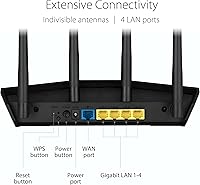
  • Connectivity: Supports both Ethernet (wired) and Wi-Fi (wireless) connectivity for flexible device hookups.
  • Dimensions: Measures 9.06 x 5.28 x 2.2 inches, making it compact enough for a shelf, desk, or media cabinet.
  • Weight: Weighs 13.1 ounces, keeping it lightweight and easy to reposition as needed.
  • In the Box: Package includes the RT-AX57 router unit, power adapter, RJ-45 Ethernet cable, quick start guide, and warranty card.
  • Color: Available in black with a low-profile design that blends into most home or office environments.
  • Release Date: First made available in February 2023, positioning it as a current-generation WiFi 6 device.
  • Customer Rating: Holds a 4.3 out of 5 star average based on over 600 verified ratings on Amazon as of the time of review.

Related Reviews
ASUS RT-AX86U WiFi 6 Gaming Router
84%
91%
Wireless Performance
88%
Gaming Latency
86%
Range & Coverage
79%
Setup & Ease of Use
74%
Value for Money
More
ASUS RT-AX88U PRO WiFi 6 Router
77%
88%
Wireless Performance
84%
Range & Coverage
91%
Multi-Device Handling
57%
Setup Experience
79%
Build Quality
More
ASUS RT-AX82U
ASUS RT-AX82U
82%
88%
Wireless Performance
91%
Gaming Latency
93%
Setup & Ease of Use
71%
Range & Coverage
82%
Build Quality & Design
More
ASUS RT-AX1800S
ASUS RT-AX1800S
79%
88%
Value for Money
79%
WiFi Speed & Performance
74%
Coverage & Range
83%
Setup & Ease of Use
67%
Router App Experience
More
ASUS RT-AX5400 WiFi 6 Dual-Band Router

80%
84%
WiFi Speed & Throughput
71%
Coverage & Range
88%
Setup & Ease of Use
91%
Built-in Security (AiProtection)
83%
Parental Controls
More
ASUS RT-BE86U BE6800 Dual-Band WiFi 7 Router
77%
83%
Wireless Performance
91%
Wired Connectivity
77%
Setup & Ease of Use
58%
Mobile App Experience
62%
Firmware Stability
More
ASUS RT-AXE7800 Tri-Band WiFi 6E Router
79%
88%
Wireless Performance
83%
Setup & Installation
79%
Signal Range & Coverage
91%
Network Security
84%
Parental Controls
More
ASUS RT-BE82U WiFi 7 Dual-Band Router
84%
88%
Wireless Performance
93%
Wired Connectivity
82%
Setup & Ease of Use
74%
Firmware & Software
86%
AiMesh Integration
More
ASUS RT-ACRH18 AC1750 Dual-Band WiFi Router
68%
88%
Setup & Installation
74%
Wi-Fi Speed & Performance
69%
Wireless Range & Coverage
66%
Connection Stability
71%
Multi-Device Handling
More
ASUS RT-BE58U WiFi 7 Router
80%
83%
Wireless Performance
81%
Range & Coverage
91%
Setup & Ease of Use
88%
Security Features
86%
Smart Home & IoT Management
More

FAQ

Not at all. The ASUS app guides you through the entire setup process step by step, and most users report being fully connected within 10 to 15 minutes. You do not need to touch any advanced settings unless you want to.

It handles 10 to 20 simultaneous devices comfortably in most home environments. WiFi 6 technologies like OFDMA and MU-MIMO help distribute bandwidth more intelligently, so having many devices connected does not degrade performance as noticeably as it would on older routers.

Yes, the RT-AX57 works with virtually all ISPs that use a standard modem or gateway. Just connect it via the included Ethernet cable and follow the app setup. If your ISP requires specific login credentials, you can enter those during the setup process.

No. AiProtection Classic is included at no ongoing cost, which is a real advantage over competitors that lock security features behind a paid subscription after the first year.

Yes, if you have another compatible ASUS router, you can use AiMesh to create a multi-node network that gives you broader coverage. Keep in mind that the additional node needs to be purchased separately — this router alone does not come with mesh capability out of the box.

It can cover a typical two-story apartment or smaller house reasonably well, but larger multi-floor homes with thick walls or long distances between floors may experience signal drop-off. If you have a bigger space, pairing it with an AiMesh node will give you much better results.

Yes, meaningfully so. The 5GHz band offers faster speeds and lower interference, which translates to lower latency in online games. For competitive gaming, connecting your console or PC to the 5GHz band is always the better choice.

It does. ASUS Instant Guard lets you activate a personal VPN with a single tap in the app, which is handy when you are on public WiFi and want to keep your browsing private. It is not a replacement for a full commercial VPN service, but it is a solid built-in option for everyday security.

Yes. The built-in parental controls let you filter content by category and set schedules for when specific devices can access the internet. It is straightforward to configure through the ASUS app without needing any extra software or account.

At this price point, this ASUS router stands out mainly for its no-subscription security and AiMesh expandability. TP-Link and Netgear offer solid alternatives, but they often charge for equivalent security features or lack a clean mesh upgrade path. The trade-off is that ASUS's app experience is slightly less polished than some competitors, so it comes down to what matters more to you.

Where to Buy

B&H Photo-Video-Audio
In stock $96.00
Newegg.com
In stock $96.98
Microless.com
In stock $65.48
Techinn.com
In stock $73.99
Grooves-Inc.com
In stock $79.12
ASUS Store US
In stock $99.99
Central Computers
In stock $99.99