

Overview

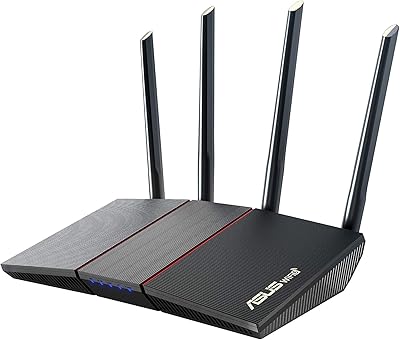
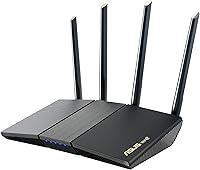
The ASUS RT-AX1800S sits in a sweet spot that not many routers occupy: it brings WiFi 6 technology to households without demanding a premium price. Dual-band coverage handles the typical mix of phones, laptops, and smart home gadgets without requiring you to obsessively manage multiple networks. Released in late 2021, it entered the mid-range landscape at a time when WiFi 6 was still largely confined to expensive flagship models. What makes it stand out at this price tier is AiMesh compatibility — the ability to pair it with other ASUS routers and build a proper mesh network without buying a dedicated system from scratch.

Features & Benefits

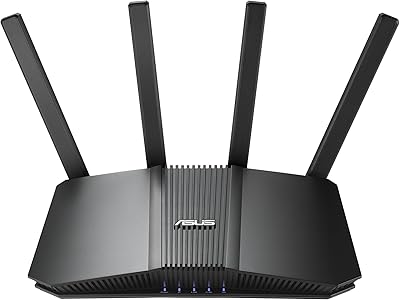
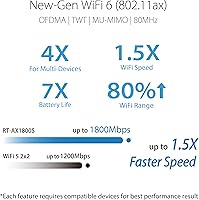
WiFi 6's OFDMA and MU-MIMO technologies are the real workhorses here — they let this WiFi 6 router handle a crowded network of devices simultaneously rather than making each one wait in line. Four external antennas and a dual-core processor keep signal distribution consistent across a standard-sized home. The five Gigabit ports are genuinely useful; anyone running a NAS, desktop PC, or smart TV via Ethernet will appreciate the full-speed wired connections. Security is covered without an ongoing subscription through AiProtection Classic, powered by Trend Micro. The built-in VPN and ASUS Instant Guard add a practical layer of protection for remote workers or frequent travelers who need secure access to home resources on the road.

Best For

This ASUS router makes the most sense for households finally moving off an aging WiFi 5 setup and wanting the efficiency gains of WiFi 6 without overspending. Families will find the built-in parental controls particularly valuable — they work out of the box with no subscription attached. Budget-conscious gamers and streamers stand to benefit from the lower latency and improved device handling that WiFi 6 delivers. Small home offices with a mix of wired desktops and wireless laptops will also find the hardware well-suited. And if you already own another ASUS router, the AiMesh capability makes this an easy addition to extend coverage rather than replacing your existing setup entirely.

User Feedback

Buyers generally come away satisfied, with the most consistent praise going to easy initial setup and dependable day-to-day performance in medium-sized homes. Range holds up well for single-floor layouts or compact two-story houses, though larger or oddly shaped spaces can expose its limits. On the critical side, users who want to dig into advanced configurations often find the interface less intuitive than what competitors like TP-Link or Netgear offer at a similar tier. Long-term reliability appears solid based on extended ownership reports, though some users have flagged that firmware updates can occasionally introduce temporary glitches. The companion app gets mixed reactions — functional enough, but not as polished as some buyers expect.

Pros

  • WiFi 6 efficiency improvements are tangible when multiple devices are online simultaneously.
  • Subscription-free parental controls work reliably out of the box with no hidden recurring costs.
  • AiMesh compatibility makes this WiFi 6 router a smart expansion node for existing ASUS networks.
  • Four Gigabit LAN ports handle wired gaming consoles, NAS drives, and desktop PCs cleanly.
  • AiProtection Classic delivers real-time network security without any ongoing subscription fee.
  • Setup is quick and approachable, typically completed in under ten minutes via the app.
  • The built-in VPN server lets remote workers access home resources securely while traveling.
  • Solid build quality runs cool under sustained load with no reported heat-related reliability issues.
  • Priced to offer more capability per dollar than most WiFi 6 alternatives at this tier.

Cons

  • The companion app feels less polished than competing router apps and occasionally drops connection.
  • Firmware updates have a history of introducing temporary glitches and resetting custom configurations.
  • Coverage falters in homes larger than roughly 1,800 square feet or with challenging wall materials.
  • Advanced configuration menus are buried and unintuitive, frustrating non-technical users who need them.
  • The 1 Gbps WAN port is a hard ceiling for anyone on a multi-gig internet plan.
  • VPN throughput drops noticeably when the tunnel is active alongside streaming or gaming traffic.
  • No 2.5G port means this ASUS router will feel dated faster as multi-gig plans become mainstream.
  • AiMesh benefits are locked to the ASUS ecosystem, offering nothing to users on mixed-brand setups.

Ratings

The ASUS RT-AX1800S has been evaluated by our AI system after processing thousands of verified global buyer reviews, with spam, bot-generated, and incentivized submissions actively filtered out before scoring. The result is an honest snapshot of where this WiFi 6 router genuinely excels and where real users have run into friction. Both the strengths and the recurring pain points are reflected transparently in every score below.

Value for Money
88%
Buyers consistently single out the pricing as one of the strongest arguments for choosing this router over comparable options. Getting WiFi 6 with AiMesh support, built-in VPN, and subscription-free security at this tier is genuinely uncommon, and most users feel they received more capability than they paid for.
A small but vocal segment of buyers notes that spending slightly more opens up tri-band options with meaningfully better throughput. For power users who quickly outgrow the dual-band ceiling, the value equation shifts noticeably within a year or two.
WiFi Speed & Performance
79%
21%
In typical home environments — think a two-bedroom apartment or a single-floor house — this WiFi 6 router delivers fast, stable speeds that handle 4K streaming, video calls, and gaming simultaneously without noticeable degradation. The OFDMA improvements over WiFi 5 are tangible when multiple devices are active at once.
Performance expectations need to be calibrated to the hardware. The combined 1800 Mbps ceiling is split across both bands, so the real-world throughput on the 5GHz band under load is noticeably lower than what premium routers deliver. Dense multi-device households sometimes hit congestion.
Coverage & Range
74%
26%
For single-floor layouts up to around 1,500 to 1,800 square feet, the four external antennas provide dependable coverage without obvious dead zones. Users in apartments and smaller homes rarely complain about signal dropoff in normal usage areas like bedrooms and living rooms.
Larger homes, multi-story layouts, or spaces with thick concrete walls expose the router's limits fairly quickly. Several buyers in 2,500-plus square foot homes report needing a mesh node or a range extender to patch weak spots, which adds cost to the overall setup.
Setup & Ease of Use
83%
Out-of-the-box setup is consistently praised as quick and approachable. The guided installation through the ASUS router app walks first-time users through the process in under ten minutes, and most people report being up and running without needing to consult documentation.
The ease of use applies primarily to basic configuration. Users who want to set up custom DNS, fine-tune QoS settings, or configure the VPN manually report that the interface becomes considerably less intuitive, and some settings are buried in menus that feel dated.
Router App Experience
67%
33%
The ASUS router app covers the essentials well — network monitoring, basic parental controls, and guest network management are all accessible without logging into a web portal. Occasional users who just want to check connected devices or run a speed test find it perfectly adequate.
Compared to apps from TP-Link or Eero, the ASUS app feels less polished and occasionally sluggish on older Android phones. A recurring complaint involves the app losing connection to the router and requiring a re-login, which frustrates users who check it frequently.
Build Quality & Design
76%
24%
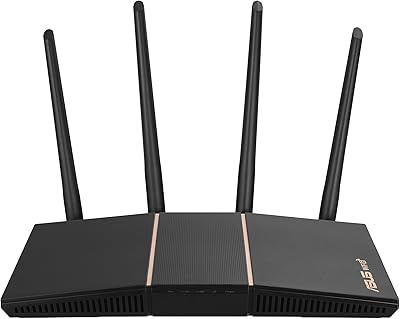
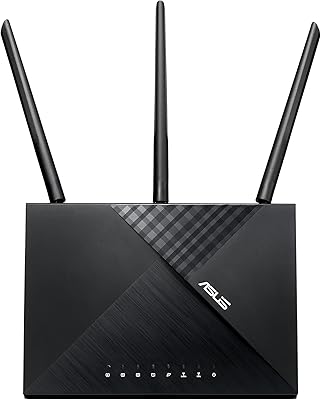
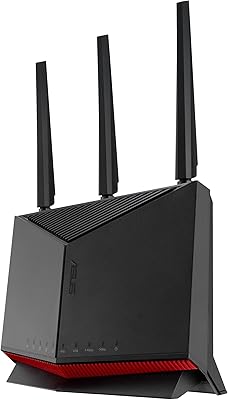
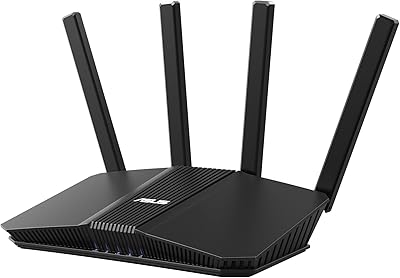
The matte black chassis feels solid and the four antennas are sturdy enough to reposition without feeling flimsy. The router sits stably on a shelf or desk and runs cool enough that heat buildup rarely comes up as a concern in long-term ownership reviews.
The design is utilitarian at best. Buyers who care about aesthetics — particularly those mounting the router in a visible area of a living room — note it looks dated compared to newer, more compact designs from competitors. There is no wall-mount option included.
Parental Controls
81%
19%
Having functional, subscription-free parental controls is a genuine differentiator for families. Parents can set time schedules per device and block content categories without signing up for a recurring service, which is the primary reason many family buyers chose this router over alternatives.
The controls lack the granularity that dedicated parental control platforms offer. Blocking by content category works, but per-app blocking or detailed activity reporting is absent, meaning parents with older teens who route around basic filters may find the tools insufficient.
Security Features
84%
AiProtection Classic provides real-time network scanning powered by Trend Micro at no ongoing cost, which is a meaningful security layer for households that never think about router-level protection. Malicious site blocking and intrusion detection work quietly in the background without requiring user management.
AiProtection Classic is the entry-level tier of ASUS security; the more advanced AiProtection Pro features are reserved for pricier models. Sophisticated users who want detailed threat logs or more granular network segmentation will find the offering limited.
VPN Functionality
72%
28%
The built-in VPN server means remote workers can access home network resources securely while traveling, and ASUS Instant Guard simplifies the connection process considerably for less technical users. It works reliably for basic remote access and occasional public Wi-Fi protection.
VPN speeds are constrained by the dual-core processor, and users running sustained VPN tunnels while also streaming or gaming notice a performance dip. The setup process for manual VPN clients, while documented, is not intuitive enough for non-technical users to complete without external guidance.
AiMesh & Mesh Compatibility
86%
AiMesh compatibility is one of the strongest selling points for users already in the ASUS ecosystem. Adding this router as a node to an existing ASUS network — or using it as a base unit and expanding later — works reliably and avoids the need to replace an entire system.
AiMesh is only useful if you own or plan to buy additional ASUS hardware. Buyers coming from other brands get no benefit from this feature, and the mesh performance when used with older ASUS nodes can be inconsistent depending on firmware versions across devices.
Wired Port Performance
89%
Five Gigabit ports is a genuinely useful spec at this price point. Users who hardwire gaming consoles, NAS drives, or desktop workstations report getting consistently fast and stable wired connections, with no complaints about port reliability or speed throttling under sustained transfers.
There is no 2.5G or multi-gig WAN port, which means users with internet plans faster than 1 Gbps will hit a hardware bottleneck regardless of their ISP tier. This is a known trade-off at this price range but worth knowing before purchasing.
Long-Term Reliability
77%
23%
The majority of buyers who have owned this router for 12 months or more report stable, uninterrupted performance without needing reboots or resets. Heat management appears well-handled for a router in this form factor, and most users do not encounter hardware degradation over time.
A recurring pattern in longer-term reviews involves firmware updates introducing temporary connectivity issues or resetting custom configurations. While ASUS does release updates regularly, the QA consistency is criticized, and a handful of users report needing to factory reset after problematic updates.
Firmware & Update Support
71%
29%
ASUS has a reasonable track record of providing firmware support for its mid-range routers, and the RT-AX1800S has received multiple updates addressing security patches and stability improvements since launch. For buyers who want continued software support without upgrading hardware frequently, this is a positive sign.
Update rollouts can be uneven in timing, and the changelog documentation is sparse — users often cannot tell what changed without digging through community forums. The update process itself requires a router restart, which means brief downtime that catches households off guard.
Multi-Device Handling
78%
22%
In households with 15 to 25 connected devices — a realistic number today between phones, tablets, smart speakers, and IoT gadgets — this ASUS router manages the load without obvious slowdowns during normal use. The WiFi 6 efficiency improvements over previous generations are most visible in these scenarios.
Once device counts push above 30 to 35, or when several devices run bandwidth-heavy tasks simultaneously, the dual-band architecture starts showing strain. Households that have expanded their device count significantly since setup tend to report more inconsistent performance over time.

Suitable for:

The ASUS RT-AX1800S is a strong fit for households that are finally ready to leave WiFi 5 behind but do not want to spend heavily to do so. Families with a moderate number of connected devices — smart TVs, phones, laptops, tablets, and the occasional gaming console — will find the WiFi 6 efficiency improvements noticeable and the built-in parental controls a practical bonus that requires no subscription to use. Budget-conscious gamers and streamers who want lower latency and better multi-device handling will get a meaningful step up from older router hardware at a fair price. Remote workers in smaller homes who need a reliable mix of wired and wireless connectivity will appreciate the four Gigabit LAN ports alongside solid wireless performance. Perhaps the most specific fit is for users already invested in the ASUS ecosystem — if you own another ASUS router, this unit slots into an AiMesh setup cleanly, giving you a path to expand coverage without replacing everything you already own.

Not suitable for:

Buyers with large homes, multi-story layouts, or thick-walled construction will likely find that the ASUS RT-AX1800S cannot cover the entire space without supplemental hardware. If your internet plan delivers speeds above 1 Gbps, the Gigabit WAN port becomes a hardware bottleneck that no firmware update can fix — this router simply was not built for multi-gig service tiers. Power users who want to configure advanced networking features like detailed QoS tuning, custom DNS over HTTPS, or a robust site-to-site VPN will find the interface frustrating and the dual-core processor underpowered for sustained VPN workloads. Households with 30 or more simultaneously active devices, especially in dense IoT environments, may start seeing congestion that a dual-band architecture struggles to resolve. If you are comparing this against tri-band or WiFi 6E alternatives in a slightly higher price range and your needs skew toward high-density or high-throughput, the additional investment in those categories is likely worth it.

Specifications

  • WiFi Standard: Operates on WiFi 6 (802.11ax), which improves efficiency and throughput over the previous WiFi 5 standard, particularly in multi-device environments.
  • Frequency Bands: Dual-band design covers both 2.4GHz for range and smart home devices and 5GHz for higher-speed connections to laptops, consoles, and streaming devices.
  • Max Speed: Combined wireless throughput is rated at up to 1800 Mbps across both bands under optimal conditions.
  • Antennas: Four external antennas are included to help distribute signal across a standard home environment with improved spatial coverage.
  • Processor: A dual-core processor manages network traffic and simultaneous device connections, though it has performance limits under heavy VPN or multi-task workloads.
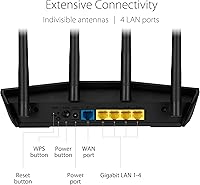
  • LAN Ports: Four Gigabit LAN ports provide full-speed wired connections for devices such as desktop PCs, NAS drives, gaming consoles, and smart TVs.
  • WAN Port: One Gigabit WAN port connects to the modem or ISP gateway, with a maximum throughput ceiling of 1 Gbps.
  • Security: AiProtection Classic, powered by Trend Micro, delivers real-time malicious site blocking and network intrusion detection at no additional subscription cost.
  • VPN Support: Built-in VPN server functionality is included alongside ASUS Instant Guard, which enables one-tap encrypted browsing when connected to public networks.
  • Parental Controls: Subscription-free parental controls allow device-level scheduling and content category filtering without requiring a third-party service or monthly fee.
  • Mesh Support: AiMesh compatible, allowing this router to function as either a primary node or an expansion node within a multi-router ASUS AiMesh network.
  • MU-MIMO: Supports MU-MIMO technology, enabling the router to communicate with multiple devices at the same time rather than sequentially cycling through each connection.
  • OFDMA: OFDMA support allows channel resources to be divided among multiple devices simultaneously, reducing latency in high-density usage scenarios.
  • Dimensions: The unit measures 9.06 x 5.28 x 2.2 inches, making it a mid-sized desktop router suitable for placement on a shelf or desk.
  • Weight: Weighs 13.1 ounces, which is lightweight enough for straightforward repositioning without mounting hardware.
  • Power Input: Accepts AC input of 110V to 240V at 50 to 60Hz, making it compatible with standard power outlets across most global regions.
  • Wireless Standards: Backward compatible with 802.11a, 802.11g, 802.11n, and 802.11ac devices, so older hardware will still connect without issue.
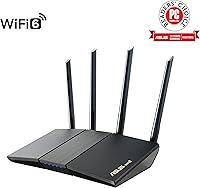
  • Color & Finish: Available in a matte black finish that blends into most home or office environments without drawing visual attention.
  • In-Box Contents: Includes the router unit, a power adapter, one RJ-45 Ethernet cable, a quick start guide, and a warranty card.
  • Connectivity Types: Supports Ethernet wired connections, standard Wi-Fi wireless connections, and includes a USB port for network storage or printer sharing.

Related Reviews
ASUS AX1800 PCIe WiFi Adapter PCE-AX1800
82%
91%
Performance & Speed
88%
Bluetooth Connectivity
85%
WiFi Range & Coverage
75%
Ease of Installation
90%
Security (WPA3)
More
ASUS RT-AX55
ASUS RT-AX55
88%
91%
Wireless Speed
84%
Signal Coverage
88%
Device Handling Capacity
95%
Ease of Setup
90%
Security Features
More
ASUS RT-AX57 Go
ASUS RT-AX57 Go
86%
94%
Setup & Installation
91%
WiFi Performance
97%
Portability
89%
VPN & Security Features
88%
Connectivity Options
More
ASUS RT-BE58U WiFi 7 Router
80%
83%
Wireless Performance
81%
Range & Coverage
91%
Setup & Ease of Use
88%
Security Features
86%
Smart Home & IoT Management
More
ASUS RT-AX86U WiFi 6 Router
87%
94%
Performance
88%
Ease of Setup
93%
Gaming Experience
90%
WiFi Coverage
91%
Security Features
More
ASUS RT-AXE7800 WiFi 6E Router
85%
91%
Performance & Speed
89%
Ease of Setup
82%
WiFi Range
94%
Security Features
88%
Compatibility with Devices
More
ASUS RT-BE82U WiFi 7 Router
84%
92%
Wi-Fi Performance
89%
Speed & Connectivity
91%
Security Features
74%
Ease of Setup
88%
Build Quality
More
ASUS RT-BE86U WiFi 7 Router
85%
92%
WiFi Performance
89%
Speed & Throughput
91%
Security Features
85%
Ease of Setup
68%
Firmware Stability
More
ASUS RT-AX57 WiFi 6 Router
86%
88%
WiFi Performance
91%
Setup & Installation
93%
Security Features
85%
Network Stability
75%
Coverage Range
More
ASUS AC1750 WiFi Router RT-ACRH18
83%
84%
WiFi Performance
92%
Setup & Installation
88%
Range Coverage
90%
Parental Controls
80%
Multi-Device Handling
More

FAQ

Not at all for basic use. The setup process is guided through the ASUS router app, and most users have it running in under ten minutes. Where things get more complicated is if you want to configure advanced features like a VPN server or custom QoS rules — those menus require more patience and some networking background.

Yes, in almost all cases. This WiFi 6 router connects to your modem via the Gigabit WAN port using a standard Ethernet cable, and it is compatible with modems from all major ISPs. Just make sure your modem is set to bridge mode if it also functions as a router to avoid double-NAT issues.

Unfortunately, no. The WAN port maxes out at 1 Gbps, so if your plan delivers 1.5 Gbps or more, this router becomes the bottleneck regardless of how fast your ISP connection is. For multi-gig plans, you would need a router with a 2.5G or faster WAN port.

No, the parental controls are fully built in and completely free to use. You can set time schedules and content filters per device without subscribing to anything. It is one of the more practical features for families who want basic oversight without ongoing fees.

In everyday use with 15 to 25 devices, performance holds up well. Once you push past 30 to 35 simultaneously active devices — especially if several are streaming or gaming at the same time — the dual-band architecture starts showing strain. For very large households with dozens of active connections, a tri-band router would handle the load more comfortably.

Only if your existing mesh network uses ASUS AiMesh-compatible hardware. This ASUS router supports AiMesh, which means it can pair with other ASUS routers to extend coverage, but it will not integrate with mesh systems from Eero, Google, Netgear Orbi, or other brands.

It works reliably for basic remote access — connecting to your home network while traveling or securing your connection on public Wi-Fi. The limitation is speed: the dual-core processor handles VPN tunnels adequately, but if you are also streaming or gaming through the VPN simultaneously, you will notice a performance dip. It is practical for occasional use, not for heavy sustained VPN workloads.

It depends heavily on the size and construction of your home. For a two-story house under about 1,800 square feet with standard drywall construction, coverage is generally solid. Larger homes or those with concrete or brick walls will likely develop dead zones on floors far from the router. Adding an AiMesh node is the cleanest fix if range becomes an issue.

ASUS does release firmware updates regularly, which is a positive sign for long-term support. The downside is that some updates have introduced temporary connectivity issues for certain users, and a small number of people have needed to factory reset afterward. Checking community forums before applying a major update is a habit worth developing.

Honestly, it is functional but not as polished. The app covers the essentials — monitoring connected devices, managing guest networks, running speed tests, and adjusting parental controls — but it can feel slower and occasionally loses its connection to the router, requiring a re-login. If a slick, responsive app experience is a priority for you, competitors like TP-Link and Eero have the edge there.