




Overview

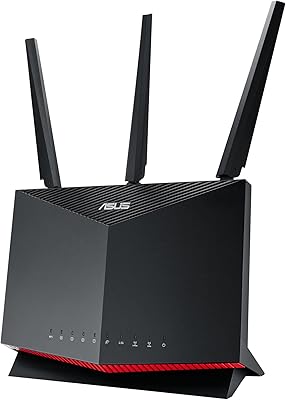
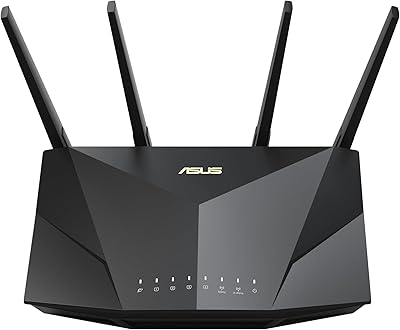
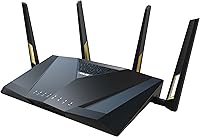
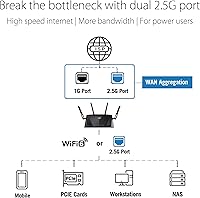
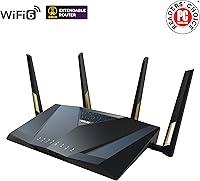
The ASUS RT-AX88U PRO WiFi 6 Router sits firmly in the premium tier of home networking — built for households where bandwidth is stretched thin by dozens of devices, 4K streams, and competitive gaming sessions happening all at once. What makes this ASUS router stand out immediately is its dual 2.5G port configuration, a hardware choice that puts it ahead of most consumer routers in its class. The quad-core 2.0 GHz CPU is not just a spec to admire on paper; it genuinely enables the router to juggle VPN tunnels, traffic prioritization, and heavy data loads simultaneously. AiMesh compatibility also means you can scale into a full mesh network later without starting over. That said, if your household mostly streams one show and checks email, this is likely more router than you need.

Features & Benefits

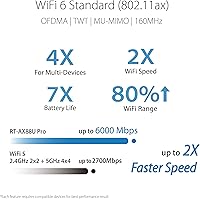
WiFi 6 with 160MHz channel support is the backbone of what this WiFi 6 router delivers — not a single device hitting 6000 Mbps, but a network that handles 20-plus devices without the usual congestion and slowdowns. The dual 2.5G ports are genuinely useful for anyone with a multi-gig ISP plan or a NAS drive needing fast local transfers, no additional switch required. Built-in AiProtection Pro, powered by Trend Micro, provides real-time network security scanning for the lifetime of the device — no annual renewal, no upsell. Adaptive QoS lets you assign traffic priority by application, so your video call does not collapse when someone else starts a large download. ASUS Instant Guard rounds this out with a one-click personal VPN, practical for remote workers or frequent travelers.

Best For

The RT-AX88U PRO is a natural fit for households that have recently upgraded to a multi-gigabit internet plan and want hardware capable of keeping pace. Competitive gamers will appreciate the low-latency prioritization that keeps their connection stable even when family members are simultaneously streaming in other rooms. It also works well in small office or prosumer environments where port flexibility and WAN aggregation matter more than plug-and-play simplicity. If you are already in the ASUS ecosystem, AiMesh support makes this a logical anchor router for expanding whole-home coverage without replacing your existing setup entirely. Less experienced users should be prepared for a capable but complex interface — this router rewards patience and a willingness to dig into settings.

User Feedback

Across its 654 ratings, this ASUS router holds a 4.2-star average — a score that reflects genuine satisfaction tempered by a few consistent sticking points. Most buyers highlight reliable speed and range as standout positives, along with appreciation for the lifetime security coverage that removes the recurring subscription headache common among competitors. Where opinions diverge is around the admin interface: network enthusiasts tend to love its depth, while less technical users find it dense and occasionally intimidating. A handful of reviewers also flagged the physical footprint — at nearly a foot long, it demands real shelf space. Firmware updates drew mixed remarks, with most reporting smooth experiences but a minority noting occasional stability hiccups following certain updates.

Pros

  • Dual 2.5G ports handle multi-gig internet plans and fast NAS transfers without needing extra hardware.
  • Lifetime AiProtection Pro security means no annual subscription fee eating into the long-term value.
  • The quad-core CPU keeps performance steady even when VPN, QoS, and heavy traffic run simultaneously.
  • WiFi 6 with 160MHz channels reduces congestion noticeably in dense, multi-device home environments.
  • AiMesh support makes it easy to expand whole-home coverage later without replacing the router entirely.
  • Adaptive QoS gives granular, real-time control over which devices and apps get bandwidth priority.
  • ASUS Instant Guard provides a practical one-click personal VPN for remote workers or frequent travelers.
  • Built-in parental controls add a layer of oversight without requiring a third-party app or service.
  • Consistent range performance earns strong marks from buyers in larger homes and multi-floor setups.
  • At a 4.2-star rating across hundreds of reviews, real-world satisfaction is broadly positive among its target audience.

Cons

  • The admin interface has a steep learning curve that regularly trips up less technical users.
  • Physical size is substantial — nearly a foot long — which limits placement options in smaller spaces.
  • AX6000 is an aggregate figure across both bands, not a single-device throughput number, which can mislead expectations.
  • Firmware updates have caused occasional stability issues for a minority of users following certain releases.
  • The feature depth that power users love can feel overwhelming and unnecessary for simpler home setups.
  • No tri-band option means very high-density environments with dozens of devices may hit practical limits.
  • Setup complexity means initial configuration can take significantly longer than typical consumer routers.
  • Buyers without a multi-gig ISP plan will not benefit from the 2.5G port hardware they are paying for.

Ratings

The scores below reflect AI-driven analysis of verified global buyer reviews for the ASUS RT-AX88U PRO WiFi 6 Router, with spam, bot activity, and incentivized feedback actively filtered out to ensure the ratings reflect genuine ownership experiences. Both the strengths that earned this router its loyal following and the friction points that frustrated certain buyers are represented transparently across each category.

Wireless Performance
88%
Users in large homes and dense multi-device environments consistently report that this WiFi 6 router holds strong, stable connections even when 20-plus devices are active simultaneously. The 160 MHz channel support on the 5 GHz band made a noticeable difference for users streaming 4K or running video calls without interruption.
A minority of reviewers noted that the advertised AX6000 figure set inflated expectations — real per-device speeds naturally fall well short of that aggregate ceiling. Buyers with older WiFi 5 or WiFi 4 client devices saw only modest speed gains compared to users who had fully upgraded their hardware.
Range & Coverage
84%
The majority of reviewers in medium to large homes praised consistent signal strength across multiple floors and through thick walls, crediting ASUS RangeBoost Plus with meaningfully reducing dead spots compared to their previous routers. Users with open-plan layouts reported particularly strong satisfaction with sustained signal at range.
In very large properties exceeding 3,000 square feet or homes with complex layouts and many obstructions, some buyers found the single-router coverage insufficient and needed AiMesh expansion nodes to fill gaps. A handful of users in older buildings with dense concrete walls noted range did not meet their expectations.
Multi-Device Handling
91%
This is one of the router's clearest strengths in buyer feedback — households running smart home devices, gaming consoles, laptops, and phones simultaneously reported far fewer slowdowns and dropped connections compared to their previous routers. The WiFi 6 efficiency improvements around OFDMA and MU-MIMO were genuinely noticeable in crowded home environments.
A small number of users with very dense device counts above 40 to 50 simultaneous connections noted occasional connection queuing during peak household hours. The dual-band limitation means there is no dedicated third band to offload backhaul traffic when used in an AiMesh configuration, which can affect throughput in larger mesh setups.
Setup Experience
57%
43%
Users who have prior experience with network hardware or ASUS products specifically found the setup process straightforward, with the ASUS router app guiding them through initial configuration without needing to touch the full web interface. The included quick start guide was cited as clear enough to get basic internet access running without technical knowledge.
Casual buyers and first-time router upgraders frequently flagged setup as the product's biggest pain point, with the admin interface described as dense and intimidating by a recurring portion of reviewers. Getting advanced features like VPN, adaptive QoS, and custom port assignments working correctly required a meaningful time investment that frustrated buyers expecting plug-and-play simplicity.
Build Quality
79%
21%
Reviewers consistently described the physical unit as solid and well-constructed, with no reports of flex, overheating under sustained load, or antenna wobble during normal operation. The matte black finish holds up well over time and does not show fingerprints or scuff easily, according to long-term owners.
The sheer physical size of the unit surprised a notable portion of buyers who had not measured their available space beforehand, and its footprint makes discreet placement difficult. A few users noted the router runs noticeably warm during heavy use, and while no thermal failures were reported, it gave some buyers pause about longevity.
Admin Interface Depth
73%
27%
For experienced home network administrators and prosumers, the ASUS admin panel is a genuine strength — the level of configurability for VLANs, firewall rules, port forwarding, and traffic monitoring goes well beyond what most consumer routers offer at any price. Power users described it as one of the most capable consumer-grade interfaces available.
The same depth that power users appreciate is a real source of frustration for mainstream buyers, with the interface offering little hand-holding for unfamiliar terminology or settings. The UI design has not changed substantially over multiple firmware generations, and several reviewers felt it was overdue for a modernization pass.
Security Features
93%
AiProtection Pro earned some of the strongest praise in the entire review corpus — the combination of network-level malware blocking, infected device isolation, and two-way intrusion prevention at no ongoing subscription cost is a meaningful differentiator. Buyers who had previously paid for third-party security suites specifically called out the lifetime coverage as a compelling long-term value.
A small number of technically advanced users noted that AiProtection Pro requires sending network traffic metadata to Trend Micro servers for analysis, which is a privacy trade-off not prominently disclosed during setup. Users who disabled AiProtection for privacy reasons effectively paid a premium for a feature they chose not to use.
Gaming Performance
86%
Gamers who configured adaptive QoS to prioritize gaming traffic reported measurably more consistent ping times and fewer lag spikes during sessions, even with family members streaming or browsing simultaneously. The RT-AX88U PRO handled online multiplayer without the jitter issues that plagued reviewers on their previous routers during peak household usage.
Setting up gaming-specific QoS rules correctly requires navigating the admin interface with some confidence, and users who did not configure it properly saw less dramatic improvements than those who did. A handful of competitive gaming reviewers noted that the router still occasionally introduced higher-than-expected latency during firmware update background processes.
Value for Money
67%
33%
For buyers who genuinely use the multi-gig ports, need the lifetime security, and have a demanding multi-device household, the long-term cost calculus works out reasonably well when factoring in the absence of security subscription fees over several years. Tech-savvy reviewers who compared it against competitors at similar price points generally concluded it offered a strong feature-per-dollar ratio.
A meaningful segment of reviewers felt the price was difficult to justify given that many of its headline features require either a high-end ISP plan or significant technical knowledge to fully activate. Buyers who primarily needed reliable basic WiFi without advanced features frequently described the purchase as excessive in hindsight.
Firmware Stability
71%
29%
The majority of long-term owners reported stable day-to-day operation with no significant issues between firmware updates, and ASUS has a reliable track record of pushing patches and improvements over the product lifecycle. Several reviewers specifically praised the ability to roll back firmware to a previous version if a new update caused problems.
A recurring minority of reviewers reported instability — ranging from dropped connections to occasional reboots — immediately following certain firmware updates. The pattern was consistent enough across reviews to be worth noting, and buyers who prefer set-it-and-forget-it stability may want to delay applying firmware updates until community feedback confirms they are clean.
Parental Controls
74%
26%
Parents who set up the parental controls praised the per-device scheduling and category-based content filtering as genuinely effective for managing children's internet access without needing a separate subscription service. The ability to pause individual devices instantly from the app was highlighted as a practical daily-use feature.
The parental control interface is buried within the broader admin panel, making it harder to find and configure than the dedicated parental control apps offered by competing routers like those from Eero or Google. Some parents also noted the content filtering categories were broader than they wanted, lacking fine-grained control over specific types of content.
AiMesh Integration
82%
18%
Buyers who already owned other ASUS routers found the AiMesh expansion process reliable and relatively straightforward, with the network recognizing compatible nodes quickly and roaming performance between nodes described as smooth in most cases. The ability to manage the entire mesh from a single admin interface was appreciated by users who had struggled with fragmented multi-router setups previously.
AiMesh performance is noticeably better when all nodes in the network are the same or similar ASUS models, and users mixing older or entry-level ASUS routers as satellite nodes reported more inconsistent roaming behavior. The lack of a dedicated backhaul band means wired backhaul connections are strongly recommended for best mesh performance in larger homes.
VPN Functionality
76%
24%
ASUS Instant Guard earned solid marks from remote workers who appreciated the one-click personal VPN that could be shared with family members traveling abroad, with setup described as far simpler than configuring a traditional VPN server manually. The ability to connect back to the home network securely while on hotel or airport Wi-Fi was a frequently cited practical benefit.
Users who attempted to use the VPN for accessing geo-restricted streaming content reported inconsistent results, as the router VPN is optimized for secure remote access rather than bypassing regional content blocks. VPN throughput speed on the router-side processing also showed noticeable drops compared to baseline internet speeds, which bothered users who ran VPN connections continuously.
Physical Design
63%
37%
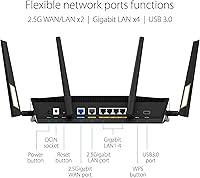
Reviewers who had dedicated shelf or rack space for networking equipment appreciated the sturdy, stable footprint and the clearly labeled ports on the back panel that made cable management straightforward. The angular aesthetic is purposeful rather than garish, fitting naturally into a home office or entertainment center setup.
The size — nearly a foot long — is the single most commonly flagged design complaint, with buyers frequently noting it was larger than photos suggested and difficult to accommodate in closets, media cabinets, or smaller apartments. Its reliance on open-air placement for adequate cooling means hiding it away in a sealed space is not really an option.

Suitable for:

The ASUS RT-AX88U PRO WiFi 6 Router was built for households and small offices where the network is genuinely under pressure — think 20-plus connected devices, multi-gigabit ISP plans, and multiple people gaming or streaming at the same time. If you have recently upgraded to a 2.5G or faster internet plan and your current router is leaving bandwidth on the table, this is exactly the hardware upgrade that closes that gap. Competitive gamers benefit directly from the adaptive QoS system, which lets you lock in low-latency priority for gaming traffic without manually babysitting the connection. Prosumers running a home NAS or needing flexible WAN configuration will also get real mileage from the dual 2.5G ports in ways most consumer routers simply cannot match. Existing ASUS router owners are in a particularly good position, since AiMesh compatibility means this router can anchor or extend a setup they already have rather than requiring a full replacement.

Not suitable for:

The ASUS RT-AX88U PRO WiFi 6 Router is genuinely overkill for anyone whose household internet habits run to casual browsing, occasional video calls, and standard-definition streaming on a handful of devices. If your ISP plan tops out at 100–300 Mbps, the advanced hardware here will spend most of its life underutilized, and the price premium is difficult to justify on those terms. The admin interface is deep and detailed, which is a strength for experienced users but a real friction point for anyone who expects plug-and-play simplicity — if router menus make your eyes glaze over, this ASUS router will likely frustrate more than it helps. Its physical footprint is also worth considering before buying: at nearly a foot long, it needs a dedicated, visible spot, which does not suit compact living spaces or hidden-away network closets with tight clearance. Buyers on tighter budgets who do not specifically need multi-gig port flexibility or lifetime security would likely be better served by a capable mid-range alternative.

Specifications

  • WiFi Standard: This router uses the 802.11ax (WiFi 6) standard, delivering improved efficiency and throughput compared to the previous WiFi 5 generation.
  • Max Speed: Aggregate throughput reaches up to 6000 Mbps across both bands combined — not a per-device figure, but a total network capacity ceiling.
  • Frequency Bands: Dual-band operation covers both 2.4 GHz for range and device compatibility, and 5 GHz for higher-speed, shorter-range connections.
  • Channel Width: Supports up to 160 MHz channel width on the 5 GHz band, which significantly increases throughput for compatible client devices.
  • Processor: A 2.0 GHz quad-core 64-bit CPU manages routing tasks, VPN processing, QoS, and security functions without creating performance bottlenecks.
  • 2.5G Ports: Two dedicated 2.5 Gbps ports can be configured flexibly as WAN or LAN connections, supporting multi-gig internet plans and high-speed NAS setups.
  • Security: AiProtection Pro, powered by Trend Micro, provides network-level threat scanning and malicious site blocking with no recurring subscription fee.
  • Mesh Support: Full ASUS AiMesh compatibility allows this router to function as a primary node or satellite within a broader whole-home mesh network.
  • VPN: ASUS Instant Guard enables a one-click personal VPN that can be shared with others, useful for secure browsing on public or remote networks.
  • Parental Controls: Built-in parental control features allow per-device scheduling and content filtering without requiring a third-party service or app subscription.
  • QoS: Adaptive QoS enables real-time traffic prioritization by application type, including dedicated gaming, streaming, and video conferencing modes.
  • Connectivity: Connectivity options include Ethernet LAN and WAN ports, USB ports for storage or printer sharing, and dual-band Wi-Fi.
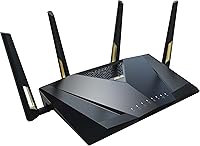
  • Dimensions: The router measures 11.81 x 7.4 x 2.38 inches, requiring a reasonably large flat surface or dedicated shelf for stable placement.
  • Weight: At 2.23 pounds, the unit is solid and stable on a desk but not designed for wall-mount or compact-space installation without planning.
  • Color: Available in black, with an angular design and external antennas intended for open-air placement rather than concealment in a cabinet.
  • Included Items: The package includes the router, a power adapter, one RJ-45 Ethernet cable, a quick start guide, and a warranty card.
  • Amazon Rating: The router holds a 4.2 out of 5 star rating based on 654 customer ratings on Amazon at the time of this review.
  • Release Date: This router was first made available for purchase in February 2023 and remains an active, non-discontinued product in the ASUS lineup.

Related Reviews
ASUS RT-AX86U WiFi 6 Gaming Router
84%
91%
Wireless Performance
88%
Gaming Latency
86%
Range & Coverage
79%
Setup & Ease of Use
74%
Value for Money
More
ASUS RT-AX57 WiFi 6 Router
86%
88%
WiFi Performance
91%
Setup & Installation
93%
Security Features
85%
Network Stability
75%
Coverage Range
More
ASUS RT-AX82U
ASUS RT-AX82U
82%
88%
Wireless Performance
91%
Gaming Latency
93%
Setup & Ease of Use
71%
Range & Coverage
82%
Build Quality & Design
More
ASUS RT-AX5400 WiFi 6 Dual-Band Router
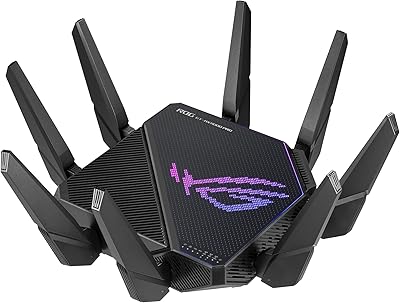
80%
84%
WiFi Speed & Throughput
71%
Coverage & Range
88%
Setup & Ease of Use
91%
Built-in Security (AiProtection)
83%
Parental Controls
More
ASUS RT-AX1800S
ASUS RT-AX1800S
79%
88%
Value for Money
79%
WiFi Speed & Performance
74%
Coverage & Range
83%
Setup & Ease of Use
67%
Router App Experience
More
ASUS ROG Rapture GT-AX11000 Pro
77%
91%
Wireless Performance
93%
Wired Port Flexibility
82%
Gaming Features
61%
Setup & Configuration
89%
Network Security
More
ASUS RT-ACRH18 AC1750 Dual-Band WiFi Router
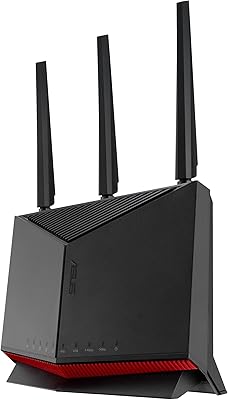
68%
88%
Setup & Installation
74%
Wi-Fi Speed & Performance
69%
Wireless Range & Coverage
66%
Connection Stability
71%
Multi-Device Handling
More
ASUS RT-BE58U WiFi 7 Router
80%
83%
Wireless Performance
81%
Range & Coverage
91%
Setup & Ease of Use
88%
Security Features
86%
Smart Home & IoT Management
More
ASUS RT-AXE7800 Tri-Band WiFi 6E Router
79%
88%
Wireless Performance
83%
Setup & Installation
79%
Signal Range & Coverage
91%
Network Security
84%
Parental Controls
More
ASUS RT-BE86U BE6800 Dual-Band WiFi 7 Router
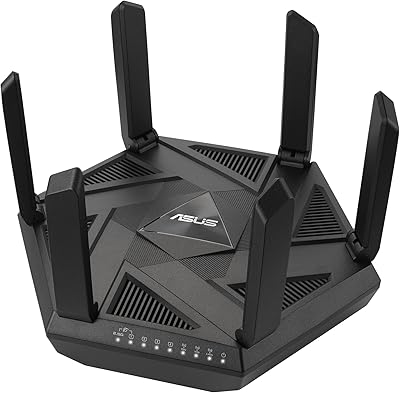
77%
83%
Wireless Performance
91%
Wired Connectivity
77%
Setup & Ease of Use
58%
Mobile App Experience
62%
Firmware Stability
More

FAQ

Not strictly, but the dual 2.5G ports and high aggregate throughput make the most sense if your ISP plan delivers at least 1 Gbps. If your plan tops out at 300–500 Mbps, the RT-AX88U PRO will still work well, though some of its best hardware features will go underused.

It is genuinely free for the lifetime of the device — no trial period, no annual renewal. ASUS partners with Trend Micro to provide this coverage, and it does not require linking a credit card or creating a paid account. That is one of the more practical long-term value points this WiFi 6 router offers.

Honest answer: it depends on how comfortable you are with network terminology. The ASUS app provides a simplified setup path that gets most people online without touching the full admin panel. However, unlocking features like QoS, VPN, or custom port configurations requires navigating a dense interface that can be confusing at first. If you are patient and willing to follow guides, it is manageable — but it is not a plug-and-play experience in the same way simpler routers are.

It can work either way. The ASUS RT-AX88U PRO WiFi 6 Router is capable of acting as the primary AiMesh node or as a satellite added to a network anchored by another compatible ASUS router. This makes it a good upgrade option if you already have ASUS hardware and want to extend coverage rather than start fresh.

The 6000 Mbps figure is the combined theoretical maximum across both bands under ideal conditions — it is not what any single device will experience. In practice, a well-placed device on the 5 GHz band with 160 MHz channels might see 800–1200 Mbps in good conditions, depending on client hardware and environment. The bigger real-world benefit of WiFi 6 is consistency across many devices, not peak speed on one.

It works with virtually any ISP that provides a standard modem or ONT with an Ethernet handoff, which covers the vast majority of cable, fiber, and DSL providers. If your ISP requires PPPoE login credentials, the router supports that configuration as well. The only edge case to check is if your ISP uses a proprietary modem-router combo unit — in that case you may need to put that unit in bridge mode first.

It is notably large — just under 12 inches long with antennas extended, it takes up real estate. If your router lives in a closet or a tight network cabinet, measure carefully before buying. Most buyers who mention the size wished they had accounted for it beforehand, even if they were otherwise satisfied with the router itself.

It is primarily designed as a security-focused personal VPN rather than a content-unblocker, so results for accessing geo-restricted streaming services may vary. For encrypting your traffic on hotel or airport Wi-Fi and keeping your home network accessible remotely, it works reliably and the one-click sharing feature is genuinely convenient.

Yes, this is actually one of its core strengths. WiFi 6 introduces OFDMA and MU-MIMO improvements that allow the router to communicate with multiple devices more efficiently at the same time. A busy smart home with 30-plus devices — thermostats, cameras, phones, TVs, laptops — is exactly the kind of environment where this ASUS router outperforms older WiFi 5 hardware.

A small portion of reviewers have reported occasional stability issues following specific firmware updates, though ASUS generally pushes fixes relatively quickly. The majority of users report stable long-term performance. As a precaution, it is worth checking the ASUS support forums before applying any major firmware update, and the router does allow you to roll back to a previous version if needed.

Where to Buy