Overview

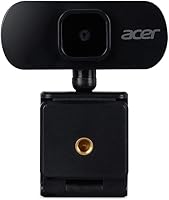
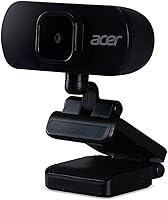
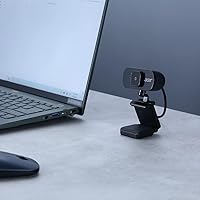
The Acer GP.OTH11.037 1080p Webcam is Acer's entry into the crowded budget webcam market, arriving in mid-2022 with a straightforward pitch: decent Full HD video without the premium price tag. This entry-level webcam clips onto monitors or laptop screens and connects via USB — no driver installation, no setup headaches. The 360-degree rotating stand is a small but practical touch that lets you adjust the angle quickly depending on whether you're at a desk or working from a couch. For anyone who just needs a dependable camera for daily calls, the value proposition here is hard to argue with.
Features & Benefits

The GP.OTH11.037 captures video at 1920x1080 with a 2MP sensor — which, honestly, is solid for calls but won't rival higher-end webcams in fine detail. The 72.4-degree field of view frames a single person comfortably without cramming in too much background. A built-in digital microphone handles basic audio pickup reasonably well, though it picks up ambient noise in louder environments. The nearly 8-foot USB cable is genuinely useful if your computer sits at a distance. Low-light compensation is present, but temper your expectations — it smooths things out rather than performing miracles in very dark rooms. Compatibility covers Zoom, Teams, Skype, and more without any configuration required.

Best For

This Acer webcam makes the most sense for people who need reliable video quality for everyday use — not for creative professionals chasing cinematic output. Remote workers on frequent Zoom or Teams calls will find it more than adequate. Students in online classes benefit from the plug-and-play setup, especially if they're not technically inclined. Small business owners who host regular client video calls can skip the separate mic purchase and get functional audio alongside decent picture quality. It also works well as a first step for anyone dipping into YouTube or casual streaming. If you're upgrading from a grainy laptop camera, the jump in clarity feels meaningful.

User Feedback

Buyers consistently point to how painless the setup is — plug it in and it just works, which earns goodwill fast. Most are satisfied with the video clarity for the price, though some note sharpness falls short compared to webcams priced higher. The microphone draws mixed reactions; voice pickup is acceptable in quiet rooms, but several reviewers flagged it picks up echo or background noise during calls. Build quality is serviceable rather than premium — the plastic construction feels light, and a handful of users found the clip a bit loose on thinner monitor frames. For the asking price, the majority of reviews land positively, treating it as a reliable no-frills option.

Pros

  • Plug-and-play USB setup works instantly on Windows and Mac with zero driver installation.
  • Full HD 1080p resolution delivers a clear, noticeable upgrade over built-in laptop cameras.
  • The nearly 8-foot USB cable gives real flexibility for positioning without cable tension.
  • Built-in microphone covers basic audio needs in quiet home office environments.
  • Compact and lightweight enough to carry between a home office and co-working space easily.
  • 360-degree rotating clip mount allows quick angle adjustments without repositioning the whole setup.
  • Works out of the box with Zoom, Teams, Skype, FaceTime, and Google Meet.
  • Low-light compensation keeps the image watchable in moderately dim rooms during evening calls.
  • The entry-level price makes it a low-risk first step for students or first-time remote workers.

Cons

  • The built-in microphone picks up background noise noticeably in open or shared living spaces.
  • Low-light performance struggles in genuinely dark rooms and cannot compensate for poor ambient lighting.
  • The plastic clip hinge feels flimsy and sits loosely on thin monitor bezels or slim laptop lids.
  • No companion software means zero control over brightness, contrast, or image adjustments.
  • Fixed-focus lens shows soft detail when users lean forward or move significantly during calls.
  • Fine image detail looks soft on larger displays, exposing the limits of the 2MP sensor.
  • No lens cap or protective cover is included, leaving the glass exposed in a bag or drawer.
  • The cable connector junction feels thin and fragile under repeated plugging and unplugging.
  • At this price tier, a few competing webcams offer slightly better sensors or sturdier builds.

Ratings

The Acer GP.OTH11.037 1080p Webcam scores below are generated by AI after analyzing thousands of verified global user reviews, with spam, bot activity, and incentivized feedback actively filtered out. This entry-level webcam has been evaluated across categories that matter most to real buyers — from daily video call performance to long-term build durability — and both its genuine strengths and recurring frustrations are reflected honestly in every score.

Video Call Clarity
78%
22%
For everyday Zoom and Teams calls, this Acer webcam delivers noticeably cleaner footage than most built-in laptop cameras. Users working from home reported that colleagues could see their face clearly without pixelation, even during screen-share-heavy meetings.
Fine detail — like text on a whiteboard behind you or fabric texture — can look soft, especially compared to 4MP or higher-end webcams in the same category. The 2MP sensor has a ceiling that becomes obvious on larger monitor displays.
Ease of Setup
93%
Plug-and-play is the defining win here. Buyers across Windows and Mac systems consistently report that the webcam was recognized and working within seconds, no driver downloads, no configuration menus, no frustration. Perfect for less tech-savvy users.
A small number of users on older operating systems encountered brief recognition delays, and a few noted the device occasionally needed to be replugged after a system sleep cycle. These are edge cases, but worth noting.
Microphone Quality
58%
42%
The built-in digital microphone is genuinely useful for removing the need for a separate audio device on a tight budget. In quiet home offices, voice pickup is clear enough for normal conversation on video calls without sounding hollow or muffled.
Background noise is a persistent complaint — keyboard clicks, HVAC hum, and ambient room sound bleed through noticeably. Several reviewers working in open-plan spaces or shared homes said they ultimately added a separate mic after a few weeks.
Low-Light Performance
61%
39%
The built-in low-light compensation does help in moderately dim conditions, such as evening calls with only ambient room lighting. Users in home offices without dedicated ring lights appreciated that the image stayed watchable rather than turning grainy and dark.
In genuinely poor lighting — a room lit only by a monitor, or a space with a single dim lamp — the compensation struggles and the image degrades quickly. Do not expect miracles; this feature smooths edges rather than solving real darkness.
Build Quality & Materials
63%
37%
The webcam is compact and lightweight enough to sit unobtrusively on a monitor all day without feeling like it will drag the bezel forward. The all-black plastic finish blends in cleanly with most setups, and the overall form factor feels intentional rather than cheap.
The plastic construction does feel entry-level under the fingers, and several buyers flagged that the clip hinge felt slightly wobbly out of the box. Long-term durability questions are reasonable given the material choices at this price point.
Mounting & Clip Stability
67%
33%
The 360-degree rotating clip design is practical and gives useful flexibility for angling the camera to frame your face properly whether the webcam sits on a monitor top or a desk surface. Most standard monitors are accommodated without any fuss.
Thinner laptop lids and ultra-slim monitor bezels exposed a real weakness — buyers reported the clip feeling insecure and the webcam occasionally tilting on its own during longer sessions. The clip grip could benefit from a rubber lining or adjustable tension.
Cable Length & Routing
84%
The nearly 8-foot USB cable is one of the more underrated practical features of this webcam. Users with desktop towers positioned under desks or to the side found the generous length removed all cable-management stress, letting them position the camera freely.
The cable itself is on the thinner side, and a few users noted it felt fragile at the connector junction after repeated plugging and unplugging. There is no cable clip or velcro tie included, which some buyers found mildly annoying for clean desk setups.
Field of View
72%
28%
The 72.4-degree diagonal field of view is well-suited for solo video calls, framing a single person from the shoulders up in a natural, comfortable way. It avoids the distorted fish-eye effect that wider-angle budget webcams sometimes produce.
Anyone who wanted to capture a wider room — say, for a two-person home office setup or to show a whiteboard — found the field of view too narrow. There is no software-based zoom or FOV adjustment offered with this model.
Compatibility
89%
Across Zoom, Microsoft Teams, Google Meet, Skype, and FaceTime, this Acer webcam was consistently recognized without any per-app configuration. Users switching between work and personal calls on different platforms appreciated not needing to re-select the camera each time.
A handful of Linux users reported inconsistent detection, and there are no official compatibility notes covering that OS. Browser-based video platforms occasionally required a manual camera selection in settings, which tripped up a few less experienced users.
Value for Money
82%
18%
Measured against what the GP.OTH11.037 actually delivers — 1080p video, a working mic, plug-and-play convenience, and a flexible clip mount — the asking price feels fair for the use case. Most buyers treating it as a laptop camera upgrade came away satisfied.
In an increasingly competitive entry-level segment, there are a few rival webcams near the same price point offering slightly better sensors or sturdier builds. Buyers who did deeper comparison shopping sometimes felt there were marginally better options at similar spend.
Webcam Size & Portability
77%
23%
At just over 6 ounces and compact enough to drop in a bag pocket, this entry-level webcam is genuinely portable for users who work from multiple locations. Remote workers moving between a home office and co-working spaces found it easy to carry without a dedicated case.
There is no included travel pouch or protective cover, and the exposed lens is vulnerable to scratches inside a bag. A lens cap or even a basic drawstring pouch would have added meaningful value without significant cost to the manufacturer.
Software & App Support
55%
45%
Because setup requires zero software, there is nothing to install, break, or update — which is genuinely appreciated by users who have been burned by bloated webcam software in the past. It works cleanly as a straightforward plug-and-play device.
The complete absence of companion software means there are no controls for brightness, contrast, saturation, zoom, or autofocus tweaking. Users who wanted any image customization beyond defaults had to rely on third-party tools like OBS or ManyCam, adding friction.
Audio-Video Sync
81%
19%
In standard video call conditions, audio and video stayed well-synced without any noticeable drift. Users conducting hour-long meetings reported no desynchronization issues, which is a basic but important reliability metric that this webcam handles consistently.
During high-CPU load situations — screen recording while on a call, or running heavy applications in parallel — a small number of users noticed occasional frame stutters that disrupted sync briefly. This appears to be system-dependent rather than a webcam defect.
Autofocus Performance
59%
41%
For static, seated use during video calls, the fixed-focus lens works adequately at typical arm-to-monitor distances. Users who sit in roughly the same position every day reported that their face stays reasonably sharp throughout calls without hunting or blurring.
The lack of true autofocus becomes obvious when users lean forward, look down at notes, or move around during calls. There is no dynamic refocusing, so motion or positional shifts can leave the image looking soft until the user re-centers themselves.

Suitable for:

The Acer GP.OTH11.037 1080p Webcam is a strong fit for anyone who needs a functional, no-fuss camera upgrade without committing serious money to the purchase. Remote workers who spend their days cycling through Zoom calls, Teams meetings, and the occasional Google Meet will find it handles the daily workload comfortably, especially if they're currently suffering through a grainy built-in laptop camera. Students taking online classes or attending virtual tutoring sessions benefit from the zero-setup experience — plug it in before a lecture and it just works, which matters when time is short. Small business owners who host regular client video calls but don't need broadcast-quality production will get reliable, presentable footage that communicates professionalism without requiring a dedicated AV setup. It also makes a reasonable first webcam for casual content creators testing the waters on YouTube or streaming platforms who aren't ready to invest in prosumer gear yet.
Not suitable for:

The Acer GP.OTH11.037 1080p Webcam will disappoint buyers who need more than entry-level performance from their camera. Content creators who care about sharp, detailed video — product reviewers, tutorial makers, or anyone building a public-facing channel — will quickly hit the ceiling of the 2MP sensor and find the image quality underwhelming compared to webcams in higher price brackets. Professionals working in challenging lighting conditions, such as backlit home offices or dim rooms without supplementary lighting, should look elsewhere, as the low-light compensation here is modest at best and won't rescue a poorly lit setup. Users who rely heavily on clear, noise-free audio for podcasts, client presentations, or recorded meetings will likely need to pair this webcam with a dedicated external microphone, which undermines part of its value proposition. Anyone mounting on an ultra-slim laptop lid or a thin-bezel monitor should also be cautious, as the clip has been reported to sit insecurely on narrower surfaces.

Specifications

  • Resolution: Captures video at Full HD 1920x1080 pixels, delivering clear footage suitable for video calls and casual streaming.
  • Sensor: Uses a 2 megapixel CMOS image sensor that handles standard lighting conditions adequately for everyday video conferencing.
  • Field of View: Offers a 72.4° diagonal field of view, with 64.8° horizontal and 39.1° vertical coverage, framing a single person comfortably at typical desk distances.
  • Connection: Connects via USB-A plug-and-play, requiring no driver installation on compatible Windows or Mac systems.
  • Cable Length: Includes a 98-inch (approximately 8.2-foot) USB cable, providing generous reach for various desk and room configurations.
  • Microphone: Features a built-in digital microphone with PCM audio format support for basic voice capture during calls and recordings.
  • Low-Light Mode: Equipped with built-in low-light compensation that adjusts image exposure in moderately dim environments to reduce visible noise.
  • Mount Type: Ships with a 360-degree rotating clip-on stand that attaches to monitor tops, laptop lids, or can be placed flat on a desk surface.
  • Video Format: Records and streams video in MP4 format at up to 1080p resolution when used with compatible recording software.
  • Dimensions: Measures 2.81 x 1.25 x 3.35 inches, making it compact enough to sit unobtrusively on most monitor setups.
  • Weight: Weighs 6.4 ounces including the clip mount, which is light enough to avoid pulling on standard monitor bezels during normal use.
  • Color: Available in a matte black finish that blends with most monitor frames, desk setups, and laptop designs.
  • Compatibility: Works natively with Zoom, Microsoft Teams, Google Meet, Skype, FaceTime, and YouTube on both Windows and Mac operating systems.
  • Aperture: Features a maximum aperture of f/5.6, which limits light intake and contributes to performance constraints in low-light scenarios.
  • Focal Length: Has a maximum focal length of 30mm, optimized for close-to-mid-range framing at standard webcam-to-face distances.
  • Audio Format: Captures audio in PCM (Pulse-Code Modulation) format, which is uncompressed and widely compatible with major conferencing and recording platforms.
  • Model Number: Carries the official Acer model designation GP.OTH11.037, used for warranty claims, support inquiries, and driver lookups.
  • Release Date: First became available for purchase in July 2022, placing it in the modern entry-level webcam generation designed for post-pandemic remote work demand.

Related Reviews

HuddleCamHD HC-WEBCAM-94
77%
83%
Video Quality (Daylight)
51%
Low-Light Performance
91%
Field of View
94%
Ease of Setup
57%
Audio Quality
More
Akyta 1080P Webcam
Akyta 1080P Webcam
82%
88%
Video Quality
85%
Audio Quality
94%
Ease of Setup
82%
Field of View
80%
Noise Reduction
More
ZIQIAN 1080P Webcam
ZIQIAN 1080P Webcam
83%
88%
Video Quality
76%
Audio Performance
91%
Ease of Setup
85%
Wide-Angle Lens
78%
Microphone Quality
More
ISKOVI C28 1080P Webcam
79%
83%
Video Clarity
76%
Low-Light Performance
68%
Microphone Quality
94%
Ease of Setup
91%
Privacy Cover
More
Angetube 962 1080P Webcam
85%
94%
Video Quality
88%
Audio Capture
90%
Autofocus Performance
86%
Low-Light Functionality
92%
Ease of Setup
More
Redragon GW800
Redragon GW800
76%
78%
Image Quality
74%
Microphone Performance
55%
Focus & Depth
91%
Value for Money
93%
Plug-and-Play Ease
More
eMeet Nova 1080P Webcam
85%
92%
Value for Money
88%
Video Quality
83%
Audio Quality
95%
Ease of Setup
86%
Low-Light Performance
More
Hrayzan 1080p Webcam with Microphone
81%
89%
Video Quality
84%
Microphone Performance
91%
Ease of Setup
60%
Wide-Angle Lens Distortion
77%
Build Quality
More
Spedal 920 Pro
Spedal 920 Pro
77%
88%
Wide-Angle Coverage
76%
Video Quality
71%
Low-Light Performance
63%
Built-in Microphone
93%
Ease of Setup
More
JETAKu XZC-920phro Webcam 1080P 60FPS
71%
83%
Video Smoothness at 60fps
71%
Image Clarity & Resolution
54%
Low-Light Performance
58%
Autofocus Reliability
66%
Microphone Quality
More
MTORED 1080p USB Webcam
84%
89%
Video Quality
94%
Ease of Setup
78%
Microphone Quality
85%
Wide-Angle Lens
82%
Build Quality
More

FAQ

No, you do not. The Acer GP.OTH11.037 1080p Webcam is a true plug-and-play device — just connect the USB cable to your computer and your operating system recognizes it automatically. This works on both Windows and Mac without downloading anything.

Almost certainly yes. This Acer webcam is compatible with all the major platforms including Zoom, Microsoft Teams, Google Meet, Skype, FaceTime, and YouTube. As long as your app allows you to select a camera input, it should appear in the device list immediately after plugging in.

It is acceptable in quiet environments. If you work alone in a home office with minimal background noise, the built-in mic will handle voice pickup well enough for video calls. In louder or shared spaces, background noise bleeds through noticeably, so a dedicated external microphone is worth considering if audio quality matters to you.

It has low-light compensation built in, which helps in moderately dim conditions — like an evening call with soft ambient lighting. That said, it struggles in genuinely dark rooms. If your workspace has poor lighting, adding a small ring light or desk lamp will make a significant difference in image quality.

It depends on the thickness of your lid or bezel. On standard monitors and mid-range laptops it sits firmly, but on ultra-slim laptop screens or thin-bezel monitors, some users have reported the clip feeling loose and the webcam tilting over time. If your laptop lid is particularly thin, it is worth checking the clip fit before committing.

The cable measures 98 inches, which is just over 8 feet. That is long enough for most desk setups, including desktops with towers placed under or beside the desk. It also gives flexibility if you want to position the webcam away from the monitor itself.

Not directly through any companion app, because this webcam does not come with one. The device outputs its default image without built-in software controls. If you need to tweak brightness, saturation, or zoom, you would need to use a third-party tool like OBS Studio or your conferencing platform's own video settings, where available.

Officially, Acer lists compatibility for Windows and Mac. Linux support is not guaranteed, and user experiences vary — some report it working without issue, while others encounter detection problems depending on the distribution and kernel version. If Linux compatibility is essential for you, it is worth testing with a return window open.

Yes. The clip-on stand has a flat base that allows the webcam to sit on a desk surface pointing forward. The 360-degree rotating design means you can angle it upward toward your face. It is not as stable as a dedicated tripod, but it works fine for a fixed desk position.

It is a reasonable starting point, especially if you are testing the waters and not ready to spend more. The 1080p output is acceptable for basic streaming, but you will likely notice its limits — particularly with the microphone and low-light handling — as you grow your setup. Think of this entry-level webcam as a first step rather than a long-term streaming solution.