
Overview

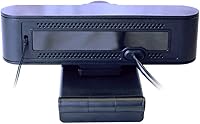
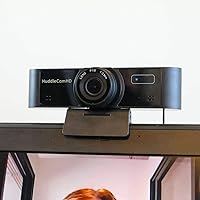
The HuddleCamHD HC-WEBCAM-94 is HuddleCamHD's answer to a simple but common problem: you need a decent wide-angle webcam that just works, without fussing over drivers or software. The brand has built its reputation around conferencing hardware, and this USB webcam reflects that practical focus. Its 94-degree field of view is the real draw — it's wide enough to capture two or three people at a shared desk without requiring anyone to shuffle their chair. It runs entirely off USB power, weighs under nine ounces, and fits in a laptop bag without a second thought. Solid everyday performance, no auto-focus tricks, no pan-tilt bells and whistles — just a reliable workhorse.

Features & Benefits

At the core of this wide-angle webcam is a 1080p Full HD CMOS sensor that handles well-lit environments confidently — faces are sharp, colors look natural, and the footage holds up clearly on larger screens. The 94-degree lens isn't just a spec; it genuinely changes how you frame a call, letting multiple people share a single shot without awkward cropping. Plug it into any USB port and it's recognized instantly — no driver downloads, no setup screens. It works with Zoom, Microsoft Teams, and virtually every conferencing app out of the box. USB bus power keeps the setup clean and clutter-free beyond that single cable connection.

Best For

This USB webcam makes the most sense for remote workers who spend their days on video calls and want something that works reliably without any setup fuss. It's a strong fit for small huddle rooms or shared workstations where more than one person needs to appear on camera — the wide field of view handles that naturally. Budget-conscious streamers or content creators who just need clean 1080p footage without learning new software will find it practical. If you frequently hot-desk or move between offices, the compact size and single USB cable setup make it easy to toss in a bag and go. IT teams looking to deploy a no-maintenance webcam at scale will also appreciate the simplicity.

User Feedback

With a 4.3-out-of-5 rating across 68 reviews, the HuddleCamHD unit has earned generally favorable marks — though the pool is small enough that a handful of experiences can shift the average noticeably. Most reviewers highlight the wide field of view and plug-and-play ease as standout strengths, with several noting that image clarity holds up well under decent lighting. The more consistent complaints involve low-light performance — the picture can get soft or grainy in dim rooms — and the fixed focus, which doesn't suit everyone. A few users also found the built-in audio quality underwhelming for anything beyond basic call audio. Overall, the feedback points to a capable, no-drama webcam that rewards those working in well-lit spaces.

Pros

  • The 94-degree wide-angle lens fits multiple people in frame without any repositioning.
  • True plug-and-play setup — recognized instantly on Windows and Mac with zero driver installs.
  • Works out of the box with Zoom, Microsoft Teams, Google Meet, and most other conferencing platforms.
  • 1080p footage looks sharp and natural in well-lit environments during daily video calls.
  • Weighs under nine ounces and fits easily in a laptop bag for users who move between locations.
  • USB bus power means no adapter, no extra cables, and no wall outlet needed.
  • The clip mount holds firmly on most monitor and laptop screen sizes without wobbling.
  • A practical choice for small huddle rooms where a standard narrow webcam leaves people out of frame.
  • Consistent, stable wired connection with no latency or dropout issues over long call sessions.

Cons

  • Low-light performance is a consistent weak point — grainy footage in dim or evening environments.
  • Fixed focus struggles when you lean in close or move frequently during a call.
  • Built-in microphone picks up background noise and keyboard clicks more than average.
  • No autofocus means the image can go soft at distances outside the fixed focal sweet spot.
  • The USB cable is non-detachable, making cable management and storage slightly awkward.
  • No companion app means no manual control over exposure, white balance, or color settings.
  • Wide-angle framing introduces subtle edge distortion, which some users find distracting on solo calls.
  • The review sample size is relatively small, so long-term durability data is limited.
  • No tripod mount thread included, restricting flexible placement beyond a standard monitor clip.
  • Competitors at a similar price now offer autofocus and better low-light processing as standard.

Ratings

The HuddleCamHD HC-WEBCAM-94 has been scored by our AI engine after analyzing verified buyer reviews from across global marketplaces, with spam, bot activity, and incentivized submissions actively filtered out. Every score below reflects what real users consistently experienced — both the genuine strengths and the frustrations that kept showing up across multiple reviews. No category has been glossed over, and no pain point has been buried.

Video Quality (Daylight)
83%
In well-lit rooms or near a window, this wide-angle webcam produces clean, detailed 1080p footage that holds up well on standard monitor sizes. Several users noted that their colleagues commented positively on picture clarity during video calls, which is a meaningful real-world endorsement.
The CMOS sensor does not apply heavy processing, so the image is fairly honest — meaning slight imperfections in your environment show up clearly. A few users found colors slightly cooler than expected, which can look unflattering without a warm light source nearby.
Low-Light Performance
51%
49%
Some users working in dimly lit home offices found the image still recognizable and functional for basic calls, which is about the floor expectation for a webcam at this price tier. It handles soft ambient light better than total darkness.
This is a recurring pain point in user feedback. In evening settings or rooms without dedicated lighting, the footage gets noticeably grainy and soft. Users who rely on a single overhead bulb or work at night reported visible degradation that made them look poorly lit on calls.
Field of View
91%
The 94-degree wide-angle lens is the most praised feature across reviews, and for good reason. Users in small huddle rooms or shared workstations found they could fit two to three people in frame without anyone needing to shift positions — a genuinely practical advantage over standard webcams.
At maximum width, there is a subtle fisheye-style distortion at the outer edges of the frame, which some users found mildly distracting. For solo users who sit close to the camera, the wide angle can make the background feel overly prominent compared to a tighter, more flattering field of view.
Ease of Setup
94%
Plug-and-play functionality is as close to frictionless as it gets with this USB webcam. Users consistently highlighted that it was recognized immediately on both Windows and Mac without any driver hunting or software installs — a real time-saver in corporate environments where admin permissions are restricted.
A small number of users on older systems reported a brief delay on first connection, and a few noted that their operating system occasionally did not retain it as the default camera after a restart. These were isolated cases, but worth noting for IT teams standardizing across machines.
Audio Quality
57%
43%
For basic call audio in a quiet room, the built-in microphone gets the job done — voices come through intelligibly without requiring any additional hardware. Users on internal team calls found it acceptable for day-to-day check-ins.
Multiple users flagged the microphone as a weak point, particularly in rooms with background noise or echo. It picks up keyboard clicks, ambient hum, and HVAC sounds more than average, making it a poor fit for anyone conducting client-facing calls or recording content without a dedicated external mic.
Build Quality
72%
28%
The HuddleCamHD unit feels solid enough for daily desk use, with a sturdy plastic housing that does not flex noticeably when handled. The clip mount works reliably on most monitors and laptop screens without slipping during a session.
The overall construction feels practical rather than premium — there is no metal reinforcement, and the USB cable feels thin for a device that gets plugged and unplugged regularly. Users who travel with it frequently noted minor scuffing over time, though nothing that affected function.
Portability
88%
At just over eight ounces and compact enough to slip into a laptop sleeve pocket, this USB webcam is genuinely easy to take between offices, co-working spaces, or client sites. The single USB cable means there is nothing extra to pack or forget.
There is no carrying pouch or protective case included, so users who travel with it daily may want to grab a small padded bag to prevent the lens from getting scratched in transit. The cable is not detachable, which limits how neatly it coils for storage.
Platform Compatibility
89%
Users reported zero compatibility issues across Zoom, Microsoft Teams, Google Meet, and OBS, which covers the vast majority of real-world use cases. It also works on Chromebooks and Linux systems without any configuration, which occasional users in those environments appreciated.
There is no dedicated companion app, so advanced settings like exposure control or white balance adjustment are not available unless your conferencing software provides them natively. Power users who want granular image control will need to rely on third-party tools.
Focus & Sharpness
63%
37%
At a standard sitting distance of roughly two to three feet, the fixed focus produces a sharp, usable image that suits most video call scenarios without any adjustment needed. Users who stay in a consistent position found it reliably crisp session after session.
The lack of autofocus is a genuine limitation if you move around during calls or if your setup has varying subject distances. Users who lean forward to reference documents or switch between positions reported the image going soft at closer distances, which can be noticeable on larger screens.
Value for Money
78%
22%
For a plug-and-play 1080p webcam with a genuinely wide field of view, most users felt the price was fair relative to what they received. Remote workers who needed a quick upgrade from a built-in laptop camera found it a worthwhile, low-friction investment.
At this price point, competition from other brands offering autofocus and improved low-light processing is real. Users who did their research post-purchase occasionally noted they could have gotten more features elsewhere for a similar spend, particularly in terms of image processing.
Cable & Connectivity
74%
26%
The USB-A connection is universally compatible and delivers stable, uninterrupted video without dropouts during extended calls. Users who had previously dealt with Bluetooth or wireless camera latency found the wired connection refreshingly consistent.
The fixed, non-detachable USB cable can be inconvenient for desk cable management. Several users noted the cable length is adequate but not generous, and those with USB ports on the back of desktop towers found themselves wishing for an extra foot or two of reach.
Mount & Positioning
76%
24%
The clip-style mount attaches quickly to a monitor or laptop lid and holds its angle once set. For most standard monitor thicknesses, it grips without wobbling during a call, which matters when people are typing nearby.
The mount does not accommodate tripods or alternative positioning out of the box, which limits placement options for users who want to mount it elsewhere — on a shelf, for example, or at a more creative angle for streaming. A standard tripod thread would have added meaningful flexibility.
Brand Reliability
81%
19%
HuddleCamHD has a track record in the conferencing hardware space, and users generally felt that translated into a dependable product. The camera functioned consistently over months of daily use according to longer-term reviewers, with no firmware or connectivity issues reported.
Customer support responsiveness is not widely discussed in the review pool, so it is difficult to assess how the brand handles issues when they arise. The relatively modest review count also means long-term durability data is limited compared to more established webcam brands.

Suitable for:

The HuddleCamHD HC-WEBCAM-94 is a strong fit for remote workers who want a reliable, no-hassle webcam that handles daily video calls without requiring any technical setup. Its wide field of view makes it particularly practical for shared desks or small meeting rooms where two or three people regularly need to appear on camera together — a scenario where most standard webcams simply fall short. Teams or IT managers looking to deploy a consistent, low-maintenance conferencing peripheral across multiple workstations will appreciate that it works instantly on both Windows and Mac without driver management or software overhead. Budget-conscious content creators who just need clean 1080p footage for streaming or recording in a well-lit space will also find it gets the job done without overcomplicating their workflow. If you move between offices or co-working spaces regularly, this USB webcam slips into a laptop bag without a second thought and is ready to go the moment you plug it in.

Not suitable for:

The HuddleCamHD HC-WEBCAM-94 is not the right choice for anyone whose primary workspace is poorly lit — evening workers, basement offices, or anyone relying on a single dim overhead bulb will likely find the image quality underwhelming and grainy. The fixed focus is a real constraint for users who move around during calls, reference documents up close, or present to clients where a sharp, professional image at varying distances genuinely matters. Content creators or streamers who need precise image control, fine-tuned white balance, or autofocus tracking should look at cameras with dedicated companion apps or more advanced sensors. The built-in microphone is adequate at best, so anyone conducting client-facing calls, recording voiceovers, or working in a noisy environment should plan to pair it with a dedicated external mic. And if you are hoping for a camera that handles 4K, HDR, or any form of background blur processing, this wide-angle webcam simply was not built for those expectations.

Specifications

  • Brand: Manufactured by HuddleCamHD, a brand focused on conferencing and huddle room hardware solutions.
  • Model Number: The official model designation is HC-WEBCAM-94.
  • Video Resolution: Captures video at 1080p Full HD, delivering clear and detailed footage for calls and recordings.
  • Field of View: Features a 94-degree wide-angle lens capable of capturing multiple people or a broad desk environment in a single frame.
  • Sensor Type: Uses a CMOS image sensor to convert light into video signal with standard dynamic range performance.
  • Maximum Aperture: The lens has a maximum aperture of f/3.1, which determines how much light the sensor receives in a given environment.
  • Focal Length: Maximum focal length is 100mm, with a fixed focus optimized for standard sitting distances of roughly 2 to 4 feet.
  • Connectivity: Connects via USB-A and operates as a true plug-and-play device requiring no driver installation on Windows or Mac.
  • Power Source: Powered entirely through the USB bus connection, eliminating the need for any external power adapter or wall outlet.
  • Dimensions: Measures 1.2 x 4.6 x 1.5 inches, making it compact enough to fit in a laptop bag pocket.
  • Weight: Weighs 8.4 oz, light enough for daily portability between offices or co-working spaces.
  • OS Compatibility: Compatible with Windows and Mac operating systems, and also functions on Chromebook and select Linux distributions.
  • Platform Support: Works out of the box with Zoom, Microsoft Teams, Google Meet, and most other major video conferencing applications.
  • Audio: Includes a built-in microphone suitable for basic call audio in quiet environments, though it is sensitive to background noise.
  • Mount Type: Ships with a clip-style mount designed to attach to standard monitor bezels and laptop screen lids.
  • Cable: Features a fixed, non-detachable USB cable integrated directly into the camera body.
  • BSR Ranking: Holds a Best Sellers Rank of #878 in the Webcams category on Amazon as of the most recent available data.
  • Release Date: First became available for purchase on August 20, 2019.

Related Reviews

Akyta 1080P Webcam
Akyta 1080P Webcam
82%
88%
Video Quality
85%
Audio Quality
94%
Ease of Setup
82%
Field of View
80%
Noise Reduction
More
Lumina LX011 4K Webcam
81%
91%
Image Quality
87%
Low-Light Performance
83%
AI Auto-Framing
93%
Build Quality
78%
Microphone Quality
More
PixelForge 2K Webcam
76%
83%
Image Quality
88%
Built-In Ring Light
71%
Autofocus Performance
67%
Microphone Quality
91%
Privacy Cover
More
MOERTEK 4K Webcam
MOERTEK 4K Webcam
87%
91%
Video Quality
89%
Noise Reduction
85%
Auto Framing
94%
Ease of Setup
88%
Privacy Features
More
NexiGo N930AF Webcam
81%
88%
Autofocus Performance
82%
Video Quality
61%
Low-Light Performance
71%
Built-in Microphone
96%
Ease of Setup
More
UGREEN 2K Webcam
UGREEN 2K Webcam
86%
91%
Video Clarity
85%
Autofocus Accuracy
88%
Audio Quality
84%
Build Quality
93%
Ease of Setup
More
PEATOP 4K-C80CCMD Webcam
75%
74%
Video Quality
68%
Autofocus Performance
61%
Low-Light Performance
63%
Microphone Quality
93%
Setup & Compatibility
More
XOCLON 2K Webcam
XOCLON 2K Webcam
86%
89%
Video Quality
91%
Audio Performance
96%
Ease of Setup
85%
Low-Light Performance
87%
Field of View
More
Diccik 4K Webcam
Diccik 4K Webcam
85%
91%
Video Quality
75%
Microphone Performance
94%
Ease of Setup
88%
Light Adjustment
89%
Compatibility
More
Lusinx 4K Webcam
Lusinx 4K Webcam
86%
91%
Video Quality
88%
Noise Cancellation Performance
87%
Low-Light Performance
94%
Setup & Installation
75%
Microphone Clarity
More

FAQ

No, you do not. The HuddleCamHD HC-WEBCAM-94 is a true plug-and-play device — just connect it to a USB port and your operating system will recognize it automatically. This applies to both Windows and Mac, and no companion app or driver download is required.

Yes, it works with both platforms right out of the box. It is also compatible with Google Meet, Webex, and most other major conferencing tools. You simply select it as your camera source within the app settings and you are ready to go.

The lens covers 94 degrees, which is meaningfully wider than most standard webcams that typically sit in the 60 to 78-degree range. In practical terms, it means two or three people sitting at a shared desk can all fit in frame without anyone needing to shuffle over — a genuine advantage in small meeting rooms or collaborative setups.

Honestly, low-light is not its strongest suit. In a well-lit room near a window or with overhead lighting, the image looks clean and sharp. But in dim environments or under a single weak bulb, the footage can get noticeably grainy and soft. If you frequently work in the evening or in a darker space, pairing it with a small LED desk light makes a real difference.

The focus is fixed, not automatic. It is optimized for a standard sitting distance of roughly two to four feet from the camera. If you stay relatively still during calls, this is rarely an issue. However, if you move around a lot, lean in to reference documents, or have a varied setup, you may notice the image go soft at closer or further distances.

Yes, in most cases it works on Chromebooks and Linux systems as well, since it uses standard USB Video Class drivers that are baked into those operating systems. No additional setup is typically needed, though it is always worth checking your specific distribution if you are running a less common Linux build.

For casual internal meetings in a quiet room, it gets the job done. That said, the microphone is one of the more commonly criticized aspects — it picks up keyboard clicks, ambient noise, and room echo more readily than a dedicated microphone would. If you are on client-facing calls or recording content, investing in a separate USB or condenser mic is worth considering.

The included mount is a clip designed for monitor bezels and laptop screens, and there is no standard tripod thread on the camera body. If you want to place it on a desk stand or mount it at a different angle for streaming, you would need a third-party adapter. It is a small limitation that matters more for content creators than for standard call users.

Very much so. It weighs just 8.4 oz, measures under five inches across, and the single USB cable means there is nothing extra to pack. It fits easily in a laptop bag side pocket and is ready to use the moment you plug it in at a new location. Regular commuters and hot-deskers tend to appreciate this about it.

For basic streaming or recording in a well-lit room, the 1080p output is respectable and more than adequate for getting started. It is not going to compete with a dedicated streaming camera that offers autofocus, background processing, or HDR, but for someone who wants clean footage without a complicated setup, this wide-angle webcam is a reasonable starting point at its price tier.