Overview

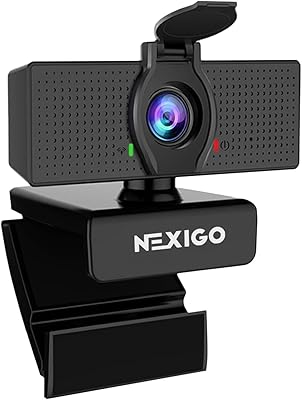
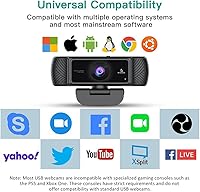
The NexiGo N680 1080P Webcam has quietly built a strong reputation since its 2020 launch, earning a spot among the top 60 bestsellers in its category with over 8,500 ratings — not a bad track record for a mid-range USB camera. It targets remote workers, students, and small business users who need a reliable upgrade without overspending. Setup is genuinely painless: plug it into a USB port and it works, no driver installation or software configuration required. The clip mount fits most monitors and laptop screens, and it runs on Windows, macOS, Linux, Chrome OS, and Ubuntu, making it one of the more broadly compatible options at this price point.

Features & Benefits

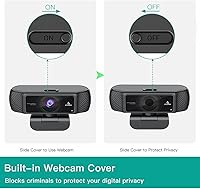
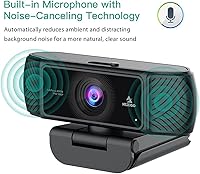
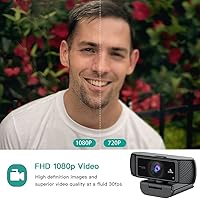
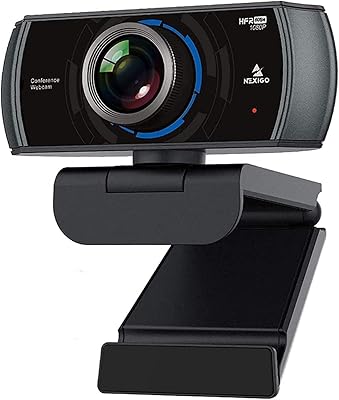
The N680 captures video at 1080p Full HD and 30fps, producing noticeably sharper results than the typical built-in laptop camera. The autofocus adjusts quickly when you shift positions during a call, keeping your face sharp without manual intervention. Field of view is listed as 90 degrees in the product copy, though the spec table says 80 — either way, it comfortably handles a single person or two people sitting close together. The dual stereo microphones with noise cancellation do a decent job filtering ambient sound in quieter rooms. A sliding privacy cover is built into the housing — a simple physical shutter that blocks the lens when not in use, no app required.

Best For

This NexiGo webcam makes the most sense for people who spend a good chunk of their day on video calls — think home office professionals on Zoom or Microsoft Teams who are tired of their laptop's washed-out built-in camera. Students attending online classes will also appreciate how little effort it takes to get up and running. It handles small group setups reasonably well, making it a workable choice for shared desks or compact meeting spaces. If you are on Windows or Mac, the plug-and-play nature means no software headaches. Linux and Chrome OS users are covered too, which is not something every webcam in this price range can claim.

User Feedback

With a 4.4-star average across more than 8,500 reviews, the N680 clearly resonates with buyers. The most consistent praise centers on easy setup and the visible jump in image clarity compared to built-in cameras. The privacy cover gets mentioned often in a positive light — people seem genuinely relieved it is a physical mechanism rather than a software toggle. On the downside, some users find the microphone struggles in louder environments, picking up more background noise than expected. A handful of reviews mention occasional autofocus hesitation during fast movement, and a few longer-term owners note the build feels adequate rather than sturdy. Low-light performance draws mixed reactions, with results varying noticeably by room conditions.

Pros

  • Plug-and-play setup works immediately on most operating systems without installing any drivers or software.
  • 1080p video quality is a noticeable, real-world upgrade over the built-in cameras found on most laptops.
  • The built-in sliding privacy cover is a practical, physical solution that does not depend on software or settings.
  • Autofocus responds quickly enough during normal call movements to keep the subject sharp without manual adjustment.
  • Wide field of view comfortably accommodates a single person or two people sitting close together.
  • Broad OS compatibility — including Linux, Chrome OS, and Ubuntu — makes this webcam genuinely versatile.
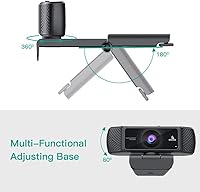
  • The adjustable clip mount fits securely on a range of monitor thicknesses and laptop screens.
  • With over 8,500 ratings and a 4.4-star average, the N680 has a well-documented and largely positive track record.
  • Noise-canceling dual microphones handle quiet home office environments reasonably well without any configuration.

Cons

  • Microphone quality drops off noticeably in louder or open-plan environments, making an external mic a likely necessity.
  • Low-light performance is inconsistent and does not live up to the automatic adjustment claims in more demanding conditions.
  • The plastic housing feels functional rather than solid, raising reasonable questions about durability over multi-year use.
  • Autofocus can hesitate or briefly lose track during fast or unexpected movement, which some users find distracting on calls.
  • No tripod adapter is included, limiting mounting flexibility for users who do not want a monitor clip setup.
  • The stated field of view is inconsistent across product materials — listed as both 80 and 90 degrees in different places.
  • Frame rate is capped at 30fps, which is standard but may disappoint users expecting smoother motion in more dynamic scenes.
  • Cable length may feel restrictive depending on desk layout, with no easy option to extend without a separate USB hub.

Ratings

Our AI-generated scores for the NexiGo N680 1080P Webcam were produced by analyzing thousands of verified global user reviews, with spam, bot submissions, and incentivized feedback actively filtered out before scoring. Each category reflects the honest distribution of real buyer experiences — strengths and frustrations weighted equally — so the numbers you see below represent what actual owners consistently reported, not a marketing summary.

Video Quality
82%
18%
For a mid-range webcam, the 1080p output genuinely impresses users who are coming from built-in laptop cameras. Skin tones render naturally in good lighting, and the image stays sharp and stable during typical call movement, which matters when you are presenting to colleagues or clients every day.
Color accuracy and sharpness drop off noticeably as lighting conditions worsen. Users in rooms with uneven or dim lighting — evening calls, basement offices — frequently report a softer, grainier image that does not match the crisp results shown in promotional materials.
Low-Light Performance
61%
39%
The automatic brightness adjustment does provide some visible correction in mildly dim environments, and some users report acceptable results with a single desk lamp positioned in front of them. For basic after-hours calls, it gets the job done at a minimal level.
Low-light performance is one of the most commonly flagged weaknesses across the review pool. In genuinely dark or backlit rooms, the image degrades significantly — faces can appear blotchy or washed out, and the auto-correction occasionally overcorrects in a way that looks unnatural to the person on the other end.
Autofocus
76%
24%
Day-to-day autofocus performance is solid for the vast majority of users. The camera locks onto faces quickly when you sit down, and minor positional shifts — leaning in, turning to grab something — are handled smoothly without the jarring refocus pause that plagues cheaper webcams.
A recurring complaint involves autofocus hesitation during faster or less predictable movement, such as animated gesturing during presentations. Some users also note that the camera occasionally struggles to decide between focusing on the person or the background in environments with busy visual elements behind them.
Microphone Quality
63%
37%
In quiet, controlled home office environments, the dual stereo microphones perform well enough that most call participants report no issues with clarity or volume. The noise-canceling function does a reasonable job filtering out consistent low-level hum, like HVAC systems or a distant fan.
The microphone is arguably the most divisive aspect of this webcam. Users in open-plan offices, shared households, or rooms with unpredictable ambient noise frequently report that background sounds bleed through clearly enough to be distracting. Many reviewers ultimately paired the N680 with a separate USB microphone to compensate.
Setup & Ease of Use
94%
Plug-and-play functionality is one of the most consistently praised attributes across the entire review base. Users on Windows, Mac, Linux, and Chrome OS all report the camera being detected and functional within seconds, with zero driver installation or software configuration required — a genuine differentiator for less technical buyers.
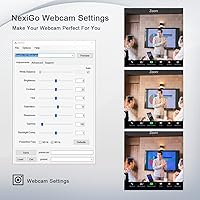
A small number of users on older operating systems or niche Linux distributions report occasional recognition issues, though these cases appear to be edge cases rather than a pattern. The companion software, while optional, has received mixed feedback from those who chose to install it for advanced adjustments.
Privacy Cover
88%
The physical sliding shutter is consistently called out in reviews as a genuinely useful feature rather than a marketing checkbox. Users with security concerns — particularly those who keep the camera plugged in permanently — appreciate that blocking the lens requires no software, no app, and no reliance on the computer being on.
A handful of users note that the sliding mechanism feels slightly loose on some units, raising minor concerns about whether the cover stays fully closed over time with frequent use. It is a small mechanical element, and while most find it reliable, build consistency appears to vary slightly between units.
Build Quality
58%
42%
The overall form factor is compact and unobtrusive, and the all-plastic housing is light enough to avoid putting stress on monitor bezels or laptop screens. For users who set it up once and leave it in place, the construction holds up adequately under normal stationary use.
Build quality is a recurring concern among longer-term owners. The plastic housing feels noticeably budget-grade in hand, and several reviewers who use the camera daily report that the clip hinge and cable connection point begin to feel less secure after six to twelve months of regular use.
Field of View
74%
26%
The wide angle — somewhere between 80 and 90 degrees depending on which spec source you reference — is genuinely useful for users who want more spatial context on their calls, or who occasionally need a second person to appear in frame without repositioning the entire camera setup.
The inconsistency between the 80-degree figure in the spec table and the 90-degree figure in marketing copy creates legitimate buyer confusion, and a few reviewers feel the actual real-world angle falls closer to the lower number. For solo home office use the difference is minor, but it matters if you are buying specifically for a multi-person setup.
Compatibility
91%
Cross-platform support is broader than most competitors in this segment. Verified user reports confirm reliable operation across Windows 10 and 11, multiple macOS versions, Ubuntu, Chrome OS, and even some older Linux kernel versions — making it a practical choice for mixed-OS households or IT environments.
Compatibility with very old or unsupported operating systems is technically listed but rarely tested by real users, so the claimed Windows XP support should be taken with appropriate skepticism. A small number of macOS users also report minor quirks with certain video conferencing apps that required a permission reset to resolve.
Mounting & Adjustability
77%
23%
The clip mount covers a reasonable range of monitor thicknesses and sits stably on most standard setups. The ability to tilt and rotate the camera without tools is a practical convenience that users appreciate when fine-tuning their framing before an important call.
The absence of a tripod adapter limits positioning options for users who do not want a monitor-mounted setup, or who need the camera at a different height or angle entirely. The clip also has a tendency to feel slightly wobbly on thinner laptop screen bezels, which a few users found distracting.
Value for Money
83%
At its price point, the N680 punches above its weight in the categories most buyers care about — primarily video clarity and ease of use. As an upgrade from a built-in laptop camera, the improvement is significant enough that most users feel the purchase was clearly justified within the first week of use.
As an all-in-one package, the microphone quality introduces some friction into the value equation, since buyers who need reliable audio in less-than-ideal environments will need to spend additionally on a standalone microphone — pushing the total cost meaningfully higher than the camera price alone suggests.
Noise Cancellation
59%
41%
The noise-canceling processing does show measurable results in consistent, low-frequency background noise scenarios. Users working in quiet rooms with steady ambient sounds — air conditioning, a white noise machine — generally report that call participants cannot detect the background noise during normal conversation.
Variable or sudden background noises — keyboard clatter, household activity, street noise through a window — tend to break through the noise cancellation more readily than users expect. Several reviews specifically describe the filtering as effective in ideal conditions but unreliable the moment the acoustic environment becomes less predictable.
Framerate Consistency
79%
21%
At 30fps under normal USB bandwidth conditions, the N680 delivers a stable, smooth video stream that holds up well across extended calls. Users hosting or attending multi-hour meetings report no significant frame drops or stuttering under typical single-camera USB usage on modern hardware.
Performance can degrade on older computers or machines with heavily loaded USB controllers, where frame drops become more noticeable. The camera does not offer 60fps as an option, which is a firm ceiling for any users whose workflows — content capture, smoother motion recording — would benefit from a higher frame rate.

Suitable for:

The NexiGo N680 1080P Webcam is a strong fit for anyone who spends a significant portion of their workday on video calls and is tired of the flat, grainy output from a built-in laptop camera. Remote professionals using Zoom, Microsoft Teams, or Google Meet will notice an immediate and meaningful improvement in how they appear on screen — sharper, more natural, and better framed. Students attending online classes benefit from the same clarity, plus the zero-setup experience means there is no technical friction between them and their first call. The wide field of view also makes it practical for shared workspaces or small desks where two people occasionally need to appear on camera together. Anyone running Linux, Chrome OS, or Ubuntu alongside the more common Windows and Mac environments will appreciate that this desktop webcam does not force them to hunt for drivers or workarounds.

Not suitable for:

The NexiGo N680 1080P Webcam is not the right tool for users who need professional-grade video quality — content creators, streamers, or anyone recording polished video for public audiences will likely find its 1080p output and plastic build insufficient. The built-in microphones, while adequate in quiet home offices, tend to struggle in open-plan spaces, louder households, or anywhere with significant ambient noise; in those environments, a dedicated external microphone is almost a necessity. Low-light performance is inconsistent — the automatic brightness adjustment helps at the margins, but it does not compensate well in genuinely dim conditions, which can be a real problem for evening calls or rooms with poor lighting. The N680 also ships without a tripod mount adapter, so users who want flexible desk positioning beyond a monitor clip will need to source that separately. If long-term build durability is a priority, the all-plastic housing may feel less reassuring compared to more premium options at higher price points.

Specifications

  • Resolution: Captures video at 1080p Full HD (1920x1080) for clear, detailed image output during calls and recordings.
  • Frame Rate: Records and streams at 30 frames per second, which is the standard rate for smooth video conferencing.
  • Field of View: The field of view is listed as 90 degrees in product marketing copy, though the official spec table cites 80 degrees; either way it covers a wider-than-average desktop angle.
  • Focus System: Uses continuous autofocus to keep the subject sharp automatically, without requiring manual adjustment between sessions.
  • Sensor Type: Equipped with a CMOS image sensor with a maximum aperture of f/1.8, which helps in moderate lighting conditions.
  • Microphone: Features dual built-in stereo microphones with noise-canceling technology to reduce ambient background sound during calls.
  • Privacy Cover: Includes an integrated sliding physical shutter that blocks the camera lens when not in use, requiring no software or app to operate.
  • Connection: Connects via a standard USB-A plug-and-play interface, requiring no driver installation on supported operating systems.
  • Dimensions: The camera body measures 3.81 x 1.81 x 3.54 inches, making it compact enough to sit unobtrusively on most monitors.
  • Weight: Weighs 8.4 ounces including the mounting clip, which is light enough not to stress most monitor bezels.
  • Mounting: Ships with an adjustable clip mount that tilts and rotates to allow flexible positioning on monitors or laptop screens; no tripod adapter is included.
  • Color: Available in black only, with a matte plastic finish designed to blend into most desktop and office environments.
  • OS Compatibility: Officially compatible with Windows XP, 7, 8, 10, and 11; macOS 10.6 and higher; Linux 2.6.24 and higher; Chrome OS 29.0.1547 and above; and Ubuntu 10.04 and higher.
  • Brand & Model: Manufactured by NexiGo under the model designation N680, first made available in August 2020.
  • Compatibility Apps: Works with major conferencing platforms including Zoom, Microsoft Teams, Skype, Google Meet, and FaceTime, as well as most standard recording applications.
  • Supported Formats: Supports video capture in MP4 format and audio in AAC and MP3 formats when used with compatible recording software.

Related Reviews
NexiGo N60 1080P Webcam
74%
78%
Image Quality
93%
Setup & Ease of Use
67%
Microphone Performance
91%
Value for Money
88%
Privacy Cover
More
NexiGo N980P
NexiGo N980P
78%
83%
Video Clarity
88%
Frame Rate Smoothness
71%
Low-Light Performance
79%
Wide-Angle Lens
62%
Built-in Microphone
More
NexiGo N660P
NexiGo N660P
78%
83%
Video Quality
88%
Frame Rate Performance
74%
Autofocus Reliability
63%
Built-in Microphone Quality
66%
Software & Manual Controls
More
HuddleCamHD HC-WEBCAM-94
77%
83%
Video Quality (Daylight)
51%
Low-Light Performance
91%
Field of View
94%
Ease of Setup
57%
Audio Quality
More
Akyta 1080P Webcam
Akyta 1080P Webcam
82%
88%
Video Quality
85%
Audio Quality
94%
Ease of Setup
82%
Field of View
80%
Noise Reduction
More
ZIQIAN 1080P USB-C Webcam
74%
78%
Daytime Image Quality
54%
Low-Light Performance
94%
Plug-and-Play Setup
61%
Microphone Quality
76%
Wide-Angle Lens Coverage
More
NexiGo N930AF Webcam
81%
88%
Autofocus Performance
82%
Video Quality
61%
Low-Light Performance
71%
Built-in Microphone
96%
Ease of Setup
More
TOUCAN 1080P Webcam with Microphone
88%
89%
Video Quality
91%
Microphone Performance
95%
Ease of Use
88%
Field of View
93%
Privacy Protection
More
MTORED TWC-25 1080p Webcam
74%
74%
Video Quality
51%
Low-Light Performance
61%
Microphone Quality
93%
Ease of Setup
88%
Value for Money
More
EMEET Nova 1080p Autofocus Webcam with Microphone
77%
78%
Image Quality
82%
Autofocus Performance
67%
Low-Light Performance
71%
Microphone Quality
93%
Ease of Setup
More

FAQ

No, the NexiGo N680 1080P Webcam is genuinely plug-and-play on all its supported operating systems. Just plug the USB-A cable into an available port and your computer should recognize it within a few seconds. No disc, no download, no account required.

It works on both. The N680 supports macOS 10.6 and higher, so it covers a wide range of Mac hardware. It also runs on Linux, Chrome OS, and Ubuntu, which puts it ahead of quite a few competitors in this price range when it comes to cross-platform support.

It is a physical sliding shutter built directly into the camera housing. You slide it manually to cover or uncover the lens. There is no app, no setting, and no dependency on your computer being on — which is exactly the point for people who want real peace of mind when the camera is not in use.

In a quiet home office, the dual stereo microphones do a reasonable job. They have noise-canceling built in, and most people on the other end of a call will hear you clearly. That said, if you are in an open-plan space, have kids or pets nearby, or work in a room with a lot of ambient noise, a dedicated USB microphone will give you noticeably cleaner audio.

This is a fair point of confusion — the marketing copy mentions 90 degrees, while the product spec table lists 80 degrees. The honest answer is that the real-world angle sits somewhere in that range, and in practice it is wide enough to comfortably frame one person at a typical desk distance, or two people sitting close together.

It has automatic brightness and color adjustment that helps at the margins, but low-light performance is genuinely mixed. Dim rooms, backlighting from windows, or evening calls with only overhead lighting can produce softer or noisier images than you might expect from the spec sheet. Good ambient lighting in front of you will make a meaningful difference in output quality.

The N680 ships with a clip mount only — there is no tripod adapter included in the box. If you need tripod mounting, you would have to source a compatible 1/4-inch thread adapter separately, which is inexpensive and widely available, but it is worth knowing upfront.

For normal call behavior — leaning forward, turning slightly, occasional movement — the autofocus handles it well and snaps back into focus quickly. A small number of users have reported brief hesitation during faster or more dramatic movement, but for standard video conferencing it is not typically a problem.

Yes, the N680 works with both, as well as Skype, Google Meet, FaceTime, and most other major conferencing or recording applications. Since it registers as a standard USB video device, virtually any app that supports an external webcam will recognize it without any additional configuration.

The housing is all plastic, which feels functional and adequate rather than premium. For most home office users who set it up once and leave it in place, it holds up fine. If you are frequently packing and unpacking it, or using it in a rougher environment, the build may feel less confidence-inspiring over time compared to metal-bodied options at higher price points.

Where to Buy