


Overview
The Maciebelle CP008 is a compact all-in-one USB webcam that bundles a 1080p camera, four omnidirectional microphones, and a built-in speaker into a single unit — a genuinely practical setup for anyone tired of juggling separate peripherals. Maciebelle is a smaller brand, so it competes on value rather than name recognition, and that positioning comes through clearly in how this webcam is designed. Plug it into a USB port and you are ready to go — no driver installation, no software headaches. A magnetic privacy cover and a dedicated mute button round out the package, addressing two concerns that come up constantly in home-office setups.
Features & Benefits
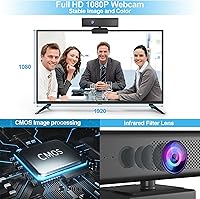
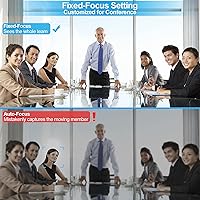
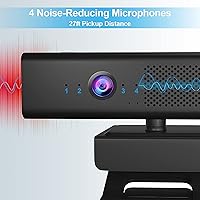
The camera shoots at full 1080p and holds a steady thirty frames per second, which is perfectly adequate for video calls. The 90-degree wide-angle lens with autofocus keeps everyone in frame without you having to fuss with manual adjustments. Four noise-reduction microphones work together to pull in sound from a wide area — useful if you move around your desk or present from across a room — while filtering out the kind of low-level hum that trips up simpler setups. The built-in speaker handles call audio at a reasonable volume, adjustable through your conferencing software. One practical note: connect it directly to your computer rather than through a USB hub to avoid intermittent power issues.
Best For
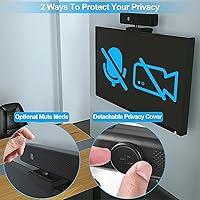
This conference cam makes most sense for remote workers and small business owners who want one device handling camera, audio input, and audio output without spending on a full conferencing kit. If you currently rely on a built-in laptop camera and its tiny integrated microphone, the step up in clarity is noticeable. It also suits anyone who takes privacy seriously at their desk — the physical lens cover is not a software toggle you can accidentally leave off; it snaps on and blocks the lens entirely. Broad OS compatibility covers most Windows versions and macOS, so older machines are not left out.
User Feedback
Buyers consistently praise how straightforward setup is and appreciate not needing a separate speaker just for calls. Microphone performance draws frequent compliments — people note that background noise stays in the background, which matters when you share a space. On the downside, low-light image quality is the most common complaint; the camera handles a well-lit room fine, but dim environments expose its limitations, so do not expect miracles without a lamp nearby. A handful of users ran into connectivity glitches that traced back to using a USB hub. The overall impression is that the value-to-price ratio holds up well, provided expectations stay realistic for a budget-tier device.
Pros
- No driver or software installation needed — just plug in and start your call immediately.
- The four-microphone array handles moderate background noise better than most webcams in this price range.
- A physical magnetic lens cover blocks the camera completely, not just in software.
- Built-in speaker means one less device to connect and manage on your desk.
- Wide compatibility covers a broad range of Windows and macOS versions, including older machines.
- Autofocus adjusts reliably during calls without manual intervention.
- Microphone clarity earns consistent praise from users whose colleagues notice the improvement.
- The universal clip mounts securely on laptops, monitors, and tripods without extra hardware.
- Cable length is generous enough to reach a desktop tower from a monitor without an extension.
- Strong value proposition for buyers replacing a weak built-in laptop camera on a tight budget.
Cons
- Low-light image quality falls noticeably short of what the product images suggest — a decent desk lamp is effectively required.
- No LED indicator confirms whether the microphone mute is active, making accidental muting easy to miss.
- Connecting through a USB hub can cause erratic behavior or failure to initialize — direct port connection is a must.
- The fixed, non-detachable cable means a worn connector requires replacing the entire unit.
- No companion software means zero manual control over exposure, white balance, or microphone sensitivity.
- Speaker volume may not cut through background noise in open or busy environments.
- Plastic build and clip mechanism show wear with extended daily use over time.
- 30fps cap makes this a poor fit for any use case involving motion beyond standard video calls.
- Noise reduction struggles in genuinely loud environments such as open-plan offices or busy households.
Ratings
Our scores for the Maciebelle CP008 are generated by AI after analyzing thousands of verified buyer reviews worldwide, with spam, bot-submitted, and incentivized feedback actively filtered out before scoring. The result is an honest picture of where this all-in-one conference cam genuinely delivers and where it falls short — no glossing over the frustrations real users encountered.
Video Quality
Microphone Performance
Built-in Speaker
Ease of Setup
Privacy Controls
Build Quality
Value for Money
Compatibility
Low-Light Performance
Audio-Video Sync
Mounting Flexibility
Cable Management
Software & App Compatibility
Suitable for:
The Maciebelle CP008 is a practical fit for remote workers and hybrid employees who want to consolidate their home-office audio and video setup without spending on three separate devices. If you are currently relying on a built-in laptop camera and its paper-thin microphone, the step up in call clarity — both how you look and how you sound — will be immediately noticeable. Small business owners who run back-to-back Zoom or Teams calls and need something that just works without IT support will appreciate the no-driver, plug-and-play approach. It also suits privacy-conscious users who want a physical guarantee that their camera is off when not in use, not just a software toggle. Buyers working across older machines on Windows or macOS will find the broad compatibility reassuring, and anyone who prefers a clean desk without a separate speaker and microphone cluttering the space will find the all-in-one format genuinely convenient.
Not suitable for:
Buyers who prioritize image quality above all else should look elsewhere — this conference cam has real limitations in dim lighting, and no amount of post-processing in your conferencing app will fully compensate for that. Content creators, streamers, or anyone recording video for a professional audience will quickly outgrow what this webcam can deliver, particularly at 30fps where fast movement looks less polished than it would on a higher-end unit. If you already own a quality headset or a dedicated USB microphone and speaker, the all-in-one format of the Maciebelle CP008 offers little extra value — you would essentially be paying for redundant hardware. Users working from desks with only USB hub connections available may run into power delivery issues that disrupt the experience. And anyone expecting the built-in speaker to double as a casual media speaker will be disappointed — it handles voice audio adequately, but little beyond that.
Specifications
- Resolution: The camera captures full 1080p footage at 1920x1080 pixels, delivering clear, sharp video suitable for professional video calls.
- Frame Rate: Video is recorded and streamed at 30 frames per second, which is standard for conferencing but not optimized for high-motion content.
- Image Sensor: A CMOS sensor handles light capture, providing adequate image quality in well-lit conditions with acceptable color accuracy.
- Aperture: The lens operates at f/2.5, allowing a moderate amount of light in — functional in bright rooms but limited in dim environments.
- Viewing Angle: The lens covers a 90-degree horizontal field of view, wide enough to include one or two people sitting at a typical desk setup.
- Autofocus: Continuous autofocus adjusts automatically during use, keeping the subject sharp without requiring manual focus adjustment.
- Microphones: Four omnidirectional noise-reduction microphones are built in, designed to capture voice clearly from multiple directions while filtering background noise.
- Pickup Range: The microphone array is rated to pick up sound from up to approximately 8 meters away under ideal conditions.
- Speaker Output: A built-in 3W mono speaker delivers call audio directly from the unit, with volume adjustable through compatible conferencing software.
- Privacy Cover: A magnetic snap-on cap physically blocks the camera lens when attached, providing a hardware-level privacy solution independent of software.
- Mute Button: A dedicated mute button on the unit silences the microphones instantly, though no indicator light confirms the active mute state.
- Connectivity: The webcam connects via a standard USB-A plug and is recognized automatically by the operating system without any driver installation.
- Cable Length: The fixed, non-detachable USB cable measures 1.7 meters, long enough to reach from a monitor to a desktop tower in most setups.
- OS Compatibility: Compatible with Windows XP, Vista, 7, 8, 8.1, and 10, as well as macOS 10.4 and later, covering a wide range of current and legacy systems.
- App Compatibility: Works out of the box with major video conferencing platforms including Zoom, Microsoft Teams, Google Meet, and Skype.
- Mounting Options: Includes a universal clip that attaches to laptop lids, LCD monitors, and flat-screen displays, and the base is also tripod-compatible.
- Weight: The unit weighs 10.6 ounces, making it lightweight enough to stay securely clipped to a monitor without adding meaningful strain.
- Package Dimensions: The retail box measures 6.73 x 3.15 x 2.95 inches, compact enough to store easily when the webcam is not in use.
- Model Number: The manufacturer model number for this unit is CP008, produced by Maciebelle.
- Power Source: The webcam draws power entirely through its USB connection and requires a direct port on the host device — USB hubs may not supply sufficient current.