Overview

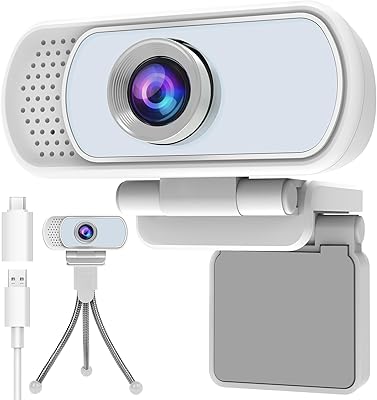
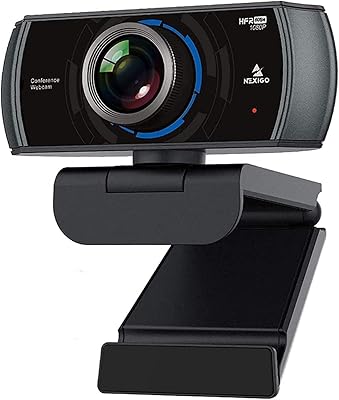
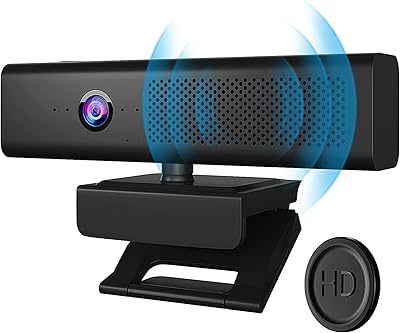
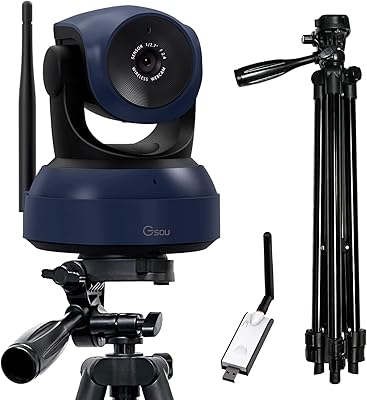
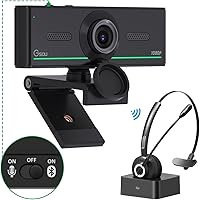
The Gsou 1080P Webcam W20 is a reliable option for those seeking a webcam with excellent video quality and user-friendly features. This webcam offers 1080p resolution and supports Bluetooth audio for seamless connectivity with external devices. Its plug-and-play functionality makes setup effortless, requiring no additional drivers. The ability to adjust the camera's angle with its 360° rotation and 180° adjustable base gives users flexibility for different setups, whether for video calls or streaming.

Features & Benefits

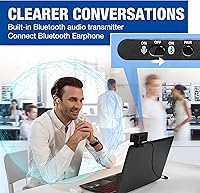
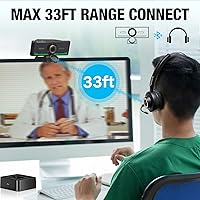
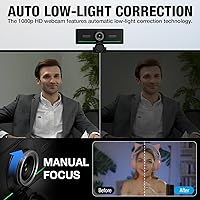
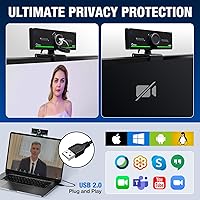
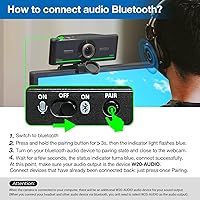
The Gsou 1080P Webcam W20 offers impressive features like auto low-light correction to ensure clear video even in dim lighting. Its manual focus allows for sharp, customized image clarity, while the wide 90° viewing angle captures more of your surroundings. The Bluetooth functionality makes it easy to connect Bluetooth earphones or speakers, providing clear, uninterrupted audio during calls or live streams. Plus, the included privacy cover adds an extra layer of security and peace of mind.

Best For

This webcam is ideal for remote workers and professionals who require high-quality video for virtual meetings or conferences. It’s also a great choice for streamers and content creators seeking a reliable webcam for smooth, professional-looking streams. Online educators and students will appreciate its stable video quality for seamless virtual learning. Additionally, users who prioritize privacy and security will benefit from its privacy cover and straightforward setup.

User Feedback

The Gsou 1080P Webcam W20 has received praise for its easy setup and clear, vibrant video quality, especially during online meetings and video calls. Bluetooth connectivity has also been appreciated, with users noting that it offers hassle-free pairing with their earphones and speakers. However, some users mentioned the need to adjust the manual focus at times, especially for close-up shots. The privacy cover is also a standout feature, with many users valuing the added layer of security for their device.

Pros

  • This webcam offers a simple plug-and-play setup, making it perfect for users who need a hassle-free solution.
  • Bluetooth connectivity enables seamless pairing with earphones or speakers for clear audio during calls or streams.
  • Auto low-light correction ensures decent video quality even in dimly lit environments, making it suitable for a range of settings.
  • The 360° rotation and adjustable base allow for flexible positioning, ideal for dynamic video calls or streaming setups.
  • Its manual focus feature provides users with control over shot clarity, which is great for those who need customizable framing.
  • The included privacy cover is a valued security feature, offering peace of mind during video sessions.

Cons

  • The manual focus may require frequent adjustments, which could be frustrating for users who need consistent sharpness.
  • Some users report that the low-light correction isn’t effective enough in very dark settings, limiting its versatility.
  • Although the webcam is compatible with multiple systems, some users have encountered compatibility issues with specific older versions of Windows.
  • The lack of autofocus might be inconvenient for users who prefer a more effortless setup, particularly in fast-paced streaming environments.
  • While flexible, the base is not as sturdy as some might expect, causing occasional wobbling during use.
  • The 1080p resolution at 30 FPS may not meet the demands of high-end streamers or those looking for top-tier video quality.

Ratings

After analyzing verified user reviews worldwide across various languages and platforms, we've compiled an overview of feedback for the Gsou 1080P Webcam W20. Spam, bot-generated, duplicated, and incentivized reviews were filtered out to ensure only high-quality, authentic insights were used. Both strengths and pain points are reflected in the following scores, which capture diverse experiences from users around the globe.

Video Quality
88%
Users praise the 1080p resolution and 30 FPS frame rate for delivering smooth, clear video, even in low-light environments. Many find the quality impressive for both video calls and streaming, with vibrant details that stand out in various settings.
A few users mentioned that while the video is generally sharp, it can struggle with very challenging lighting conditions, especially in darker rooms. Some noted that the colors can look a bit washed out when compared to higher-end webcams.
Bluetooth Connectivity
91%
Many users were highly impressed with the Bluetooth functionality, which allows easy pairing with earphones and speakers. This feature ensures seamless audio during video calls or streaming sessions, eliminating the need for additional wires and cables.
Some users reported occasional connectivity issues, particularly with non-brand Bluetooth devices. In rare cases, the audio connection could drop, requiring a re-pairing, which could be frustrating during live sessions or calls.
Ease of Setup
94%
The plug-and-play feature is one of the standout aspects of this device. Users love how simple and fast it is to set up—just connect it to the USB port, and the webcam is ready to use without any additional drivers or software installation.
While most users found the setup straightforward, a few noted that the automatic driver installation sometimes conflicts with other peripherals. This issue was rare but required a bit of troubleshooting for some users.
Privacy Features
85%
The included privacy cover is highly appreciated by users who value security. It adds a layer of protection, ensuring the webcam is covered when not in use, preventing any unwanted surveillance.
Some users pointed out that the privacy cover could feel a bit flimsy and might not stay securely in place if not handled gently. Additionally, some would have liked the cover to be more robust to prevent potential wear over time.
Manual Focus Adjustment
72%
28%
A few buyers appreciate the manual focus feature for achieving sharpness and clarity in their video streams. It's a helpful option for those who want more control over their video framing, especially for detailed shots.
However, several users found the manual focus to be less than ideal for everyday use. They felt that it required frequent adjustments during calls or streaming sessions, which could be annoying and time-consuming.
Low-Light Performance
87%
The auto low-light correction works well for most users, providing clear video even in dimly lit rooms. Many found this feature particularly beneficial for late-night calls or streaming sessions in less-than-ideal lighting conditions.
Some users reported that while the low-light correction improves the image, it doesn’t fully compensate for very low or uneven lighting. In extremely dark conditions, the webcam still struggles to provide optimal video quality.
Build Quality
80%
20%
Users generally find the build quality of this webcam to be solid and durable. The adjustable base and 360° rotation provide flexibility for different angles, which many appreciate for various use cases.
A few buyers noted that the plastic material feels a bit lightweight and not as premium as other high-end webcams. While it holds up well for everyday use, it might not feel as sturdy over long-term use, especially if frequently adjusted.
Viewing Angle
82%
18%
With a 90° viewing angle, this webcam provides a wide field of view, which is especially beneficial for group video calls and streaming setups. It gives users a better frame without having to adjust the camera too much.
Some users felt that the 90° angle might be a bit too wide for personal calls or one-on-one video chats. In smaller spaces, this can result in a slightly distorted or over-exposed video image.
Rotation/Adjustability
90%
The webcam’s 360° rotation and adjustable base received positive feedback from users who need versatile positioning for different setups. It allows easy adjustments for capturing different angles during calls or streams without needing to reposition the entire device.
While most users found the rotation feature useful, a few complained that the base could feel a bit wobbly when rotated too far. This can result in slight instability, especially on uneven surfaces.
Software Compatibility
93%
The webcam is compatible with multiple operating systems, including Windows, Mac, Linux, and Chrome OS. Users appreciated the broad compatibility, allowing them to use the device across a variety of setups without issues.
A small number of users encountered compatibility issues with older operating system versions, particularly with Linux. While these were not widespread, it required some additional tweaks to make the webcam fully functional on those systems.
Customer Support
78%
22%
Some users had positive experiences with customer support, particularly when troubleshooting setup issues. They found the response time reasonable, and the support staff was knowledgeable about resolving basic concerns.
However, there were a few reports of slow response times and unhelpful interactions, especially for more complex technical problems. This inconsistency in support left some buyers frustrated, as they had to follow up multiple times for a resolution.
Value for Money
92%
Many users felt that the webcam offers excellent value for the price, especially considering its full HD 1080p resolution, Bluetooth features, and versatile adjustability. It strikes a good balance between cost and performance, making it a great choice for both casual and professional users.
A small group of users mentioned that while the price is reasonable, it still doesn't offer the top-tier quality found in more expensive webcams. They noted that while it performs well overall, there are some minor shortcomings in video color accuracy and build quality.

Suitable for:

The Gsou 1080P Webcam W20 is well-suited for remote workers, students, and professionals who require a reliable and easy-to-use webcam for video calls and conferencing. Its plug-and-play functionality and 1080p resolution make it ideal for those looking to upgrade their video quality without the hassle of complex setup. Streamers and content creators will also appreciate the versatility offered by the 360° rotation and adjustable base, as well as the Bluetooth connectivity for seamless audio. Additionally, those who value privacy can rely on the included privacy cover, which provides peace of mind during use.

Not suitable for:

While this webcam offers solid performance for everyday tasks, it may not meet the expectations of users seeking high-end video quality or advanced features. Users working in very low-light conditions may find the auto low-light correction somewhat limited, as it doesn’t fully compensate for extremely dark environments. Additionally, those who need precise and effortless focus adjustments may be frustrated by the manual focus, which requires frequent tweaking. Heavy-duty streamers or professionals who require the best color accuracy and video clarity may want to explore more specialized webcams.

Specifications

  • Resolution: Offers Full HD 1080p resolution for clear and detailed video quality.
  • Frame Rate: Supports 30 frames per second (FPS) for smooth video playback.
  • Focus Type: Features manual focus adjustment, allowing users to fine-tune image clarity.
  • Field of View: Wide 90° viewing angle for flexible and customizable shots.
  • Rotation: 360° rotation capability for complete flexibility in camera positioning.
  • Adjustable Base: Base can be rotated 180° for easy positioning and stability.
  • Bluetooth Support: Includes Bluetooth connectivity for pairing with compatible audio devices like earphones or speakers.
  • Low-Light Correction: Auto low-light correction adjusts video brightness for improved visibility in dim environments.
  • Privacy Cover: Equipped with a privacy cover to protect the lens when the camera is not in use.
  • Plug-and-Play: Requires no additional drivers or software installation; simply plug it in and use.
  • Compatibility: Compatible with Windows, Mac, Linux, and Chrome OS operating systems.
  • Cable Length: Includes a 5 ft USB cable for flexible installation and setup.
  • Dimensions: Compact and lightweight design, ideal for desk setups and portable use.
  • Microphone: Integrated microphone for clear audio during video calls or streaming.
  • Mounting Option: Can be mounted on various devices, such as laptops, desktops, or tripods.
  • USB Port: Uses a USB 2.0 connection for easy plug-and-play functionality.
  • Video Call Quality: Designed to deliver stable and high-quality video for professional and personal video calls.
  • Software Compatibility: Works with most major video conferencing software like Zoom, Skype, and Microsoft Teams.
  • Color Accuracy: Delivers accurate and vibrant color reproduction for video calls and streaming.

FAQ

Setting up this webcam is straightforward. Simply plug it into a USB port on your computer, and it should be ready to use without the need for additional drivers. The webcam is compatible with Windows, Mac, Linux, and Chrome OS, and works with video conferencing apps like Zoom and Skype right out of the box.

Yes, the Gsou 1080P Webcam W20 supports Bluetooth connectivity, allowing you to pair it with Bluetooth audio devices like earphones or speakers for clear, synchronized audio during video calls or streams.

Yes, the webcam offers full 1080p resolution at 30 frames per second, ensuring high-quality, smooth video during calls or streaming. It's an ideal choice for users seeking clear and detailed video.

The Gsou 1080P Webcam W20 features auto low-light correction, which helps brighten your video feed when you're in dim environments. This makes it easier to maintain good video quality even if you're not in perfect lighting.

This webcam uses manual focus, giving you the flexibility to adjust the sharpness of the video feed according to your preference. However, some users have noted that it requires regular adjustments for optimal clarity.

Yes, this device offers 360° rotation and an adjustable base, allowing you to position the camera at virtually any angle. This feature is particularly useful for video conferencing and streaming setups that require flexible camera placement.

The privacy cover is a simple, yet effective, feature that helps protect your privacy by covering the lens when the webcam is not in use. It provides peace of mind, especially for users concerned about webcam hacking or unauthorized access.

The webcam is compatible with multiple operating systems, including Windows, Mac, Linux, and Chrome OS. It should work with most major video conferencing software, such as Zoom, Microsoft Teams, and Skype, without additional software installation.

While the Gsou webcam performs well in moderate lighting, the low-light correction feature helps improve video quality in dim settings. However, in very dark environments, some users report that the image quality could still be improved.

Some users have mentioned that the manual focus requires regular adjustment, especially when moving the webcam around. Additionally, while the Bluetooth functionality is generally praised, some users have faced minor connectivity issues with certain devices.